


A BPMN diagram becomes meaningful when its elements are connected correctly. Two of the most important BPMN connectors are sequence flows and message flows.
Both are represented as arrows, but they describe different relationships:
-
A sequence flow shows the order in which activities, events, and gateways occur within a process.
-
A message flow shows communication between separate participants, such as companies, departments modeled as separate pools, customers, or external systems.
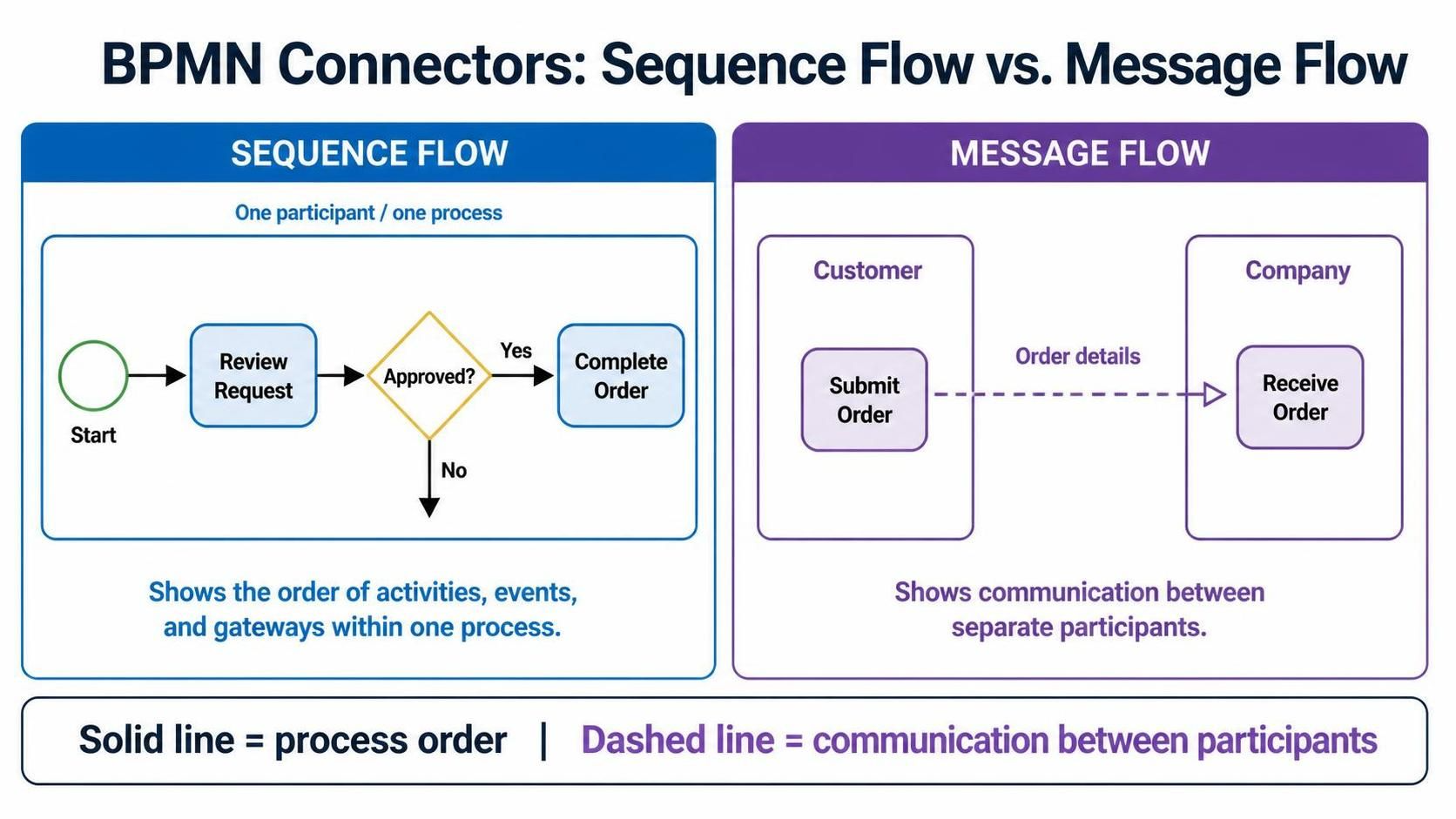
Confusing these two connectors is one of the most common BPMN modeling mistakes.
What Is a Sequence Flow?
A sequence flow represents the internal progression of a process. It answers the question:
What happens next?
A sequence flow is drawn as a solid line with a filled arrowhead. It can connect events, activities, and gateways within the same pool or process. For example:
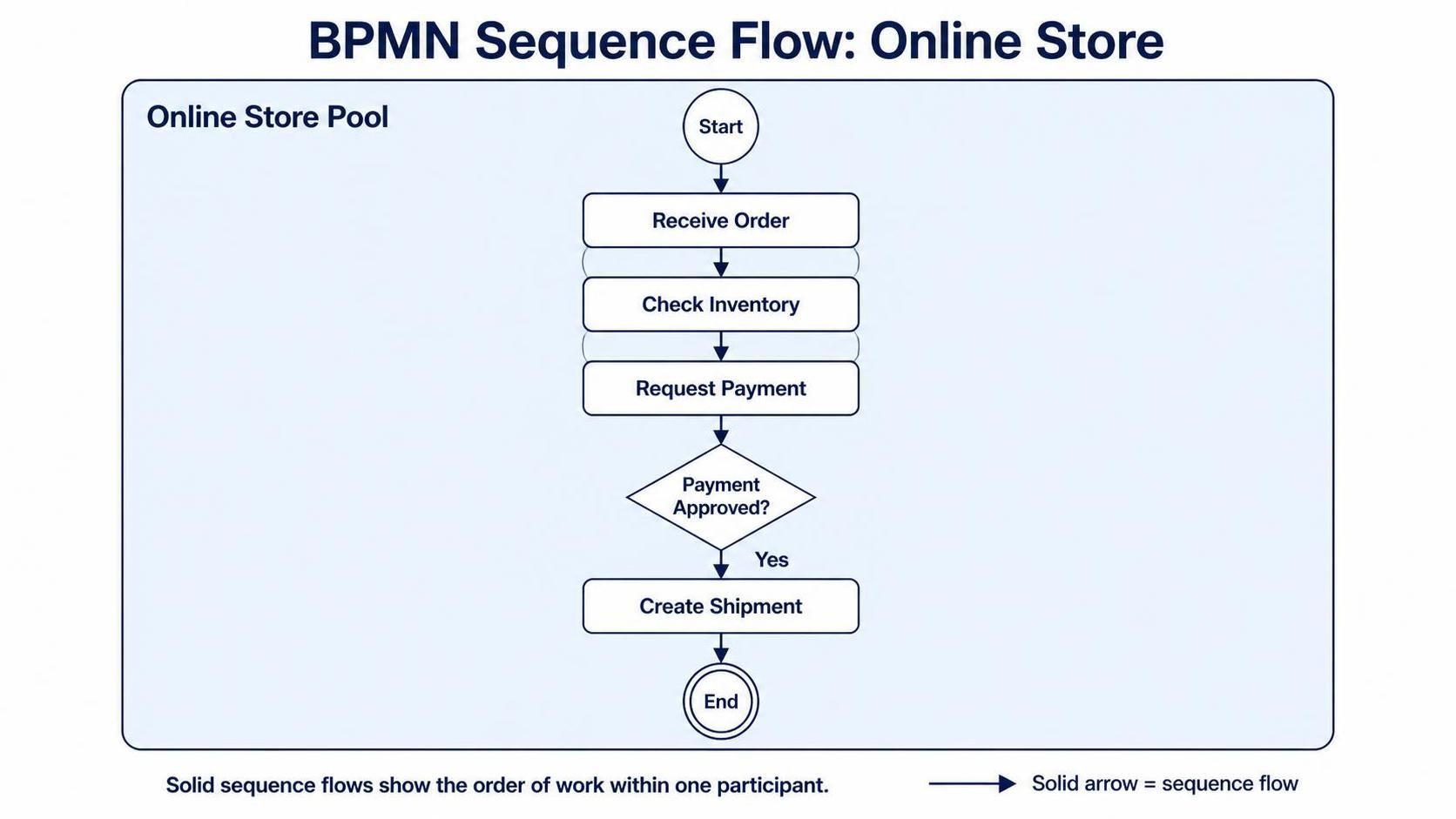
Start Event → Receive Order → Check Inventory → Ship Order → End Event
This means that the process starts, the order is received, inventory is checked, and the order is shipped in that sequence.
Sequence flows can also show branching and merging:
-
A flow leaving an exclusive gateway may represent one possible decision outcome.
-
Several flows leaving a parallel gateway may represent simultaneous work.
-
Multiple incoming flows may merge into a later activity.
-
A conditional flow may proceed only when a specified condition is true.
-
A default flow provides a fallback path when no other condition applies.
Sequence flows define process behavior. They are not merely visual lines used to make a diagram easier to read.
What Is a Message Flow?
A message flow represents communication between separate BPMN participants. It answers the question:
What information is exchanged between participants?
A message flow is drawn as a dashed line, usually with an open arrowhead. It may connect activities, events, or other appropriate message-related elements in separate pools.
For example, an online retailer may send a payment request to a payment provider:
Retailer Pool: Send Payment Request - - - - - > Payment Provider Pool: Receive Payment Request
The dashed connector shows that one participant sends information to another. It does not mean that the sender directly controls the receiver’s internal process.
Message flows are used in BPMN collaborations to model communication between independent participants. The BPMN specification includes message flows as one of the standard elements for process and collaboration modeling.
The Main Difference
The simplest rule is:
Use sequence flows within a pool. Use message flows between pools.
A pool represents a participant, such as a company, customer, supplier, department modeled independently, or external application. A lane is only a subdivision inside a pool, so activities in different lanes are still connected with sequence flows.
| Feature | Sequence flow | Message flow |
|---|---|---|
| Main purpose | Shows process order | Shows communication |
| Visual appearance | Solid line with filled arrowhead | Dashed line with open arrowhead |
| Typical location | Within one pool | Between separate pools |
| Represents | Control or execution flow | Information exchange |
| Example | Review Request → Approve Request | Customer → Submit Application |
| Crosses pool boundaries? | No | Yes |
| Controls the other participant’s process? | Models internal progression | No; it represents interaction |
Sequence flows connect flow objects within one pool, while message flows represent messages exchanged across participant boundaries.
Sequence Flow Across Lanes
Consider a purchase approval process with three lanes:
-
Employee
-
Manager
-
Finance
If all three lanes belong to one company pool, the process can be modeled like this:
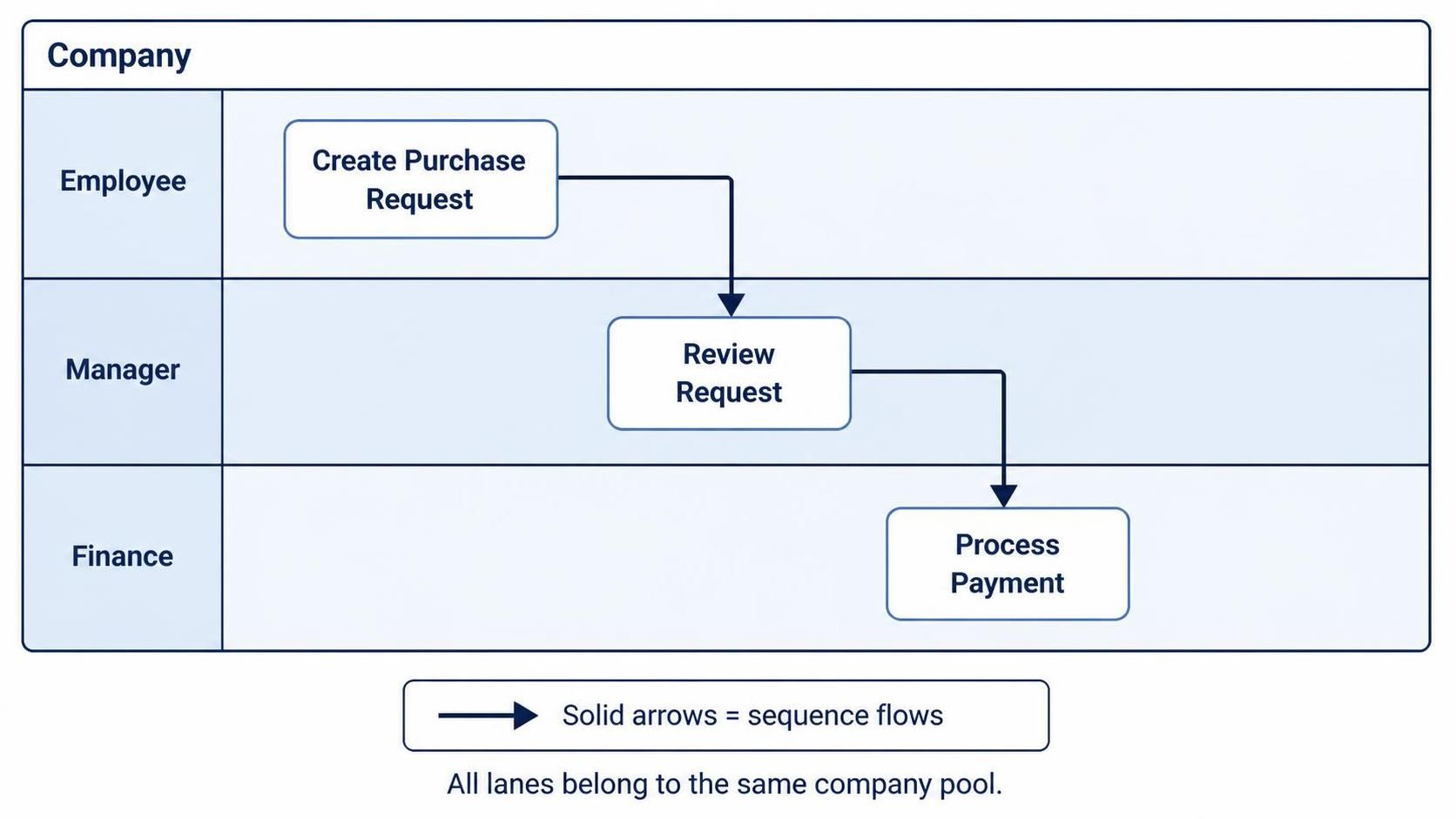
The arrows between these activities are sequence flows because the lanes are part of the same pool.
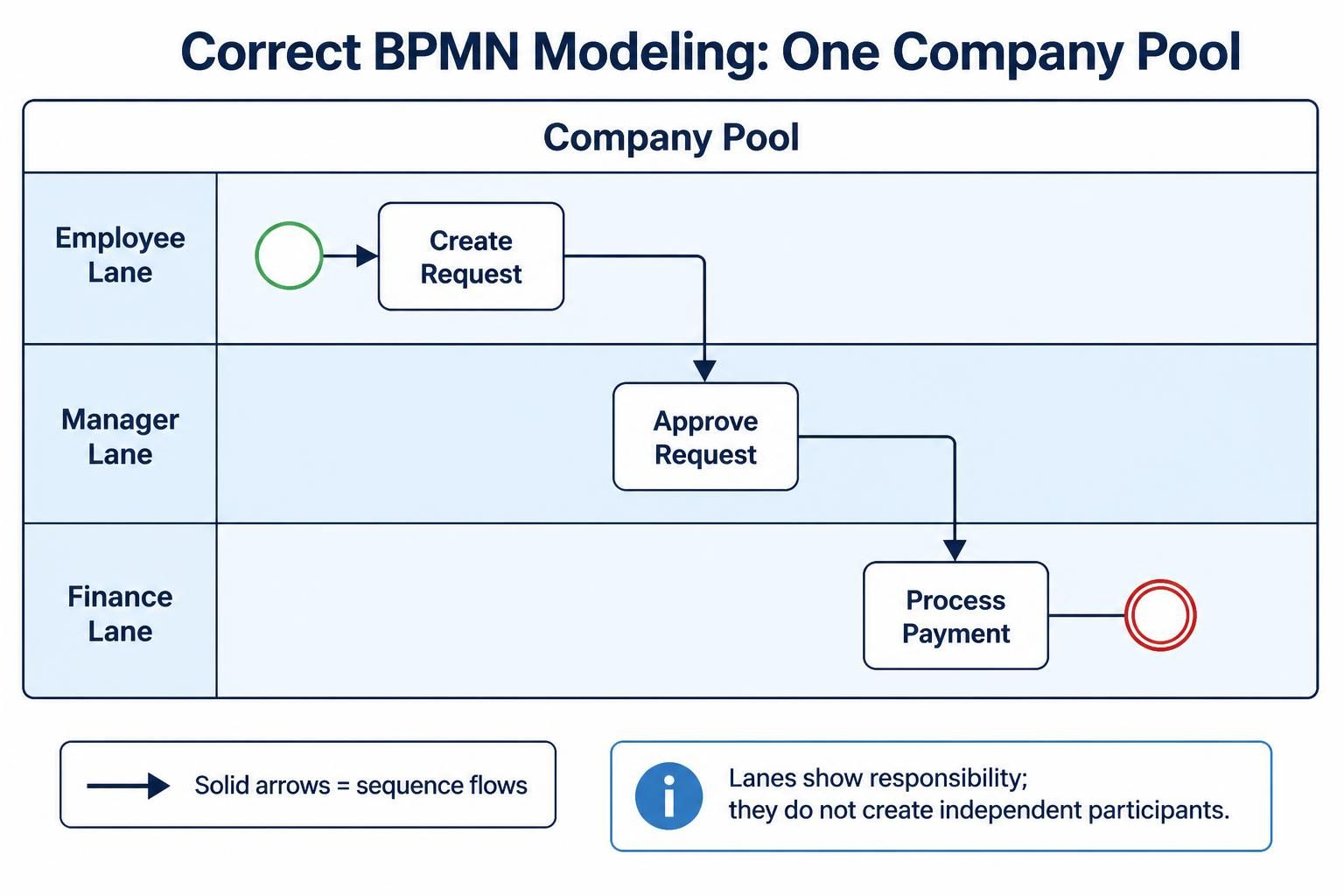
The lanes identify responsibility, but they do not create independent participants. The process still represents one coordinated internal workflow.
Correct modeling
Incorrect modeling
Using message flows between lanes inside the same pool:
Employee Lane - - - > Manager Lane - - - > Finance Lane
This incorrectly suggests that the employee, manager, and finance team are independent BPMN participants rather than roles within the same organization.
Message Flow Between Pools
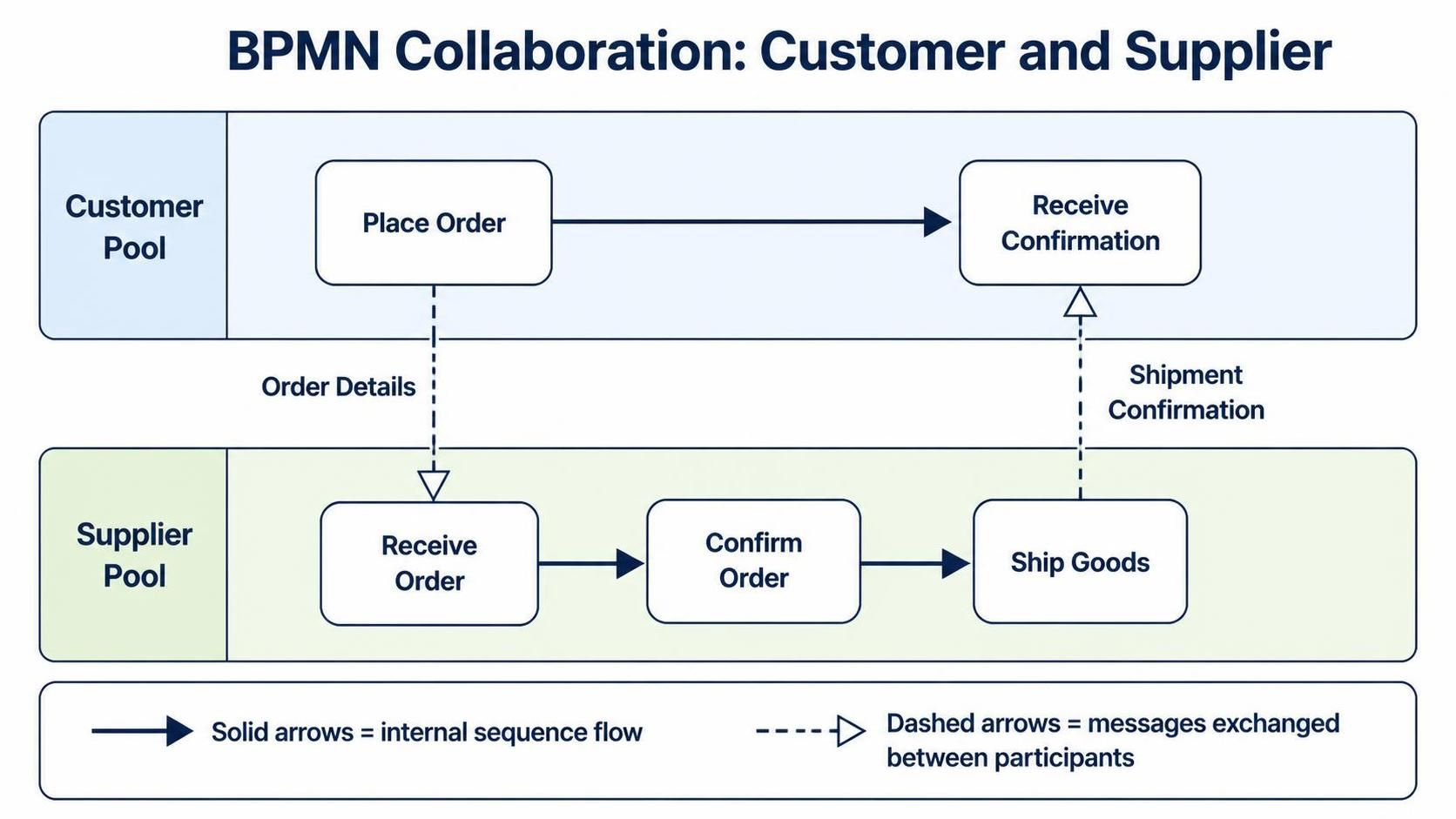
Now consider a purchase process involving a customer and a supplier. These are independent participants, so they should be modeled as separate pools:
Customer Pool:
Submit Order
      - - - - - - - - - - >
Supplier Pool:
Receive Order
The message flow indicates that the supplier receives information from the customer. The supplier’s internal activities may then be connected with sequence flows:
Supplier Pool:
Receive Order → Check Inventory → Prepare Shipment
A complete collaboration might look like this:
A Practical Example: Online Order Fulfillment
Imagine an online order process involving:
-
Customer
-
Online Store
-
Payment Provider
-
Shipping Company
A suitable BPMN collaboration may contain four pools.
Online Store sequence flow
Inside the Online Store pool:
Message flows between participants
Between pools:
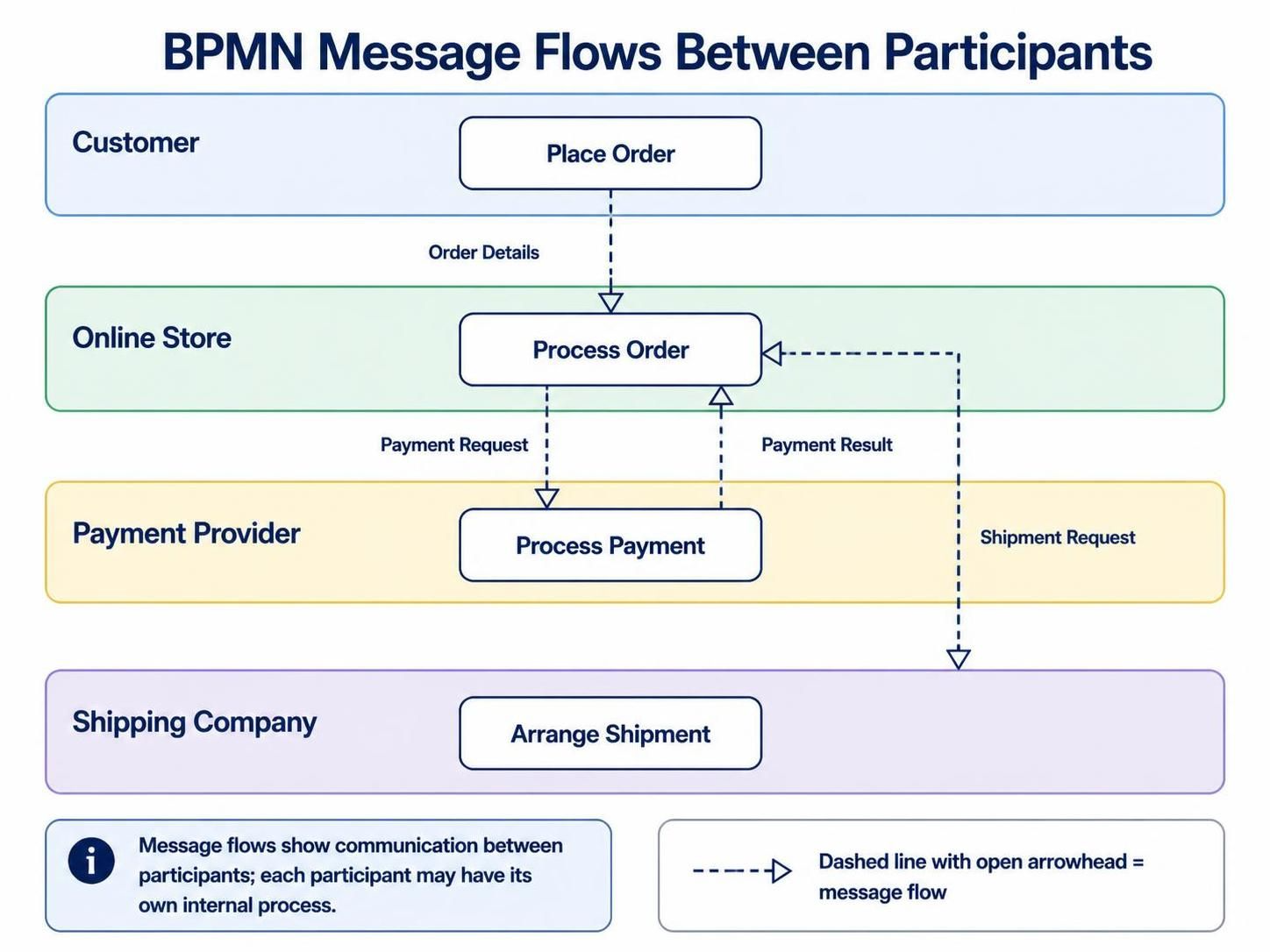
The payment provider and shipping company may have their own internal processes, but the online store does not control those internal steps. It only exchanges messages with them.
Message Flow Does Not Mean “Any Communication”
A common mistake is to use message flows whenever information is involved. That is not always correct.
Suppose a customer service process has a task called Review Customer Email, followed by Update Case Record. The email and case record are information, but the activities may still belong to the same process and pool. The activities should be connected with a sequence flow.
The distinction is based primarily on participant boundaries, not simply on whether data or information is present.
Use:
-
Sequence flow for the order of work within a participant’s process.
-
Message flow for communication between separate participants.
-
Data association for showing that an activity reads or produces a data object.
-
Association for linking annotations or supporting documentation to process elements.
Data objects and annotations add context; they do not replace sequence or message flows.
Pools, Lanes, and Flow Selection
Choosing the correct connector begins with choosing the correct participant structure.
Use lanes when:
-
Activities belong to the same organization.
-
Teams share one overall process.
-
You want to show responsibility by department or role.
-
The process engine or organization coordinates the work.
Examples include:
-
Sales, Finance, and Operations within one company
-
HR, IT, and Facilities during employee onboarding
-
Claims Intake, Assessment, and Payments within one insurer
Use sequence flows between activities in these lanes.
Use pools when:
-
Participants are independent organizations.
-
A customer interacts with a company.
-
An external system has its own process.
-
You want to hide or abstract another participant’s internal workflow.
-
The interaction is best understood as a collaboration or message exchange.
Examples include:
-
Customer and retailer
-
Bank and payment provider
-
Manufacturer and supplier
-
Employer and government agency
-
Company and external identity-verification service
Use message flows between these pools.
Modeling the Same Scenario Two Ways
Consider a loan application involving a bank and an applicant.
Option 1: Applicant as a lane
If the diagram describes the bank’s coordinated internal process and treats the applicant as a role participating in that process, the applicant may appear as a lane within the bank’s pool.
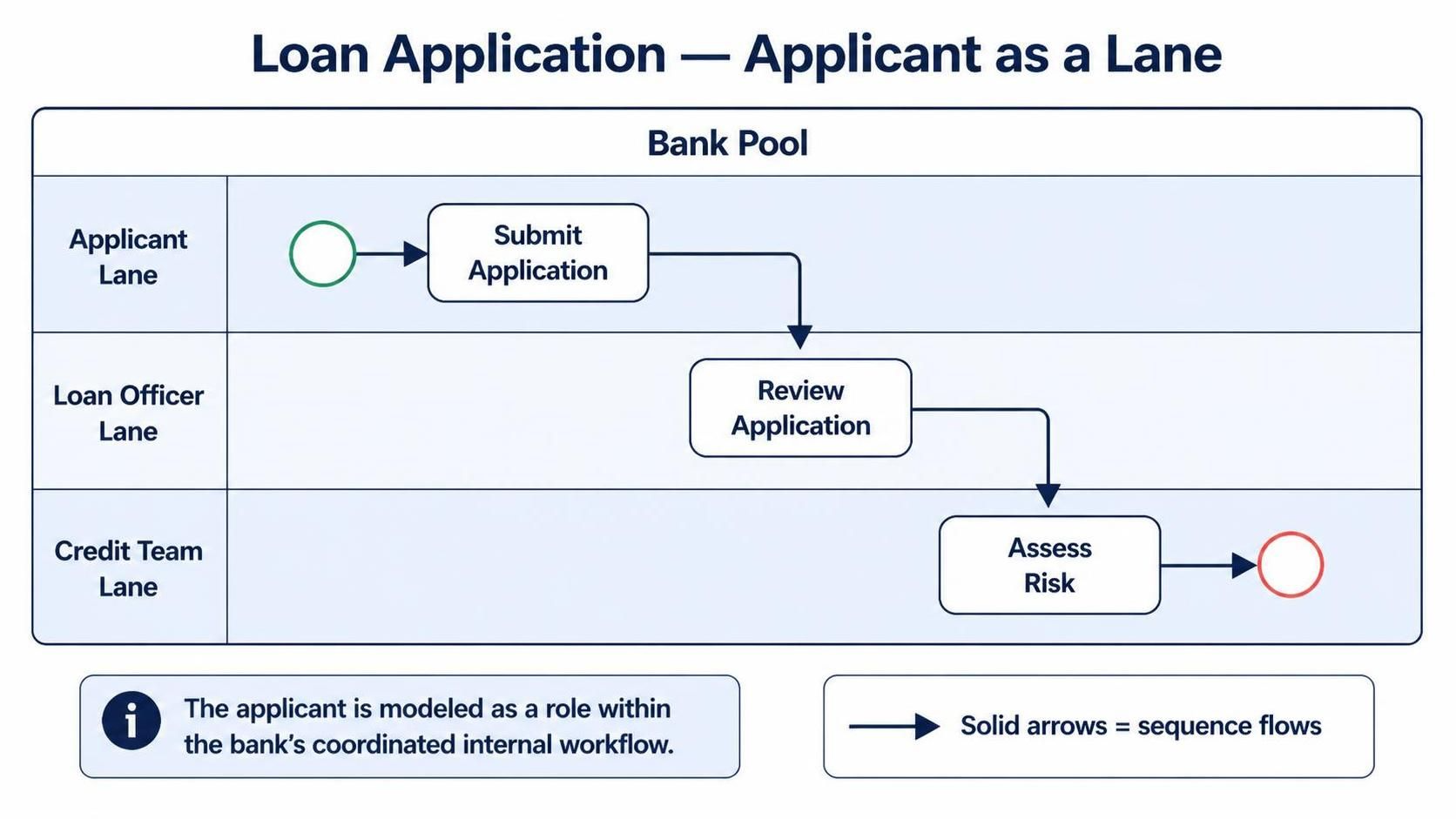
Sequence flows connect the activities.
This approach is useful when the goal is to document the bank’s internal operating procedure.
Option 2: Applicant as a separate pool
If the diagram focuses on collaboration between the applicant and the bank, use separate pools:
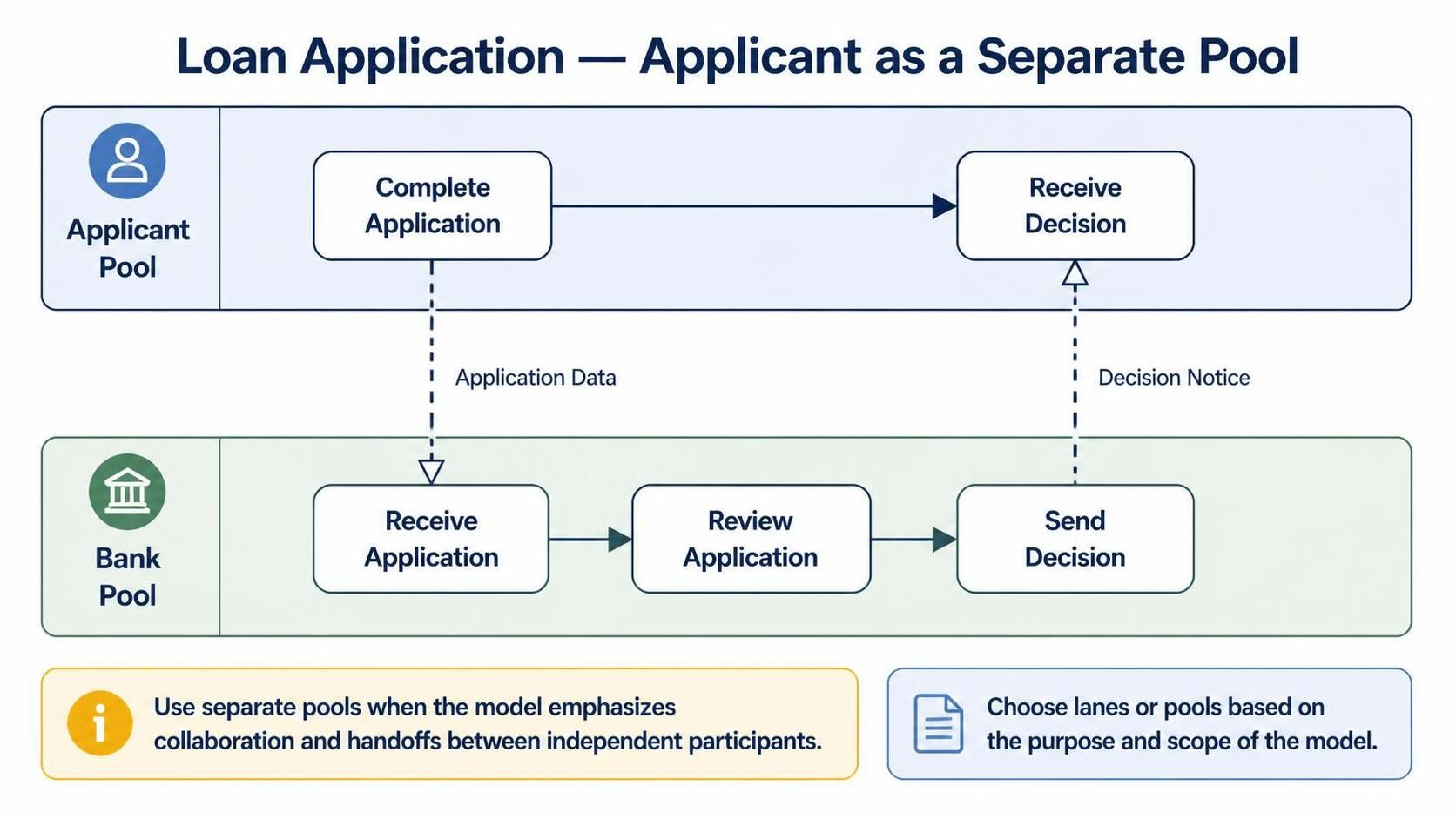
This approach emphasizes communication and handoffs between independent participants.
Neither representation is automatically correct in every situation. The appropriate choice depends on the purpose and scope of the model.
Common Mistakes
Using a message flow between lanes
Lanes are subdivisions of a pool. If two lanes belong to the same pool, connect their activities with sequence flows.
Using a sequence flow between separate pools
A sequence flow should not cross from one participant pool into another. Use a message flow for communication between pools.
Mixing internal work and external communication
A message flow should show the message exchange, while each participant’s internal work should be modeled separately with sequence flows.
For example:
Incorrect:
Customer Task → Supplier Task
A better collaboration model is:
Customer Pool:
Submit Order
      - - Order Message - - >
Supplier Pool:
Receive Order → Validate Order → Confirm Order
Treating lanes as independent organizations
A lane may represent a department, role, or system, but it is still inside a pool. If the participant has its own process boundary and communicates independently, it may need its own pool instead.
Using arrows without clear meaning
Every connector should answer a specific question:
-
Is this showing what happens next?
-
Is this showing who communicates with whom?
-
Is this linking data or documentation to an activity?
If the answer is unclear, the connector may be misplaced or unnecessary.
Creating Sequence and Message Flows with Visual Paradigm BPMN Online Free
Visual Paradigm BPMN Online Free provides a browser-based environment for creating and editing BPMN diagrams. Its drag-and-drop editor can be used to model pools, lanes, activities, events, gateways, sequence flows, and message flows. Visual Paradigm also provides BPMN 2.0 modeling capabilities, process drill-down, and options for sharing or exporting diagrams.
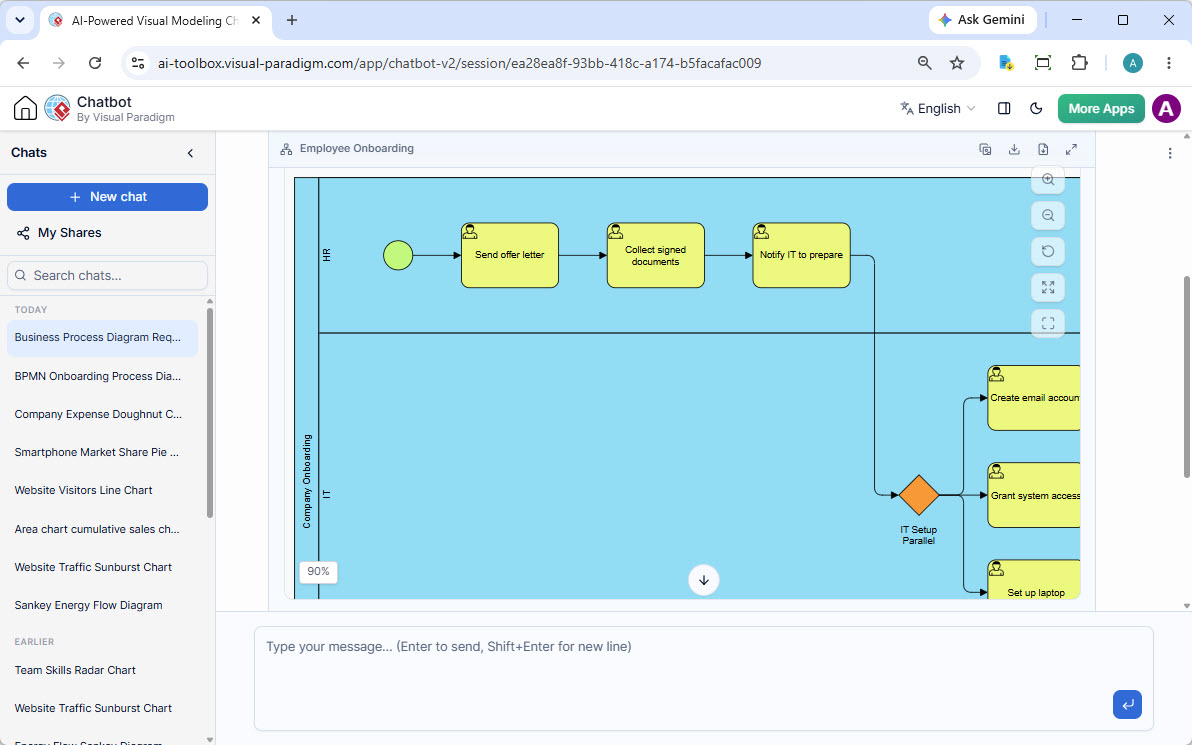
A practical workflow is:
-
Open the BPMN diagramming tool.
-
Create a new Business Process Diagram.
-
Add a pool for each independent participant.
-
Add lanes only when dividing responsibilities within one participant.
-
Place activities and events inside the appropriate pool or lane.
-
Connect internal activities with sequence flows.
-
Connect separate pools with message flows.
-
Label message flows with meaningful content, such as:
-
Order details
-
Payment request
-
Approval decision
-
Shipping confirmation
-
-
Add conditions to sequence flows leaving decision points.
-
Review the diagram to confirm that no sequence flow crosses a pool boundary.
-
Use automatic layout or manual alignment to improve readability.
-
Share or export the completed diagram for stakeholder review.
Visual Paradigm’s BPMN editor supports process drill-down, allowing a high-level subprocess to be expanded into a more detailed process diagram without overcrowding the main model.
Using AI-Assisted Features
AI-assisted BPMN features can help create an initial process model from a plain-language description. Visual Paradigm’s AI tools can interpret a narrative, identify participants and activities, suggest lanes and gateways, and generate an editable BPMN diagram. The generated diagram can then be opened in the online editor for manual refinement.
For example, instead of starting with a blank canvas, provide a prompt such as:
Create a BPMN collaboration for an online order process involving a customer,
an online retailer, a payment provider, and a shipping company.

The customer submits an order to the retailer. The retailer checks inventory
and sends a payment request to the payment provider. The provider returns an
approval or decline message. If payment is approved, the retailer sends a
shipment request to the shipping company. The shipping company sends a
delivery confirmation to the retailer, which notifies the customer.
An AI-generated draft may identify:
-
Customer, retailer, payment provider, and shipping company as pools
-
Inventory checking as an activity
-
Payment approval as a gateway
-
Payment request and payment result as message flows
-
Internal retailer steps as sequence flows
-
Shipping confirmation as a message flow
The AI should be treated as a starting point rather than the final authority. Review the generated model carefully, especially the boundaries between pools and lanes.
A useful refinement prompt
After generating the initial diagram, ask for a specific correction:
Review the diagram and ensure that all flows within the retailer pool are
sequence flows, while all communication between the retailer, payment
provider, customer, and shipping company is represented with message flows.
Add labels to each message flow.
You can also ask the AI to:
-
Add an alternative path for declined payment.
-
Add a timer event for payment timeout.
-
Separate customer support into its own pool.
-
Convert an internal department into a lane.
-
Expand the shipment subprocess.
-
Identify any connectors that cross pool boundaries incorrectly.
Visual Paradigm describes its AI-assisted workflow as conversational and iterative: users can generate a diagram, request changes, and then open the result in the full-featured online editor for further editing.
Reviewing an AI-Generated Diagram
Before sharing or implementing an AI-generated BPMN model, check the following:
-
Are independent participants represented as separate pools?
-
Are departments and roles inside one organization represented as lanes?
-
Are sequence flows restricted to the correct pool?
-
Are message flows used only for communication between pools?
-
Does every message flow have a clear sender and receiver?
-
Are message names meaningful?
-
Are gateway conditions explicit?
-
Are start and end events included where appropriate?
-
Does the diagram reflect the real business process?
-
Have stakeholders reviewed the participant boundaries?
AI can accelerate diagram creation, but it may infer organizational boundaries incorrectly. A department may be modeled as a separate pool when it should be a lane, or an external service may be placed inside the organization’s pool. Human review remains essential.
Quick Decision Guide
Use this rule when modeling in Visual Paradigm or any other BPMN tool:
Are the two connected elements inside the same pool?

Yes → Use a sequence flow.

No → Are they independent participants in separate pools?

Yes → Use a message flow.

No → Consider whether you need a data association or documentation association.
Another way to remember the distinction is:
Sequence flows describe how work moves. Message flows describe how information moves between participants.
Conclusion
Sequence flows and message flows serve different purposes in BPMN:
-
Sequence flows represent the internal order of activities, events, and gateways.
-
Message flows represent communication between independent participants.
-
Lanes organize responsibilities within a pool but do not create new participants.
-
Pools establish participant boundaries and determine where message flows are appropriate.
Visual Paradigm BPMN Online Free makes this distinction practical through a visual drag-and-drop modeling environment. Its AI-assisted features can generate an initial BPMN model from a natural-language description, while the online editor lets you correct pool boundaries, refine connectors, label messages, and prepare the model for stakeholder review.
When in doubt, identify the boundary first. If the work occurs within one participant, use a sequence flow. If two independent participants exchange information, use a message flow.
This post is also available in Deutsch, Español, فارسی, Français, English, Bahasa Indonesia, 日本語, Polski, Portuguese, Ру́сский, Việt Nam, 简体中文 and 繁體中文.