
Introduction
In the fast-paced world of software development and systems engineering, documentation is often treated as a necessary evil—a static artifact created at the beginning of a project and quickly forgotten. This approach leads to a critical problem known as “Temporal Spec Decay”: the gradual divergence between what was originally specified and what is actually being built, tested, or maintained. Team members end up working from outdated requirements buried in email threads, chat logs, or obsolete wiki pages, leading to compliance risks, operational failures, and wasted engineering hours.
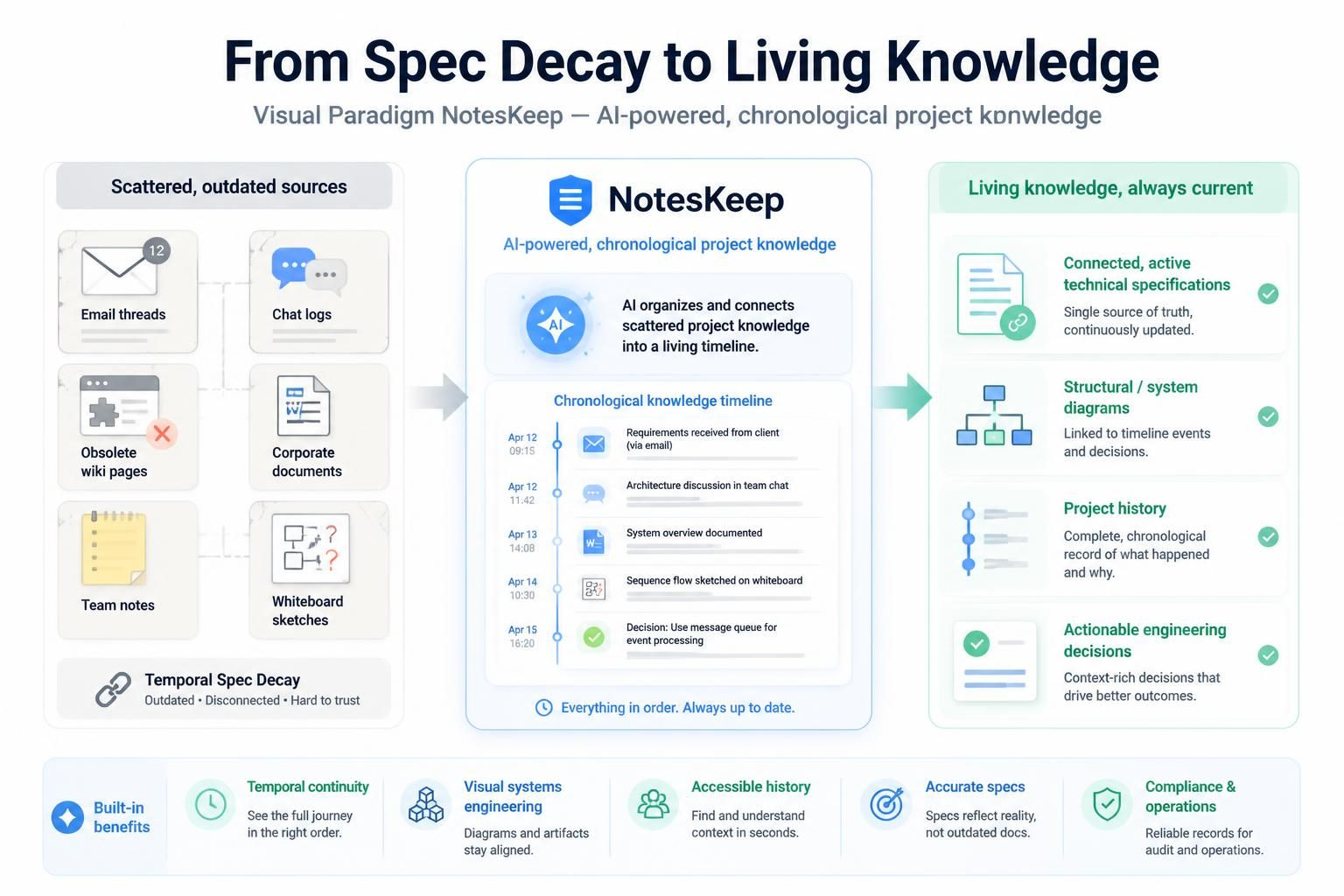
Visual Paradigm NotesKeep emerges as a unified, AI-powered knowledge management platform designed to solve this exact problem. It transitions project documentation from passive text entry into an active, living chronological narrative. By focusing on temporal continuity and visual systems engineering, NotesKeep seamlessly converts scattered corporate documents, team notes, and whiteboard sessions into interconnected, active technical specifications and structural diagrams. This guide explores how NotesKeep transforms knowledge management, ensuring that your project’s history remains accessible, accurate, and actionable.
Key Concept: Ending “Temporal Spec Decay”
The Problem
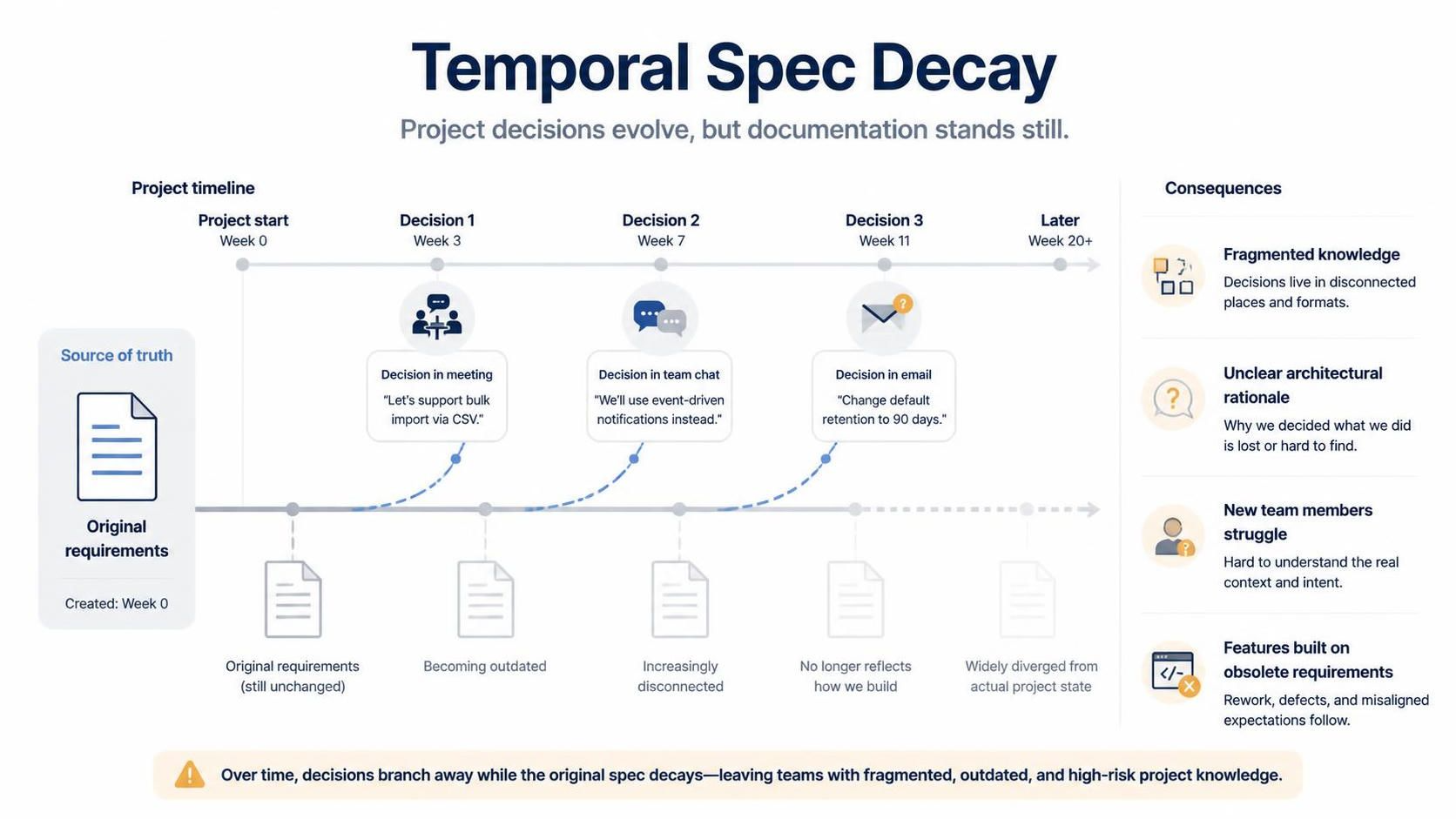
Traditional project repositories suffer from spec drift. As projects evolve, new decisions are made in meetings, chats, or quick emails, but the central documentation remains unchanged. Over time, the “source of truth” becomes fragmented. New team members struggle to understand why certain architectural decisions were made, and existing teams risk building features based on obsolete requirements.
The NotesKeep Solution
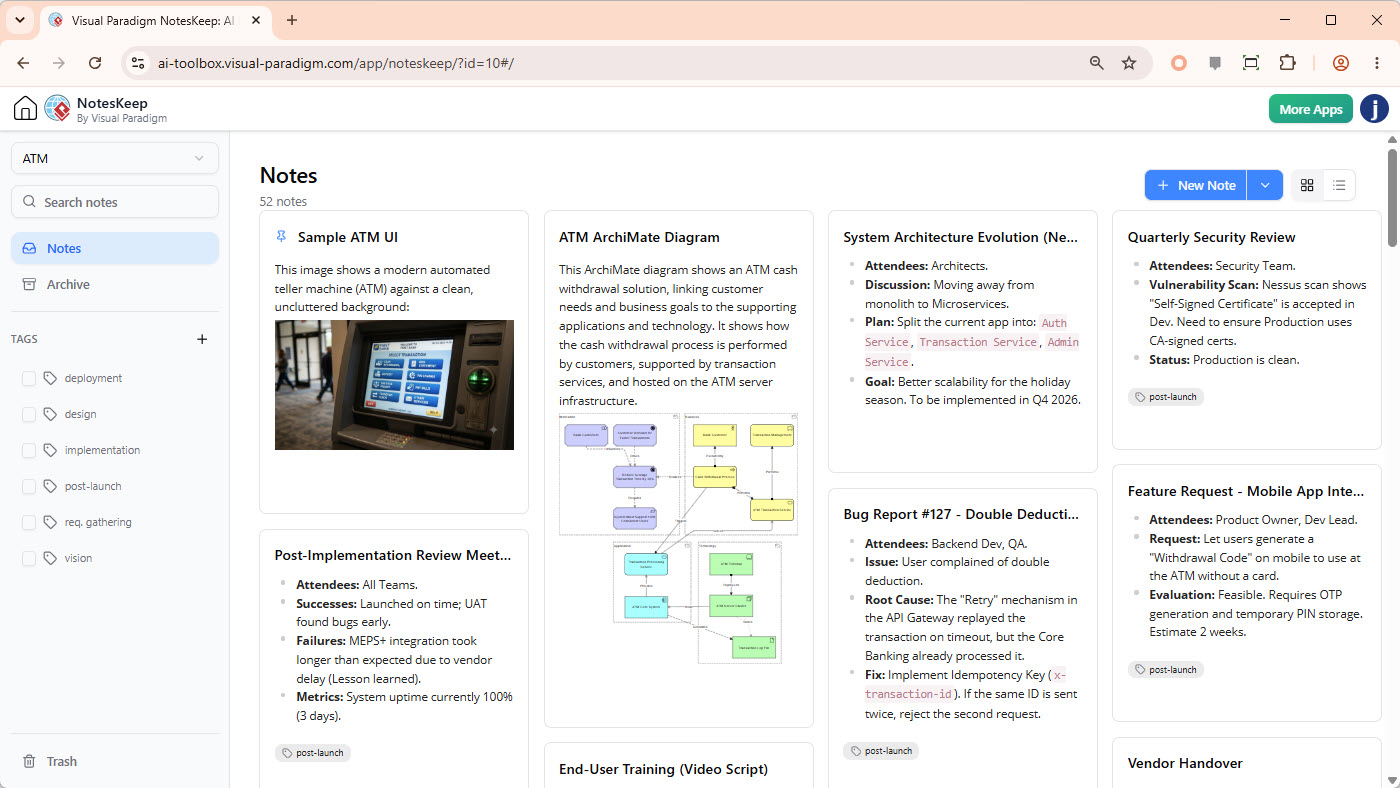
NotesKeep structures documentation as a chronological timeline. This design allows teams and accompanying AI models to:
-
Track Evolution: See how requirements change over time.
-
Resolve Discrepancies: Identify when and why structural changes occurred.
-
Trace Decisions: Link current implementations back to historical context.
-
Prevent Risks: Ensure compliance and operational integrity by maintaining a clear audit trail.
By treating documentation as a living timeline rather than a static folder, NotesKeep ensures that knowledge remains relevant and connected to the current state of the project.
Core Feature Framework
1. Note Management & Multi-Format Ingestion
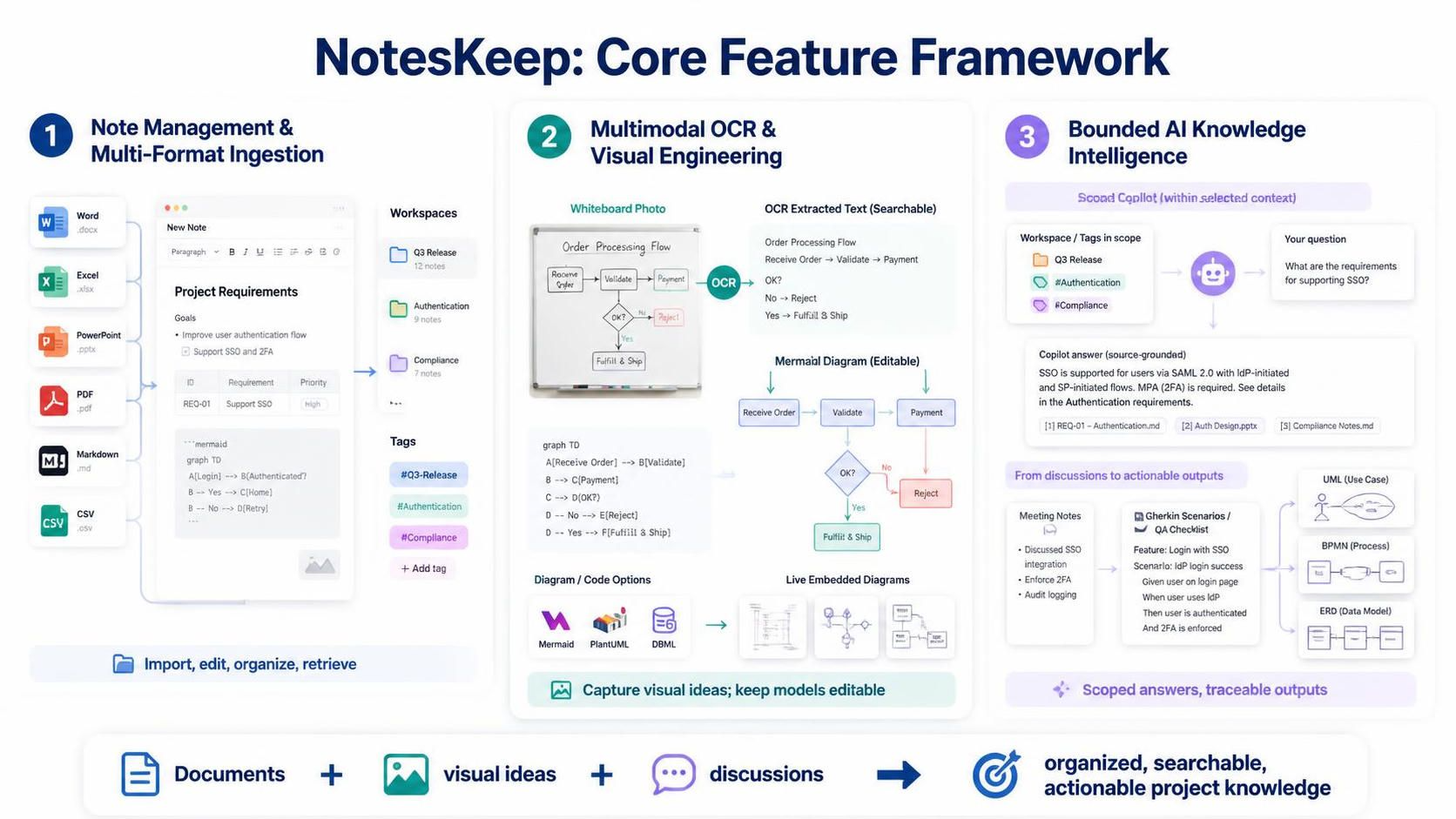
NotesKeep eliminates the friction of creating and organizing documentation by supporting a wide range of input formats and providing powerful editing tools.
-
Rich WYSIWYG Editor: Users can format documents using multi-dimensional styling, embedded elements, code blocks, and markdown shortcuts. This ensures that notes are not just plain text but rich, interactive documents.
-
Universal Document Ingestion: The platform parses and converts multiple distinct file extensions—including Microsoft Word (.docx), Excel (.xlsx), PowerPoint (.pptx), PDFs, Markdown, and CSVs—into completely editable rich notes. This means legacy documents don’t need to be manually recreated; they are instantly integrated into the living knowledge base.
-
Multi-Dimensional Taxonomy: Notes are cleanly compartmentalized via structured Project Workspaces and layered with custom tag matrices for deep cross-referencing. This allows users to filter and find information based on project, topic, status, or any custom dimension.
Example: A product manager uploads a legacy PRD in Word format, a set of user stories in Excel, and a meeting summary in PDF. NotesKeep ingests all three, converting them into editable notes within the same workspace. Tags like
#Q3-Release,#Authentication, and#Complianceare applied, allowing instant retrieval across all document types.
2. Multimodal OCR & Visual Engineering
Modern engineering relies heavily on visual communication—whiteboards, wireframes, and architecture diagrams. NotesKeep bridges the gap between visual ideas and structured documentation.
-
Whiteboard Transcription: Built-in Multimodal OCR Vision scans handwriting, whiteboard flowcharts, and user interface wireframes to output extractable digital data. This captures the spontaneous creativity of brainstorming sessions and makes it searchable and actionable.
-
Diagram-as-Code Integration: Supports side-by-side architecture modeling natively via sandbox syntax engines like Mermaid, PlantUML, and DBML. This allows engineers to keep diagrams version-controlled and synchronized with their codebase.
-
Ecosystem Syncing: Directly embeds active web diagrams, live Excalidraw workspaces, and Visual Paradigm tool assets straight into note blocks. This ensures that diagrams are not static images but live, interactive components of the documentation.
Example: During a sprint planning session, the team sketches a new microservices architecture on a whiteboard. A photo of the whiteboard is uploaded to NotesKeep. The Multimodal OCR extracts the service names and connections, generating a draft Mermaid diagram. Engineers then refine this diagram directly in the note using PlantUML syntax, keeping the visual model alive and up-to-date.
3. Bounded AI Knowledge Intelligence
NotesKeep leverages AI not just for generation, but for precise, context-aware intelligence that reduces hallucinations and increases trust.
-
Scoped Retrieval (RAG): The built-in AI chatbot co-pilot can be restricted strictly to target workspaces or defined tag contexts. This yields precise, hallucination-free summaries with absolute inline citations. Users can ask questions like “What were the security requirements for the payment module?” and get answers sourced only from relevant, tagged documents.
-
Automated Requirements Synthesis: Instantly refines disjointed meeting logs into Gherkin scenarios, automated QA tests, and active functional checklists. This accelerates the transition from discussion to implementation.
-
Instant Visual Modeling: Translates raw descriptive system prompts or written requirements directly into professional UML layouts, BPMN flows, Entity-Relationship Diagrams (ERD), and server topologies. This allows non-technical stakeholders to visualize requirements and engineers to quickly bootstrap architecture designs.
Example: A product manager pastes a transcript from a stakeholder meeting into NotesKeep. The AI analyzes the text and generates a set of Gherkin scenarios for the new feature. It also creates an initial ERD based on the data entities mentioned. The team reviews these outputs, refines them, and links them to the corresponding Jira tickets, ensuring traceability from conversation to code.
Application for Professional Roles
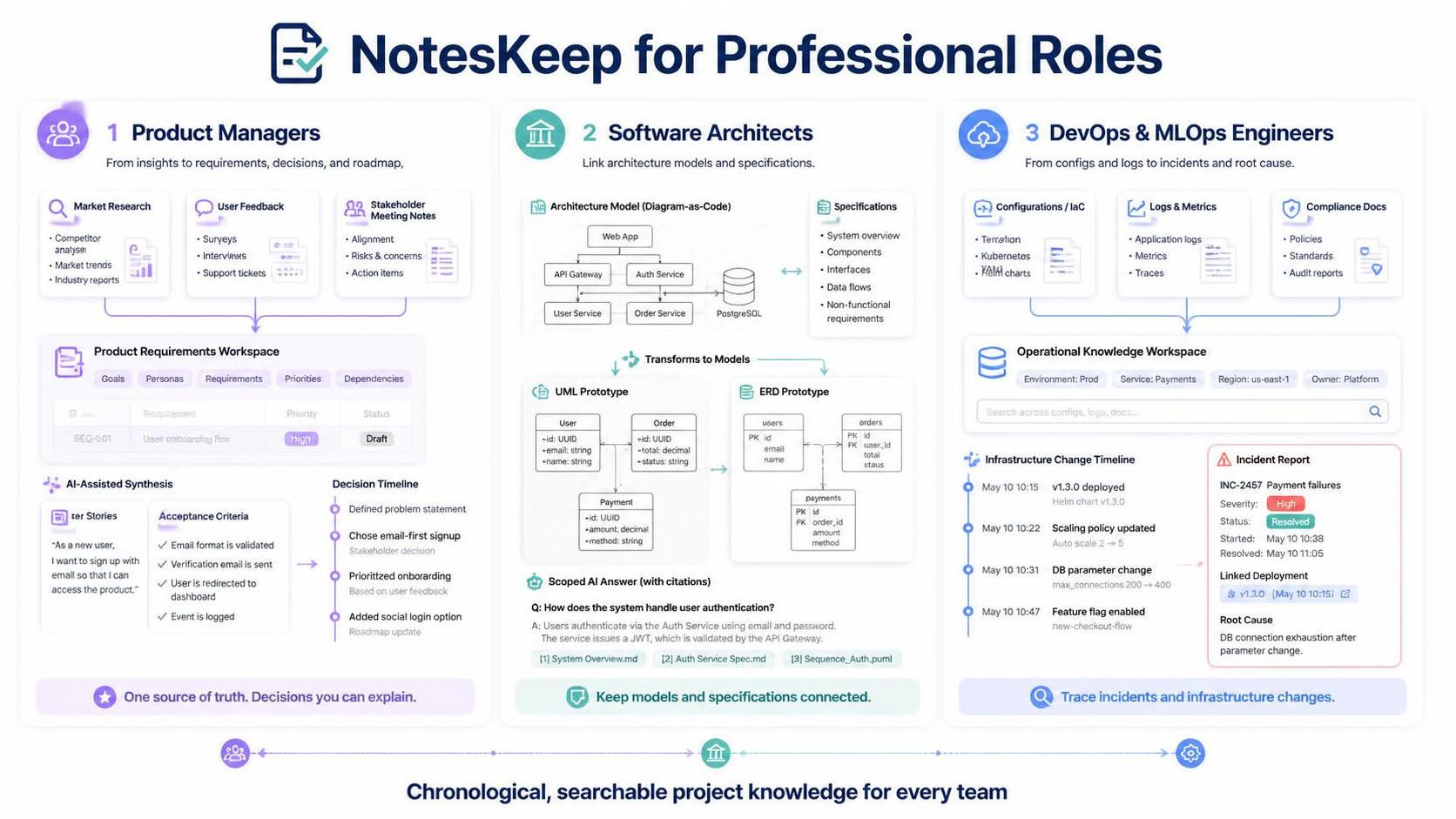
For Product Managers
NotesKeep helps PMs maintain a single source of truth for product requirements. By ingesting market research, user feedback, and stakeholder meetings, PMs can use the AI to synthesize requirements into clear user stories and acceptance criteria. The chronological timeline ensures that every decision is traceable, making it easier to justify roadmap changes to stakeholders.
For Software Architects
Architects benefit from the seamless integration of visual modeling and documentation. Diagrams created in Whiteboard sessions or via Diagram-as-Code are kept in sync with textual specifications. The AI’s ability to generate UML and ERDs from text allows architects to quickly prototype and validate designs, while the scoped RAG ensures that architectural decisions are always backed by cited sources.
For DevOps & MLOps Engineers
For teams managing complex infrastructure, NotesKeep’s ability to ingest configuration files, logs, and compliance documents into a searchable, tagged workspace is invaluable. The chronological timeline helps track changes to infrastructure-as-code, while the AI can summarize incident reports and link them to specific deployment versions, aiding in root cause analysis.
Conclusion
Visual Paradigm NotesKeep represents a paradigm shift in how organizations manage knowledge. By moving beyond static wikis and embracing a chronological, visual, and AI-enhanced approach, NotesKeep ensures that documentation remains a living, breathing part of the development process. It ends “Temporal Spec Decay” by keeping requirements, decisions, and designs interconnected and up-to-date.
For teams looking to reduce risk, improve collaboration, and accelerate delivery, NotesKeep offers a powerful solution that turns scattered information into structured, actionable intelligence. Whether you’re a product manager defining the next big feature, an architect designing complex systems, or an engineer maintaining critical infrastructure, NotesKeep provides the tools to keep your knowledge base as dynamic as your projects.
Note: This guide is based on the provided description of Visual Paradigm NotesKeep. For specific licensing details, edition comparisons, or to explore how NotesKeep integrates with your existing toolchain, please refer to the official Visual Paradigm documentation or contact their sales team.