
Introduction
In the world of project management, systems engineering, and organizational design, complexity is the enemy of execution. Whether you are managing a multi-million dollar software rollout, decomposing a complex enterprise architecture, or structuring a new department, the ability to break down large concepts into manageable, actionable components is critical.
Traditionally, creating these hierarchical views required switching between word processors for documentation and separate diagramming tools for visualization. This disconnect often leads to outdated diagrams, inconsistent branding, and wasted time.
With the latest update to Visual Paradigm OpenDocs, this friction is eliminated. OpenDocs now natively supports the Breakdown Structure chart type, fully integrated with AI generation capabilities. This guide will walk you through the key concepts of breakdown structures, demonstrate how to leverage this new feature within Visual Paradigm, and provide practical examples to help you streamline your documentation workflow.
Key Concepts: Understanding Breakdown Structures
Before diving into the tooling, it is essential to understand what a Breakdown Structure is and why it is a foundational element of professional documentation.
What is a Breakdown Structure?
A Breakdown Structure is a hierarchical decomposition of a total scope of work, system, or organization into smaller, more manageable parts. It provides a clear visual representation of “what needs to be done” or “how a system is composed.”
Common Types of Breakdown Structures
-
Work Breakdown Structure (WBS):
-
Use Case: Project Management.
-
Purpose: Decomposes a project into deliverables and work packages. It is the backbone of project scheduling and cost estimation.
-
Example: A “Mobile App Launch” project broken down into “Design,” “Development,” “Testing,” and “Marketing,” with further sub-tasks under each.
-
-
Product Breakdown Structure (PBS):
-
Use Case: Product Management & Engineering.
-
Purpose: Breaks down a physical or digital product into its constituent components or features.
-
Example: An “E-Commerce Platform” broken down into “User Interface,” “Payment Gateway,” “Inventory Database,” and “Customer Support Module.”
-
-
Organizational Breakdown Structure (OBS):
-
Use Case: Human Resources & Operations.
-
Purpose: Illustrates the hierarchy of teams, roles, and responsibilities within an organization.
-
Example: A “Tech Department” broken down into “Engineering,” “QA,” and “DevOps,” with individual teams listed under each.
-
-
Risk Breakdown Structure (RBS):
-
Use Case: Risk Management.
-
Purpose: Categorizes potential risks by source or type to ensure comprehensive risk identification.
-
Example: “Project Risks” broken down into “Technical,” “External,” “Organizational,” and “Project Management” risks.
-
Why Visualization Matters
Text-heavy descriptions of hierarchies are difficult to parse. A visual Breakdown Structure allows stakeholders to:
-
Grasp Scope Quickly: See the big picture and the details simultaneously.
-
Identify Gaps: Spot missing components or uneven distribution of work.
-
Improve Communication: Provide a shared reference point for cross-functional teams.
Tooling: Creating Breakdown Structures in Visual Paradigm OpenDocs
Visual Paradigm OpenDocs is an AI-powered knowledge management tool that bridges the gap between text-heavy documentation and visual storytelling. The new Breakdown Structure feature allows you to create professional-grade visual hierarchies in seconds, either as embedded components within a document or as standalone pages.
Feature Highlights
-
AI-Powered Generation: Transform simple text descriptions into comprehensive visual hierarchies instantly.
-
Two Integration Modes:
-
Embeddable Components: Insert charts directly into your document pages for contextual clarity.
-
Standalone Component Pages: Create dedicated diagram pages for high-level overviews within your Space.
-
-
Seamless Editing: Customize shapes, colors, and connectors to match your brand guidelines using the full-featured editor.
Step-by-Step Guide: How to Create a Breakdown Structure
There are two primary ways to create a Breakdown Structure in OpenDocs. Below are detailed instructions for both methods.
Method 1: Embedding a Breakdown Structure in a Document Page
This method is ideal when you want to provide visual context alongside your written documentation.
-
Open Your Page: Navigate to the desired page in your OpenDocs Space.
-
Enter Edit Mode: Click on the Edit button at the top right corner of the page.
-
Position Cursor: Click in the page editor where you want to insert the breakdown structure chart.
-
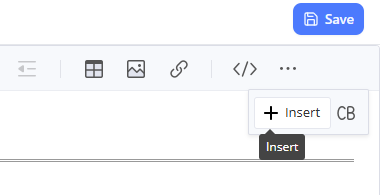
Insert Diagram: Click on the Insert button in the toolbar.
-
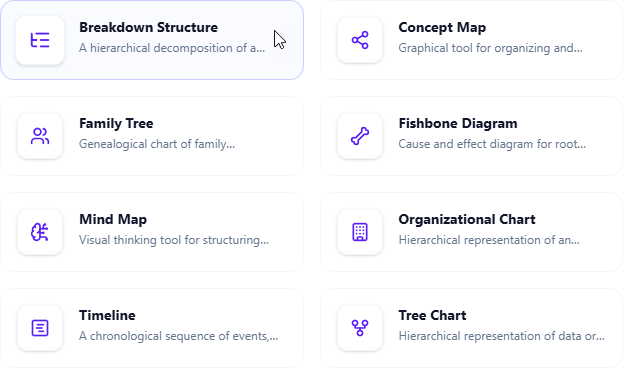
Select Chart Type: From the menu, navigate to Mind Maps > Breakdown Structure.
-
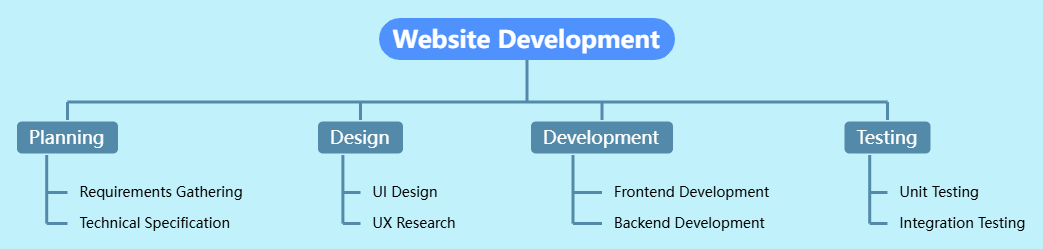
Edit Your Chart: Use the intuitive editor to add nodes, adjust hierarchy, and customize the appearance.
-
Save Changes: Once satisfied, click Save at the top right.
-
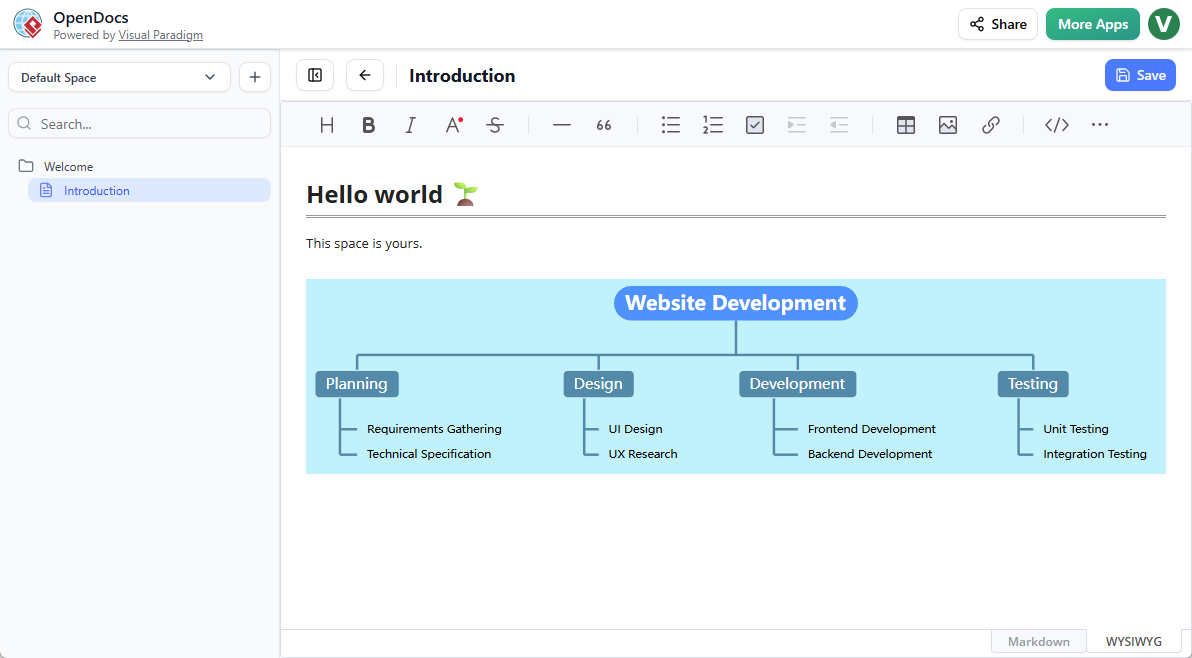
Return to View: Click Close to exit the editor and return to your document page.
Method 2: Creating a Standalone Component Page
This method is best for creating high-level overview diagrams that can be linked to from multiple documents or used as a central reference point.
-
Create New Page: In the table of contents pane, click the + icon and select New Component Page.
-
Select Chart Type: Choose Mind Maps > Breakdown Structure.
-
Build Your Structure: Use the editor to build out your hierarchy.
-
Save: Click Save at the top right to finalize your standalone component.
Practical Examples
To illustrate the versatility of the Breakdown Structure tool, here are three common scenarios:
Example 1: Software Development Project (WBS)
Goal: Plan the development of a new AI-powered customer support chatbot.
Structure:
-
Project: AI Chatbot Launch
-
Phase 1: Requirements
-
Stakeholder Interviews
-
User Story Mapping
-
-
Phase 2: Design
-
Conversation Flow Diagrams
-
UI/UX Mockups
-
-
Phase 3: Development
-
Backend API Integration
-
NLP Model Training
-
Frontend Widget Implementation
-
-
Phase 4: Testing
-
Unit Testing
-
User Acceptance Testing (UAT)
-
-
Phase 5: Deployment
-
Server Configuration
-
Go-Live Support
-
-
Example 2: Enterprise Architecture (System Decomposition)
Goal: Document the components of a cloud-based ERP system.
Structure:
-
ERP System
-
Frontend Layer
-
Web Portal
-
Mobile App
-
-
Application Layer
-
Finance Module
-
HR Module
-
Supply Chain Module
-
-
Data Layer
-
Primary Database
-
Data Warehouse
-
Cache Service
-
-
Infrastructure Layer
-
Load Balancers
-
Compute Instances
-
Storage Solutions
-
-
Example 3: Marketing Campaign (Task Breakdown)
Goal: Organize tasks for a Q3 product launch campaign.
Structure:
-
Q3 Product Launch
-
Content Creation
-
Blog Posts
-
Video Tutorials
-
Social Media Graphics
-
-
Channel Strategy
-
Email Newsletter Series
-
LinkedIn Ads
-
Partner Webinars
-
-
Events
-
Virtual Launch Event
-
Press Release Distribution
-
-
Analytics
-
KPI Dashboard Setup
-
Weekly Performance Reviews
-
-
Why Use OpenDocs for Your Documentation?
OpenDocs is more than just a diagramming tool; it is a centralized hub for your team’s collective intelligence. By combining an intelligent rich text editor with an AI-powered knowledge management tool, Visual Paradigm ensures that your documentation remains consistent, professional, and visually engaging.
-
For Business Analysts: Clearly define requirements and system boundaries.
-
For Software Engineers: Document architecture and module dependencies.
-
For Project Managers: Track deliverables and communicate scope to stakeholders.
Everything lives in your Space, ready to be published and shared with a single click. No more switching between applications or worrying about version control for separate diagram files.
Conclusion
The introduction of the Breakdown Structure chart type in Visual Paradigm OpenDocs marks a significant step forward in simplifying complex documentation. By enabling users to transform text into visual hierarchies seamlessly, OpenDocs empowers teams to communicate more effectively, plan more thoroughly, and execute with greater clarity.
Whether you are embedding a quick WBS into a project plan or creating a detailed system decomposition on a standalone page, this feature reduces the friction between thinking and documenting. With AI-powered generation and intuitive editing tools, you can focus on what matters most: delivering value.
Ready to visualize your next project?
Experience the power of automated diagramming today. The breakdown structure support is now live for all users with Visual Paradigm Online (Combo Edition) or Visual Paradigm (Professional Edition) licenses.
Try the Breakdown Structure Tool Now
To learn more about how OpenDocs can revolutionize your workflow, visit our official feature home page.
Stay tuned as we continue to roll out more AI-enhanced chart types, including Mind Maps, Fishbone Diagrams, and Timelines, to help you build better, faster, and smarter.