


Creating a BPMN diagram does not have to begin with a blank canvas. With Visual Paradigm Online, you can build business process diagrams in a browser using drag-and-drop modeling, templates, collaborative editing, and AI-assisted tools. The platform offers a free plan for personal, educational, and non-commercial use, while paid plans add commercial-use rights, expanded diagramming features, collaboration capabilities, and additional AI tools.
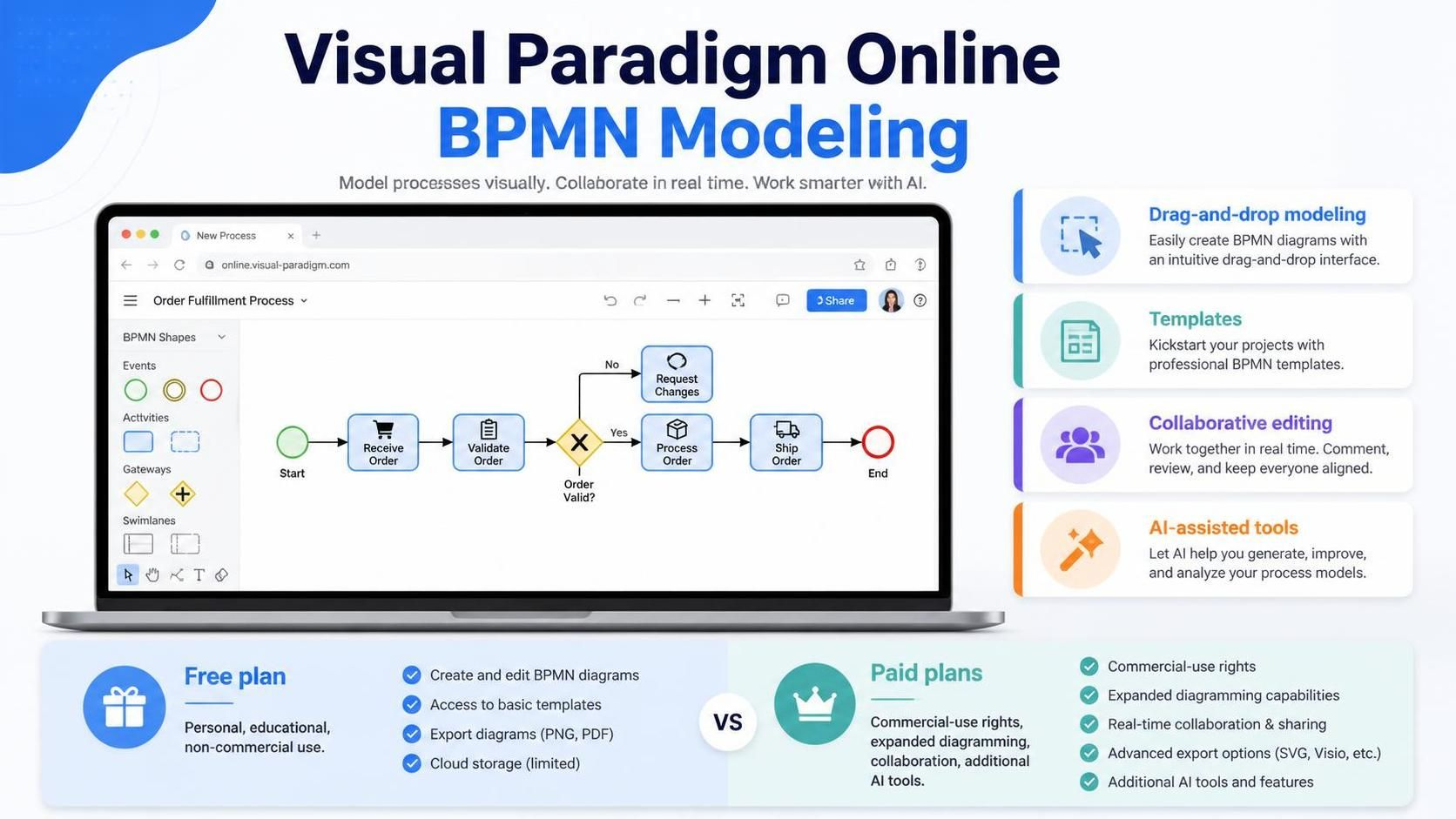
This makes Visual Paradigm useful for business analysts, students, process owners, consultants, and teams that need to document workflows without immediately installing desktop software.
What Visual Paradigm Online Provides for BPMN Modeling
Visual Paradigm Online is a cloud-based visual modeling platform. It supports diagram creation from a web browser and includes BPMN among its business-diagram capabilities. Users can begin with a blank diagram, choose a template, or use AI-assisted generation to create an initial process model.
The core BPMN workflow typically involves:
-
Defining the process scope.
-
Identifying participants, departments, and systems.
-
Adding pools and lanes.
-
Placing events, activities, and gateways.
-
Connecting elements with sequence flows.
-
Reviewing the diagram with stakeholders.
-
Exporting or sharing the finished model.
The online environment is particularly suitable for early process discovery and collaborative workshops. The editor supports drag-and-drop creation, automatic connector adjustment, alignment guides, templates, comments, and exports such as PNG, SVG, and PDF.
Getting Started with the Free Online Tool
To begin, open Visual Paradigm Online and select the diagramming area. Choose a BPMN or business process diagram template, or create a new diagram from a blank canvas.
A practical starting process is employee onboarding:
-
HR receives the new-hire details.
-
HR creates the employee record.
-
IT prepares equipment and accounts.
-
The manager schedules an orientation.
-
The employee completes required training.
-
HR confirms that onboarding is complete.
Before drawing, write the process as a short chronological description. This makes it easier to identify participants, actions, decisions, and possible outcomes.
For example:
HR receives the signed employment documents and creates an employee record. IT prepares the laptop and user accounts in parallel. The hiring manager schedules orientation. If any required document is missing, HR contacts the employee and pauses onboarding until the document is received. When all activities are complete, HR closes the onboarding case.
This description can be modeled manually or used as input for an AI-assisted diagramming feature.
Modeling Pools and Lanes
Pools and lanes are central to a clear BPMN diagram because they show who performs each activity.
A pool generally represents an independent participant, organization, company, customer, supplier, or major system. For example, an employee onboarding collaboration diagram might contain these pools:
-
The company
-
The new employee
-
An external background-check provider
A lane divides a pool into internal roles, departments, teams, or systems. Within the company pool, lanes might include:
-
Human Resources
-
IT Department
-
Hiring Manager
-
Payroll
Use lanes when the participants belong to the same organizational process. Use separate pools when communication crosses an organizational or participant boundary.
For example:
-
HR and IT in the same company can be represented as lanes within one pool.
-
A company and an external payroll provider should usually be represented as separate pools.
-
Communication between separate pools is modeled with message flows rather than sequence flows.
In Visual Paradigm Online, the diagram editor helps position and connect shapes, while alignment guides make it easier to maintain a readable swimlane layout.
A Practical Pool-and-Lane Example
Consider an invoice-approval process:
-
A supplier submits an invoice.
-
Accounts Payable checks the invoice.
-
The purchasing department confirms that the goods or services were received.
-
A manager approves or rejects the invoice.
-
Accounts Payable schedules payment.
-
The supplier receives a payment notification.
A suitable BPMN structure could include:
| BPMN structure | Participant or responsibility |
|---|---|
| Pool | Buyer organization |
| Lane | Accounts Payable |
| Lane | Purchasing |
| Lane | Approving Manager |
| Separate pool | Supplier |
| Message flow | Invoice submission and payment notification |
| Sequence flow | Internal work within the buyer organization |
The supplier’s invoice submission should cross from the supplier pool to the buyer’s process using a message flow. Activities that move from Accounts Payable to Purchasing inside the buyer organization can be connected with sequence flows.
This distinction helps prevent one of the most common BPMN modeling errors: treating every connector as the same type of flow.
Using Templates to Accelerate Process Design
Templates are useful when the process follows a familiar business pattern. Instead of creating every symbol manually, start with a structure that resembles the target workflow and customize it.
Common BPMN use cases include:
-
Order fulfillment
-
Employee onboarding
-
Purchase approval
-
Customer complaint handling
-
Loan applications
-
Insurance claims
-
Invoice processing
-
Software deployment
A template should be treated as a starting point, not as a finished process model. Replace generic steps with the organization’s actual activities, roles, systems, rules, and exceptions.
For example, a generic purchase-approval template may contain an “Approve purchase” task. A production-ready version should clarify:
-
Who performs the approval
-
What spending threshold applies
-
Whether multiple approvals are required
-
What happens when the request is rejected
-
Whether approval is completed manually or through an enterprise system
-
What notification is sent to the requester
AI-Assisted BPMN Diagram Generation
Visual Paradigm’s AI features can convert a written process description into an initial diagram. The AI BPMN workflow is designed to identify participants, tasks, decision points, swimlanes, and process sequences from natural-language input. Generated diagrams remain editable so that users can correct and refine the result.
A typical AI-assisted workflow is:
-
Describe the process in plain language.
-
Identify the diagram type as a business process diagram.
-
Indicate whether pools and lanes should be included.
-
Generate the first draft.
-
Review the BPMN elements and relationships.
-
Edit the diagram manually or refine it through additional instructions.
-
Validate the result with process participants.
The quality of the output depends heavily on the quality of the prompt. A short phrase such as “customer complaint process” leaves too much room for interpretation. A better prompt identifies the participants, order of activities, decision rules, exceptions, and outcomes.
Example AI Prompt
Create a BPMN diagram for a customer complaint process. Include separate participants for the customer and the company. Within the company pool, create lanes for Customer Service, Technical Support, and a Supervisor. The customer submits a complaint. Customer Service records and categorizes it. If the complaint is technical, Technical Support investigates it. If the issue is urgent or unresolved after 24 hours, the case is escalated to a Supervisor. Customer Service sends the resolution to the customer and closes the case.
This prompt gives the AI enough information to infer:
-
Separate pools
-
Internal lanes
-
The process sequence
-
An exclusive decision
-
An escalation path
-
A time-based condition
-
The final outcome
Visual Paradigm’s documented AI workflow includes selecting a business process diagram, optionally enabling pools and lanes, and entering a detailed chronological narrative.
Improving AI-Generated Diagrams
An AI-generated BPMN diagram is a first draft. It should be reviewed by someone who understands the actual process.
Check the following areas:
Participants
Confirm that each pool and lane represents a real participant, department, role, or system. AI may create separate lanes for responsibilities that should be grouped together, or combine roles that need to remain distinct.
Task names
Use concise verb–object names:
-
“Review application”
-
“Validate invoice”
-
“Approve purchase”
-
“Notify customer”
Avoid vague labels such as:
-
“Processing”
-
“Handle request”
-
“Do approval”
-
“Complete task”
Gateways
Verify that each gateway has a clear purpose and condition. For example:
-
“Invoice valid?”
-
“Budget available?”
-
“Complaint resolved?”
-
“Payment approved?”
Add conditions to outgoing flows, such as “Yes,” “No,” “Approved,” or “Rejected.”
Exceptions
Look for missing alternate paths. Real processes often include:
-
Missing information
-
Rejected requests
-
System failures
-
Expired deadlines
-
Escalations
-
Cancellations
-
Rework
-
Compensation or refunds
AI can suggest these paths, but subject-matter experts must confirm whether they reflect actual policy.
Message and sequence flows
Ensure that sequence flows remain within the same pool. Use message flows to show communication between separate pools. This is especially important when modeling customers, suppliers, regulators, external systems, or partner organizations.
Combining Visual Editing with AI
The most effective workflow combines AI generation with manual modeling.
AI is useful for:
-
Producing a first draft quickly
-
Converting workshop notes into a visual structure
-
Suggesting activities and decision points
-
Identifying likely participants
-
Exploring alternative process designs
-
Helping non-specialists begin a BPMN model
Manual editing is necessary for:
-
Confirming organizational responsibilities
-
Applying internal policies
-
Correcting BPMN semantics
-
Adding data objects and documentation
-
Refining exception handling
-
Checking compliance requirements
-
Preparing the diagram for automation
Visual Paradigm describes AI-generated diagrams as editable through its online editor, with more advanced modeling available through its desktop application.
Free Plan Considerations
The free Visual Paradigm Online plan is intended for students, hobbyists, and personal projects. It is listed at $0 and includes access to a selection of AI-powered applications and basic diagramming capabilities. The plan is restricted to non-commercial use.
For business use, check the current plan terms before publishing diagrams or using the tool for client work. Paid plans add features such as commercial-use rights, watermark-free exports, expanded diagram types, collaboration, and additional AI capabilities.
This distinction matters when BPMN diagrams are being created for:
-
A consulting engagement
-
A commercial process-improvement project
-
Internal corporate documentation
-
Client deliverables
-
Paid training materials
-
Public product documentation
A Recommended BPMN Modeling Workflow
Use the following workflow when creating diagrams with Visual Paradigm Online:
-
Define the scope. Decide where the process begins and ends.
-
Write the process narrative. Describe activities in chronological order.
-
Identify participants. List organizations, customers, systems, departments, and roles.
-
Choose pools and lanes. Separate independent participants from internal responsibilities.
-
Generate or draw the first draft. Use AI for rapid ideation or the editor for direct control.
-
Add events. Define the start, intermediate triggers, deadlines, errors, and end states.
-
Add gateways. Show decisions, parallel work, merging, and synchronization.
-
Label conditions. Make the meaning of each outgoing path explicit.
-
Review connectors. Check sequence flows, message flows, and associations.
-
Validate with stakeholders. Ask process owners to confirm that the model reflects reality.
-
Simplify the layout. Remove unnecessary detail and avoid crossing connectors.
-
Share or export the result. Use comments, collaborative review, or an appropriate export format.
Best Practices for Visual Paradigm BPMN Diagrams
Keep the main process readable. If a diagram becomes crowded, convert a group of activities into a collapsed sub-process and create a separate detailed diagram.
Use a consistent left-to-right direction, align activities, and avoid unnecessary visual decoration. Give each task one clear purpose, and use separate end events for different outcomes such as “Order completed,” “Order rejected,” and “Order cancelled.”
When using AI, provide explicit information about:
-
Business context
-
Participants
-
Task order
-
Decision criteria
-
Timing requirements
-
External systems
-
Error conditions
-
Final outcomes
Do not assume that a visually attractive AI-generated diagram is automatically a correct BPMN model. Review its semantics, validate its responsibilities, and confirm that the process reflects real organizational behavior.
Conclusion
Visual Paradigm Online offers a practical entry point for BPMN modeling through browser-based diagramming, templates, collaboration features, and AI-assisted generation. The free plan can be useful for learning, experimentation, and non-commercial projects, while professional plans provide broader capabilities for business and team use.
The strongest approach is to use AI for speed and exploration, then apply human judgment to pools, lanes, sequence flows, message flows, gateways, exceptions, and business rules. Used this way, Visual Paradigm can help transform a process narrative into a clear, reviewable BPMN model without sacrificing modeling quality.
This post is also available in Deutsch, Español, فارسی, Français, English, Bahasa Indonesia, 日本語, Polski, Portuguese, Ру́сский, Việt Nam, 简体中文 and 繁體中文.