
1. Overview
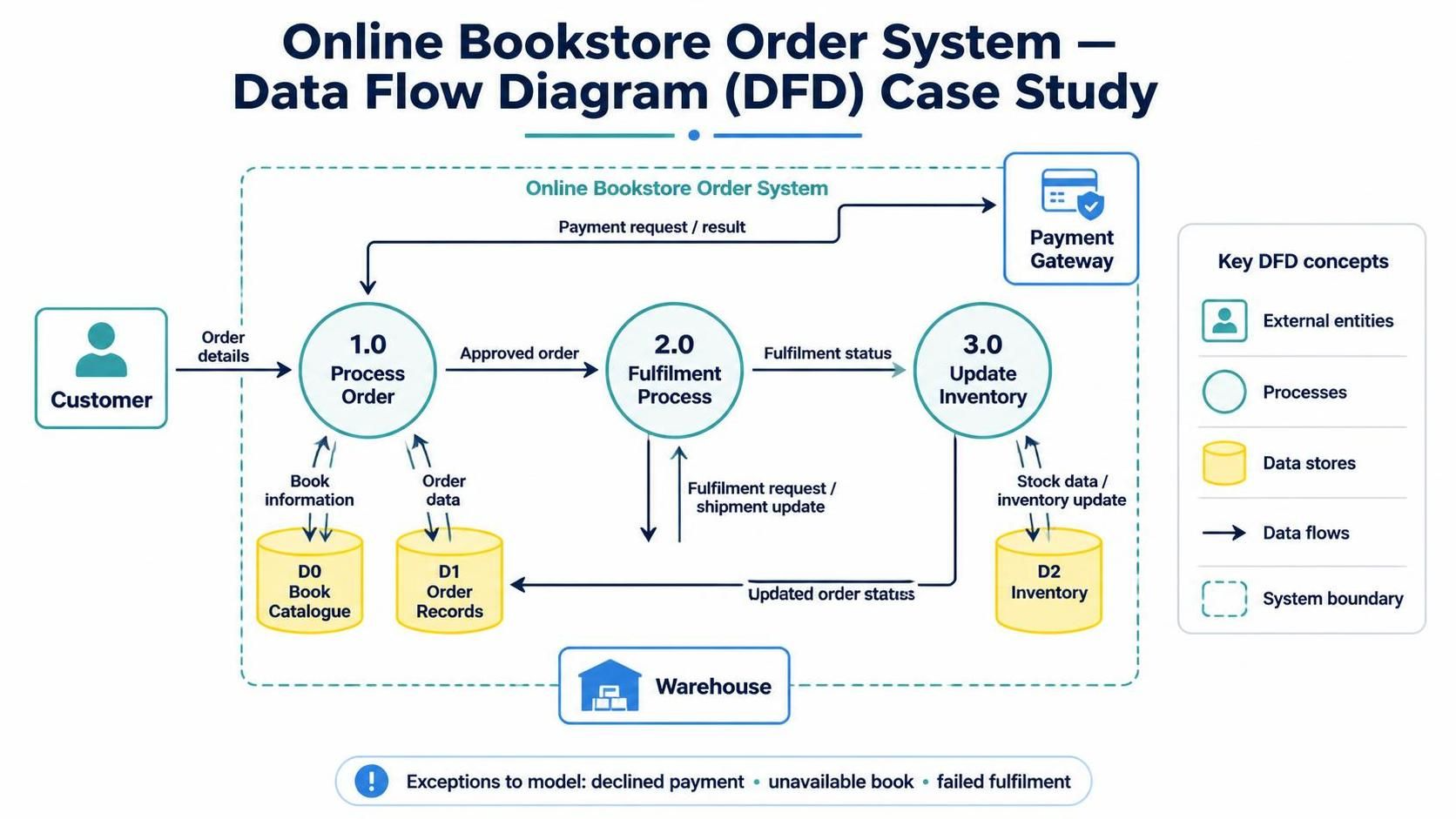
This case study describes an Online Bookstore Order System using a Data Flow Diagram (DFD). The diagram shows how a customer’s order moves through the system, how payment and fulfilment are handled, and how inventory is updated.
The diagram appears to contain three processes, three data stores, and three external entities. Some labels and flow names are small in the image, so the interpretation below follows the visible labels and the most likely meaning of the connections.
2. Business problem
The bookstore needs to process online orders reliably. When a customer places an order, the system must:
-
Capture the order details.
-
Check the book catalogue and record the order.
-
Confirm payment through a payment gateway.
-
Send the order for fulfilment.
-
Coordinate with the warehouse.
-
Update inventory after the order is processed.
The DFD makes these information flows visible, helping stakeholders understand the system’s boundaries and identify missing or unclear steps.
3. Scope and diagram elements
The dotted boundary represents the Online Bookstore Order System. Components inside it belong to the system; external entities outside it interact with the system but are not part of it.
| DFD element | Visible item | Role |
|---|---|---|
| External entity | Customer | Provides order information and receives order-related responses. |
| External entity | Payment Gateway | Processes or confirms payment. |
| External entity | Warehouse | Receives fulfilment information and provides shipment or fulfilment updates. |
| Process | 1.0 Process Order | Takes in customer order details and coordinates order processing. |
| Process | 2.0 Fulfilment Process | Handles the next stage of the order, likely preparing it for dispatch after approval. |
| Process | 3.0 Update Inventory | Updates stock information as the order is fulfilled. |
| Data store | D0 Book Catalogue | Holds book or catalogue information used during order processing. |
| Data store | D1 Order Records | Stores order information. |
| Data store | D2 Inventory | Holds stock levels and inventory information. |
4. Diagram interpretation
4.1 Order submission
The Customer sends order details to 1.0 Process Order. This is the start of the order-processing flow.
The process appears to interact with D0 Book Catalogue, presumably to access book details such as titles, availability, or prices. It also interacts with D1 Order Records to create or retrieve order information.
4.2 Payment
The order process communicates with the Payment Gateway. The gateway’s response—such as payment approval or rejection—should determine whether the order proceeds.
The diagram shows an interaction between the gateway and the order-processing area, but the exact labels are difficult to read. For a clearer model, name the flows explicitly, for example payment request and payment result.
4.3 Fulfilment
After the order is processed and payment is approved, the system sends order information to 2.0 Fulfilment Process. This process appears to coordinate the order’s next stage, likely preparing it for fulfilment.
The diagram shows the fulfilment process interacting with D1 Order Records, which suggests that order status or fulfilment details are recorded or retrieved there.
4.4 Warehouse interaction
The Warehouse is an external entity below the system boundary. The diagram shows information passing between it and the system, apparently including shipment or tracking-related information.
A useful refinement would label both directions clearly—for example, fulfilment request from the system to the warehouse and shipment confirmation from the warehouse to the system.
4.5 Inventory update
Process 3.0 Update Inventory interacts with D2 Inventory to update or read stock information. It also appears to receive information connected to fulfilment. This represents the business rule that inventory should change when an order is fulfilled or otherwise reaches the appropriate status.
The diagram’s exact inventory-flow labels are not fully legible, so the specific timing of the update should be confirmed with stakeholders.
5. End-to-end scenario
A typical successful order can be read as follows:
-
The customer submits order details.
-
1.0 Process Order checks relevant catalogue information and records the order.
-
The system requests payment authorization from the payment gateway.
-
If payment is approved, the order proceeds to 2.0 Fulfilment Process.
-
The system exchanges fulfilment information with the warehouse.
-
3.0 Update Inventory updates the inventory store, and the order’s relevant status is recorded.
A complete operational DFD should also show what happens when payment is declined, a book is unavailable, or the warehouse cannot fulfil the order. Those exception paths are not clearly visible in the supplied diagram.
6. Key DFD concepts illustrated
-
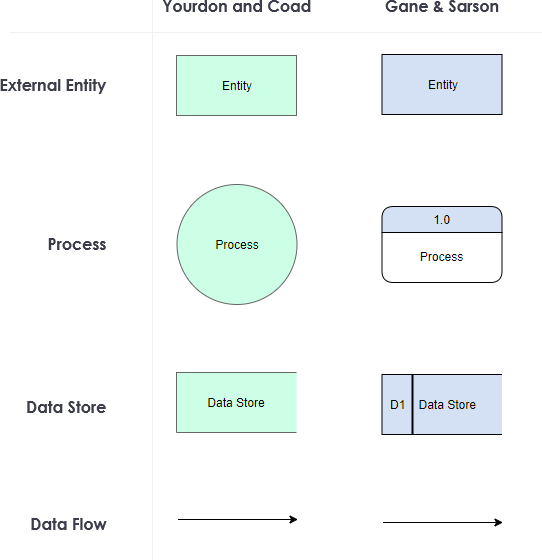
External entities are sources or destinations of data outside the system boundary, such as the customer, payment gateway, and warehouse.
-
Processes transform incoming data into outgoing data. Process names should describe an action, such as “Process Order.”
-
Data stores represent information the system retains, such as orders and inventory.
-
Data flows show information moving among entities, processes, and stores. They should be named with the data being transferred, not with an action or vague label.
-
System boundary distinguishes the bookstore system from external services and organizations.
-
Balancing and consistency matter when moving between DFD levels: a decomposed process should account for the same inputs and outputs as the higher-level process it represents.
A DFD describes what information moves and where it goes. It does not, by itself, specify screen layouts, implementation code, database schemas, or the exact order of every operation.
7. Recommendations for improving the diagram
-
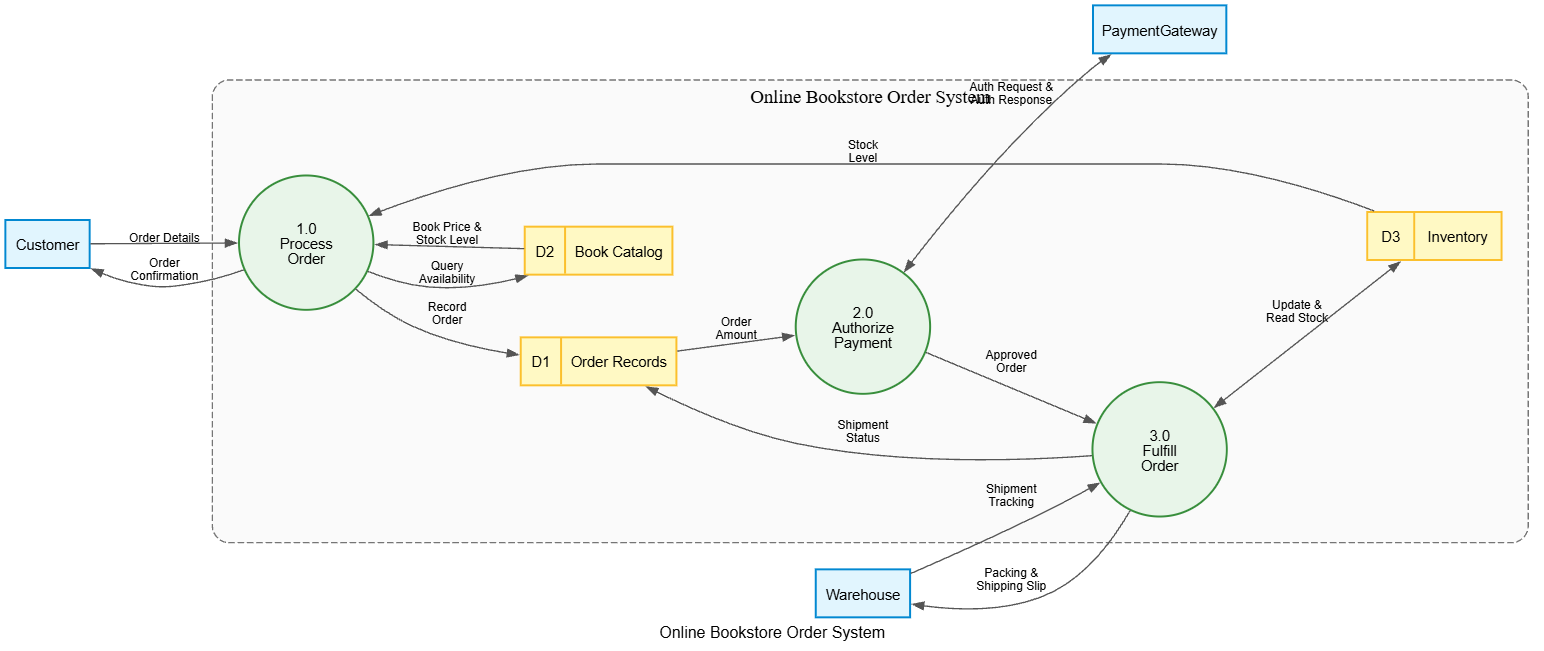
Make flow names explicit. Use labels such as “customer order,” “catalogue details,” “payment request,” “payment result,” “fulfilment request,” “shipment update,” and “inventory adjustment.”
-
Clarify process responsibilities. “Fulfilment Process” could be made more specific if it covers activities such as checking stock, preparing a shipment, or updating order status.
-
Show exception flows. Add paths for declined payment, unavailable books, cancelled orders, and failed fulfilment.
-
Clarify when inventory changes. Confirm whether stock is reduced when an order is placed, when payment is approved, or when the warehouse confirms fulfilment.
-
Use consistent data-store labels. Adopt a consistent numbering and naming convention, such as D1 Order Records, D2 Book Catalogue, and D3 Inventory.
-
Check DFD rules. A data flow should normally connect to a process; external entities should not connect directly to data stores, and data stores should not exchange data directly without a process.
-
Consider a context diagram and a lower-level DFD. A context diagram can show the bookstore as one process and its external interactions. A Level 1 diagram can then expand that process into order processing, payment, fulfilment, and inventory updates.
8. Using Visual Paradigm AI Chatbot and VPasCode Tool
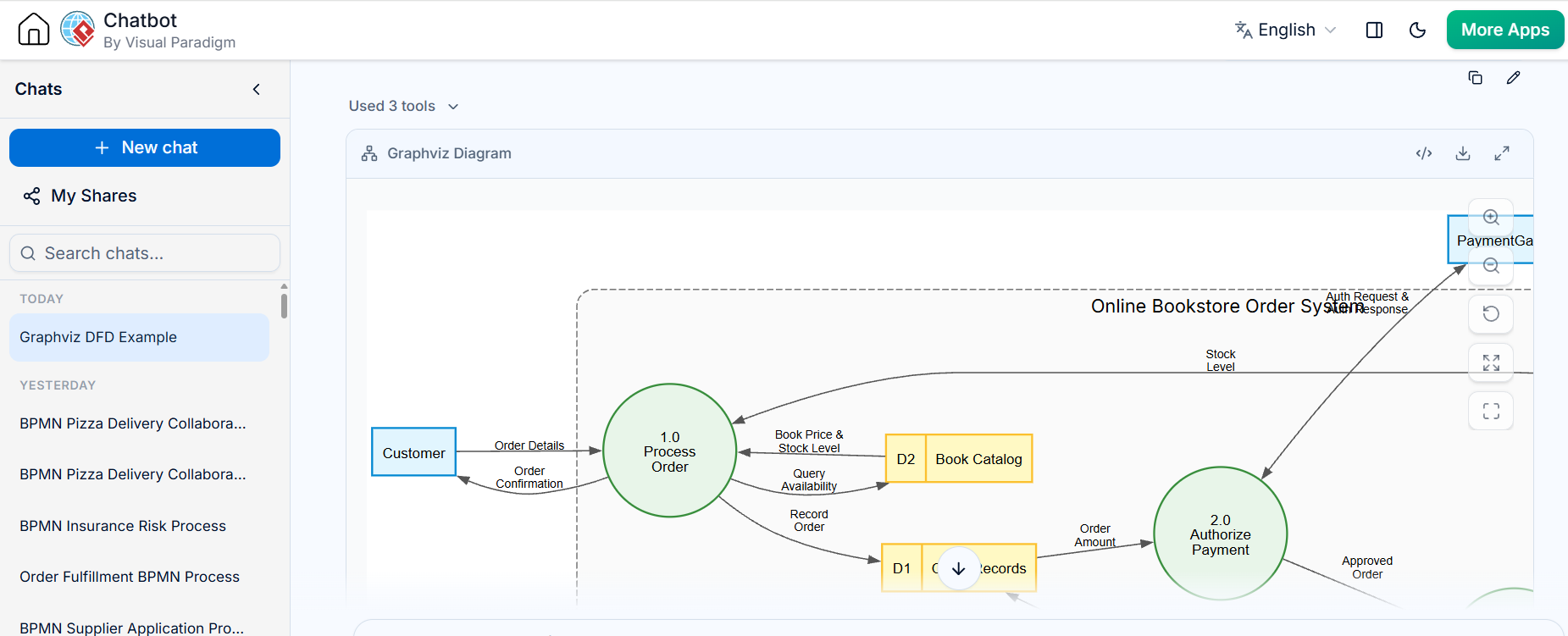
A practical workflow is to use Visual Paradigm AI Chatbot to develop and refine the model, then use VPasCode Tool to represent or generate the diagram in a structured, repeatable way.
Visual Paradigm AI Chatbot
Use the chatbot to turn the business description into candidate DFD components and flows. Ask it to:
-
Identify external entities, processes, data stores, and data flows.
-
Propose clear process and flow names.
-
Check whether each flow has a sensible source and destination.
-
Identify missing exception paths and ambiguous assumptions.
-
Explain the diagram in plain language for review by nontechnical stakeholders.
Treat the generated model as a draft. Confirm business rules—especially payment handling, inventory timing, and warehouse responsibilities—with the relevant stakeholders.
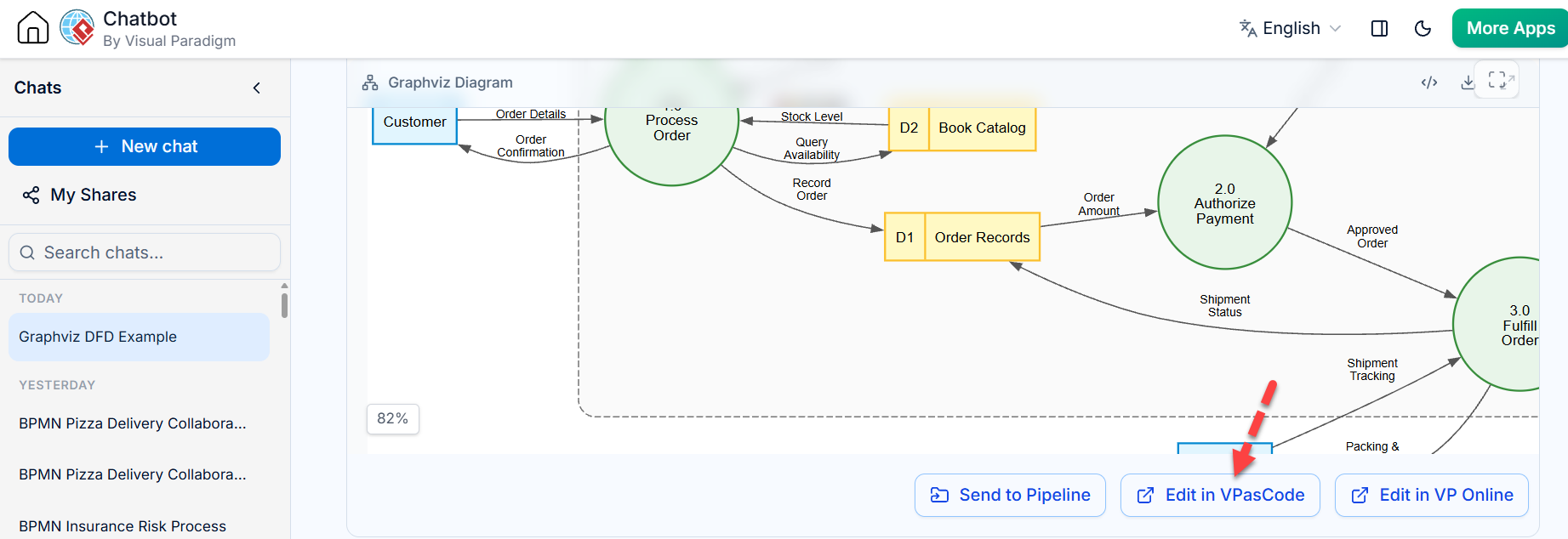
VPasCode Tool
Use VPasCode Tool to encode the agreed diagram structure and support consistent updates or regeneration, according to the tool’s supported syntax and workflow. Keep the structure aligned with the reviewed DFD: the system boundary, entities, processes, stores, and labeled flows should agree with the written requirements.
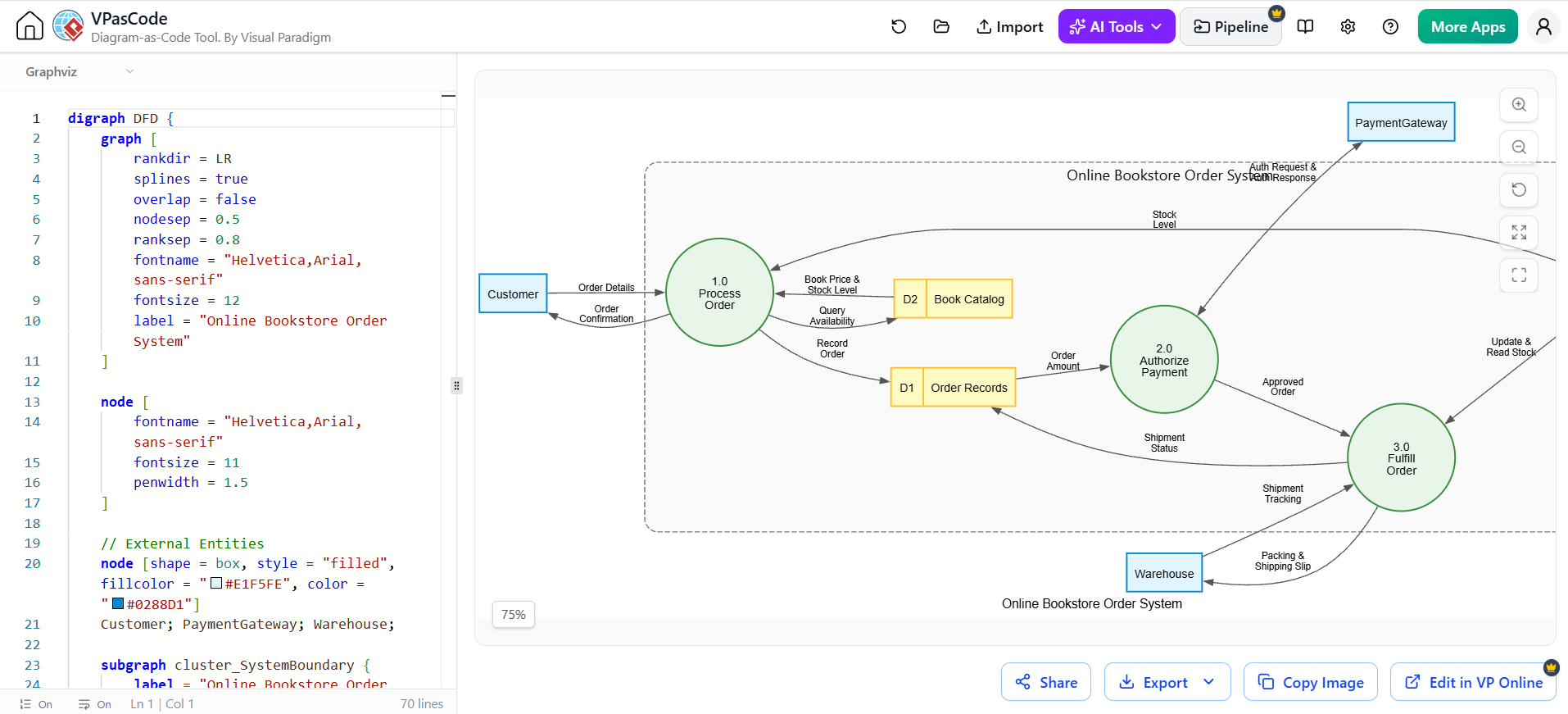
The specific commands and syntax depend on the VPasCode Tool version and setup, so validate the generated result in Visual Paradigm rather than assuming that generated output is correct.
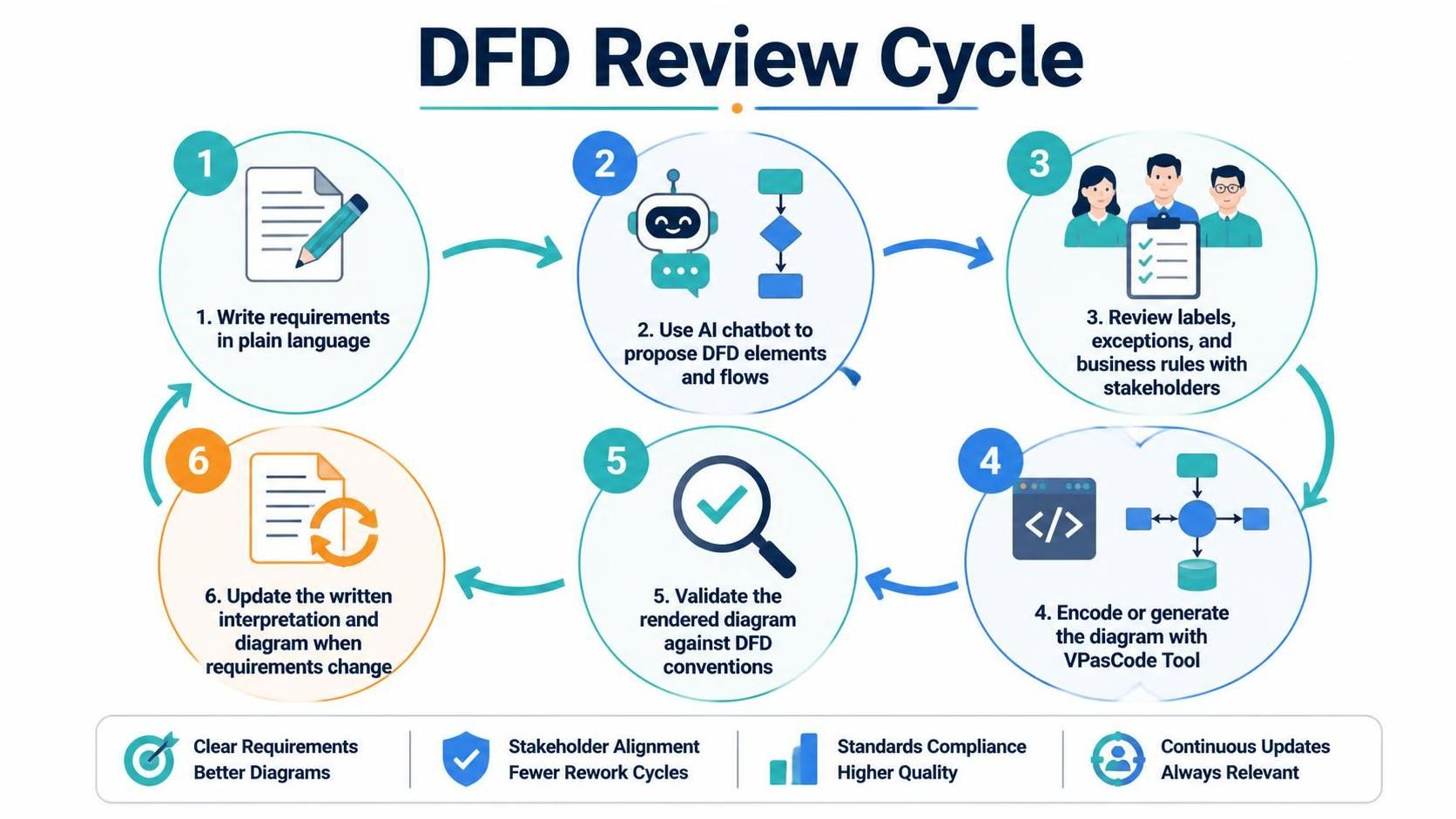
Suggested review cycle
-
Write the order-processing requirements in plain language.
-
Use the AI chatbot to propose DFD elements and flows.
-
Review labels, exceptions, and business rules with stakeholders.
-
Encode or generate the diagram with VPasCode Tool.
-
Validate the rendered diagram against DFD conventions.
-
Update the written interpretation and diagram together when requirements change.
9. Conclusion
The diagram models the core information flow of an online bookstore: a customer submits an order, the system consults catalogue and order data, payment is handled externally, fulfilment is coordinated with a warehouse, and inventory is updated. Its main value is making responsibilities and information exchanges visible. The most important next steps are to clarify the flow labels, verify when inventory changes, and add the missing failure and cancellation paths.