


What is BPMN? A Beginner’s Guide to Business Process Modeling
What Exactly is BPMN?
Why Should Beginners Care About BPMN?
-
Universal Understanding: Because BPMN is an international standard, a process map created using BPMN can be interpreted by stakeholders, developers, and managers anywhere in the world.
-
Clarity and Transparency: It forces you to define every single step, decision point, and handoff in a process, making invisible inefficiencies instantly visible.
-
Bridge Between Business and Tech: BPMN diagrams are clear enough for business managers to review, yet structured and precise enough for software developers to translate directly into automated workflows (using Business Process Management Systems or BPMS).
The 4 Basic Building Blocks of BPMN
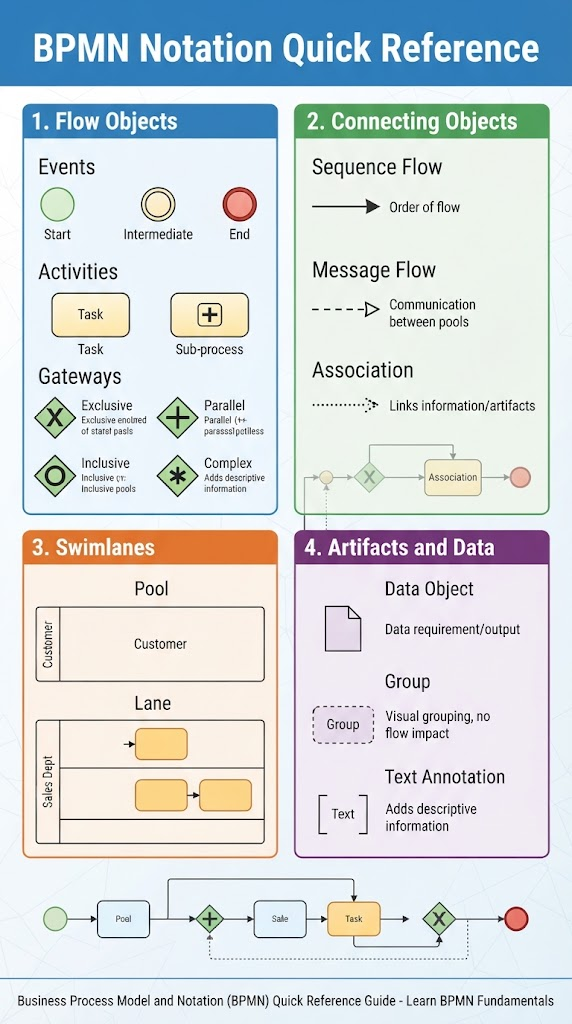
1. Flow Objects (The Actions)
-
Events (Circles): Something that happens during the course of a process (e.g., a process starting, an email arriving, or a timer going off). They can be Start, Intermediate, or End events.
-
Activities (Rounded Rectangles): A unit of work that needs to be performed (e.g., “Review Invoice” or “Ship Order”).
-
Gateways (Diamonds): Used to diverge or converge paths based on conditions or decisions (e.g., “Is payment approved?” leading to a Yes or No branch).
2. Connecting Objects (The Flow)
-
Sequence Flows (Solid lines with a solid arrowhead): Shows the order in which activities are performed.
-
Message Flows (Dashed lines with an open circle and arrowhead): Shows the flow of messages between separate organizational units or participants (pools).
-
Associations (Dotted lines): Links text or data artifacts to flow objects.
3. Swimlanes (The Responsibilities)
-
Pools: Represent separate participants or independent organizations (e.g., “Customer” vs. “Company”).
-
Lanes: Sub-partitions within a pool that represent specific roles, departments, or systems (e.g., “Sales Department” or “Billing System”).
4. Artifacts and Data (The Context)
-
Data Objects: Show which data is required or produced by an activity (e.g., an “Invoice” document).
-
Groups: Visual boundaries to highlight certain parts of a diagram.
-
Text Annotations: Extra notes or descriptions added for clarity.
How to Get Started with Your First BPMN Diagram
-
Define the Scope: Pick a simple, well-defined process to start with—like an employee onboarding request or an expense reimbursement workflow. Determine exactly where the process starts and where it ends.
-
Identify the Participants: Figure out who is involved. Do you need swimlanes for different departments?
-
Draft the Sequence: Map out the main tasks in chronological order using activities (rectangles).
-
Add Decision Points: Insert gateways (diamonds) wherever the process splits based on a choice or condition.
-
Review and Refine: Walk through the diagram step-by-step to ensure there are no dead ends or missing triggers.
Tooling: Visual Paradigm BPMN with AI-Assisted Features
Visual Paradigm provides a practical environment for creating, editing, and improving BPMN diagrams. Beginners can use its drag-and-drop editor to place events, activities, gateways, sequence flows, pools, and lanes, while more experienced users can build detailed BPMN 2.0 models for analysis, documentation, and process improvement.
What makes Visual Paradigm especially useful is its AI-assisted BPMN generation. Instead of starting with a blank canvas, you can describe a workflow in plain English—such as an employee onboarding or order fulfillment process—and let the AI create an initial BPMN diagram. It can identify key participants, suggest swimlanes, recognize tasks and decision points, and arrange them into a structured process model. The generated diagram remains editable, so you can adjust the flow and add organization-specific details.
For example, you might enter:
“Create a BPMN diagram for an employee onboarding process involving HR, IT, the hiring manager, and the new employee. Include document collection, account setup, equipment delivery, and an approval step for access permissions.”
Visual Paradigm can use this description to propose a process structure with appropriate roles, activities, and gateways. You can then refine the result by adding data objects, exception paths, timer events, business rules, and annotations. This makes AI most valuable as a starting point: it reduces the time spent drawing the first draft while leaving the analyst responsible for validating the process logic.
A typical workflow looks like this:
-
Describe the process in natural language.
-
Generate an initial BPMN diagram with AI.
-
Review the suggested participants, tasks, events, and gateways.
-
Edit the diagram in the visual BPMN editor.
-
Add business rules, data objects, exception paths, and documentation.
-
Share the model with stakeholders for feedback and refinement.
Visual Paradigm also connects AI-assisted generation with broader modeling capabilities. Generated diagrams can be opened in a web-based editor or imported into the desktop application for advanced modeling, documentation, collaboration, and traceability. Teams can also maintain an “As-Is” version of a process and compare it with a future “To-Be” version when planning improvements.
To get better results, make your prompt specific. Name the participants, describe the main activities in order, identify decision criteria, and mention important deadlines or exceptions. For instance, instead of writing “Create a loan approval process,” try:
“Create a BPMN diagram for a retail bank loan application involving the customer, loan officer, credit system, and underwriter. Include document verification, a credit check, approval and rejection paths, and an escalation if the application remains pending for more than two business days.”
Remember to treat the AI-generated model as a draft rather than a final source of truth. Walk through every path with subject-matter experts, confirm that gateways represent the correct business rules, and check that start and end events, message flows, and exception scenarios are modeled accurately. Used this way, Visual Paradigm combines the accessibility of natural-language diagramming with the control and precision needed for professional BPMN modeling.
Final Thoughts
Visual Paradigm BPMN + AI Articles
-
From Narrative to Knowledge: The AI-Powered BPMN and Documentation Pipeline: Explores the end-to-end pipeline from natural language to structured BPMN diagrams, including simulation and documentation.
-
AI BPMN Diagram Generator: Quick BPD Tool for Visual Paradigm: Announcement of the AI BPD generator feature, detailing how to convert simple text descriptions into professional process diagrams.
-
AI BPMN Diagram Generator Guide: A comprehensive guide on using the AI diagram generator, covering key benefits and step-by-step instructions for creating BPDs.
-
Introducing the All-New AI BPMN Generator: From Conversational Ideation to Professional Process Modeling: Details the 4-stage evolutionary workflow from AI chatbot ideation to full-scale enterprise modeling with VP Desktop.
-
Comprehensive Guide to BPMN, Visual Paradigm Tooling, AI, and Ecosystem: An in-depth guide covering the four pillars of the Visual Paradigm AI ecosystem, key BPMN concepts, and practical AI-generated examples.
-
BPMN 2.0 商業流程建模新手實戰指南:運用 Visual Paradigm 與 AI 輕鬆打造專業流程圖: A practical beginner’s guide in Chinese on using Visual Paradigm with AI to create professional BPMN diagrams.
-
Tutorial – 5 Steps to Draw Flowchart with BPMN: A step-by-step tutorial on drawing a flowchart using BPMN notation, covering organizations, participants, events, and tasks.
-
How to draw a BPMN Business Process Diagram: Documentation on the basics of creating a BPD, including assigning IDs to model elements for documentation purposes.
This post is also available in Deutsch, Español, فارسی, Français, English, Bahasa Indonesia, 日本語, Polski, Portuguese, Ру́сский, Việt Nam, 简体中文 and 繁體中文.