


Introduction
In the fast-paced world of digital transformation, clarity is currency. As organizations strive to optimize their operations, the ability to visualize complex workflows becomes not just a nice-to-have, but a critical necessity. Enter Business Process Model and Notation (BPMN)—the global standard for business process modeling.
While BPMN offers a rich vocabulary of symbols, many professionals find themselves overwhelmed by the sheer variety of options. However, the heart of any process diagram lies in its Events. Understanding how to correctly use Start, Intermediate, and End events can transform a confusing sketch into a professional, executable blueprint. This guide breaks down the essential concepts of BPMN Events, offering a clear, user-friendly path to mastering this vital skill. Whether you are a seasoned business analyst or a product manager looking to streamline team communication, this overview will help you create diagrams that are not only accurate but also universally understood.
What are BPMN Events?
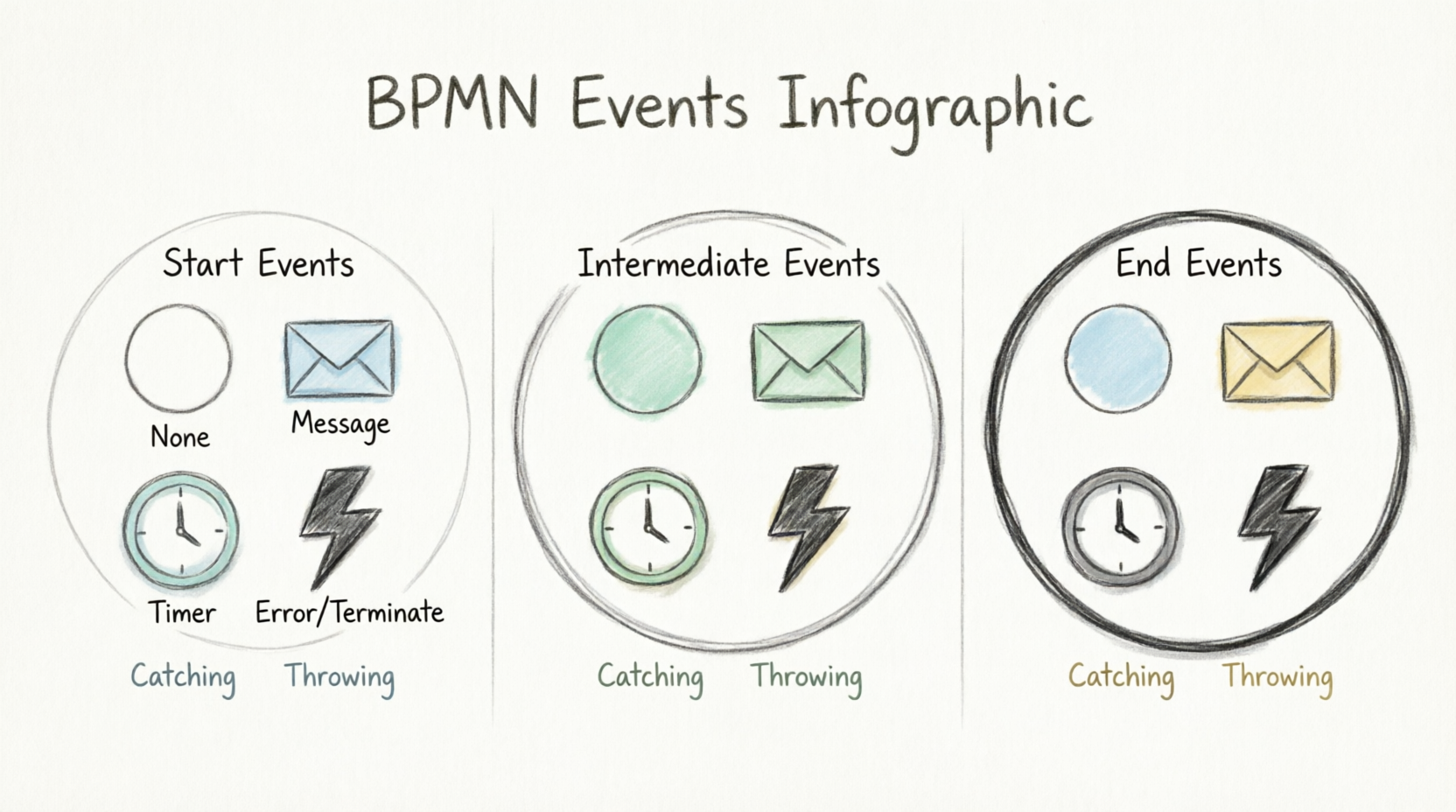
In BPMN, an Event is something that “happens” during the course of a process. Events affect the flow of the process and usually have a cause (trigger) or an impact (result). They are visually represented by circles.
The Three Main Categories
BPMN events are classified by their position in the process flow:
- Start Events: Indicate where a process begins. They have a single, thin border.
- Intermediate Events: Represent events that occur between the start and end of a process. They are indicated by a double-line border.
- End Events: Indicate where a process (or a specific path) finishes. They are indicated by a thick, bold border.
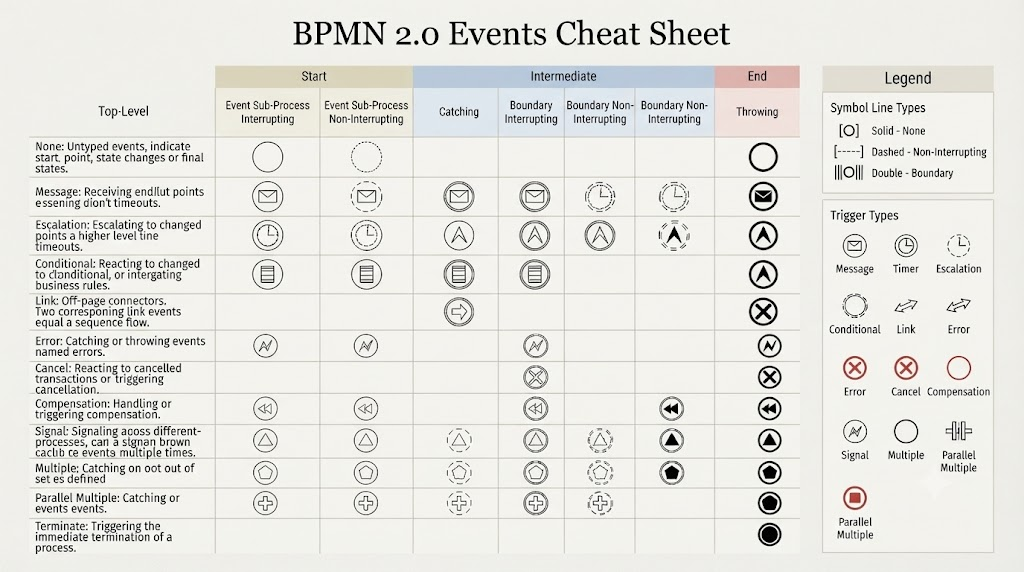
Core Conventions: How to Read the Matrix
The power of BPMN lies in the combination of the Shape (the circle) and the Marker (the icon inside).
- Catching vs. Throwing:
- Catching: If the icon is an empty outline (white background), the process is waiting for this event to happen.
- Throwing: If the icon is filled (black or solid color), the process triggers this event as a result of its actions.
- Border Styles:
- A dashed border on an intermediate event indicates a “non-interrupting” event, meaning the process continues running alongside the task it is attached to.
- A solid double-line border indicates an “interrupting” event, which stops the associated task when triggered.
Common Event Types
Here is a breakdown of the most frequently used event triggers:
| Event Type | Purpose | Example |
|---|---|---|
| None | Indicates a basic start or end point. | A process simply starts or reaches completion. |
| Message | Used for communication between processes. | Receiving an email or a customer order. |
| Timer | Based on time (fixed date, cycle, or duration). | A deadline for a task or a weekly report generation. |
| Error | Triggered when something goes wrong. | A system failure or an invalid data input. |
| Signal | Broadcasts a message that can be heard by many. | A “Company Holiday” signal affecting multiple departments. |
| Terminate | Immediately kills all active paths in the process. | An emergency shutdown of a production line. |
Learning Through Visualization
To better understand how these symbols integrate into real-world business scenarios, it is helpful to see how they are structured within a process model.
Tips for Beginners
- Start Simple: Don’t use every symbol at once. Start by mastering Start (None), End (None), Message, and Timer events.
- Consistency Matters: Always use the appropriate border style (thin for Start, double for Intermediate, bold for End) to ensure your model is standard-compliant.
- Ask “Why?”: Before adding an event, ask if it is a necessary trigger or a result of an action. If it’s just a state change, a “None” event is usually sufficient.
Understanding the Context
When looking at the matrix you provided, notice how the Link event is used strictly for intermediate transitions (off-page connectors), while the Terminate event is strictly reserved for End states. Mastering these “rules of placement” will make your diagrams professional and universally understandable.
Would you like to walk through a specific business scenario (e.g., an e-commerce order process) to see how we might apply these specific event symbols?
Conclusion
Mastering BPMN Events is less about memorizing every possible symbol and more about understanding the logic of flow. By focusing on the core categories—Start, Intermediate, and End—and recognizing the difference between catching and throwing events, you can create diagrams that tell a clear, compelling story.
As you continue to refine your modeling skills, remember that the goal is communication. A well-constructed BPMN diagram bridges the gap between technical teams and business stakeholders, ensuring everyone is aligned on how work gets done. Start with the basics, remain consistent with your notation, and don’t hesitate to leverage modern tools that simplify the modeling process. With practice, you’ll find that BPMN becomes an intuitive language for driving efficiency and clarity in your organization.
References
- Visual Paradigm Features: Visual Paradigm provides a fully comprehensive, standards-compliant BPMN 2.0 modeling platform tailored for business analysts and developers alike, blending traditional diagramming with advanced automation and simulation.
- BP Modeling Solution: Offers smart connection rules, flexible swimlane editing, and resource-centric modeling to optimize operational workflows and prevent invalid sequence paths.
- AI BPMN Generator Guide: Explains how the AI BPMN Diagram Generator automatically translates plain-English process narratives into fully interactive, standard-compliant BPMN 2.0 layouts.
- BPMN Made Easy: Highlights tools for simplifying BPMN modeling, including process animation and gap analysis for non-technical stakeholders.
- BPMN Tutorial 1: Provides foundational tutorials on BPMN notations, including events, specialized task types, gateways, and data objects.
- BPMN Tutorial PDF: A downloadable PDF version of the foundational BPMN tutorial for offline reference.
- BPMN Activity Types Explained: Detailed guide on different BPMN activity types, helping users choose between Service, User, Manual, and Script tasks.
- Visual Paradigm YouTube Demo: Video demonstration of Visual Paradigm’s features, including swimlane editing and process drill-down capabilities.
- SysML Modeling Guide: Discusses resource-centric modeling where elements are created as reusable model components rather than static shapes.
- BPMN Swimlanes Tutorial: Focuses on partitioning processes using interactive horizontal or vertical pools and lanes.
- BPMN Diagram Tools Overview: Reiterates the comprehensive feature set for BPMN diagramming, including full notation support and AI integration.
- Visual Paradigm Blog: Discusses Visual Paradigm as an all-in-one software solution, emphasizing its role in software development and process modeling.
- Business Process Modeling Guide: Covers best practices for business process modeling, including As-Is and To-Be gap analysis.
- BPMN Features List: Lists key features such as process simulation, animation, and matrix transformation for RACI/CRUD outputs.
This post is also available in Español, فارسی, English, Bahasa Indonesia, 日本語, Polski, Portuguese, Ру́сский, Việt Nam and 简体中文.
Related posts:
 How Visual Paradigm’s AI Diagram Generation Turns Your Ideas into Professional UML & BPMN Diagrams in Seconds
 Mastering Business Process Modeling: A Hands-On Review of BPMN and Visual Paradigm’s AI-Powered Tools
 Mastering AI-Powered Mind Mapping with Visual Paradigm
 A Software Engineer’s Field Guide to UML, BPMN, and SysML