Introduction
In today’s fast-paced business environment, clarity in process documentation isn’t just helpful—it’s essential. Whether you’re a business analyst mapping customer journeys, a developer implementing workflow automation, or a manager seeking operational transparency, having a shared visual language for processes is invaluable. That’s where Business Process Model and Notation (BPMN) comes in.
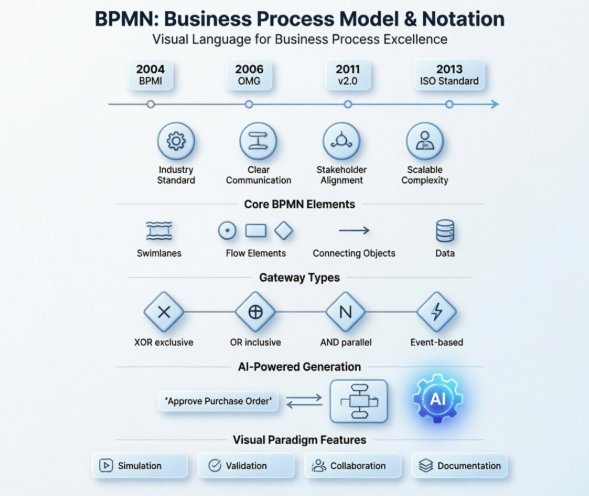
This guide shares a practitioner’s perspective on BPMN: what it is, why it matters, and how modern tools like Visual Paradigm are transforming the modeling experience with AI-powered assistance. Based on real-world usage and industry standards, we’ll walk through BPMN fundamentals, notation essentials, and practical examples—all while keeping the focus on usability, collaboration, and tangible business outcomes.
What Is BPMN?
Business Process Modeling Notation (BPMN) is a visual modeling language designed for business analysis applications and specifying enterprise process workflows. As an open standard notation for graphical flowcharts, BPMN enables teams to define, communicate, and refine business processes with precision. Its intuitive graphic style makes it accessible to all stakeholders—from business users and analysts to software developers and data architects—bridging the gap between strategy and execution.
History of BPMN
BPMN emerged from the synthesis of multiple business modeling notations. Originally published by the Business Process Management Initiative (BPMI) in 2004, it has been maintained by the Object Management Group (OMG) since the two organizations merged in 2005. Key milestones include:
- February 2006: OMG releases the first BPMN specification document
- 2010: Development of BPMN Version 2.0 begins
- December 2013: Latest specification version released
- ISO/IEC 19510: BPMN 2.0.2 formally published as an international standard
This evolution reflects BPMN’s maturity as a globally recognized framework for process modeling.
Benefits of BPMN
Adopting BPMN delivers measurable advantages for organizations:
- Industry Standard: Developed and maintained by the OMG consortium, ensuring broad compatibility and long-term support
- Clarity & Consistency: Enables teams to capture and document processes in a clear, repeatable format
- Stakeholder Alignment: Provides a notation readily understandable by both technical and non-technical audiences
- Communication Bridge: Reduces misalignment between process design and implementation teams
- Scalable Complexity: Simple to learn yet powerful enough to model intricate business logic
These benefits make BPMN a strategic asset for process improvement initiatives.
The Goal of BPMN
BPMN serves three primary audiences:
- Technical Experts: Responsible for implementing and automating processes
- Business Analysts: Who design, document, and optimize workflows
- Managers: Who monitor, control, and measure process performance
By catering to these roles, BPMN fosters collaboration across the entire process lifecycle.
Overview of BPMN
Understanding how a business operates is the critical first step in process improvement. BPMN provides a graphical representation of workflows that anyone—from analysts to executives—can interpret. Processes are depicted as sequences of activities performed according to business rules, either sequentially or in parallel.
Consider the “Place Order Online” process for an e-commerce store:
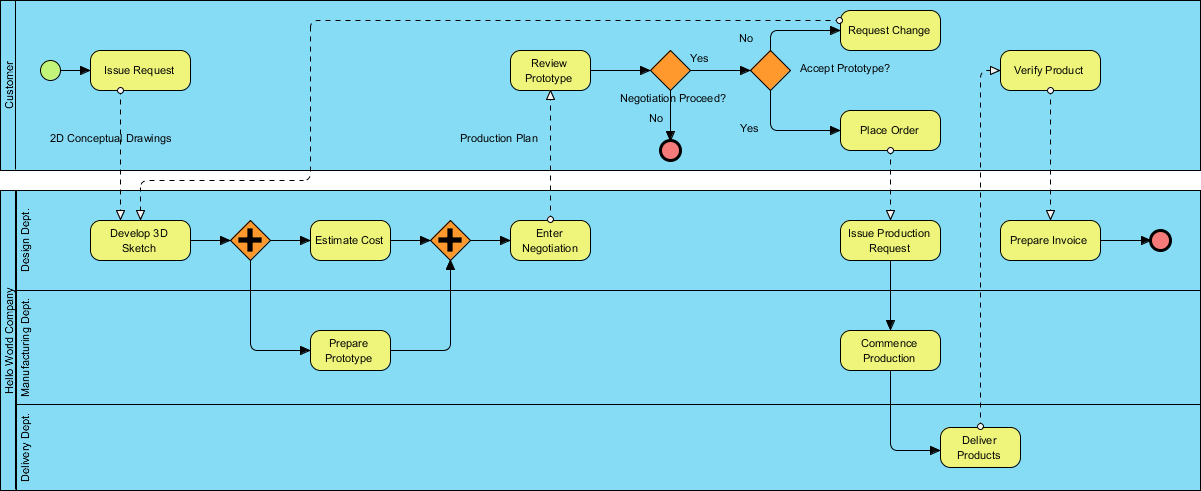
This visual approach accelerates analysis, identifies bottlenecks, and supports continuous improvement.
BPMN Notation Essentials
BPMN diagrams use a standardized set of graphic elements organized into intuitive categories. This structure helps users quickly recognize and apply the right symbols for any scenario.
Basic Constructs
BPMN elements fall into five foundational categories, each representing a unique aspect of business processes.
Swimlanes

Swimlanes are graphical containers representing process participants. Two types exist: Pools (external or major participants) and Lanes (sub-partitions within a pool, like roles or departments).
Flow Elements
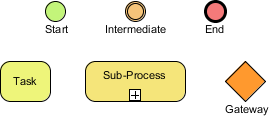
Flow elements define process behavior and include:
- Events: Triggers or results (start, intermediate, end)
- Activities: Work performed (tasks or sub-processes)
- Gateways: Decision points controlling flow paths
Connecting Objects

Connectors link flow elements to form coherent workflows:
- Sequence Flows: Order of execution within a pool
- Message Flows: Communication between pools
- Associations: Links to data or annotations
- Data Associations: Movement of data objects
Data
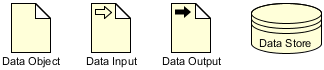
Data elements represent information used or produced during process execution:
- Data Objects, Inputs, Outputs, and Stores
- State management (instantiated, completed, deleted)
BPMN Swimlanes Deep Dive
Swimlanes organize responsibilities visually. They can be arranged horizontally (left-to-right flow) or vertically (top-to-bottom flow), with identical semantics.
Pools
Pools represent major participants—entities like “Customer,” “Accounting Department,” or “Payment Gateway.” A special case is the blackbox pool, which has no internal detail. Blackboxes model external entities whose internal workings are irrelevant to the current process scope.
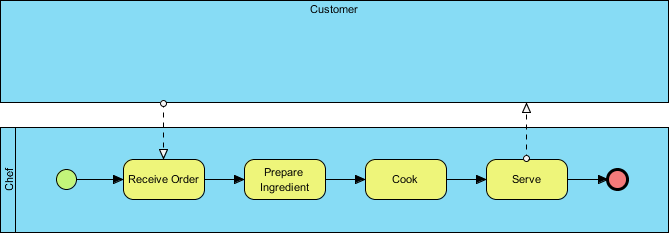
For example, in a meal preparation process, the “Customer” might be a blackbox. If modeling order placement instead, the “Chef” could become the blackbox. Perspective determines scope.
Lanes
Lanes subdivide pools to represent roles or sub-teams (e.g., “Department Head” vs. “General Clerk”). Lanes can nest for hierarchical organization, but BPMN focuses on process flow—not organizational charts. Use lanes to clarify responsibility, not to replicate HR structures.
Activities
Activities represent work performed within a process, shown as rounded rectangles.
Tasks vs. Sub-Processes
- Tasks: Atomic units of work that aren’t (or needn’t be) broken down further
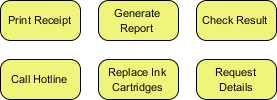
- Sub-Processes: Complex activities expandable into detailed child diagrams
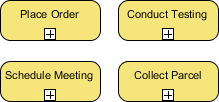
The choice depends on audience needs: a customer may not need payment processing details, but the finance team certainly does.
Events
Events are occurrences that influence process flow, depicted as circles (often with icons indicating trigger type).
Three Event Types
- Start Event: Marks process initiation
- Intermediate Event: Occurs during execution (can attach to activities or connect flows)
- End Event: Signals process completion
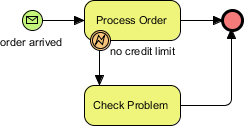
Example logic: “When an order is received, begin processing. If credit limit is exceeded, investigate. Process ends when order is fulfilled or issue resolved.”
Gateways
Gateways control flow branching based on conditions or events, shown as diamonds.
Common Gateway Types
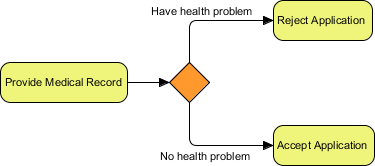
- Exclusive Gateway (XOR): Only one outgoing path is taken based on conditions
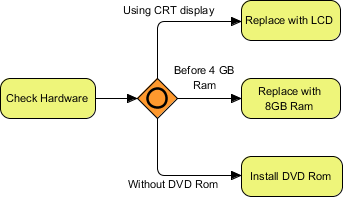
- Inclusive Gateway (OR): Multiple paths may be taken if conditions are met
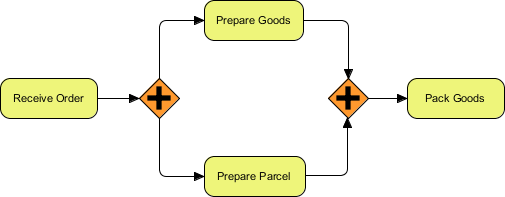
- Parallel Gateway (AND): All outgoing paths execute simultaneously
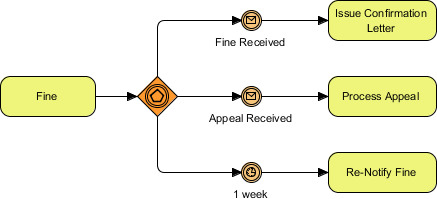
- Event-Based Gateway: Path selection depends on which event occurs first (e.g., waiting for “Yes” or “No” reply)
Sequence Flows
Sequence flows (solid lines with arrows) show execution order between elements within the same pool.

They cannot cross pool boundaries—use message flows instead for inter-pool communication.
Message Flows
Message flows (dotted lines with arrows) represent communication between pools, such as emails, calls, or system notifications.
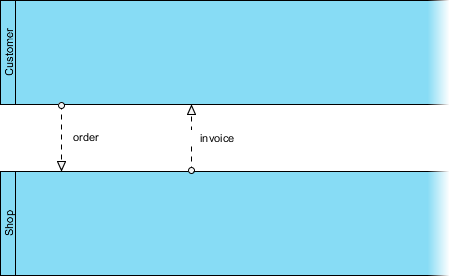
This distinction ensures clarity between internal workflow (sequence) and external interaction (message).
Data Elements
Data objects model information produced or consumed during process execution—like purchase orders, invoices, or customer records.
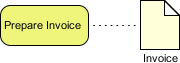
BPMN supports tracking data states (created, updated, archived), enhancing auditability and compliance.
Groups & Annotations
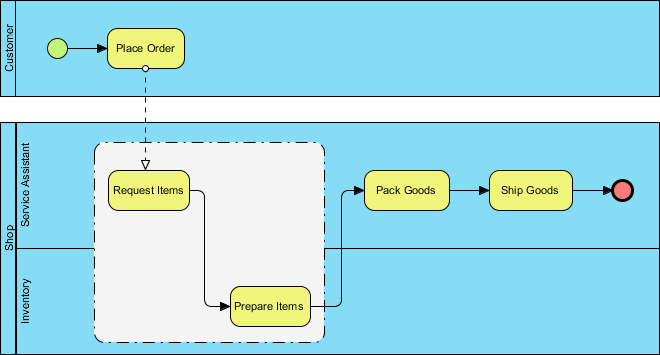
- Groups: Dotted boxes that visually cluster related elements for documentation purposes
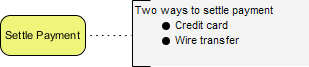
- Text Annotations: Supplementary notes that clarify intent without affecting flow logic
These elements improve diagram readability and stakeholder understanding.
BPMN in Action: True Aqua Distilled Water Company
To illustrate BPMN’s practical value, consider The True Aqua Distilled Water Company—a young supplier aiming to grow market share from 5% to 10% by improving ordering efficiency and customer satisfaction.
As the assigned business analyst, you document their distilled water delivery process:
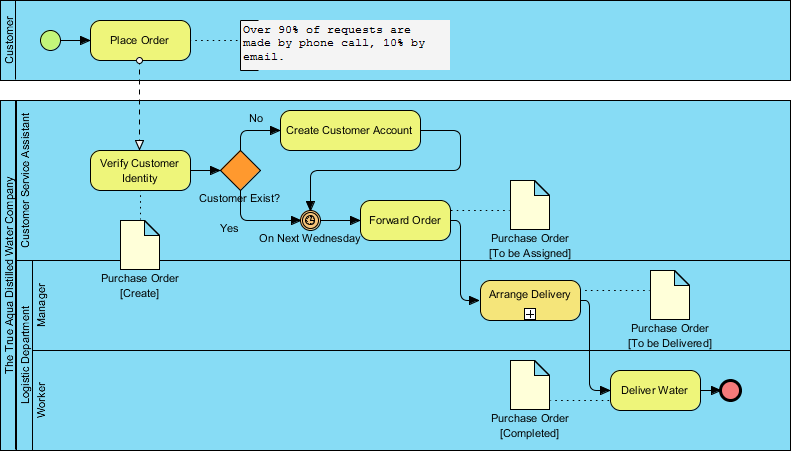
Process Flow Summary:
- Customers order via phone (90%) or email (10%)
- Customer service checks if the customer is new; creates accounts as needed
- Every Wednesday, orders are forwarded to Logistics
- Logistics manager assigns workers, prints schedules, and coordinates deliveries
- Workers deliver water and confirm completion
This visual model enables the team to identify automation opportunities, reduce handoff delays, and standardize service—directly supporting strategic growth goals.
Accelerate Modeling with AI-Powered BPMN Generation
Modern tools are transforming BPMN adoption. Visual Paradigm Desktop now integrates AI-powered diagram generation, allowing analysts to convert plain-text descriptions into professional BPMN diagrams in seconds.
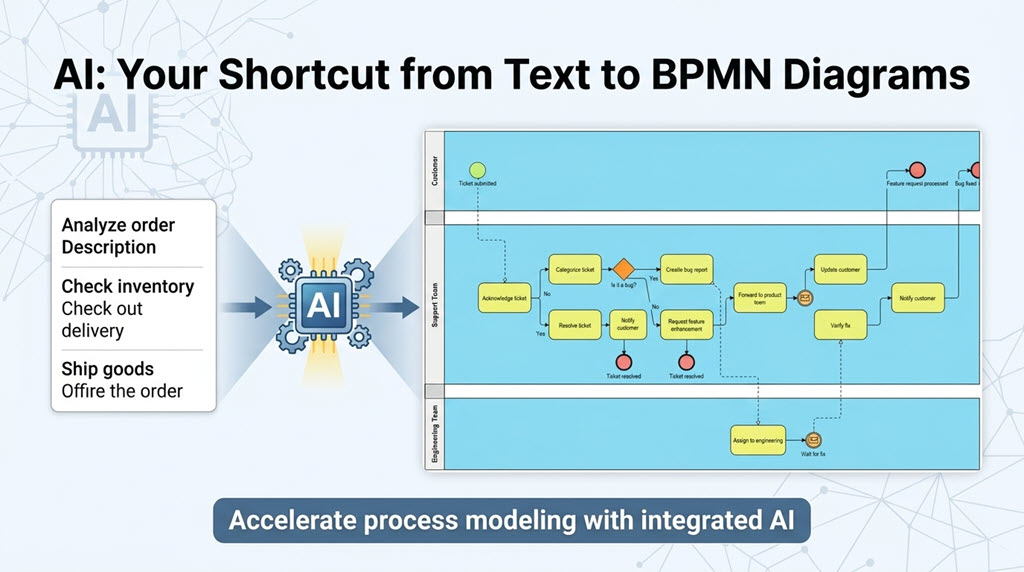
This feature eliminates tedious manual drafting, providing a sophisticated starting point for refinement and collaboration.
How to Use the AI BPMN Generator
- Navigate to Tools > AI Diagram Generation
- Select Business Process Diagram as the diagram type
- (Optional) Check “Include Pools and Lanes” for participant organization
- Enter a descriptive prompt, e.g., “An order fulfillment process for an e-commerce fashion retailer, covering the flow of purchasing and shipment.”
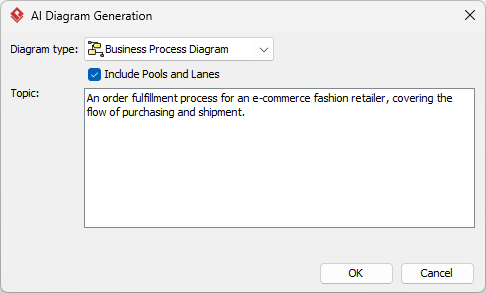
- Click OK to generate
The AI constructs a compliant BPMN 2.0 diagram ready for customization using Visual Paradigm’s full modeling suite.
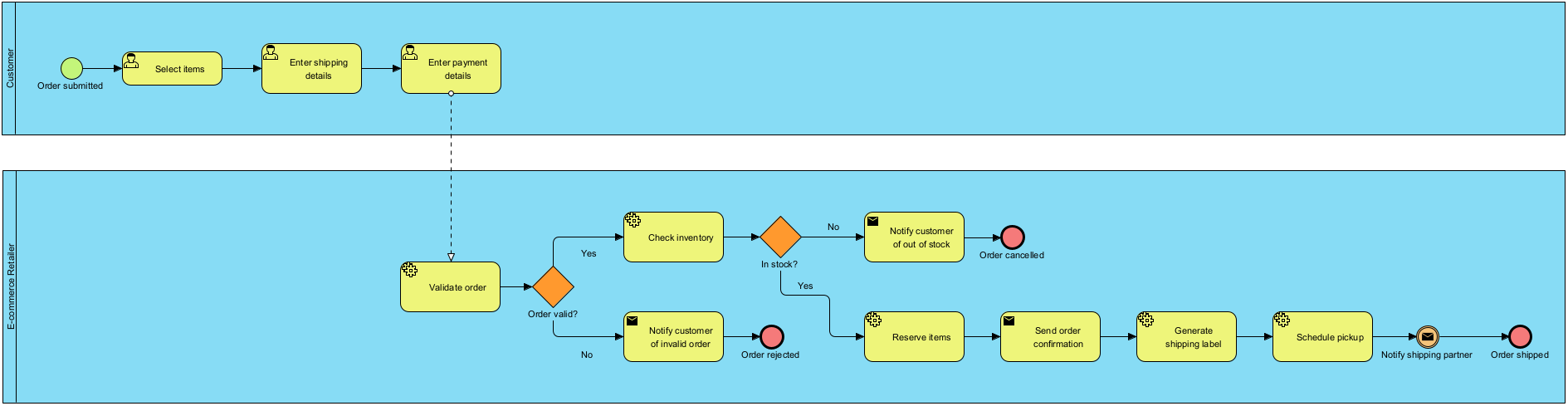
Teams report significant time savings on initial drafting, freeing capacity for deep analysis and optimization.
AI-Generated BPMN Examples
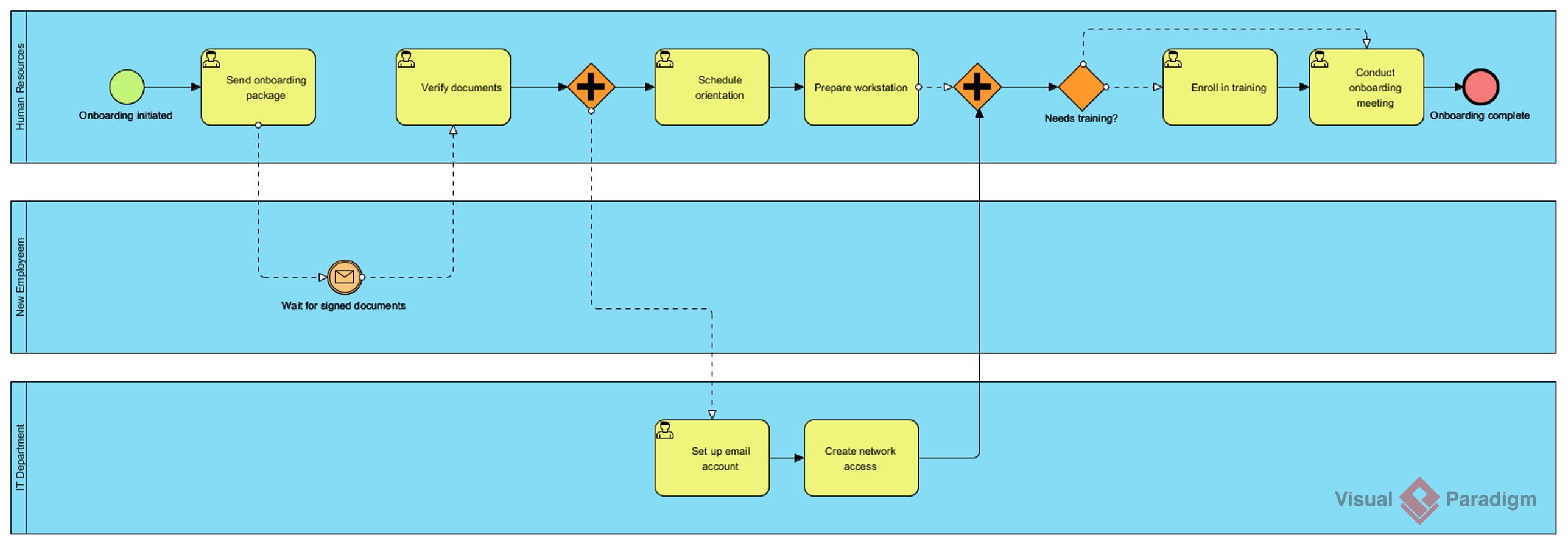
Employee Onboarding Process
Prompt: “An employee onboarding process in a mid-sized company.”
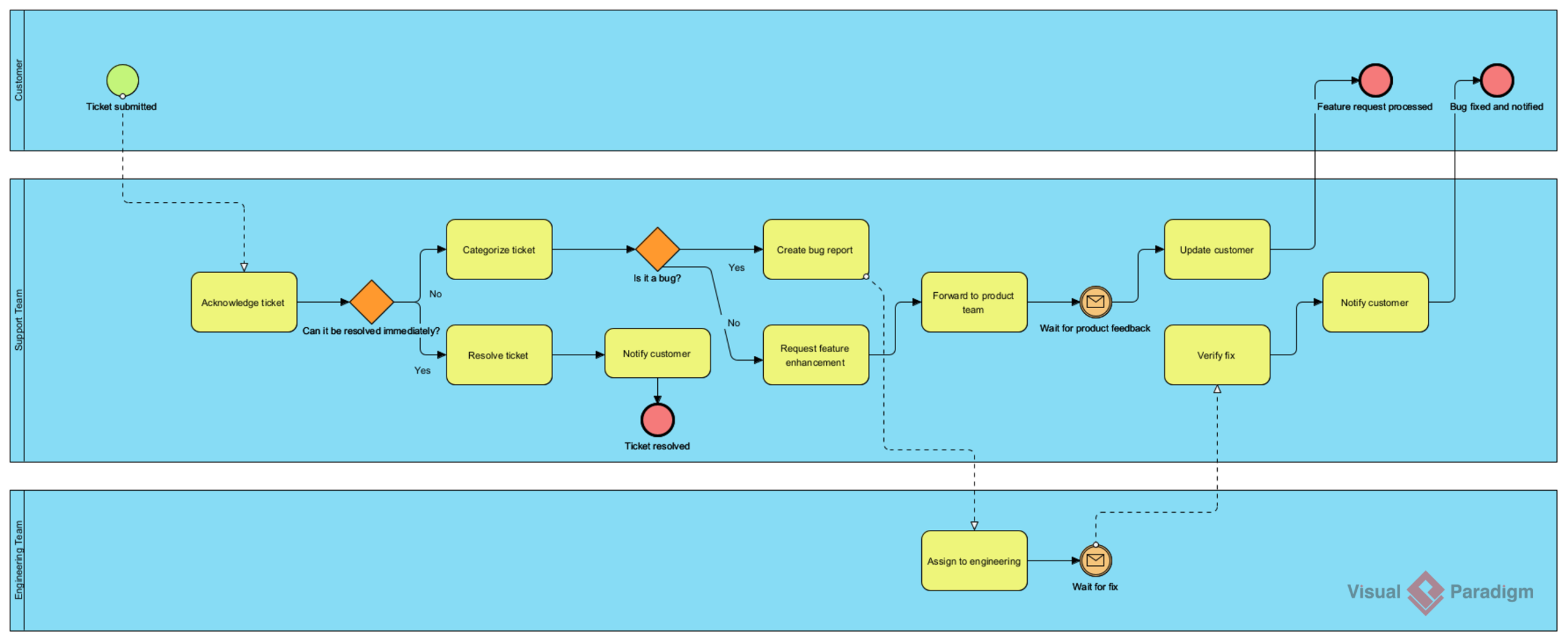
Customer Support Ticket Resolution
Prompt: “A customer support ticket resolution process for a SaaS company.”
Loan Application & Approval
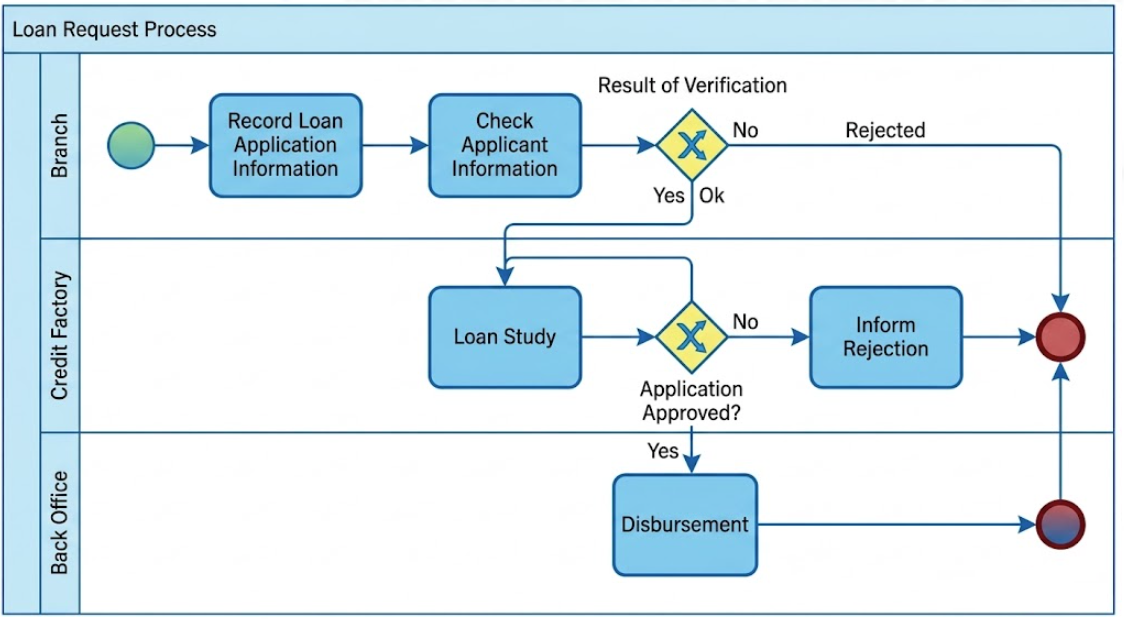
Prompt: “A loan application and approval process in a retail bank.”
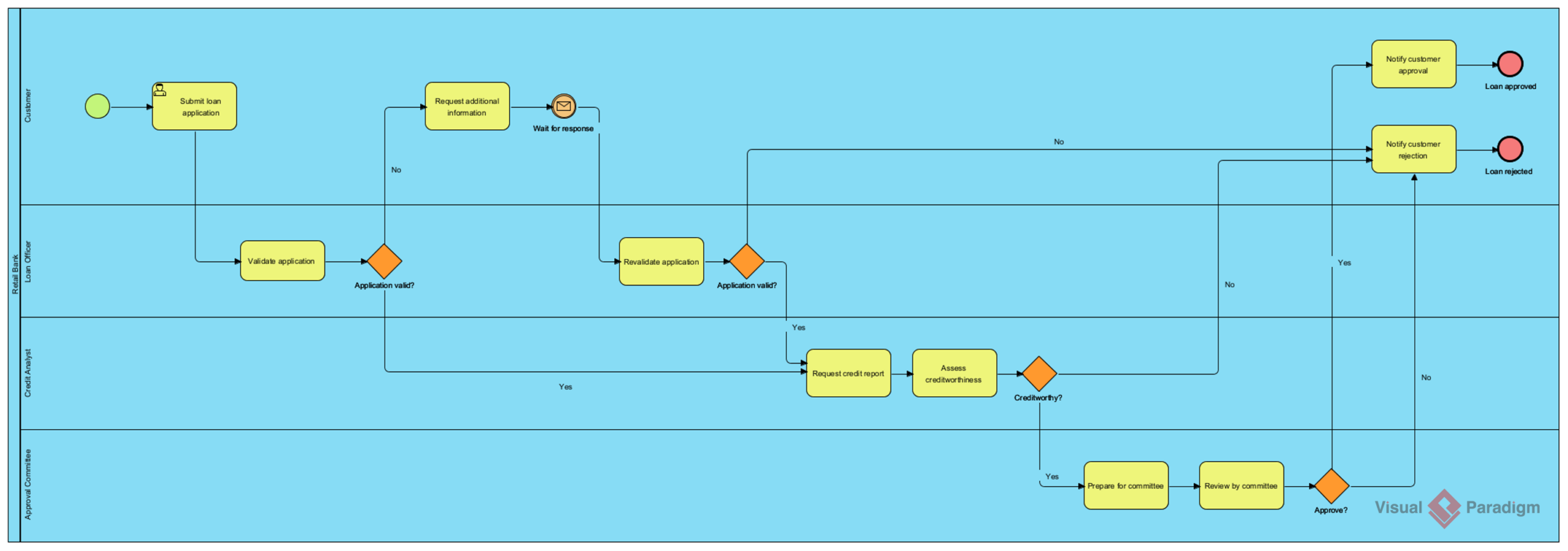
These examples demonstrate the AI’s ability to interpret domain-specific prompts and produce structurally sound, business-relevant models.
Core BPMN Modeling Capabilities in Visual Paradigm
Visual Paradigm delivers enterprise-grade BPMN support designed for both strategic analysis and technical execution:
- Full BPMN 2.0 Compliance: Complete library of activities, events, gateways, and flow objects
- Intuitive Drag-and-Drop Editor: Resource Catalog simplifies connecting elements
- Hierarchical Modeling: Drill into sub-processes with child diagrams for scalable complexity
- Real-Time Validation: Automatic checks ensure specification compliance (e.g., missing end events, invalid flows)
Advanced Analysis & Automation Features
Beyond diagramming, Visual Paradigm enables proactive process optimization:
- Process Simulation: Run animations to identify bottlenecks, calculate resource costs, and forecast performance
- As-Is vs. To-Be Analysis: Compare current and future states with traceable change tracking
- Executable Model Export: Generate XML or BPEL for deployment in workflow engines
- Cross-Standard Integration: Map BPMN to UML, ERD, or user stories for end-to-end solution design
Documentation & Collaboration Tools
Effective process management requires more than visuals:
- Working Procedure Editor: Document step-by-step instructions for each task; generate formal Process Specification reports
- Team Collaboration: Version control, cloud sync via VP Online, and multi-user modeling support
- Business Glossary: Centralized terminology management ensures consistent language across teams and diagrams
Conclusion
BPMN remains the gold standard for business process visualization—not because it’s the most complex notation, but because it strikes the perfect balance between expressiveness and accessibility. When paired with modern tooling like Visual Paradigm’s AI-powered diagram generator, BPMN transforms from a documentation exercise into a strategic accelerator.
For practitioners, the value is clear: faster onboarding of new analysts, clearer communication with technical teams, and a living artifact that evolves with the business. The integration of AI doesn’t replace human judgment; it amplifies it—freeing experts to focus on optimization, innovation, and value delivery rather than manual diagram assembly.
Whether you’re modernizing legacy workflows, designing customer journeys, or preparing for automation initiatives, investing in BPMN proficiency—and the right tooling—pays dividends in clarity, alignment, and agility. Start with a simple process, leverage AI to accelerate the draft, and refine collaboratively. The result isn’t just a diagram; it’s a shared understanding that drives better business outcomes.
References
- BPMN Modeling Software | Visual Paradigm: Comprehensive overview of Visual Paradigm’s BPMN diagramming and modeling tools for business process analysis.
- What is BPMN?: Beginner-friendly guide explaining the fundamentals of Business Process Model and Notation.
- BPMN Modeling Software | Visual Paradigm: Feature-rich BPMN toolset supporting end-to-end process modeling, simulation, and documentation.
- Drawing BPMN Conversation Diagram in Visual Paradigm: Step-by-step tutorial for creating BPMN conversation diagrams using Visual Paradigm’s interface.
- BPMN Activity Types Explained: Detailed breakdown of task and sub-process activity types in BPMN 2.0.
- BPMN Made Easy: Practical guide to simplifying business process modeling with intuitive BPMN tools.
- Business Process Modeling: Enterprise-grade solutions for designing, analyzing, and optimizing business workflows.
- Simplify Business Process Modeling with Visual Paradigm’s BPMN Tools: Third-party review highlighting how Visual Paradigm streamlines BPMN adoption for teams.
- BPMN Guide: Complete resource library covering BPMN notation, best practices, and advanced modeling techniques.
- How to Document Working Procedures for BPMN Tasks: Tutorial on creating detailed process documentation and specifications from BPMN models.
This post is also available in Deutsch, Español, فارسی, Français, English, Bahasa Indonesia, 日本語, Polski, Portuguese, Ру́сский, Việt Nam, 简体中文 and 繁體中文.