


Introduction
1. Executive Summary
This case study analyzes the architectural design of the Internet Banking System for a fictional financial institution, “BigBank.” The goal of the project was to provide personal banking customers with secure, accessible, and multi-channel access to their accounts (via web and mobile) while integrating with existing legacy core banking infrastructure.
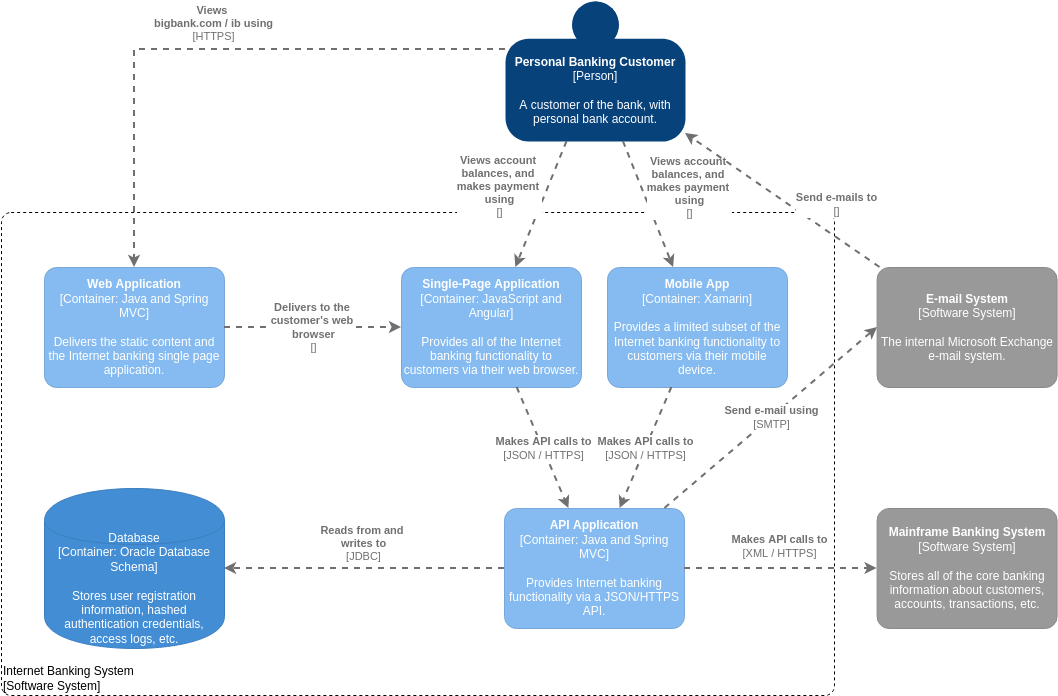
The architecture is documented using the C4 Model (Container Diagram), which visualizes the high-level technology choices and how the system’s containers (applications, databases, etc.) interact.
2. Business Challenges
-
Legacy Integration: The bank possesses a robust but older “Mainframe Banking System” that holds the core truth of customer data. The new system needed to expose this data without replacing the mainframe immediately.
-
Multi-Channel Access: Customers demanded access via both desktop browsers and mobile devices.
-
Security: Handling sensitive financial data requires strict authentication and secure communication channels.
3. Architectural Solution (The C4 Container View)
The solution is designed as a decoupled system where the presentation layer is separated from the business logic and data layers.
A. The User Interface Layer (Frontends)
The system supports three distinct entry points for the Personal Banking Customer:
-
Single-Page Application (SPA):
-
Technology: JavaScript and Angular.
-
Role: This runs in the customer’s web browser. It provides the full suite of internet banking functionality. It is a dynamic, responsive interface that communicates asynchronously with the backend.
-
-
Web Application:
-
Technology: Java and Spring MVC.
-
Role: This acts as the entry point for the web experience. It delivers the static content (HTML/CSS/JS) and hosts the Single-Page Application. It serves as the “launcher” for the Angular app.
-
-
Mobile App:
-
Technology: Xamarin (allowing for cross-platform development, likely iOS and Android).
-
Role: Provides a “limited subset” of functionality optimized for mobile devices. This suggests that complex tasks (like setting up international wires) might be restricted to the full Web/SPA interface, while common tasks (checking balance) are available on mobile.
-
B. The Business Logic Layer (Backend)
-
API Application:
-
Technology: Java and Spring MVC.
-
Role: This is the central nervous system of the architecture. It acts as an API Gateway or Backend-for-Frontend (BFF).
-
Function: It exposes a JSON/HTTPS API to the Web and Mobile clients. It handles authentication, authorization, and orchestration of data requests.
-
C. The Data & Integration Layer
-
Database:
-
Technology: Oracle Database Schema.
-
Role: Stores internet-banking specific data. This includes user registration info, hashed authentication credentials (security best practice), and access logs. It does not store the actual bank balances (those are in the Mainframe).
-
Communication: The API Application reads/writes to this via JDBC.
-
-
Mainframe Banking System:
-
Role: The System of Record. It stores core banking info (customers, accounts, transactions).
-
Communication: The API Application talks to the Mainframe using XML over HTTPS. This indicates the Mainframe is likely a legacy SOAP-based service or an older system requiring structured XML data exchange.
-
-
E-mail System:
-
Technology: Microsoft Exchange.
-
Role: Handles notifications.
-
Communication: The API Application sends emails via SMTP to the Exchange server, which then delivers them to the customer.
-
4. Key Data Flows & User Journeys
Scenario 1: Logging in via Web Browser
-
The Personal Banking Customer navigates to
bigbank.com/ibusing HTTPS. -
The request hits the Web Application (Java/Spring MVC).
-
The Web Application delivers the Single-Page Application (Angular) to the customer’s browser.
-
The customer enters credentials in the SPA.
-
The SPA makes an API call (
JSON/HTTPS) to the API Application. -
The API Application validates the credentials against the Database (via JDBC).
-
Upon success, the SPA requests account balances. The API Application fetches this data from the Mainframe Banking System (
XML/HTTPS) and returns it to the SPA.
Scenario 2: Mobile Transaction Notification
-
The customer makes a payment via the Mobile App (Xamarin).
-
The App sends a request to the API Application.
-
The API Application processes the payment with the Mainframe.
-
The API Application triggers a confirmation email by sending an SMTP request to the E-mail System (Exchange).
-
The customer receives an email notification.
5. Technical Highlights & Best Practices
-
Separation of Concerns: The diagram clearly separates the “Internet Banking” specific data (Oracle DB) from the “Core Banking” data (Mainframe). This prevents the web layer from directly touching the core financial ledger.
-
Protocol Translation: The API Application acts as a translator. Modern frontends speak JSON, but the legacy backend speaks XML. The API Application bridges this gap.
-
Security: Credentials are stored as “hashed” in the database, ensuring that even if the database is compromised, raw passwords are not exposed. All external communication uses HTTPS.
-
Scalability: By using a Single-Page Application (Angular) and a decoupled API, the frontend can be scaled independently of the backend logic.
6. Architectural Guidelines for Implementation
6.1 Security & Regulatory Compliance
- Zero-Trust Communication: Enforce mutual TLS (mTLS) for internal service-to-service calls, especially between the API Application and the Mainframe. All external endpoints must terminate HTTPS with modern cipher suites.
- Identity & Access Management: Implement OAuth 2.0 / OpenID Connect for authentication. Store only salted, hashed passwords (e.g., Argon2 or bcrypt) in the Oracle Database. Enforce multi-factor authentication (MFA) for high-risk transactions.
- Compliance-by-Design: Align data flows with PCI-DSS, GDPR, and local banking regulations. Ensure PII and financial data are encrypted at rest and in transit. Maintain immutable access logs in the Database for audit trails.
6.2 API-First & Contract-Driven Development
- Define Contracts Early: Use OpenAPI/Swagger to version the JSON/HTTPS API exposed by the API Application. Treat the contract as the single source of truth for both SPA and Mobile teams.
- Idempotency for Payments: All payment endpoints must support idempotency keys to prevent duplicate transactions during network retries.
- Backend-for-Frontend (BFF) Pattern: If mobile and web requirements diverge significantly, consider splitting the API Application into specialized BFFs to avoid over-fetching or under-fetching data.
6.3 Strategic Legacy Integration
- Anti-Corruption Layer: The API Application should act as a translation layer between modern JSON payloads and the Mainframe’s XML/HTTPS schema. This prevents legacy data models from leaking into frontend code.
- Circuit Breakers & Fallbacks: Implement resilience patterns (e.g., Resilience4j or Polly) around Mainframe calls. If the legacy system becomes unresponsive, gracefully degrade to read-only mode or cached balances.
- Asynchronous Offloading: Use message queues (e.g., RabbitMQ, Kafka) for non-critical operations like email notifications or audit logging to avoid blocking the customer-facing request thread.
6.4 Data Consistency & Transaction Integrity
- Distributed Transaction Management: Since account data lives in the Mainframe and session/auth data lives in Oracle, use the Saga pattern or compensating transactions to maintain consistency across payment flows.
- Eventual Consistency Where Appropriate: Balance view and balance displays can be cached with short TTLs to reduce Mainframe load, while transaction histories should be fetched synchronously or via event streaming.
- Strict Schema Evolution: Coordinate database changes with API versioning. Use backward-compatible schema migrations and deprecation windows to avoid breaking mobile app releases.
6.5 Observability & Operational Excellence
- Distributed Tracing: Inject correlation IDs at the Web/Mobile entry point and propagate them through the API Application, Mainframe calls, and E-mail System to enable end-to-end request tracing.
- Structured Logging & Metrics: Log all authentication attempts, API calls, and Mainframe interactions with consistent severity levels. Export metrics to a time-series database for real-time dashboards.
- Health Checks & Readiness Probes: Expose
/healthand/readyendpoints on the API Application to orchestrate smooth deployments and auto-scaling in containerized environments.
7. Tips & Tricks for Real-World Success
7.1 Mastering the C4 Modeling Workflow
- One Abstraction Level Per Diagram: Keep container diagrams strictly at the container level. Push technology details, classes, or database tables to Component/Code diagrams to avoid clutter.
- Automate Diagram Generation: Use tools like Structurizr, C4-PlantUML, or Mermaid to generate diagrams from code or configuration. This ensures diagrams evolve alongside the system.
- Link to Documentation: Embed C4 diagrams in architecture decision records (ADRs) and onboarding wikis. Tag each container with owner teams, SLAs, and deployment pipelines.
7.2 Performance & Latency Optimization
- CDN for Static Assets: Offload Angular/JavaScript bundles, CSS, and images from the Web Application to a CDN. This reduces origin server load and improves global page load times.
- Payload Optimization for Mobile: Xamarin apps should request only necessary fields. Implement GraphQL or field-selection parameters in the API to reduce JSON payload size over cellular networks.
- Connection Pooling & Keep-Alive: Tune JDBC connection pools for the Oracle Database and HTTP client pools for Mainframe calls to avoid connection thrashing during peak banking hours.
7.3 Resilience & Failure Handling
- Graceful Degradation: If the E-mail System is down, queue SMTP requests instead of failing the user transaction. Notify ops teams via alerts, not users.
- Rate Limiting & Throttling: Apply adaptive rate limits at the API Application to protect the Mainframe from burst traffic during salary days or market volatility.
- Retry with Exponential Backoff: Implement intelligent retries for transient failures (e.g., network timeouts, 5xx errors), but never retry idempotent payment calls without explicit idempotency keys.
7.4 Testing Across Distributed Boundaries
- Contract Testing: Use Pact or Spring Cloud Contract to verify that the SPA/Mobile clients and API Application adhere to agreed JSON schemas, preventing integration breaks during independent deployments.
- Test Doubles for Legacy Systems: Mock or simulate the Mainframe Banking System in CI/CD pipelines. Use recorded XML request/response pairs to test API translation logic without touching production mainframes.
- Chaos Engineering Lite: Periodically inject latency or failures into non-critical paths (e.g., email delivery, logging) to validate fallback behaviors and alerting thresholds.
7.5 Documentation as a Living Artifact
- Version Diagrams with Code: Store C4 diagrams in the same Git repository as the source code. Treat architecture documentation as code that requires review and CI validation.
- Maintain a System Context Map: Keep an updated C4 Context diagram alongside the Container diagram to track external dependencies (e.g., third-party fraud detection, regulatory reporting systems).
- Conduct Architecture Katas: Run quarterly diagram review sessions with cross-functional teams (dev, ops, security, product) to validate assumptions, identify bottlenecks, and align on modernization roadmaps.
These guidelines and practical tips provide a actionable blueprint for teams implementing, scaling, or modernizing similar internet banking architectures. By combining disciplined C4 modeling with resilient engineering practices, organizations can deliver secure, high-performance digital banking experiences while safely bridging modern cloud-native patterns with legacy core systems.
8. Tooling: Accelerating C4 Modeling with Visual Paradigm
Documenting and maintaining a complex architecture like BigBank’s Internet Banking System requires robust, flexible tooling. Visual Paradigm offers comprehensive, native support for the full C4 Model hierarchy, enabling architecture teams to create, collaborate on, and evolve diagrams with precision and efficiency.
8.1 Why Visual Paradigm for C4 Modeling?
Visual Paradigm stands out as an enterprise-grade solution for C4 modeling due to its:
-
Complete Hierarchy Support: Natively create all six essential C4 diagram types—System Context, Container, Component, System Landscape, Dynamic, and Deployment—within a single, unified environment. [1, 2, 6, 7]
-
Multi-Platform Accessibility: Work seamlessly across Desktop (v16.3+), Online (browser-based), and AI-powered platforms, ensuring flexibility for distributed teams and varying workflow preferences. [4, 16, 18]
-
Architecture-First Design: Elements are rich, semantic objects—not just visual shapes. Support for custom attributes, stereotypes, and tagged values allows diagrams to carry meaningful metadata for governance, impact analysis, and automated documentation. [8, 12]
8.2 Key Features for the BigBank Case Study
For documenting the BigBank architecture, Visual Paradigm provides targeted capabilities:
| Feature | Application to BigBank Architecture |
|---|---|
| AI-Powered Diagram Generation | Quickly bootstrap the initial Container Diagram by describing the system in plain text (e.g., “SPA talks to API App, which connects to Oracle DB and Mainframe”). The AI generator produces a structured starting point for refinement. [5, 13] |
| Element Reusability & Consistency | Define the “API Application” container once, then reuse it across Context, Container, Component, and Deployment diagrams. Updates propagate automatically, ensuring architectural consistency and reducing maintenance overhead. [8, 12] |
| C4-PlantUML Integration | For teams that prefer code-based modeling, use the integrated C4-PlantUML Studio to write diagrams as text, with instant visual rendering and full C4 semantic support. Ideal for version-controlling architecture alongside source code. [12, 15] |
| Dynamic & Deployment Views | Model runtime interactions (e.g., “User logs in via SPA”) with Dynamic Diagrams, and map containers to infrastructure (e.g., “API Application deployed to AWS ECS”) with Deployment Diagrams—critical for operational readiness and DevOps handoff. [5, 9, 11] |
| Collaboration & Templates | Use Visual Paradigm Online for real-time co-editing of diagrams with security, backend, and frontend teams. Leverage pre-built C4 Model Templates to accelerate onboarding and ensure diagram standards. [4, 17] |
8.3 Practical Workflow Integration
-
Start with Context: Use the System Context Diagram to align stakeholders on BigBank’s boundaries and external dependencies (Mainframe, E-mail System, Customers).
-
Zoom to Containers: Create the Container Diagram (as analyzed in this case study) to detail technology choices and high-level data flows.
-
Drill into Components: For complex containers like the “API Application,” generate a Component Diagram to break down internal modules (Authentication Service, Mainframe Adapter, Notification Service).
-
Model Runtime & Deployment: Use Dynamic Diagrams to validate critical user journeys and Deployment Diagrams to plan infrastructure provisioning and scaling strategies.
-
Maintain as Living Documentation: Store diagrams in your Git repository, link them to ADRs and user stories, and use Visual Paradigm’s versioning to track architectural evolution alongside code releases.
8.4 Getting Started
-
Try It Free: Begin with the Visual Paradigm Online Editor for a no-cost, browser-based experience with core C4 modeling features. [16, 19]
-
Desktop Power Users: Download Visual Paradigm Desktop (v16.3 or later) for advanced modeling, offline work, and enterprise integrations. [18]
-
Learn & Explore: Access the Beginner’s Guide to C4 Model Diagrams and the C4 Diagram Tool feature page for tutorials, best practices, and community examples. [1, 2, 16]
By leveraging Visual Paradigm’s dedicated C4 support, the BigBank architecture team can transform static diagrams into a dynamic, collaborative, and actionable source of truth—accelerating design decisions, improving cross-team alignment, and ensuring the architecture evolves safely alongside business requirements.
Conclusion
This post is also available in Deutsch, Español, فارسی, Français, English, Bahasa Indonesia, 日本語, Polski, Portuguese, Ру́сский, Việt Nam, 简体中文 and 繁體中文.