


Introduction
In today’s fast-paced business environment, clarity in process design isn’t just helpful—it’s essential. Organizations that can clearly map, analyze, and optimize their workflows gain a significant competitive edge. That’s where Business Process Model and Notation (BPMN) comes in: a globally recognized standard that turns complex operational logic into visual, understandable diagrams.
This guide shares a third-party perspective on working with BPMN 2.0, with a focused look at how Visual Paradigm’s modeling environment—especially its new AI-powered features—supports analysts, developers, and business stakeholders throughout the process lifecycle. Whether you’re drafting your first flowchart or refining executable process models for deployment, this review walks through core concepts, practical tooling, and real-world application to help you get the most from your BPMN journey.
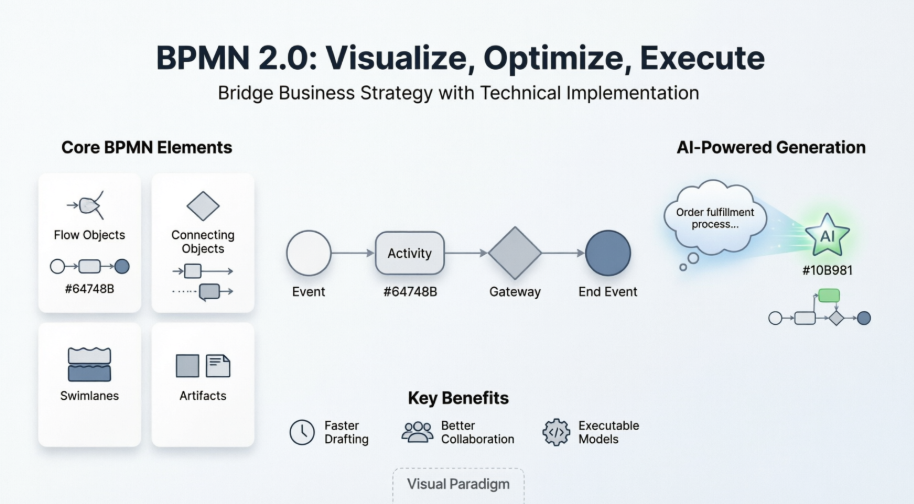
Understanding BPMN: The Foundation
A business goal is a target that an organization aims to achieve by performing correctly the related business process. A business process consists of a set of activities that are performed in coordination in an organizational and technical environment. These activities jointly realize a business goal.
The primary goal of the BPMN effort was to provide a notation that is readily understandable by all business users—from the business analysts that create the initial drafts of the processes, to the technical developers responsible for implementing the technology that will perform those processes, and finally, to the business people who will manage and monitor those processes.
-
A BPD BPMN defines a Business Process Diagram (BPD) which is made up of a set of graphical elements. BPMN is based on a flowcharting technique tailored for creating graphical models of business process operations.
-
A Business Process Model, then, is a network of graphical objects, which are activities (i.e., work) and the flow controls that define their order of performance.
-
These elements enable the easy development of simple diagrams that will look familiar to most business analysts (e.g., a flowchart diagram).
-
The elements were chosen to be distinguishable from each other and to utilize shapes that are familiar to most modelers.
BPMN can also be supported by an internal model that will enable the generation of executable BPEL4WS. Thus, BPMN creates a standardized bridge for the gap between the business process design and process implementation. Thus, BPMN can be applied in three different levels:
-
Descriptive Process Models – Suitable for high-level modeling – should be comfortable for analysts that have used flowcharts.
-
Analytic Process Models – Contains the concepts most commonly used and covered in BPMN training
-
Common Executable Process Models – Focuses on the elements required for executable process models
The Evolution of BPMN
-
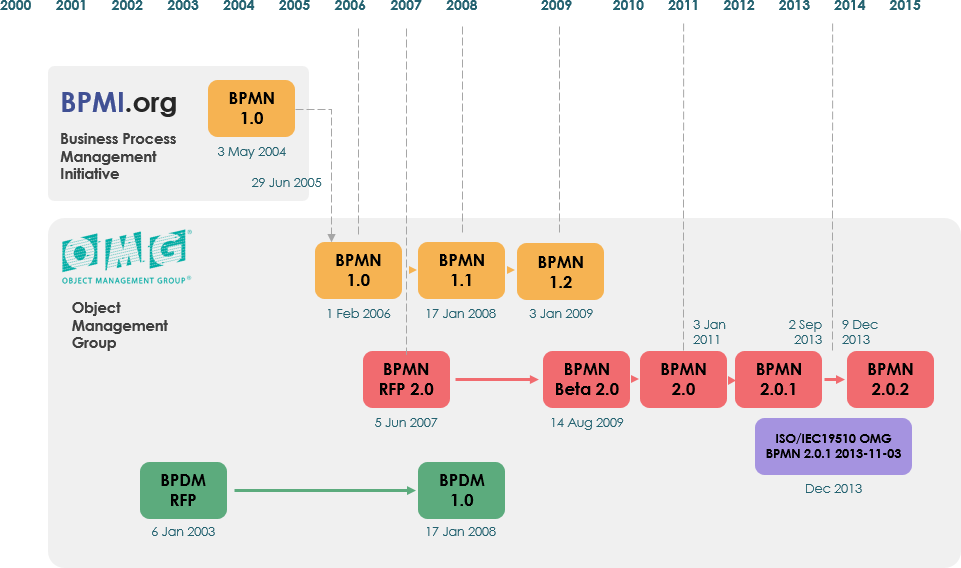
BPMN was originally developed by the Business Process Management Initiative (BPMI).
-
The BPMN 1.0 specification was released to the public in May 2004. This specification represents more than two years of effort by the BPMI Notation Working Group.
-
A BPMN Specification document was released by OMG in February 2006. Version 2.0 of BPMN was developed in 2010, and the actual version of the specification was released in December 2013.
-
The latest version (2.0.2) has been formally published by ISO as the 2013 edition standard: ISO/IEC 19510.
Core BPMN Elements: A Practical Breakdown
A BPD is made up of a set of graphical elements. These elements enable the easy development of simple diagrams that will look familiar to most business analysts (e.g., a flowchart diagram). The elements were chosen to be distinguishable from each other and to utilize shapes that are familiar to most modelers. For example, activities are rectangles and decisions are diamonds. It should be emphasized that one of the drivers for the development of BPMN is to create a simple mechanism for creating business process models, while at the same time being able to handle the complexity inherent to business processes.
The approach taken to handle these two conflicting requirements was:
-
To organize the graphical aspects of the notation into specific categories.
-
This provides a small set of notation categories so that the reader of a BPD can easily recognize the basic types of elements and understand the diagram.
-
Within the basic categories of elements, additional variation and information can be added to support the requirements for complexity without dramatically changing the basic look-and-feel of the diagram.
The four basic categories of elements are:
-
Flow Objects
-
Connecting Objects
-
Swimlanes
-
Artifacts
Flow Objects
A BPD has a small set of (three) core elements, which are the Flow Objects so that modelers do not have to learn and recognize a large number of different shapes. The three Flow Objects are:
Event
An Event is represented by a circle and is something that “happens” during the course of a business process. These Events affect the flow of the process and usually have a cause (trigger) or an impact (result). Events are circles with open centers to allow internal markers to differentiate different triggers or results. There are three types of Events, based on when they affect the flow: Start, Intermediate, and End (see the figures to the right, respectively).
Activity
An Activity is represented by a rounded-corner rectangle (see the figure to the right) and is a generic term for work that the company performs. An Activity can be atomic or nonatomic (compound). The types of Activities are Task and Sub-Process. The Sub-Process is distinguished by a small plus sign in the bottom center of the shape.
Gateway
A Gateway is represented by the familiar diamond shape and is used to control the divergence and convergence of Sequence Flow. Thus, it will determine traditional decisions, as well as the forking, merging, and joining of paths. Internal Markers will indicate the type of behavior control.
| Exclusive Gateway
Follow only one path |
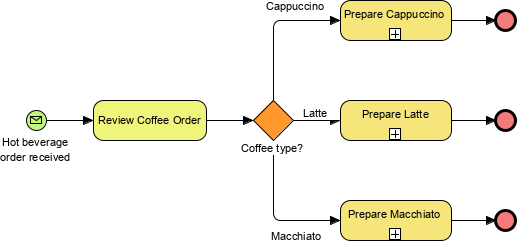 |
|---|---|
| Inclusive
Follow one or more paths |
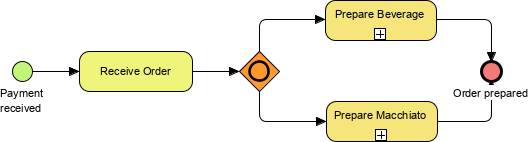 |
| Parallel
Follow all paths |
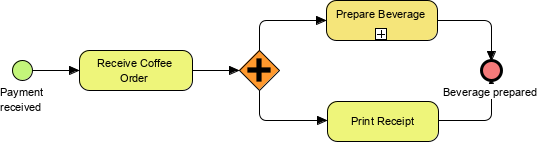 |
Flow Object Summary
Events

Activities

Gateways

BPMN Connecting Objects
The flow objects are connected together in a diagram to create the basic skeletal structure of a business process. There are three Connecting Objects that provide this function. These connectors are:
Sequence Flow
A Sequence Flow is represented by a solid line with a solid arrowhead (see the figure to the right) and is used to show the order (the sequence) that activities will be performed in a Process. Note that the term “control flow” is generally not used in BPMN.
Message Flow
A message Flow symbolizes information flow across organizational boundaries. Message flow can be attached to pools, activities, or message events. The Message Flow can be decorated with an envelope depicting the content of the message.
Association
Annotations allow additional information relevant in documenting the process to be shown on the diagram.

BPMN Swimlanes
Many process modeling methodologies utilize the concept of swimlanes as a mechanism to organize activities into separate visual categories in order to illustrate different functional capabilities or responsibilities. BPMN supports swimlanes with two main constructs.
The two types of BPD swimlane objects are:
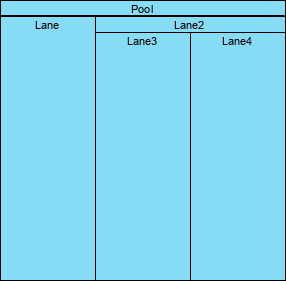
Pool – A Pool represents a Participant in a Process. It also acts as a graphical container for partitioning a set of activities from other Pools (see the figure to the right), usually in the context of B2B situations.
Lane – A Lane is a sub-partition within a Pool and will extend the entire length of the Pool, either vertically or horizontally (see the figure to the right). Lanes are used to organize and categorize activities.
BPMN Artifacts
BPMN was designed to allow modelers and modeling tools some flexibility in extending the basic notation and in providing the ability to add a context appropriate to a specific modeling situation, such as for a vertical market (e.g., insurance or banking). Any number of Artifacts can be added to a diagram as appropriate for the context of the business processes being modeled. The current version of the BPMN specification pre-defines only three types of BPD Artifacts, which are:
Data Object
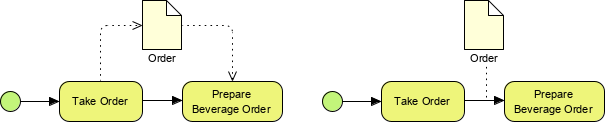
Data Objects are a mechanism to show how data is required or produced by activities. They are connected to activities through Associations.
Data Store
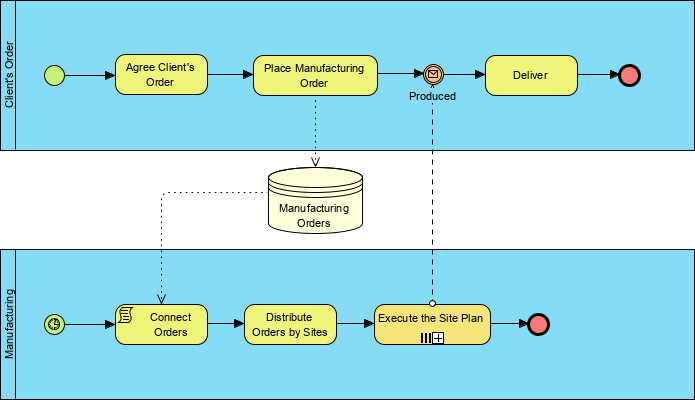
A datastore is somewhere that the process can read or write data, that persists beyond the scope of the process.
Group
A Group is represented by a rounded-corner rectangle drawn with a dashed line (see the figure to the right). The grouping can be used for documentation or analysis purposes but does not affect the Sequence Flow.
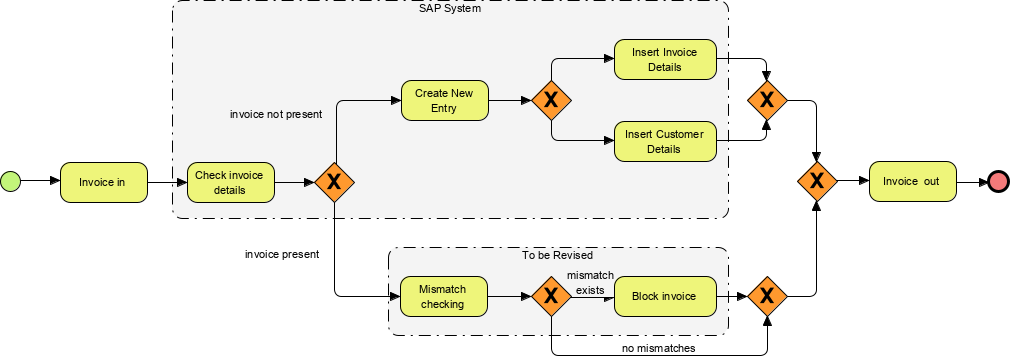
Annotation
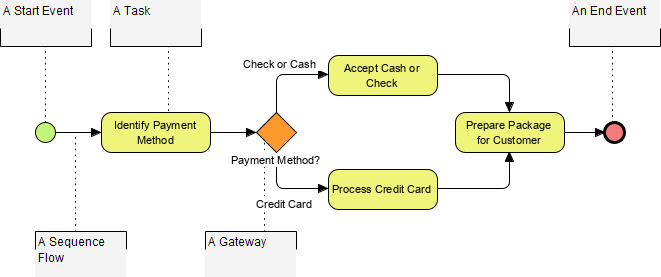
Annotations are a mechanism for a modeler to provide additional text information for the reader of a BPMN Diagram (see the figure to the right). In this example, the annotations are used to explain the BPMN elements:
BPMN Notation: Balancing Simplicity and Complexity
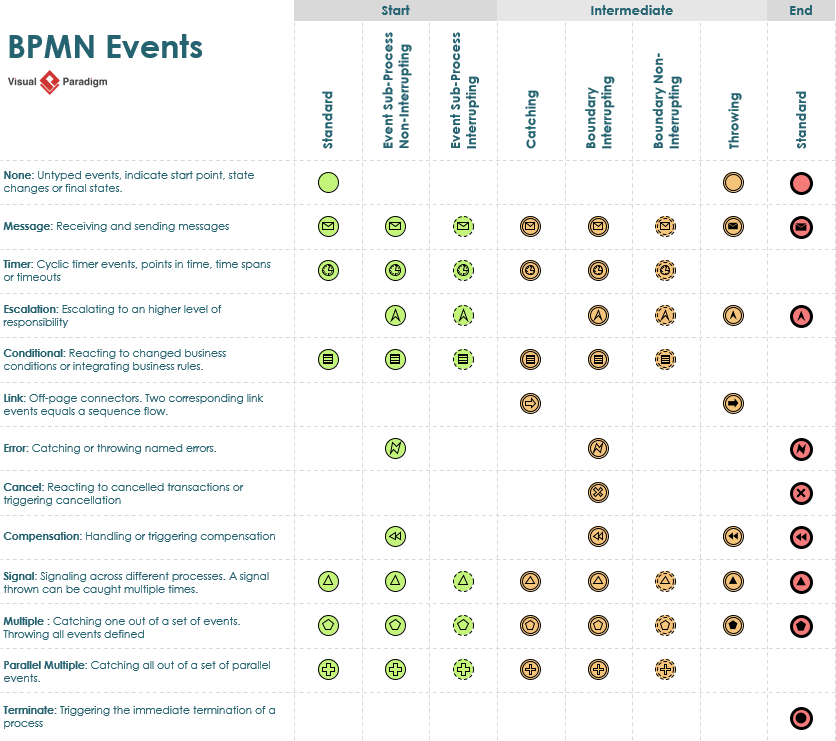
As mentioned above, within the basic categories of elements, additional variation and information can be added to support the requirements for complexity without dramatically changing the basic look-and-feel of the diagram.
The event table below shows the complete combination of how events can be represented by using the basic element with an additional variation. BPMN events now can support for complexity without changing the basic look & feel of the notation:
Visual Paradigm: A User’s Perspective on BPMN Tooling
Visual Paradigm provides comprehensive support for Business Process Model and Notation (BPMN) 2.0, offering a professional-grade modeler designed for both high-level business analysis and technical implementation. It is widely recognized for bridging the communication gap between business stakeholders and technical teams through its intuitive, compliant diagramming tools.
We are excited to announce a major update for Visual Paradigm Desktop. To empower business analysts and process architects, we have integrated advanced artificial intelligence directly into our modeling environment. You can now use our AI BPMN diagram generator to transform simple text descriptions into comprehensive, professional-grade Business Process Diagrams in seconds.
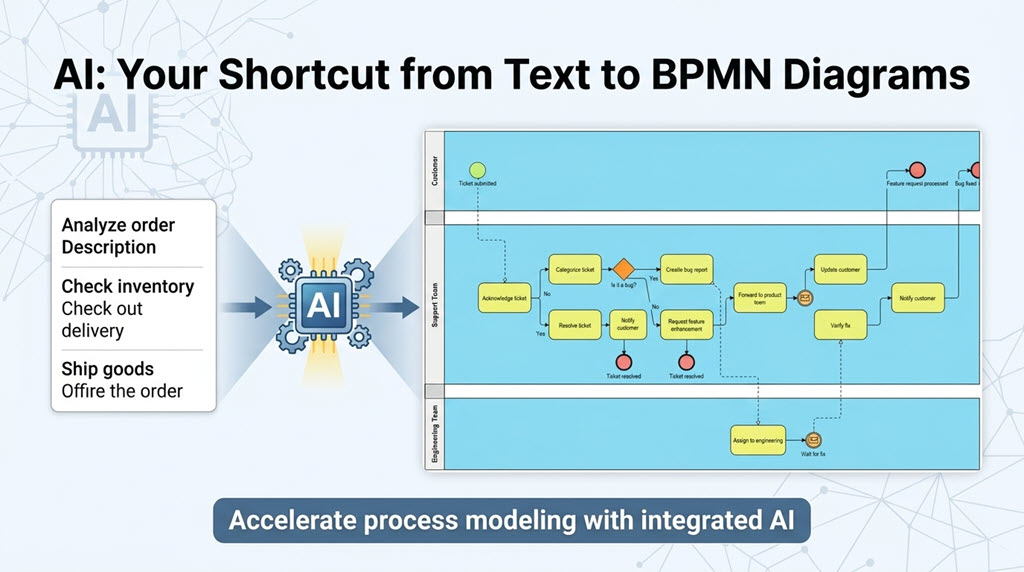
This new feature serves as a robust AI BPMN tool, eliminating the manual effort of dragging and dropping every single task and gateway when starting a new project. Whether you are mapping out internal operations or documenting client workflows, the AI BPD generator provides a sophisticated starting point that you can further refine and customize using Visual Paradigm’s industry-leading modeling suite.
How to Use the AI Business Process Diagram Generator
Generating your next process model is straightforward. Follow these simple steps within Visual Paradigm Desktop:
-
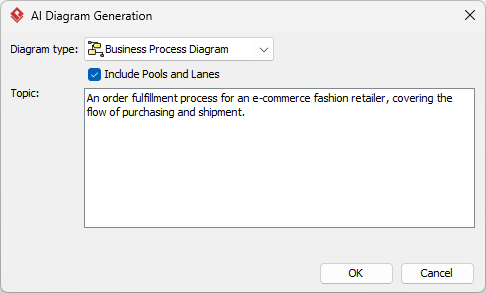
Navigate to the main menu and select Tools > AI Diagram Generation. This will open the AI Diagram Generation dialog box.
-
From the available options, select Business Process Diagram as your intended diagram type.
-
Optionally, you can check the “Include Pools and Lanes” box. This ensures the generated flow is organized into participants, representing different departments or roles within the process.
-
Enter your topic in the description field. For example: “An order fulfillment process for an e-commerce fashion retailer, covering the flow of purchasing and shipment.”
-
Click OK.
The AI BPMN diagram generator will then construct the resulting diagram. Once the initial model is generated, you have full flexibility to revise, extend, and continue modeling using our standard BPMN 2.0 tools.
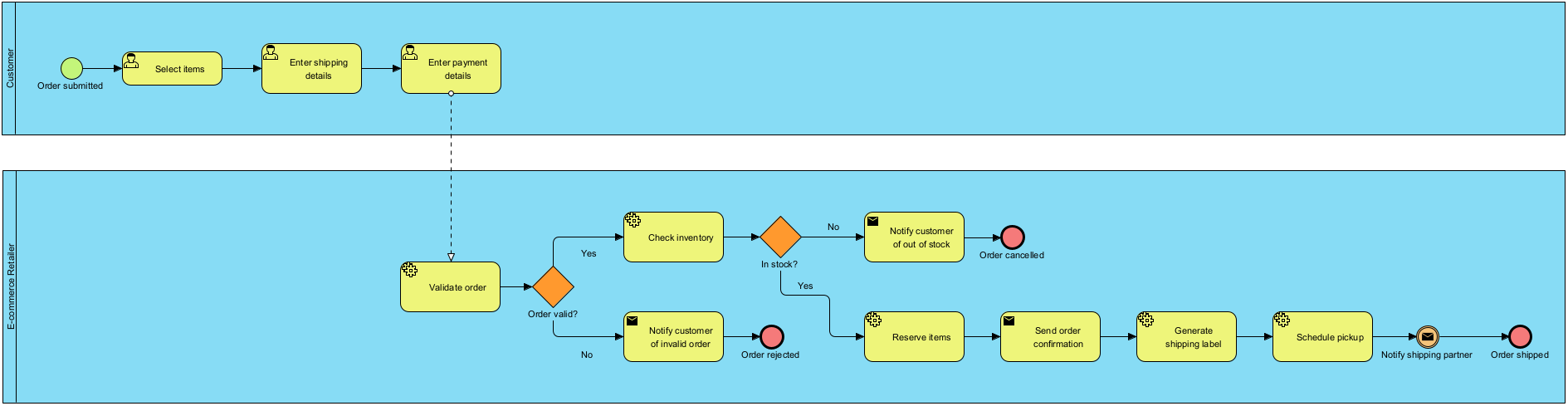
By leveraging this AI business process diagram generator, teams can significantly reduce the time spent on initial drafting, allowing more time for deep analysis and process optimization.
AI Business Process Diagram Examples
Listed below are more Business Process Diagram generated with AI, using Visual Paradigm Desktop.
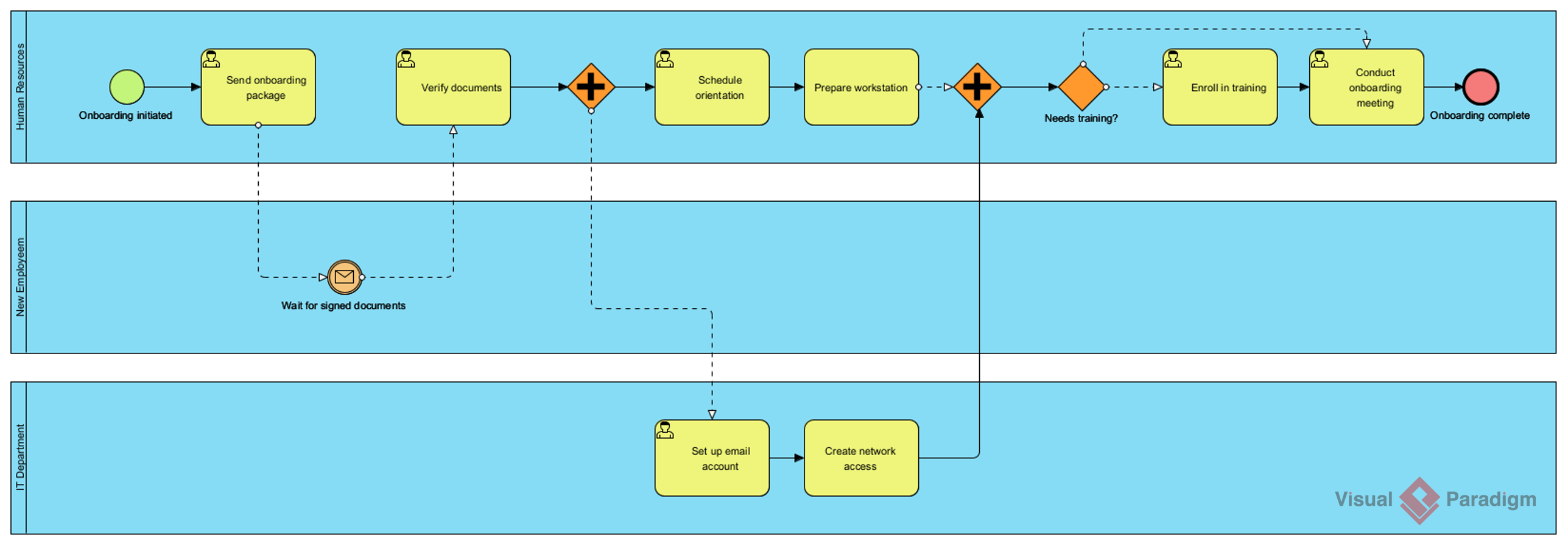
AI-Generated BPD: Employee onboarding process
Prompt: An employee onboarding process in a mid-sized company.
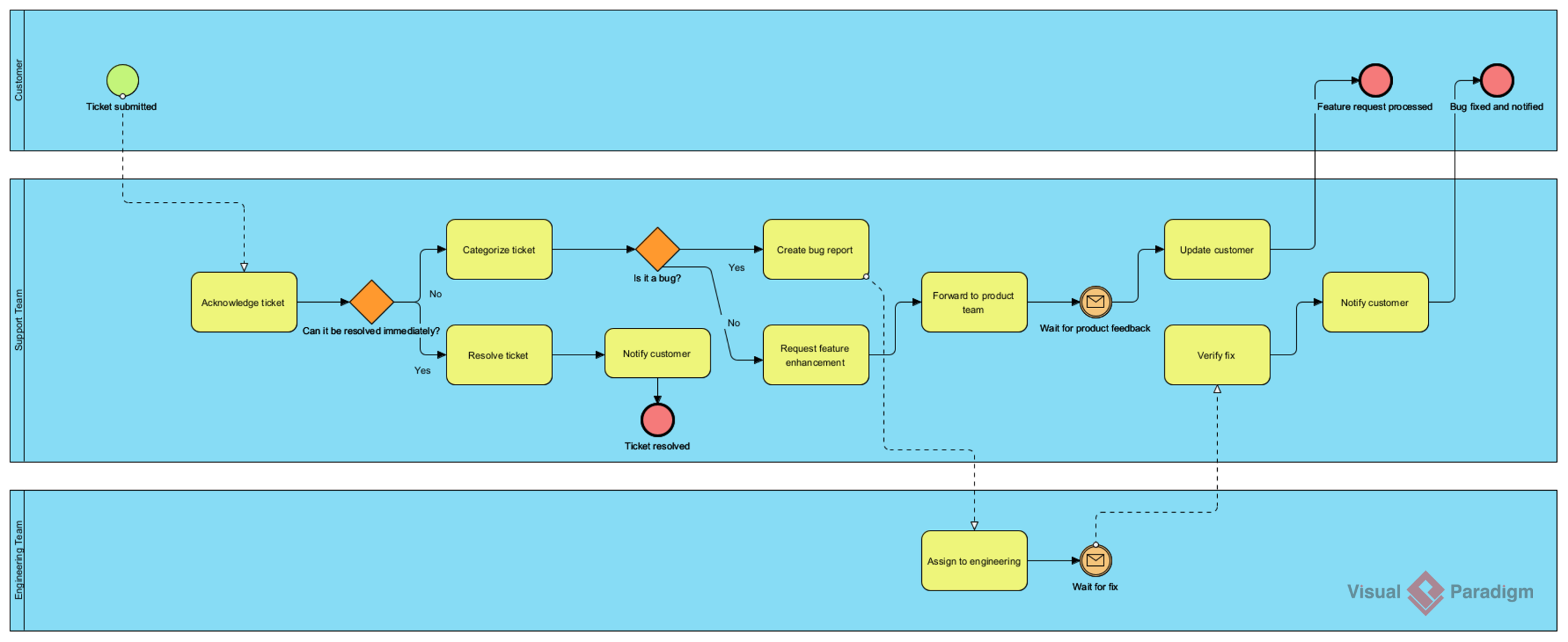
AI-Generated BPD: Customer support ticket resolution process
Prompt: A customer support ticket resolution process for a SaaS company.
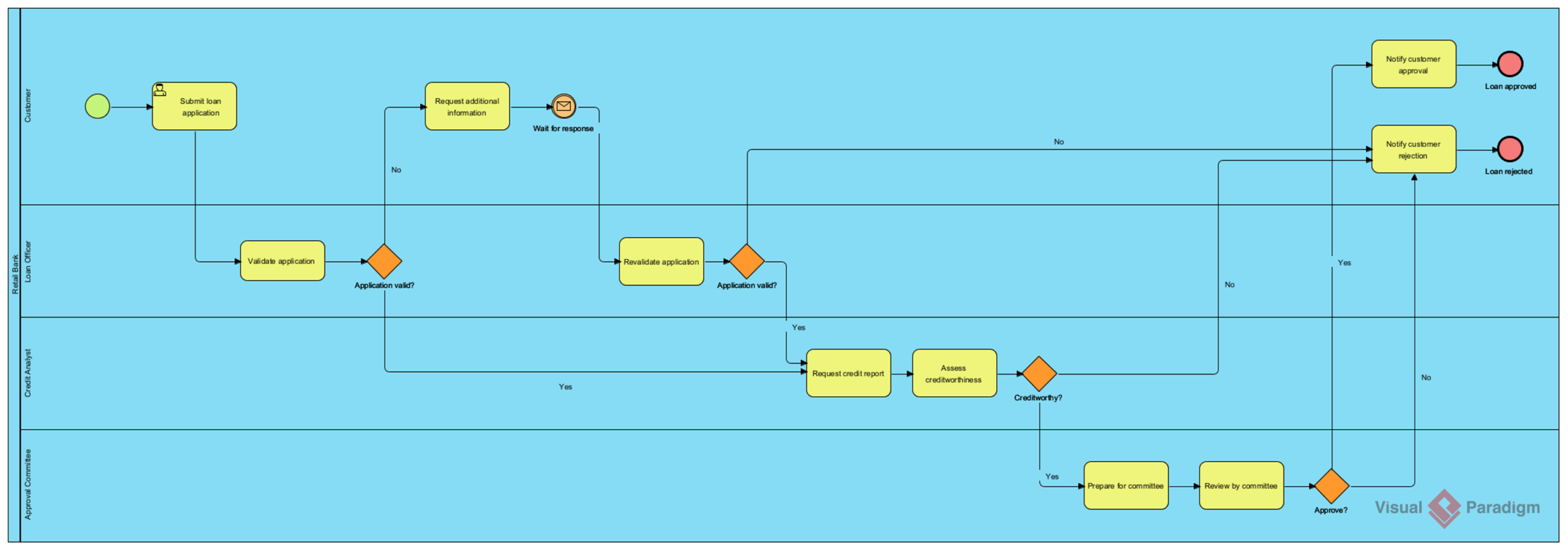
AI-Generated BPD: Loan application and approval process
Prompt: A loan application and approval process in a retail bank.
Core BPMN Modeling Capabilities in Visual Paradigm
-
Full BPMN 2.0 Compliance: Support for all major BPMN elements including activities (tasks, sub-processes), events (start, intermediate, end), gateways, and flow objects.
-
Intensive Tooling: Features a drag-and-drop editor with a Resource Catalog that simplifies connecting flow objects.
-
Hierarchical Modeling: Enables process drill-down, allowing users to expand complex sub-processes into detailed child diagrams for better organization.
-
Validation & Verification: Real-time validation rules ensure diagrams adhere to the official BPMN 2.0 specification, helping modelers catch errors like missing end events or invalid flows.
Advanced Analysis & Automation
-
Process Simulation: Users can run simulations and animations to analyze performance, identify bottlenecks, and calculate resource costs before implementation.
-
As-Is vs. To-Be Analysis: Provides dedicated features to compare current states with future process improvements, ensuring traceability throughout a digital transformation.
-
Executable Models: BPMN diagrams can be exported to executable formats like XML or BPEL for deployment in process engines.
-
Integration with Other Standards: Unlike standalone tools, Visual Paradigm allows you to map BPMN diagrams to other modeling artifacts such as UML shapes, ERD entities, and user stories.
Documentation & Collaboration
-
Working Procedure Editor: Allows for documenting step-by-step instructions for each task, which can then be generated into a formal Process Specification report.
-
Team Collaboration: Supports version control, cloud synchronization via VP Online, and team modeling to facilitate multi-user projects.
-
Glossary Management: A centralized repository to link process terms to a business glossary, ensuring consistent terminology across the organization.
Conclusion
BPMN 2.0 remains the gold standard for visualizing, analyzing, and executing business processes—and for good reason. Its intuitive notation bridges the gap between business strategy and technical execution, while its extensibility supports everything from high-level overviews to fully executable workflows.
From a practitioner’s perspective, Visual Paradigm elevates the BPMN experience. Its AI-powered diagram generator dramatically reduces the friction of getting started, while its robust modeling environment supports deep refinement, validation, and collaboration. Whether you’re a business analyst sketching initial concepts, a developer preparing executable processes, or a manager overseeing operational workflows, the combination of BPMN’s clarity and Visual Paradigm’s tooling creates a powerful foundation for process excellence.
For teams looking to modernize their process documentation, accelerate digital transformation, or simply bring more structure to how work gets done, investing time in mastering BPMN with a capable platform like Visual Paradigm is a strategic move worth making.
References
- BPMN Modeling Software | Visual Paradigm: Comprehensive overview of Visual Paradigm’s BPMN diagramming and modeling tools for business process management.
- Comprehensive Guide to BPMN and Using Visual Paradigm’s BPMN Tool: In-depth guide covering BPMN fundamentals and practical application with Visual Paradigm.
- BPMN Modeling Software | Visual Paradigm: Details on Visual Paradigm’s BPMN solutions for business process management and optimization.
- What is BPMN?: Foundational guide explaining Business Process Model and Notation standards and concepts.
- BPMN Activity Types Explained: Detailed breakdown of different activity types within BPMN 2.0 specification.
- BPMN Made Easy: Visual Paradigm’s approach to simplifying business process modeling for users of all skill levels.
- Business Process Modeling: Overview of Visual Paradigm’s business process modeling capabilities and methodologies.
- Simplify Business Process Modeling with Visual Paradigm’s BPMN Tools: Third-party review highlighting how Visual Paradigm streamlines BPMN modeling workflows.
- BPMN Guide: Complete resource hub for learning and mastering BPMN with Visual Paradigm.
- How to Document Working Procedures for BPMN Tasks: Step-by-step tutorial on creating formal process documentation from BPMN models.
This post is also available in Deutsch, Español, فارسی, Français, English, Bahasa Indonesia, 日本語, Polski, Portuguese, Ру́сский, Việt Nam, 简体中文 and 繁體中文.
Related posts:
 🚀 Simplify Complex Workflows with Visual Paradigm AI Sequence Diagram Tool!
 AI Animated Banner Generator Review: The Ultimate Tool for Instant Marketing Visuals
Review: Unleashing Creativity with the AI-Powered Flipbook Maker
From Idea to Strategy: My Journey Mastering Business Model Canvas with Visual Paradigm’s AI-Powered Tools
AI Animated Banner Generator Review: The Ultimate Tool for Instant Marketing Visuals
Review: Unleashing Creativity with the AI-Powered Flipbook Maker
From Idea to Strategy: My Journey Mastering Business Model Canvas with Visual Paradigm’s AI-Powered Tools