Introduction
For years, I approached complex projects the same way: linear outlines, bullet-point lists, and endless sticky notes scattered across my desk. While this method worked for simple tasks, I constantly hit walls when tackling multifaceted challenges—product launches, strategic planning sessions, or even organizing research for a major report. Ideas felt fragmented, connections remained hidden, and the “big picture” stayed frustratingly out of reach.
That changed when I discovered mind mapping, and more recently, AI-powered visual tools. What began as curiosity about a productivity technique evolved into a transformative workflow shift. In this guide, I’m sharing my hands-on experience exploring mind mapping fundamentals and testing Visual Paradigm’s AI-enhanced ecosystem. Whether you’re a student, entrepreneur, or team lead, I hope my journey helps you unlock clearer thinking and faster execution.
What Are Mind Maps and Why They Matter
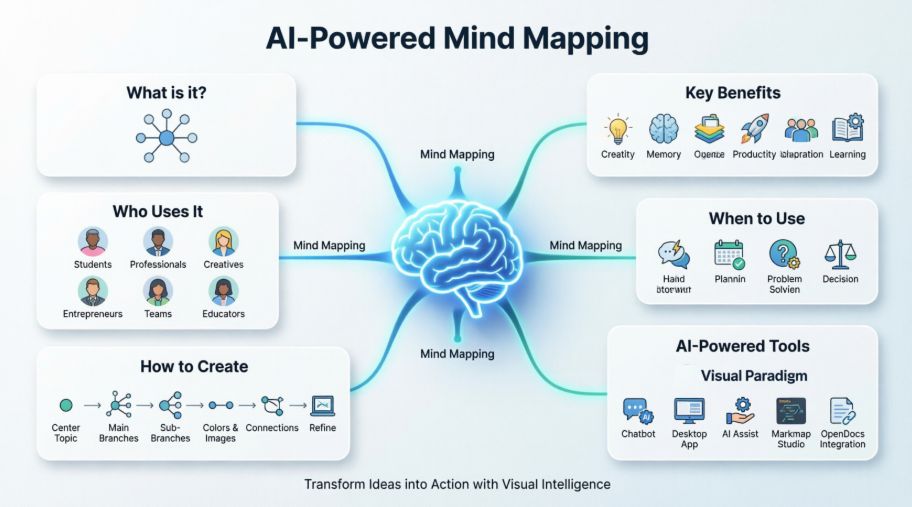
A mind map is a visual thinking tool that radiates ideas outward from a central concept, mimicking how our brains naturally associate and connect information. Unlike rigid linear notes, mind maps embrace non-linear thinking—using branches, colors, keywords, and imagery to create a flexible “map” of thoughts that’s easy to scan, expand, and remember.
Popularized by psychologist Tony Buzan in the 1970s, modern mind mapping draws inspiration from da Vinci’s notebooks and neuroscience research on neural connections. Today, it’s a globally adopted technique for learning, planning, and innovation.

The Benefits I’ve Experienced Personally
-
Enhanced Creativity: The radial structure encourages free association without premature judgment
-
Better Memory Retention: Visual elements and spatial organization make information significantly more memorable
-
Complexity Simplified: Overwhelming data transforms into clear, hierarchical overviews
-
Faster Planning: I draft project outlines in minutes instead of hours
-
Collaboration Friendly: Teams can build, share, and iterate on visual maps in real-time
-
Reduced Mental Load: One central focus with expanding branches prevents tunnel vision
Who Actually Benefits from Mind Mapping?
When I first explored mind mapping, I assumed it was just for creatives or students. I was wrong. In my testing across different scenarios, I found value for:
-
Students & Educators: Essay planning, lecture notes, concept mastery
-
Professionals & Managers: Strategy docs, meeting summaries, roadmap visualization
-
Creatives & Writers: Story arcs, campaign concepts, design exploration
-
Entrepreneurs: Business models, SWOT analysis, product development
-
Individuals: Goal setting, habit tracking, personal problem-solving
-
Teams: Workshop facilitation, ideation sessions, knowledge sharing
If you think, learn, or create—mind mapping can elevate your process.
When I Reach for a Mind Map
Mind maps shine brightest during specific phases of work. Here’s when I deploy them:
✅ Ideal Scenarios:
-
Rapid idea generation (brainstorming sessions)
-
Breaking down complex projects into manageable parts
-
Preparing presentations, exams, or executive reports
-
Planning events, vacations, or personal milestones
-
Analyzing books, research, or competitive landscapes
-
Decision-making with multiple variables
-
Aligning teams through visual overview
⚠️ Less Ideal For:
-
Highly detailed technical specifications (use flowcharts instead)
-
Final deliverable documents requiring strict formatting
-
Situations demanding linear, sequential instructions
Mind maps excel at the beginning (divergent ideation) and middle (organization/connection) of processes—not necessarily the final polished output.
My Step-by-Step Process for Creating Effective Mind Maps
After testing both analog and digital approaches, here’s the workflow that consistently delivers results:
-
Start Center-Out: Place your core topic in the middle of a landscape canvas. Use an image or symbol when possible for stronger visual anchoring.
-
Build Primary Branches: Draw thick branches for main categories. Stick to one keyword per branch to maintain clarity and flexibility.
-
Expand with Sub-Branches: Add thinner branches for supporting details, examples, or sub-ideas. Let connections emerge organically.
-
Engage Visual Memory: Assign distinct colors to branches. Incorporate icons, simple drawings, or emojis to reinforce concepts.
-
Show Relationships: Use arrows or curved lines to link related ideas across different branches—this reveals hidden patterns.
-
Embrace Organic Flow: Curved lines, varied branch thickness, and generous white space keep the map readable and dynamic.
-
Iterate Fearlessly: Step back, reorganize, prune, or expand. Your first draft is rarely your best.


Pro Tip: Digital tools like XMind, MindMeister, or Visual Paradigm accelerate this process with drag-and-drop editing, cloud sync, and collaboration features.
How Mind Maps Transformed My Brainstorming Sessions
Brainstorming used to feel chaotic—ideas scattered, dominant voices overshadowing others, and valuable insights lost in the noise. Integrating mind maps changed everything.
My 4-Phase Brainstorming Workflow:
Phase 1: Divergence (Ideation)
Place the central question. Set a timer (10-15 minutes). Rapidly add every idea without judgment. Quantity over quality at this stage.
Phase 2: Organization (Pattern Recognition)
Group similar concepts into main branches. Identify emerging themes, connections, or gaps.
Phase 3: Evaluation (Prioritization)
Add pros/cons, feasibility scores, or resource requirements to key branches. Highlight high-potential paths.
Phase 4: Action (Execution Planning)
Convert prioritized branches into tasks, timelines, or linear project plans.
This visual approach reduces idea blocking, sparks unexpected associations, and creates equitable participation—quieter team members can contribute via the map as effectively as vocal collaborators.
Example: When brainstorming “New Seasonal Drinks” for a café concept, branches for Ingredients, Pricing, Names, Visual Appeal, Dietary Options, and Marketing Hooks quickly revealed innovative combinations I’d have missed in a linear list.
Core Principles I Follow for Powerful Maps
Through trial, error, and refinement, these principles consistently elevate my mind maps:
-
Central Focus: Everything connects back to one core idea—maintain this anchor
-
Keyword Discipline: One word or short phrase per branch preserves flexibility and impact
-
Radiant Hierarchy: Place major concepts closer to center; details extend outward
-
Visual Emphasis: Use thicker lines, larger text, or bold colors to signal importance
-
Association Over Perfection: Prioritize meaningful connections over aesthetic polish
-
Non-Linear Freedom: Jump between branches freely; structure emerges through iteration
-
Holistic + Detail View: Design maps that show the big picture while allowing deep dives
Real-World Examples That Changed My Workflow
Seeing is believing. Here are mind map applications that delivered tangible results in my work:
📘 Book Summary Map
Center: Book Title
Branches: Plot, Characters, Themes, Key Takeaways, Personal Insights
Result: 70% faster review preparation and stronger retention during discussions
📊 Business Strategy Map
Center: “Q3 Marketing Campaign”
Branches: Goals, Channels, Content Ideas, Budget, Metrics, Timeline
Result: Aligned cross-functional teams in one session; reduced follow-up meetings by half
🎯 Personal Goal Map
Center: “Fitness 2026”
Branches: Workout Plans, Nutrition, Tracking, Obstacles, Motivations
Result: Clearer action steps and sustained motivation through visual progress tracking
🔍 Problem-Solving Map
Center: “Low Team Productivity”
Branches: Root Causes, Potential Solutions, Resources Needed, Expected Outcomes
Result: Identified a hidden communication bottleneck that linear analysis had missed
My Experience with Visual Paradigm’s AI-Powered Tools
While traditional mind mapping delivers value, integrating AI accelerates the process dramatically. I tested Visual Paradigm’s ecosystem extensively—here’s my honest assessment.
🤖 AI Chatbot for Rapid Prototyping

Starting a complex strategy from scratch used to take hours. With Visual Paradigm’s AI Chatbot, I simply describe my goal in plain English: “Outline a digital marketing strategy for a new eco-friendly product launch.” Within seconds, the AI generates a structured mind map with intelligent branches: Product Understanding, Market Research, Target Audience, Channel Strategy, and Metrics.
What impressed me most: the AI doesn’t just list items—it understands relationships. “Buyer Personas” automatically nests under “Target Audience,” while “Competitor Analysis” connects to “Market Research.” This contextual awareness saves hours of manual organization.
💻 Desktop Application for Deep Modeling

For technical projects requiring rigor, the desktop suite shines. When developing a mobile fitness app, I input: “Map key features, user flows, and stakeholders for a heart-rate tracking application.”

The AI generated a fully editable UML-style mind map in seconds—covering Key Ideas (user-centric design), Features (heart monitoring, calorie tracking), and Stakeholders (end-users, developers, health partners). Critically, this wasn’t a static image: I could reposition branches, link nodes to user stories, and export to SVG for presentations. The AI handled ~80% of foundational structuring, letting me focus on high-value refinement.
👥 AI Assist Brainstorming for Team Collaboration

For fast-paced team sessions, the AI Assist Brainstorming tool operates at “speed of thought.” Typing “Healthy meal prep ideas” instantly populated a web of concepts categorized by protein sources, produce, grains, and prep methods. Keyboard shortcuts let me insert nodes or reorganize hierarchies without menu diving. The Markdown export feature was a game-changer—seamlessly transitioning from brainstorming to writing execution while preserving structural integrity.
⚙️ Markmap Studio for Technical Workflows

As someone who prefers text-first workflows, Markmap Studio’s live split-screen resonated deeply. Writing Markdown headings and lists instantly rendered an interactive mind map. For a SWOT analysis, the AI generated structured Markdown with tables, checkboxes, and emojis—then visualized it all cohesively. The ability to toggle between code view (for precision) and preview mode (for presentations) accommodated both my analytical and communicative needs.
📝 OpenDocs Integration for Documentation

The newest addition—mind mapping inside OpenDocs—solved a persistent pain point: keeping visual plans connected to written documentation. Inside any OpenDocs page, I click the + icon, select “Mind Maps,” and use “Create with AI” to generate a structured map from a brief prompt. After refining via drag-and-drop, I embed it directly into the document. No switching apps, no exporting/importing—just seamless visual-textual integration.
Common Pitfalls I Avoided and Best Practices I Adopted
❌ Mistakes That Slowed Me Down:
-
Overloading branches with full sentences instead of keywords
-
Monochrome maps that failed to leverage visual memory
-
Perfectionism paralysis—waiting for “ideal” structure before sharing
-
Overcrowding without strategic white space
-
Isolating maps from action plans (visualization without execution)
✅ Practices That Accelerated Results:
-
Start messy, refine later: Capture ideas rapidly; organize in phase two
-
Print large-format reviews: Physical scale reveals patterns screens miss
-
Combine techniques: Embed SWOT, user stories, or timelines within branches
-
Schedule map reviews: Revisit and update maps as projects evolve
-
Share early: Use maps as living collaboration tools, not private artifacts
Conclusion: Why Visual Thinking Became My Non-Negotiable
Mind mapping isn’t just another productivity hack—it’s a fundamental upgrade to how I process complexity. By externalizing thoughts visually, I uncover connections linear methods obscure, accelerate ideation without sacrificing structure, and create artifacts that teams actually engage with.
Integrating AI tools like Visual Paradigm’s ecosystem didn’t replace my thinking; it amplified it. The AI handles foundational structuring, pattern recognition, and rapid prototyping—freeing me to focus on strategic judgment, creative refinement, and human-centered decisions.
If you’re hesitant to start: grab a blank page, write one central challenge in the middle, and branch outward for five minutes. No rules, no judgment. That small experiment might unlock the same clarity shift I experienced.
The future of work demands both creative breadth and analytical depth. Mind mapping—especially when powered by thoughtful AI—delivers both. Happy mapping.
Reference
- Boost Creativity & Productivity with AI-Powered Mind Maps: This article describes how users can create professional-quality mind maps instantly with AI to support real-time collaboration and strategic visualization.
- Comprehensive Guide to AI Brainstorming and Mind Map Generators: This resource provides a detailed exploration of AI-driven brainstorming tools and mind map generators designed for improved ideation, planning, and collaboration.
- How AI Mind Map Generators Are Revolutionizing Productivity in 2024: This guide explains how AI-powered mind map generators transform brainstorming sessions into structured, actionable plans to boost productivity across various industries.
- Unleash Your Potential with Smart Board – Free Mind Mapping Tool: This post introduces Smart Board as a free and powerful mind mapping tool that empowers users to simplify complex ideas and enhance their overall creativity.
- Instant AI Mind Maps for Rapid Idea Organization: This article details how AI-powered mind maps instantly transform raw ideas into structured visual formats to enhance clarity and creative output.
- Mind Mapping with AI: Transforming Brainstorming into Structure: This guide focuses on how AI-powered mind mapping converts chaotic brainstorming sessions into organized, actionable plans by using real-time insights.
- Comprehensive Guide to Mind Mapping for Effective Brainstorming: This resource serves as a guide on using mind mapping to boost creativity, organize complex thoughts, and improve brainstorming for both individuals and teams.
- AI-Powered Markmap Studio Launch: This release announcement highlights how the AI-powered Markmap Studio enables automated visual mapping and diagram generation from text input for intuitive knowledge visualization.
- Unlock Your Potential with Visual Paradigm Online’s Free Mind Mapping Tool: This article explains how the free mind mapping feature supports effective brainstorming and the visualization of complex ideas to unlock user potential.
- AI Brainstorming Tool – Visual Paradigm AI: This tool description outlines how to generate and organize ideas quickly using AI-driven insights and smart templates within a specialized brainstorming environment.
This post is also available in Deutsch, Español, فارسی, Français, English, Bahasa Indonesia, 日本語, Polski, Portuguese, Ру́сский, Việt Nam, 简体中文 and 繁體中文.