


Introduction
In the world of business process management, there is a constant tension between clarity and detail. Stakeholders want high-level overviews that fit on a single slide, while operational teams need granular instructions to execute tasks without ambiguity. For years, I’ve watched organizations struggle with this balance, often resulting in sprawling, unreadable diagrams that serve neither audience well.
Recently, I had the opportunity to dive deep into a case study involving a mid-to-large organization’s Human Resources department. They were facing a classic scaling problem: how to manage a high volume of job applications with multi-level evaluation criteria without creating an unmanageable mess. The solution they adopted leverages one of BPMN 2.0’s most powerful but underutilized features: Embedded Sub-Processes.
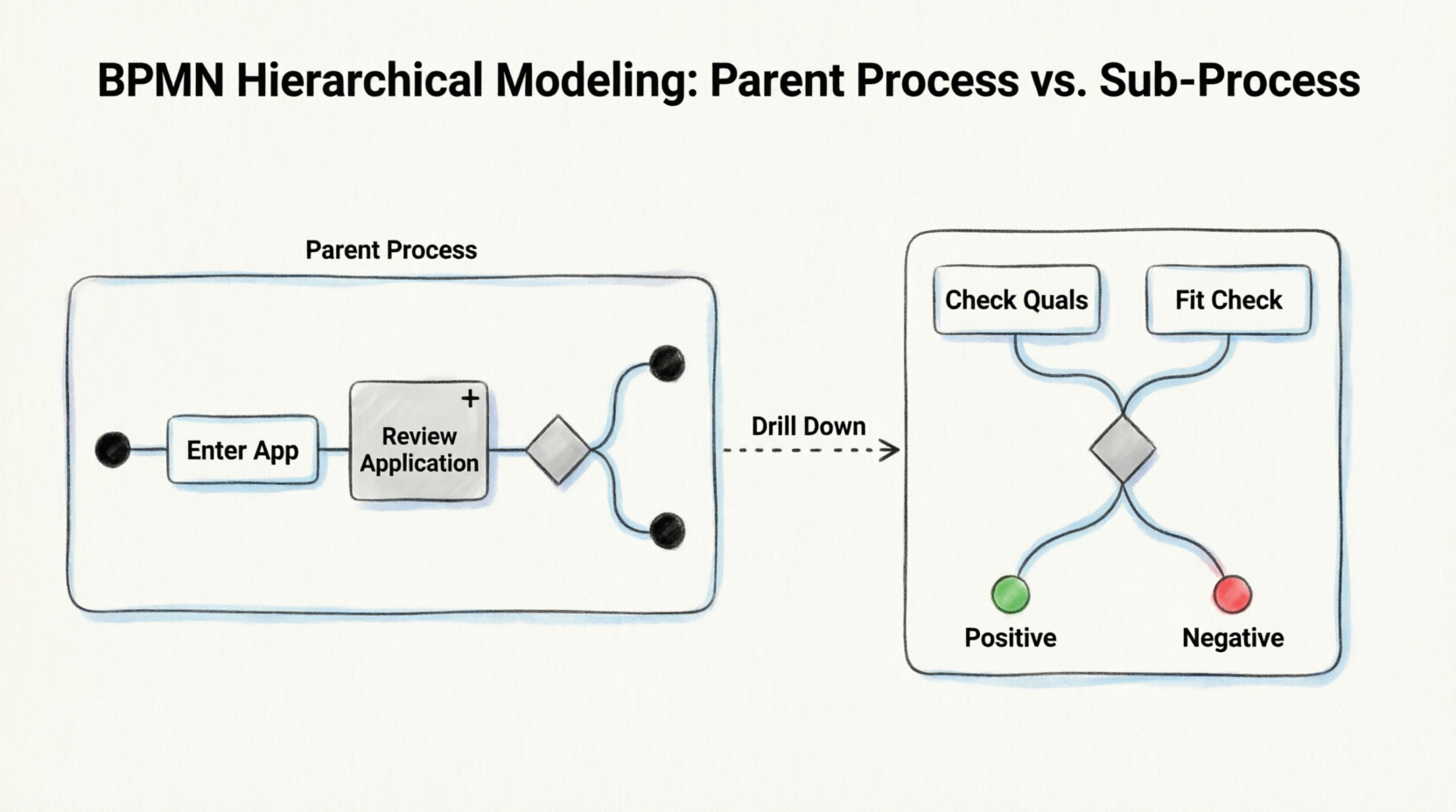
This guide shares my experience reviewing their approach, breaking down why separating “Tasks” from “Sub-Processes” is not just a visual choice, but an architectural necessity for scalable workflows. Whether you are a Business Analyst, HR Operations Manager, or Process Architect, this review offers practical insights into modeling complex decision logic while maintaining executive readability.
1. The Problem: When Hiring Gets Complicated
The HR department in question was dealing with several critical challenges:
- High Volume: Hundreds of applications required systematic screening.
- Multi-Level Criteria: Candidates needed both formal qualification checks (degrees, certifications) and position-fit assessments.
- Decision Complexity: A candidate might not fit the applied-for role but could be perfect for another open position.
- Auditability: Managers needed clear visibility into why an application was accepted or rejected.
- Scalability: As the company grew, flat diagrams became too complex to maintain.
The core business question was: “How do we model a hiring workflow that is both high-level enough for executives to understand at a glance, yet detailed enough for HR analysts to execute consistently?”
The answer lay in hierarchical modeling.
2. Conceptual Foundation: Tasks vs. Sub-Processes
Before looking at the diagrams, it is crucial to understand the distinction between a Task and a Sub-Process. This is the foundation of clean BPMN modeling.
| Feature | Task | Sub-Process |
|---|---|---|
| Definition | An atomic unit of work; not further subdivided in the current model. | A compound activity containing its own internal flow of tasks, gateways, and events. |
| Notation | Rounded rectangle. | Rounded rectangle with a + symbol at the bottom center. |
| Expandability | Can be subdivided later, but is treated as atomic here. | Already contains a detailed child process. |
| Token Behavior | Token enters → work done → token exits. | Token triggers sub-process start → flows through child process → reaches end event → token emitted to parent. |
| Purpose | Simplicity, abstraction. | Encapsulation of complex logic. |
Critical Note: Modeling “Enter Application” as a Task does not mean it cannot be subdivided. It simply means that subdivision has not been done in this particular model. This is a modeling choice, not a permanent constraint.
Gateways in BPMN control how sequence flows diverge or converge based on conditions, acting as decision points within both parent processes and sub-processes.
3. Diagram Explanation: The Parent Process
The first level of the model is designed for executive stakeholders. It provides a high-level view of the hiring workflow without getting bogged down in the specific criteria of the review.
Figure: Parent Process — Process with Sub-Process ‘Review Application’
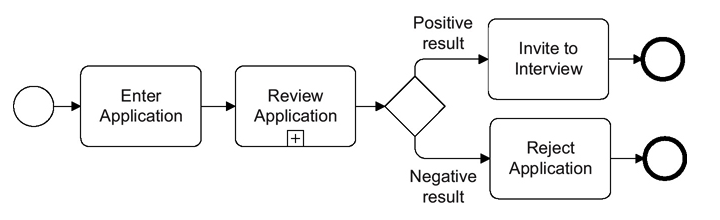
(Note: In the original context, this diagram shows the high-level flow. Imagine a Start Event leading to “Enter Application,” then to “Review Application ⊕,” followed by a Gateway splitting into “Invite to Interview” or “Reject Application.”)
Element-by-Element Breakdown
| Element | Type | Role |
|---|---|---|
| ○ (thin circle) | Start Event | Triggers the entire process when an application is submitted. |
| [Enter Application] | Task | Captures/records the candidate’s application data; atomic at this level. |
| [Review Application ⊕] | Embedded Sub-Process | Contains the full multi-step evaluation logic; marked with “+”. |
| ◇ (diamond) | Exclusive Gateway (XOR) | Routes flow based on the result of the sub-process: “Positive” or “Negative”. |
| [Invite to Interview] | Task | Executed only if the review outcome is positive. |
| [Reject Application] | Task | Executed only if the review outcome is negative. |
| ◎ (thick circle) | End Events | Terminate the respective branches of the process. |
Key Behavioral Rule:
In the parent process, it does not matter which end event was reached inside the sub-process. What matters is that the sub-process has finished completely before a token is passed to the outgoing sequence flow. The gateway then evaluates the data produced by the sub-process (e.g., an attribute called "result" with values "positive" or "negative") to determine the routing path.
4. Diagram Explanation: The Child Process
For HR analysts who need to execute the review consistently, the sub-process is expanded. This reveals the detailed logic hidden behind the “+” symbol.
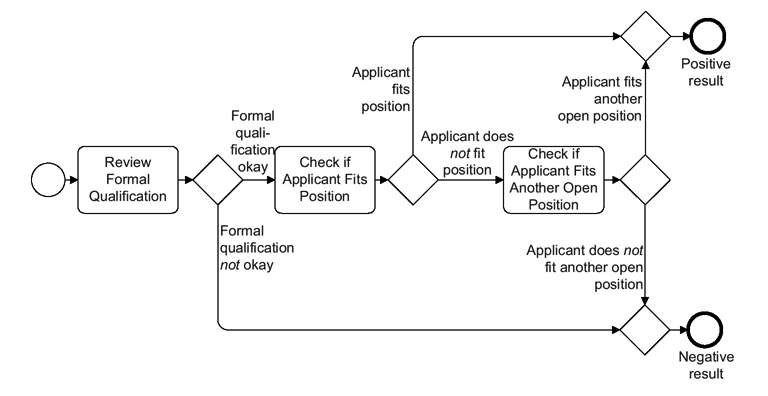 Figure: Child Process — Sub-Process “Review Application” (Expanded View)
(Note: In the original context, this diagram shows the internal logic. Imagine a Start Event leading to “Review Formal Qualification,” then a Gateway. If OK, it goes to “Check if Applicant Fits Position.” If not, it may go to “Check if Applicant Fits Another Open Position.” All paths lead to either a “Positive Result” or “Negative Result” End Event.)
Element-by-Element Breakdown
| Element | Type | Role |
|---|---|---|
| ○ (thin circle) | Start Event | Triggered automatically when the parent process token arrives. |
| [Review Formal Qualification] | Task | First evaluation step: verifies degrees, certifications, experience thresholds. |
| ◇ Gateway #1 | Exclusive Gateway | Decision: Is formal qualification OK or NOT OK? |
| [Check if Applicant Fits Position] | Task | Second evaluation: assesses skills/experience match against the specific role. |
| ◇ Gateway #2 | Exclusive Gateway | Decision: Does the applicant fit the applied-for position? |
| [Check if Applicant Fits Another Open Position] | Task | Third evaluation (fallback): searches other open roles for a potential match. |
| ◇ Gateway #3 | Exclusive Gateway | Decision: Does the applicant fit any other open position? |
| ◎ Positive Result | End Event | Signals successful review; sets result = "positive". |
| ◎ Negative Result | End Event | Signals failed review; sets result = "negative". |
Token Flow Logic
- A token arrives from the parent → triggers the sub-process start event.
- Token flows through Review Formal Qualification.
- If qualification fails → jumps directly to Negative Result end event.
- If qualification passes → proceeds to Check if Applicant Fits Position.
- If fits → goes to Positive Result end event.
- If doesn’t fit → tries Check if Applicant Fits Another Open Position.
- If fits another → Positive Result; if not → Negative Result.
- Upon reaching any end event, the sub-process is complete, and a token is emitted back to the parent process’s outgoing flow.
5. Interpretation & Data Flow Semantics
This is the most nuanced aspect of the case study. There is an apparent paradox in BPMN syntax:
“According to BPMN syntax, there is no direct relation between the different end events within a sub-process and the conditions at the decision gateway in the higher-level process.”
In strict BPMN terms, the parent gateway cannot “see” which end event was reached inside the sub-process. So how does the parent know whether to go to “Invite to Interview” or “Reject Application”?
The Resolution: Data Attributes
The correct interpretation is that the sub-process produces data. Specifically, a process attribute called "result" receives the value "positive" or "negative" depending on which internal path was taken. Since all data within a process is available everywhere, including within embedded sub-processes and back in the parent process, the gateway conditions in the parent process simply evaluate this attribute:
- Condition:
result == "positive"→ route to “Invite to Interview” - Condition:
result == "negative"→ route to “Reject Application”
Similarly, gateways inside the sub-process can also read and write the "result" attribute.
Why This Matters Practically
This pattern ensures:
- ✅ Loose coupling between parent and child process logic.
- ✅ Reusability: The “Review Application” sub-process could be called from multiple parent processes.
- ✅ Maintainability: Changes to review criteria only require editing the child process, not the parent.
- ✅ Compliance: Each decision point is auditable with clear data trails.
6. When to Use Sub-Processes vs. Tasks
Based on this case study and BPMN best practices, here is a decision framework for your own modeling efforts.
✅ Use a Sub-Process When:
| Scenario | Example from Case Study |
|---|---|
| Complex internal logic with multiple decision points | “Review Application” has 3 gateways and 4 tasks internally. |
| Reusable process fragment used in multiple parent processes | The same review logic could apply to internal transfers, promotions, etc. |
| Team ownership boundaries | HR Operations owns “Review Application”; Recruitment owns “Invite to Interview”. |
| Diagram readability | Combining both figures into one would yield 8+ nodes and become hard to read. |
| Hierarchical reporting needs | Executives view the parent; HR analysts work with the child. |
| Independent lifecycle management | Review criteria change quarterly; interview scheduling logic changes annually. |
Best practice recommends creating hierarchical multi-layer process models and using sub-processes to split processes into logical phases.
✅ Use a Task When:
| Scenario | Example from Case Study |
|---|---|
| Atomic, indivisible work at the current modeling scope | “Enter Application” is a single form-entry action. |
| Simplicity suffices — no internal branching needed | “Invite to Interview” is a straightforward notification/email task. |
| Future expansion possible but not yet needed | “Enter Application” could be expanded later to include document upload, validation, etc. |
| External system call represented as a single service task | Calling an external ATS API to store the application. |
💡 Modeling Principle: Always model at the appropriate level of abstraction for your audience. A task today can become a sub-process tomorrow as requirements evolve — this is a feature, not a limitation.
7. BPMN Best Practices Demonstrated
This case study highlights several key best practices:
- Hierarchical Layering: Two clear levels — strategic overview and operational detail — following the recommendation to create multi-layer process architectures.
- Consistent Gateway Usage: Exclusive gateways correctly used for mutually exclusive decision paths at every branching point.
- Clear Labeling: Every sequence flow out of a gateway is labeled with its condition (“Positive result”, “Formal qualification okay”, etc.) — a recognized best practice for readability.
- Single Entry, Controlled Exit: The sub-process has one start event and exactly two end events, making its contract with the parent process well-defined.
- Data-Centric Decision Making: Rather than relying on implicit token routing, explicit data attributes (“result”) drive gateway conditions — improving traceability and testability.
- Standard Symbol Compliance: All elements use correct BPMN 2.0 notation, ensuring interoperability across modeling tools.
8. Summary Table
| Aspect | Detail |
|---|---|
| Domain | Human Resources / Recruitment |
| Process Name | Application Review & Interview Decision |
| BPMN Pattern | Embedded Sub-Process with Data-Driven Gateway Routing |
| Parent Process Nodes | 1 Start, 2 Tasks, 1 Sub-Process, 1 Gateway, 2 End Events |
| Sub-Process Nodes | 1 Start, 3 Tasks, 3 Gateways, 2 End Events |
| Key Data Attribute | result ∈ {“positive”, “negative”} |
| Primary Benefit | Separation of concerns; scalable, maintainable, auditable process model |
| Applicable Standard | BPMN 2.0 (ISO/IEC 19510) |
9. Extensions & Variations
This case study can be extended in several directions to handle more complex scenarios:
- Call Activity: Replace the embedded sub-process with a reusable Call Activity (global sub-process) if “Review Application” is shared across multiple hiring workflows.
- Event Sub-Process: Add an interrupting timer event sub-process to auto-reject applications after 30 days of inactivity.
- Message Events: Replace the start event with a Message Start Event to trigger the process via email or API.
- Multi-Instance Sub-Process: If multiple reviewers must independently evaluate the same application, model “Review Application” as a multi-instance sub-process with parallel execution.
- Compensation: Add compensation handlers to undo “Invite to Interview” if a subsequent background check fails.
Conclusion
This case study demonstrates that BPMN sub-processes are not merely a visual convenience — they are a fundamental architectural mechanism for managing complexity in business process models. By encapsulating the multi-step “Review Application” logic within a sub-process, the organization achieves clarity at the executive level while preserving analytical depth at the operational level, all connected through well-defined data contracts rather than fragile implicit dependencies.
For anyone looking to implement similar workflows, tools like Visual Paradigm offer robust support for these patterns. With features like AI-driven diagram generation, process simulation, and team collaboration capabilities, it simplifies the creation of standards-compliant BPMN 2.0 models. Whether you are mapping out “As-Is” processes or designing “To-Be” improvements, leveraging hierarchical modeling ensures your processes remain scalable, maintainable, and clear to all stakeholders.
References
- Visual Paradigm Features: Visual Paradigm provides a fully comprehensive, standards-compliant BPMN 2.0 modeling platform tailored for business analysts and developers alike, blending traditional diagramming with advanced automation and simulation.
- BP Modeling Solution: Offers smart connection rules, flexible swimlane editing, and resource-centric modeling to optimize operational workflows and prevent invalid sequence paths.
- AI BPMN Generator Guide: Explains how the AI BPMN Diagram Generator automatically translates plain-English process narratives into fully interactive, standard-compliant BPMN 2.0 layouts.
- BPMN Made Easy: Highlights tools for simplifying BPMN modeling, including process animation and gap analysis for non-technical stakeholders.
- BPMN Tutorial 1: Provides foundational tutorials on BPMN notations, including events, specialized task types, gateways, and data objects.
- BPMN Tutorial PDF: A downloadable PDF version of the foundational BPMN tutorial for offline reference.
- BPMN Activity Types Explained: Detailed guide on different BPMN activity types, helping users choose between Service, User, Manual, and Script tasks.
- Visual Paradigm YouTube Demo: Video demonstration of Visual Paradigm’s features, including swimlane editing and process drill-down capabilities.
- SysML Modeling Guide: Discusses resource-centric modeling where elements are created as reusable model components rather than static shapes.
- BPMN Swimlanes Tutorial: Focuses on partitioning processes using interactive horizontal or vertical pools and lanes.
- BPMN Diagram Tools Overview: Reiterates the comprehensive feature set for BPMN diagramming, including full notation support and AI integration.
- Visual Paradigm Blog: Discusses Visual Paradigm as an all-in-one software solution, emphasizing its role in software development and process modeling.
- Business Process Modeling Guide: Covers best practices for business process modeling, including As-Is and To-Be gap analysis.
- BPMN Features List: Lists key features such as process simulation, animation, and matrix transformation for RACI/CRUD outputs.
- Visual-Diff Feature: Explains the version comparison tool that tracks operational revisions by visually comparing different workflow versions.
- REST API Design Solution: Highlights Agile integration features, synchronizing workflow components into user stories and development backlogs.
This post is also available in Deutsch, Español, فارسی, Français, English, Bahasa Indonesia, 日本語, Polski, Portuguese, Ру́сский, Việt Nam, 简体中文 and 繁體中文.
Related posts:
 How Visual Paradigm’s AI Diagram Generation Turns Your Ideas into Professional UML & BPMN Diagrams in Seconds
 Mastering Business Process Modeling: A Hands-On Review of BPMN and Visual Paradigm’s AI-Powered Tools
 Mastering AI-Powered Mind Mapping with Visual Paradigm
 A Software Engineer’s Field Guide to UML, BPMN, and SysML