


Introduction
In the ideal world of business process management, every order is fulfilled, every payment clears, and every shipment arrives on time. This is the “Happy Path.” However, robust system design requires us to plan for the inevitable exceptions: shipping failures, inventory discrepancies, or payment reversals.
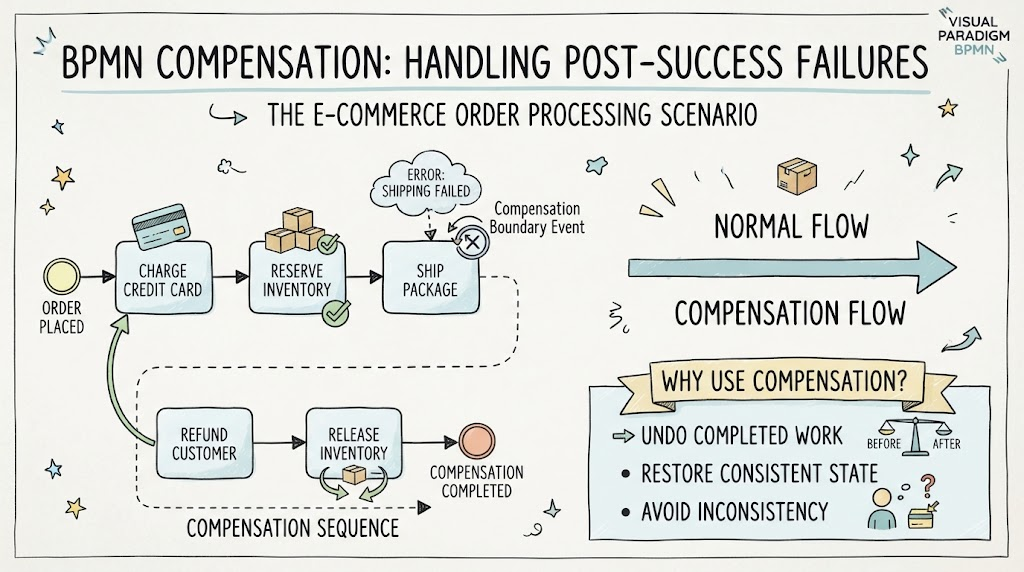
Standard error handling in BPMN (Business Process Model and Notation) is designed to manage failures as they happen—stopping a process before it proceeds further. But what happens when a failure occurs after critical steps have already been successfully completed? If a credit card has been charged and inventory reserved, but the shipping provider rejects the package, simply stopping the process leaves the business in an inconsistent state: the customer is charged for an item they will never receive, and stock is locked in limbo.
This is where BPMN Compensation becomes essential. Compensation is the specialized mechanism for “undoing” work that has already been finished. It allows a process to revert previous successful transactions—issuing refunds and releasing inventory—restoring the system to a consistent state.
This guide explores how to model these critical “undo” operations using the E-Commerce Order Processing scenario, leveraging Visual Paradigm’s advanced BPMN modeling and AI-assisted features to ensure your workflows are not just efficient, but resilient.
The Scenario: E-Commerce Order Processing with Compensation
The following diagram illustrates a classic compensation scenario in an online retail environment.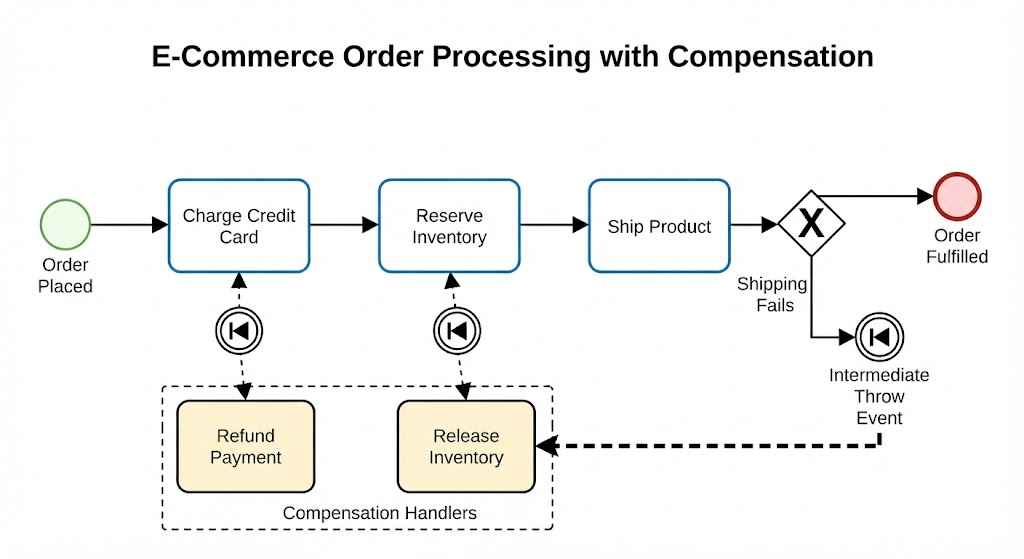
Process Breakdown
-
Forward Flow (The Happy Path):
-
Order Placed: The process begins.
-
Charge Credit Card: The system successfully charges the customer.
-
Reserve Inventory: The system successfully locks the stock in the warehouse.
-
Ship Product: The system attempts to hand off the package to the courier.
-
-
The Exception (Shipping Fails):
-
After the product is ready to ship, an Exclusive Gateway (
X) determines the outcome. -
If the shipping provider rejects the package (e.g., invalid address), the flow diverts to the Intermediate Throw Event (the circle with the rewind icon
|<<).
-
-
The Compensation Mechanism:
-
The Trigger: The Intermediate Throw Event acts as a signal. It effectively says, “Shipping failed; we must undo the previous successful steps.”
-
The Handlers: The signal activates the Compensation Boundary Events (the rewind icons attached to the bottom of the “Charge Credit Card” and “Reserve Inventory” tasks).
-
The Rollback:
-
The boundary event on Charge Credit Card triggers the Refund Payment task.
-
The boundary event on Reserve Inventory triggers the Release Inventory task.
-
-
These handlers are connected via dashed association lines, indicating they are triggered by the event rather than being part of the standard sequential flow.
-
Key Concepts: Understanding BPMN Compensation
To implement this correctly in a modeling tool, one must understand the specific notation rules that distinguish compensation from standard error handling.
1. The “Throw and Catch” Logic
Compensation works on a decoupled trigger system.
-
The Thrower (Intermediate Throw Event): This event is placed in the main flow where the decision to rollback is made. When the token reaches this event, it broadcasts a compensation signal.
-
The Catcher (Compensation Boundary Event): These are attached to the activities that need to be undone. They remain dormant during normal execution and only “wake up” when the Thrower activates them.
2. Associations vs. Sequence Flows
A common mistake in modeling is connecting compensation handlers with solid arrows.
-
Rule: You must use Associations (dashed lines with open arrowheads) to connect a Compensation Boundary Event to its Handler task.
-
Reason: A sequence flow implies “do this next.” An association implies “if this event fires, execute this handler.”
3. The Compensation Marker
Any task designed to perform an undo action (like “Refund Payment”) should ideally be marked with the Compensation Marker (two left-pointing triangles << inside the task box) or be clearly identified as a compensation handler within the tool’s properties. This distinguishes it from a standard task in the forward flow.
Tooling: Modeling with Visual Paradigm & AI
Creating this diagram manually requires precision, but modern tools like Visual Paradigm streamline the process through intelligent modeling assistants and AI generation.
1. Using Visual Paradigm’s Smart Guide
Visual Paradigm’s desktop and online editors feature a “Resource Centric” interface that simplifies adding boundary events.
-
Step 1: Create your main tasks (Charge Credit Card, Reserve Inventory).
-
Step 2: Hover over the bottom edge of the Charge Credit Card task. The Smart Guide menu will appear.
-
Step 3: Select the Compensation Boundary Event icon. Visual Paradigm automatically attaches the event to the task boundary.
-
Step 4: Drag from the Boundary Event to create the Refund Payment task. The tool will automatically suggest using a Dashed Association line, ensuring BPMN compliance.
2. Leveraging AI-Assisted Features
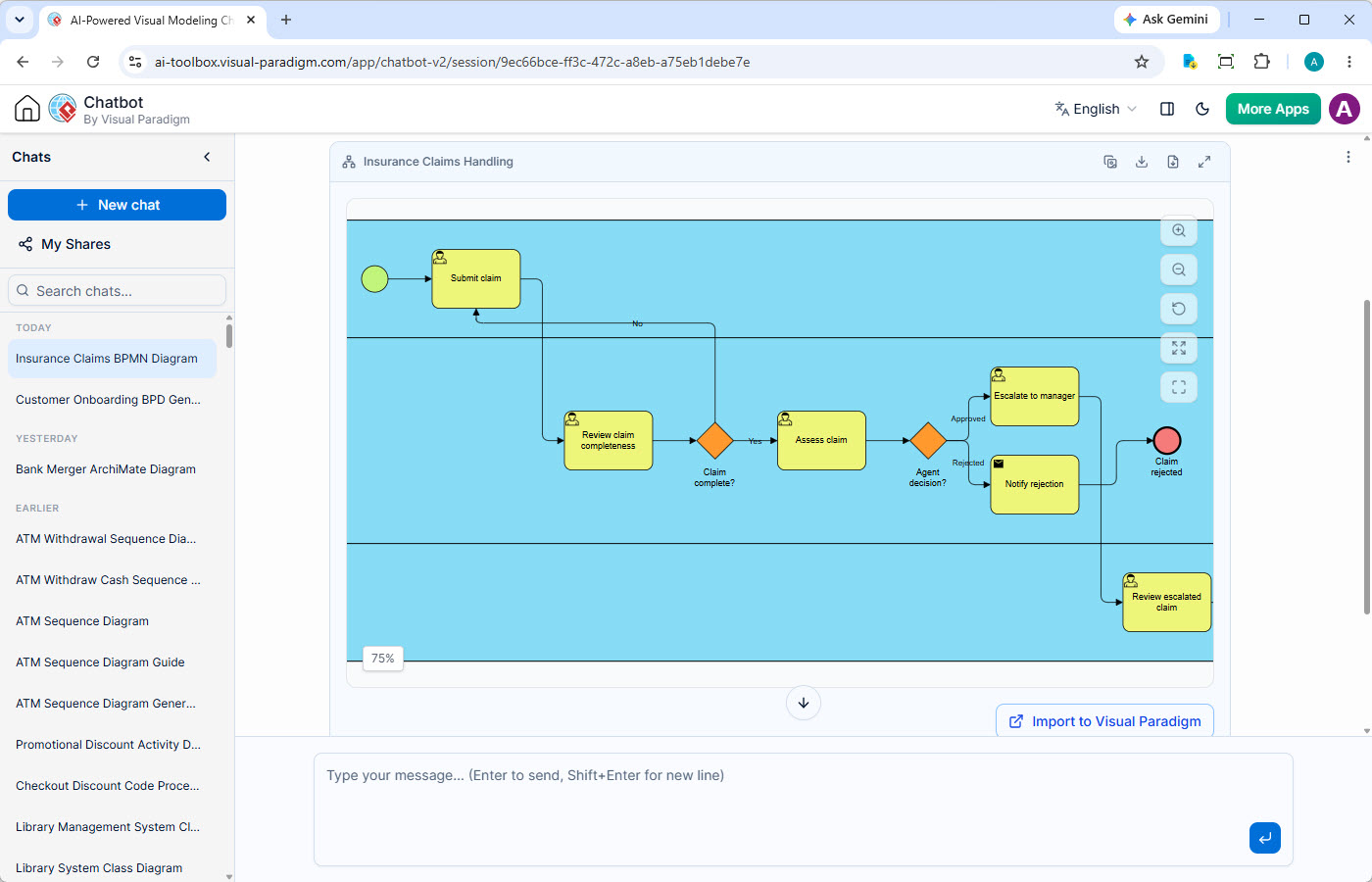
For complex processes, starting from a blank canvas can be daunting. Visual Paradigm’s AI BPMN Generator allows you to describe the logic in plain English and generate the initial structure .
Example AI Prompt:
“Create a BPMN diagram for an e-commerce order. Steps: Charge Card, Reserve Inventory, Ship Product. If Shipping fails, trigger compensation to Refund Payment and Release Inventory. Use an exclusive gateway for the shipping decision.”
How the AI Helps:
-
Structure Generation: The AI instantly creates the swimlanes, tasks, and the exclusive gateway.
-
Logic Interpretation: It recognizes the “If… then…” logic to place the Intermediate Throw Event correctly.
-
Refinement: Once generated, you can use the chat interface to ask, “Add a compensation boundary event to the Charge Card task,” and the AI will modify the diagram accordingly.
3. Validation and Simulation
Visual Paradigm allows you to simulate the process. You can run a “Token Simulation” where you force the “Shipping Fails” path. The simulation will visually demonstrate the token moving to the Throw Event and then jumping back to activate the Refund Payment and Release Inventory tasks, verifying that your compensation logic holds up before deployment.
Best Practices for Compensation Modeling
When designing these workflows, keep the following rules in mind to ensure clarity and executability:
-
Atomic Handlers: Keep compensation tasks simple and specific. “Refund Payment” is better than “Handle Financial Reversal and Notify Accounting.”
-
Scope Limitation: Only attach compensation boundary events to tasks that change state. There is no need to compensate a “Send Email Notification” task unless sending a “Cancellation Email” is strictly required for legal reasons.
-
Naming Conventions: Clearly label your throw events (e.g., “Shipping Failed”) so stakeholders understand why the rollback is happening.
-
Transaction Subprocesses: For critical operations like payments, consider wrapping the steps in a Transaction Subprocess (double-lined border). If any step inside fails, the BPMN engine can automatically trigger compensation for all completed steps within that scope without needing manual throw events for every single failure point.
Conclusion
In the high-stakes world of e-commerce, the ability to gracefully handle failure is just as important as the ability to process success. A process model that only accounts for the “Happy Path” is incomplete and potentially dangerous to data integrity.
By mastering BPMN Compensation, you ensure that your business processes possess the resilience to recover from errors. When a shipment fails, your system doesn’t just crash—it intelligently refunds the customer and restocks the shelf, maintaining trust and operational consistency.
Tools like Visual Paradigm bridge the gap between complex notation and practical application. By utilizing AI-assisted generation to draft your workflows and smart modeling guides to enforce standards like dashed associations, you can focus less on drawing syntax and more on designing robust, reliable business logic. Remember: the goal of compensation is not just to stop the process, but to restore the system to a valid state—as if the error had never occurred.
This post is also available in Deutsch, Español, فارسی, Français, English, Bahasa Indonesia, Polski, Portuguese, Ру́сский, Việt Nam, 简体中文 and 繁體中文.
Related posts:
 How Visual Paradigm’s AI Diagram Generation Turns Your Ideas into Professional UML & BPMN Diagrams in Seconds
 From Text to Process Flow: My Hands-On Review of Visual Paradigm’s AI BPMN Diagram Generator
 From Whiteboard to Workflow: A PM’s Guide to AI-Powered BPMN Modeling with Visual Paradigm
 BPMN —Quick Guide