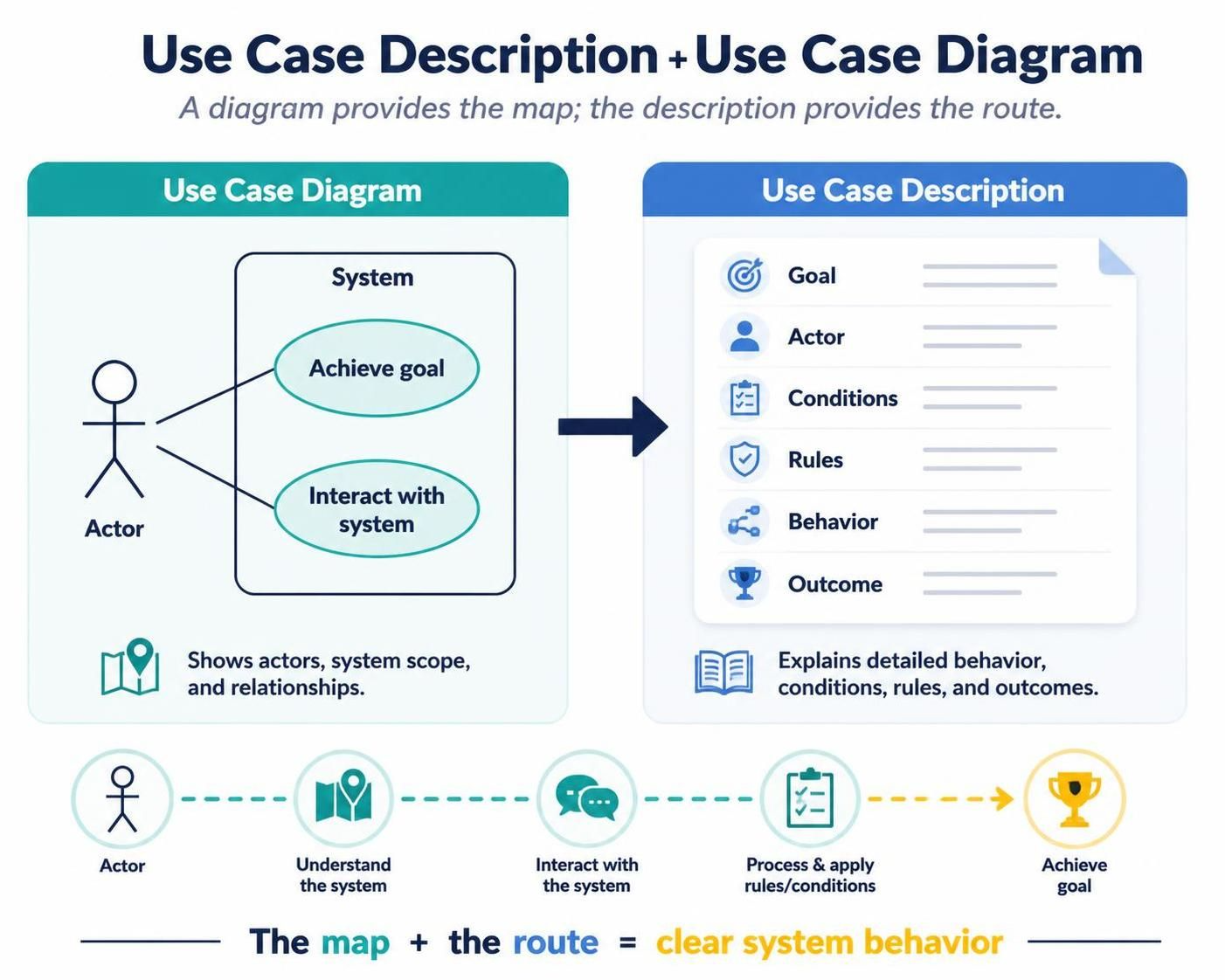
A use case description explains how an actor achieves a goal by interacting with a system. It complements a use case diagram:
-
Use case diagram: Shows actors, system scope, and relationships.
-
Use case description: Explains the detailed behavior, conditions, rules, and outcomes.
A diagram provides the map; the description provides the route.
1. What Is a Use Case?
A use case represents a valuable goal that an external actor accomplishes through a system.
Examples:
-
Customer places an order
-
Employee submits an expense claim
-
Patient schedules an appointment
-
Administrator creates a user account
-
Customer resets a password
A good use case is:
-
Goal-oriented
-
Valuable to an actor
-
Described from the user’s perspective
-
Independent of specific screen layouts
-
Focused on observable system behavior
Poor and improved use case names
| Poor name | Improved name | Reason |
|---|---|---|
| Login screen | Authenticate user | Describes a goal |
| Database update | Record payment | Describes business value |
| Click submit button | Submit expense claim | Avoids UI-specific wording |
| Validate account | Create customer account | Makes the outcome clear |
| Process order | Place order | Uses an actor-centered goal |
Use a short verb–noun phrase such as Submit Expense Claim, Track Shipment, or Approve Loan Application.
2. Key Concepts
2.1 Actors
An actor is an external role that interacts with the system.
An actor may be:
-
A person
-
An organization
-
Another software system
-
A hardware device
-
A scheduled or time-based trigger
Examples:
-
Customer
-
Support Agent
-
Warehouse Clerk
-
Payment Gateway
-
Email Service
-
Administrator
An actor is a role, not necessarily a specific individual. For example, “Customer” is usually better than “Jane Smith.”
Primary and supporting actors
The primary actor initiates the use case to achieve a goal.
The supporting actor assists the system during execution.
Example:
-
Primary actor: Customer
-
Supporting actor: Payment Gateway
-
Use case: Place Order
The customer initiates the order, while the payment gateway authorizes payment.
2.2 System Boundary
The system boundary defines what is inside the system being modeled.
For an online store, the boundary might contain:
-
Browse Products
-
Add Product to Cart
-
Place Order
-
Make Payment
-
Track Order
The following are outside the boundary:
-
Customer
-
Payment Gateway
-
Delivery Company
-
Email Provider
The boundary prevents confusion about system responsibility.
2.3 Use Case
A use case should describe a complete interaction that produces a meaningful result.
For example:
Place Order: A customer selects products, provides delivery information, pays for the order, and receives an order confirmation.
“Validate credit card number” might be a system function, but it is usually too small to be a standalone user goal. It may instead be part of Place Order or Make Payment.
2.4 Preconditions
A precondition states what must already be true before the use case starts.
Examples:
-
The customer has an active account.
-
The product is available for sale.
-
The employee is authenticated.
-
The appointment slot exists.
-
The shopping cart contains at least one item.
A precondition is not an action performed by the use case.
Poor precondition:
The customer logs in.
Better precondition:
The customer is authenticated.
2.5 Postconditions
A postcondition states what is true after the use case finishes.
Examples:
-
The order is recorded.
-
Payment is authorized.
-
A confirmation email is sent.
-
The expense claim has a submitted status.
-
The user account is marked as active.
Postconditions should describe results, not implementation details.
Poor postcondition:
The
orderstable is updated.
Better postcondition:
The order is stored and available for fulfillment.
2.6 Main Success Scenario
The main success scenario, also called the basic flow or happy path, describes the normal successful interaction.
Each step should describe:
-
An interaction between actor and system
-
A system response
-
A meaningful business action
Example:
-
Customer selects products.
-
System displays the current cart.
-
Customer enters delivery information.
-
System validates the delivery information.
-
Customer submits the order.
-
System requests payment authorization.
-
Payment Gateway authorizes the payment.
-
System records the order.
-
System displays the order confirmation.
Avoid interface-specific details unless they are essential to the requirement.
Poor step:
Customer clicks the blue button in the lower-right corner.
Better step:
Customer submits the order.
2.7 Alternative Flows
An alternative flow describes a valid variation of the main scenario.
Examples:
-
Customer chooses store pickup instead of delivery.
-
Customer pays with a saved payment method.
-
Administrator approves a claim with conditions.
-
User authenticates using a one-time code.
Alternative flows may rejoin the main flow.
Example:
A1. Customer uses a saved payment method
At Step 6, the customer selects a saved payment method. The system requests authorization using that method, then continues at Step 7.
2.8 Exception Flows
An exception flow describes an unsuccessful or abnormal condition.
Examples:
-
Payment is declined.
-
Product is out of stock.
-
Authentication fails.
-
External service is unavailable.
-
Required data is invalid.
An exception flow should explain:
-
Where the problem occurs
-
What the system does
-
What the actor sees
-
Whether the use case ends or resumes
Example:
E1. Payment is declined
At Step 7, the Payment Gateway rejects the transaction. The system displays the reason, marks the order as unpaid, and allows the customer to select another payment method.
2.9 Include and Extend Relationships
include
Use include when one use case always invokes another reusable behavior.
Example:
-
Place Order includes Calculate Total
-
Place Order includes Authenticate Customer
-
Withdraw Cash includes Verify PIN
The included behavior is required.
Place Order <<include>> Calculate Total
extend
Use extend when an optional or conditional behavior supplements a base use case.
Example:
-
Place Order may be extended by Apply Discount Code
-
Checkout may be extended by Add Gift Message
The extending behavior is not always executed.
Apply Discount Code <<extend>> Place Order
A useful rule:
-
Include: “This always happens as part of the use case.”
-
Extend: “This may happen under certain conditions.”
Do not use include and extend simply to break every flow into small pieces. Excessive decomposition makes the model difficult to understand.
2.10 Generalization
Generalization represents inheritance between actors or use cases.
Example:
-
Employee is a general actor.
-
Manager is a specialized actor who inherits Employee behavior.
Manager --|> Employee
Use generalization when the specialized element is genuinely a type of the generalized element, not merely because two elements share a few steps.
3. Standard Use Case Description Template
The following template works well for requirements documents, project specifications, and analysis models.
Use Case ID:
Use Case Name:
Goal:
Scope:
Level:
Primary Actor:
Supporting Actors:
Stakeholders and Interests:

Trigger:

Preconditions:

Minimal Guarantees:

Success Guarantees:

Main Success Scenario:
1.
2.
3.

Alternative Flows:
A1.
A2.

Exception Flows:
E1.
E2.

Special Requirements:
- Performance
- Security
- Usability
- Availability
- Compliance

Business Rules:

Data Requirements:

Frequency and Volume:

Assumptions:

Open Questions:

Related Use Cases:
Explanation of the fields
| Field | Purpose |
|---|---|
| Use Case ID | Provides a stable reference, such as UC-001 |
| Use Case Name | Names the actor’s goal |
| Goal | Summarizes the intended business result |
| Scope | Identifies the system or subsystem |
| Level | Indicates whether it is a user goal, summary, or subfunction |
| Primary Actor | Identifies who initiates the use case |
| Supporting Actors | Lists external participants |
| Stakeholders and Interests | Captures what each stakeholder expects |
| Trigger | Explains what starts the use case |
| Preconditions | Defines what must already be true |
| Minimal Guarantees | Describes what remains true after failure |
| Success Guarantees | Describes successful results |
| Main Success Scenario | Documents the normal flow |
| Alternative Flows | Describes valid variations |
| Exception Flows | Describes failures and recovery |
| Special Requirements | Captures nonfunctional constraints |
| Business Rules | Records policies and domain rules |
| Data Requirements | Lists information entered, read, or produced |
| Open Questions | Tracks unresolved issues |
4. Example: Place Order
UC-001 — Place Order
Goal:
Allow a customer to purchase one or more products.
Scope:
Online Store
Level:
User goal
Primary actor:
Customer
Supporting actors:
-
Payment Gateway
-
Inventory Service
-
Email Service
-
Delivery Service
Stakeholders and interests:
-
Customer: Wants to purchase products successfully and receive confirmation.
-
Store: Wants to record a valid order and collect payment.
-
Warehouse: Needs accurate fulfillment information.
-
Payment Gateway: Needs a valid payment request.
-
Delivery Service: Needs a complete delivery address.
Trigger:
The customer submits the shopping cart for checkout.
Preconditions:
-
The customer has at least one item in the cart.
-
Products are available for ordering.
-
The customer provides a valid delivery address.
-
The system can communicate with the payment service.
Minimal guarantees:
-
No unpaid order is treated as confirmed.
-
The customer is informed if the order cannot be completed.
-
Reserved inventory is released if payment fails.
Success guarantees:
-
Payment is authorized.
-
The order is recorded.
-
Inventory is reserved.
-
The customer receives confirmation.
-
Fulfillment information is made available to the warehouse.
Main success scenario
-
Customer reviews the shopping cart.
-
System displays the products, quantities, prices, taxes, shipping cost, and total.
-
Customer provides delivery information.
-
System validates the delivery information.
-
Customer selects a payment method.
-
Customer submits the order.
-
System checks product availability.
-
System requests payment authorization from the Payment Gateway.
-
Payment Gateway authorizes the payment.
-
System creates the order.
-
System reserves the ordered products.
-
System sends an order confirmation to the customer.
-
System displays the order number and estimated delivery date.
Alternative flows
A1. Customer uses a saved address
At Step 3, the customer selects a previously saved address. The system displays the address and continues at Step 4.
A2. Customer uses a saved payment method
At Step 5, the customer selects a saved payment method. The system uses that method and continues at Step 6.
A3. Customer chooses store pickup
At Step 3, the customer selects store pickup instead of delivery. The system displays available stores and pickup dates, then continues at Step 5.
Exception flows
E1. Product is unavailable
At Step 7, the system determines that a product is unavailable. The system identifies the unavailable product, updates the cart, and asks the customer to review the order.
E2. Payment is declined
At Step 9, the Payment Gateway declines the payment. The system does not confirm the order, releases inventory reservations, displays the failure message, and allows the customer to select another payment method.
E3. Payment Gateway is unavailable
At Step 8, the Payment Gateway does not respond within the configured timeout. The system marks the payment attempt as pending, informs the customer, and prevents duplicate order submission.
Business rules
-
An order must contain at least one product.
-
Product quantity must be greater than zero.
-
A product cannot be ordered when available stock is insufficient.
-
Payment must be authorized before an order is confirmed.
-
Prices and taxes are calculated using the current pricing rules.
-
A customer may cancel an order only before fulfillment begins.
Special requirements
-
The order summary should be displayed within two seconds under normal load.
-
Payment information must not be stored in plain text.
-
Duplicate submissions must not create duplicate orders.
-
The system must record an audit trail for payment and order status changes.
5. Use Case Levels
Use case descriptions can be written at different levels of detail.
Summary-level use case
A summary use case describes a broad business process.
Example:
Fulfill Customer Order
This may include:
-
Receive order
-
Pick products
-
Pack order
-
Dispatch order
User-goal-level use case
This is usually the most useful level for requirements analysis.
Example:
Place Order
It describes a goal that a primary actor can achieve in one sitting.
Subfunction-level use case
This describes a smaller reusable system behavior.
Examples:
-
Calculate Order Total
-
Validate Payment
-
Generate Invoice
Subfunction-level use cases are useful when behavior is reused or technically complex, but they should not replace user-goal use cases.
6. Writing High-Quality Use Case Descriptions
Use actor-centered language
Write from the actor’s perspective:
Customer submits an order.
Avoid implementation-centered wording:
OrderController invokes the order service.
The latter belongs in design documentation, not in a business use case.
Keep each step atomic
Avoid combining too many actions:
Customer enters details, selects payment, confirms the order, and receives an email.
Improve it by separating the interaction:
-
Customer enters delivery information.
-
System validates the information.
-
Customer selects a payment method.
-
Customer confirms the order.
-
System sends a confirmation.
Describe observable behavior
A reader should be able to determine whether the requirement has been implemented.
Weak:
System processes the request.
Stronger:
System validates the request, records the claim, assigns it a claim number, and displays the submission status.
Avoid premature UI design
Use:
Customer provides delivery information.
Rather than:
Customer enters the address into the text box and clicks the green Continue button.
The second version unnecessarily constrains the interface.
Keep the main flow successful
Do not fill the basic flow with every possible error. Put errors into exception flows.
Identify business rules separately
Business rules often apply to multiple use cases. Keeping them separate prevents repeated, inconsistent text.
Make failure behavior explicit
For every important failure, specify:
-
Whether data is saved
-
Whether a transaction is rolled back
-
Whether the actor can retry
-
Whether an administrator is notified
-
Whether the use case ends or resumes
7. From Requirements to Use Cases
A practical workflow is:
-
Identify the system being modeled.
-
List external actors.
-
Ask what each actor wants to accomplish.
-
Convert each goal into a use case name.
-
Define the system boundary.
-
Write the main success scenario.
-
Add alternative and exception flows.
-
Add business rules and special requirements.
-
Draw the use case diagram.
-
Review the model with stakeholders.
-
Link use cases to requirements, tests, and design artifacts.
Actor-goal analysis
| Actor | Goal | Candidate use case |
|---|---|---|
| Customer | Buy products | Place Order |
| Customer | Check shipment progress | Track Order |
| Support Agent | Resolve a complaint | Resolve Complaint |
| Warehouse Clerk | Prepare an order | Pick Order |
| Payment Gateway | Authorize payment | Authorize Payment |
| Administrator | Control access | Manage User Accounts |
A useful question is:
What business result does this actor need from the system?
8. Use Case Diagram Notation
The most common elements are:
-
Actor: External role
-
Use case: System capability or actor goal
-
System boundary: Scope of the system
-
Association: Actor participates in a use case
-
Include: Required reused behavior
-
Extend: Optional or conditional behavior
-
Generalization: Specialized actor or use case
A use case diagram should not attempt to show:
-
Every workflow step
-
Database tables
-
Class attributes
-
Detailed business rules
-
Screen layouts
-
Internal algorithms
Those belong in activity diagrams, class diagrams, sequence diagrams, or written requirements.
9. PlantUML Diagram Example
The following example models the Place Order use case and related behavior.
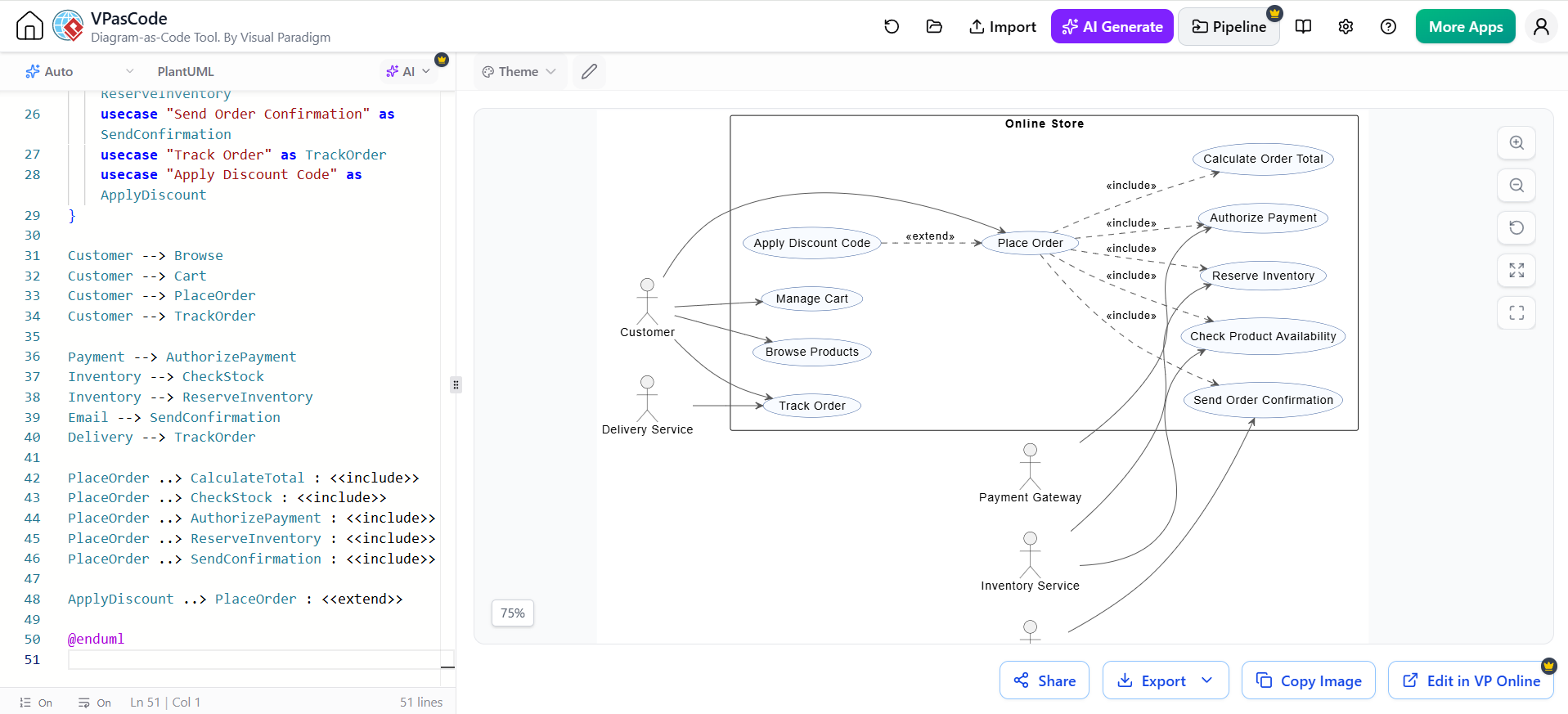
@startuml
left to right direction

skinparam packageStyle rectangle
skinparam shadowing false
skinparam usecase {
    BackgroundColor #F8FBFF
    BorderColor #2F5597
    ArrowColor #555555
}

actor Customer
actor "Payment Gateway" as Payment
actor "Inventory Service" as Inventory
actor "Email Service" as Email
actor "Delivery Service" as Delivery

rectangle "Online Store" {
    usecase "Browse Products" as Browse
    usecase "Manage Cart" as Cart
    usecase "Place Order" as PlaceOrder
    usecase "Calculate Order Total" as CalculateTotal
    usecase "Check Product Availability" as CheckStock
    usecase "Authorize Payment" as AuthorizePayment
    usecase "Reserve Inventory" as ReserveInventory
    usecase "Send Order Confirmation" as SendConfirmation
    usecase "Track Order" as TrackOrder
    usecase "Apply Discount Code" as ApplyDiscount
}

Customer --> Browse
Customer --> Cart
Customer --> PlaceOrder
Customer --> TrackOrder

Payment --> AuthorizePayment
Inventory --> CheckStock
Inventory --> ReserveInventory
Email --> SendConfirmation
Delivery --> TrackOrder

PlaceOrder ..> CalculateTotal : <<include>>
PlaceOrder ..> CheckStock : <<include>>
PlaceOrder ..> AuthorizePayment : <<include>>
PlaceOrder ..> ReserveInventory : <<include>>
PlaceOrder ..> SendConfirmation : <<include>>

ApplyDiscount ..> PlaceOrder : <<extend>>

@enduml
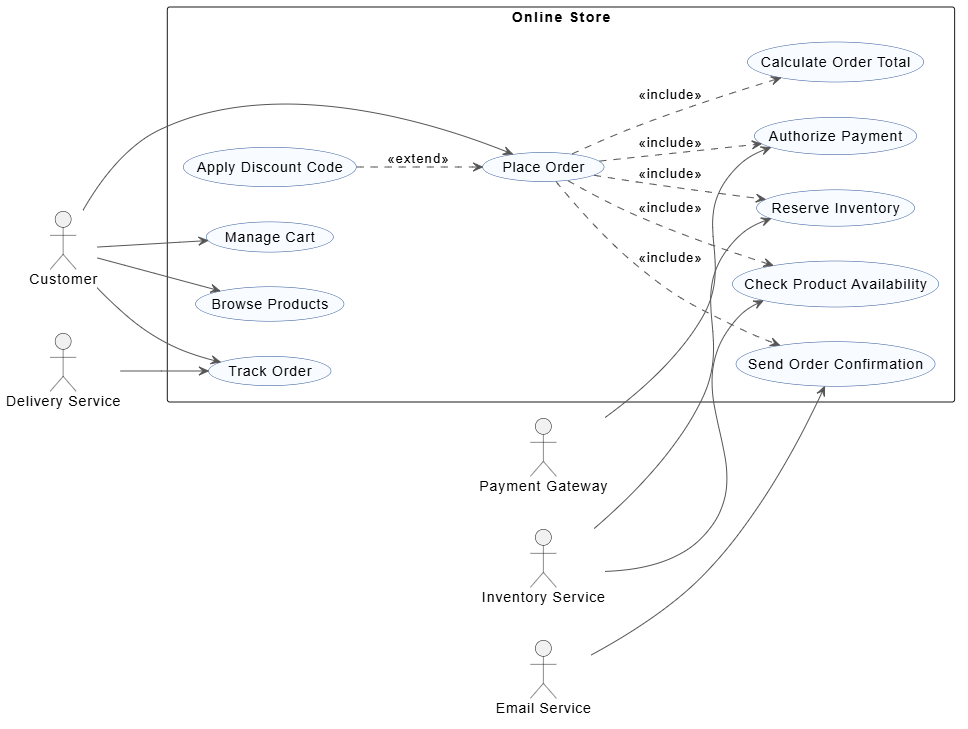
Interpretation
-
The Customer initiates
Place Order. -
Place Orderalways includes calculation, stock checking, payment authorization, inventory reservation, and confirmation. -
Apply Discount Codeis optional, so it extendsPlace Order. -
External services participate in specific system behaviors.
-
The system boundary is the
Online Storerectangle.
The exact placement of elements is controlled by the rendering engine. The important modeling decisions are the actors, use cases, boundaries, and relationships.
10. Creating the Diagram in Visual Paradigm VPasCode
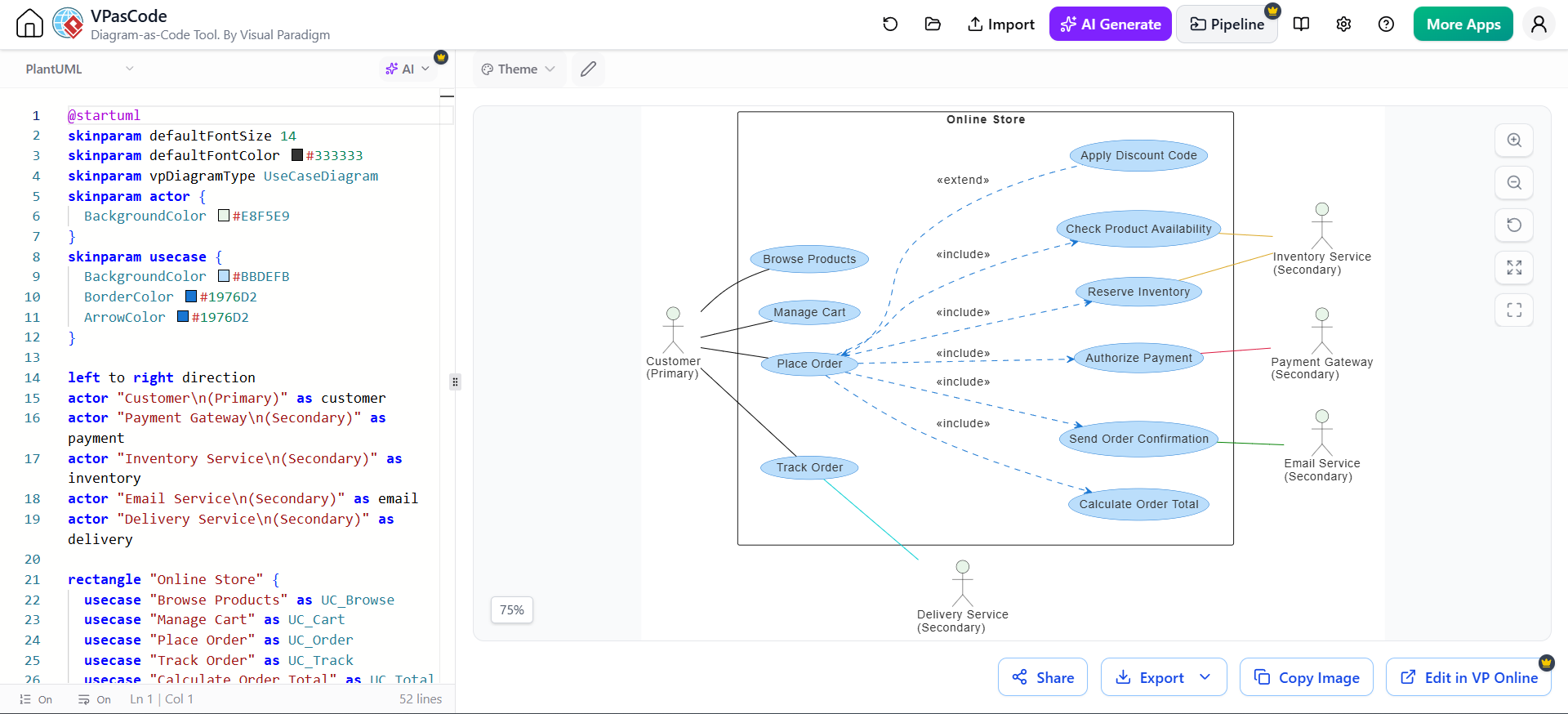
VPasCode is a browser-based text-to-diagram platform that supports PlantUML, Mermaid, Graphviz, and other diagram formats. It provides source editing and live rendering, allowing the diagram to update as the code changes.
Basic workflow
-
Open the VPasCode editor.
-
Create a new PlantUML diagram.
-
Paste the PlantUML source.
-
Confirm that the editor recognizes the PlantUML syntax.
-
Review the live preview.
-
Edit actors, use cases, relationships, and styling in the source pane.
-
Export or copy the rendered diagram.
-
Add the diagram to project documentation.
VPasCode supports PlantUML use case diagrams and offers real-time rendering in the browser. It also provides examples and styling options for PlantUML diagrams.
Example prompt for AI-assisted generation
If using an AI diagram-generation feature, a useful prompt is:
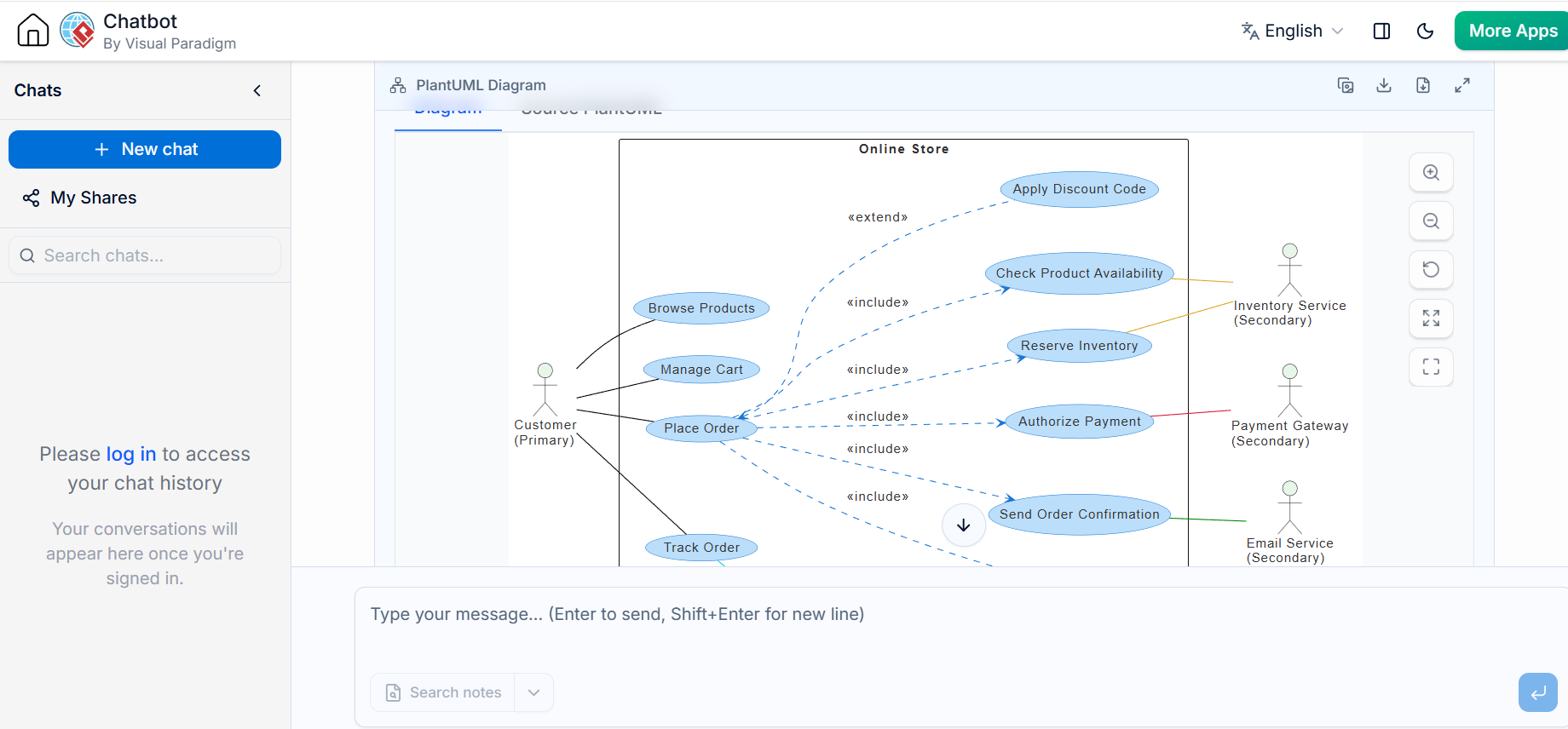
Create a PlantUML use case diagram for an online store.

Primary actor:
- Customer

Supporting actors:
- Payment Gateway
- Inventory Service
- Email Service
- Delivery Service

Main use cases:
- Browse Products
- Manage Cart
- Place Order
- Track Order

Place Order must include:
- Calculate Order Total
- Check Product Availability
- Authorize Payment
- Reserve Inventory
- Send Order Confirmation

Apply Discount Code should extend Place Order.

Use a system boundary named Online Store.
Treat generated code as a starting point. Review whether:
-
Actors are genuinely external
-
Use cases represent user goals
-
includeandextendare used correctly -
The system boundary is accurate
-
Relationships reflect real business behavior
VPasCode also supports moving between text-based diagram editing and Visual Paradigm’s graphical modeling tools, which can be useful when teams want source-based editing for versioning and visual editing for layout refinement.
11. Maintaining PlantUML Use Case Diagrams
Use meaningful aliases
Aliases make relationships easier to maintain:
usecase "Place Order" as PlaceOrder
Customer --> PlaceOrder
Add comments
' Core customer transaction
usecase "Place Order" as PlaceOrder
Comments help other team members understand the source and maintain the diagram.
Keep the diagram focused
If a diagram contains too many use cases:
-
Create a context diagram
-
Create separate diagrams by business area
-
Use package groupings
-
Link related diagrams through documentation
-
Avoid showing every subfunction at the highest level
Use consistent naming
Choose one convention and apply it consistently:
-
Place Order -
Cancel Order -
Track Order
Avoid mixing styles such as:
-
Place Order -
OrderCancellation -
tracking_function
Store source with the project
A typical repository structure might be:
docs/
  use-cases/
    UC-001-place-order.md
    UC-002-track-order.md
  diagrams/
    online-store-use-cases.puml
Keeping the .puml source under version control makes changes reviewable and reproducible.
12. Traceability
A mature requirements process connects use cases to other project artifacts.
| Use case | Requirement | Test case | Design component |
|---|---|---|---|
| Place Order | REQ-ORDER-001 | TC-ORDER-001 | Order Service |
| Authorize Payment | REQ-PAY-002 | TC-PAY-002 | Payment Adapter |
| Track Order | REQ-TRACK-001 | TC-TRACK-001 | Tracking Service |
Traceability helps answer:
-
Which requirements are covered?
-
Which use cases have not been tested?
-
Which design components support a business goal?
-
What is affected if a requirement changes?
13. Common Mistakes
Modeling internal components as actors
A database or internal service is not usually an actor if it is inside the system boundary.
An actor must be external to the system being modeled.
Treating screens as use cases
A screen is a user-interface element, not necessarily a user goal.
Use:
Submit Expense Claim
Instead of:
Expense Claim Screen
Using include for every shared step
Shared wording alone does not justify an included use case. Use include when the behavior is mandatory and independently meaningful.
Using extend for normal steps
If a behavior always occurs, it should not be modeled as an extension.
Writing implementation details
Avoid references to:
-
Controllers
-
Database tables
-
API endpoints
-
Classes
-
Internal methods
unless the document is specifically a technical design.
Omitting failure behavior
A use case is incomplete if it explains only success. Payment rejection, invalid data, timeouts, authorization failures, and unavailable resources should be addressed.
Making use cases too broad
“Manage the Entire Business” is not actionable. Break broad goals into user-goal-level use cases.
Making use cases too small
“Validate field” and “Display message” are generally system steps, not independent actor goals.
14. Review Checklist
Before approving a use case description, verify:
Scope and actors
-
Is the system boundary clear?
-
Are all external actors identified?
-
Are actors roles rather than individual names?
-
Are supporting systems modeled only when they are external?
Goal quality
-
Does the use case provide value to the primary actor?
-
Is the name a clear verb–noun phrase?
-
Is the use case at an appropriate level?
Flow quality
-
Does the main scenario describe a successful outcome?
-
Is each step atomic and observable?
-
Are alternative paths documented?
-
Are exception paths documented?
-
Is recovery behavior clear?
Conditions and results
-
Are preconditions testable?
-
Are success guarantees explicit?
-
Are minimal guarantees defined?
-
Are business rules separated from procedural steps?
Diagram quality
-
Are all use cases inside the correct boundary?
-
Are actor associations meaningful?
-
Are
includerelationships mandatory? -
Are
extendrelationships optional or conditional? -
Is the diagram readable without excessive detail?
Requirements quality
-
Can each important step be tested?
-
Are nonfunctional requirements included?
-
Are unresolved questions recorded?
-
Is the use case linked to requirements and test cases?
15. Recommended Deliverable Structure
For a complete project package, use the following structure:
1. System context
2. Actor catalog
3. Use case diagram
4. Use case catalog
5. Detailed use case descriptions
6. Business rules
7. Nonfunctional requirements
8. Traceability matrix
9. Open questions and assumptions
10. PlantUML source files
A strong use case description is precise enough for analysts, understandable to stakeholders, and testable by a quality-assurance team. The best workflow is to use the written description to establish behavior, the use case diagram to communicate scope and relationships, and PlantUML in VPasCode to keep the visual model easy to edit and maintain.
Reference
-
How to Create UML Use Case Diagram in Visual Paradigm: A step-by-step guide covering actor creation, system boundaries, associations, and include/extend relationships .
-
Ultimate Guide to Use Case Diagrams in 2026: Comprehensive guide explaining core notation, best practices, and AI-driven modeling workflows .
-
Bridging Requirements and Design: A Practical Guide to Use Case Modeling: Real-world case study demonstrating PlantUML implementation and core modeling concepts .
-
Master AI-Driven Use Case Diagrams: A Short Tutorial: Tutorial on using the AI-powered tool to generate and refine use case diagrams from domain descriptions .
-
Practical 2: Hands-on Use Case Modeling: Hands-on exercise for building a Library Management System diagram manually and with AI .
-
Use Case Diagram Made Easy: Overview of Visual Paradigm’s use case diagram features including flow of events editor and activity diagram generation .