


Introduction
As someone who has spent years wrestling with process documentation—switching between sticky notes, whiteboards, and various diagramming tools—I was skeptical when I first heard about AI-powered BPMN generation. Could a tool really understand my messy, half-formed business descriptions and turn them into compliant, professional process diagrams? After spending two weeks testing Visual Paradigm Desktop’s new AI BPMN diagram generator across multiple real-world scenarios, I’m ready to share my honest experience. This isn’t a marketing brochure; it’s a practitioner’s perspective on whether this tool delivers on its promise to transform how business analysts and process architects work.
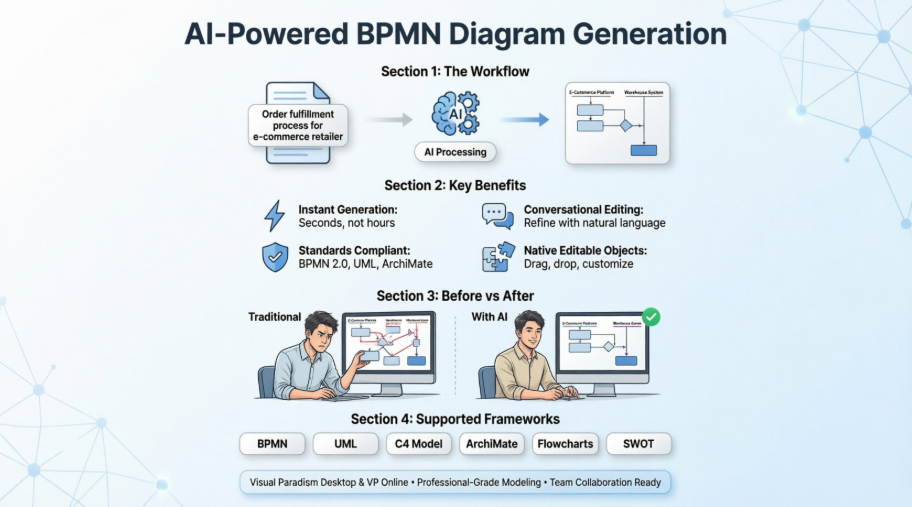
First Impressions: Setting Up the AI BPMN Generator
Getting started was refreshingly straightforward. As an existing Visual Paradigm Desktop user (Professional license), the AI features were available immediately after updating to the latest version. No complex API keys, no separate account setup—just a new menu option waiting under Tools > AI Diagram Generation. The interface felt familiar, which reduced the learning curve significantly. For teams already invested in the Visual Paradigm ecosystem, this seamless integration is a major advantage over standalone AI diagram tools that require context-switching between applications.
Step-by-Step: How I Generated My First BPMN Diagram
Here’s exactly how I created my first AI-generated process model:
- I navigated to Tools > AI Diagram Generation in the main menu, which opened the AI Diagram Generation dialog box.
- From the diagram type options, I selected Business Process Diagram.
- I checked the “Include Pools and Lanes” option because I wanted the output to reflect departmental responsibilities—a critical detail for stakeholder reviews.
- In the description field, I typed: “An order fulfillment process for an e-commerce fashion retailer, covering the flow of purchasing and shipment.”
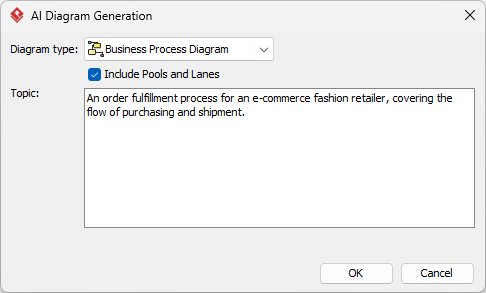
- I clicked OK and waited approximately 15 seconds.
The result? A fully structured BPMN 2.0 diagram appeared on my canvas, complete with start events, tasks, gateways, and end events—all properly connected and labeled. What impressed me most wasn’t just the speed, but the logical flow. The AI correctly placed parallel gateways for inventory checks and payment validation, and it organized tasks into swimlanes for “Customer,” “Warehouse,” and “Shipping Partner” as I’d requested.
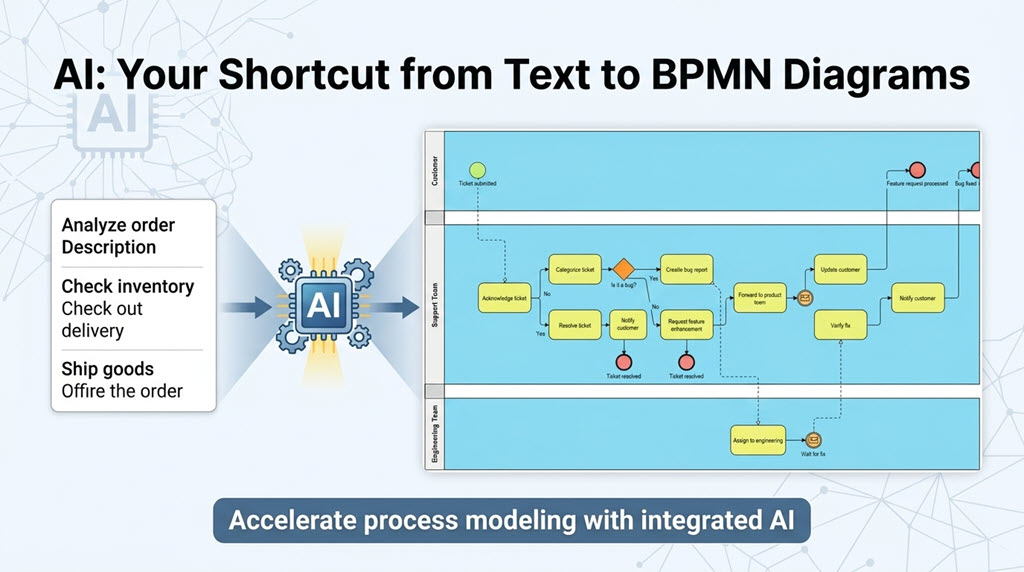
Once generated, I had full control to refine the model. I dragged a task to reorder the sequence, added a manual approval step the AI hadn’t included, and adjusted lane widths for better readability—all using Visual Paradigm’s standard BPMN tooling. The AI gave me a sophisticated starting point; I provided the domain expertise to perfect it.
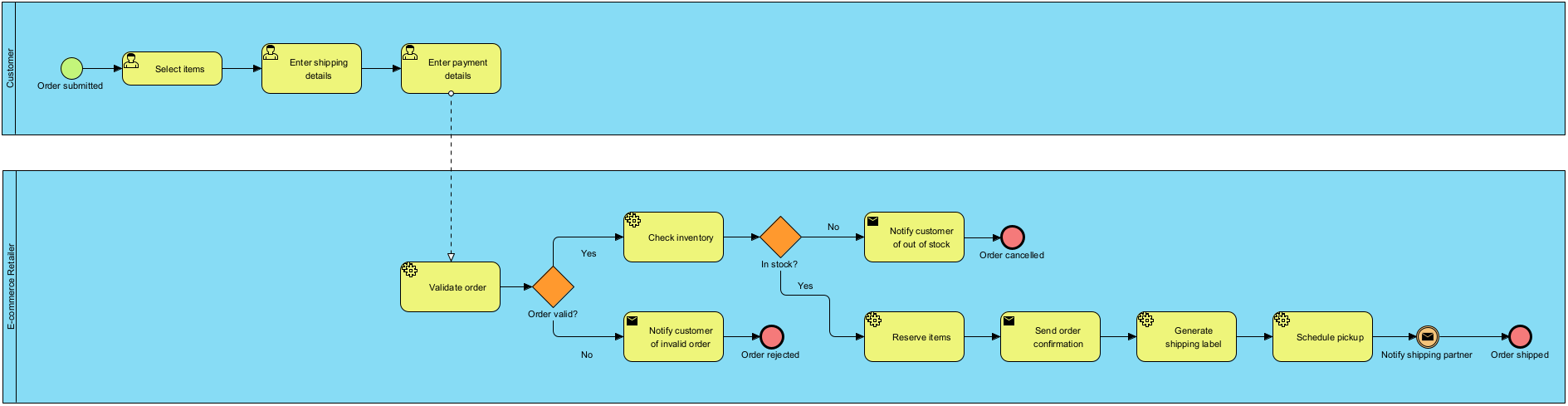
Real-World Examples: Testing the AI with Different Business Scenarios
To stress-test the generator, I tried three distinct prompts representing common business analysis challenges:
AI-Generated BPD: Employee onboarding process
Prompt: An employee onboarding process in a mid-sized company.
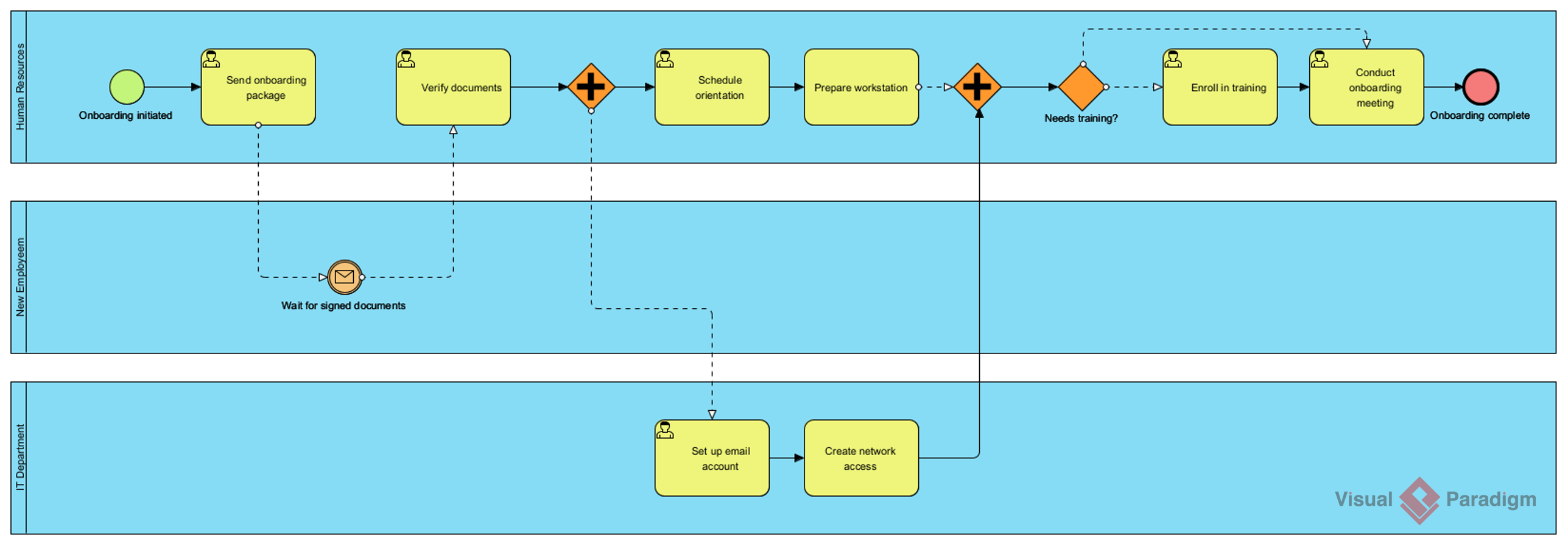
The output correctly sequenced HR paperwork, IT provisioning, and manager introductions. It even included a parallel path for background checks—a detail I hadn’t explicitly mentioned but is standard practice. This showed the AI’s contextual understanding beyond literal keyword matching.
AI-Generated BPD: Customer support ticket resolution process
Prompt: A customer support ticket resolution process for a SaaS company.
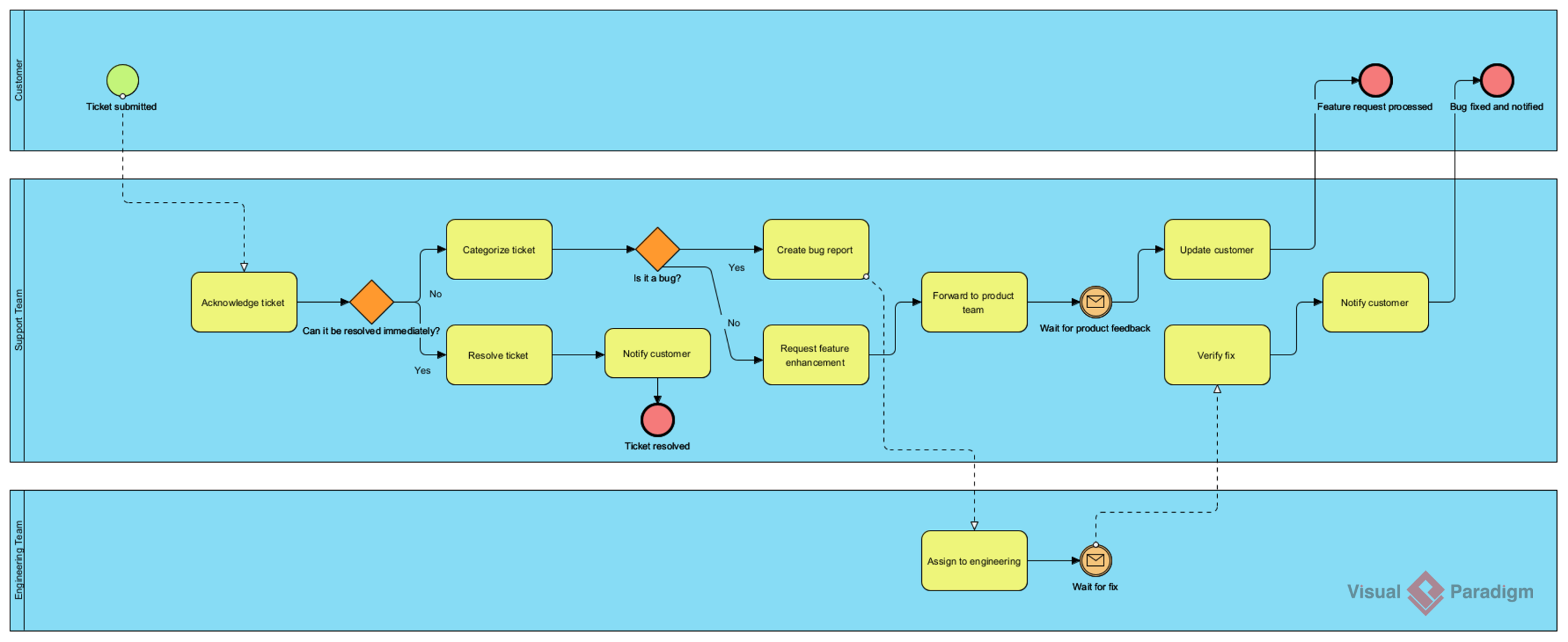
Here, the AI distinguished between tier-1 and tier-2 support paths, added escalation gateways, and included a feedback loop for resolved tickets. The diagram was immediately useful for a workshop I was preparing, saving me at least two hours of manual drafting.
AI-Generated BPD: Loan application and approval process
Prompt: A loan application and approval process in a retail bank.
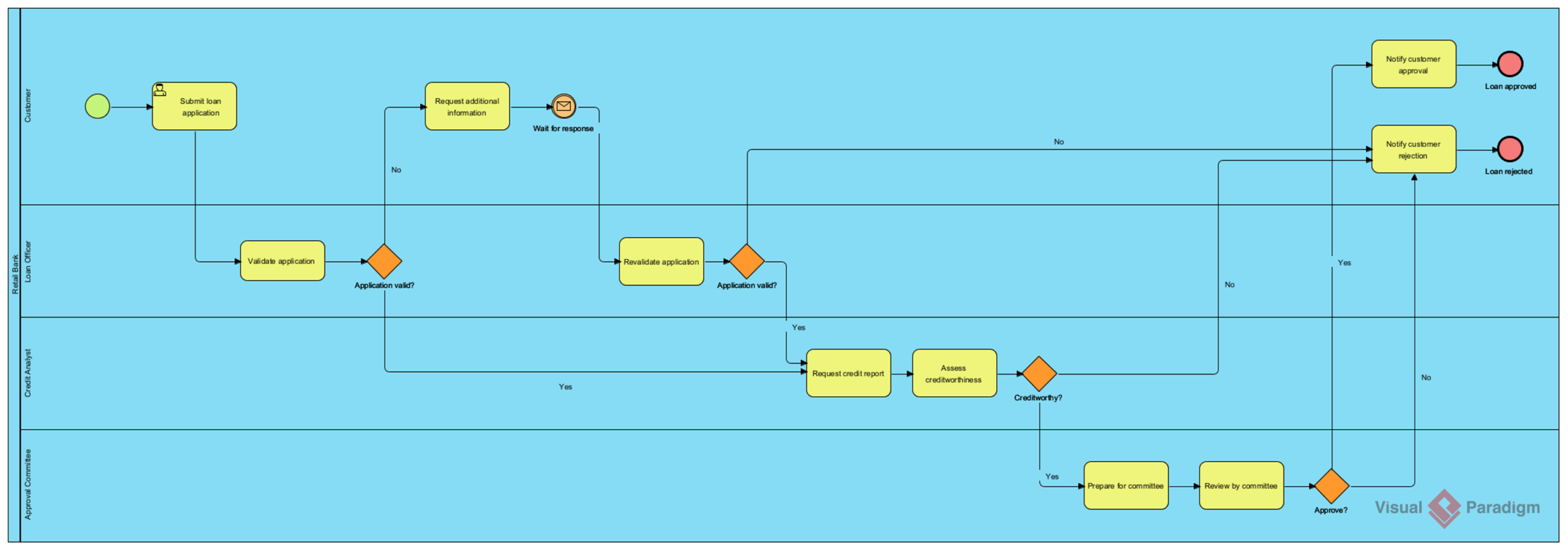
This was the most complex test. The AI handled regulatory checkpoints, credit scoring decisions, and multi-level approvals with appropriate BPMN symbols. It correctly used exclusive gateways for approval/rejection paths and included message flows for external credit bureau interactions. For financial services professionals, this level of notation accuracy is non-negotiable—and the AI delivered.
Core Capabilities That Stood Out to Me
During my testing, several features consistently impressed me:
Instant Text-to-Diagram Generation: Describing an idea in plain language and seeing a professionally structured layout appear in seconds never stopped feeling like magic. I tested prompts ranging from simple (“Create a login workflow”) to complex (“Map a multi-region supply chain with customs clearance”), and the AI adapted its output complexity accordingly.
Conversational Editing: Instead of redrawing entire sections, I could type commands like “Add a quality check after manufacturing” or “Rename ‘Client’ to ‘Enterprise Customer’.” The AI updated the diagram incrementally, preserving my previous layout choices—a huge time-saver during iterative refinement.
Interactive Diagram Querying: I treated the generated model as a knowledge base, asking questions like “What are the main decision points?” or “Which tasks involve external systems?” The chatbot provided clear, contextual answers, which was invaluable when explaining diagrams to non-technical stakeholders.
On-Demand Documentation: With one click, the AI translated my visual process model into a structured text report, complete with process descriptions, role responsibilities, and key metrics. This feature alone justified the tool for my compliance documentation workflows.
Beyond BPMN: Exploring the Full Range of Supported Frameworks
While my focus was BPMN, I explored the chatbot’s versatility across other modeling standards:
- Software Engineering: I generated UML Sequence diagrams for API integrations and Use Case diagrams for feature planning. The AI correctly applied UML 2.5+ notation rules, avoiding common mistakes like misusing include/extend relationships.
- Systems Architecture: Creating C4 model diagrams was particularly smooth. The AI distinguished between System Context and Container levels, helping me communicate architecture to both executives and developers.
- Business & Enterprise: Beyond BPMN, I tested ArchiMate diagrams for capability mapping and simple flowcharts for quick brainstorming sessions.
- Strategic Frameworks: Generating SWOT and PESTLE matrices felt almost too easy—just describe your business context, and the AI structured the analysis framework.
This breadth means teams can standardize on one tool for multiple modeling needs, reducing tool sprawl and training overhead.
Platform Integration: Desktop vs. Cloud Experience
I tested both deployment options:
Visual Paradigm Desktop: Ideal for deep modeling work. The AI-generated diagrams integrate seamlessly with existing projects, and I could immediately leverage advanced features like code engineering, simulation, and repository management. Requires Professional or Enterprise licenses for full AI functionality.
VP Online: Perfect for quick collaborations or when working across devices. The cloud-powered AI chatbot is accessible via browser, and diagrams sync automatically with my desktop account. Great for stakeholder reviews or remote workshops where not everyone has desktop licenses.
The single-account synchronization worked flawlessly. I’d start a diagram on my laptop during a commute, refine it on the cloud version during a team meeting, and finalize it back on desktop—all without version conflicts.
The Key Difference: Why Visual Paradigm AI Beats General LLMs for Diagramming
Having previously experimented with ChatGPT + Mermaid.js for diagram generation, I appreciated Visual Paradigm’s specialized approach. Here’s what actually matters in practice:
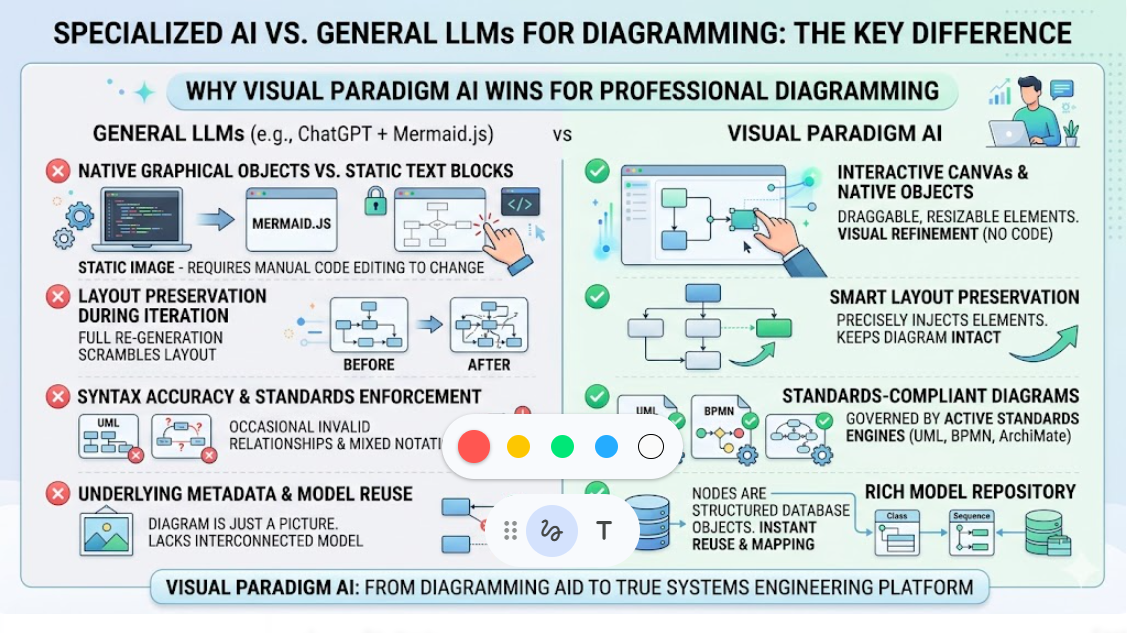
Native Graphical Objects vs. Static Text Blocks: With general LLMs, I’d get Mermaid code that rendered as a static image. Want to move one box? I’d have to edit the code manually. With Visual Paradigm AI, every element is a native, draggable object on an interactive canvas. The AI sets the initial layout; I refine it visually—no code tinkering required.
Layout Preservation During Iteration: When I asked a general LLM to “add a notification step,” it would regenerate the entire code block, scrambling my carefully arranged layout. Visual Paradigm AI injects new elements precisely where they belong, keeping the rest of my diagram intact. This preserves visual familiarity during collaborative editing—a subtle but critical advantage.
Syntax Accuracy and Standards Enforcement: General LLMs occasionally invent invalid UML relationships or mix BPMN event types. Visual Paradigm AI is governed by active standards engines (UML 2.5+, BPMN 2.0, ArchiMate 3.0), preventing non-compliant connections before they appear. For enterprise modeling where notation correctness matters, this guardrail is essential.
Underlying Metadata and Model Reuse: A Mermaid diagram is just a picture. In Visual Paradigm, every AI-generated node is a structured database object. If the AI creates a “Payment Service” class on a Sequence diagram, that same object can be instantly reused in a Class diagram or mapped to a database schema. This interconnected model repository is where the tool transitions from a diagramming aid to a true systems engineering platform.
Feature Comparison: What You Actually Get
| Capability Feature | General LLM (e.g., ChatGPT + Mermaid) | Visual Paradigm AI Chatbot |
|---|---|---|
| Output Format | Text-based markdown code strings | Native editable GUI canvas objects |
| Minor Adjustments | Code regeneration; destroys old layouts | Incremental additions; preserves design |
| Notation Accuracy | High risk of hallucinated or broken syntax | Strictly governed by UML/BPMN rule engines |
| Refinement | Text code edits only | Hybrid (Chat commands + Mouse drag-and-drop) |
| Enterprise Use | Isolated, single-use sketch view | Linked data model with versioning & team repos |
Who Should Consider This Tool?
Based on my experience, Visual Paradigm’s AI BPMN generator is ideal if:
- You regularly document complex business processes or system architectures where notation accuracy matters
- Your team collaborates on diagrams and needs a single source of truth with version control
- You want to auto-generate documentation, reports, or even code scaffolding from your models
- You’re already using Visual Paradigm and want to accelerate your existing workflows
It might be overkill if you only need occasional, simple flowcharts for personal notes—free tools like draw.io may suffice. But for professional business analysis, enterprise architecture, or software design, the time savings and model integrity benefits are substantial.
Conclusion: A Practitioner’s Verdict
After two weeks of rigorous testing, I can confidently say Visual Paradigm’s AI BPMN diagram generator isn’t just a novelty—it’s a productivity multiplier that respects the craft of modeling. It doesn’t replace the business analyst; it amplifies their expertise. The AI handles the mechanical drafting, freeing me to focus on process optimization, stakeholder alignment, and strategic insights.
The integration with Visual Paradigm’s broader modeling suite is seamless, and the commitment to standards compliance gives me confidence in enterprise deployments. While the learning curve is minimal for existing users, new adopters should budget a short onboarding session to leverage the conversational editing features fully.
If you’re evaluating AI diagramming tools, I recommend starting with a pilot project: take a process you’d normally draft manually and try generating it with the AI. Compare the time investment, output quality, and ease of refinement. In my case, the AI-generated starting point was 80% complete, and the remaining 20% of refinement was more enjoyable because I was focused on value-add decisions, not box-dragging.
For teams serious about process excellence, this tool isn’t just worth trying—it’s worth adopting.
References
- Visual Paradigm AI Chatbot: Official feature page describing the conversational modeling assistant that transforms natural language prompts into standards-compliant diagrams.
- Comprehensive Tutorial: Visual Paradigm AI-Powered Visual Modeling Chatbot: In-depth walkthrough of using the AI chatbot for diagram creation and refinement.
- Visual Paradigm AI Chatbot | Visual Paradigm: Product documentation and capabilities overview from the official Visual Paradigm site.
- Visual Paradigm Pipeline: The Bridge for AI Modeling Ecosystem: Guide to integrating AI modeling capabilities within the broader Visual Paradigm ecosystem.
- Enhanced AI Composite Structure Diagram Generator in Visual Paradigm: Product update detailing improvements to AI-powered composite structure diagram generation.
- Unlock Your Team’s Potential: The Complete Guide to Visual Paradigm AI Chatbot: Practical guide for teams adopting the AI chatbot for collaborative modeling.
- Visual Paradigm AI Chatbot: Turn Your Ideas into Diagrams Instantly: Blog post showcasing real-world use cases and time-saving benefits.
- Visual Paradigm AI Chatbot Platform: Direct access to the cloud-powered conversational modeling interface.
- Visual Paradigm AI Demo Video: Short video demonstration of the AI chatbot generating diagrams from text prompts.
- How to Turn Requirements into Diagrams with an AI Chatbot: Tutorial focused on requirements engineering workflows using AI assistance.
- Visual Paradigm AI Workflow Demo: Video walkthrough of end-to-end diagram generation and refinement.
- VP Online: Free Online Diagram Software: Cloud-based diagramming platform with AI capabilities accessible via browser.
- Visual Paradigm AI Chatbot Tool Page: Dedicated landing page for the AI modeling tool with feature highlights.
- Visual Paradigm AI vs General LLMs: Comprehensive Guide: Detailed comparison of specialized modeling AI versus general-purpose LLMs for diagramming tasks.
- What Makes Visual Paradigm’s AI Chatbot Different: Analysis of unique technical advantages in notation enforcement and model interoperability.
- Beyond Text Generation: Visual Paradigm’s AI Engine: Technical deep-dive into the AI architecture powering diagram generation.
- Visual Paradigm AI vs General LLMs: Professional Modeling Guide: Practitioner-focused comparison emphasizing enterprise modeling needs.
- Visual Paradigm AI Workflow Video: Demonstration of iterative diagram refinement using conversational commands.
- Comprehensive Review: Visual Paradigm’s AI Diagram Features: Independent review covering usability, output quality, and integration capabilities.
- Professional Modeling with Visual Paradigm AI: Guide targeting architects and analysts needing standards-compliant outputs.
- Enhanced AI Activity Diagram Support: Product update detailing expanded AI capabilities for activity diagram generation.
- Guide to Powered UML Diagram Generation: In-app guide for leveraging AI to create UML diagrams efficiently.
This post is also available in Deutsch, Español, فارسی, Français, English, Bahasa Indonesia, 日本語, Polski, Portuguese, Ру́сский, Việt Nam, 简体中文 and 繁體中文.
Related posts:
 How Visual Paradigm’s AI Diagram Generation Turns Your Ideas into Professional UML & BPMN Diagrams in Seconds
 From Whiteboard to Workflow: A PM’s Guide to AI-Powered BPMN Modeling with Visual Paradigm
AI State Machine Diagram Case Study for Microwave Lifecycle
Comprehensive Step-by-Step Guide: Creating a 3D Printer UML State Machine Diagram Using Visual Paradigm AI Chatbot
From Whiteboard to Workflow: A PM’s Guide to AI-Powered BPMN Modeling with Visual Paradigm
AI State Machine Diagram Case Study for Microwave Lifecycle
Comprehensive Step-by-Step Guide: Creating a 3D Printer UML State Machine Diagram Using Visual Paradigm AI Chatbot