


Introduction
Business Process Model and Notation (BPMN) serves as the universal language for process modeling, bridging the gap between technical developers and business stakeholders. However, as organizational workflows grow in complexity, diagrams can quickly become cluttered and unreadable. The solution lies in effective abstraction through sub-processes. A sub-process is a compound activity that encapsulates a collection of tasks, gateways, and events into a single manageable unit. By splitting complex processes into hierarchical levels, modelers can maintain high-level clarity while preserving detailed logic for specific areas of interest.
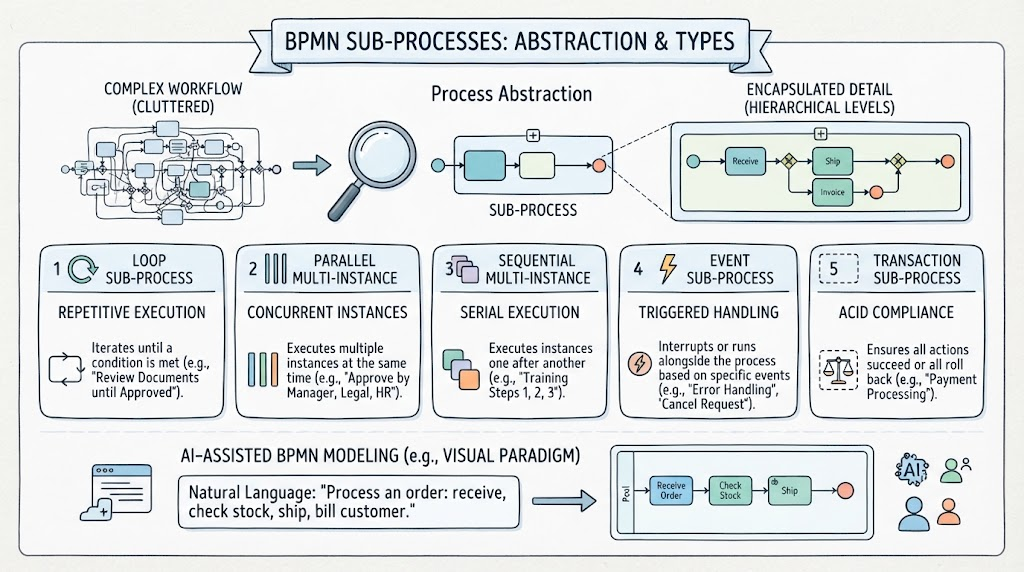
Understanding the distinct types of sub-process markers is essential for accurate modeling. Each marker conveys specific behavioral semantics regarding repetition, parallelism, error handling, or flexibility. This guide explores the five primary sub-process types defined in BPMN 2.0, providing key concepts and practical examples to help you select the right structure for your business needs. Additionally, we will examine how modern AI-assisted tooling, such as Visual Paradigm, accelerates the creation of these sophisticated models by converting natural language narratives directly into compliant BPMN diagrams.
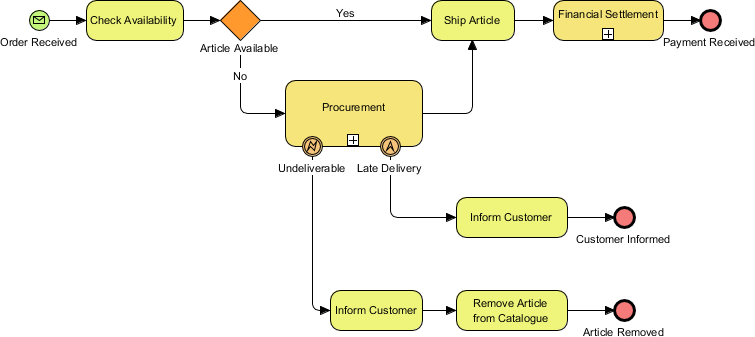
BPMN specifies five types of markers for Sub-Processes. We will cover each of them in the sections below.

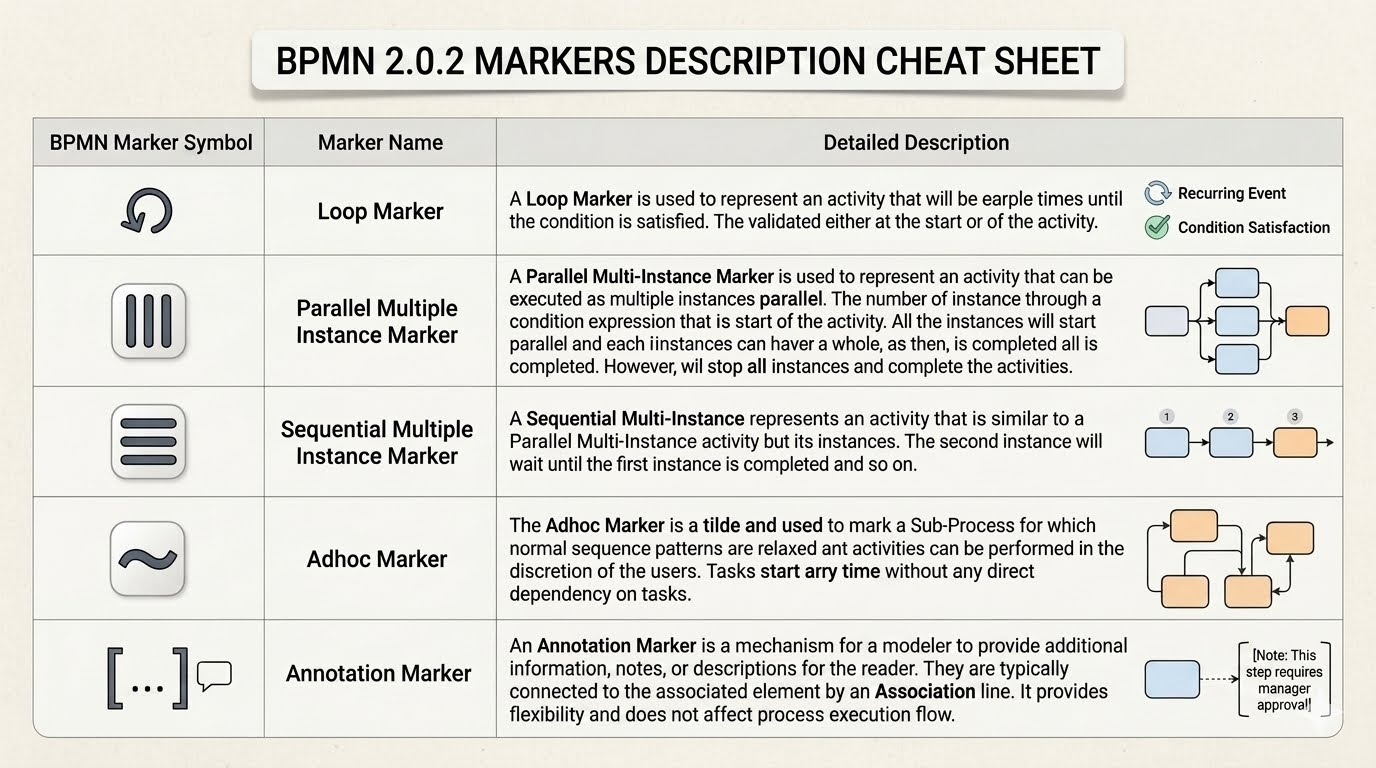
BPMN 2.0.2 Marker Types: A Quick Reference
|
Marker Symbol
|
Marker Name
|
Behavioral Summary
|
|---|---|---|
|
Loop (Circular Arrow)
|
Loop Marker
|
Indicates sequential repetition of an activity until a specific condition is met. The condition is evaluated either at the start or end of each iteration.
|
|
Parallel Multi-Instance (Three Vertical Bars)
|
Parallel Multiple Instance Marker
|
Spawns multiple identical instances of an activity that execute simultaneously. All instances must complete before the process proceeds to the next step.
|
|
Sequential Multi-Instance (Three Horizontal Bars)
|
Sequential Multiple Instance Marker
|
Executes multiple instances of an activity one after another. Each instance waits for the previous one to finish before starting, similar to a loop but with a predefined instance count.
|
|
Ad Hoc (Tilde ~)
|
Adhoc Marker
|
Denotes a flexible sub-process where internal activities have no enforced sequence. Tasks can be performed in any order, repeated, or skipped based on user discretion or runtime conditions.
|
|
Annotation ([…] with Note Icon)
|
Annotation Marker
|
Provides supplementary text, notes, or descriptions attached via an association line. This marker adds context for readers without altering the executable process flow.
|
Loop Sub-Processes
Key Concepts
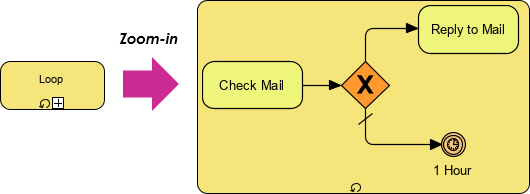
A sub-process with a loop marker indicates that the activity repeats itself sequentially based on a defined condition. Unlike multi-instance patterns, loop iterations occur one after another; the next iteration cannot begin until the current one completes. This type is ideal when data or state must be preserved and updated across iterations, or when exceptional conditions might interrupt the cycle.
Practical Example: Email Management
Consider a “Check Mail” process where an employee checks their inbox every hour. If new mail exists, they reply to it before returning to the check state. The loop marker effectively models this cyclical behavior. Because the process loops back immediately after replying, there is no wait state if new mail arrives during the reply phase. This optimizes throughput by ensuring continuous processing without artificial delays between cycles.
Multi-Instance Sub-Processes
Key Concepts
While loops handle sequential repetition, multi-instance sub-processes handle concurrency. This marker indicates that multiple instances of the same sub-process can execute simultaneously (parallel) or sequentially. Parallel execution is particularly valuable for improving efficiency when independent actors or resources can perform identical tasks at the same time.
Practical Example: Collaborative Pizza Ordering
In a flat-sharing community, roommates deciding on pizza could pass a menu around sequentially (a loop), but this is inefficient. Using a multi-instance sub-process allows all roommates to review the menu and make selections concurrently. The process waits for all parallel instances to complete before proceeding to the order placement step. This distinction between sequential looping and parallel instantiation is critical for accurately representing resource utilization and timing in business models.
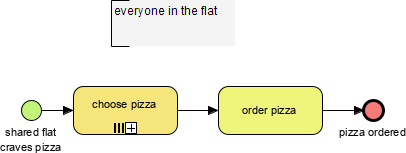
A Sub-Process with Multi-Instance marker indicates that the sub-process can run with other identical sub-processes simultaneously.
Compensation Sub-Processes
Key Concepts
Compensation sub-processes are specialized activities designed exclusively to undo or mitigate the effects of a previously completed task. They are never triggered by standard sequence flows; instead, they are activated solely by compensation events via associations. This makes them fundamental for transactional integrity and error recovery in long-running processes.
Combined Markers
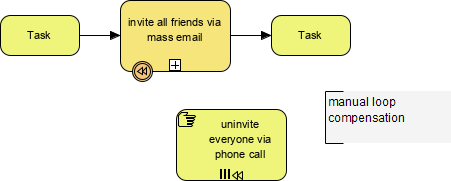
Compensation markers can be combined with loop or multi-instance markers. When combined, both symbols appear in parallel within the sub-process shape. For example, a manual compensation task might need to repeat until successful (loop + compensation) or execute across multiple affected records simultaneously (multi-instance + compensation). These combinations provide granular control over rollback strategies.
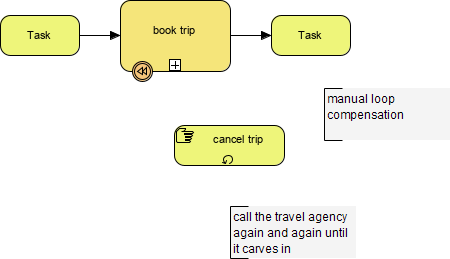
A Sub-Process with Compensation Marker and Multi-Instance marker indicates that the sub-process can run with the compensation actions with multi-instance sub-processes simultaneously.
Ad Hoc Sub-Processes
Key Concepts
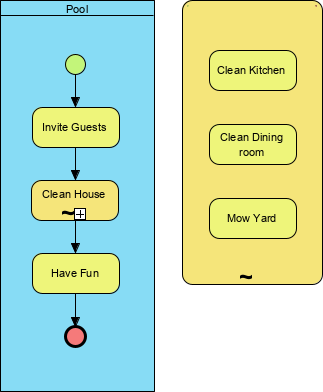
An ad hoc sub-process represents unstructured or flexible workflow segments where the execution order is not predetermined. Identified by a tilde (~) marker, this type allows contained activities to be executed in any order, repeated multiple times, or skipped entirely based on runtime decisions. It is best suited for knowledge work, case management, or collaborative problem-solving where rigid sequencing would hinder effectiveness.
Practical Example: Case Investigation
In a fraud investigation, analysts may need to interview witnesses, review documents, and run background checks in varying sequences depending on emerging evidence. An ad hoc sub-process accommodates this fluidity, allowing the analyst to navigate available tasks dynamically rather than following a fixed path.
Accelerating Modeling with AI-Assisted Tools
Creating properly structured sub-processes manually can be time-consuming. Modern platforms like Visual Paradigm leverage Natural Language Processing (NLP) to transform plain-text narratives into fully interactive, BPMN 2.0-compliant diagrams. Rather than producing static images, these tools generate true semantic models where swimlanes, gateways, and sub-process types are editable and reusable.
Key capabilities include automatic role extraction for pool/lane generation, intelligent logic routing for gateway placement, and direct text-to-diagram translation. Users can access this functionality through conversational AI chatbots or dedicated diagram generation menus, significantly reducing the barrier to entry for complex hierarchical modeling. By describing roles, conditional logic, and communication types in structured narratives, modelers can rapidly prototype sub-process structures and refine them using built-in validation checks.
Conclusion
Sub-processes are indispensable for managing complexity in BPMN modeling. Whether you need sequential repetition through loops, concurrent execution via multi-instance markers, transactional safety with compensation, or operational flexibility through ad hoc structures, selecting the correct marker ensures your diagram accurately reflects business reality. Mastery of these five types enables clearer communication between stakeholders and more robust process automation. Furthermore, integrating AI-assisted tooling into your modeling practice streamlines the creation of these sophisticated structures, allowing teams to focus on process optimization rather than diagram drafting. As business environments continue to evolve, combining rigorous BPMN standards with intelligent automation will remain key to maintaining agile and transparent operations.
Recommended Resources
- From Narrative to Diagram: How Visual Paradigm’s AI BPMN Generator Transforms Process Modeling Workflows: Explains the methodology for converting structured text descriptions into accurate BPMN diagrams with proper swimlanes and gateways.
- Comprehensive Guide to AI-Powered BPMN 2.0 with Visual Paradigm: Learn by Examples: Provides practical tutorials and use cases demonstrating AI-driven process modeling capabilities within the Visual Paradigm ecosystem.
- How AI-Powered NLP Is Revolutionizing Text-to-BPMN Generation for Enterprise Process Modeling: Details the underlying NLP technology that enables semantic understanding of business narratives for automated diagram creation.
- BPMN Diagram and Tools Features Overview: Outlines core BPMN modeling features including sub-process types, validation rules, and AI integration points.
- BPMN with Visual Paradigm AI: A Comprehensive Guide: Offers end-to-end guidance on leveraging AI assistants for iterative process design and model refinement.
- Mastering BPMN Flow Types: A Comprehensive Guide for Visual Paradigm Users: Focuses on distinguishing between sequence flows, message flows, and association flows in complex subprocess architectures.
- AI BPMN Diagram Chatbot Documentation: Describes the conversational interface for generating and iterating on BPMN models through natural language interaction.
This post is also available in Deutsch, Español, فارسی, Français, English, Bahasa Indonesia, 日本語, Polski, Portuguese, Ру́сский, Việt Nam, 简体中文 and 繁體中文.
Related posts:
 Business Process Model and Notation: Strategies for Aligning IT Architecture with Business Goals
 Mastering Business Process Visualization: A Practitioner’s Review of BPMN and Process Mapping with Visual Paradigm
 Mastering Business Process Modeling: A Hands-On Review of BPMN and Visual Paradigm’s AI-Powered Tools
 Mastering AI-Powered Mind Mapping with Visual Paradigm