


Introduction
In the rapidly evolving landscape of software development and enterprise architecture, the gap between rigorous system engineering and agile, collaborative design has never been more critical to bridge. Traditional modeling tools often demand steep learning curves and heavy infrastructure, while lightweight diagramming tools lack the semantic depth required for code generation and consistency checks.
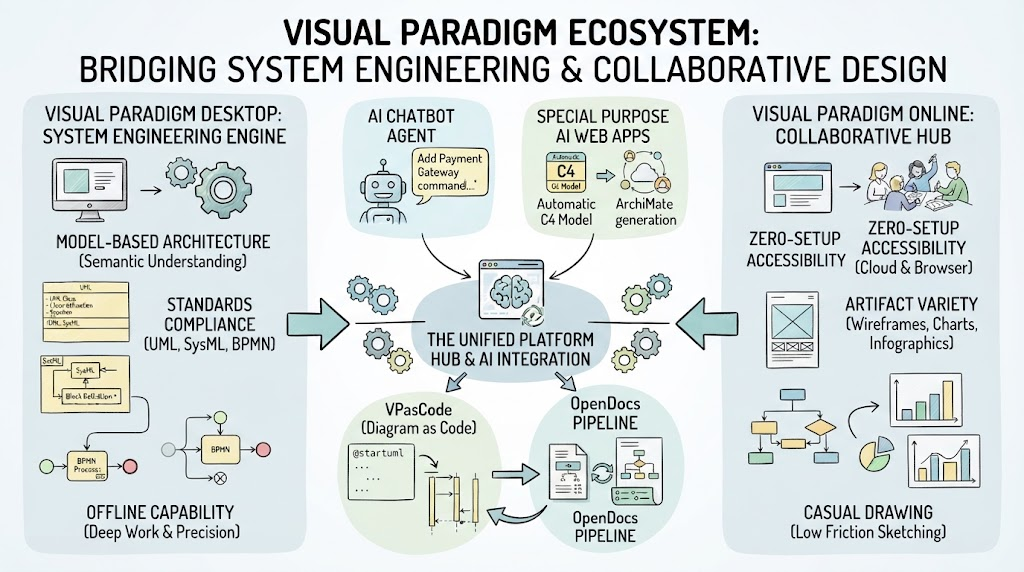
The Visual Paradigm Ecosystem emerges as a unified solution to this dichotomy. It is not merely a collection of disjointed tools but a cohesive platform that connects traditional system engineering standards (like UML and SysML) with modern cloud capabilities, artificial intelligence, and “Diagram as Code” methodologies. By splitting its capabilities into robust desktop modeling and flexible online collaboration, while tying them together with an intelligent AI agent and a centralized hub, Visual Paradigm offers a seamless workflow for architects, developers, and product managers alike.
This guide explores the core pillars of this ecosystem, demonstrating how it transforms static diagrams into living, interactive assets that drive both technical precision and creative collaboration.
Core Pillars: Desktop vs. Online
The foundation of the Visual Paradigm ecosystem rests on two distinct yet synergistic working spaces, each designed for specific phases of the development lifecycle.
Visual Paradigm Desktop: The Engine of System Engineering
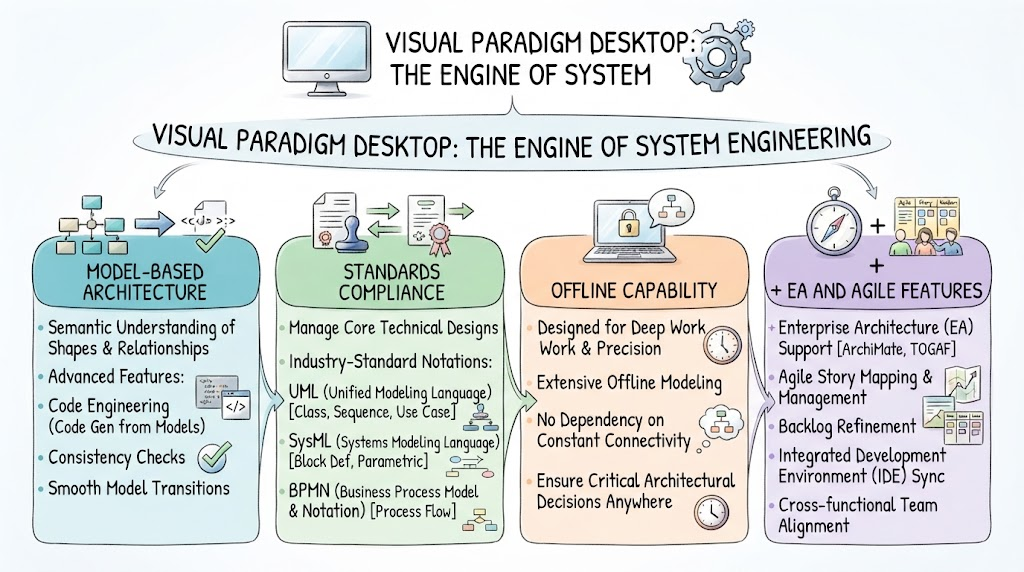
Visual Paradigm Desktop is built for heavy-duty system engineering where precision, compliance, and technical depth are paramount. It is the tool of choice for enterprise architects and senior engineers who need to manage complex technical designs.
-
Model-Based Architecture: Unlike simple drawing tools, VP Desktop stores the properties of shapes and relationships. This semantic understanding supports advanced features like code engineering (generating code from models), consistency checks, and smooth model transitions.
-
Standards Compliance: It manages core technical designs using industry-standard notations such as UML (Unified Modeling Language), SysML (Systems Modeling Language), and BPMN (Business Process Model and Notation).
-
Offline Capability: Designed for deep work, it allows for extensive offline modeling, ensuring that critical architectural decisions can be made without dependency on constant connectivity.
Visual Paradigm Online: The Hub of Creative Collaboration
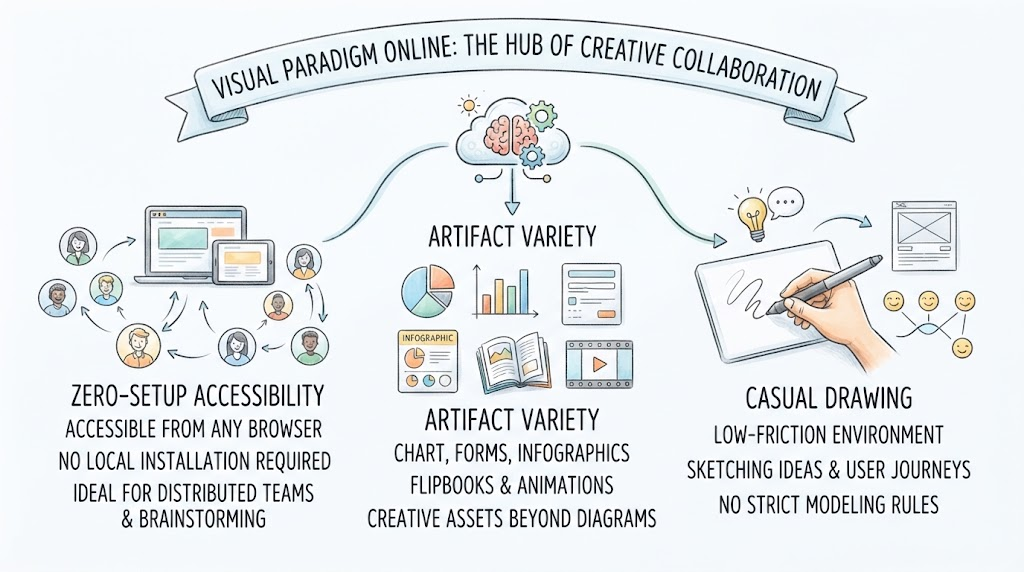
On the other side of the spectrum, Visual Paradigm Online (VP Online) is built for lightweight, web-based projects that require speed, accessibility, and creative flexibility.
-
Zero-Setup Accessibility: Accessible from any browser, VP Online requires no local installation, making it ideal for distributed teams and quick brainstorming sessions.
-
Artifact Variety: Beyond standard diagrams, it supports a wide range of creative assets including charts, forms, infographics, flipbooks, and animations.
-
Casual Drawing: It provides a low-friction environment for sketching ideas, creating wireframes, or mapping out user journeys without the overhead of strict modeling rules.
Special Purpose AI Web Apps
The cloud ecosystem leverages Artificial Intelligence to automate repetitive tasks and accelerate the diagramming process. These AI-driven tools are designed to handle step-by-step processes, reducing the manual effort required to create structured diagrams.
-
Framework Automation: The AI can instantly generate targeted diagrams based on specific architectural frameworks. For example, it can automatically create C4 Model diagrams for software architecture or ArchiMate diagrams for enterprise architecture, ensuring that the correct notation and structure are applied from the start.
-
Use Case Driven Approach: By analyzing user text descriptions, the AI can dynamically layout software user stories and workflows. This allows product managers and business analysts to convert natural language requirements into visual workflows seamlessly.
The AI Chatbot Agent: Your Virtual System Architect
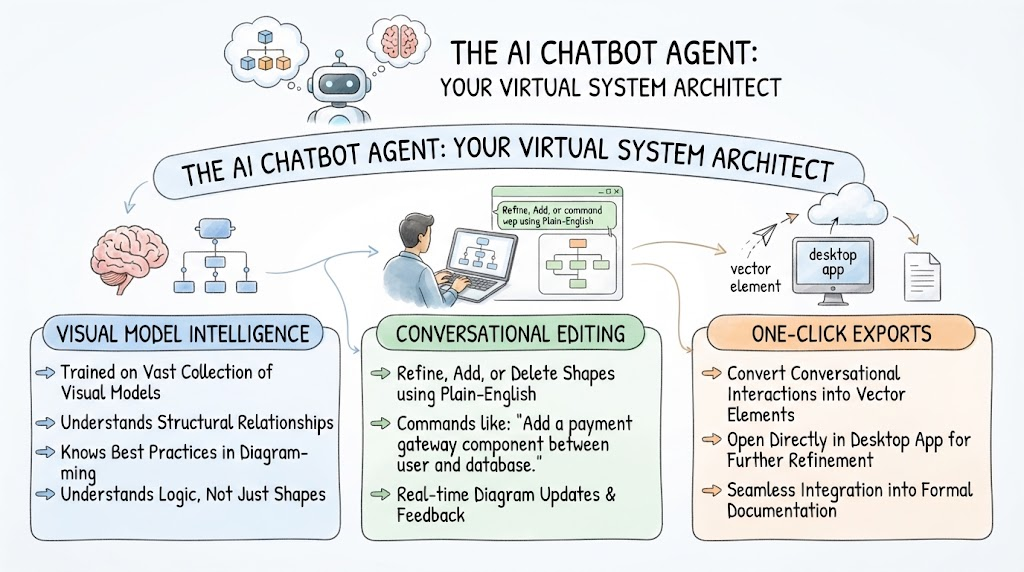
At the heart of the ecosystem’s intelligence is the Visual Paradigm AI Chatbot. This tool acts as a virtual system architect, bridging the gap between natural language and technical modeling.
-
Visual Model Intelligence: Trained on a vast collection of visual models, the chatbot understands structural relationships and best practices in diagramming. It doesn’t just draw shapes; it understands the logic behind them.
-
Conversational Editing: Users can refine, add, or delete shapes using plain-English commands. For instance, you can ask the chatbot to “Add a payment gateway component between the user and the database,” and it will update the diagram accordingly.
-
One-Click Exports: The results of these conversational interactions can be converted into vector elements that open directly in the Desktop app, allowing for further refinement and integration into formal documentation.
VPasCode: Diagram as Code
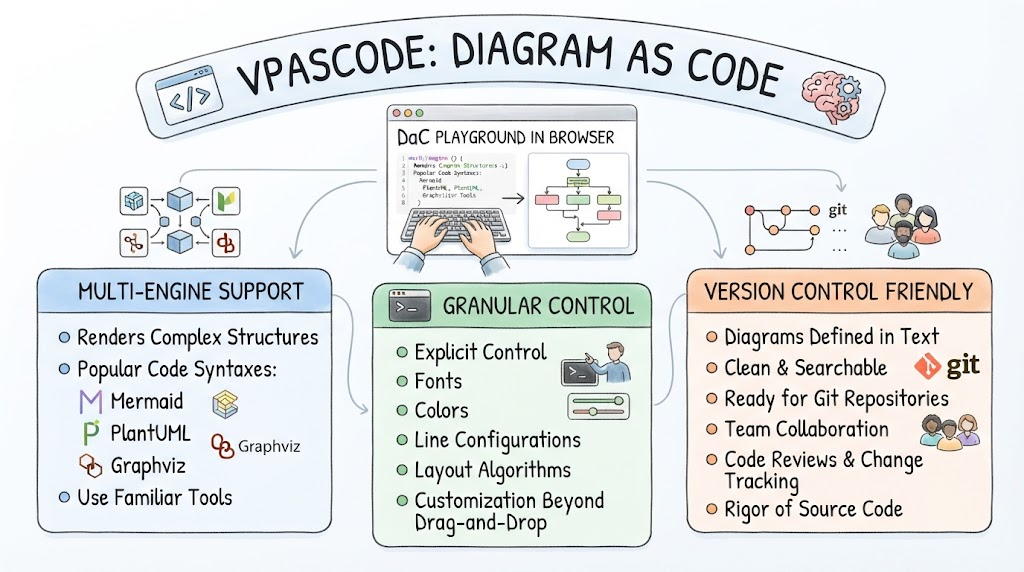
For software engineers who prefer textual precision and version control, VPasCode provides a powerful “Diagram as Code” (DaC) playground inside the browser.
-
Multi-Engine Support: VPasCode renders complex structures using popular code syntaxes such as Mermaid, PlantUML, and Graphviz. This allows engineers to use the tools they are already familiar with.
-
Granular Control: Acting as the “engineer’s engine,” it provides explicit control over fonts, colors, line configurations, and layout algorithms, offering a level of customization that drag-and-drop interfaces often lack.
-
Version Control Friendly: Since diagrams are defined in text, they are clean, searchable, and ready for Git repositories. This enables team collaboration through code reviews and change tracking, treating diagrams with the same rigor as source code.
Example: PlantUML Sequence Diagram
Below is an example of a sequence diagram defined using PlantUML syntax, which can be rendered in VPasCode:
@startuml
title User Authentication Flow

actor User
participant "Web App" as Web
participant "Auth Service" as Auth
database "User DB" as DB

User -> Web: Enter Credentials
Web -> Auth: Validate Request
Auth -> DB: Query User Data
DB --> Auth: Return User Record
Auth --> Web: Token Generated
Web --> User: Redirect to Dashboard

note right of Auth
  If invalid credentials,
  return error message
end note

@enduml
OpenDocs & The Living Docs Pipeline
One of the most significant challenges in software development is keeping documentation in sync with the actual system design. The OpenDocs pipeline addresses this by connecting technical code designs to clear, team-facing documentation.
-
Model to Documentation: Detailed diagrams created in VP Desktop can be fed directly into OpenDocs. This ensures that the documentation is grounded in the actual technical model, reducing discrepancies.
-
Living Docs: The diagrams embedded in corporate documents remain interactive and web-based. As the backend model evolves in VP Desktop, the diagrams in the documentation can be automatically updated, ensuring that stakeholders always have access to the most current information.
The Unified Platform Hub
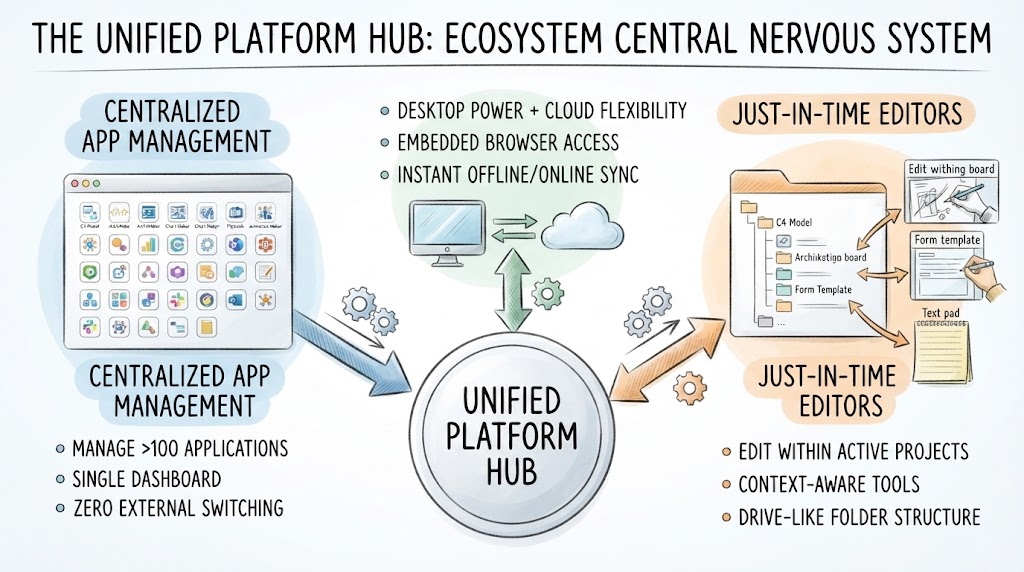
The Unified Platform Workspace serves as the central nervous system of the ecosystem, managing more than 100 applications under a single dashboard.
-
Zero External Switching: Users can find, create, or alter elements within a single, drive-like folder structure. There is no need to switch between disparate applications or file systems.
-
Just-In-Time Editors: The platform pulls up casual drawing boards, forms, or text pads right inside active projects, allowing for context-aware editing without leaving the workspace.
-
Desktop & Web Synergy: The Desktop software opens the platform through an embedded browser, ensuring that local offline work and cloud data synchronize instantly. This hybrid approach provides the best of both worlds: the power of desktop applications and the flexibility of cloud collaboration.
Conclusion
The Visual Paradigm Ecosystem represents a significant evolution in visual modeling and design. By recognizing that different stages of development require different tools—rigorous modeling for engineering, flexible sketching for ideation, and code-based definitions for version control—it offers a comprehensive suite that caters to all stakeholders.
The integration of AI through the Chatbot and specialized web apps reduces the barrier to entry for complex modeling, while the Unified Platform Hub ensures that these diverse tools work in harmony rather than in silos. For organizations looking to streamline their architecture, improve documentation accuracy, and foster better collaboration between technical and non-technical teams, the Visual Paradigm Ecosystem provides a robust, future-ready foundation.
Whether you are a system architect defining complex SysML models, a developer managing PlantUML scripts in Git, or a product manager sketching user journeys in the browser, the ecosystem adapts to your workflow, ensuring that your visual designs are not just static images, but living components of your development process.
Recommended Reading: Visual Paradigm Resources
- Visual Paradigm Official Website: The central hub for all Visual Paradigm products, featuring downloads, tutorials, and licensing information.
- Introduction to the Unified Platform: A quick introductory guide explaining the core concepts and benefits of the Unified Platform Workspace.
- AI Chatbot: Turn Ideas into Diagrams Instantly: A detailed look at how the AI Chatbot uses natural language processing to generate and edit visual models.
- Mastering VPasCode: Diagram as Code Guide: A comprehensive tutorial on using VPasCode with Mermaid, PlantUML, and Graphviz for version-controlled diagramming.
- Desktop vs. Online: A Comprehensive Guide: An in-depth comparison helping users choose between the heavy-duty Desktop suite and the lightweight Online tools.
- Transforming Visual Modeling with AI: An exploration of how AI is integrated across the Visual Paradigm ecosystem to automate and enhance modeling tasks.
- Visual Paradigm 18.1 Release Notes: Official release notes detailing the new features of the Unified Platform and AI-driven innovations.
- From Text to Code: Beginner’s Guide to DaC: A beginner-friendly introduction to converting textual descriptions into code-based diagrams using AI assistance.
This post is also available in Deutsch, Español, فارسی, Français, English, Bahasa Indonesia, Polski, Portuguese, Ру́сский, Việt Nam and 简体中文.