
A UML use case diagram shows what a system offers and who—or what—interacts with it. With a diagram-as-code workflow, the diagram’s source is plain text: edit the text, render the diagram, and keep the source alongside project documentation.
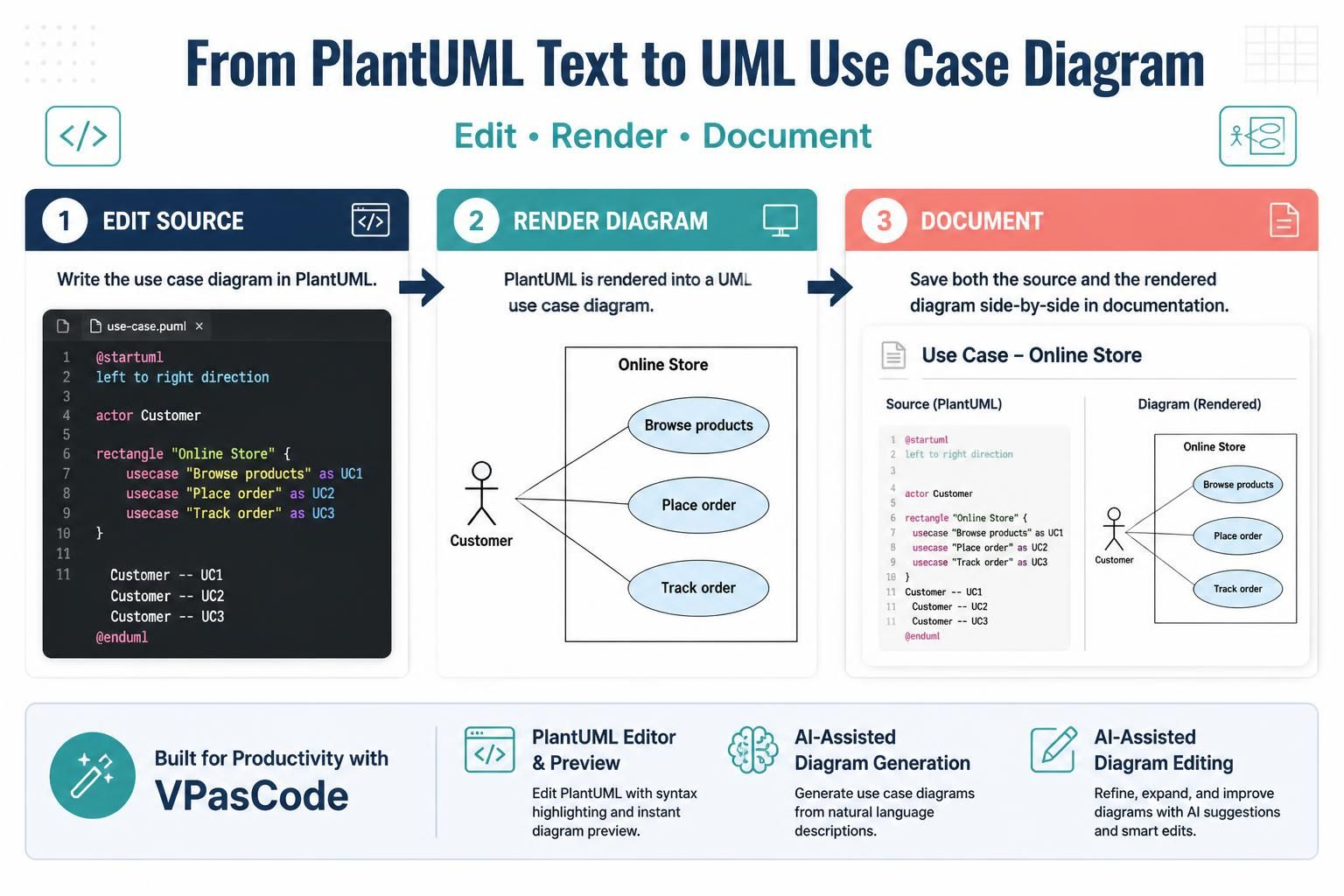
PlantUML supports use case diagrams. Visual Paradigm’s VPasCode editor provides a PlantUML editor and preview, along with AI-assisted diagram generation and editing features.
1. What a use case diagram communicates
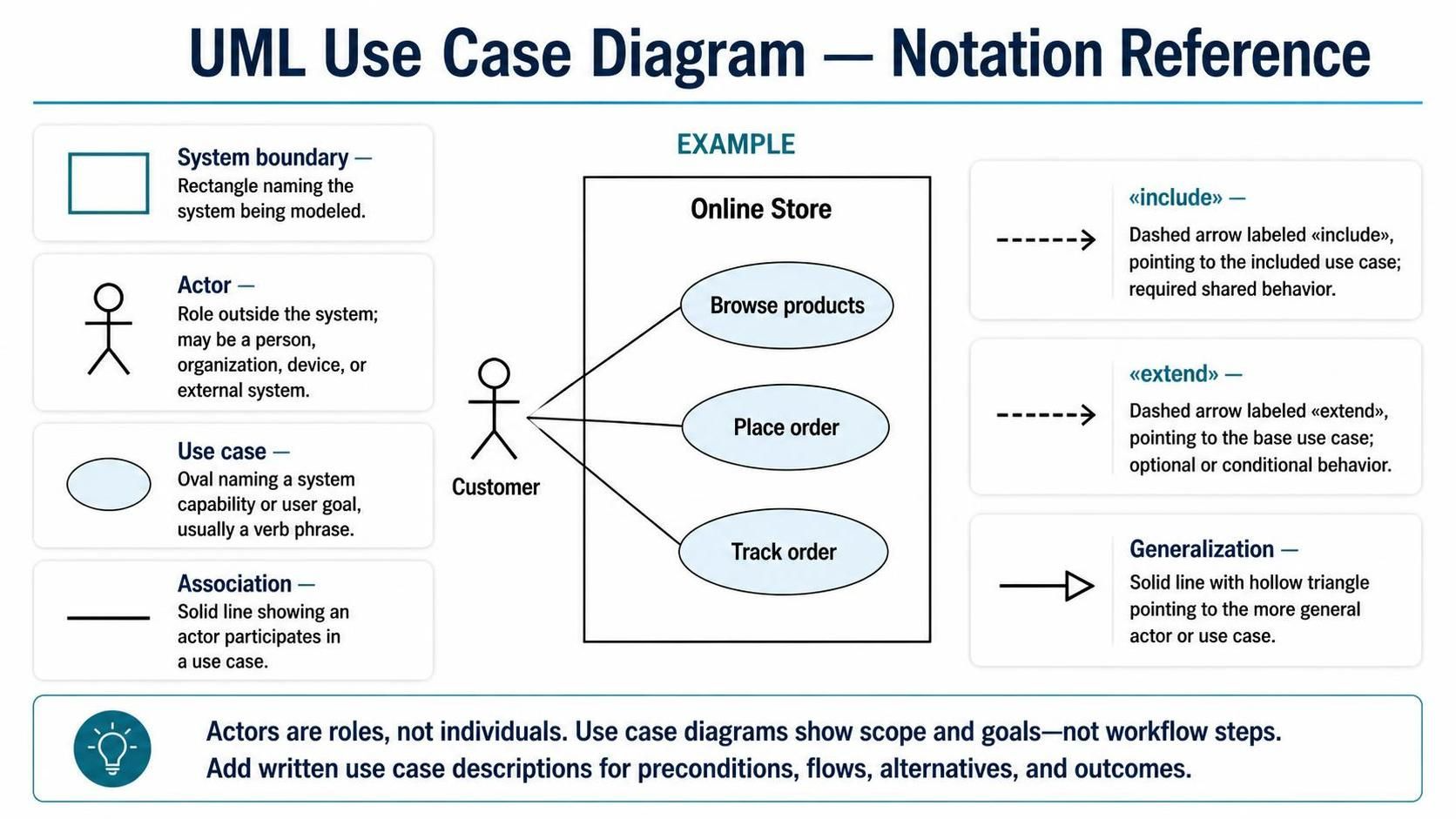
Use case diagrams focus on system scope and user goals, not the step-by-step mechanics of a workflow. A diagram typically contains:
-
System boundary: A rectangle naming the system being modeled.
-
Actor: A role outside the system that interacts with it. Actors may be people, organizations, devices, or external systems.
-
Use case: A capability or goal provided by the system, usually shown as an oval and named with a verb phrase, such as “Place order.”
-
Association: A line showing that an actor participates in a use case.
-
Use case relationships: Include, extend, and generalization.
Actors represent roles, not specific individuals. An external payment service can be an actor if it interacts with the system being modeled.
Use case diagrams are useful for clarifying system scope, discussing requirements with stakeholders, identifying external dependencies, and providing a shared overview for development and testing. Pair them with written use case descriptions when you need details such as preconditions, main steps, alternate flows, and outcomes.
2. Relationships at a glance
-
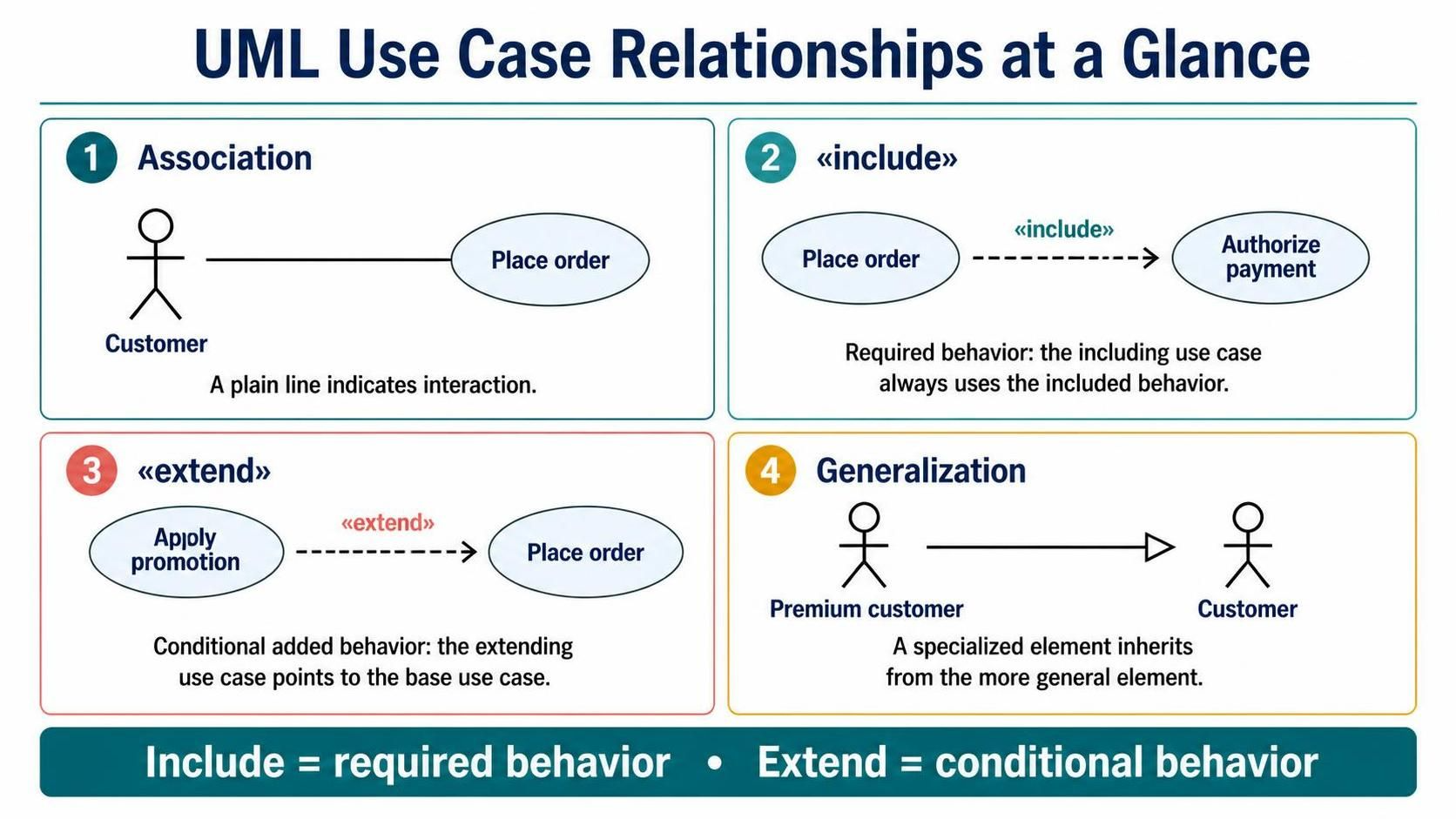
Actor–use case association: A plain line indicating interaction.
-
<<include>>: The including use case always uses the included behavior. The dashed arrow points from the including use case to the included use case. For example, placing an order may always include payment authorization. -
<<extend>>: An extending use case adds behavior to a base use case under a condition. The dashed arrow points from the extending use case to the base use case. For example, applying a promotion may extend placing an order. -
Generalization: A specialized actor or use case inherits from a more general one. The solid line with a hollow triangle points to the general element.
A useful distinction: include means required behavior; extend means conditional added behavior.
3. PlantUML essentials
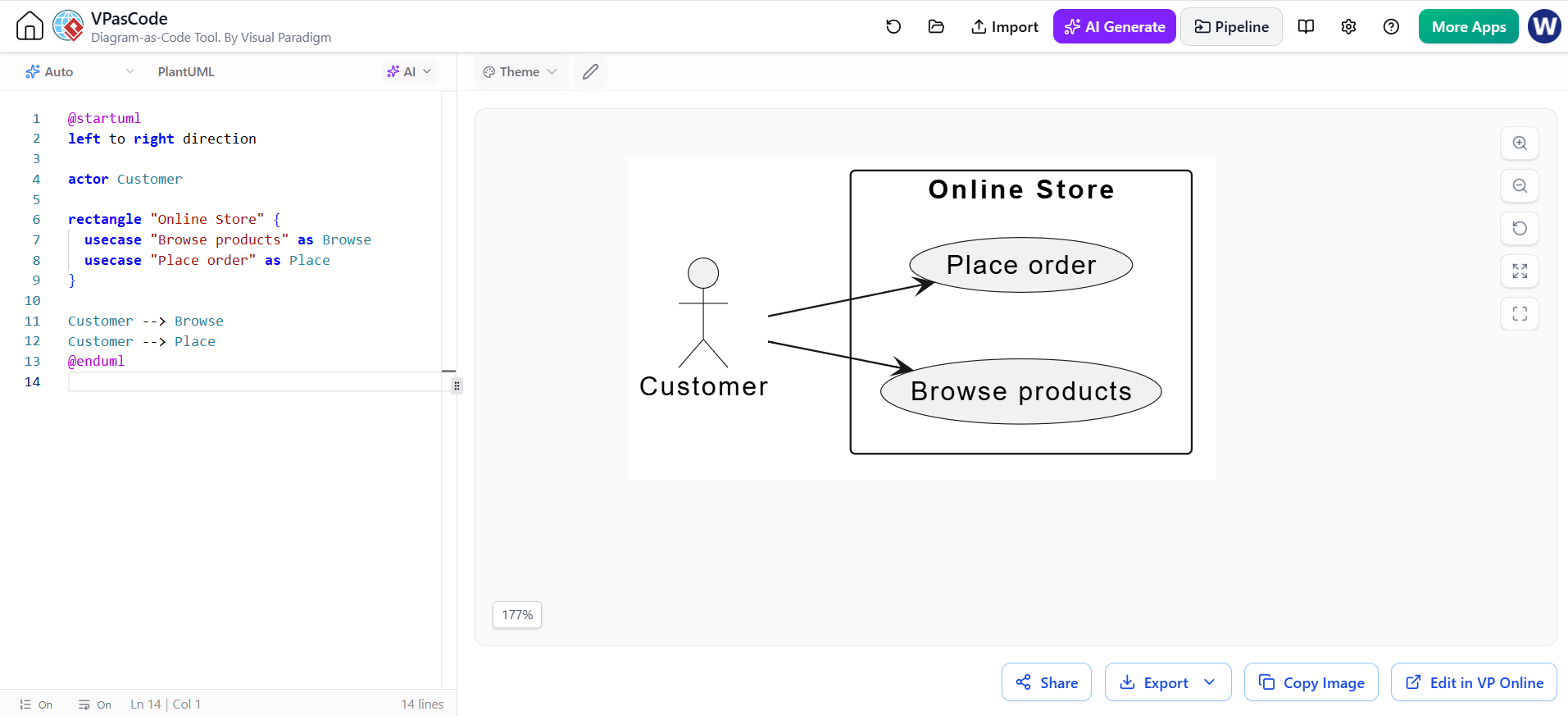
A PlantUML diagram starts with @startuml and ends with @enduml. Declare actors with actor, use cases with usecase, and system boundaries with rectangle. Aliases make elements easier to reference in relationships.
@startuml
left to right direction

actor Customer

rectangle "Online Store" {
  usecase "Browse products" as Browse
  usecase "Place order" as Place
}

Customer --> Browse
Customer --> Place
@enduml
left to right direction asks PlantUML to lay out the diagram horizontally. PlantUML may adjust the precise layout as the diagram changes.
4. Example: basic online store
@startuml
left to right direction

actor Customer
actor Administrator as Admin

rectangle "Online Store" {
  usecase "Browse products" as Browse
  usecase "Place order" as Place
  usecase "Track shipment" as Track
  usecase "Manage catalog" as Manage
}

Customer --> Browse
Customer --> Place
Customer --> Track
Admin --> Manage
@enduml
Customers browse, order, and track shipments. The administrator manages the catalog. The diagram deliberately omits the internal steps of order processing.
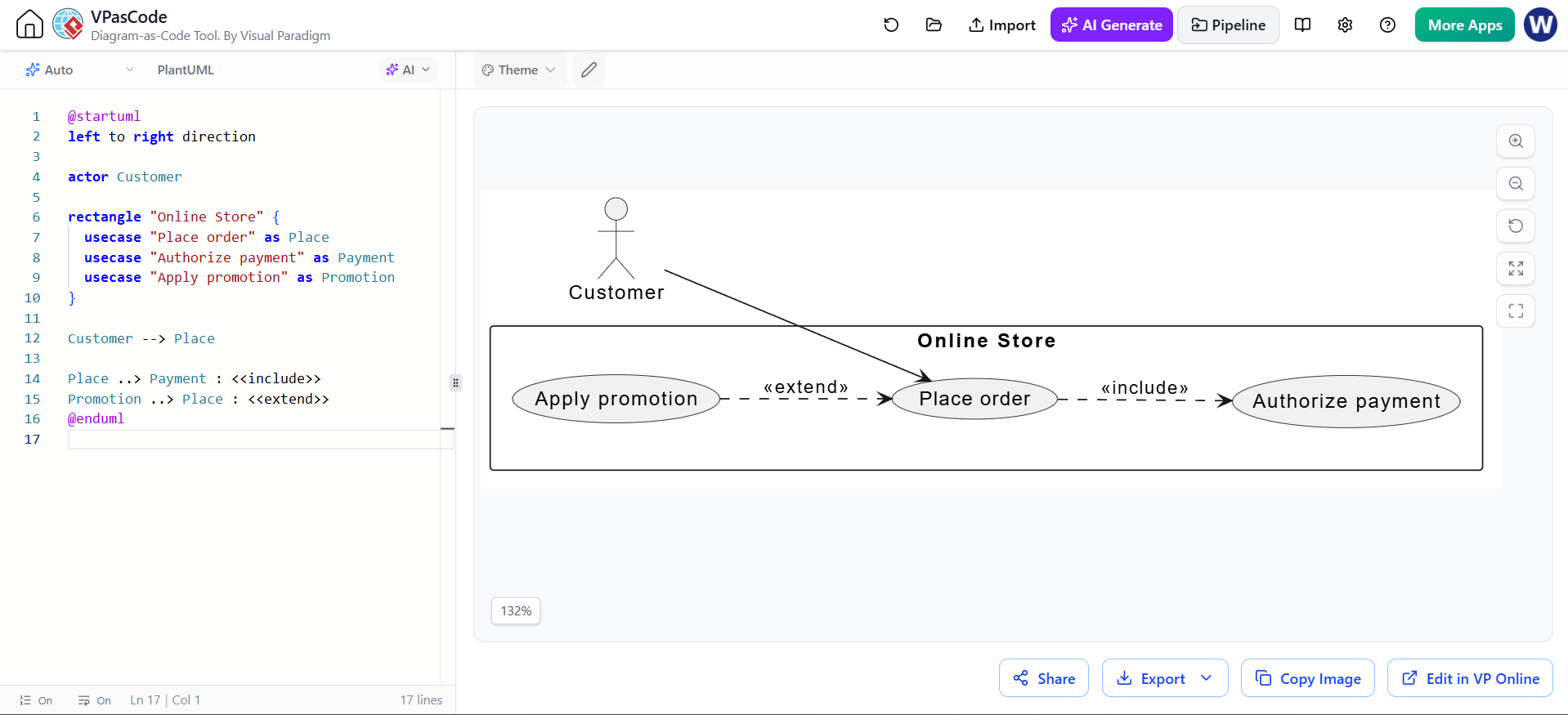
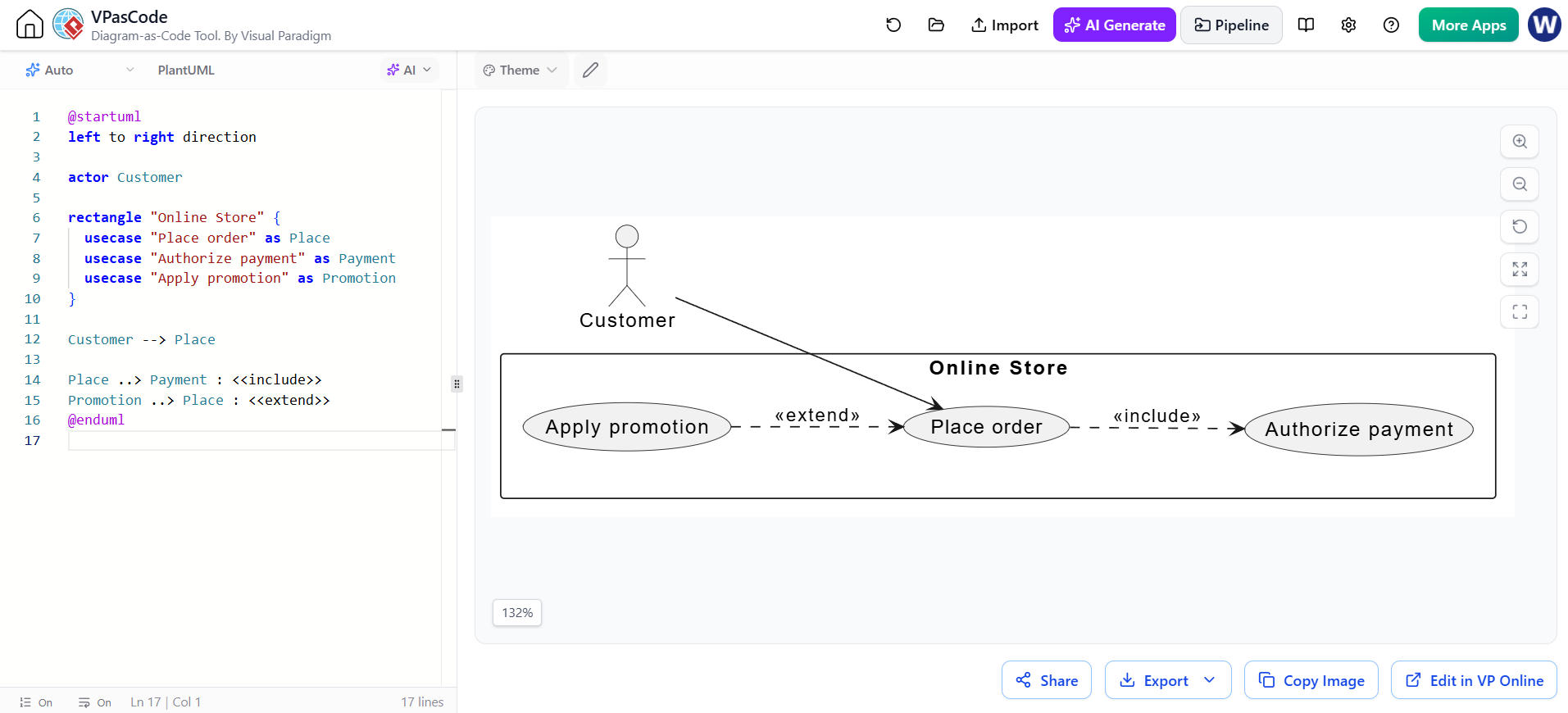
5. Example: include and extend
Suppose placing an order always requires payment authorization, while applying a promotion is optional and conditional.
@startuml
left to right direction

actor Customer

rectangle "Online Store" {
  usecase "Place order" as Place
  usecase "Authorize payment" as Payment
  usecase "Apply promotion" as Promotion
}

Customer --> Place

Place ..> Payment : <<include>>
Promotion ..> Place : <<extend>>
@enduml
The Place ..> Payment arrow means that “Place order” includes the required payment behavior. The Promotion ..> Place arrow means that “Apply promotion” extends “Place order” when its condition is met.
Document the condition—for example, “customer enters a valid promotion code”—in the use case description or a note.
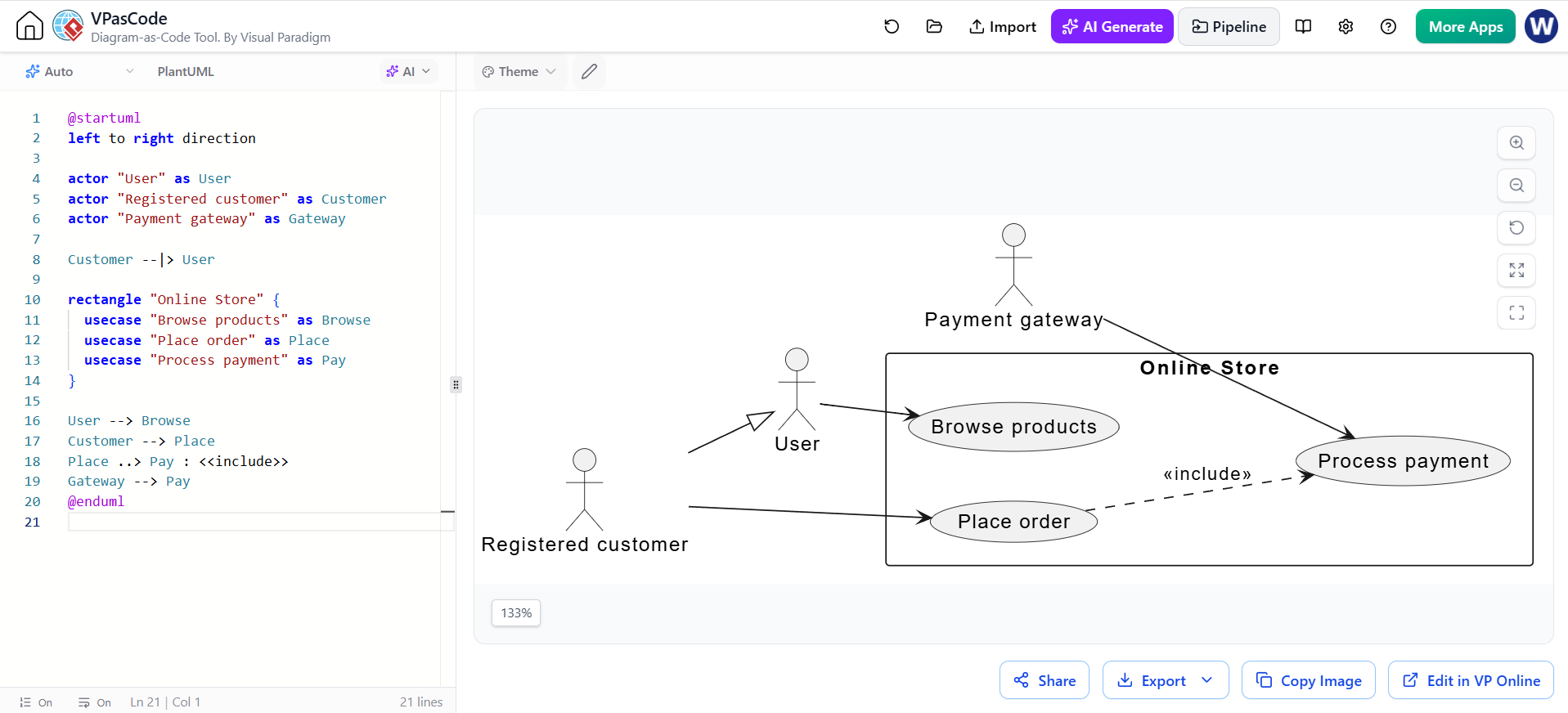
6. Example: actor generalization and external systems
A specialized actor inherits interactions from a more general actor. External services can also be actors when they interact with the system.
@startuml
left to right direction

actor "User" as User
actor "Registered customer" as Customer
actor "Payment gateway" as Gateway

Customer --|> User

rectangle "Online Store" {
  usecase "Browse products" as Browse
  usecase "Place order" as Place
  usecase "Process payment" as Pay
}

User --> Browse
Customer --> Place
Place ..> Pay : <<include>>
Gateway --> Pay
@enduml
“Registered customer” specializes “User” and inherits the general user interaction. The payment gateway is outside the Online Store boundary but participates in the payment use case.
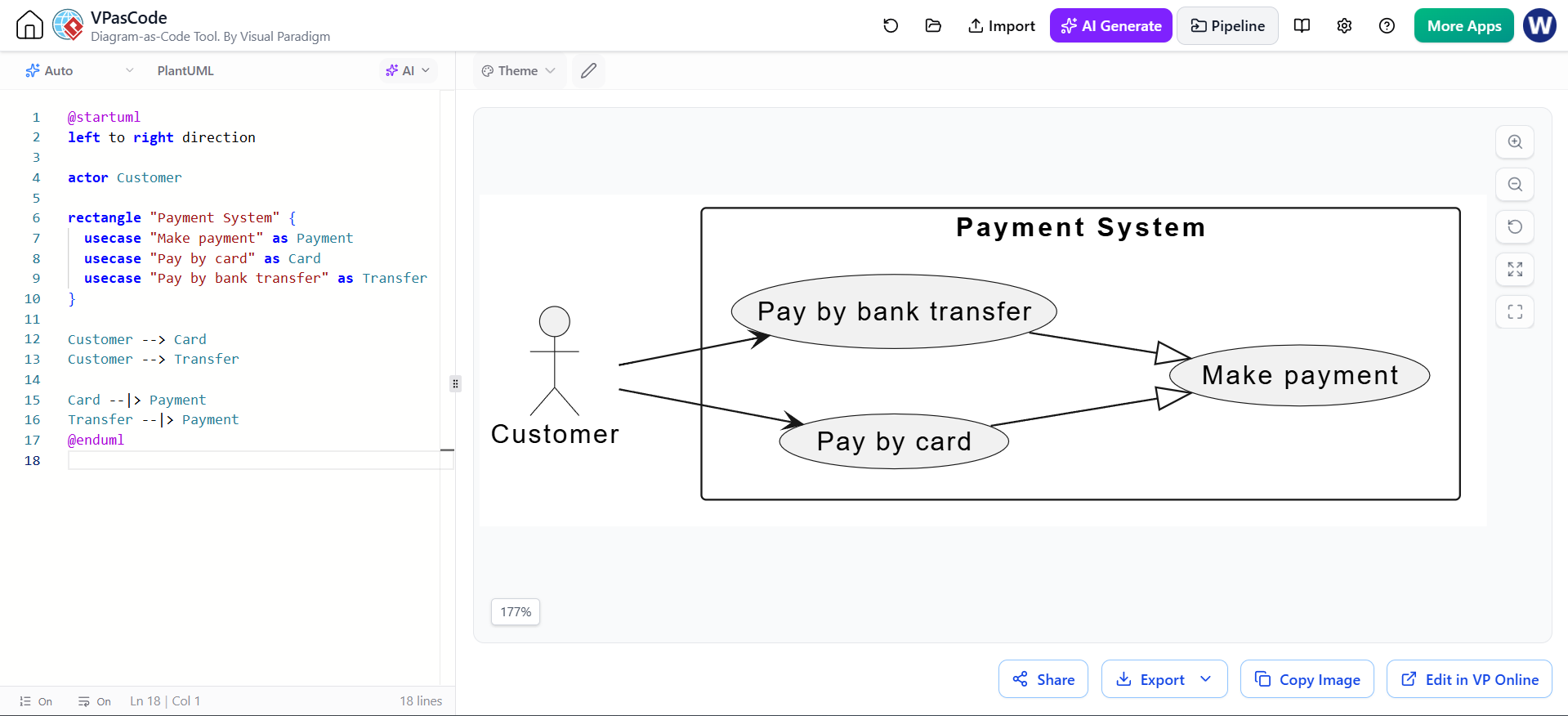
7. Example: use case generalization
Generalization can represent specialized versions of a broader use case. The hollow triangle points toward the general use case.
@startuml
left to right direction

actor Customer

rectangle "Payment System" {
  usecase "Make payment" as Payment
  usecase "Pay by card" as Card
  usecase "Pay by bank transfer" as Transfer
}

Customer --> Card
Customer --> Transfer

Card --|> Payment
Transfer --|> Payment
@enduml
Use this when the specialized use cases share a general goal but have meaningful differences. If the variations are merely conditional steps, an <<extend>> relationship or a written use case description may be clearer.
8. Working in VPasCode
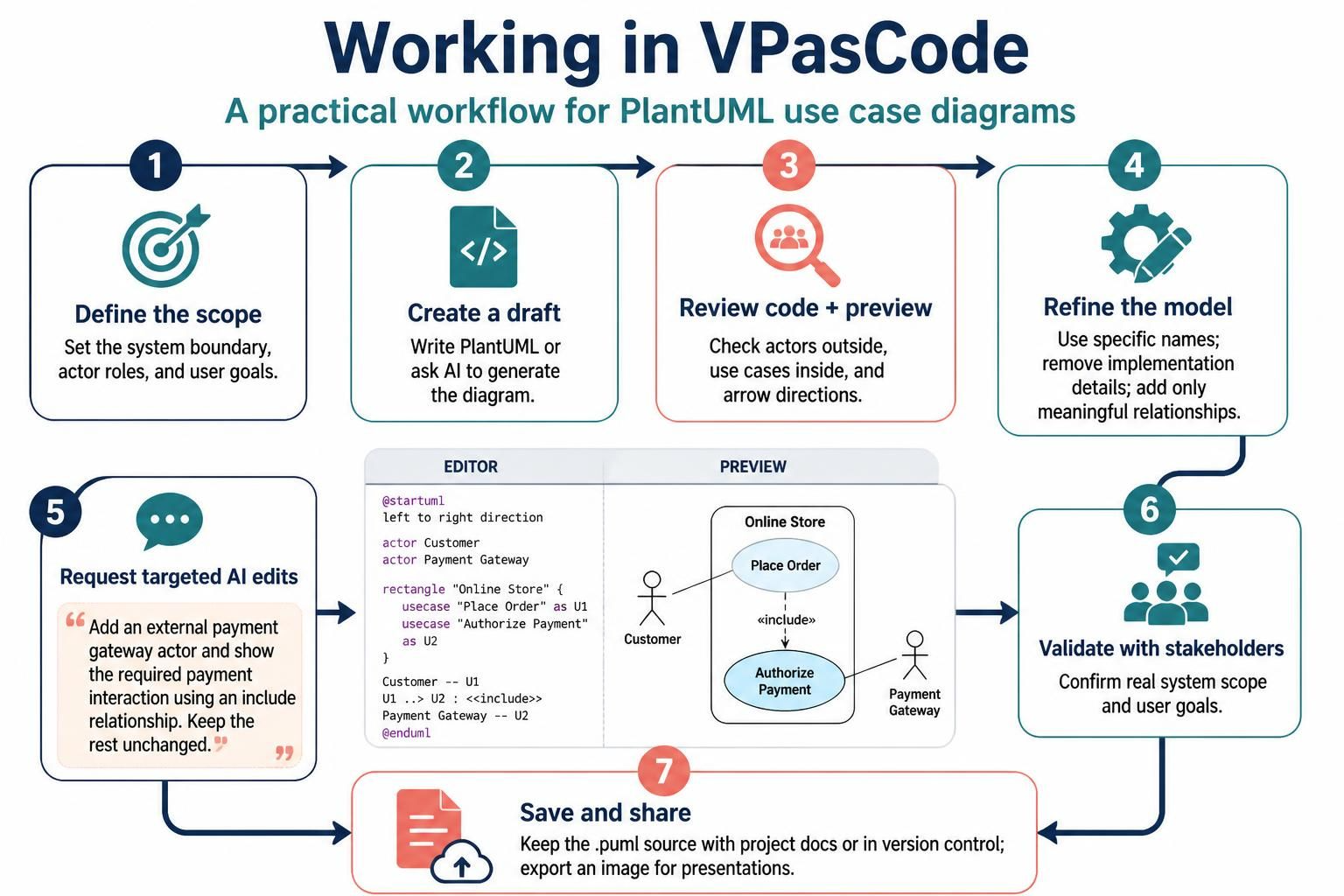
A practical workflow:
-
Define the scope. Identify the system boundary, actor roles, and goals each role wants to achieve.
-
Create a draft. Write PlantUML directly or ask the AI assistant to generate a use case diagram.
-
Review the code and preview. Confirm actors are outside the system boundary, use cases are inside it, and arrows point in the correct direction.
-
Refine the model. Replace vague names, remove implementation details, and add relationships only when they reflect real requirements.
-
Request targeted AI edits. For example: “Add an external payment gateway actor and show the required payment interaction using an include relationship. Keep the rest unchanged.”
-
Validate with stakeholders. Check that the diagram reflects the system’s actual scope and user goals.
-
Save the source. Keep the
.pumltext with project documentation or in version control. Export an image when needed for documents or presentations.
Example prompt for AI assistance
Create a UML use case diagram in PlantUML for an online store. Include a system boundary, Customer and Administrator actors, and the goals Browse products, Place order, Track shipment, and Manage catalog. Show payment authorization as required behavior included by Place order. Show applying a promotion as a conditional extension of Place order. Return only valid PlantUML source.
Treat AI-generated code as a first draft. Review the actors, boundaries, relationships, and business assumptions before using it.
9. Common pitfalls
-
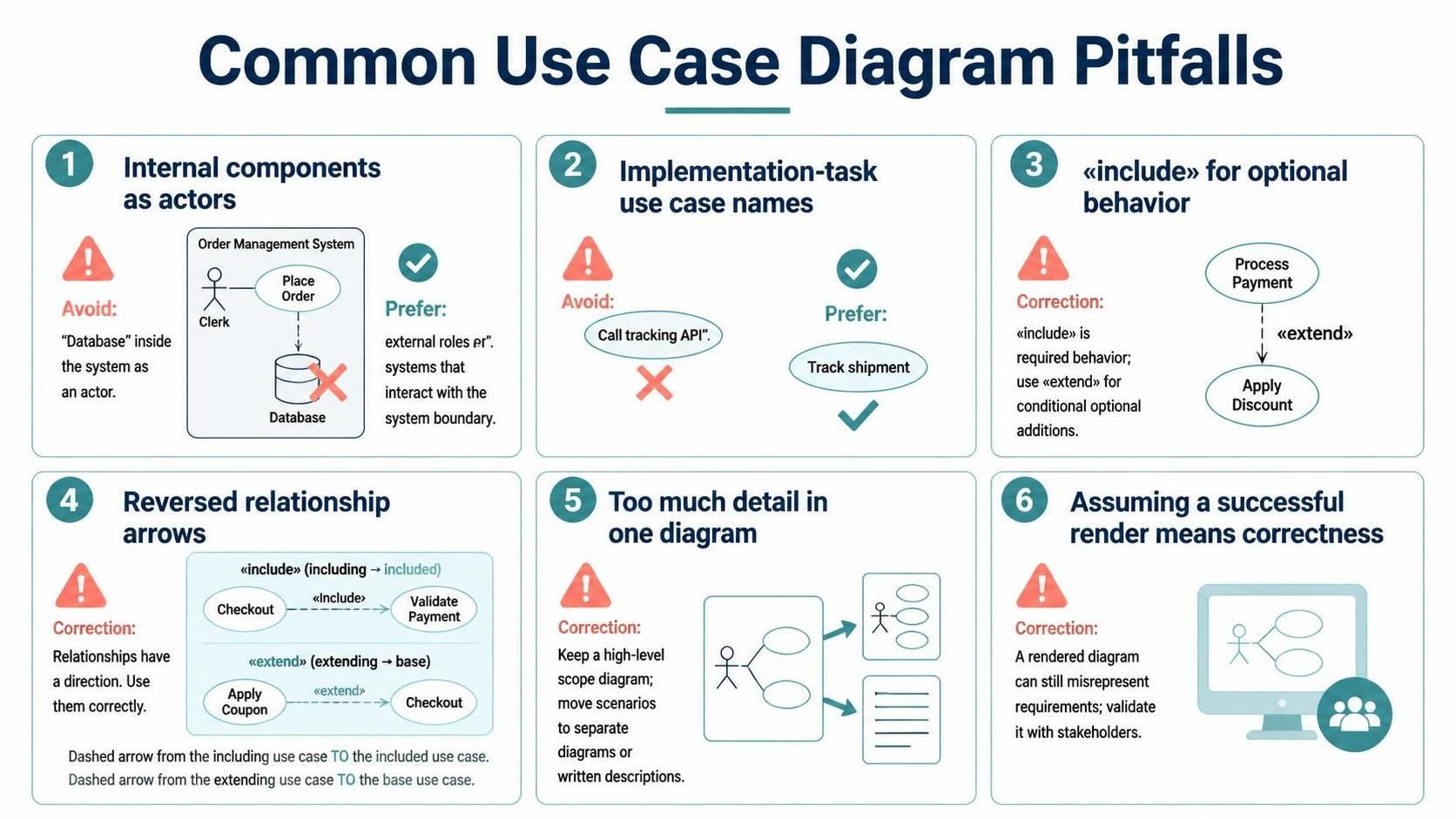
Modeling internal components as actors: Actors should be external roles or systems that interact with the subject.
-
Naming use cases as implementation tasks: Prefer “Track shipment” over “Call tracking API.”
-
Using
<<include>>for optional behavior: Include represents behavior the base use case requires. -
Reversing relationship arrows: Include points to the included use case; extend points to the base use case.
-
Crowding one diagram with details: Use a high-level diagram for scope, then separate diagrams or text for detailed scenarios.
-
Assuming a successful render means the model is correct: PlantUML can render a diagram that still misrepresents the requirements.
10. Review checklist
Before sharing the diagram, confirm that:
-
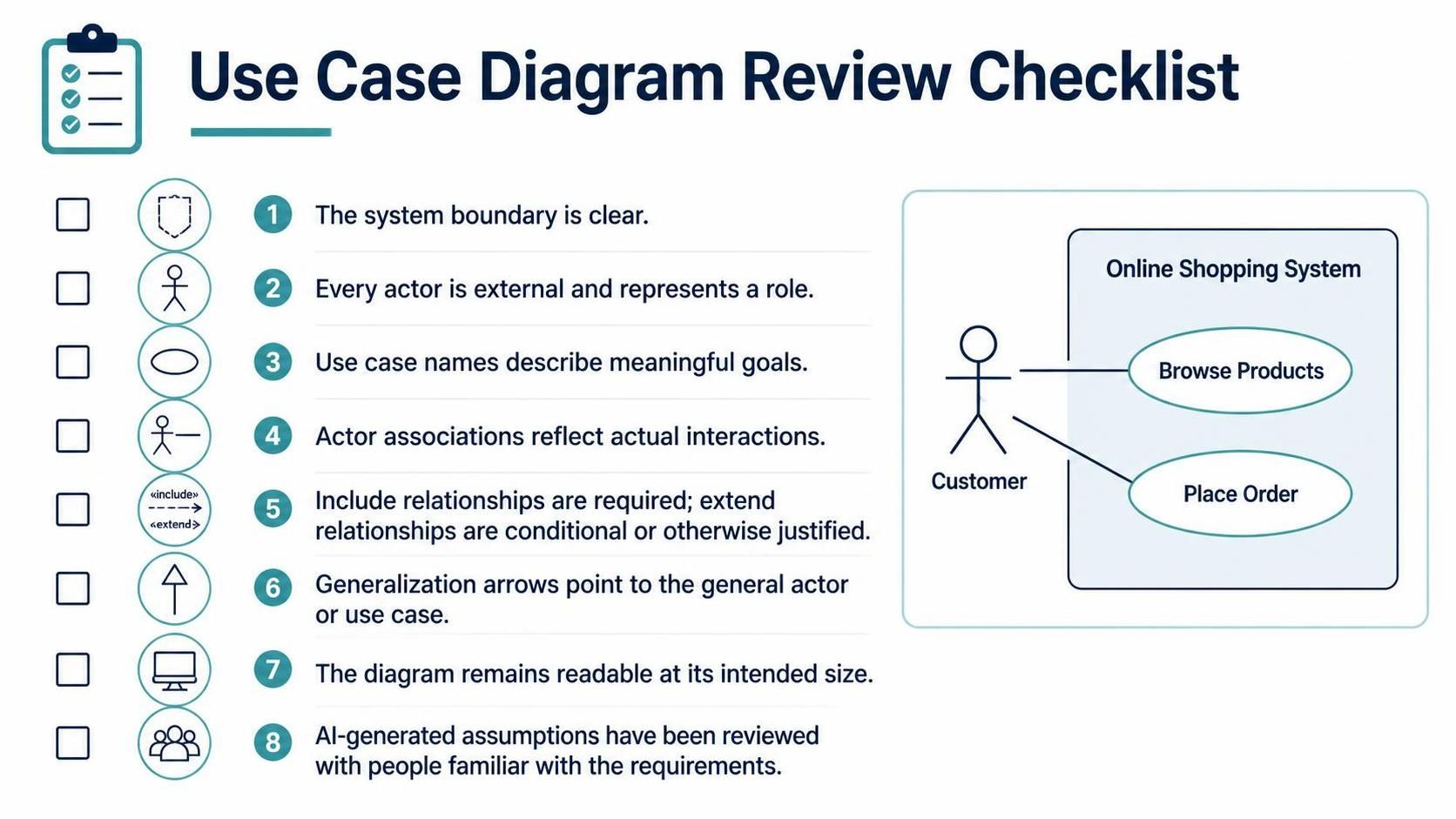
The system boundary is clear.
-
Every actor is external and represents a role.
-
Use case names describe meaningful goals.
-
Actor associations reflect actual interactions.
-
Include relationships are required; extend relationships are conditional or otherwise justified.
-
Generalization arrows point to the general actor or use case.
-
The diagram remains readable at its intended size.
-
AI-generated assumptions have been reviewed with people familiar with the requirements.