
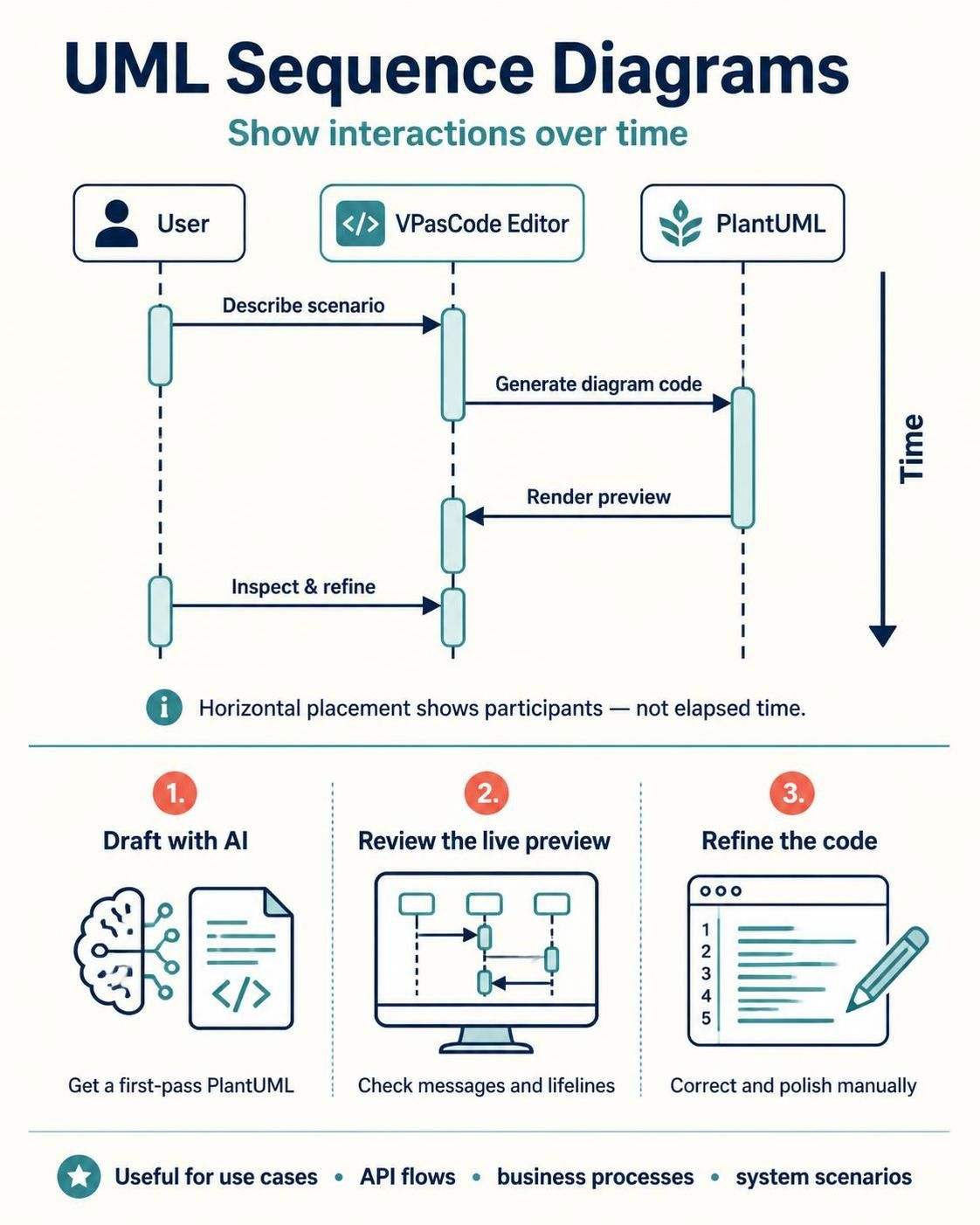
A UML sequence diagram shows how participants interact over time. It is useful for documenting a use case, API flow, business process, or system scenario. Time generally moves from top to bottom; horizontal placement shows who participates, not a precise measure of elapsed time.
PlantUML lets you describe the diagram as text. Visual Paradigm’s VPasCode Editor pairs a code editor with a live preview and AI assistance for generating, modifying, and correcting diagram code. A good workflow is to use AI to get a first draft, then inspect and refine the PlantUML yourself.
1. The basic structure
A PlantUML sequence diagram starts with @startuml and ends with @enduml. Participants are usually listed before the messages so you can control their names and order.
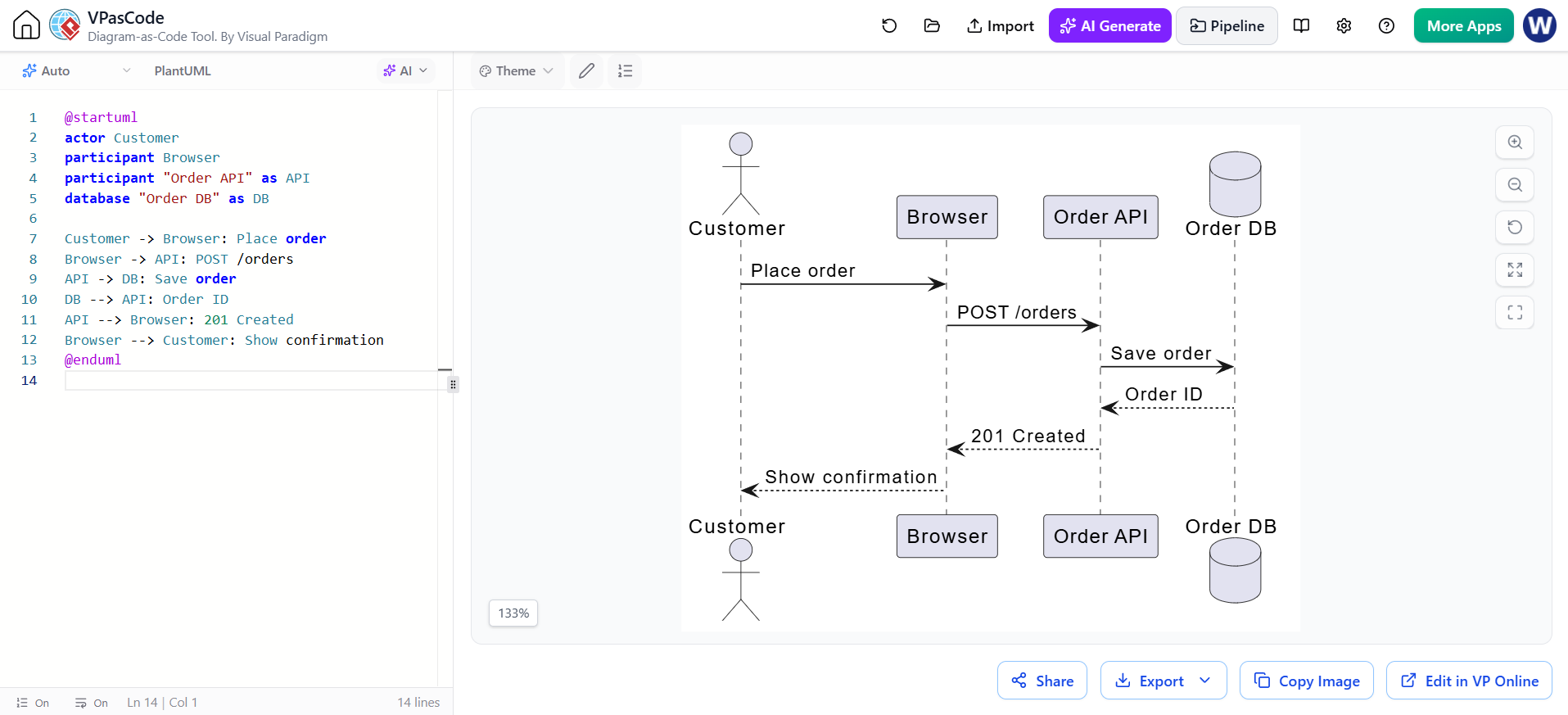
@startuml
actor Customer
participant Browser
participant "Order API" as API
database "Order DB" as DB

Customer -> Browser: Place order
Browser -> API: POST /orders
API -> DB: Save order
DB --> API: Order ID
API --> Browser: 201 Created
Browser --> Customer: Show confirmation
@enduml
The participant’s displayed label can be quoted, with as providing a shorter alias for use in messages. Common participant keywords include actor, participant, boundary, control, entity, database, and collections. Use the keyword that best communicates the participant’s role; it does not enforce a particular architecture.
2. Reading messages and time
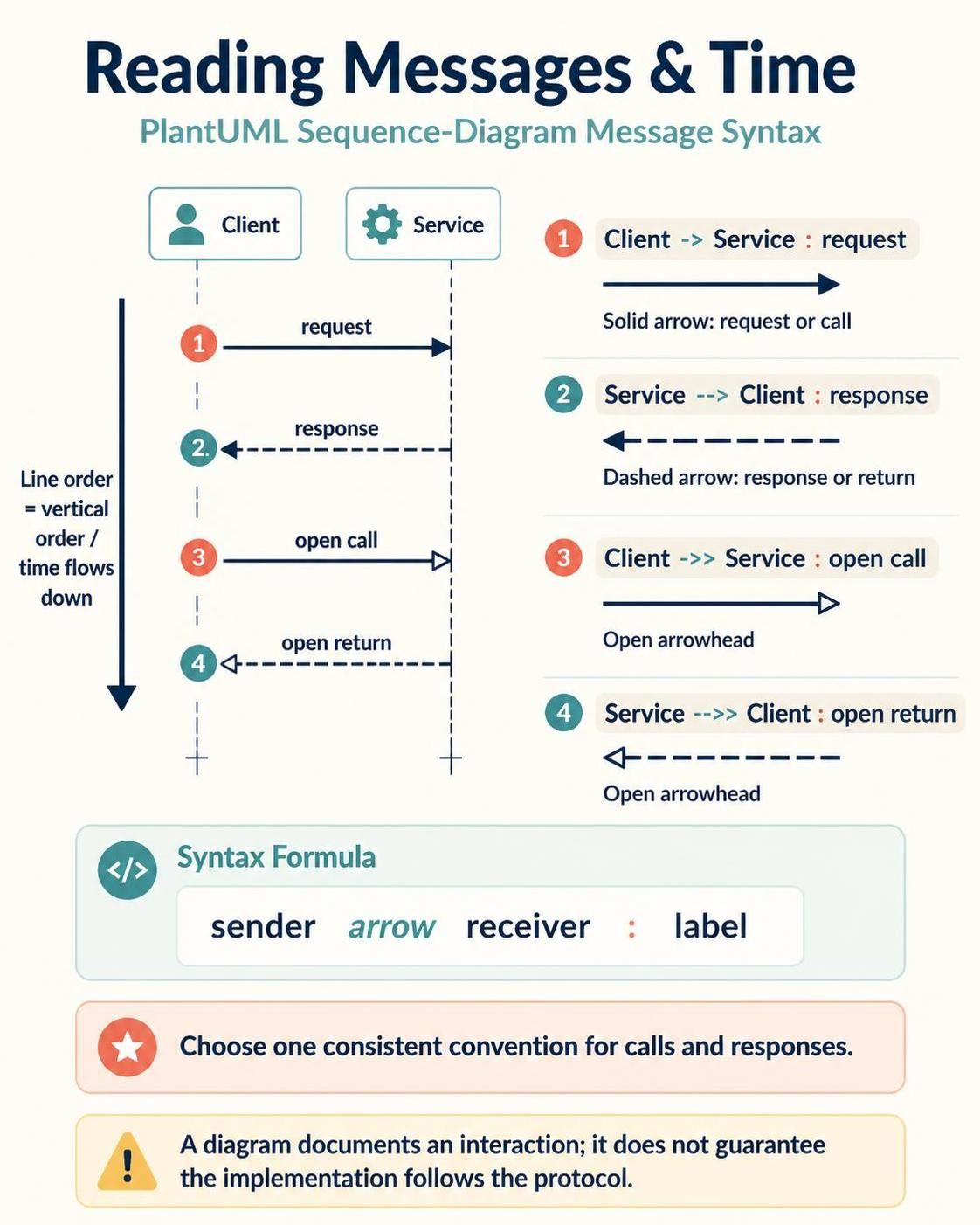
Each message is written as a sender, an arrow, a receiver, and a label. The order of message lines determines their vertical order in the diagram.
-
->is a solid message arrow, commonly used for a request or call. -
-->is a dashed arrow, often used for a response or return. -
->>and-->>use open arrowheads in common PlantUML styles. -
: textadds the message label.
Choose a consistent convention for calls and responses. UML diagrams communicate an interaction; they do not automatically guarantee that the implementation follows the depicted protocol.
3. Activations and participant lifetimes
Activations can show when a participant is doing work. Use activate and deactivate, or the shorthand ++ and -- on message arrows.
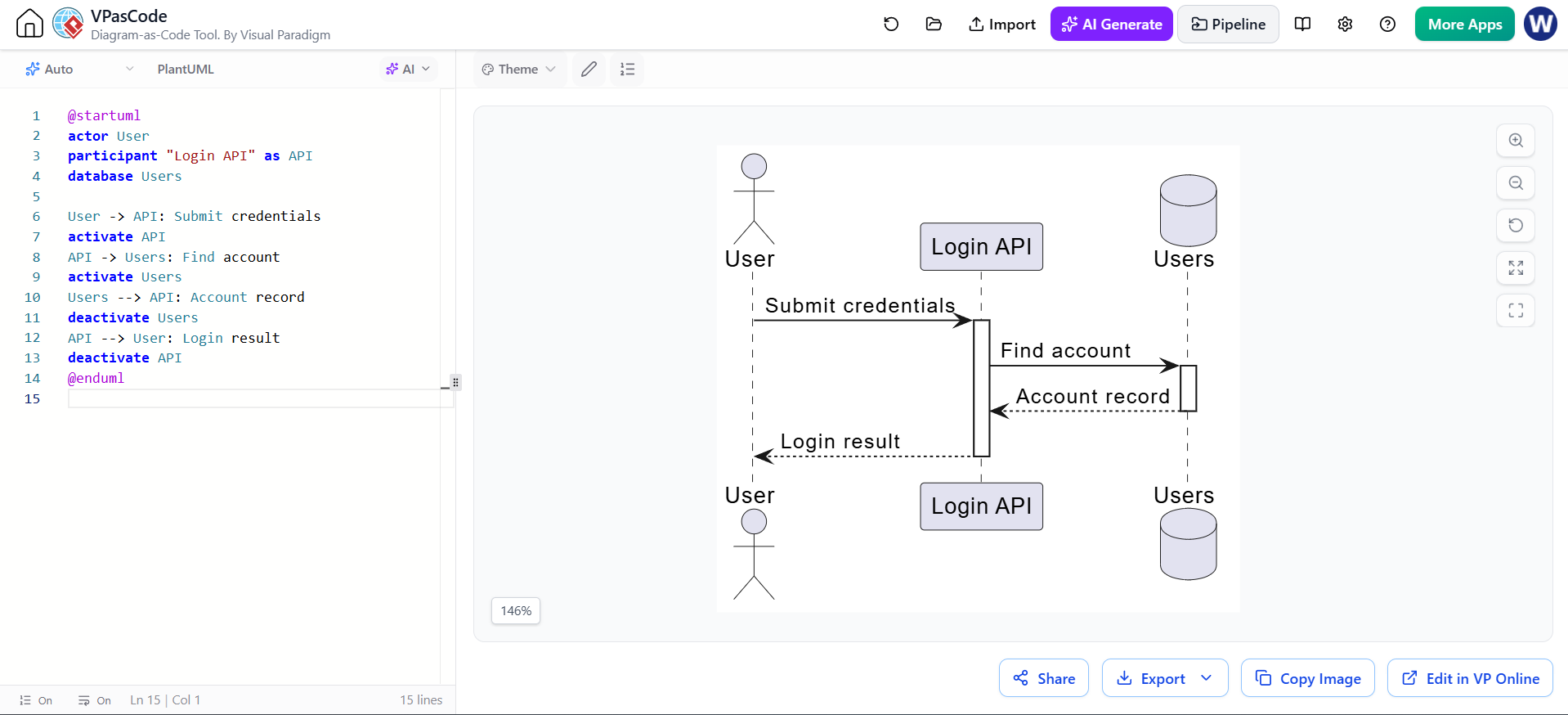
@startuml
actor User
participant "Login API" as API
database Users

User -> API: Submit credentials
activate API
API -> Users: Find account
activate Users
Users --> API: Account record
deactivate Users
API --> User: Login result
deactivate API
@enduml
Activations are most useful when they clarify nested calls or responsibility. Avoid adding them mechanically to every message if they make the diagram harder to read.
4. Conditions, alternatives, and repetition
Use combined fragments to show control flow. The fragment keyword starts the block, else separates alternatives where applicable, and end closes it. Guard conditions go in square brackets.
Alternative paths: alt and else
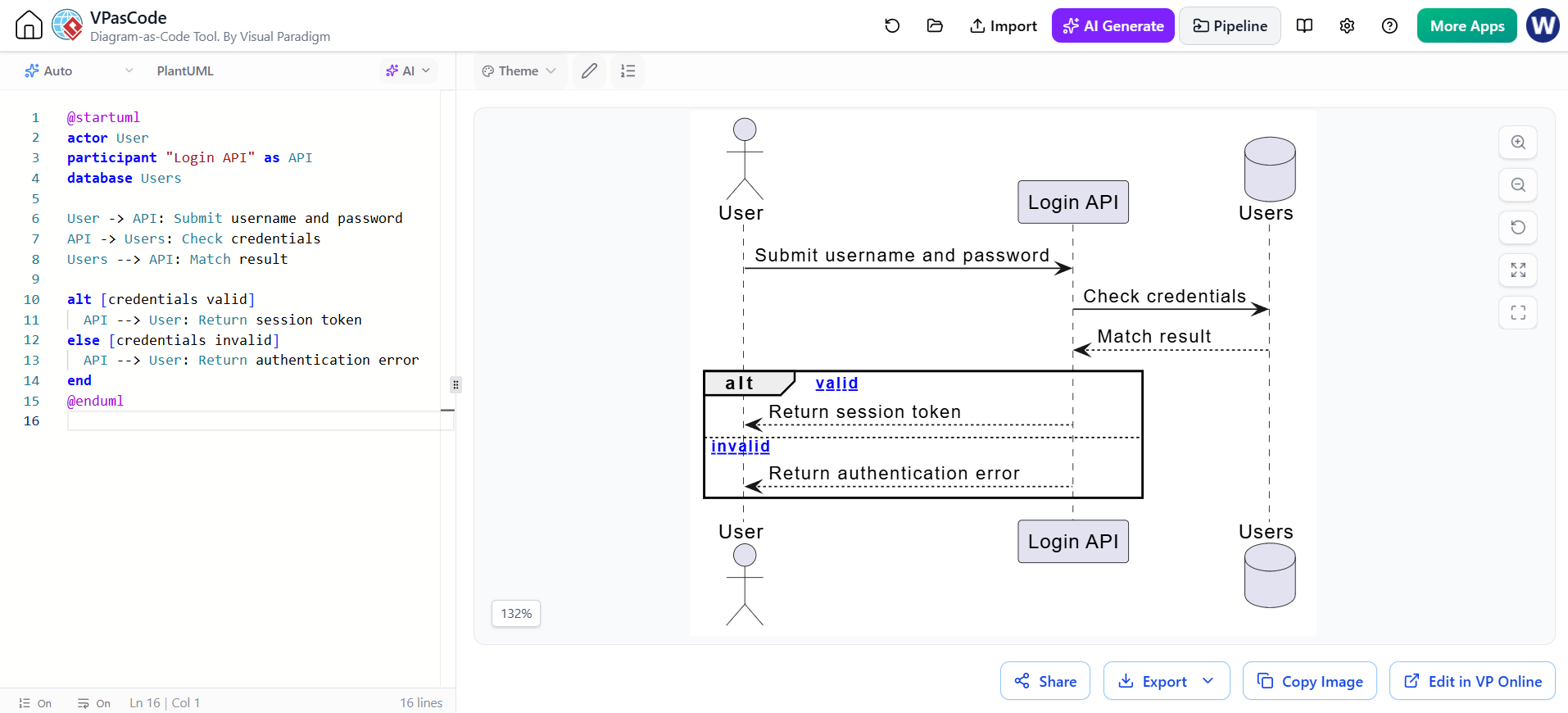
@startuml
actor User
participant "Login API" as API
database Users

User -> API: Submit username and password
API -> Users: Check credentials
Users --> API: Match result

alt [credentials valid]
  API --> User: Return session token
else [credentials invalid]
  API --> User: Return authentication error
end
@enduml
alt is appropriate when the paths are mutually exclusive. Use labels that make the conditions clear.
Optional behavior: opt
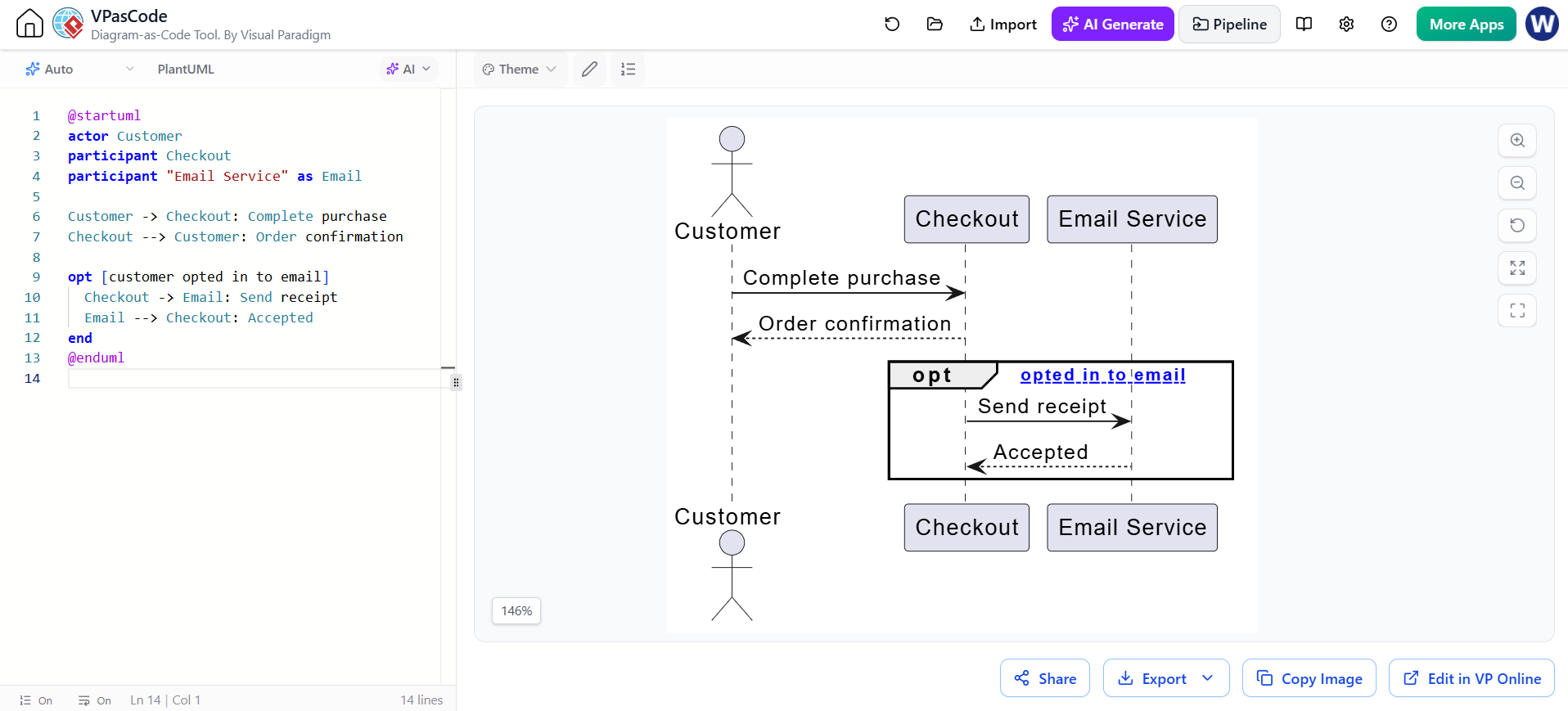
@startuml
actor Customer
participant Checkout
participant "Email Service" as Email

Customer -> Checkout: Complete purchase
Checkout --> Customer: Order confirmation

opt [customer opted in to email]
  Checkout -> Email: Send receipt
  Email --> Checkout: Accepted
end
@enduml
Repetition: loop
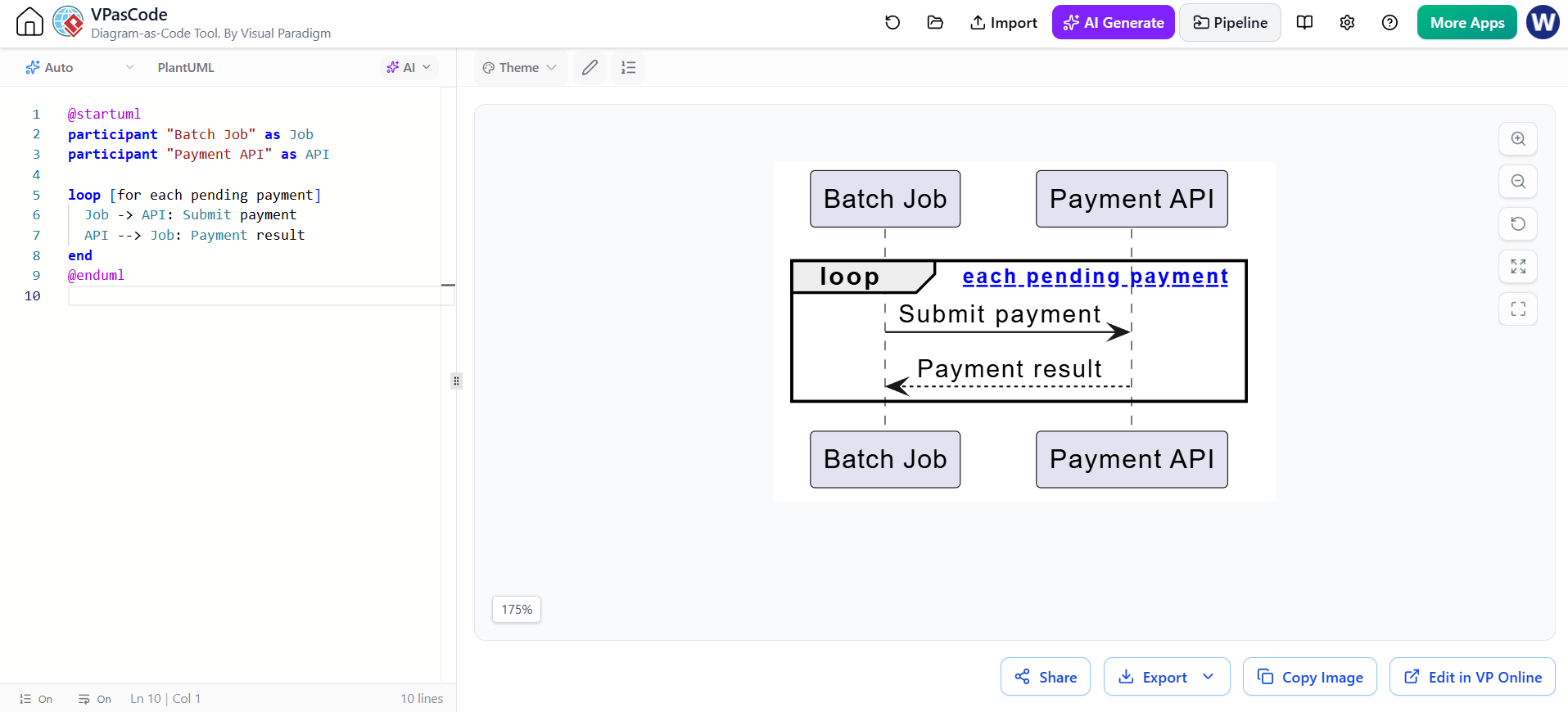
@startuml
participant "Batch Job" as Job
participant "Payment API" as API

loop [for each pending payment]
  Job -> API: Submit payment
  API --> Job: Payment result
end
@enduml
Put the repeated action inside the fragment and state the loop condition or scope clearly.
5. Parallel and grouped interactions
Use par when interactions happen concurrently or their order is not significant. Use group to label a set of messages without implying a particular control-flow structure.
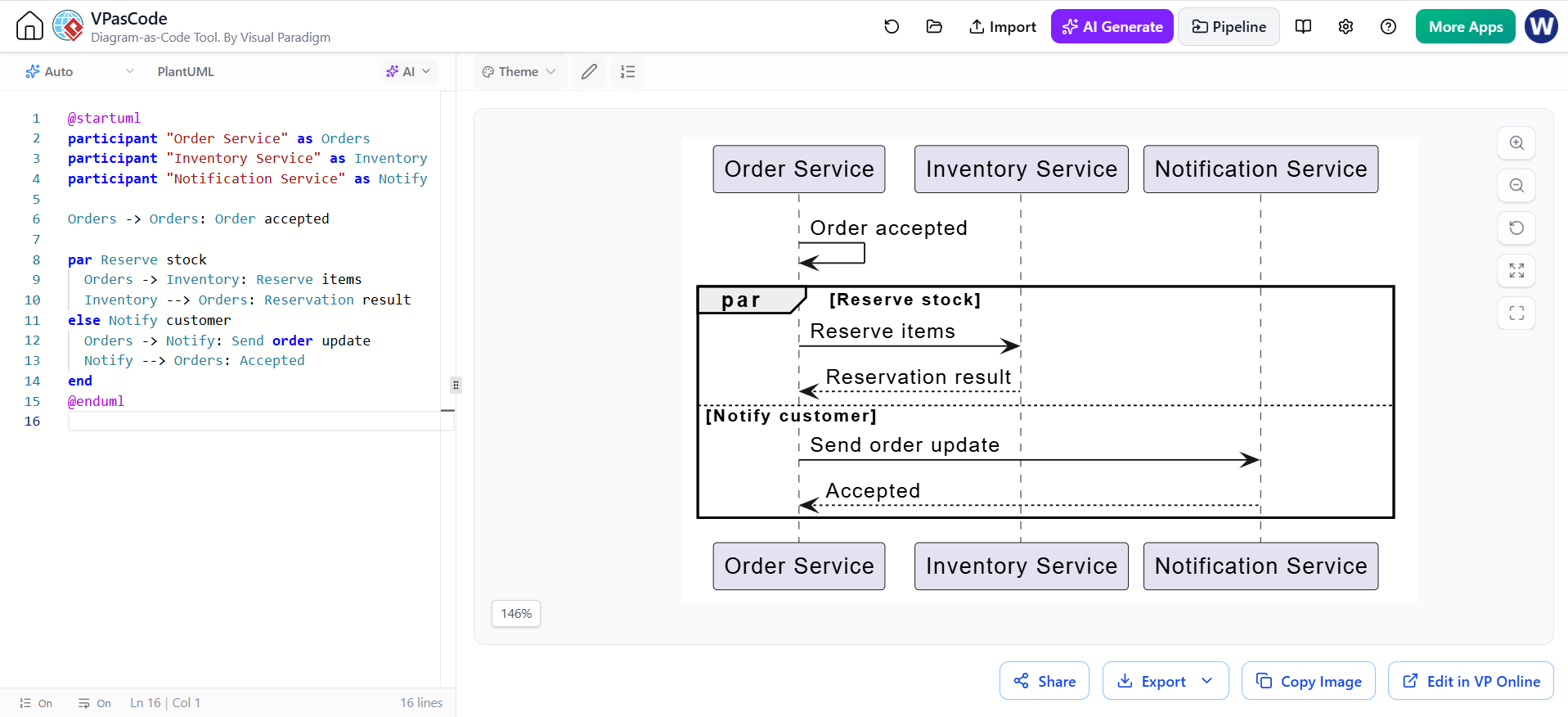
@startuml
participant "Order Service" as Orders
participant "Inventory Service" as Inventory
participant "Notification Service" as Notify

Orders -> Orders: Order accepted

par Reserve stock
  Orders -> Inventory: Reserve items
  Inventory --> Orders: Reservation result
else Notify customer
  Orders -> Notify: Send order update
  Notify --> Orders: Accepted
end
@enduml
Use par only when concurrency is meaningful. If one action must finish before another begins, show the messages in sequence instead.
6. Notes, references, and visual grouping
Notes can clarify assumptions, constraints, or decisions. A ref fragment can point readers to another diagram or a separately documented interaction.
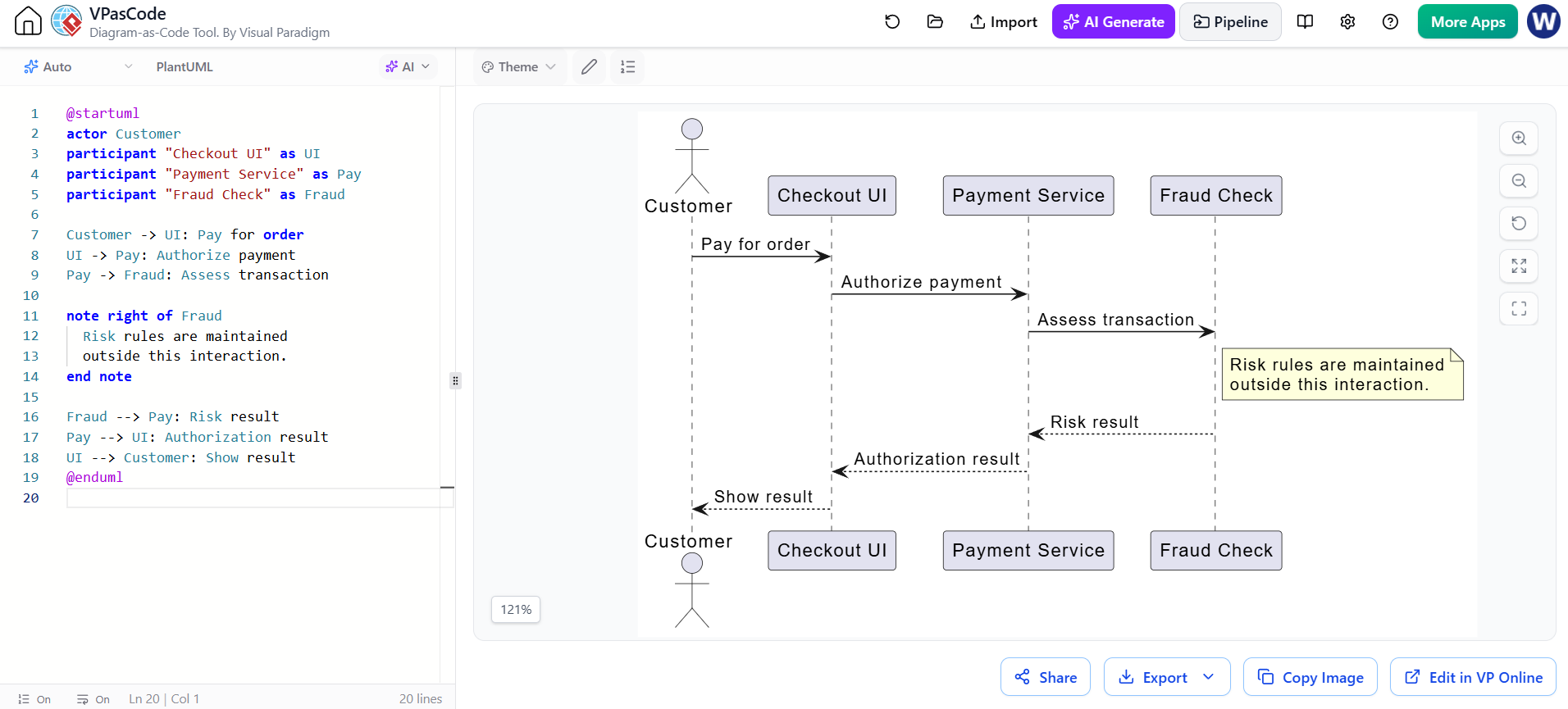
@startuml
actor Customer
participant "Checkout UI" as UI
participant "Payment Service" as Pay
participant "Fraud Check" as Fraud

Customer -> UI: Pay for order
UI -> Pay: Authorize payment
Pay -> Fraud: Assess transaction

note right of Fraud
  Risk rules are maintained
  outside this interaction.
end note

Fraud --> Pay: Risk result
Pay --> UI: Authorization result
UI --> Customer: Show result
@enduml
Notes should add context rather than repeat message labels. If the diagram becomes crowded, split it into focused scenarios and use references or documentation links to connect them.
7. Creating and refining diagrams in VPasCode
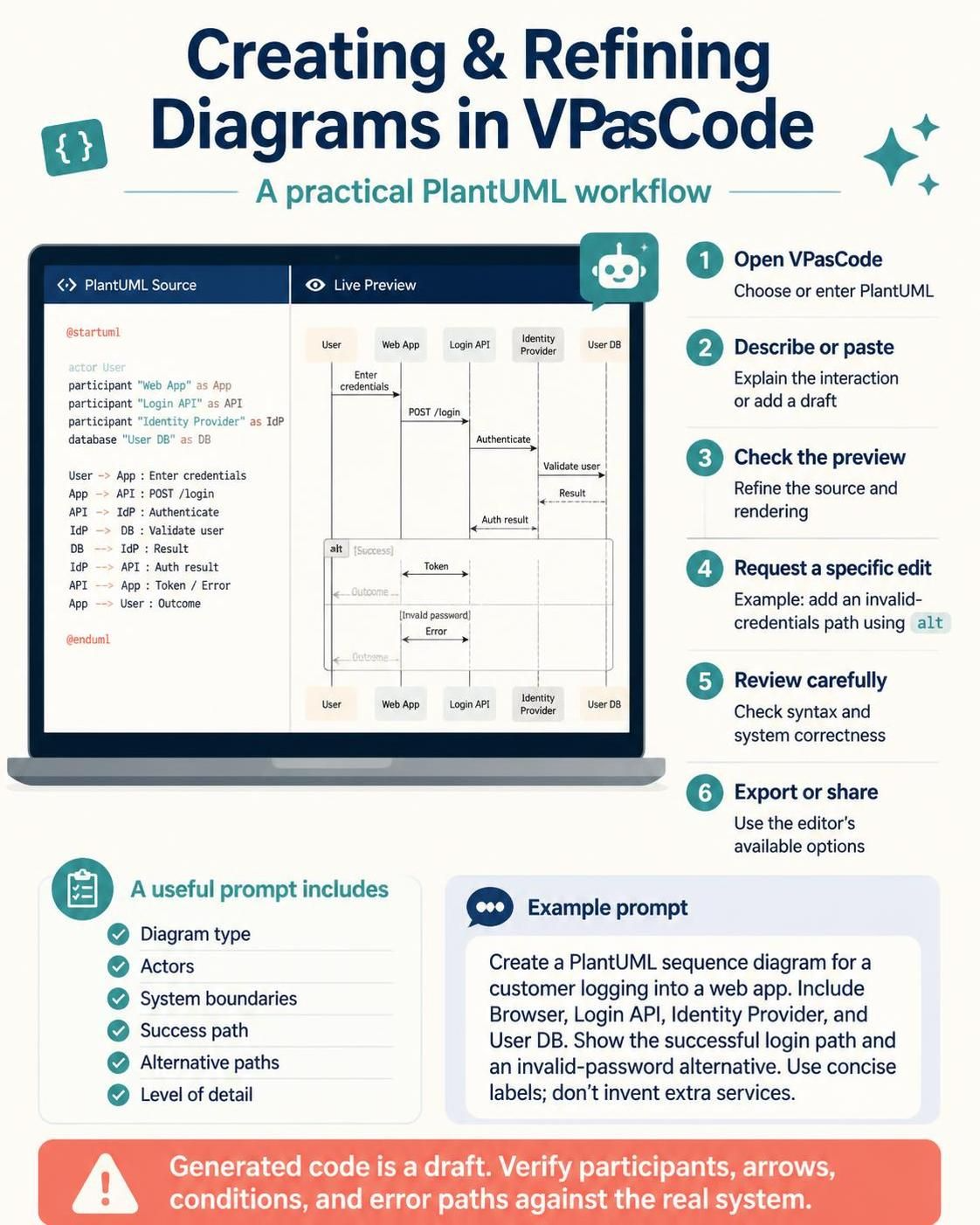
VPasCode supports PlantUML editing with live rendering, as well as AI-assisted diagram generation, code modification, and syntax correction. Its exact interface and feature availability can change, but the general workflow is:
-
Open VPasCode and choose or enter PlantUML.
-
Describe the interaction, or paste a PlantUML draft into the editor.
-
Check the rendered preview as you refine the source.
-
Ask the AI to make a specific change, such as “add an invalid-credentials path using
alt.” -
Review the resulting code and diagram for both syntax and system correctness.
-
Export or share the finished diagram using the options available in the editor.
A useful prompt gives the AI the diagram type, actors, system boundaries, main success path, important alternative paths, and level of detail. For example:
Create a PlantUML sequence diagram for a customer logging into a web app. Include Browser, Login API, Identity Provider, and User DB. Show the successful login path and an invalid-password alternative. Use concise labels and do not invent services beyond these.
Treat generated code as a draft. Check that participants, arrows, conditions, and error paths reflect the actual system—not just a plausible-looking flow.
8. A fuller example: checkout with payment failure
This example combines participant aliases, activations, and an alternative path.
@startuml
title Checkout and Payment Authorization

actor Customer
boundary "Checkout UI" as UI
control "Order Service" as Orders
participant "Payment Gateway" as Pay
database "Order DB" as DB

Customer -> UI: Submit checkout
UI -> Orders: Create pending order
activate Orders

Orders -> DB: Save pending order
DB --> Orders: Order ID

Orders -> Pay: Authorize payment
activate Pay

alt [payment approved]
  Pay --> Orders: Authorization code
  deactivate Pay

  Orders -> DB: Mark order confirmed
  DB --> Orders: Updated
  Orders --> UI: Order confirmed
  UI --> Customer: Show confirmation
else [payment declined]
  Pay --> Orders: Decline reason
  deactivate Pay

  Orders -> DB: Mark order failed
  DB --> Orders: Updated
  Orders --> UI: Payment declined
  UI --> Customer: Show retry option
end

deactivate Orders
@enduml
Check that the diagram’s order matches the real behavior. For example, if the system persists the order only after authorization succeeds, move the database messages to match that design.
9. Practical modeling guidelines
-
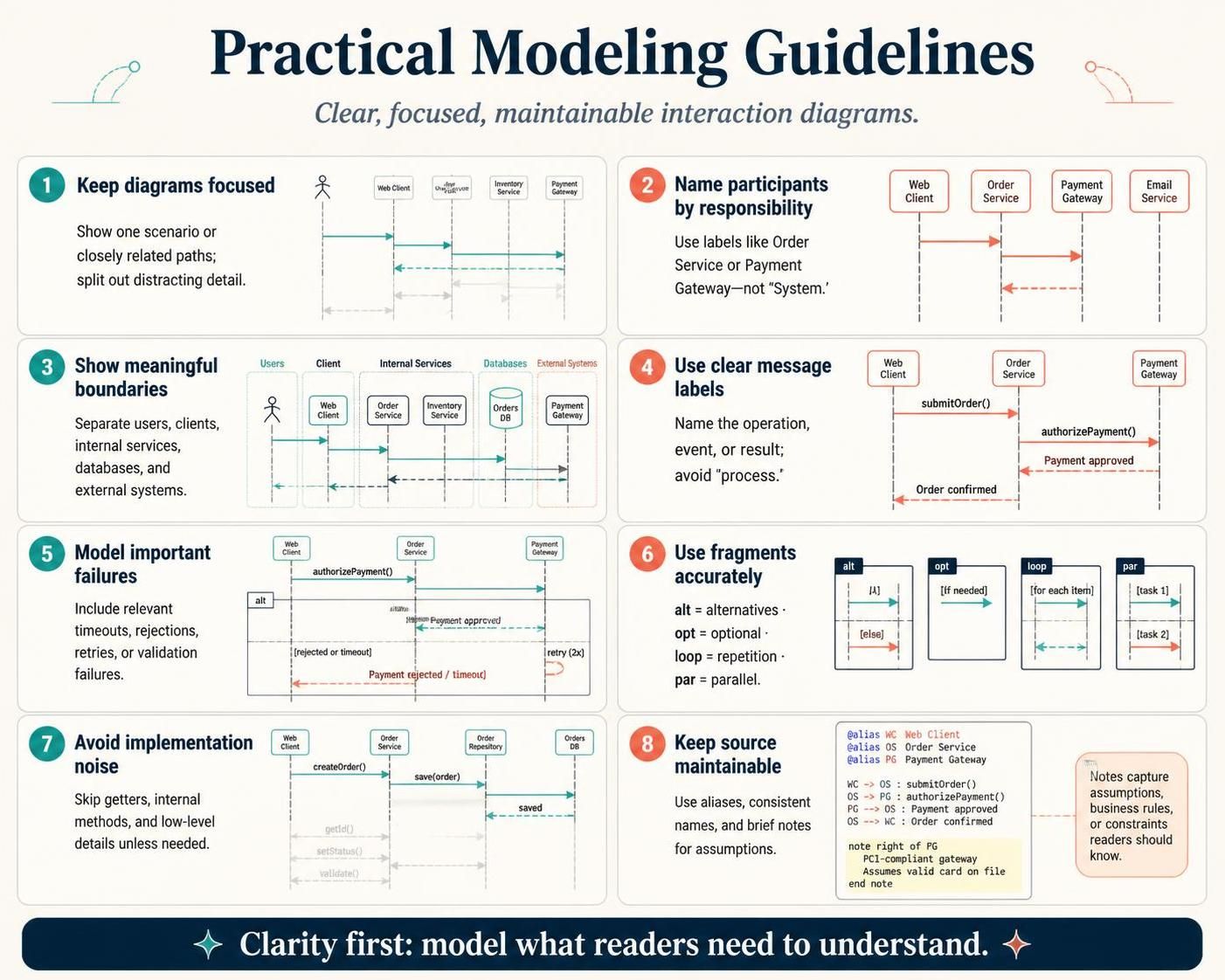
Keep a diagram focused. Show one scenario or a closely related set of paths. Split out deep details that distract from the main interaction.
-
Name participants by responsibility. Prefer labels such as
Order ServiceorPayment Gatewayto vague labels such asSystem. -
Show meaningful boundaries. Distinguish the user, client, internal services, databases, and external systems when that helps readers understand responsibility.
-
Use clear message labels. Include an operation, event, or important result; avoid labels that merely say “process.”
-
Model failure paths that matter. Include relevant timeouts, rejections, retries, or validation failures when they affect the scenario.
-
Use fragments accurately.
altmeans alternative paths,optmeans optional behavior,loopmeans repetition, andparmeans parallel behavior. -
Avoid implementation noise. Don’t diagram every getter, internal method, or low-level detail unless the audience needs it.
-
Keep source maintainable. Use aliases for long names, consistent naming, and short comments or notes for important assumptions.
10. Common errors and review checklist
If the diagram fails to render, check that @startuml and @enduml are present, fragment blocks have matching end statements, aliases are used consistently, and all message endpoints refer to defined participants. Also check for syntax from another diagram language accidentally pasted into the PlantUML source.
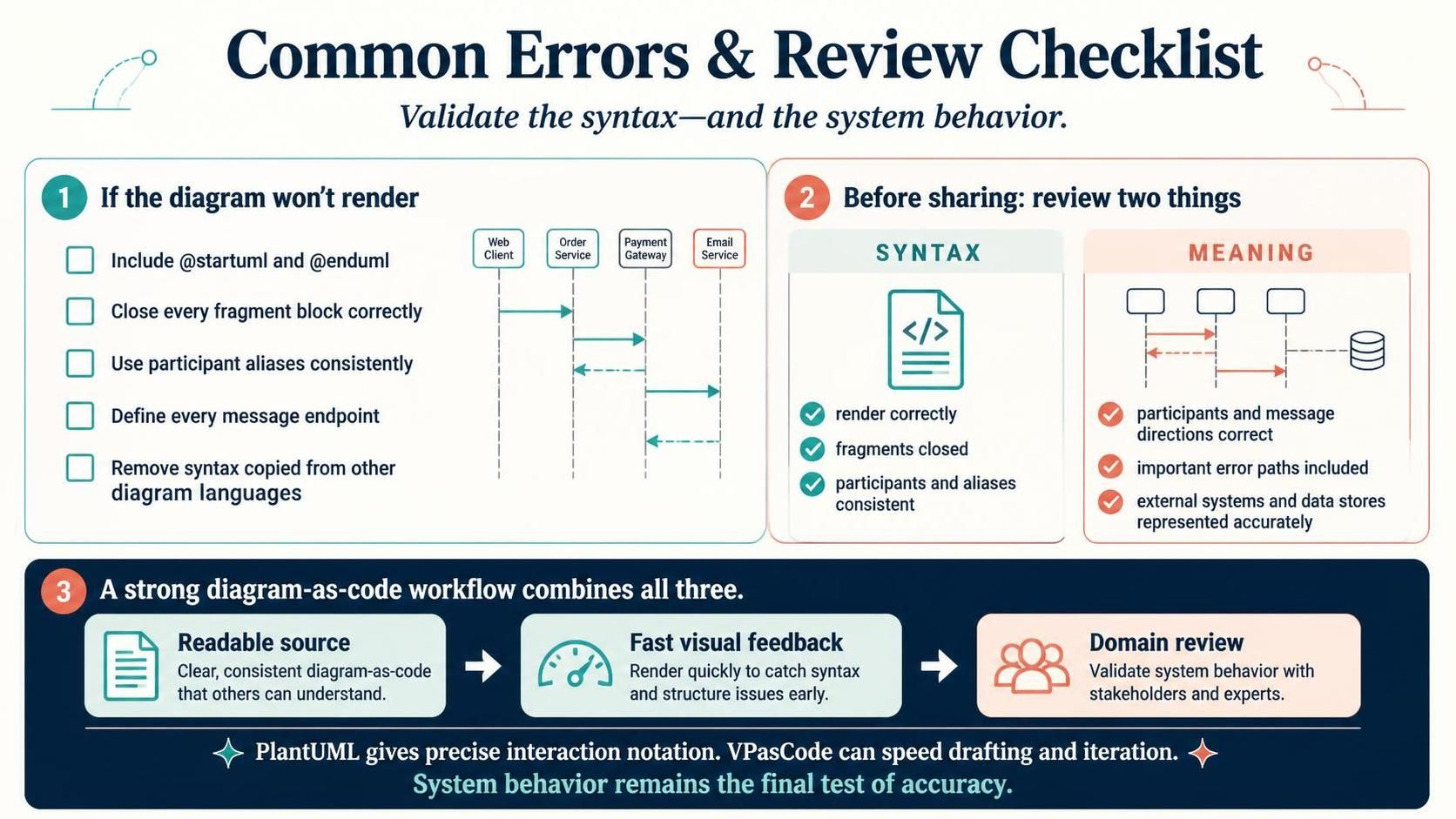
Before sharing, review two things:
-
Syntax: Does it render? Are fragments closed? Are participants and aliases consistent?
-
Meaning: Are the participants and message directions correct? Are important error paths included? Are external systems and data stores represented accurately?
The strongest diagram-as-code workflow combines readable source, fast visual feedback, and domain review. PlantUML provides explicit control over interaction notation, while VPasCode can speed up drafting and iteration; the final authority on the diagram’s accuracy is still the system behavior it is meant to describe.