


Introduction: Why Object Diagrams Deserve Your Attention
As someone who has navigated countless software architecture discussions and modeling workshops, I’ve noticed a recurring pattern: teams invest heavily in class diagrams but often overlook their concrete counterpart—the object diagram. After spending time with Visual Paradigm’s object diagram capabilities, I wanted to share a practical, experience-driven guide for anyone looking to bridge the gap between abstract design and real-world system behavior.
Object diagrams aren’t just academic exercises. They’re powerful communication tools that help stakeholders see how your system actually works at a specific moment. Whether you’re validating a design, onboarding a new team member, or debugging complex relationships, object diagrams provide the concrete snapshot that class diagrams alone cannot. This guide walks through what they are, why they matter, and exactly how to create them effectively using Visual Paradigm—based on hands-on exploration and real project scenarios.
What Is an Object Diagram in UML?
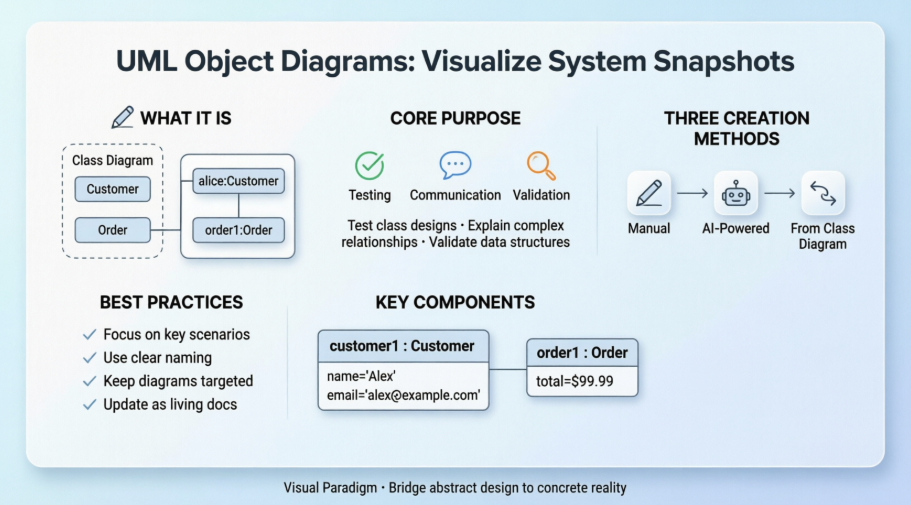
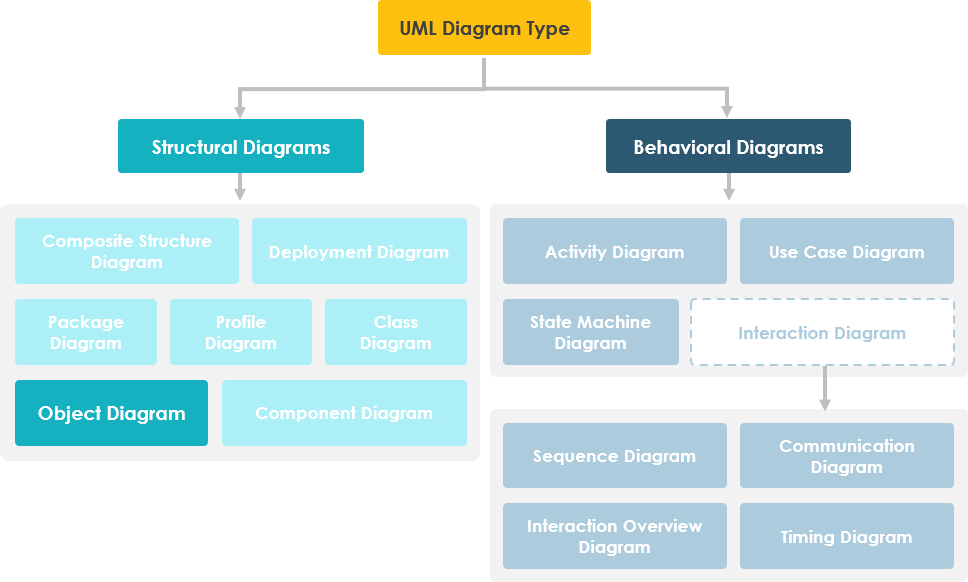
An object diagram in the Unified Modeling Language (UML) is a diagram that shows a complete or partial view of the structure of a modeled system at a specific time. In other words, it represents an instance of a class diagram which depicts a snapshot of the system at a particular moment. Object diagrams and class diagrams are closely related and use almost identical notation. Both diagrams are meant to visualize static structure of a system. While class diagrams show classes, object diagrams display instances of classes (objects). Object diagrams are more concrete than class diagrams. They are often used to provide examples or act as test cases for class diagrams. Only aspects of current interest in a model are typically shown on an object diagram.
Purpose of Object Diagrams: When and Why to Use Them
The use of object diagrams is fairly limited, mainly to show examples of data structures.
-
During the analysis phase of a project, you might create a class diagram to describe the structure of a system and then create a set of object diagrams as test cases to verify the accuracy and completeness of the class diagram.
-
Before you create a class diagram, you might create an object diagram to discover facts about specific model elements and their links, or to illustrate specific examples of the classifiers that are required.
Other Related Object Diagram Articles
- What is Object Diagram?
- What is Class Diagram?
- What is UML?
- Why UML Modeling?
- Overview of the 14 UML Diagram Types
- How to draw a Object Diagram in UML
How to Draw an Object Diagram in UML: A Step-by-Step Walkthrough
Object diagram is a kind of UML diagram that shows a snapshot of instances of things in class diagram. Similar to class diagram, it shows the static design of system from the real or prototypical perspective.
Creating an Object Diagram
Perform the steps below to create a UML object diagram in Visual Paradigm.
-
Select Diagram > New from the application toolbar.
-
In the New Diagram window, select Object Diagram.
-
Click Next.
-
Enter the diagram name and description. The Location field enables you to select a model to store the diagram.
-
Click OK.
Creating Instance Specification
To create instance specification in object diagram:
-
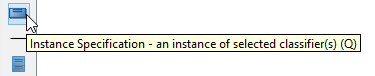
Select Instance Specification from the diagram toolbar.
-
Click on the diagram to create an instance specification shape. Name it.

Selecting Classifiers
To specify classifiers for an instance specification:
-
Right-click on the desired instance specification shape and select Select Classifier > Select Classifier… from the pop-up menu.
-
This opens the Classifiers tab. Click Add… in it.
-
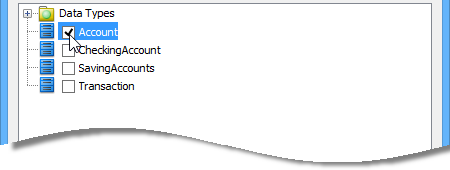
In the Select Classifier window, select the class(es) to be the classifier of the instance specification. If you are referencing another project, you can select its model element to be the classifier. Just change the from project selection at the top of the window.
-
Click OK to return to the Instance Specification Specification window.
-
Click OK to return to the diagram.

Defining Slots
To define slots for an instance specification:
-
Right-click on the desired instance specification shape and select Slots… from the pop-up menu.
-
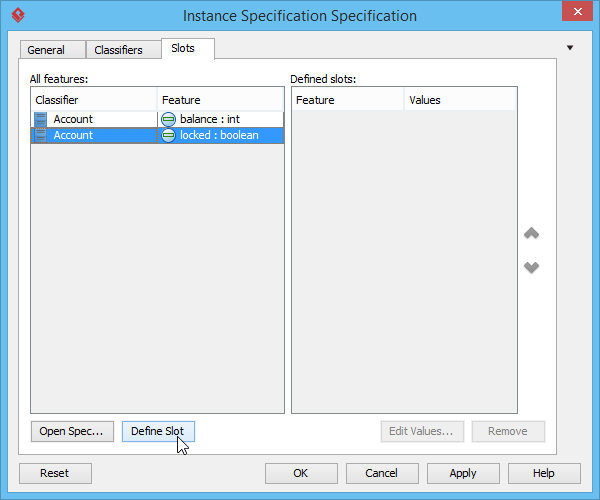
The Instance Specification Specification window appears with the Slots tab selected. Select the features that you want to define slots on the left and click Define Slot.
-
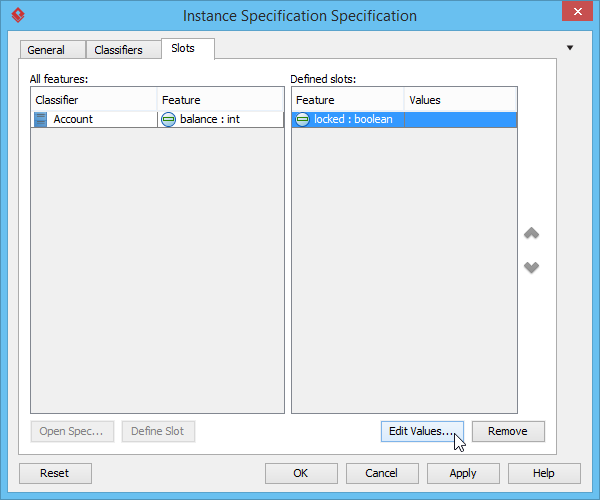
Select a defined slot and click Edit Values… at bottom right.
-
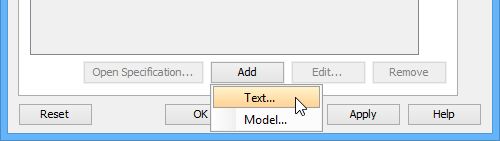
The Slot Specification window pops out, the Values tab is opened by default. Click Add button and select Text from the pop-up menu.
-
Enter the slot value and click OK to confirm.
-
Click OK again in the Instance Specification Specification window to return to the diagram.

Creating Links Between Objects
To create link between instance specifications:
-
Move the mouse pointer over the source instance specification.
-
Press on the Resource Catalog button and drag it out. Drag to the target instance specification and release the mouse button.

-
Select Link from Resource Catalog. A link is created.

Three Ways to Create Object Diagrams in Visual Paradigm: My Experience
In Visual Paradigm, an Object Diagram is a UML structural diagram that provides a concrete “snapshot” of a system’s state at a specific point in time. While a Class Diagram shows the abstract blueprint (classes and their relationships), an Object Diagram displays actual instances (objects) with real data values for their attributes. [1, 2, 3, 4]
Based on my hands-on testing, you can create these diagrams using three primary methods:
1. Manual Creation (Best for Precision & Learning)
-
Go to Diagram > New from the application toolbar.
-
Select Object Diagram from the list and click Next.
-
Enter a name and description, then click OK to open the canvas. [5, 6]
My take: This method gives you full control and is ideal when you’re learning UML notation or need pixel-perfect diagrams for documentation. The learning curve is gentle thanks to Visual Paradigm’s intuitive toolbar and context menus.
2. AI-Powered Generation (Best for Speed & Ideation)
-
In the Desktop version, navigate to Tools > AI Diagram Generation, select “Object Diagram,” and provide a natural language description (e.g., “visualize objects in a library system”).
-
Alternatively, use the Visual Paradigm AI Chatbot to generate diagrams from plain text descriptions instantly. [3, 7, 8]
My take: This feature is a game-changer for rapid prototyping. I tested it with “show a customer placing an order with multiple products,” and the AI generated a logically consistent object diagram in seconds. Perfect for brainstorming sessions or when you need a starting point fast.
3. Instantiation from Class Diagrams (Best for Validation & Testing)
-
Object diagrams are often derived directly from existing Class Diagrams to act as test cases or concrete examples of the abstract structure. [1, 9]
My take: This is where object diagrams truly shine. By instantiating objects from your class diagram, you can validate multiplicities, association navigability, and attribute constraints. I used this approach to catch a missing null-check in a payment workflow—something the class diagram alone didn’t reveal.
Key Components Explained: What You’re Actually Drawing
-
Objects: Represented as rectangles showing the object name, its class (e.g.,
alice : Customer), and specific attribute values (e.g.,email = "[email protected]"). -
Links: Solid lines representing instances of associations between objects, demonstrating how they relate at runtime. [1, 3, 4]
Pro tip: Always label your objects clearly using the objectName : ClassName convention. It dramatically improves readability, especially when sharing diagrams with non-technical stakeholders.
Core Use Cases & Best Practices: Where Object Diagrams Add Real Value
-
System Testing: Creating object diagrams as test cases to verify the accuracy of a class diagram.
-
Explaining Complexity: Illustrating smaller, concrete portions of a complex system or modeling recursive relationships.
-
Data Structure Visualization: Showing examples of how data is stored and linked within the system. [1, 9]
My Recommended Workflow:
-
Start with a high-level class diagram during design.
-
Create 2-3 object diagrams representing key scenarios (happy path, edge case, error state).
-
Use these object diagrams in code reviews to align developers on expected runtime behavior.
-
Update object diagrams when business rules change—they’re living documentation.
Lesson learned: Don’t try to diagram your entire system. Focus on the 20% of objects and relationships that drive 80% of your business logic. Object diagrams are most effective when they’re targeted and purposeful.
User Experience Review: Visual Paradigm’s Object Diagram Tooling
After using Visual Paradigm for several weeks to create object diagrams across multiple projects, here’s my honest assessment:
✅ Strengths:
-
Intuitive drag-and-drop interface with smart connectors
-
Seamless integration between class and object diagrams (changes propagate intelligently)
-
AI generation feature saves significant time during early design phases
-
Excellent export options (PNG, SVG, PDF) for documentation and presentations
-
Comprehensive tooltip guidance reduces the learning curve for UML newcomers
⚠️ Areas for Improvement:
-
The slot value editor could benefit from syntax highlighting for complex expressions
-
Bulk editing of multiple object attributes would speed up large diagram updates
-
A “scenario library” feature to reuse common object configurations would be valuable
🎯 Who Should Use This:
-
Software architects validating domain models
-
Business analysts clarifying requirements with concrete examples
-
Developers writing unit tests based on object relationships
-
Educators teaching UML concepts with tangible illustrations
Conclusion: Making Object Diagrams Work for You
Object diagrams are the unsung heroes of UML modeling. While they may not get the same spotlight as class or sequence diagrams, their ability to ground abstract designs in concrete reality makes them indispensable for robust system design. Through my experience with Visual Paradigm, I’ve found that even a single well-crafted object diagram can prevent miscommunication, uncover hidden assumptions, and accelerate team alignment.
My final recommendation? Don’t treat object diagrams as optional documentation. Integrate them into your design workflow as living artifacts. Start small—create one object diagram for your next user story. You’ll quickly discover how these “snapshots in time” bring clarity to complexity and confidence to your development process.
Whether you’re validating a new microservice architecture, onboarding a junior developer, or preparing for a stakeholder review, object diagrams offer a visual language that transcends technical jargon. With Visual Paradigm’s tooling—especially its AI-assisted features—you can create these powerful diagrams faster than ever before.
The best models don’t just describe systems—they help teams build better ones. Object diagrams, done right, do exactly that.
References
- What is Object Diagram?: Comprehensive introduction to UML object diagrams, their purpose, notation, and relationship to class diagrams within the Visual Paradigm guide.
- Object Diagram: A Guide to AI-Powered Structural Visualization: Explores how Visual Paradigm’s AI capabilities can accelerate the creation of object diagrams from natural language descriptions.
- Create UML Object Diagrams with AI: Practical article demonstrating AI-assisted workflows for generating object diagrams, including use cases and productivity tips.
- UML Object Diagram: Interactive guide and examples for creating object diagrams using Visual Paradigm’s AI chatbot interface.
- Drawing Object Diagrams: Official Visual Paradigm user guide section detailing step-by-step instructions for manually creating object diagrams.
- How to Draw an Object Diagram in UML: Community-driven tutorial with screenshots and best practices for object diagram creation in Visual Paradigm.
- UML Tool Features: Overview of Visual Paradigm’s UML modeling capabilities, including support for all 14 UML diagram types with emphasis on object diagram tooling.
- Visual Paradigm Object Diagram Tutorial (Video): Video walkthrough demonstrating object diagram creation techniques and use cases within Visual Paradigm.
- Object Diagram Documentation: Central hub for object diagram resources, including conceptual guides, tutorials, and integration tips with other UML diagrams.
This post is also available in Deutsch, Español, فارسی, Français, English, Bahasa Indonesia, 日本語, Polski, Portuguese, Ру́сский, Việt Nam, 简体中文 and 繁體中文.