


Introduction
In today’s fast-paced business environment, clarity and efficiency are paramount. Organizations constantly strive to optimize their workflows, reduce bottlenecks, and ensure that every team member understands their role in the larger operational picture. However, describing complex business processes using only text or informal sketches often leads to miscommunication, especially between technical teams (developers, IT architects) and non-technical stakeholders (business analysts, process owners, end-users).
This is where Business Process Model and Notation (BPMN) steps in as a critical solution. BPMN is a standardized graphical modeling language that provides a common vocabulary for mapping out business processes. It bridges the communication gap by offering a visual representation that is both simple enough for business users to understand and detailed enough for technical implementation.
This guide serves as a comprehensive introduction to BPMN, exploring its core constructs, benefits, and how modern tooling like Visual Paradigm—enhanced with AI capabilities—can streamline the creation of professional-grade process diagrams. Whether you are a business analyst looking to document current procedures or a product manager aiming to design future workflows, this guide will equip you with the foundational knowledge to model processes effectively.
Why Use BPMN? The Benefits of Standardization
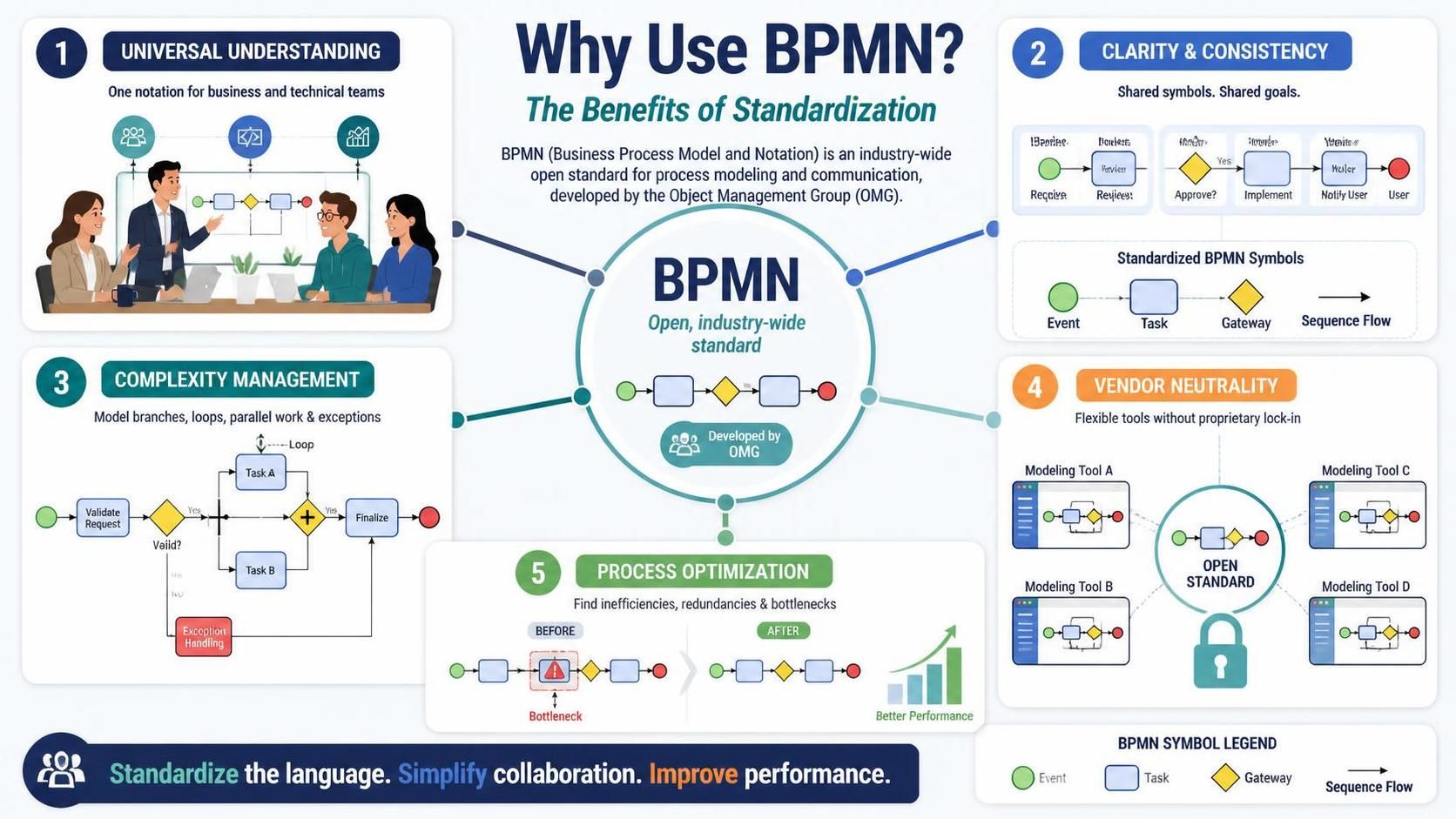
BPMN is not just another diagramming standard; it is an industry-wide consensus developed by the Object Management Group (OMG). Its adoption offers several strategic advantages:
-
Universal Understanding: BPMN provides a standard notation that is readily understandable by all business stakeholders. This helps bridge the frequent communication gap between business process design and technical implementation.
-
Clarity and Consistency: By using a defined set of symbols, organizations can create clear and consistent representations of their processes. This ensures that everyone—from process owners to developers—is aligned and working towards the same goals.
-
Complexity Management: While simple to learn, BPMN is powerful enough to depict the potential complexities of a business process, including branching paths, loops, parallel processing, and exception handling.
-
Vendor Neutrality: As an open standard, BPMN is supported by a wide range of tools, making it a versatile and flexible option for organizations of all sizes. It prevents lock-in to specific proprietary formats.
-
Process Optimization: Visualizing processes makes it easier to identify inefficiencies, redundancies, and bottlenecks, leading to streamlined operations and improved overall business performance.
Basic Constructs of BPMN
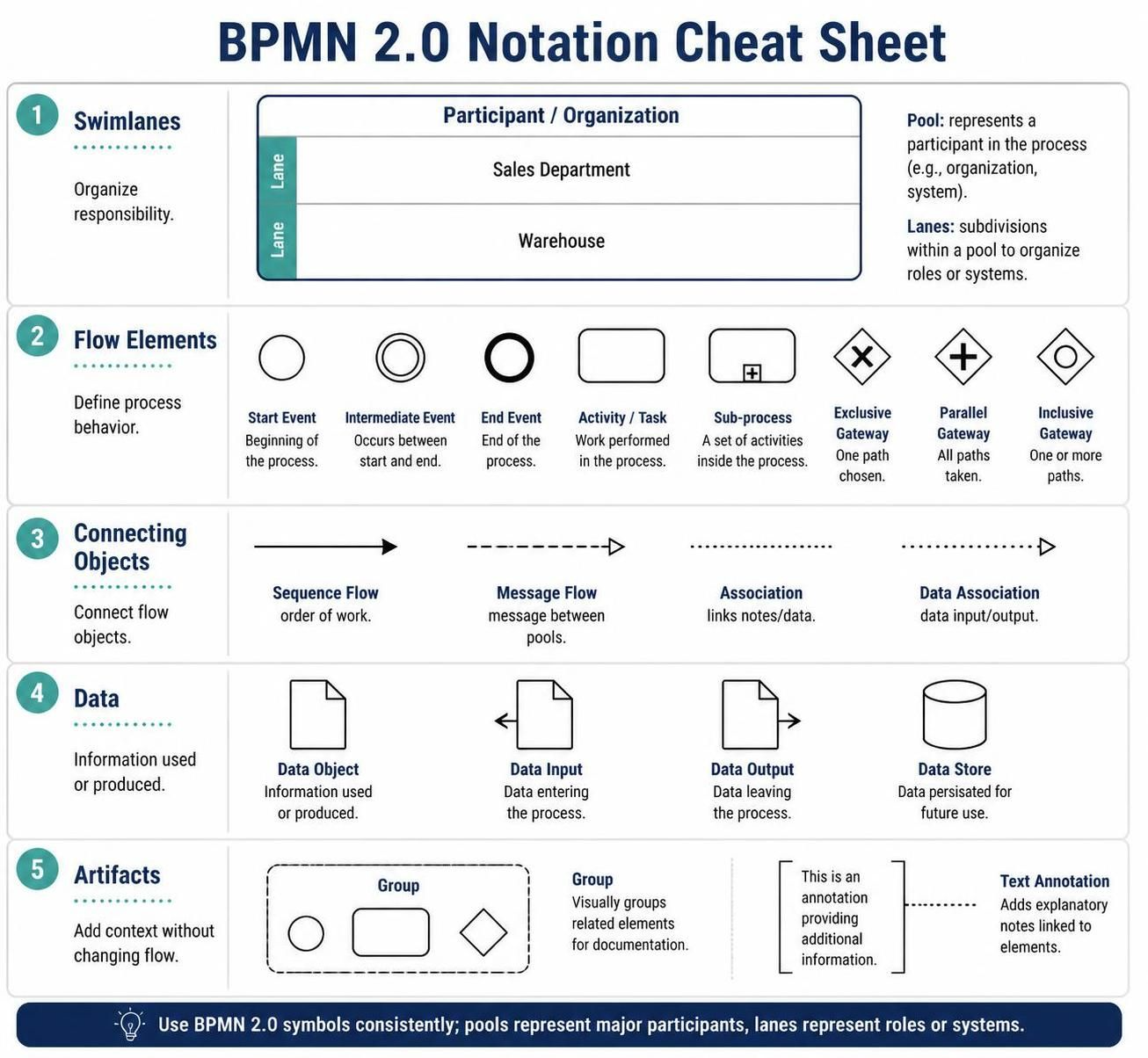
To create effective Business Process Diagrams (BPDs), one must understand the five basic categories of BPMN elements. Each category represents a unique aspect of a business process.
1. Swimlanes

Swimlanes are graphical containers that represent the participants in a process. They organize activities by who is responsible for performing them. There are two primary types:
-
Pools: Represent major participants in a process, such as different organizations or departments.
-
Lanes: Sub-divisions within a pool, representing specific roles, systems, or individuals within that participant.
Swimlanes provide immediate context, showing handoffs and responsibilities clearly. For example, in an order fulfillment process, one lane might represent the “Sales Department,” while another represents the “Warehouse.”
2. Flow Elements
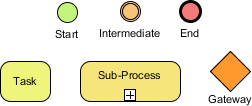
Flow elements are the core building blocks that define the behavior of a process. They connect to form the workflow itself. There are three main types:
-
Events: Something that happens during the course of a process. Examples include start events (triggering the process), intermediate events (something occurring between start and end), and end events (concluding the process).
-
Activities: Work that is performed within a process. This can be a simple task or a sub-process containing further detail.
-
Gateways: Control points that determine how flows diverge or converge. They handle decisions (exclusive gateways), parallel paths (parallel gateways), or inclusive choices.
3. Connecting Objects
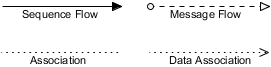
Flow objects do not exist in isolation; they are linked to show the sequence and relationship of actions. The connectors include:
-
Sequence Flows: Show the order in which activities are performed.
-
Message Flows: Represent the flow of messages between two separate pools (participants).
-
Associations: Link artifacts or data to flow objects.
-
Data Associations: Specifically show the input or output of data to/from activities.
4. Data
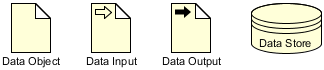
Data represents the information needed or produced when executing a business process. Understanding data flow is crucial for system integration and compliance. The four types include:
-
Data Objects: Information required or produced by activities.
-
Data Inputs: Data entering the process.
-
Data Outputs: Data resulting from the process.
-
Data Stores: Persistent storage where data is kept, such as databases or file systems.
5. Artifacts

Artifacts provide additional context and information about the process without affecting the flow itself. They help in documentation and clarification. The two main types are:
-
Groups: Used to visually group activities for analysis or documentation purposes.
-
Text Annotations: Provide explanatory notes or comments attached to specific elements in the diagram.
Leveraging Visual Paradigm for BPMN Modeling
While understanding the notation is essential, having the right tooling significantly accelerates the modeling process. Visual Paradigm is a robust platform that supports BPMN 2.0 standards and offers a rich set of features for creating, analyzing, and sharing business process diagrams.
Key Features of Visual Paradigm for BPMN:
-
Intuitive Drag-and-Drop Interface: Easily add swimlanes, tasks, gateways, and events from a comprehensive palette.
-
Standard Compliance: Ensures your diagrams adhere to BPMN 2.0 specifications, facilitating interoperability.
-
Collaboration Tools: Share diagrams with stakeholders for feedback and review, ensuring alignment across teams.
-
Integration Capabilities: Connect with other modeling standards like UML or ERD for a holistic view of your enterprise architecture.
The Power of AI in Process Modeling
Recent advancements have integrated Artificial Intelligence into tools like Visual Paradigm, revolutionizing how BPMN diagrams are created. The AI Business Process Diagram Generator allows users to generate detailed BPMN models simply by describing the process in natural language.
How it works:
-
Input Description: You provide a text description of the business process (e.g., “Create an employee onboarding process where HR sends documents, IT sets up accounts, and the manager assigns a buddy”).
-
AI Generation: The AI analyzes the text, identifies key actors, tasks, decisions, and flows, and automatically generates a structured BPMN diagram.
-
Refinement: Users can then refine the generated diagram using the Visual Paradigm editor, adding specific details, adjusting layouts, or correcting any nuances.
This feature is particularly useful for rapid prototyping, brainstorming sessions, or converting existing textual documentation into visual models quickly. It handles complex logic such as gateways, parallel execution, and swimlane assignments automatically, saving hours of manual drawing.
Key Concepts and Practical Examples
To solidify your understanding, let’s look at how these concepts apply in real-world scenarios.
Example 1: Employee Onboarding
-
Pool: “Company”
-
Lanes: “HR Department,” “IT Department,” “Hiring Manager”
-
Start Event: “New Hire Accepted Offer”
-
Tasks: HR sends welcome packet; IT creates email account; Manager schedules orientation.
-
Gateway: Exclusive gateway after “Paperwork Submitted” to check if all documents are complete. If no, flow back to HR; if yes, proceed to IT setup.
-
End Event: “Onboarding Complete”
Example 2: Order Fulfillment
-
Pool: “E-commerce Company”
-
Lanes: “Customer,” “Sales System,” “Warehouse”
-
Message Flow: Customer places order (message to Sales System).
-
Task: Sales System validates payment.
-
Gateway: Parallel gateway to trigger “Inventory Check” and “Invoice Generation” simultaneously.
-
Data Object: “Order Details” passed between systems.
-
End Event: “Order Shipped”
Conclusion
BPMN is an indispensable tool for modern organizations seeking to clarify, optimize, and communicate their business processes. By providing a standardized visual language, it ensures that stakeholders across technical and non-technical domains share a common understanding of how work gets done.
With the foundational knowledge of BPMN’s basic constructs—Swimlanes, Flow Elements, Connecting Objects, Data, and Artifacts—you can begin to map out your organization’s workflows with precision. When combined with powerful tooling like Visual Paradigm, and enhanced by AI-driven generation capabilities, the process of creating and maintaining these models becomes faster, more accurate, and more collaborative.
Whether you are documenting existing processes for compliance or designing new workflows for innovation, mastering BPMN will empower you to drive efficiency and clarity in your business operations. Start small, iterate often, and leverage the right tools to turn complex processes into clear, actionable insights.
Recommended Resources on Visual Paradigm and BPMN
- Comprehensive Guide to BPMN, Visual Paradigm Tooling, AI, and Ecosystem: Official blog post outlining the four pillars of the VP AI ecosystem with practical BPMN examples like Employee Onboarding and Order Fulfillment.
- Mastering Business Process Modeling: A Complete Guide to BPMN and AI-Powered Diagram Generation: Official guide detailing how to use the AI Business Process Diagram generator, with step-by-step instructions and feature comparisons.
- From Text to Process Flow: My Hands-On Review of Visual Paradigm’s AI-Powered BPMN Generator: Independent review testing the generator across real-world scenarios (e-commerce, IT support, banking) from a business analyst perspective.
- AI BPMN Diagram Generator: Professional BPD Tool: Official product page explaining the text-to-diagram feature, how to access it in VP Desktop, and key benefits like standard compliance.
- BPMN、Visual Paradigm 工具、人工智能与生态系统全面指南: Chinese version of the comprehensive guide, covering BPMN fundamentals and AI-driven generation case studies.
- From Text to Process Flow: A Hands-On Review of Visual Paradigm’s AI-Powered BPMN Generator: Detailed case study on a hardware retailer’s shipment process, demonstrating how AI handles gateways, parallel execution, and swimlane logic.
- AI BPMN图生成器:专业BPD工具: Chinese product guide detailing the AI generator’s capabilities, including automatic pool and lane inclusion for cross-functional clarity.
- 我的亲身体验:利用 Visual Paradigm 的 AI 驱动 BPMN 改变工作流程文档: First-hand review of the AI generator’s performance on employee onboarding, customer support, and loan approval scenarios.
- BPMN 2.0 商业流程建模新手实战指南:运用 Visual Paradigm 与 AI 轻松打造专业流程图: Practical tutorial with prompt writing strategies and advanced optimization techniques using the AI Chatbot for conversational refinement.
- BPMN 完整实战教程:Visual Paradigm 体验、AI 功能与生态系统深度指南: Series of articles covering the AI-powered BPMN generator launch, with deep dives into ecosystem integration and practical examples.
This post is also available in Deutsch, Español, فارسی, Français, English, Bahasa Indonesia, 日本語, Polski, Portuguese, Ру́сский, Việt Nam, 简体中文 and 繁體中文.