


Introduction
Business Process Modeling Notation (BPMN) has become the global standard for visualizing business processes. Developed initially by the Business Process Management Initiative in 2000 and maintained by the Object Management Group (OMG) since 2004, BPMN bridges the gap between technical implementation and business understanding. While activities represent the “work” being done, Events represent the “triggers” that start, interrupt, or end that work.
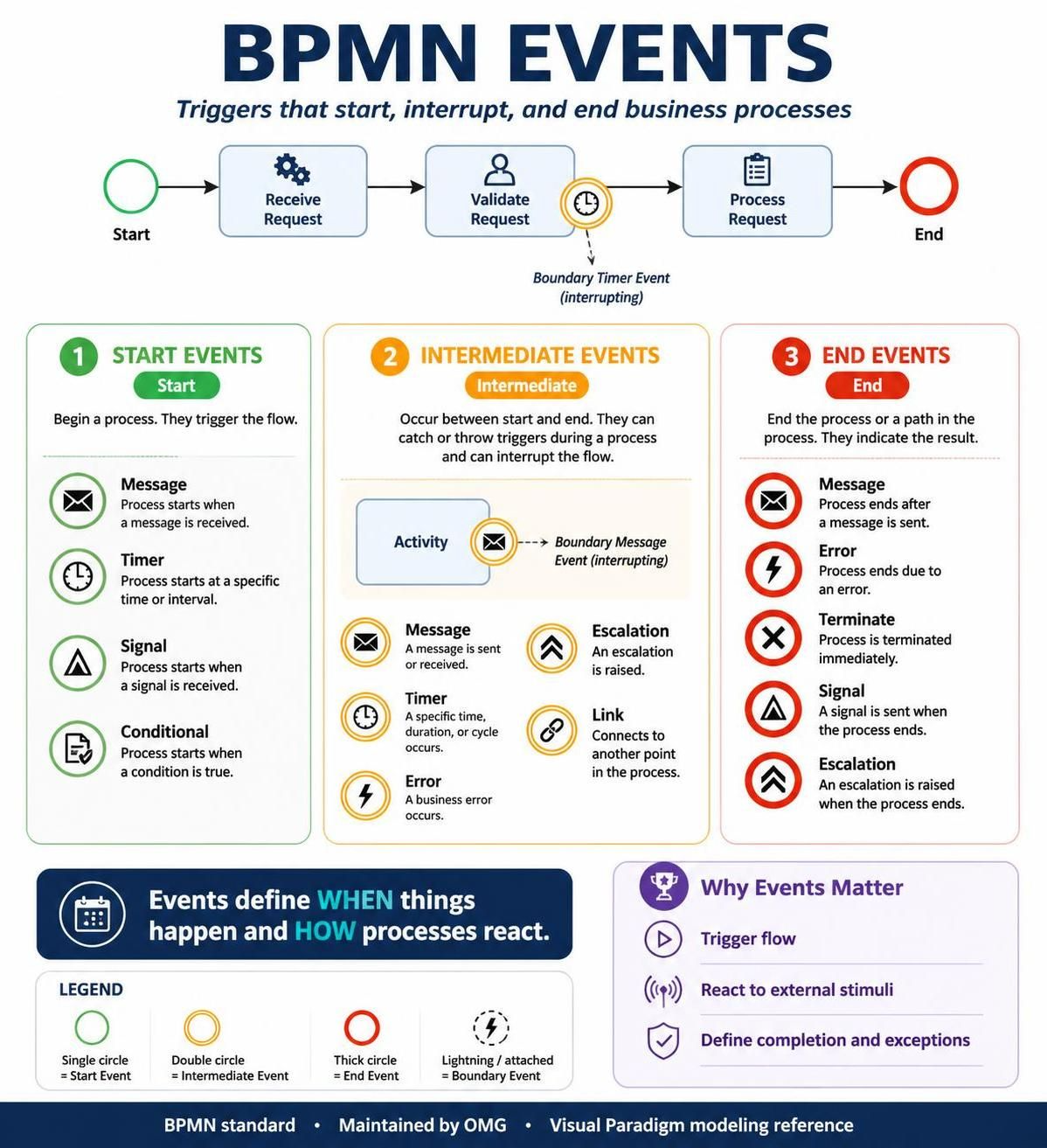
Understanding BPMN Events is critical for creating accurate, executable process models. Events are not just passive markers; they define when things happen, what triggers a change in flow, and how processes react to external stimuli like messages, timers, or errors. This guide explores the nuances of BPMN Events, from basic start and end points to complex boundary behaviors, using Visual Paradigm as our reference tooling environment.
BPMN Elements Overview
Before diving deep into events, it is essential to understand where they fit within the broader BPMN landscape. The intent of BPMN is to create a standard visual language that all process modelers recognize.
| Element | Symbol | Description |
|---|---|---|
| Activity |  |
An activity is a work that is performed within a business process. |
| Event |  |
An event is something that happens during the course of a process. |
| Gateway |  |
A gateway is used to control the divergence, and convergence of sequence flows in a process. |
| Flow |  |
Two major flow elements are core to BPM:· A sequence flow is used to show the order that activities will be performed in a process.· A message flow is used to show the flow of messages between two participants of a process. |
What is an Event in BPMN?
An event is a fundamental BPMN element that represents something that “happens” during the course of a process. Unlike activities, which consume time and resources, events are instantaneous occurrences. In BPMN diagrams, events are always expressed as circles.
Events indicate when something occurs at the start, end, or during a process, rather than what task is being performed. They are the triggers that drive the process forward or alter its path.
Types of Events by Position
The position of an event in the process flow determines its primary classification. There are three main types:
-
Start Events: These occur at the beginning of the process. Every process must have at least one start event. They are visually represented by a thin narrow line (single circle).
-
Intermediate Events: These occur in the middle of the process, between activities. They can catch triggers (wait for something) or throw triggers (signal something). They are represented by a thin double line (double circle).
-
End Events: These occur at the end of the process. Every process must have at least one end event. They are represented by a thick single line (filled outer circle).

Simple BPMN Diagram Example
To visualize how these events connect with activities, consider a simple linear process:

In this example, a Start Event triggers the first activity, which leads to an Intermediate Event, followed by another activity, and finally concludes with an End Event.
Advanced Event Concepts: Boundary, Interrupting, and Catching/Throwing
As processes become more complex, simple start/end events are insufficient. BPMN 2.0 introduced sophisticated event behaviors to handle real-world scenarios like timeouts, errors, and parallel notifications.
Boundary Events
A boundary event is an intermediate event attached to the border of an activity (or subprocess). It represents something that can happen while that activity is being performed.
For example, a Timer boundary event might represent a deadline. If the activity takes too long, the timer triggers, and the process flow diverts to a different path. Boundary events can be time-based or condition-based.
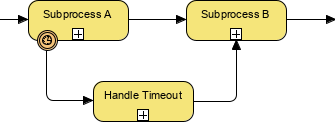
Interrupting vs. Non-Interrupting Events
Introduced in BPMN 2.0, this distinction is crucial for modeling realistic business logic. This concept applies primarily to intermediate and boundary events.
-
Interrupting Event (Solid Line): This is the most common type. When triggered, it stops the current activity immediately. The flow of control abandons the current task and proceeds along the new path defined by the event.
-
Non-Interrupting Event (Dashed Line): When triggered, it does not stop the current activity. Instead, it creates a parallel flow. The original activity continues to completion, while a new branch of the process starts simultaneously to handle the event.
Example: Imagine a “Review Document” task.
-
An Interrupting Timer might mean: “If not reviewed in 2 days, cancel the review and escalate to management.”
-
A Non-Interrupting Timer might mean: “If not reviewed in 2 days, send a reminder email, but keep the review task active.”
Catching vs. Throwing Events
Every event in BPMN is either “catching” or “throwing.” This defines the direction of the trigger.
-
Catching Events: These events wait for a trigger to activate. They are passive. For example, a “Message Start Event” catches an incoming email to start a process. In Visual Paradigm and standard BPMN, catching events often have unfilled internal markers.
-
Throwing Events: These events generate a trigger. They are active. For example, a “Message End Event” throws a notification to another system when the process completes. Throwing events typically have filled internal markers.
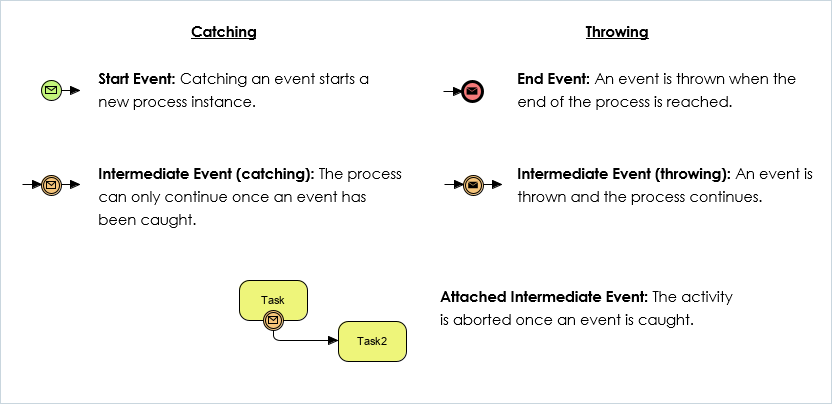
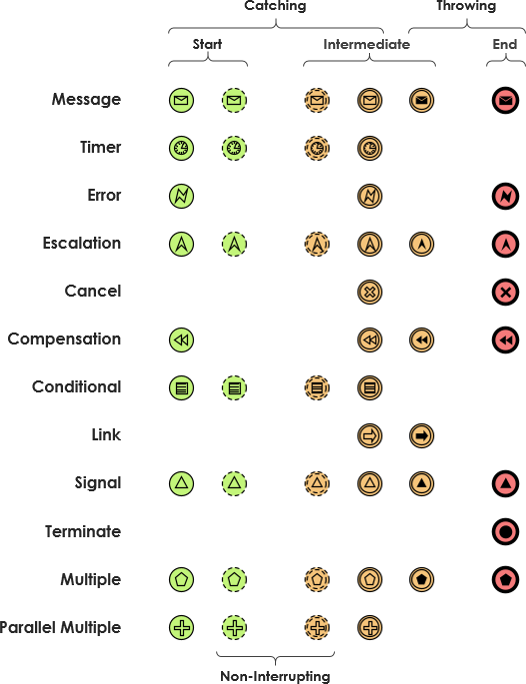
Summary of Events and Markers
BPMN 2.0 supports over 60 different types of events, allowing for highly detailed process modeling. To decode these events, you must look at three visual components: the outer border, the internal marker, and the line style.
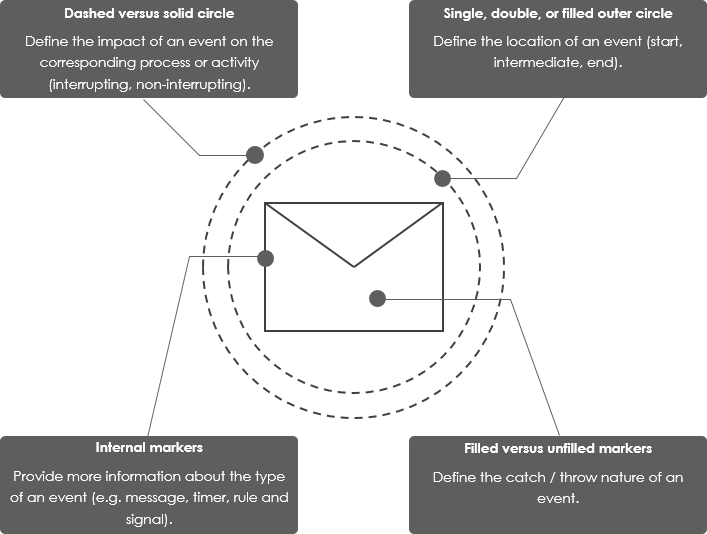
Decoding the Visual Language
-
Outer Border (Position):
-
Single Circle: Start Event.
-
Double Circle: Intermediate Event.
-
Thick/Filled Ring: End Event.
-
-
Internal Markers (Type):
-
The icon inside the circle defines the nature of the event (e.g., a clock for Timer, an envelope for Message, a lightning bolt for Error).
-
Unfilled Marker: Indicates a Catching event (waiting for input).
-
Filled Marker: Indicates a Throwing event (sending output).
-
-
Line Style (Behavior):
-
Solid Line: Interrupting. The event stops the current activity.
-
Dashed Line: Non-Interrupting. The event runs in parallel without stopping the current activity.
-
Key Concepts and Examples in Visual Paradigm
When using tools like Visual Paradigm, understanding these concepts allows you to build executable models. Here are three common scenarios:
1. The Order Processing Timeout
-
Scenario: A customer places an order. If payment is not received within 24 hours, the order is cancelled.
-
Modeling: Use a Non-Interrupting Timer Boundary Event on the “Wait for Payment” task. If the timer fires, it throws a signal to cancel the order, but if payment arrives first, the timer is discarded.
2. The Customer Service Escalation
-
Scenario: A support ticket is being handled. If the customer sends a “Urgent” message, the ticket is immediately escalated to a manager, stopping the current agent’s work.
-
Modeling: Use an Interrupting Message Boundary Event on the “Handle Ticket” task. The solid line indicates that the current work stops, and the flow moves to the “Manager Review” activity.
3. The Multi-System Notification
-
Scenario: When a project is completed, notify both the CRM system and the Billing system.
-
Modeling: Use a Throwing Message End Event. The filled envelope marker indicates that the process is actively sending messages out to external systems as it concludes.
Conclusion
BPMN Events are the heartbeat of any business process model. They transform static flowcharts into dynamic representations of real-world business logic. By mastering the distinctions between Start, Intermediate, and End events, and understanding the critical differences between Interrupting/Non-Interrupting and Catching/Throwing behaviors, you can create models that are not only visually clear but also technically accurate.
Whether you are using Visual Paradigm or another BPMN tool, remembering that events represent “when” and “what triggers” while activities represent “how” and “what work” will help you design processes that are robust, understandable, and ready for automation.
Reference
-
Comprehensive Guide to BPMN, Visual Paradigm Tooling, AI, and Ecosystem: Official blog post outlining the four pillars of the VP AI ecosystem with practical BPMN examples like Employee Onboarding and Order Fulfillment .
-
Mastering Business Process Modeling: A Complete Guide to BPMN and AI-Powered Diagram Generation: Official guide detailing how to use the AI Business Process Diagram generator, with step-by-step instructions and feature comparisons .
-
From Text to Process Flow: My Hands-On Review of Visual Paradigm’s AI-Powered BPMN Generator: Independent review testing the generator across real-world scenarios (e-commerce, IT support, banking) from a business analyst perspective .
-
AI BPMN Diagram Generator: Professional BPD Tool: Official product page explaining the text-to-diagram feature, how to access it in VP Desktop, and key benefits like standard compliance .
-
BPMN、Visual Paradigm 工具、人工智能与生态系统全面指南: Chinese version of the comprehensive guide, covering BPMN fundamentals and AI-driven generation case studies .
-
From Text to Process Flow: A Hands-On Review of Visual Paradigm’s AI-Powered BPMN Generator: Detailed case study on a hardware retailer’s shipment process, demonstrating how AI handles gateways, parallel execution, and swimlane logic .
-
AI BPMN图生成器:专业BPD工具: Chinese product guide detailing the AI generator’s capabilities, including automatic pool and lane inclusion for cross-functional clarity .
-
我的亲身体验:利用 Visual Paradigm 的 AI 驱动 BPMN 改变工作流程文档: First-hand review of the AI generator’s performance on employee onboarding, customer support, and loan approval scenarios .
-
BPMN 2.0 商业流程建模新手实战指南:运用 Visual Paradigm 与 AI 轻松打造专业流程图: Practical tutorial with prompt writing strategies and advanced optimization techniques using the AI Chatbot for conversational refinement .
-
BPMN 完整实战教程:Visual Paradigm 体验、AI 功能与生态系统深度指南: Series of articles covering the AI-powered BPMN generator launch, with deep dives into ecosystem integration and practical examples .
This post is also available in Deutsch, Español, فارسی, Français, English, Bahasa Indonesia, 日本語, Polski, Portuguese, Ру́сский, Việt Nam, 简体中文 and 繁體中文.