


Flowcharts and BPMN diagrams both show how work progresses from one step to another. The difference is mainly purpose and precision:
-
A flowchart is a general-purpose diagram for showing logic, steps, and decisions.
-
BPMN, or Business Process Model and Notation, is a standardized language designed specifically for modeling business processes, responsibilities, events, messages, data, and automation.
A flowchart is often the quickest way to explain a simple procedure. BPMN becomes more useful when a process involves multiple people, departments, organizations, exceptions, deadlines, or software systems.
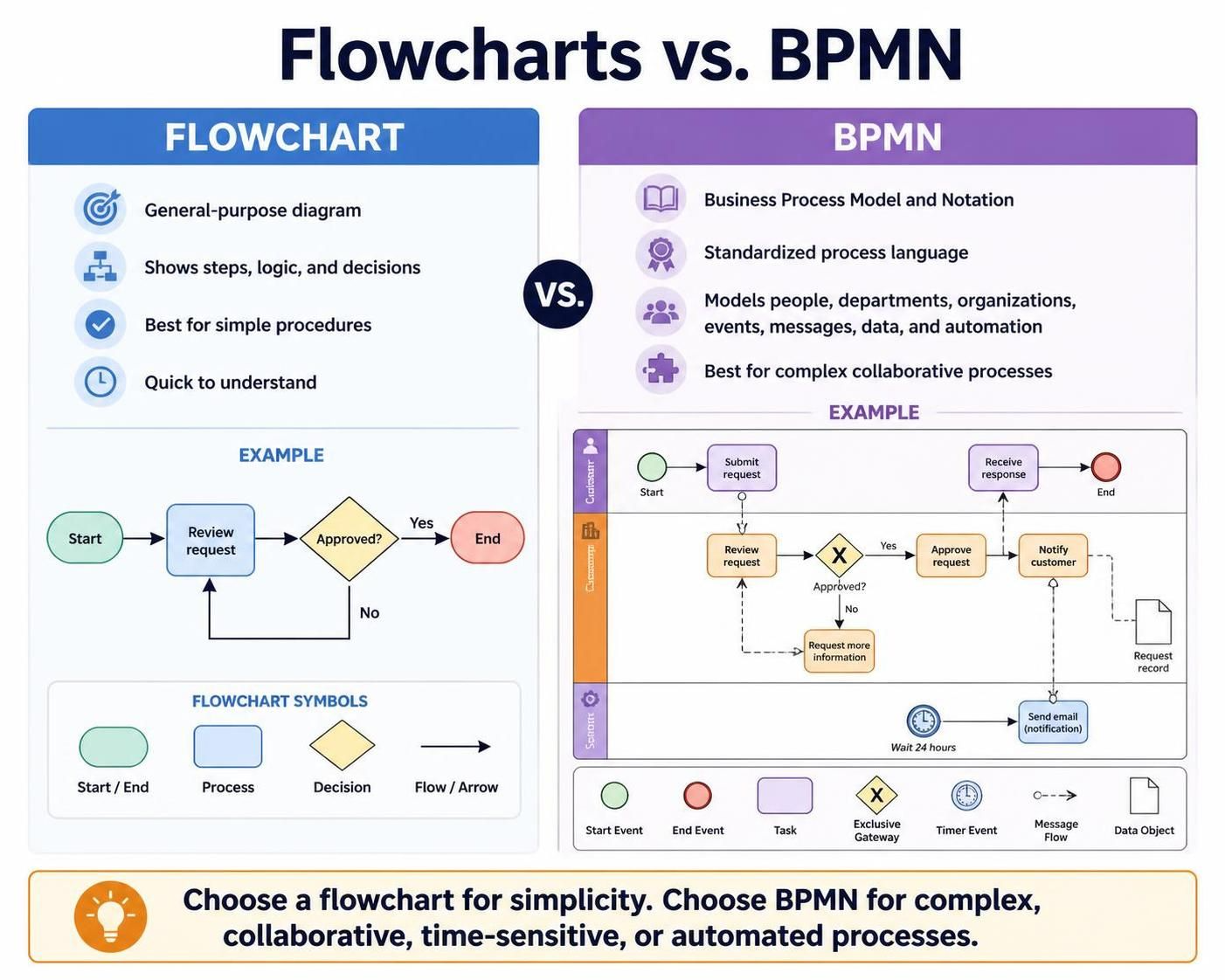
BPMN is maintained as a formal specification by the Object Management Group. Its notation is designed to be understandable to business stakeholders while remaining precise enough to support technical implementation. The current formal specification commonly used is BPMN 2.0.2.
1. What Is a Flowchart?
A flowchart is a visual representation of a sequence of steps. It uses simple shapes connected by arrows to show how a task or decision progresses.
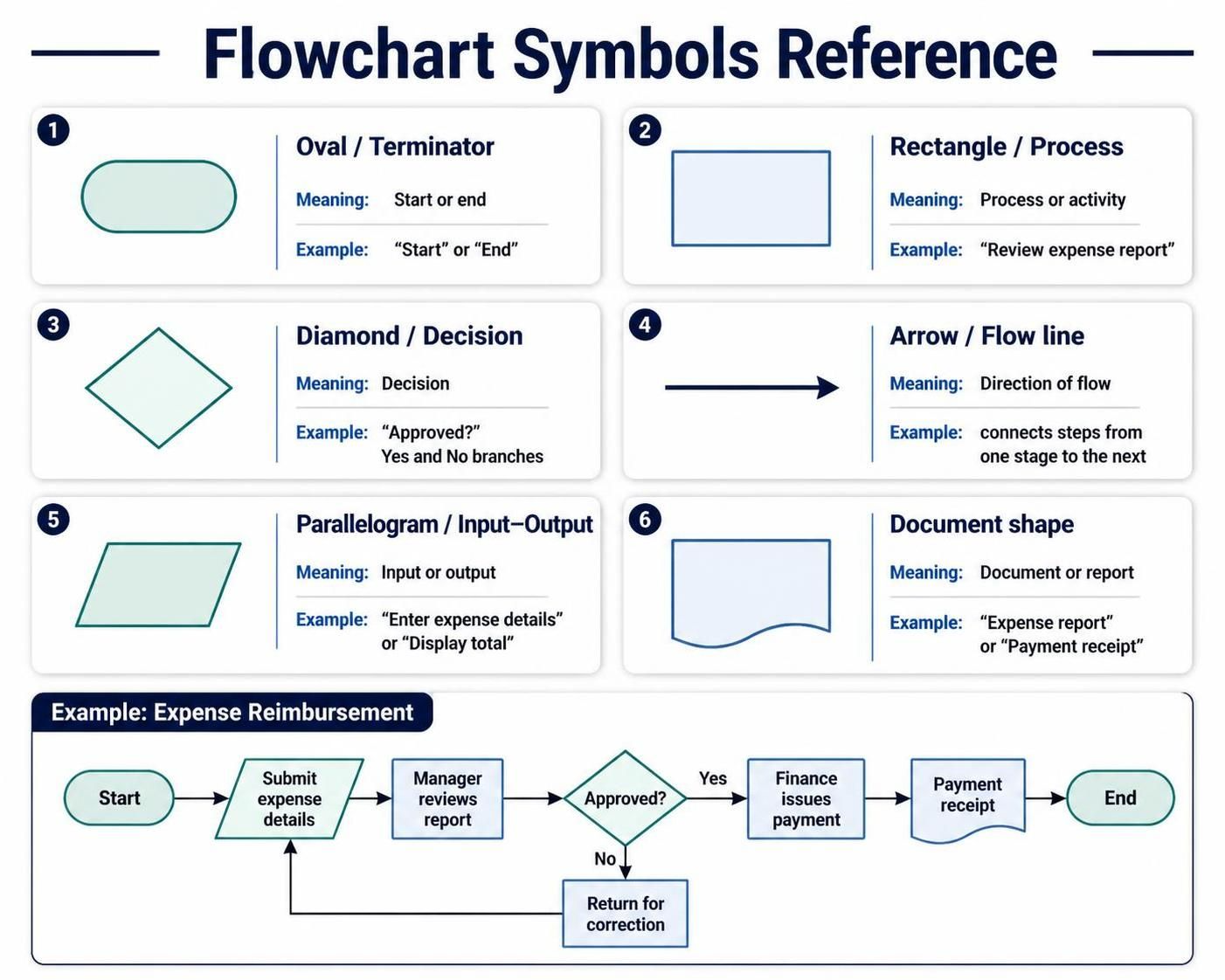
A typical flowchart includes:
-
Oval: Start or end
-
Rectangle: Process or activity
-
Diamond: Decision
-
Arrow: Direction of flow
-
Parallelogram: Input or output
-
Document shape: Document or report
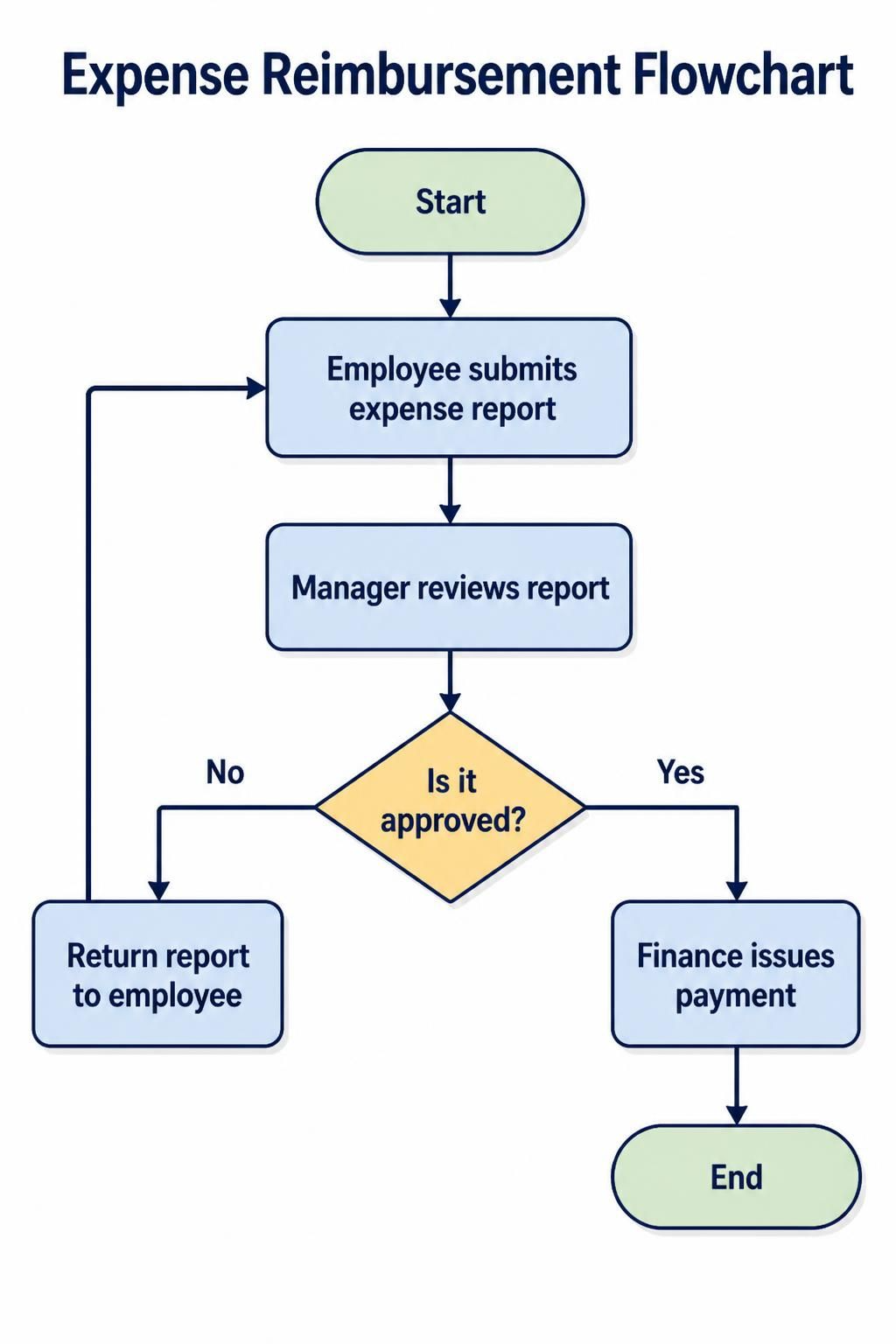
For example, a basic expense-reimbursement flowchart might look like this:
Start
  ↓
Employee submits expense report
  ↓
Manager reviews report
  ↓
Is it approved?
 ├── No → Return report to employee
 └── Yes → Finance issues payment
  ↓
End
Flowcharts are easy to create and understand because they use a small number of familiar symbols. They are useful for:
-
Explaining a simple procedure
-
Documenting an algorithm
-
Describing troubleshooting steps
-
Mapping a personal or departmental workflow
-
Training employees
-
Showing a basic decision sequence
The main limitation is that traditional flowcharts do not always clearly represent who performs each task, how different organizations communicate, or what happens when events interrupt the normal process.
2. What Is BPMN?
BPMN stands for Business Process Model and Notation. It is a standardized notation for describing business processes in a consistent way.
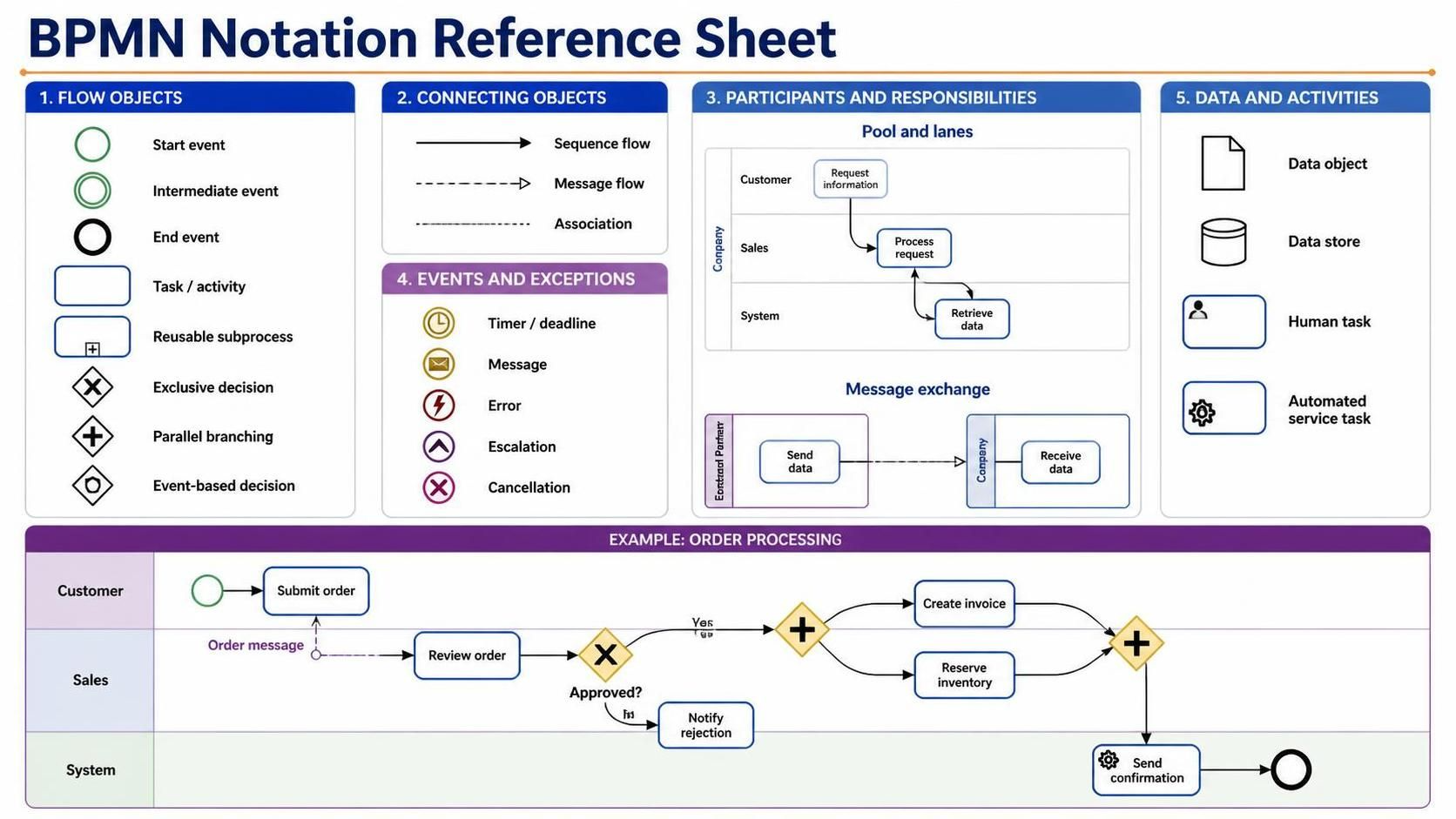
BPMN diagrams can represent:
-
Activities and tasks
-
Start, intermediate, and end events
-
Decisions and branching logic
-
Parallel work
-
Participants and responsibilities
-
Communication between departments or organizations
-
Messages
-
Data inputs and outputs
-
Timers, errors, cancellations, and escalations
-
Reusable subprocesses
-
Human and automated activities
BPMN is based on flowchart concepts, but it adds a much richer vocabulary for business operations. Its core categories include flow objects, connecting objects, swimlanes, and artifacts.
A simplified BPMN process might be described as:
Customer submits order
        ↓
Sales system records order
        ↓
Warehouse checks inventory
        ↓
Is the item available?
 ├── No → Notify customer
 └── Yes → Pick and pack order
                 ↓
           Shipping provider delivers order
In an actual BPMN diagram, each participant could appear in a separate pool or lane, and communication between them could be represented with message flows.
3. BPMN vs. Flowcharts at a Glance
| Feature | Flowchart | BPMN |
|---|---|---|
| Primary purpose | Show general logic or sequence | Model business processes |
| Standardization | Often informal or tool-specific | Formal international modeling notation |
| Learning curve | Low | Moderate |
| Number of symbols | Small set | Larger, specialized vocabulary |
| Roles and responsibilities | Usually limited | Explicitly represented with pools and lanes |
| Cross-organization communication | Difficult to show precisely | Represented with message flows |
| Exceptions and interruptions | Usually simplified | Events can represent timers, errors, messages, and escalations |
| Parallel activities | Possible but often unclear | Supported with parallel gateways |
| Automation support | Limited | Can be detailed enough to support implementation |
| Best use | Simple procedures and logic | Complex, collaborative, repeatable processes |
| Typical audience | General users, students, teams | Analysts, process owners, developers, managers |
| Detail level | Low to medium | Medium to very high |
4. The Central Difference: General Logic vs. Business Process Semantics
The most important distinction is that a flowchart primarily answers:
“What happens next?”
BPMN can answer several additional questions:
-
Who performs each activity?
-
Which department or organization is involved?
-
Is the interaction internal or external?
-
Is the next step caused by a message, timer, error, or condition?
-
Can activities happen in parallel?
-
What data is required?
-
What happens if the process fails?
-
Which tasks are performed by people, systems, or rules?
-
Can this process be automated or monitored?
For example, a flowchart might say:
Review application → Approve application → Send confirmation
A BPMN model could distinguish:
-
The customer submits the application.
-
The customer service team validates it.
-
An automated system checks credit information.
-
A manager approves applications above a certain amount.
-
A timer triggers a reminder after three business days.
-
A message is sent to the customer.
-
An error path handles missing documentation.
The flowchart communicates the outline. BPMN communicates the operational structure.
5. The Main BPMN Elements Beginners Need
BPMN contains many symbols, but beginners only need a small core set at first.
Events
Events represent something that happens rather than something someone does.
They are drawn as circles.
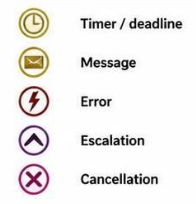
Common types include:
-
Start event: Begins a process
-
Intermediate event: Occurs during a process
-
End event: Completes a process
-
Message event: A message is received or sent
-
Timer event: A deadline or scheduled time is involved
-
Error event: An error occurs
-
Escalation event: A matter requires higher-level attention
Examples:
-
A customer places an order.
-
A payment deadline expires.
-
An email is received.
-
A system error occurs.
Activities
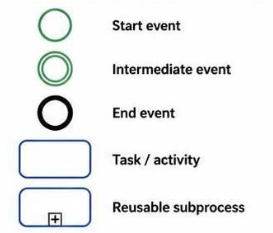
Activities represent work being performed. They are drawn as rounded rectangles.
They may be:
-
Tasks: Individual units of work
-
Subprocesses: Groups of related activities
-
User tasks: Work completed by a person through a system
-
Service tasks: Work performed automatically by software
-
Manual tasks: Work performed without system assistance
-
Business rule tasks: Work determined by a business rule or decision service
For a beginner, the most important idea is simple:
Events happen; activities are performed.
Gateways
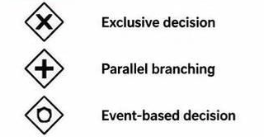
Gateways control how the process splits or joins. They are drawn as diamonds.
Common gateway types include:
-
Exclusive gateway: Only one path is selected
-
Parallel gateway: Multiple paths happen at the same time
-
Inclusive gateway: One or more paths may be selected
-
Event-based gateway: The next path depends on which event happens first
Example of an exclusive decision:
Payment received?
 ├── Yes → Ship order
 └── No → Send payment reminder
Example of parallel work:
Order approved
      ↓
 ┌───────────────┬────────────────┐
 │               │                │
Pack order   Prepare invoice   Notify customer
 │               │                │
 └───────────────┴────────────────┘
      ↓
Order ready for dispatch
Sequence Flow
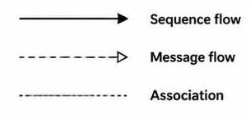
A solid arrow shows the order in which activities, events, and gateways occur within the same process.
Task A → Task B → Task C
Message Flow
A dashed arrow represents communication between separate participants or pools.
For example:
Customer ──message──> Company
Company ──confirmation──> Customer
A message flow is different from sequence flow:
-
Sequence flow: Shows the order of work within a process
-
Message flow: Shows communication between participants
Pools and Lanes
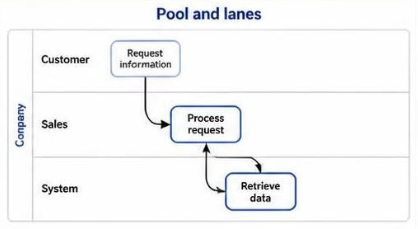
Swimlanes organize work by participant or responsibility.
-
A pool generally represents a participant, organization, business entity, or independent process.
-
A lane divides a pool into roles, teams, departments, or systems.
Example:
Customer lane:     Submit order ─────────────── Receive confirmation
                         │                              ↑
Sales lane:                  Review order ─────── Send confirmation
Pools and lanes answer one of the most important process questions:
Who is responsible for this step?
Data Objects and Annotations
Data objects show information used or produced by an activity.
Examples:
-
Application form
-
Invoice
-
Contract
-
Customer record
-
Shipping label
Annotations add explanatory text without changing the process logic.
6. When a Flowchart Is the Better Choice
Use a flowchart when the process is simple, linear, or mainly concerned with decisions.
A flowchart is usually sufficient when:
-
There is one main participant
-
The process has only a few steps
-
Responsibilities do not need to be emphasized
-
There are no complex interactions with external parties
-
The diagram is for a quick explanation
-
The process is being explored informally
-
You are documenting an algorithm or troubleshooting routine
-
Your audience is unfamiliar with BPMN
For example, “How to reset a password” may be better represented by a simple flowchart:
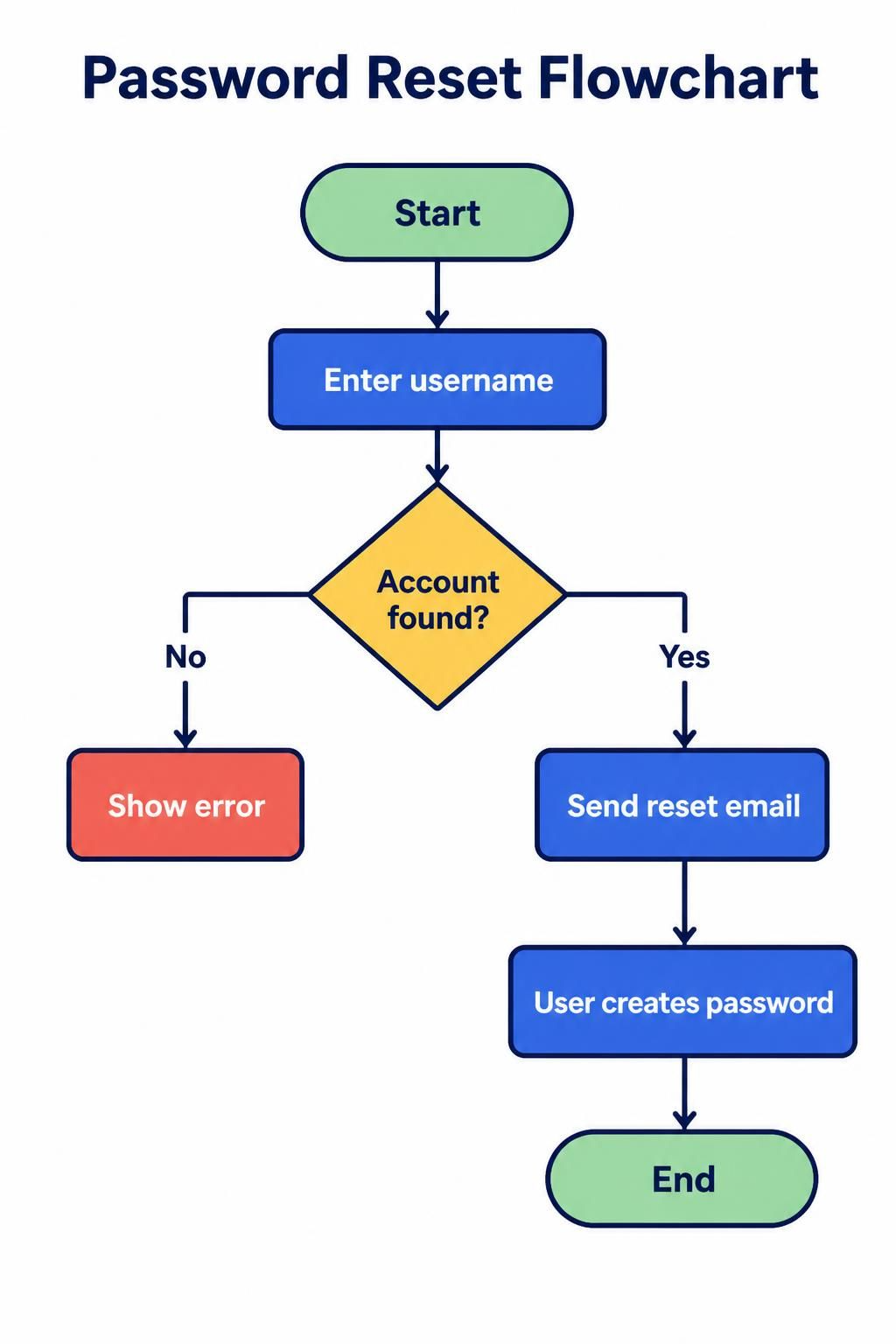
Start
  ↓
Enter username
  ↓
Account found?
 ├── No → Show error
 └── Yes → Send reset email
                ↓
          User creates password
                ↓
               End
Using BPMN for this process could add unnecessary complexity unless the purpose is to model the complete service operation, including identity verification, notifications, system tasks, escalation, and audit records.
7. When BPMN Is the Better Choice
Use BPMN when you need to model a real business process rather than merely describe a sequence.
BPMN is especially useful when a process has:
-
Multiple departments
-
Several roles or participants
-
Customers, suppliers, regulators, or partners
-
Hand-offs between teams
-
Parallel activities
-
External messages
-
Timers or deadlines
-
Errors or exception handling
-
Approval levels
-
Automated system tasks
-
Compliance requirements
-
Repeated process improvement efforts
-
A future goal of workflow automation
Typical BPMN use cases include:
-
Purchase-order approval
-
Loan application processing
-
Insurance claims
-
Employee onboarding
-
Customer support escalation
-
Invoice processing
-
Product returns
-
Healthcare referrals
-
Contract review
-
Shipment fulfillment
-
Regulatory reporting
-
Software deployment workflows
A useful rule is:
If the process crosses a boundary—between people, teams, systems, or organizations—BPMN is usually worth considering.
8. Why Use BPMN?
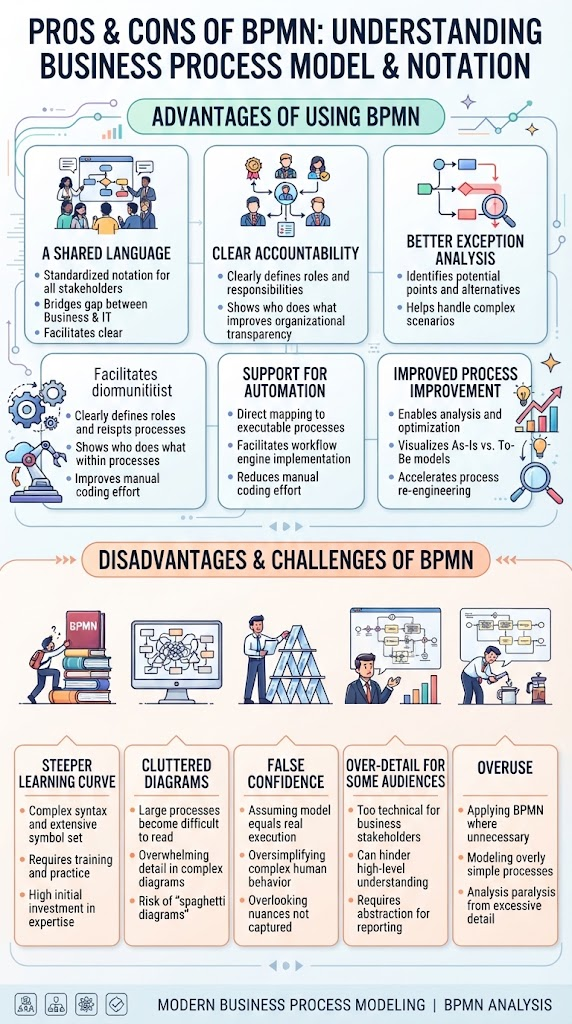
A Shared Language
Different groups often describe the same process differently. A business manager may talk about approvals, a developer about services, and an employee about daily tasks.
BPMN provides a common visual language that can help these groups discuss the same process. Its design goal is to be usable by business stakeholders while also being precise enough to translate into software process components.
Clear Accountability
Lanes make responsibility visible.
Instead of showing:
Review application → Approve application → Create account
BPMN can show:
-
Customer submits application
-
Customer service validates information
-
Credit team performs assessment
-
Manager approves exception
-
IT system creates the account
This can reveal duplicated work, unclear ownership, and unnecessary hand-offs.
Better Exception Analysis
Many real processes do not follow the happy path. BPMN makes it easier to model:
-
Missing information
-
Rejected applications
-
Expired deadlines
-
Failed payments
-
System errors
-
Cancellations
-
Customer escalations
-
Compensation or corrective action
A flowchart can show exceptions, but BPMN provides specialized event types and conventions for representing them more clearly.
Support for Automation
BPMN models can contain enough detail to guide workflow implementation. Not every BPMN diagram is executable, but BPMN is more suitable than a basic flowchart when the model may later be used to configure or design an automated process.
For example, a process designer may distinguish between:
-
A task performed by an employee
-
A task performed by an automated service
-
A decision evaluated by a business rule
-
A message received from another system
-
A timer that triggers an action
Improved Process Improvement
A BPMN diagram can help identify:
-
Bottlenecks
-
Long approval chains
-
Repeated data entry
-
Unnecessary reviews
-
Manual tasks suitable for automation
-
Missing exception paths
-
Excessive hand-offs
-
Unclear ownership
-
Delays caused by external parties
This makes BPMN valuable not only for documenting processes but also for analyzing and redesigning them.
9. The Disadvantages of BPMN
BPMN is powerful, but it is not always the right choice.
It Has a Steeper Learning Curve
Flowcharts can often be understood immediately. BPMN requires users to learn distinctions such as:
-
Sequence flow vs. message flow
-
Events vs. activities
-
Pools vs. lanes
-
Exclusive vs. parallel gateways
-
Interrupting vs. non-interrupting events
-
Catching vs. throwing events
Diagrams Can Become Cluttered
A large BPMN diagram may contain dozens of symbols and crossing lines. Poorly designed models can be harder to understand than a simple flowchart.
Precision Can Create False Confidence
Using BPMN symbols does not automatically make a process model accurate. The model still depends on correct information from process owners and subject-matter experts.
Not Every Audience Needs the Full Detail
Senior managers may want a high-level process overview, while a workflow developer may need detailed task and exception information. One diagram rarely serves both purposes perfectly.
It Can Be Overused
A five-step internal procedure does not necessarily need message events, multiple pools, and nested subprocesses. The notation should match the problem.
10. A Practical Decision Guide
Use these questions to choose between a flowchart and BPMN:
-
How many participants are involved?
-
One person or team: flowchart may be enough.
-
Several teams or organizations: BPMN is more suitable.
-
-
Do responsibilities matter?
-
If no, use a flowchart.
-
If yes, use lanes or pools in BPMN.
-
-
Are there external communications?
-
If no, either notation may work.
-
If yes, BPMN can distinguish messages from internal process flow.
-
-
Are there timers, errors, or escalations?
-
If no, a flowchart may be sufficient.
-
If yes, BPMN provides clearer modeling tools.
-
-
Will the process be automated?
-
If no, a flowchart may be adequate for a simple process.
-
If yes, BPMN is usually a better foundation.
-
-
Does the process need to be reused as a formal standard?
-
If no, use the simplest notation your audience understands.
-
If yes, BPMN offers greater consistency between diagrams and tools.
-
-
What is your audience’s skill level?
-
General audience: start with a simple flowchart or high-level BPMN.
-
Analysts and technical teams: use BPMN with appropriate detail.
-
11. A Beginner-Friendly BPMN Modeling Method
Step 1: Define the Process Boundaries
Decide where the process starts and ends.
For example:
-
Start: Customer submits a support request
-
End: Customer receives a resolution
Avoid attempting to model the entire organization at once.
Step 2: Identify the Participants
List the people, teams, organizations, and systems involved.
Example:
-
Customer
-
Support agent
-
Technical support team
-
Billing system
-
Service manager
These may become pools or lanes.
Step 3: Write the Happy Path First
Document the normal process without exceptions.
Receive request
  ↓
Classify request
  ↓
Investigate issue
  ↓
Resolve issue
  ↓
Notify customer
  ↓
Close request
This gives you a clear foundation before adding complexity.
Step 4: Add Start and End Events
Every complete BPMN process should have a clear beginning and conclusion.
Examples:
-
Start: Message received
-
Start: Timer reached
-
Start: Customer submits form
-
End: Case closed
-
End: Request rejected
-
End: Payment completed
Step 5: Assign Work to Participants
Place each activity in the appropriate lane.
For example:
Customer:       Submit request ───────────── Receive resolution
Support:                    Classify ─ Investigate ─ Resolve
System:                                      Send notification
Step 6: Add Gateways for Decisions
Use an exclusive gateway when only one path should be followed.
Issue resolved?
 ├── No → Escalate
 └── Yes → Notify customer
Do not use a gateway merely because a task has a question in its name. Use one when the process actually branches.
Step 7: Add Parallel Work Carefully
Use a parallel gateway when activities can genuinely happen at the same time.
For example, after an order is approved:
-
Reserve inventory
-
Generate invoice
-
Notify warehouse
If one activity must happen before another, do not model them as parallel.
Step 8: Add Messages and Data
Show messages when participants communicate.
Examples:
-
Customer sends application
-
Supplier sends shipment notice
-
System sends approval email
Add data objects when information is important to the activity.
Step 9: Add Exceptions
Ask:
-
What if required information is missing?
-
What if the customer does not respond?
-
What if payment fails?
-
What if the deadline expires?
-
What if the system is unavailable?
-
What if an employee rejects the request?
Model only exceptions that matter to understanding or improving the process.
Step 10: Review the Diagram with Process Owners
A diagram should be reviewed by the people who perform the work. They can identify:
-
Missing steps
-
Incorrect responsibilities
-
Informal workarounds
-
Exceptions not documented in procedures
-
Delays and unnecessary approvals
12. Example: Flowchart Version vs. BPMN Version
Simple Flowchart
Suppose a customer returns a product:
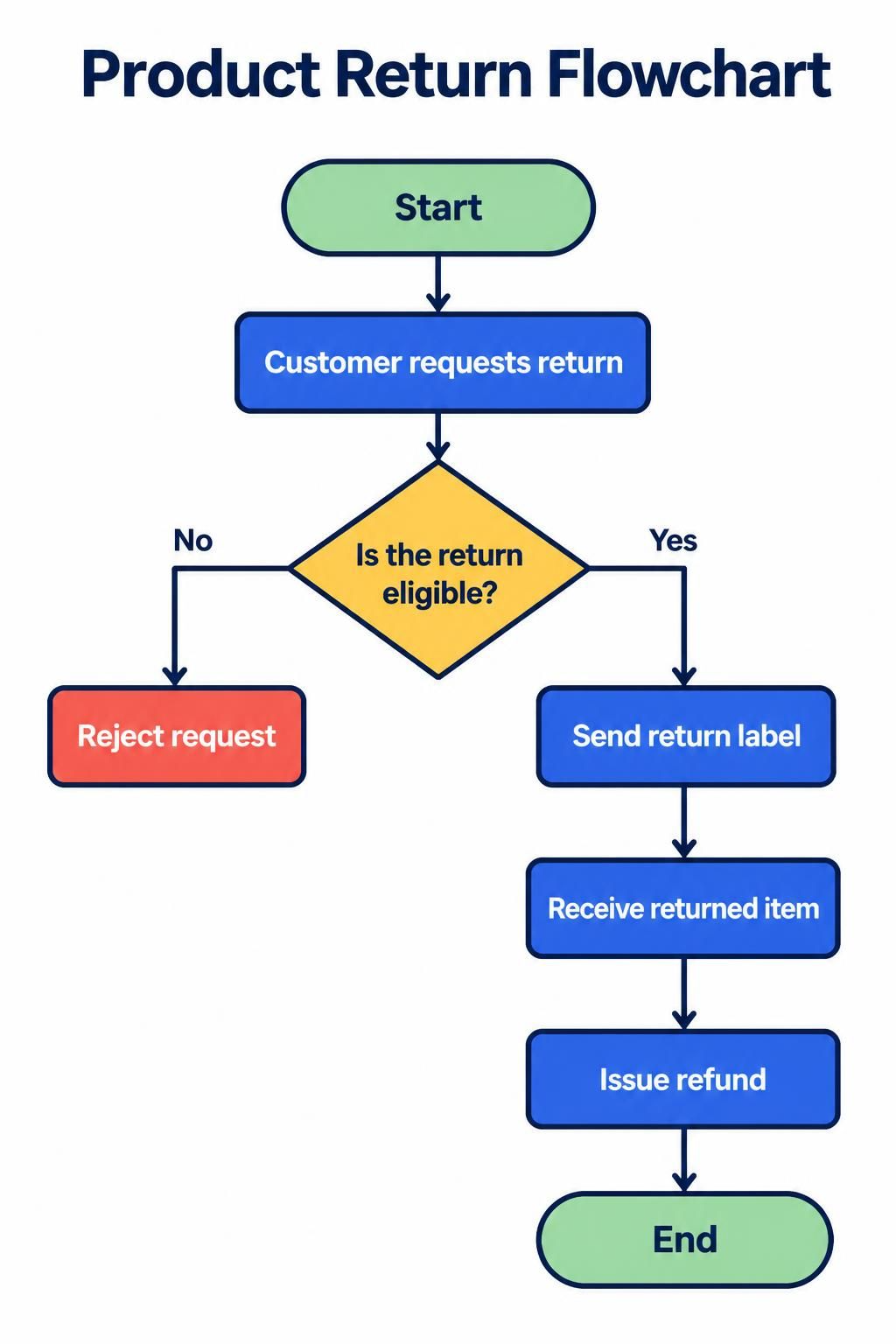
Start
  ↓
Customer requests return
  ↓
Is the return eligible?
 ├── No → Reject request
 └── Yes → Send return label
                ↓
          Receive returned item
                ↓
          Issue refund
                ↓
               End
This is easy to understand and may be sufficient for training or a quick overview.
BPMN-Oriented Version
A more detailed BPMN model would distinguish participants:
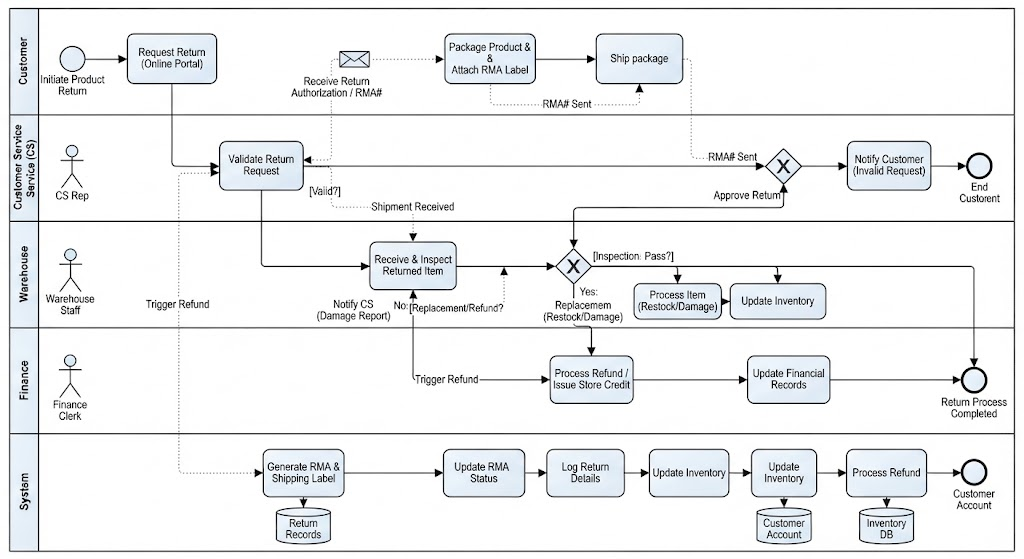
Customer
-
Request return
-
Package product
-
Send product
Customer Service
-
Validate return request
-
Approve or reject return
-
Send return instructions
Warehouse
-
Receive product
-
Inspect condition
Finance
-
Issue refund
System
-
Send confirmation
-
Update inventory
-
Record refund
The model could also represent:
-
A message from the customer
-
A timer for the return deadline
-
A gateway based on product condition
-
An error if the item is not received
-
Parallel inventory and refund activities
-
A message confirming the refund
The flowchart explains the broad logic. BPMN explains the operational collaboration.
13. Common Beginner Mistakes
Mistake 1: Using Every BPMN Symbol
Beginners sometimes try to use as many symbols as possible. This makes diagrams harder to read.
Start with:
-
Start and end events
-
Tasks
-
Exclusive gateways
-
Sequence flows
-
Pools and lanes
-
Message flows when needed
Add advanced elements only when they solve a real modeling problem.
Mistake 2: Confusing Sequence Flow and Message Flow
Sequence flow shows progression inside a process. Message flow shows communication between separate participants.
Do not use message flows merely to make lines look different.
Mistake 3: Mixing Pools and Lanes Incorrectly
Use lanes to divide responsibilities within a participant. Use separate pools when participants are independent entities or processes.
For example:
-
Sales, Finance, and Operations may be lanes within one company.
-
Customer and Supplier may be separate pools.
Mistake 4: Treating Every Decision as Exclusive
An exclusive gateway means exactly one route is selected. If several routes can happen simultaneously, use a parallel gateway. If one or more optional routes can occur, consider an inclusive gateway.
Mistake 5: Omitting the Trigger
A process should explain what starts it. “Process order” is vague unless the model shows whether the trigger is:
-
A customer order
-
A scheduled batch
-
A payment confirmation
-
A message from another system
Mistake 6: Modeling the Ideal Process Only
Real processes include rework, rejection, delays, and escalation. A model that shows only the happy path may be attractive but operationally incomplete.
Mistake 7: Putting Too Much Text Inside Activities
Task labels should generally use a concise verb-object format:
-
Review application
-
Validate address
-
Approve refund
-
Send confirmation
Avoid long paragraphs inside task boxes. Put supporting explanations in annotations or documentation.
Mistake 8: Creating One Giant Diagram
Large processes should be divided into subprocesses. A high-level diagram might show:
Receive order → Process payment → Fulfill order → Close order
Each stage can link to a more detailed diagram.
14. BPMN Best Practices for Readable Diagrams
-
Begin with a clear start event.
-
End with one or more meaningful end states.
-
Arrange the main flow from left to right or top to bottom.
-
Keep sequence-flow lines as straight as practical.
-
Avoid crossing lines.
-
Use consistent task names.
-
Keep the main diagram at a readable level of detail.
-
Use lanes only when responsibility matters.
-
Label gateways with meaningful questions or conditions.
-
Label outgoing gateway paths when the meaning is not obvious.
-
Use subprocesses to hide unnecessary detail.
-
Distinguish normal paths from exception paths.
-
Keep message flows between appropriate pools.
-
Use annotations sparingly.
-
Validate the model with people who perform the process.
-
Create separate “current state” and “future state” diagrams when redesigning a process.
15. How Much BPMN Should a Beginner Learn?
You do not need to learn the entire BPMN specification to create useful diagrams.
Beginner Level
Learn:
-
Start events
-
End events
-
Tasks
-
Sequence flows
-
Exclusive gateways
-
Parallel gateways
-
Pools
-
Lanes
-
Message flows
-
Basic data objects
This is enough for many business-process diagrams.
Intermediate Level
Add:
-
Timer events
-
Message events
-
Error events
-
Subprocesses
-
Call activities
-
User tasks
-
Service tasks
-
Boundary events
-
Event-based gateways
-
Compensation paths
Advanced Level
Study:
-
Choreography diagrams
-
Conversation diagrams
-
Non-interrupting events
-
Event subprocesses
-
Transactions
-
Compensation
-
Multi-instance activities
-
Correlation
-
Execution semantics
-
Tool-specific implementation rules
BPMN supports several model types, including process, collaboration, choreography, and conversation diagrams. Beginners should usually start with ordinary process and collaboration diagrams before studying the more specialized types.
16. BPMN, Flowcharts, and Related Notations
BPMN is not the only modeling notation.
-
Flowcharts: Best for simple logic and procedures
-
BPMN: Best for business processes and workflow collaboration
-
UML activity diagrams: Useful for software and system behavior
-
DMN: Useful for formal business decisions and rules
-
CMMN: Useful for flexible, case-based work where the path is not fully predefined
-
Value-stream maps: Useful for analyzing end-to-end value and waste
-
SIPOC diagrams: Useful for high-level supplier-input-process-output-customer analysis
BPMN may show that a decision occurs, while a decision-focused notation such as DMN can describe the rules used to make that decision. These notations can complement one another rather than compete.
17. A Simple Rule of Thumb
Choose a flowchart when:
You need to explain a sequence of steps or decisions as quickly and simply as possible.
Choose BPMN when:
You need to understand, communicate, analyze, improve, or automate a business process involving responsibilities, events, systems, or organizations.
You can also use both:
-
Start with a simple flowchart to understand the overall process.
-
Convert it to BPMN when roles, messages, exceptions, timing, or automation become important.
-
Create a high-level BPMN diagram for executives and a detailed version for analysts or developers.
Conclusion
Flowcharts and BPMN are not competing tools in every situation. A flowchart is a lightweight visual explanation. BPMN is a structured modeling language for processes that require greater clarity, accountability, and operational detail.
For beginners, the best approach is to start simple:
-
Define the process boundaries.
-
Identify participants.
-
Map the normal path.
-
Add decisions.
-
Assign responsibilities.
-
Add messages, timers, data, and exceptions only when they matter.
-
Use subprocesses to control complexity.
If your process is short and handled by one person or team, a flowchart is probably enough. If the process involves multiple roles, departments, systems, external parties, deadlines, or automation, BPMN will usually provide a clearer and more durable model.
This post is also available in Deutsch, Español, فارسی, Français, English, Bahasa Indonesia, 日本語, Polski, Portuguese, Ру́сский, Việt Nam, 简体中文 and 繁體中文.