


Introduction
In the fast-paced world of software development, clear communication is just as critical as clean code. Whether you’re designing a new microservices architecture, documenting an API integration, or troubleshooting a complex user journey, sequence diagrams serve as the universal language for visualizing how systems interact over time.
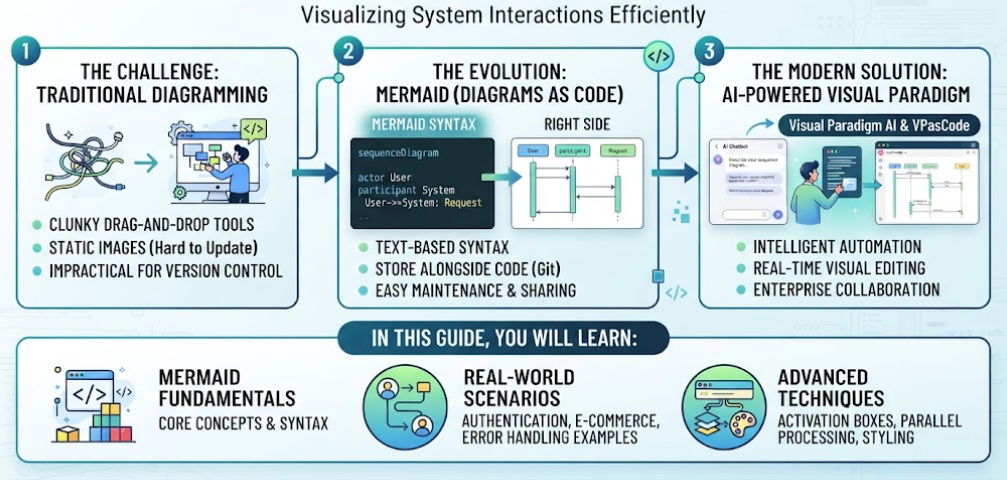
Traditionally, creating these diagrams meant wrestling with clunky drag-and-drop tools that produced static images difficult to update and impossible to version control. Enter Mermaid—a revolutionary JavaScript-based diagramming tool that lets you define visuals using simple, text-based syntax. By treating diagrams as code, Mermaid enables developers to store, share, and maintain their documentation alongside their source code in Git repositories.
However, while Mermaid solves the “version control” problem, it introduces a new challenge: the learning curve of its syntax and the manual effort required to keep complex diagrams accurate. This is where modern AI-powered platforms like Visual Paradigm’s AI Chatbot and VPasCode (Visual Paradigm as Code) change the game. They bridge the gap between raw text-based diagramming and enterprise-grade collaboration, offering intelligent automation, real-time visual editing, and seamless integration into your existing workflow.
In this comprehensive guide, we will:
-
Break down the core concepts and syntax of Mermaid sequence diagrams.
-
Provide ready-to-use code examples for common scenarios like authentication, e-commerce flows, and error handling.
-
Explore advanced features such as activation boxes, parallel processing, and styling.
-
Analyze why Visual Paradigm AI + VPasCode stands out as a superior tooling choice for teams seeking efficiency, collaboration, and intelligent diagram generation.
Whether you’re a seasoned architect looking to standardize your documentation or a product manager aiming to clarify requirements, this guide will equip you with the skills to create precise, maintainable, and professional sequence diagrams.
Basic Mermaid Syntax
Simple Two-Party Communication
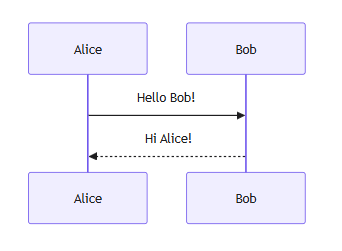
sequenceDiagram
    participant A as Alice
    participant B as Bob

    A->>B: Hello Bob!
    B-->>A: Hi Alice!
Key elements:
-
participant– Defines actors/objects -
->>– Solid arrow (synchronous message) -
-->>– Dashed arrow (asynchronous/response)
Key Concepts & Elements
1. Participants & Aliases
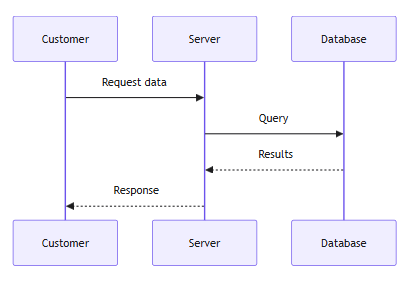
sequenceDiagram
    participant C as Customer
    participant S as Server
    participant DB as Database

    C->>S: Request data
    S->>DB: Query
    DB-->>S: Results
    S-->>C: Response
2. Message Types
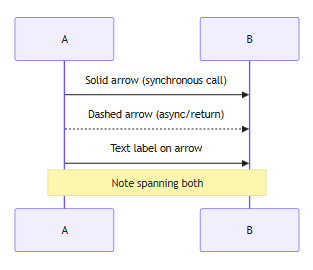
sequenceDiagram
    participant A
    participant B

    A->>B: Solid arrow (synchronous call)
    A-->>B: Dashed arrow (async/return)
    A->>B: Text label on arrow
    Note over A,B: Note spanning both
3. Self-Calls (Activation)
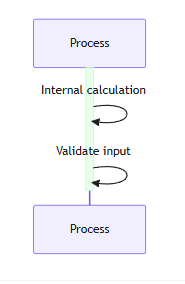
sequenceDiagram
    participant Process

    activate Process
    Process->>Process: Internal calculation
    Process->>Process: Validate input
    deactivate Process
4. Notes & Comments
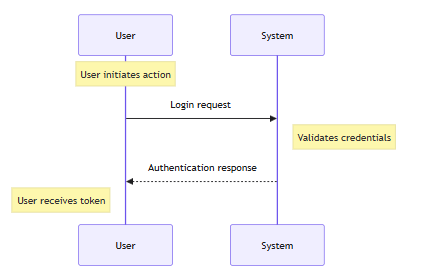
sequenceDiagram
    participant User
    participant System

    Note over User: User initiates action
    User->>System: Login request
    Note right of System: Validates credentials
    System-->>User: Authentication response
    Note left of User: User receives token
5. Loops & Alternatives
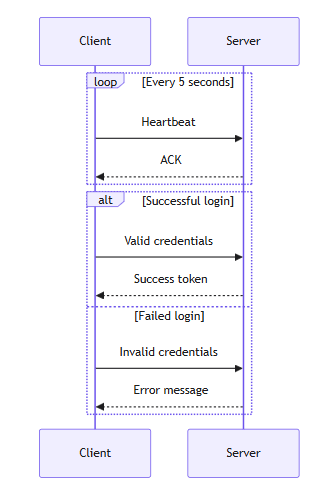
sequenceDiagram
    participant Client
    participant Server

    loop Every 5 seconds
        Client->>Server: Heartbeat
        Server-->>Client: ACK
    end

    alt Successful login
        Client->>Server: Valid credentials
        Server-->>Client: Success token
    else Failed login
        Client->>Server: Invalid credentials
        Server-->>Client: Error message
    end
6. Optional & Critical Regions
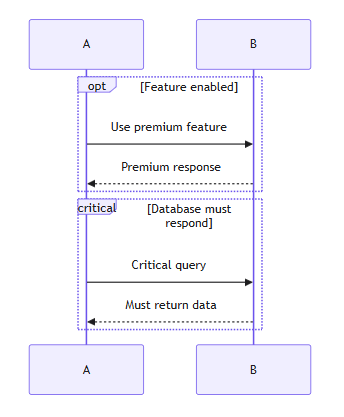
sequenceDiagram
    participant A
    participant B

    opt Feature enabled
        A->>B: Use premium feature
        B-->>A: Premium response
    end

    critical Database must respond
        A->>B: Critical query
        B-->>A: Must return data
    end
7. Parallel Execution
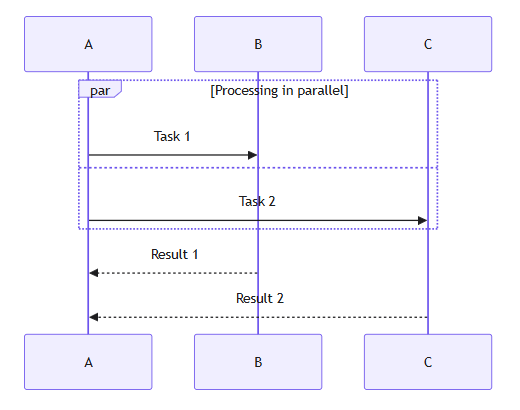
sequenceDiagram
    participant A
    participant B
    participant C

    par Processing in parallel
        A->>B: Task 1
    and
        A->>C: Task 2
    end

    B-->>A: Result 1
    C-->>A: Result 2
8. Break & Destroy
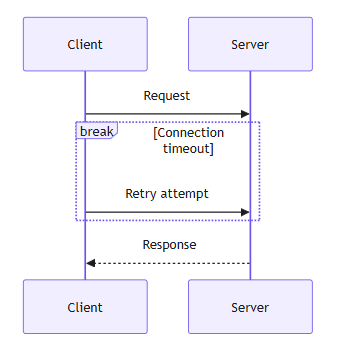
sequenceDiagram
    participant Client
    participant Server

    Client->>Server: Request
    break Connection timeout
        Client->>Server: Retry attempt
    end

    Server-->>Client: Response
    destroy Server
Advanced Features
Activation Boxes
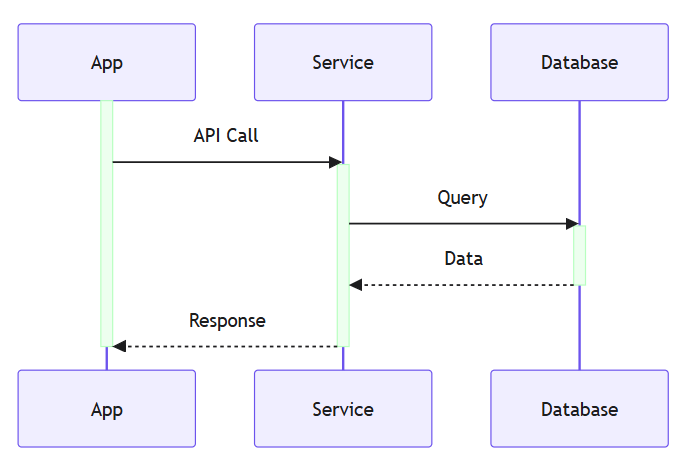
sequenceDiagram
    participant A as App
    participant S as Service
    participant D as Database

    activate A
    A->>S: API Call
    activate S
    S->>D: Query
    activate D
    D-->>S: Data
    deactivate D
    S-->>A: Response
    deactivate S
    deactivate A
Grouping with Rectangles
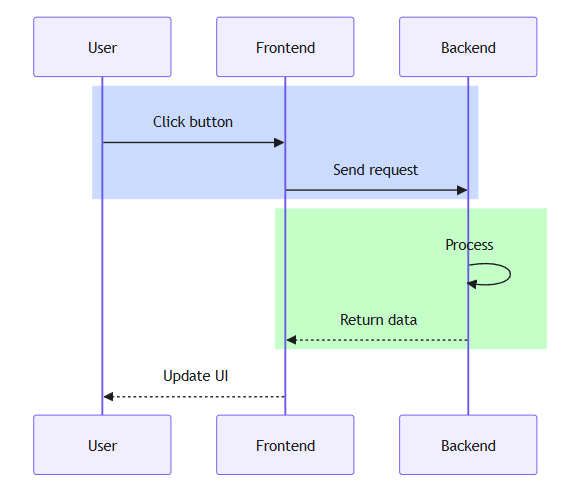
sequenceDiagram
    participant User
    participant Frontend
    participant Backend

    rect rgb(200, 220, 255)
        User->>Frontend: Click button
        Frontend->>Backend: Send request
    end

    rect rgb(200, 255, 200)
        Backend->>Backend: Process
        Backend-->>Frontend: Return data
    end

    Frontend-->>User: Update UI
Styling Participants
sequenceDiagram
    participant A as Alice
    participant B as Bob

    %% Custom styling
    style A fill:#f9f,stroke:#333,stroke-width:4px
    style B fill:#bbf,stroke:#333,stroke-width:2px

    A->>B: Styled communication
Complete Real-World Examples
Example 1: E-Commerce Checkout Flow
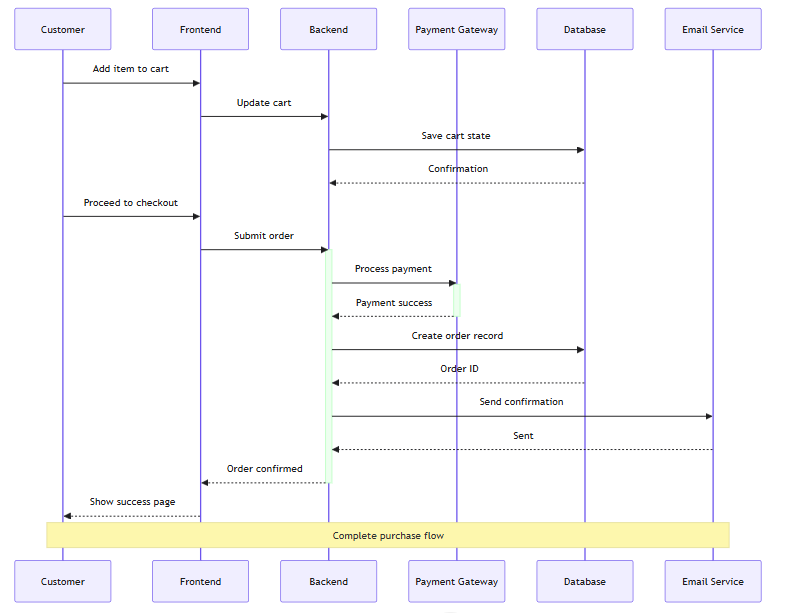
sequenceDiagram
    participant C as Customer
    participant FE as Frontend
    participant BE as Backend
    participant PAY as Payment Gateway
    participant DB as Database
    participant EMAIL as Email Service

    C->>FE: Add item to cart
    FE->>BE: Update cart
    BE->>DB: Save cart state
    DB-->>BE: Confirmation

    C->>FE: Proceed to checkout
    FE->>BE: Submit order
    activate BE

    BE->>PAY: Process payment
    activate PAY
    PAY-->>BE: Payment success
    deactivate PAY

    BE->>DB: Create order record
    DB-->>BE: Order ID

    BE->>EMAIL: Send confirmation
    EMAIL-->>BE: Sent

    BE-->>FE: Order confirmed
    deactivate BE
    FE-->>C: Show success page

    Note over C,EMAIL: Complete purchase flow
Example 2: Microservices Authentication
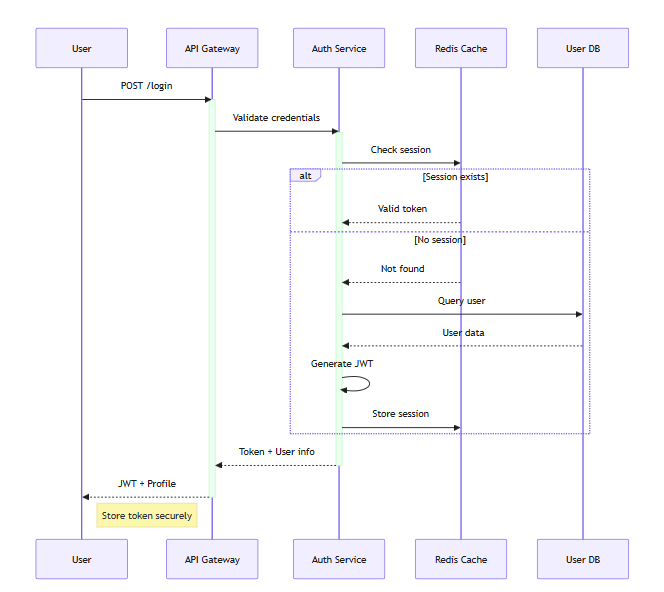
sequenceDiagram
    participant User
    participant Gateway as API Gateway
    participant Auth as Auth Service
    participant Cache as Redis Cache
    participant DB as User DB

    User->>Gateway: POST /login
    activate Gateway

    Gateway->>Auth: Validate credentials
    activate Auth

    Auth->>Cache: Check session
    alt Session exists
        Cache-->>Auth: Valid token
    else No session
        Cache-->>Auth: Not found
        Auth->>DB: Query user
        DB-->>Auth: User data
        Auth->>Auth: Generate JWT
        Auth->>Cache: Store session
    end

    Auth-->>Gateway: Token + User info
    deactivate Auth

    Gateway-->>User: JWT + Profile
    deactivate Gateway

    Note right of User: Store token securely
Example 3: File Upload with Progress
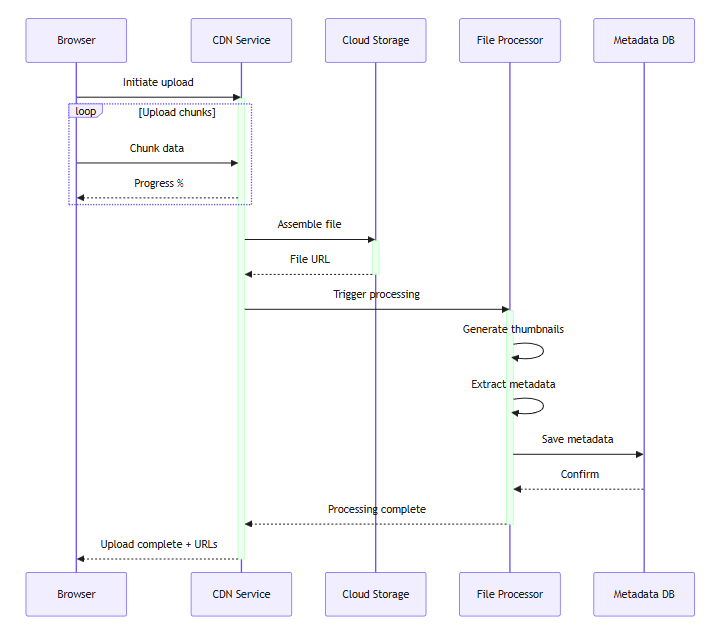
sequenceDiagram
    participant Browser
    participant CDN as CDN Service
    participant Storage as Cloud Storage
    participant Processor as File Processor
    participant DB as Metadata DB

    Browser->>CDN: Initiate upload
    activate CDN

    loop Upload chunks
        Browser->>CDN: Chunk data
        CDN-->>Browser: Progress %
    end

    CDN->>Storage: Assemble file
    activate Storage
    Storage-->>CDN: File URL
    deactivate Storage

    CDN->>Processor: Trigger processing
    activate Processor
    Processor->>Processor: Generate thumbnails
    Processor->>Processor: Extract metadata
    Processor->>DB: Save metadata
    DB-->>Processor: Confirm
    Processor-->>CDN: Processing complete
    deactivate Processor

    CDN-->>Browser: Upload complete + URLs
    deactivate CDN
Example 4: Error Handling Scenario
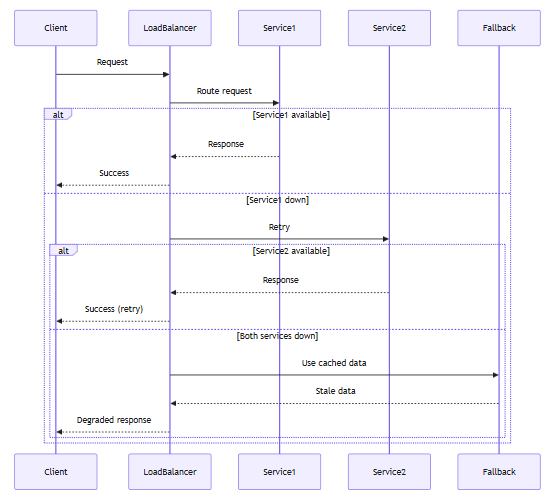
sequenceDiagram
    participant Client
    participant LoadBalancer
    participant Service1
    participant Service2
    participant Fallback

    Client->>LoadBalancer: Request
    LoadBalancer->>Service1: Route request

    alt Service1 available
        Service1-->>LoadBalancer: Response
        LoadBalancer-->>Client: Success
    else Service1 down
        LoadBalancer->>Service2: Retry
        alt Service2 available
            Service2-->>LoadBalancer: Response
            LoadBalancer-->>Client: Success (retry)
        else Both services down
            LoadBalancer->>Fallback: Use cached data
            Fallback-->>LoadBalancer: Stale data
            LoadBalancer-->>Client: Degraded response
        end
    end
Example 5: WebSocket Real-Time Communication
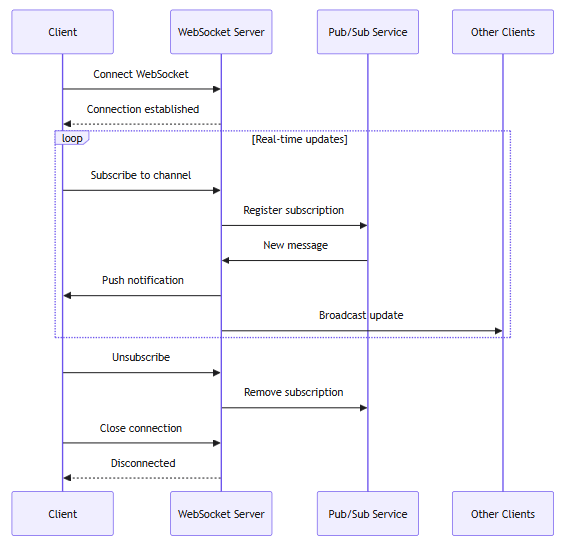
sequenceDiagram
    participant Client
    participant WS as WebSocket Server
    participant PubSub as Pub/Sub Service
    participant OtherClients as Other Clients

    Client->>WS: Connect WebSocket
    WS-->>Client: Connection established

    loop Real-time updates
        Client->>WS: Subscribe to channel
        WS->>PubSub: Register subscription

        PubSub->>WS: New message
        WS->>Client: Push notification
        WS->>OtherClients: Broadcast update
    end

    Client->>WS: Unsubscribe
    WS->>PubSub: Remove subscription
    Client->>WS: Close connection
    WS-->>Client: Disconnected
Visual Paradigm AI Chatbot + VPasCode: Why They Stand Out
What is Visual Paradigm AI + VPasCode?
Visual Paradigm is a comprehensive modeling platform, and their AI Chatbot combined with VPasCode (Visual Paradigm as Code) creates a unique ecosystem for diagram creation and management.
Unique Benefits & Standout Features
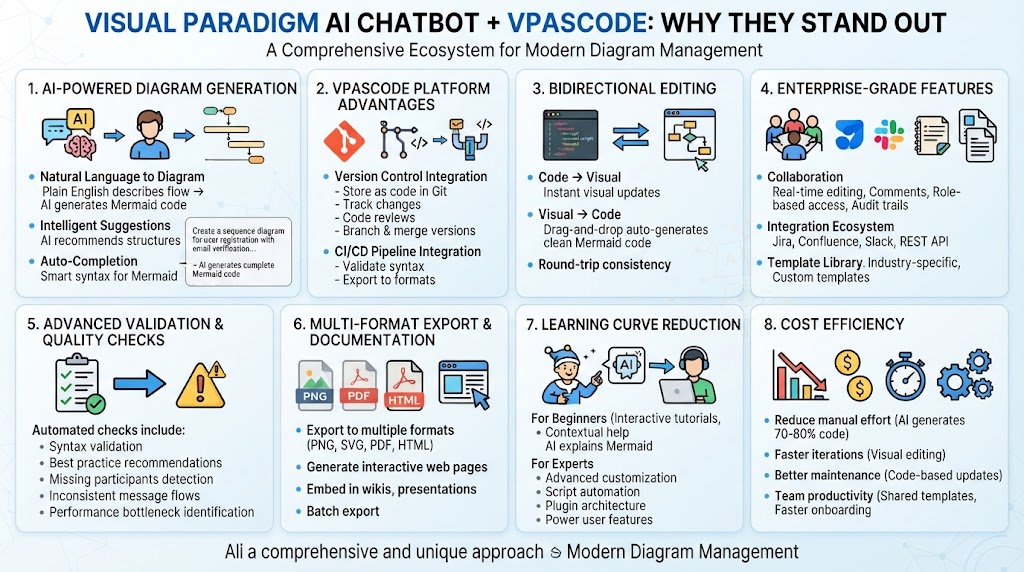
1. AI-Powered Diagram Generation
-
Natural Language to Diagram: Describe your sequence flow in plain English, and the AI generates the Mermaid code
-
Intelligent Suggestions: AI recommends optimal diagram structures based on your use case
-
Auto-Completion: Smart code completion for Mermaid syntax reduces errors
Example prompt to AI:
"Create a sequence diagram for user registration with email verification,
including database storage and error handling"
→ AI generates complete Mermaid code automatically
2. VPasCode Platform Advantages
Version Control Integration:
-
Store diagrams as code in Git repositories
-
Track changes with meaningful diffs
-
Collaborate using pull requests and code reviews
-
Branch and merge diagram versions like regular code
CI/CD Pipeline Integration:
-
Automatically generate diagrams from documentation
-
Validate diagram syntax in build pipelines
-
Export diagrams to multiple formats (PNG, SVG, PDF) programmatically
3. Bidirectional Editing
-
Code → Visual: Edit Mermaid code, see instant visual updates
-
Visual → Code: Drag-and-drop in visual editor, auto-generates clean Mermaid code
-
Round-trip consistency: Changes sync in both directions without conflicts
4. Enterprise-Grade Features
Collaboration:
-
Real-time multi-user editing
-
Comment threads on specific diagram elements
-
Role-based access control
-
Audit trails for compliance
Integration Ecosystem:
-
Jira integration for linking diagrams to tickets
-
Confluence embedding for living documentation
-
Slack notifications for diagram updates
-
REST API for custom integrations
Template Library:
-
Pre-built templates for common patterns (authentication, payment, CRUD operations)
-
Industry-specific templates (finance, healthcare, e-commerce)
-
Custom template creation and sharing
5. Advanced Validation & Quality Checks
Automated checks include:
✓ Syntax validation
✓ Best practice recommendations
✓ Missing participants detection
✓ Inconsistent message flows
✓ Performance bottleneck identification
6. Multi-Format Export & Documentation
-
Export to PNG, SVG, PDF, HTML
-
Generate interactive web pages with clickable elements
-
Embed in wikis, documentation sites, presentations
-
Batch export for entire project documentation
7. Learning Curve Reduction
For Beginners:
-
Interactive tutorials within the platform
-
Contextual help and examples
-
AI explains complex Mermaid features
-
Guided wizards for common diagram types
For Experts:
-
Advanced customization options
-
Script automation capabilities
-
Plugin architecture for extensions
-
Keyboard shortcuts and power user features
8. Cost Efficiency
-
Reduce manual effort: AI generates 70-80% of diagram code
-
Faster iterations: Visual editing speeds up refinements
-
Better maintenance: Code-based diagrams are easier to update
-
Team productivity: Shared templates and AI assistance reduce onboarding time
Comparison: Pure Mermaid vs. VP AI + VPasCode
| Feature | Pure Mermaid | VP AI + VPasCode |
|---|---|---|
| Learning curve | Steep for beginners | Gentle with AI assistance |
| Collaboration | Manual via Git | Real-time + Git |
| Validation | Basic syntax only | Semantic + best practices |
| Templates | Community-driven | Curated enterprise library |
| AI generation | None | Built-in natural language |
| Visual editing | None | Full WYSIWYG editor |
| Enterprise support | Community | Dedicated support |
| Integration | Manual | Native Jira/Confluence/Slack |
| Cost | Free | Subscription (ROI positive) |
When to Choose Visual Paradigm AI + VPasCode
✅ Choose VP when:
-
Working in enterprise environments
-
Need real-time collaboration
-
Require integration with existing tools (Jira, Confluence)
-
Team has mixed skill levels (developers + business analysts)
-
Compliance and audit trails are important
-
Large-scale documentation projects
✅ Stick with pure Mermaid when:
-
Small personal projects
-
Tight budget constraints
-
Simple diagrams only
-
Already comfortable with Mermaid syntax
-
No collaboration needed
Quick Reference Cheat Sheet
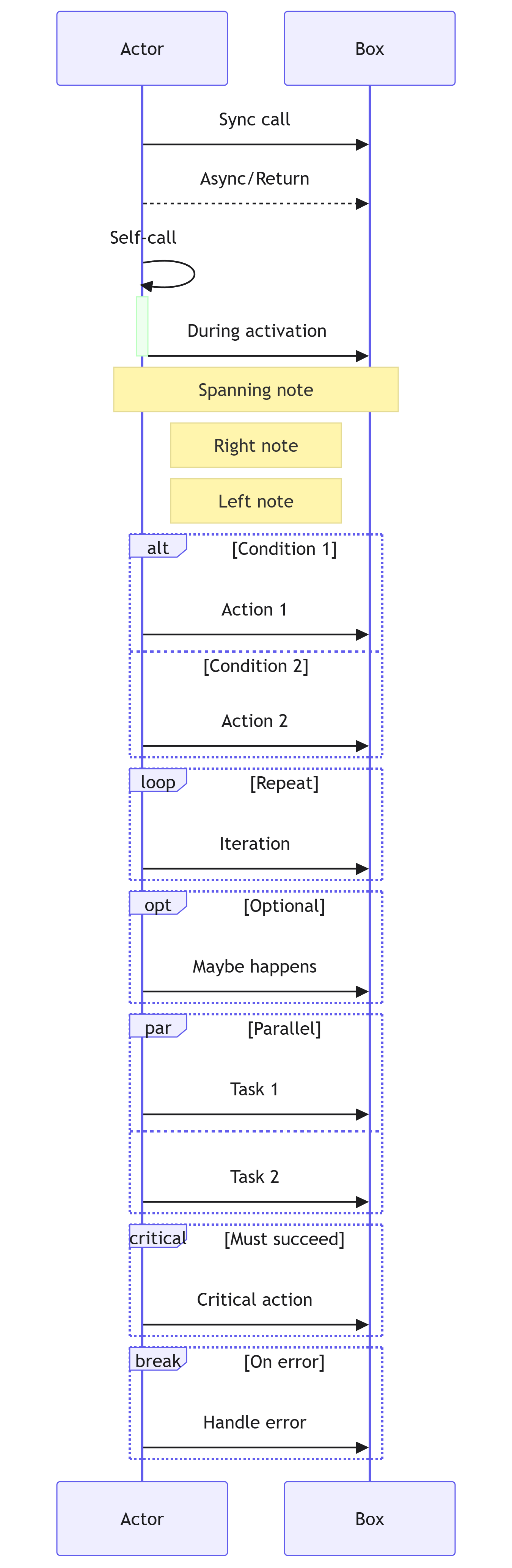
sequenceDiagram
    %% PARTICIPANTS
    participant A as Actor
    participant B as Box

    %% MESSAGES
    A->>B: Sync call
    A-->>B: Async/Return
    A->>A: Self-call

    %% ACTIVATION
    activate A
    A->>B: During activation
    deactivate A

    %% NOTES
    Note over A,B: Spanning note
    Note right of A: Right note
    Note left of B: Left note

    %% CONTROL FLOW
    alt Condition 1
        A->>B: Action 1
    else Condition 2
        A->>B: Action 2
    end

    loop Repeat
        A->>B: Iteration
    end

    opt Optional
        A->>B: Maybe happens
    end

    par Parallel
        A->>B: Task 1
    and
        A->>B: Task 2
    end

    critical Must succeed
        A->>B: Critical action
    end

    break On error
        A->>B: Handle error
    end
Best Practices
-
Keep diagrams focused: One diagram per interaction flow
-
Use meaningful names: Clear participant aliases
-
Add notes for context: Explain non-obvious steps
-
Group related actions: Use rectangles or loops
-
Show error paths: Include alt/break blocks
-
Limit participants: Max 6-8 for readability
-
Document assumptions: Note preconditions
-
Version your diagrams: Use VPasCode for change tracking
Conclusion
Sequence diagrams are more than just visual aids; they are critical tools for aligning technical teams, clarifying complex logic, and documenting system behavior. By mastering Mermaid, you unlock the ability to treat your documentation as code—making it versionable, reviewable, and maintainable. The syntax, while initially unfamiliar, becomes intuitive with practice, allowing you to rapidly prototype and iterate on interaction flows without leaving your code editor.
However, the true power of modern diagramming lies not just in the syntax, but in the ecosystem surrounding it. As we’ve explored, Visual Paradigm’s AI Chatbot and VPasCode platform elevate the Mermaid experience from a solitary coding task to a collaborative, intelligent workflow. The ability to generate diagrams from natural language, validate structures automatically, and seamlessly integrate with enterprise tools like Jira and Confluence addresses the real-world pain points of scaling documentation across large teams.
Key Takeaways
-
Start Simple: Begin with basic participants and messages, then gradually incorporate loops, alternatives, and activation boxes as needed.
-
Embrace “Diagrams as Code”: Store your
.mmdor.mermaidfiles in Git to track changes and facilitate peer reviews. -
Leverage AI: Use tools like Visual Paradigm’s AI to accelerate creation, reduce syntax errors, and generate boilerplate for common patterns.
-
Prioritize Clarity: A good sequence diagram tells a story. Use notes, clear aliases, and focused scopes to ensure your audience understands the why behind the how.
Whether you choose to stick with pure Mermaid for lightweight projects or adopt the full power of Visual Paradigm for enterprise-scale collaboration, the goal remains the same: clearer communication, fewer misunderstandings, and better software.
This guide provides everything you need to master sequence diagrams with Mermaid, while understanding why Visual Paradigm’s AI-powered platform offers significant advantages for professional teams. Now that you have the syntax, the examples, and the tooling insights, it’s time to open your editor and start mapping out your next great interaction flow. Happy diagramming!
This post is also available in Deutsch, Español, فارسی, Français, English, Bahasa Indonesia, 日本語, Polski, Portuguese, Ру́сский, Việt Nam, 简体中文 and 繁體中文.