


Introduction
Modern software development demands speed, precision, and seamless integration between coding and documentation. Historically, creating architectural diagrams required context switching between code editors and separate modeling tools, breaking the developer’s flow.
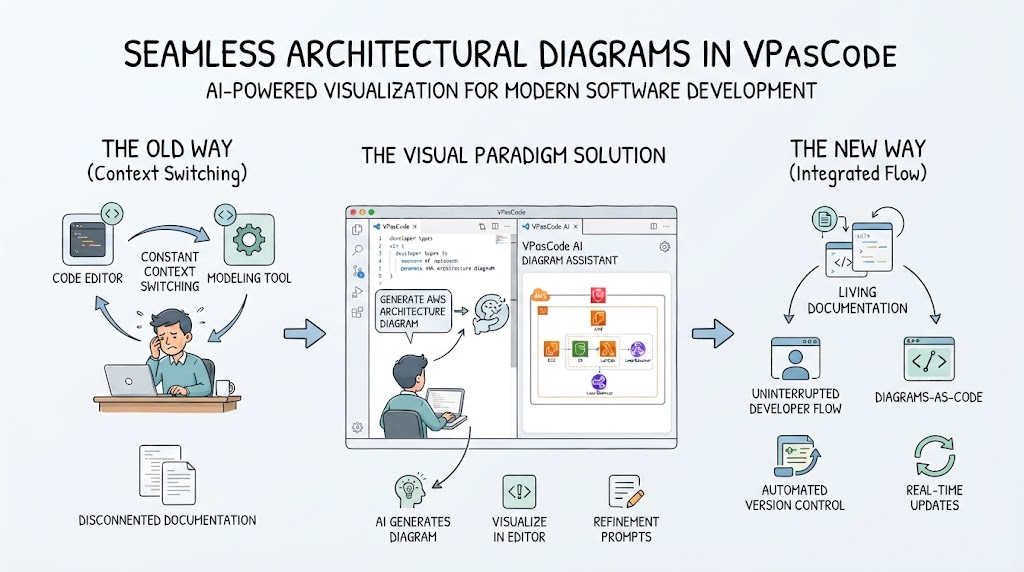
Visual Paradigm has addressed this friction by embedding AI-powered diagram generation directly into the VPasCode editor. This integration allows developers to generate, visualize, and refine diagrams using natural language prompts without ever leaving their primary workspace. By treating diagrams as code that can be generated and version-controlled alongside application logic, teams can maintain living documentation that evolves in real-time with their projects.
Key Concepts
-
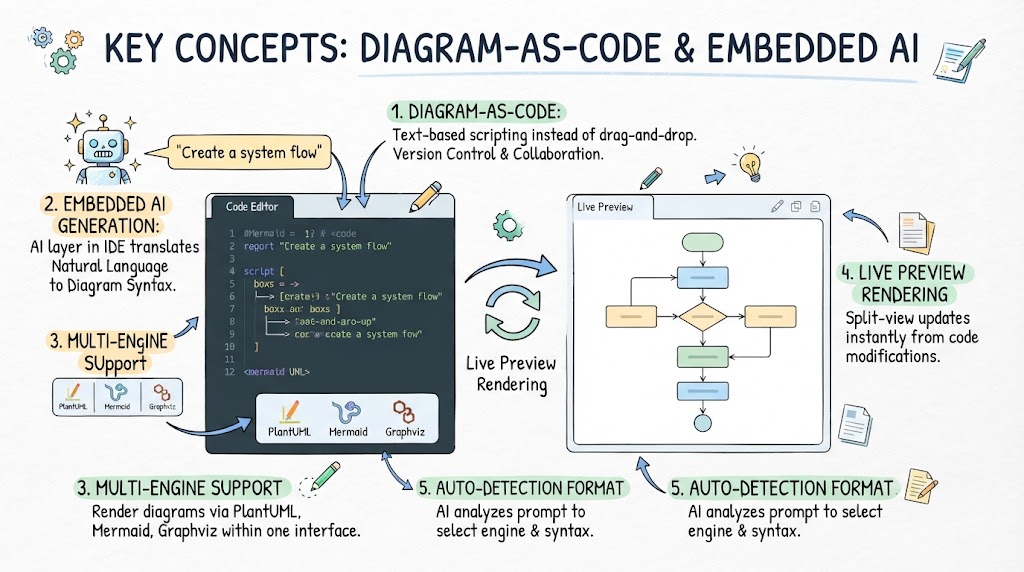
Diagram-as-Code: The practice of defining visual models using text-based scripting languages rather than drag-and-drop interfaces, enabling version control, collaboration, and automation.
-
Embedded AI Generation: An artificial intelligence layer integrated directly into the IDE or editor toolbar that translates natural language descriptions into valid diagram syntax.
-
Multi-Engine Support: The ability to render diagrams using various industry-standard engines (PlantUML, Mermaid, Graphviz) within a single unified interface.
-
Live Preview Rendering: A split-view workspace where code modifications on the left instantly update the visual diagram on the right, providing immediate feedback loops.
-
Auto-Detection Format: An intelligent default setting that analyzes the user’s prompt to automatically select the most appropriate diagramming engine and syntax.
Step-by-Step: Generating Diagrams Inside VPasCode
Creating visual models within the VPasCode environment is designed to be intuitive and non-disruptive. Follow this workflow to generate diagrams directly from your editor:
1. Access the AI Generate Tool
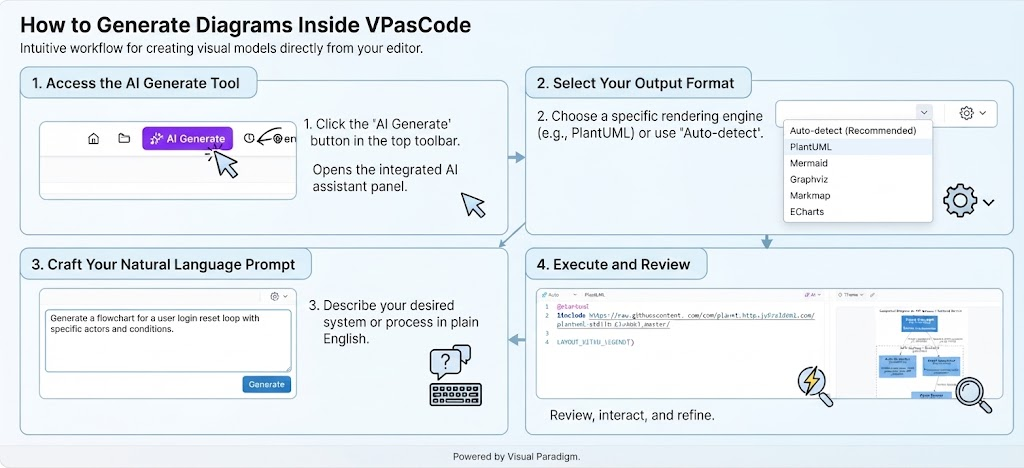
Navigate to the top toolbar of the VPasCode editor interface. Locate and click the AI Generate button. This action opens the integrated AI assistant panel specifically configured for diagram creation, eliminating the need to launch external chatbots or separate applications.
2. Select Your Output Format
While the tool defaults to Auto-detect, you have granular control over the rendering engine. Use the dropdown menu to specify a particular format if your project has standardized documentation requirements. Available options include PlantUML, Mermaid, Graphviz, Markmap, and ECharts. Auto-detect remains the recommended starting point for most users, as it intelligently matches the prompt to the optimal syntax.
3. Craft Your Natural Language Prompt
In the provided text input field, describe the system, process, or architecture you wish to visualize using plain English. Be as specific or as high-level as needed. For example, typing “Generate a flowchart for a user login reset loop” provides sufficient context for the AI to construct a valid diagram structure. The more detailed your description of actors, steps, and conditions, the more accurate the initial generation will be.
4. Execute and Review
Click the AI Generate button to process your request. The editor will immediately populate the left pane with the generated diagram-as-code script and simultaneously render the interactive visual model in the right pane. You can now interact with the diagram, zoom, pan, and make direct code edits to refine the output iteratively.
Supported Formats and Use Cases
VPasCode supports multiple diagramming engines, each optimized for different types of visualization tasks:
-
PlantUML: Ideal for standard UML artifacts including Sequence diagrams, Use Case diagrams, Class diagrams, and Activity diagrams. It offers extensive styling options and is widely adopted in enterprise environments.
-
Mermaid: Excellent for lightweight documentation embedded in markdown files. Best suited for flowcharts, mind maps, entity-relationship (ER) diagrams, and Gantt charts.
-
Graphviz: Powerful for visualizing complex structural data, dependency graphs, and network topologies where automatic layout algorithms are essential.
-
Markmap: Designed specifically for converting markdown outlines into interactive mind maps, useful for brainstorming and knowledge organization.
-
ECharts: Focused on data visualization and statistical charting rather than architectural modeling.
Conclusion
The integration of AI generation into VPasCode represents a significant shift in how developers approach visual documentation. By removing the barrier between writing code and creating diagrams, teams can maintain architectural clarity without sacrificing development velocity. The combination of natural language prompting, multi-engine support, and live preview rendering creates a feedback loop that makes diagram-as-code accessible to both experienced modelers and newcomers. As development workflows continue to emphasize automation and integration, tools that embed intelligence directly into the editor will become essential for maintaining high-quality, synchronized documentation.
Visual Paradigm Related Posts and Articles
- VPasCode AI Diagram Generation & Code Modification Update: Official release notes detailing the embedded AI generate feature, supported formats, and editor integration improvements.
- Mastering VPasCode: The Ultimate Guide to AI-Powered Diagram-as-Code: Comprehensive tutorial covering prompt engineering strategies, multi-engine workflows, and best practices for diagram refinement.
- Visual Paradigm VPasCode Feature Overview: Product page highlighting core capabilities including AI chatbot integration, code-to-diagram conversion, and collaborative editing features.
- AI Diagramming Chatbot & Data Format Generation Update: Technical update explaining the underlying AI model improvements, new data format support, and chatbot refinements for diagram mocking.
This post is also available in Deutsch, Español, Français, English, Bahasa Indonesia, 日本語, Polski, Portuguese, Ру́сский, Việt Nam, 简体中文 and 繁體中文.
Related posts:
 Effortless UML Refinement: A Step-by-Step Guide to Modifying Class Diagrams with VPasCode’s Embedded AI
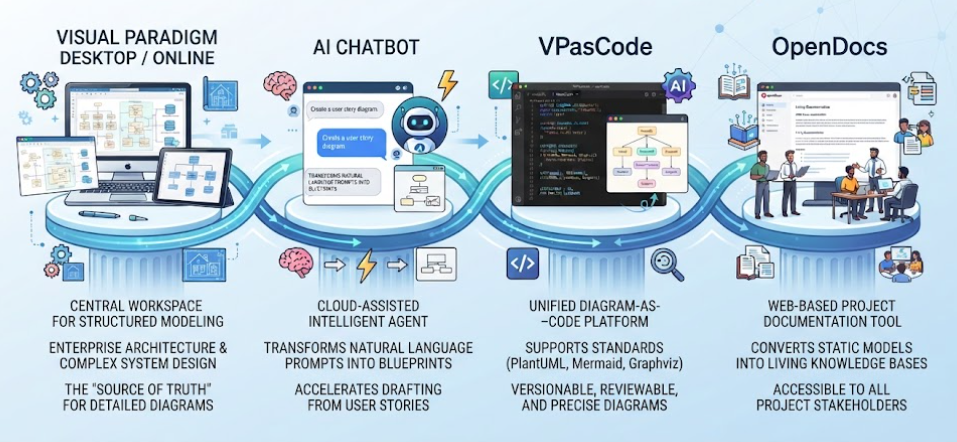 Visual Paradigm’s Unified Platform At a Glance
 Comprehensive Guide to Sequence Diagrams with Diagram as Code using Mermaid with VPasCode and VP AI Chatbot
 Smarter Documentation with OpenDocs’ Tabbed Groups