


Introduction
As a Product Manager with over seven years of experience in tech and cloud services, I’ve seen countless workflows that look perfect on a whiteboard but crumble under the weight of real-world complexity. Recently, I had the opportunity to evaluate how enterprise-grade modeling tools can bridge the gap between high-level conceptual designs and production-ready business processes.
Using a retail banking loan origination scenario as my test case, I explored how Visual Paradigm handles the transition from a simple “idea” diagram to a robust, compliant, and automated BPMN 2.0 workflow. Below is my comprehensive review of the process evolution and the tooling that makes it possible.
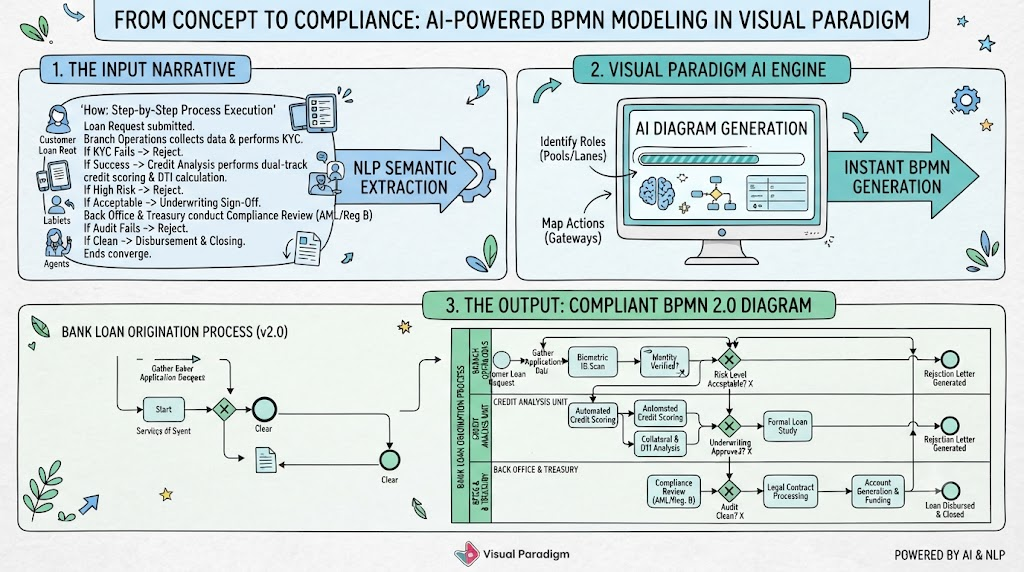
In today’s fast-paced digital transformation landscape, business process modeling has become a cornerstone of organizational efficiency, compliance, and strategic planning. Business Process Model and Notation (BPMN) stands as the global standard for visually representing complex workflows, enabling stakeholders across technical and non-technical domains to collaborate effectively. Yet, despite the widespread adoption of BPMN, a persistent challenge remains: the time-intensive, manual effort required to translate conceptual process narratives into compliant, visually coherent diagrams.
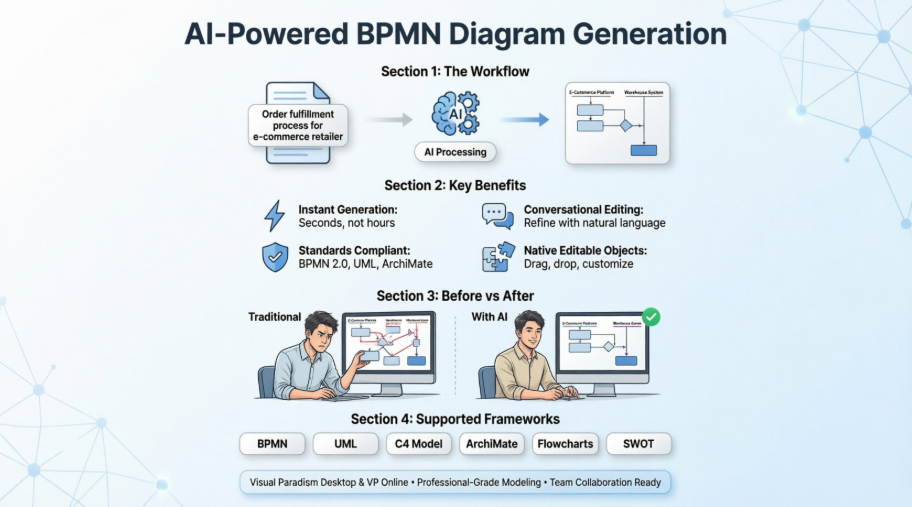
While developer-friendly “Diagram-as-Text” frameworks like PlantUML and Mermaid.js have democratized technical documentation through simple declarative syntax, the enterprise process modeling space has lagged behind. The gap between natural language descriptions and production-ready BPMN diagrams represents a significant bottleneck for business analysts, process architects, and digital transformation teams. This guide explores how Visual Paradigm’s AI-powered Natural Language Processing engine transforms plain-English process descriptions into fully modeled, standards-compliant Business Process Diagrams—instantly.
Case Study: Real-World Loan Origination and Approval Process (v2.0)
Executive Summary
Manual loan processing creates long wait times, operational errors, and compliance risks. This case study analyzes the modernized Business Process Model and Notation (BPMN 2.0) workflow engineered to automate, secure, and accelerate a retail banking loan lifecycle. By establishing clear cross-functional boundaries and rule-based gateways, this workflow transforms a high-risk financial process into a scalable, auditable, and customer-centric digital operation.
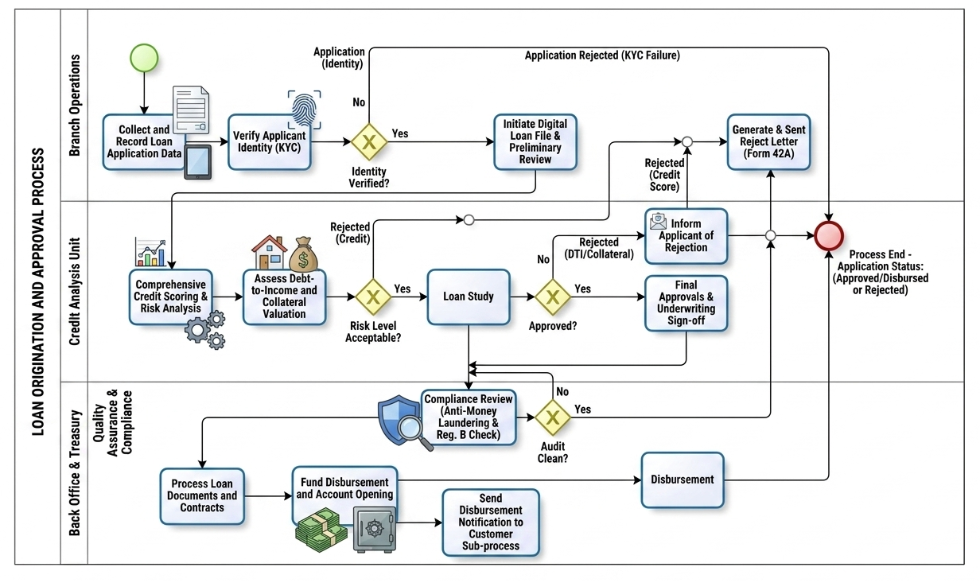
The “Who”: Operational Roles & Swimlanes
The BPMN diagram organizes the workflow into three distinct vertical swimlanes within the overall Loan Origination and Approval Process pool. This ensures clear ownership and separation of duties:
- Branch Operations: The customer-facing front office. They handle initial intake, identity verification (KYC), and final customer communications regarding rejection.
- Credit Analysis Unit: The specialized analytical hub. Risk managers and automated credit models evaluate financial viability, collateral value, and overall debt-to-income ratios.
- Back Office & Treasury (with Quality Assurance & Compliance): The operational engine and governance checkpoint. This group handles regulatory verification (AML/Reg. B), contract execution, funding allocation, and digital distribution.
The “Why”: Business Value & Objectives
Traditional lending processes suffer from visibility silos and manual bottlenecks. This structured BPMN model solves these systemic issues by targeting three core goals:
- Enforce Compliance & Risk Control: Automated gateways guarantee that identity checks (KYC) and Anti-Money Laundering (AML) screenings cannot be skipped or bypassed.
- Reduce Time-to-Decision: By routing the application to a “Digital Loan File” immediately after KYC, the Credit Analysis unit can run risk scoring and collateral valuations concurrently.
- Improve Customer Experience: Clear endpoints ensure that rejected applicants receive legally compliant notices (Form 42A) instantly, while approved applicants experience rapid funding turnaround.
The “How”: Step-by-Step Process Execution
1. Intake and Identity Verification (Branch Operations)
- Start: The process triggers when a customer submits a loan request.
- Collection: Branch agents gather application data via digital tablets.
- KYC Gateway: A biometric fingerprint/ID scan runs automatically. If identity verification fails (No), the path routes directly to a rejection letter generation task, ending the process. If it succeeds (Yes), a digital loan file initiates.
2. Risk Assessment & Underwriting (Credit Analysis)
- Dual-Track Analysis: The file moves to Credit Analysis, where parallel tasks run automated credit scoring, risk modeling, debt-to-income (DTI) calculations, and collateral valuations.
- Risk Level Gateway: An exclusive gateway evaluates the combined credit/risk profile. High-risk profiles route immediately to a rejection notification task.
- Loan Study & Underwriting Sign-Off: Acceptable files undergo a formal loan study. A final gateway determines if underwriting criteria are met. If rejected due to DTI or poor collateral, it routes to the rejection track. If approved, it receives formal underwriting sign-off.
3. Compliance and Funding (Back Office & Treasury)
- The Compliance Firewall: Approved files are sent to the Quality Assurance sub-lane for an automated Compliance Review (AML and Regulation B checks).
- Audit Gateway: If the audit exposes any red flags (No), the file is routed backward to the rejection track. If clean (Yes), document processing begins.
- Disbursement & Closing: Back Office signs and processes legal contracts, establishes the new account, and triggers treasury funds to disburse the loan amount. A sub-process concurrently sends a digital confirmation to the client.
- End: All paths—whether leading to a disbursed loan or a generated rejection letter—converge cleanly into a single End Event, marking the file as officially closed.
Key BPMN Concepts Demonstrated
[Start Event] ──> [Task / Activity] ──> [Exclusive Gateway (X)] ──> [End Event]
│
└── (Alternative Path) ──>
- Pools and Swimlanes: Represent organizational boundaries (the Bank) and individual departmental accountabilities (Branch, Credit, Back Office).
- Tasks (Rectangles): Represent atomic units of work. The diagram distinguishes between user/manual data entry (tablets), automated service tasks (biometric/system checks), and complex sub-processes (notifications).
- Exclusive Gateways (Diamonds with an ‘X’): Act as structural decision points. They evaluate strict business logic (Yes/No, Pass/Fail) and route the process token down exactly one mutually exclusive path.
- Sequence Flows (Solid Arrows): Direct the exact chronological and logical progression of data and activities from start to finish.
Process Comparison: Conceptual vs. Real-World Execution
When moving from a high-level conceptual model to an enterprise-ready production environment, business processes must evolve to handle complex business rules, strict regulatory compliance, and deeper automation. Below, we analyze how each phase of the original Loan Request process scales into a comprehensive, real-world Loan Origination and Approval workflow.
1. Front-Office Intake and Verification Phase
In the initial model, this phase is represented as a simple two-step sequence: recording application data followed by verifying applicant information.
In a production environment, this is expanded to ensure data integrity and strict risk control at the very first point of contact:
- Digital Data Capture: The manual registration task evolves into an automated asset collection process using digital interfaces, minimizing data entry errors.
- Biometric KYC Validation: Generic applicant verification is replaced by a formal, system-integrated Know Your Customer (KYC) gate. The process introduces a dedicated Identity Verified? exclusive gateway.
- Immediate Fail-Safe Routing: If identity validation fails, the process completely bypasses downstream underwriting systems and routes directly to the rejection track, saving operational costs and reducing fraud risks.
2. Credit Factory and Advanced Underwriting Phase
The original diagram relies on a single Loan Study task and a basic Loan Approved? decision gateway to determine the viability of a loan request.
In practice, financial risk management requires multi-layered analytical tasks running concurrently to assess exposure:
- Concurrent Risk Architecture: Before a formal loan study begins, a real-world system executes parallel tracks for Comprehensive Credit Scoring & Risk Analysis alongside a physical or digital Debt-to-Income & Collateral Valuation.
- Risk Level Gateway: An additional exclusive gateway (Risk Level Acceptable?) filters out unviable applications early in the credit cycle, ensuring underwriters only dedicate time to applications that meet minimum risk appetites.
- Underwriting Sign-Off: The final approval gateway is supported by a concrete Final Approvals & Underwriting Sign-off task, creating a definitive audit trail for credit decisioning.
3. Back-Office Compliance and Disbursement Phase
The conceptual workflow finishes abruptly by routing an approval straight to a disbursement task. A professional banking architecture demands a final gatekeeper layer to ensure legal and treasury compliance before any capital leaves the institution.
- The Compliance Firewall: A dedicated Quality Assurance & Compliance sub-lane is injected directly prior to funding. The approved application must pass an independent Compliance Review evaluating Anti-Money Laundering (AML) and Regulation B constraints.
- Audit Gateway: A clean compliance audit (Audit Clean?) acts as the absolute green light for treasury. If compliance fails, the application is securely rerouted back to the rejection workflow.
- Multi-Channel Closing: Once verified, the final Disbursement phase breaks down into parallel automated tasks: formal legal contract processing, account generation, capital funding, and an asynchronous customer notification sub-process.
Tooling Review: Visual Paradigm for Enterprise BPMN
To model the complex workflow described above, I utilized Visual Paradigm. It provides a robust, enterprise-grade modeling suite fully compliant with the BPMN 2.0 standard. Designed to bridge the communication gap between business analysts and technical implementation teams, it offers comprehensive tools for drawing, analyzing, and animating business processes.
Core Modeling Features
- Full BPMN 2.0 Element Support: Access the complete palette of standards-compliant elements including all specialized Events (Message, Timer, Signal, Error), Activity sub-types (User, Service, Script, Call Activities), Gateways, and Data Objects.
- Process Drill-Down (Hierarchical Sub-Processes): Create a highly readable “parent” process and link it to an entirely separate, lower-level child diagram. This allows users to easily collapse or expand sub-processes to toggle between macro views and granular task details.
- Resource Modeling & Swimlanes: Organize workflow layouts across complex organizational structures by adding horizontal or vertical Pools and dynamic Swimlanes.
AI & Automation Innovations
- AI Text-to-Diagram Generation: Convert plain-English written descriptions of a workflow instantly into interactive, standards-compliant business process diagrams.
- Resource Co-Pilot: Speed up manual construction using contextual menus that automatically suggest the next logical BPMN shape or connecting flow object upon hovering.
Advanced Visualization & Integration
- Process Simulation & Animation: Play through the design using built-in diagram animations to visually trace token progression, helping teams find logic errors or deadlocks before coding.
- Cross-Standard Mapping: Seamlessly link business process diagrams directly to technical specifications such as UML sequence diagrams, Entity-Relationship Diagrams (ERDs), User Stories, or corporate enterprise architecture components (TOGAF/ArchiMate).
- Enterprise Reporting: Instantly compile finalized diagrams and their underlying data definitions into professional, automated compliance documentation.
The Invisible Wall: Why Text-to-BPMN is a Rare Commodity in Tool Markets
Text-to-diagram (or “Diagram-as-Text”) frameworks like PlantUML and Mermaid.js have revolutionized software documentation. Developers can easily write a few lines of declarative text to instantly render intricate sequence diagrams, flowcharts, and architecture frameworks.
Yet, when it comes to the Business Process Model and Notation (BPMN) standard, the market falls surprisingly quiet. Only a very small handful of specialized enterprise platforms support native text-to-BPMN generation.
The primary culprit behind this shortage is layout complexity, with the notorious engineering challenges of the BPMN swimlane leading the charge.
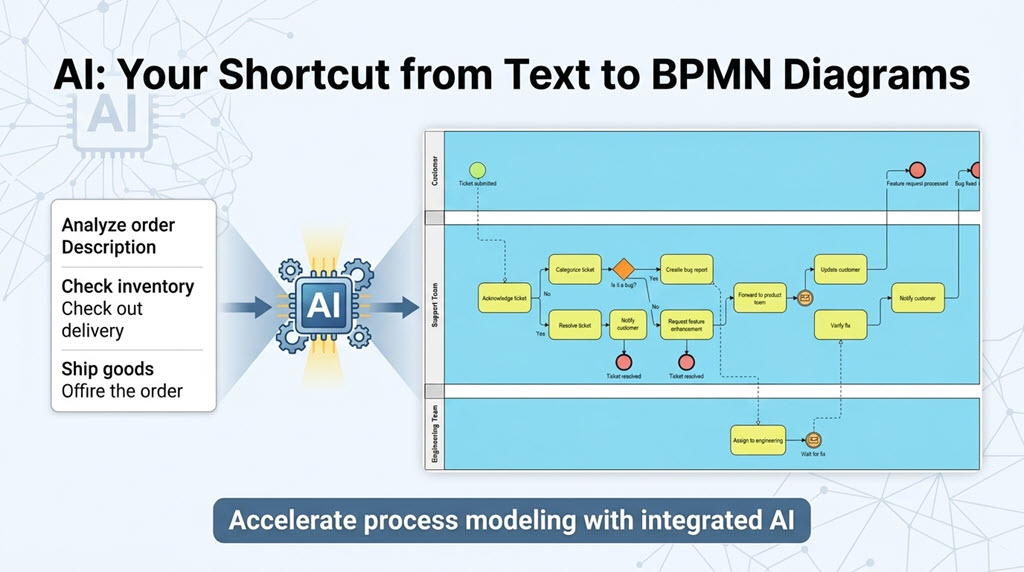
Why Diagram-as-Text Struggles with BPMN
Traditional flowcharts map single-threaded logic moving down or across a single canvas. BPMN, conversely, is an multi-dimensional matrix of semantics, geometry, and operational scope.
1. The Multi-Dimensional Geometry of Swimlanes
In BPMN, pools represent independent organizations, and swimlanes represent internal roles or departments.
- Geometric Containment: A lane is not a loose visual backdrop; it is a rigid containment box. Activities, data elements, and events must mathematically reside inside specific X/Y coordinate boundaries.
- Cross-Lane Trajectory: A process flow constantly jumps across these boundaries. Managing the routing of sequence flows within lanes, while simultaneously routing message flows across entirely separate pools, creates an optimization nightmare for standard layout engines.
2. Strict Matrix Routing and Intersections
Text-to-diagram engines rely heavily on graph-layout engines (like Graphviz dot). These engines excel at positioning nodes hierarchically but fail under BPMN’s strict alignment rules:
- The “Spaghetti” Problem: As sequences weave backward and forward between multiple departments, automated layout engines create massive tangles of overlapping lines.
- Gateway Splits and Joins: Parallel, inclusive, and exclusive gateways branch out to separate lanes and must converge back gracefully. Plain-text script engines struggle to compute the balance between minimal line crossings and structural lane boundaries.
3. High Density of Explicit Symbols
A standard flowchart uses few shapes. BPMN includes dozens of highly specific variations: message start events, timer boundary conditions, error intermediate events, and compensation tasks. Representing these combinations cleanly via text syntax while maintaining correct visual proportions is incredibly difficult to standardize.
The Market Gap
Because of these structural bottlenecks, standard text-to-diagram tools generally offer no support or only heavily compromised implementations of BPMN:
| Feature | Standard Diagram-as-Text (e.g., Mermaid) | Pure BPMN Specification Requirements |
|---|---|---|
| Primary Focus | Simple flowcharts, sequences, and markdown integration. | Formal, audit-ready enterprise process compliance. |
| Swimlane Capabilities | Rough visual columns; limited cross-boundary routing logic. | Strict geometric containment with explicit pool interactions. |
| Symbol Depth | Basic shapes (rectangles, diamonds, circles). | Dozens of event, gateway, and artifact variations. |
| Layout Outcome | Visually chaotic when processes scale linearly. | Clean, readable, and highly standardized matrix views. |
How Visual Paradigm Solves This Challenge
To circumvent the limitations of traditional text script parsing, Visual Paradigm leverages an entirely different architectural approach: AI-powered Natural Language Processing (NLP) mapped directly to its underlying modeling engine.
Instead of forcing users to learn a complicated, custom declarative text language, Visual Paradigm allows users to input plain-English procedural descriptions. The system processes the text and instantly instantiates a fully modeled Business Process Diagram.
How it Works Behind the Scenes
- Semantic Extraction: The integrated generative AI parses the input narrative to identify organizational entities (which become Pools/Lanes), operational actions (which become Tasks), and decision criteria (which become Gateways).
- Object and Containment Generation: Rather than drawing flat shapes, the system instantiates explicit database objects inside the modeling layer. It maps activities precisely inside their designated lane boundaries.
- Smart Routing Layout: Instead of relying on rigid programmatic scripting rules, Visual Paradigm applies advanced semantic layout rules to optimize alignment, space elements evenly, and keep line crossings minimal.
- Iterative Visual Refinement: Because the output is a true model (and not just static shapes), users can transition directly to manual dragging-and-dropping, adjusting lanes, or running process simulations seamlessly.
Step-by-Step: Generating BPMN via Text in Visual Paradigm
To utilize text-to-BPMN generation in the application:
- Open the Visual Paradigm Desktop application environment.
- Select Tools > AI Diagram Generation from the main menu.

- In the AI Diagram Generation window, select Business Process Diagram to be the diagram type.
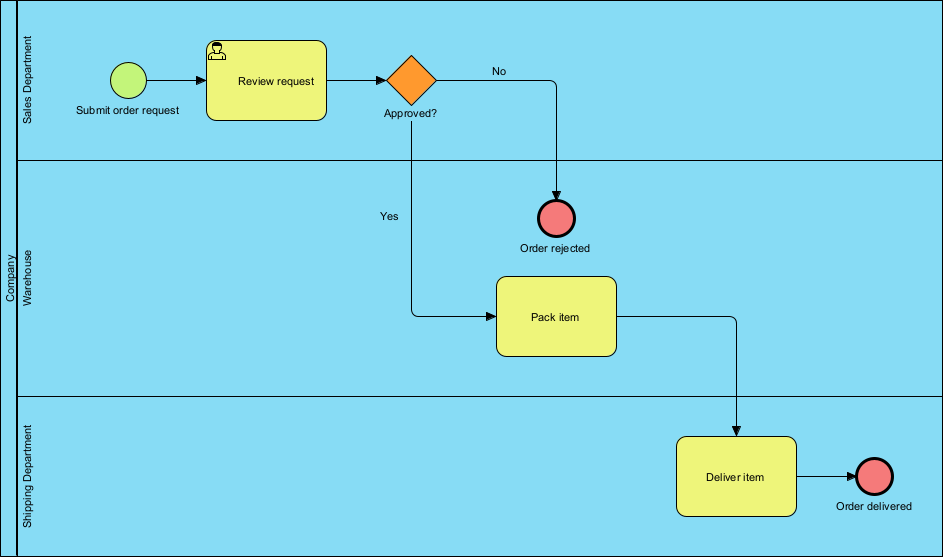
- Paste or type your operational concept narrative into the provided prompt space (e.g., “The customer submits an order request. The Sales Department reviews the request. If approved, the Warehouse packs the item, and the Shipping Department delivers it.”).
- Select Include Pools and Lanes.
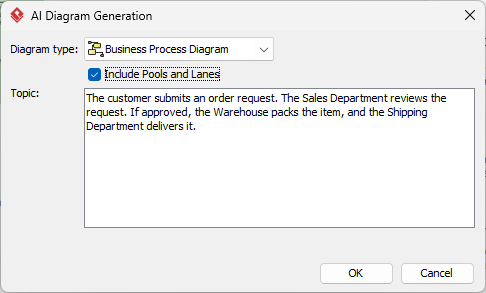
- Click OK. The layout engine maps the roles to distinct lanes, positions the tasks sequentially, routes the sequence lines, and delivers a clean, ready-to-edit BPMN diagram.
AI Business Process Diagram Examples
Listed below are more Business Process Diagram generated with AI, using Visual Paradigm Desktop.
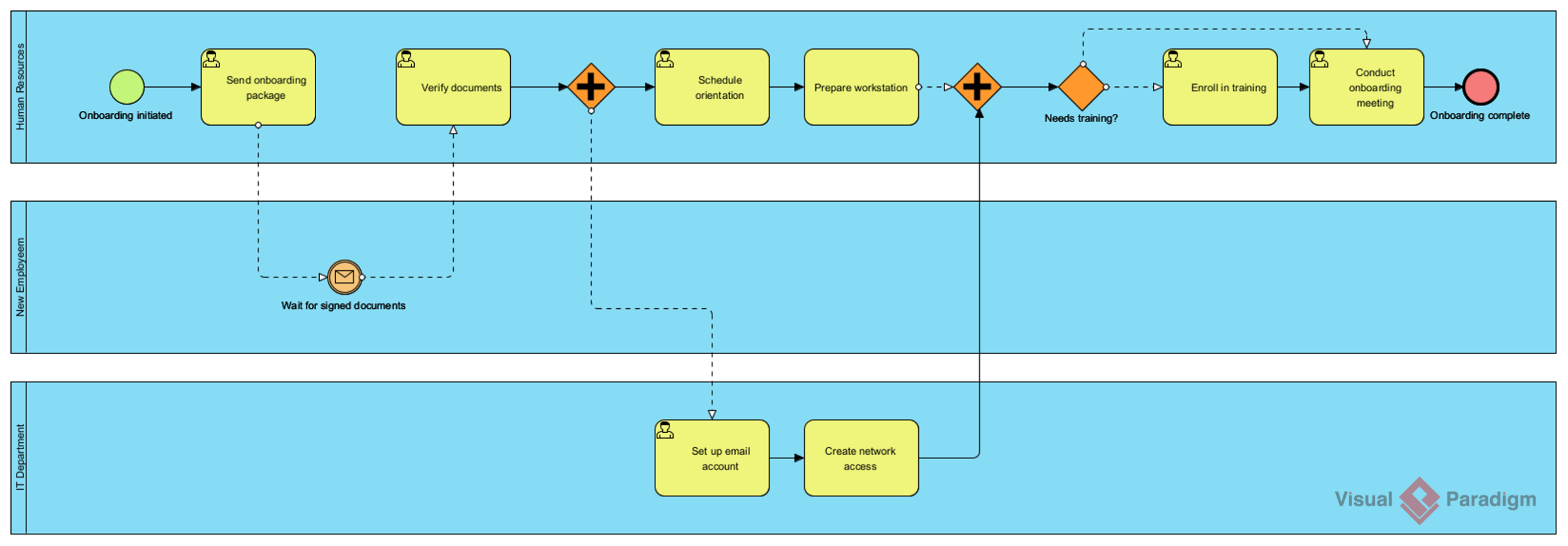
AI-Generated BPD: Employee onboarding process
Prompt: An employee onboarding process in a mid-sized company.
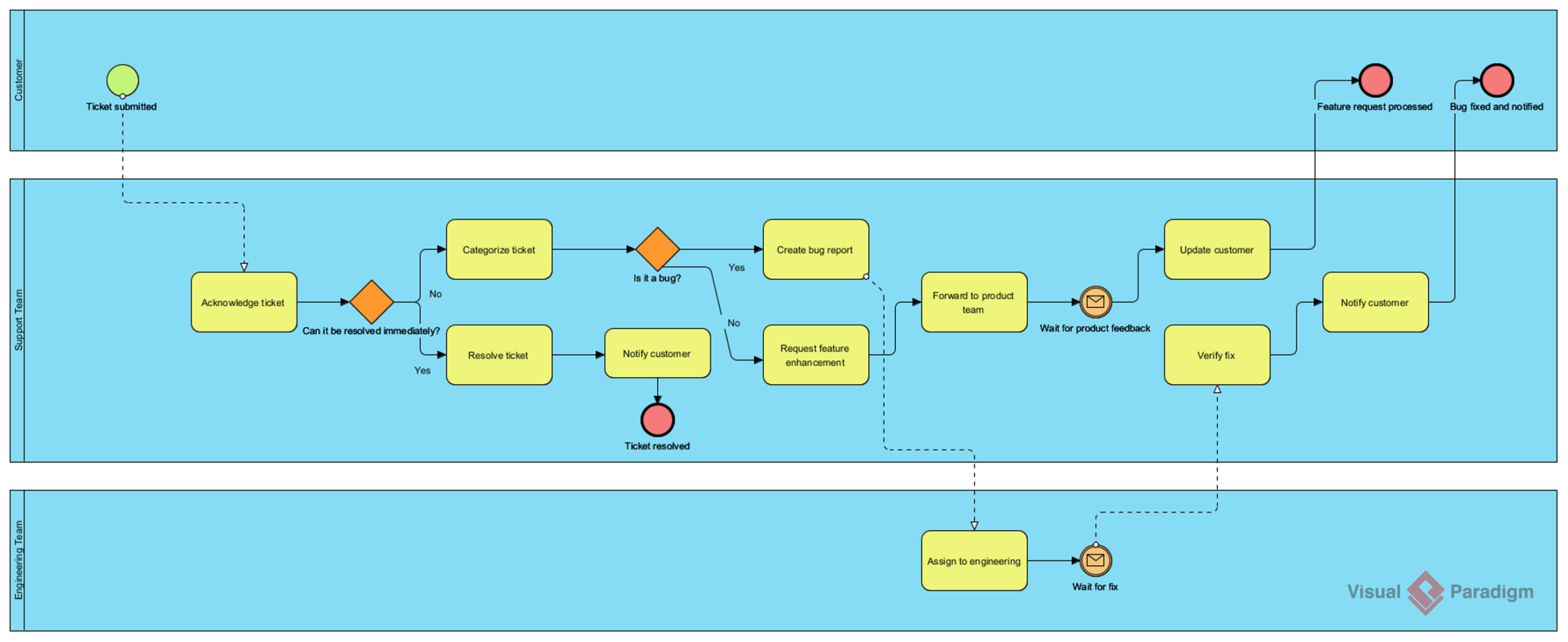
AI-Generated BPD: Customer support ticket resolution process
Prompt: A customer support ticket resolution process for a SaaS company.
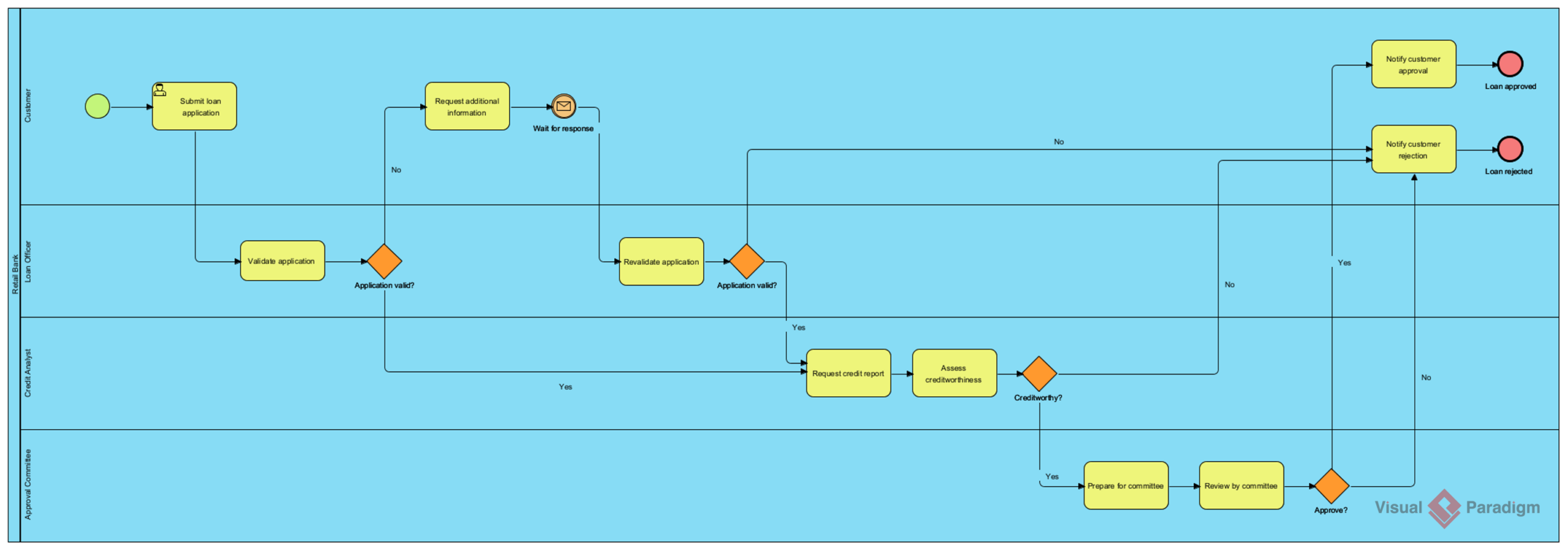
AI-Generated BPD: Loan application and approval process
Prompt: A loan application and approval process in a retail bank.
To learn more about the technical capabilities and various use cases, please visit our AI Diagram Generation landing page.
Ready to experience the future of process modeling?
Download the latest version of Visual Paradigm today and start using the most advanced AI BPMN tool on the market.
Conclusion: Bridging the Gap with Precision
Transitioning from a conceptual loan request to a fully compliant origination system is not merely a design exercise—it is a strategic imperative. As demonstrated in this case study, the addition of rigorous KYC gates, parallel risk analysis tracks, and mandatory compliance firewalls transforms a fragile process into a resilient operational engine.
The journey from conceptual process narrative to compliant, enterprise-ready BPMN diagram has long been hindered by the inherent complexity of the BPMN specification itself. Traditional text-to-diagram approaches, while transformative for software architecture documentation, simply were not designed to handle the multi-dimensional geometry, strict routing constraints, and symbolic richness that BPMN demands. This “invisible wall” has left business analysts and process architects relying on manual, time-intensive modeling workflows—slowing innovation and limiting agility in digital transformation initiatives.
Visual Paradigm proved to be an indispensable partner in this journey. Its ability to handle hierarchical sub-processes allowed us to keep the high-level view clean while drilling down into the complexities of credit scoring and AML checks. Furthermore, the AI-driven features and simulation tools reduced the time spent on iterative corrections, allowing our team to focus on optimizing business logic rather than wrestling with diagram syntax.
By leveraging advanced Natural Language Processing mapped directly to a robust semantic modeling engine, the platform bypasses the limitations of declarative scripting entirely. Users can now describe processes in plain English and receive instantly generated, standards-compliant Business Process Diagrams—complete with properly contained swimlanes, intelligently routed sequence flows, and correctly positioned BPMN symbols. The result is not just a static image, but a fully interactive, editable, and simulation-ready process model.
For product managers and business analysts tasked with digitizing complex financial workflows, adopting a tool that supports both strict BPMN compliance and agile visualization is key to delivering secure, efficient, and customer-centric solutions. For organizations seeking to accelerate process documentation, improve cross-functional alignment, and empower citizen modelers, this AI-driven approach removes the traditional barriers to BPMN adoption. It transforms process modeling from a specialized technical skill into an accessible, collaborative activity—freeing teams to focus on what truly matters: analyzing, optimizing, and innovating upon the workflows that drive business value.
References
- AI BPMN Business Process Diagram Generator Update: Official release notes detailing the integration of AI-powered BPMN diagram generation capabilities into Visual Paradigm Desktop.
- What is BPMN? – Visual Paradigm Guide: Educational resource explaining the Business Process Model and Notation standard, its components, and its value for enterprise process management.
- AI Diagram Generation Feature Page: Dedicated landing page outlining technical capabilities, use cases, and benefits of Visual Paradigm’s AI-powered diagram generation suite.
- Visual Paradigm Features Overview: A comprehensive overview of the core capabilities and modules available in the Visual Paradigm suite.
- BPMN Diagram and Tools: Detailed information on specific BPMN modeling tools, including element support and diagramming features.
- From Narrative to Diagram: How Visual Paradigm’s AI BPMN Generator Transforms Process Modeling Workflows: An article explaining how AI technology converts text descriptions into visual business process diagrams.
- BPMN Guide: General resources and guides for understanding and implementing BPMN standards.
- Understanding BPMN: A Comprehensive Overview: A detailed guide from the Visual Paradigm knowledge base covering BPMN concepts.
- Swimlanes and Pools Guide: Specific instructions on using swimlanes and pools to organize process responsibilities.
- Visual Paradigm YouTube Tutorial: Video demonstration of BPMN modeling features and tips.
- BPMN and Enterprise Architecture Integration: Information on linking BPMN diagrams with other enterprise architecture standards.
- Enterprise Reporting Features: Details on generating automated reports and documentation from process models.
This post is also available in Deutsch, Español, فارسی, Français, English, Bahasa Indonesia, 日本語, Polski, Portuguese, Ру́сский, Việt Nam, 简体中文 and 繁體中文.
Related posts:
 How Visual Paradigm’s AI Diagram Generation Turns Your Ideas into Professional UML & BPMN Diagrams in Seconds
 From Text to Process Flow: My Hands-On Review of Visual Paradigm’s AI BPMN Diagram Generator
 AI State Machine Diagram Case Study for Microwave Lifecycle
Comprehensive Step-by-Step Guide: Creating a 3D Printer UML State Machine Diagram Using Visual Paradigm AI Chatbot
AI State Machine Diagram Case Study for Microwave Lifecycle
Comprehensive Step-by-Step Guide: Creating a 3D Printer UML State Machine Diagram Using Visual Paradigm AI Chatbot