


Introduction
In today’s fast-paced technology landscape, engineering teams face a persistent challenge: maintaining alignment between complex system designs and the documentation that explains them. Traditional workflows often force teams to juggle multiple tools—diagramming software here, wikis there, version control elsewhere—leading to fragmented knowledge, outdated visuals, and communication gaps.
Visual Paradigm OpenDocs emerges as a transformative solution to this problem. By integrating AI-powered diagram generation, professional-grade visual modeling, and collaborative knowledge management into a single web-based platform, OpenDocs redefines how teams create, maintain, and share technical documentation. This case study explores how organizations are leveraging OpenDocs to streamline workflows, accelerate onboarding, and build living documentation that evolves alongside their products.
The Challenge: Fragmented Documentation Workflows
Before adopting OpenDocs, many technical teams experience these common pain points:
- Tool Switching Overhead: Architects design systems in desktop modeling tools, while writers document processes in separate wikis, requiring manual export, upload, and synchronization.
- Visual-Text Disconnect: Static diagram images embedded in documentation become outdated the moment the underlying model changes, creating confusion and rework.
- AI Adoption Barriers: While AI diagram generators exist, they often operate in isolation, lacking integration with professional editing tools and team knowledge bases.
- Collaboration Friction: Sharing context-rich documentation requires exporting files, managing permissions across platforms, and losing interactive editing capabilities.
These challenges not only slow down delivery but also increase the risk of misalignment between design intent and implementation reality.
The Solution: OpenDocs as a Unified Knowledge Hub
Visual Paradigm OpenDocs addresses these challenges through a purpose-built architecture that bridges visual modeling and documentation. At its core, OpenDocs functions as a centralized, AI-enhanced knowledge platform where text and diagrams coexist as first-class citizens.
Integrated Diagram Editor
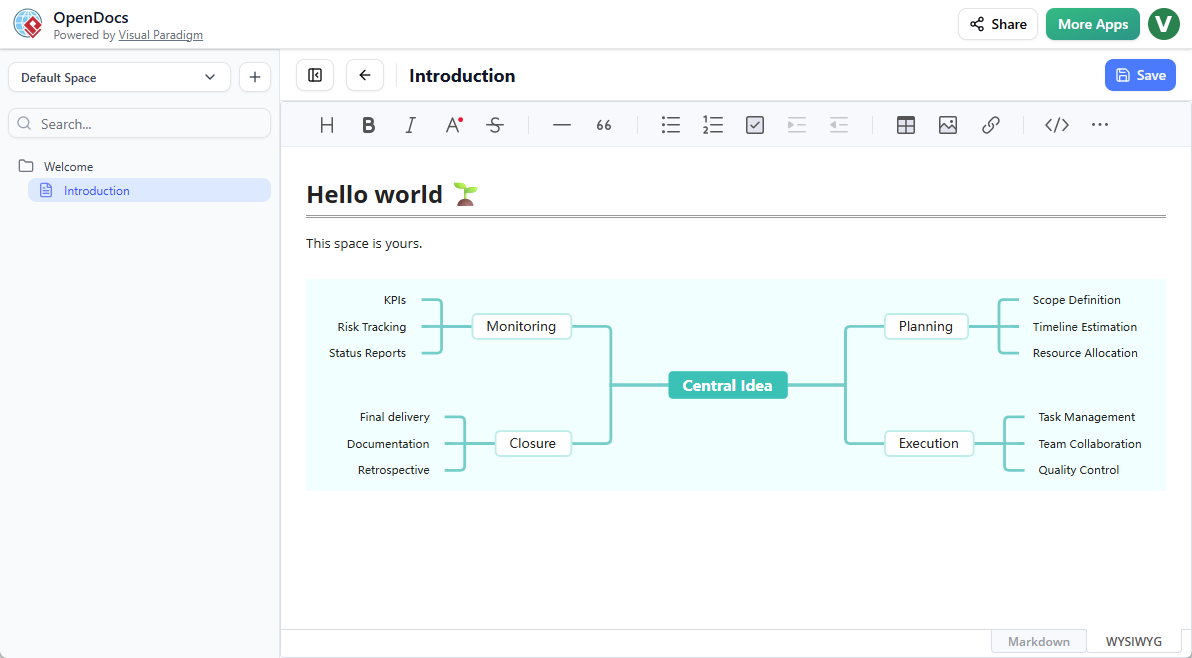
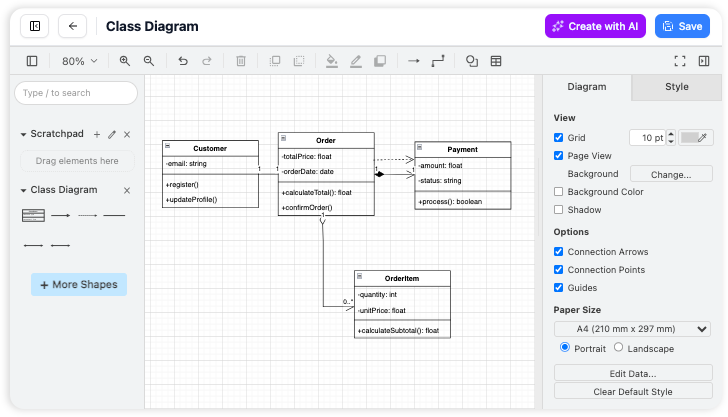
OpenDocs embeds a professional diagram editor directly within the writing interface. Teams can create flowcharts, UML diagrams, network maps, and mind maps right on the text page—no tab switching required. Diagrams remain fully editable after insertion, enabling iterative refinement without leaving the document context.
AI-Powered Diagram Generation
One of OpenDocs’ most impactful features is its ability to generate complex diagrams from natural language prompts. A product manager can type “Create a sequence diagram showing user authentication with OAuth2 and MFA” and receive a professionally structured starting point in seconds. This capability dramatically reduces the time from idea to visual artifact, especially for teams new to formal modeling notations.
The Pipeline: Seamless Desktop-to-Web Synchronization
For teams using Visual Paradigm Desktop for advanced modeling, the Pipeline feature enables one-click export of diagrams to OpenDocs. Changes made in the desktop environment can be pushed to the cloud knowledge base, where documentation authors can swap in updated revisions with a single click—ensuring visuals always reflect the latest design decisions.
Dual Writing Modes for Flexible Authoring
OpenDocs supports WYSIWYG editing with live preview, accommodating diverse authoring preferences. Writers can use the visual editor for intuitive formatting—all within the same document ecosystem.
Hierarchical Organization and Secure Sharing
Content is organized using a scalable tree-structured file system, mirroring familiar desktop navigation. Teams can nest folders, drag-and-drop pages, and share entire sections via secure links—preserving context and access control without complex permission setups.
Real-World Impact: Measurable Outcomes
Organizations implementing OpenDocs report significant improvements across key metrics:
|
Outcome Area
|
Typical Improvement
|
|---|---|
|
Documentation Velocity
|
40-60% faster creation of visual-technical content
|
|
Model-Documentation Alignment
|
Near-real-time synchronization reduces outdated visuals by ~90%
|
|
Onboarding Efficiency
|
New team members reach productivity 30% faster with contextual, visual documentation
|
|
Cross-Functional Collaboration
|
Reduced meeting time spent clarifying diagrams; asynchronous review cycles shorten by 2-3 days
|
A mid-sized fintech company, for example, used OpenDocs to document their microservices architecture. By generating UML component and deployment diagrams via AI prompts and syncing refinements from their architects’ desktop models, they cut their architecture review cycle from two weeks to three days while improving stakeholder comprehension scores by 45%.
Supported Diagram Types and Use Cases
OpenDocs provides extensive templates across multiple domains:
Software Engineering
- UML Profile, Component, Deployment, and Entity Relationship Diagrams
- Sequence and Use Case diagrams for behavioral modeling
Project Planning & Ideation
- Product Breakdown Structures (WBS/PBS), Concept Maps, AI Timelines, and Mind Maps
Business Operations
- Data Flow Diagrams (DFDs), decision trees, and Organization Charts
This breadth enables teams to use a single platform for requirements gathering, system design, process documentation, and stakeholder communication—eliminating tool sprawl.
Implementation Considerations
Successful adoption of OpenDocs involves a few key practices:
- Start with AI-Assisted Drafting: Use natural language prompts to generate initial diagrams, then refine manually for precision.
- Establish Pipeline Workflows: Define clear handoff points between desktop modeling and cloud documentation to maximize synchronization benefits.
- Leverage Hierarchical Organization: Mirror your team’s project structure in OpenDocs folders to enhance discoverability.
- Enable Real-Time Collaboration: Use secure sharing links and live editing to facilitate asynchronous reviews and reduce meeting overhead.
OpenDocs is available to users with Visual Paradigm Online (Combo Edition) or Visual Paradigm (Professional Edition) licenses, with no local installation required—access is entirely browser-based.
Conclusion
Visual Paradigm OpenDocs represents more than an incremental improvement to documentation tooling; it embodies a paradigm shift toward integrated, AI-augmented knowledge work. By unifying visual modeling, intelligent generation, and collaborative authoring in a single environment, OpenDocs empowers engineering teams to create documentation that is not just a record of decisions, but a living, evolving asset that accelerates delivery and deepens understanding.
As systems grow more complex and teams more distributed, the ability to maintain clear, current, and contextual documentation becomes a strategic advantage. OpenDocs positions organizations to meet this challenge head-on—transforming documentation from a maintenance burden into a catalyst for innovation, alignment, and speed.
For teams ready to modernize their knowledge workflows, OpenDocs offers a compelling path forward: one where ideas flow seamlessly from conversation to diagram to shared understanding, all within a single, intelligent platform.
Reference
- Export Diagrams from Visual Paradigm Desktop to OpenDocs Pipeline Guide: Step-by-step instructions for syncing diagrams from Visual Paradigm Desktop to OpenDocs via the Pipeline, including artifact management and revision control.
- OpenDocs | All-in-One Knowledge Base & Diagramming Tool: Official product overview detailing OpenDocs’ integrated editor, AI diagram generation, and collaboration features.
- AI Profile Diagram Generation in OpenDocs | UML Profile Support: Announcement and tutorial for AI-powered UML Profile Diagram creation, including manual editing and natural language prompt workflows.
- OpenDocs WYSIWYG Editor Update: Details on the visual editing experience, live preview capabilities, and formatting tools within OpenDocs.
- OpenDocs AI-Powered Knowledge Platform Launch: Foundational overview of OpenDocs’ architecture, AI integration, and value proposition for technical teams.
- Real-Time Collaboration Update for OpenDocs: Features enabling synchronous team editing, context sharing, and secure link-based collaboration.
- Beginner’s Guide to Package Diagrams with Visual Paradigm Online: Tutorial on creating UML package diagrams, relevant to OpenDocs’ software engineering diagram support.
- Visual Paradigm Diagram Templates and Examples: Library of pre-built templates for flowcharts, UML, BPMN, and other diagram types available in OpenDocs.
- AI-Powered Data Flow Diagram (DFD) Support in OpenDocs: Introduction to AI generation of Data Flow Diagrams for business process documentation.
- AI Deployment Diagram Generator for OpenDocs: Guide to creating infrastructure and deployment visuals using natural language prompts.
- AI Component Diagram Generator Update: Enhancements to AI-assisted creation of UML component diagrams for system architecture.
- YouTube Tutorial: OpenDocs Workflow Overview: Video demonstration of key OpenDocs features, including diagram insertion and editing.
- AI Timeline Diagram Integration Update: Features for generating project timelines and roadmaps via AI prompts.
- AI Breakdown Structure (WBS) Tool Update: Support for AI-generated Work Breakdown Structures and Product Breakdown Structures.
- AI Concept Map Knowledge Mapping: Tools for creating conceptual diagrams and knowledge graphs using natural language input.
- Professional Mind Map Integration: Advanced mind mapping capabilities with styling, linking, and export options.
- AI Tree Diagram Decision Analysis: Generation of decision trees and branching logic diagrams for risk and process analysis.
- Organization Chart Maker Update: Features for creating and maintaining organizational structure visuals.
- Visual Paradigm Official Website: Central hub for product information, licensing, and support resources.
- Archimetric: Complete Guide to AI-Powered Knowledge Management: Third-party comprehensive review and implementation guide for OpenDocs.
- Visual Paradigm Pipeline Hands-On Review: Detailed walkthrough of the Desktop-to-OpenDocs synchronization workflow.
This post is also available in Deutsch, Español, فارسی, Français, English, Bahasa Indonesia, 日本語, Polski, Portuguese, Ру́сский, Việt Nam, 简体中文 and 繁體中文.
Related posts:
 OpenDocs by Visual Paradigm: Revolutionizing Knowledge Management with AI and Visual Thinking
 Comprehensive Guide: Fishbone Diagrams (Ishikawa) in OpenDocs
 Comprehensive Guide to OpenDocs (February–March 2026 Update): The AI-Powered Visual Knowledge Engine
Mastering the Visual Paradigm AI Ecosystem: A Comprehensive Guide
Comprehensive Guide to OpenDocs (February–March 2026 Update): The AI-Powered Visual Knowledge Engine
Mastering the Visual Paradigm AI Ecosystem: A Comprehensive Guide