


Introduction
The Unified Modeling Language (UML) is the undisputed standard for visualizing, specifying, constructing, and documenting the artifacts of software systems. However, for many developers and architects, UML presents a formidable challenge. With 14 distinct diagram types and a sprawling specification document spanning over 700 pages, the traditional, manual process of dragging, dropping, and connecting elements carries a notoriously steep learning curve.
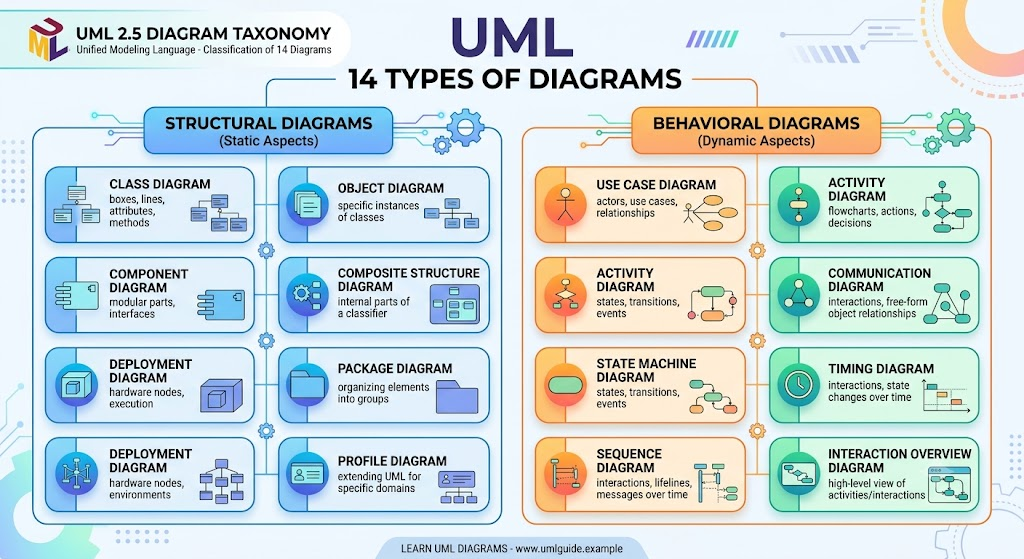
Enter the era of AI-assisted engineering. Visual Paradigm’s AI Diagramming Chatbot revolutionizes this landscape by transforming UML modeling from a tedious manual drawing process into an intuitive, conversational workflow. By automating the selection and drafting of models, the AI chatbot allows professionals to bypass the syntactic complexities of UML and focus purely on system logic and architecture.
This guide explores the key concepts of AI-driven UML modeling, provides practical examples of conversational prompts, and demonstrates the resulting diagrams using PlantUML code.
Key Concepts in AI-Driven UML Modeling
The AI Diagramming Chatbot simplifies complex architectural tasks through four core mechanisms. Below is a detailed breakdown of these concepts, complete with practical examples.
1. Conversational Generation from Plain English
Instead of navigating complex toolbars to find the right UML elements, users describe their system in natural language. The AI analyzes the intent, suggests the most appropriate diagram type, explains its reasoning, and instantly drafts the visual model.
Examples of Conversational Prompts & AI Actions:
-
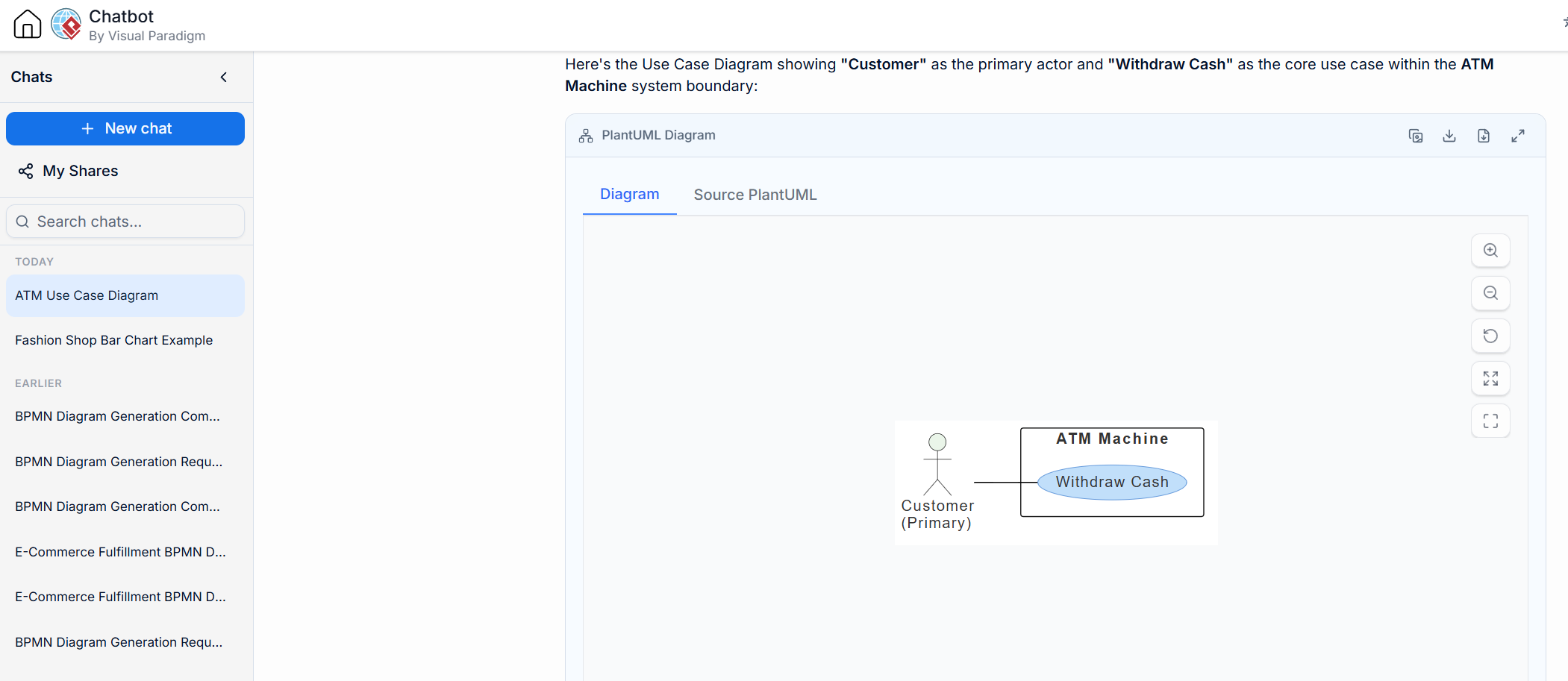
Prompt: “I need to show how a customer interacts with an ATM to withdraw cash, including the actors and the system boundaries.”
-
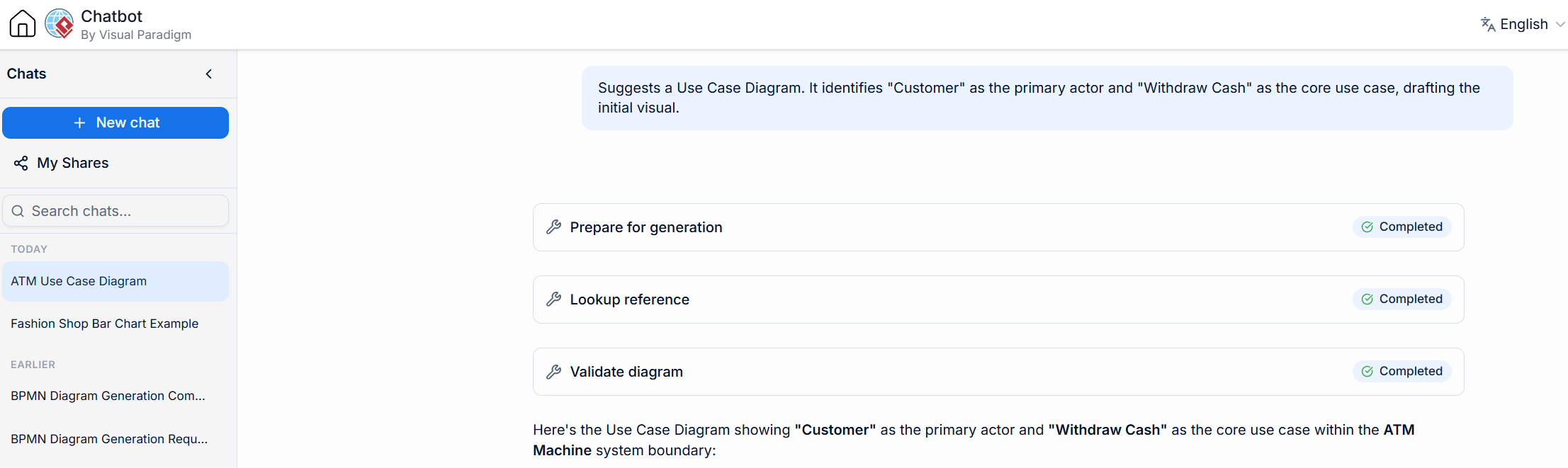
AI Action: Suggests a Use Case Diagram. It identifies “Customer” as the primary actor and “Withdraw Cash” as the core use case, drafting the initial visual.
-
-
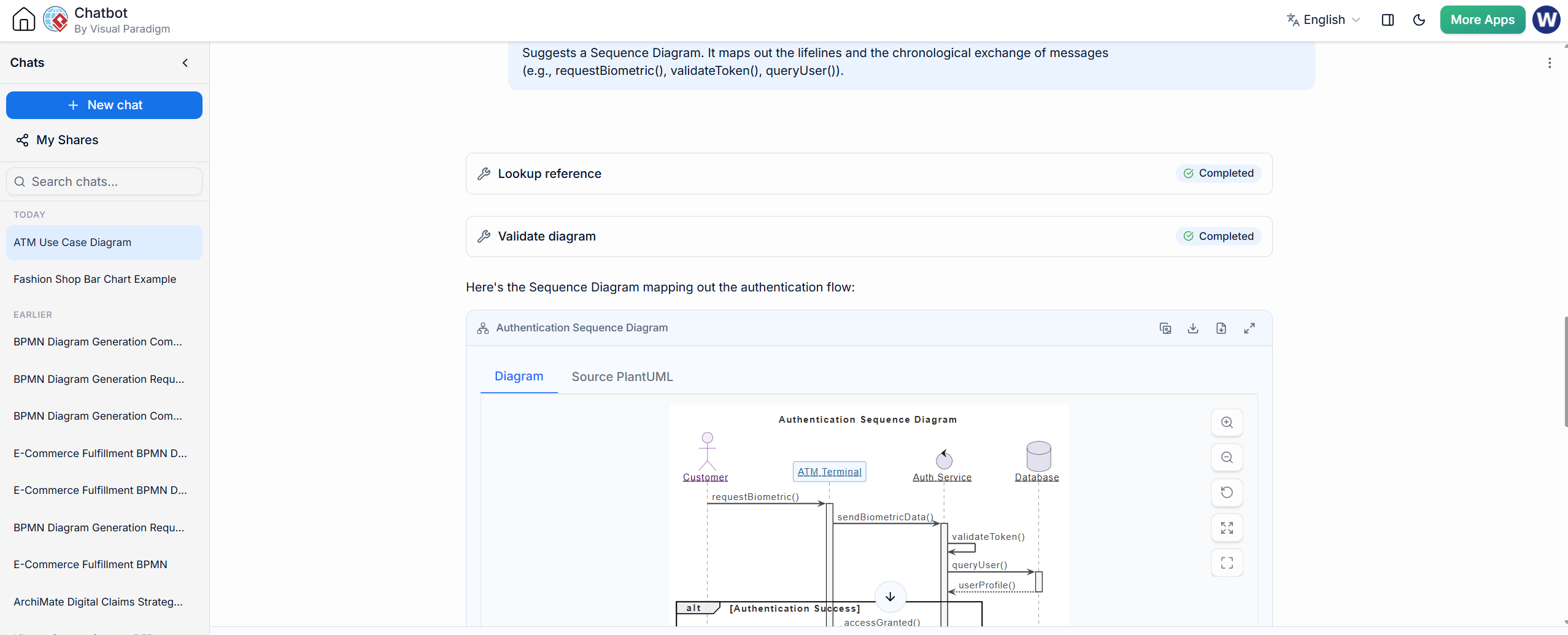
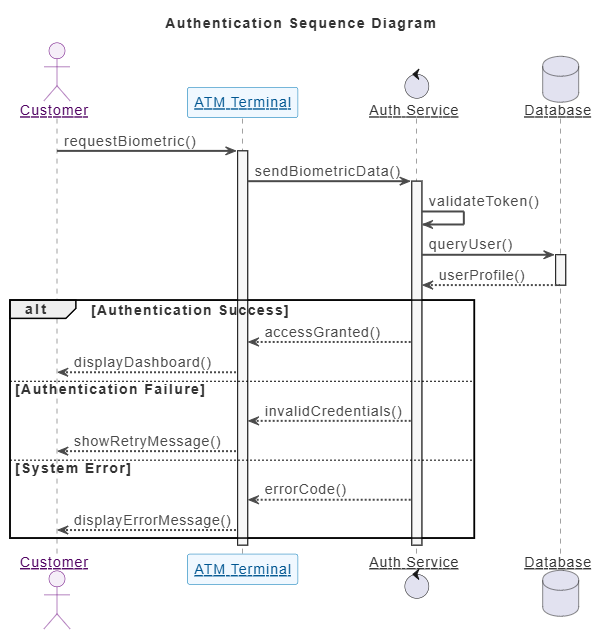
Prompt: “Show me the step-by-step message flow between a mobile app, an authentication server, and a database when a user logs in via biometrics.”
-
AI Action: Suggests a Sequence Diagram. It maps out the lifelines and the chronological exchange of messages (e.g.,
requestBiometric(),validateToken(),queryUser()).
-
-
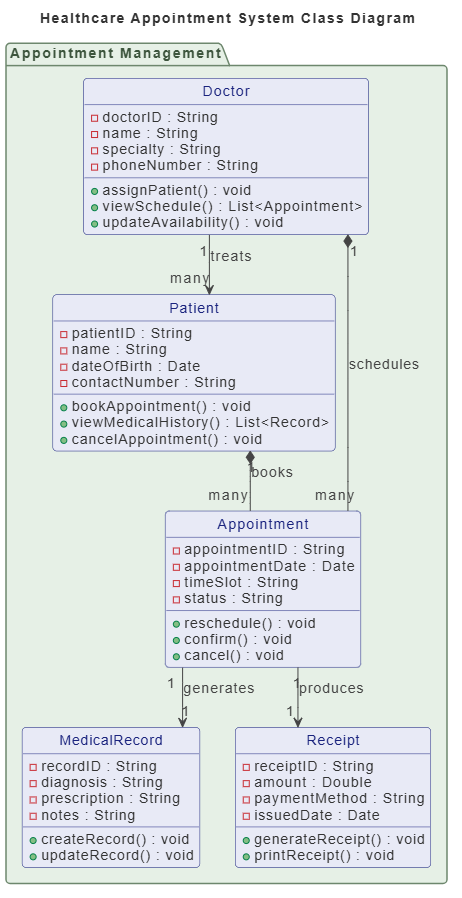
Prompt: “Define the data structure for a hospital system, including Doctors, Patients, and Appointments, with their attributes and relationships.”
-
AI Action: Suggests a Class Diagram. It generates the classes, infers logical attributes (e.g.,
doctorID,appointmentDate), and establishes multiplicity (e.g., one Doctor to many Patients).
-
| Class | Key Attributes | Key Methods |
|---|---|---|
| Doctor | doctorID, name, specialty, phoneNumber | assignPatient(), viewSchedule(), updateAvailability() |
| Patient | patientID, name, dateOfBirth, contactNumber | bookAppointment(), viewMedicalHistory(), cancelAppointment() |
| Appointment | appointmentID, appointmentDate, timeSlot, status | reschedule(), confirm(), cancel() |
| MedicalRecord | recordID, diagnosis, prescription, notes | createRecord(), updateRecord() |
| Receipt | receiptID, amount, paymentMethod, issuedDate | generateReceipt(), printReceipt() |
| Relationship | Cardinality | Meaning |
|---|---|---|
| Doctor → Appointment | 1 *– many | One Doctor schedules many Appointments (composition) |
| Patient → Appointment | 1 *– many | One Patient books many Appointments (composition) |
| Doctor → Patient | 1 –> many | One Doctor treats many Patients (association) |
| Appointment → MedicalRecord | 1 –> 1 | Each Appointment generates exactly one MedicalRecord |
| Appointment → Receipt | 1 –> 1 | Each Appointment produces one Receipt |
2. Iterative Refinement and Coherence
Modeling is rarely a one-shot process. The chatbot supports continuous improvement within a single conversation, ensuring that all diagrams remain logically coherent.
Examples of Iterative Refinement:
-
Modifications: “Add an ‘Admin’ actor to the ATM diagram who can replenish cash.” (The AI updates the existing Use Case diagram without losing previous context).
-
Model Derivation: “Take the ‘Process Payment’ use case we just discussed and generate a Sequence Diagram for it.” (The AI seamlessly translates high-level functional requirements into detailed interaction logic).
-
Coherent Logic: “What happens if the biometric scan fails three times? Add an alternative flow to the sequence diagram.” (The AI introduces an
altfragment to handle the exception logic).
3. Integrated Modeling Ecosystem
The AI chatbot is not an isolated toy; it is the starting point for professional-grade engineering. It bridges the gap between rapid ideation and rigorous specification.
Examples of Ecosystem Integration:
-
One-Click Import: After brainstorming a high-level Component Diagram in the chat, the user clicks “Import to Desktop.” The diagram opens in the full Visual Paradigm environment for detailed styling, tagging, and code generation.
-
Visual Paradigm VPasCode Integration: A developer generates a Class Diagram via chat but needs to add 20 specific attributes quickly. They switch to VPasCode, edit the underlying code representation of the diagram, and the visual model updates instantly.
-
OpenDocs Documentation: Once the AI generates a suite of coherent diagrams, the user sends them to OpenDocs to automatically compile a comprehensive, standardized technical specification document.
4. The Simplified 3-Step Workflow
The chatbot condenses the entire architectural lifecycle into a frictionless pipeline:
-
Describe: Articulate the problem or system logic in plain English.
-
Generate & Refine: Let the AI draft the model, then use conversational follow-ups to tweak, expand, or derive new models.
-
Model & Document: Export the refined concepts into the desktop environment for 100% UML 2.x compliant, professional-grade engineering and documentation.
Diagram Examples
To illustrate what the AI chatbot generates based on the concepts above, here are three standard UML diagrams represented in PlantUML code. These represent the kind of accurate, standards-compliant output you can expect from the AI before importing it into a professional desktop environment.
Example 1: Use Case Diagram (High-Level Concept)
Generated from the prompt: “Show the external actors interacting with an e-commerce checkout system.”
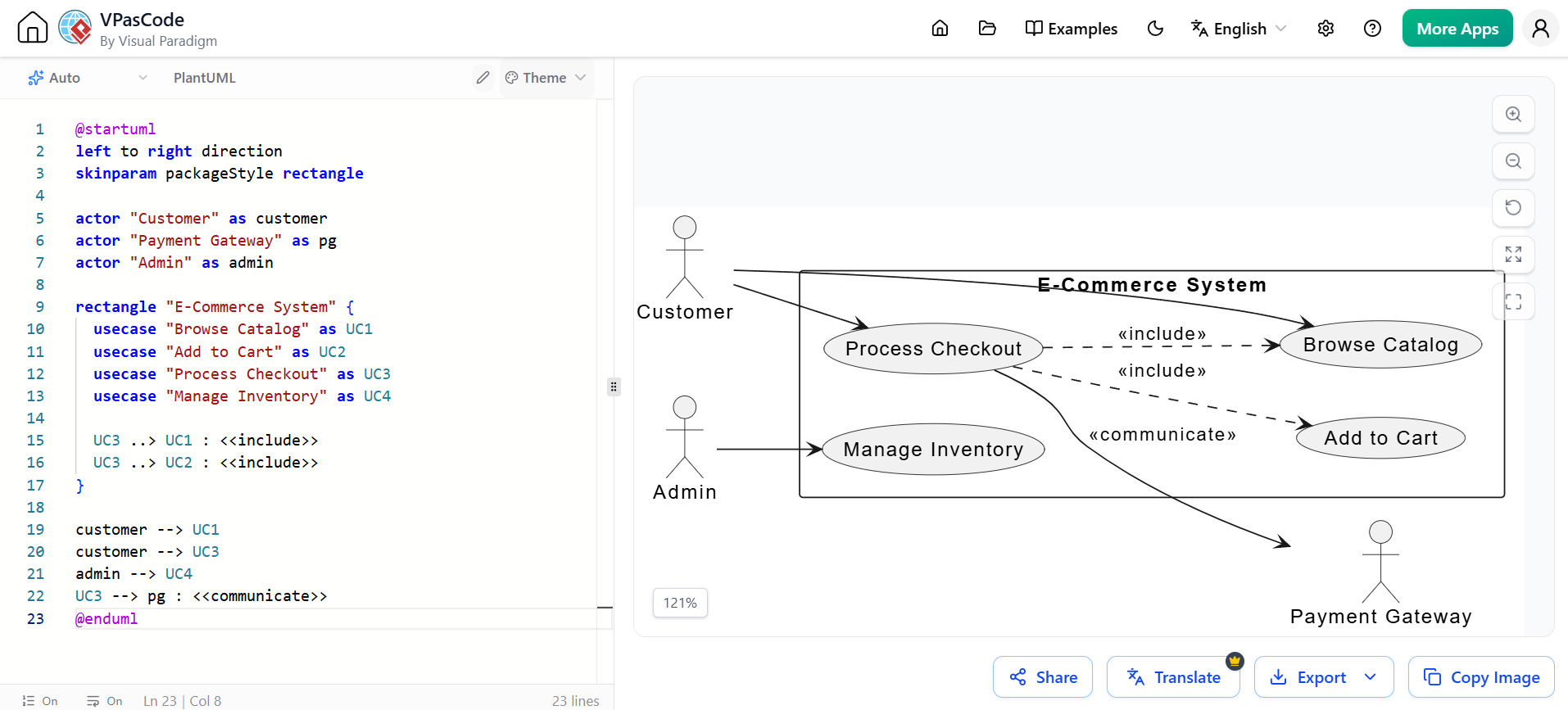
@startuml
left to right direction
skinparam packageStyle rectangle

actor "Customer" as customer
actor "Payment Gateway" as pg
actor "Admin" as admin

rectangle "E-Commerce System" {
  usecase "Browse Catalog" as UC1
  usecase "Add to Cart" as UC2
  usecase "Process Checkout" as UC3
  usecase "Manage Inventory" as UC4

  UC3 ..> UC1 : <<include>>
  UC3 ..> UC2 : <<include>>
}

customer --> UC1
customer --> UC3
admin --> UC4
UC3 --> pg : <<communicate>>
@enduml
Example 2: Sequence Diagram (Model Derivation)
Generated via the prompt: “Derive a sequence diagram for the ‘Process Checkout’ use case, including a failure scenario if the payment is declined.”
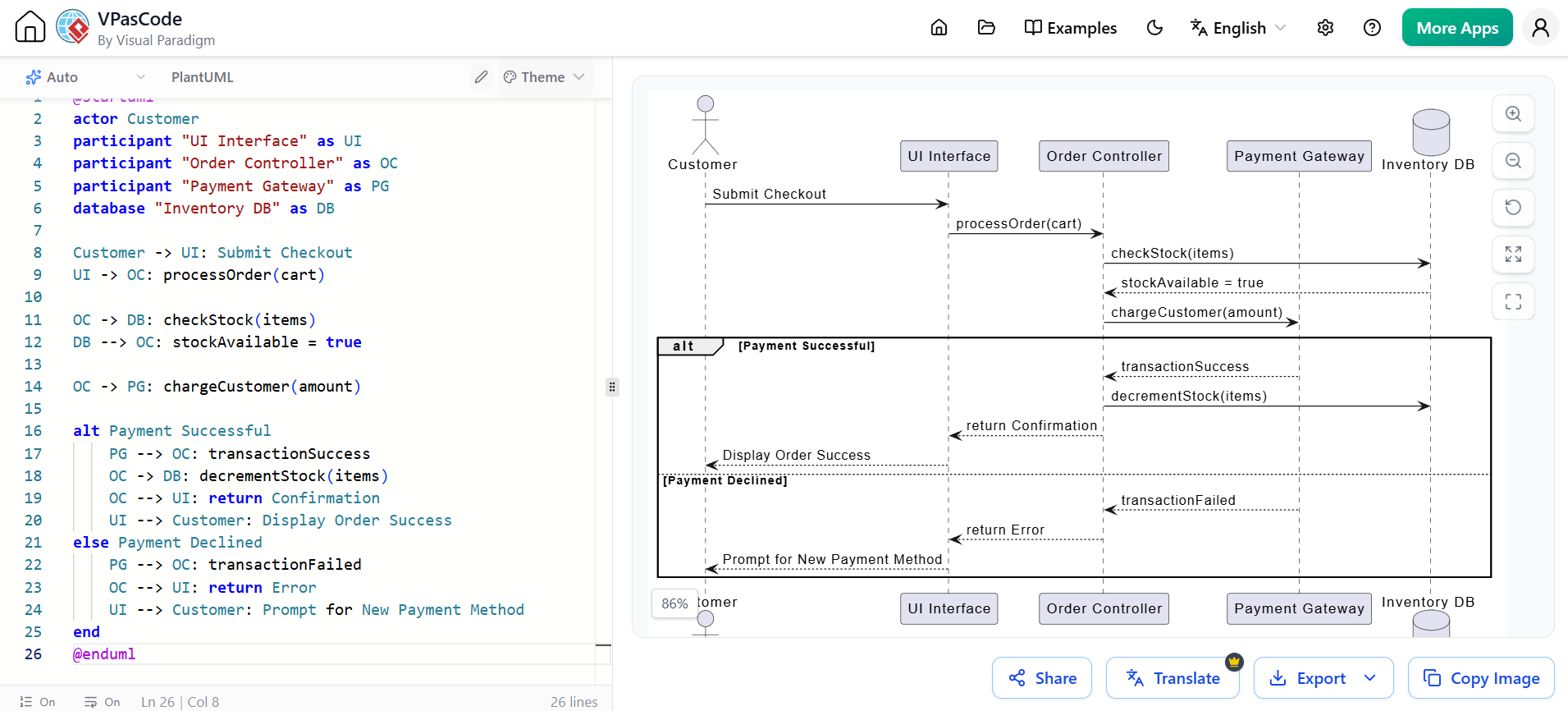
@startuml
actor Customer
participant "UI Interface" as UI
participant "Order Controller" as OC
participant "Payment Gateway" as PG
database "Inventory DB" as DB

Customer -> UI: Submit Checkout
UI -> OC: processOrder(cart)

OC -> DB: checkStock(items)
DB --> OC: stockAvailable = true

OC -> PG: chargeCustomer(amount)

alt Payment Successful
    PG --> OC: transactionSuccess
    OC -> DB: decrementStock(items)
    OC --> UI: return Confirmation
    UI --> Customer: Display Order Success
else Payment Declined
    PG --> OC: transactionFailed
    OC --> UI: return Error
    UI --> Customer: Prompt for New Payment Method
end
@enduml
Example 3: Class Diagram (Structural Modeling)
Generated from the prompt: “Define the classes for a library management system including Book, Member, and Loan.”
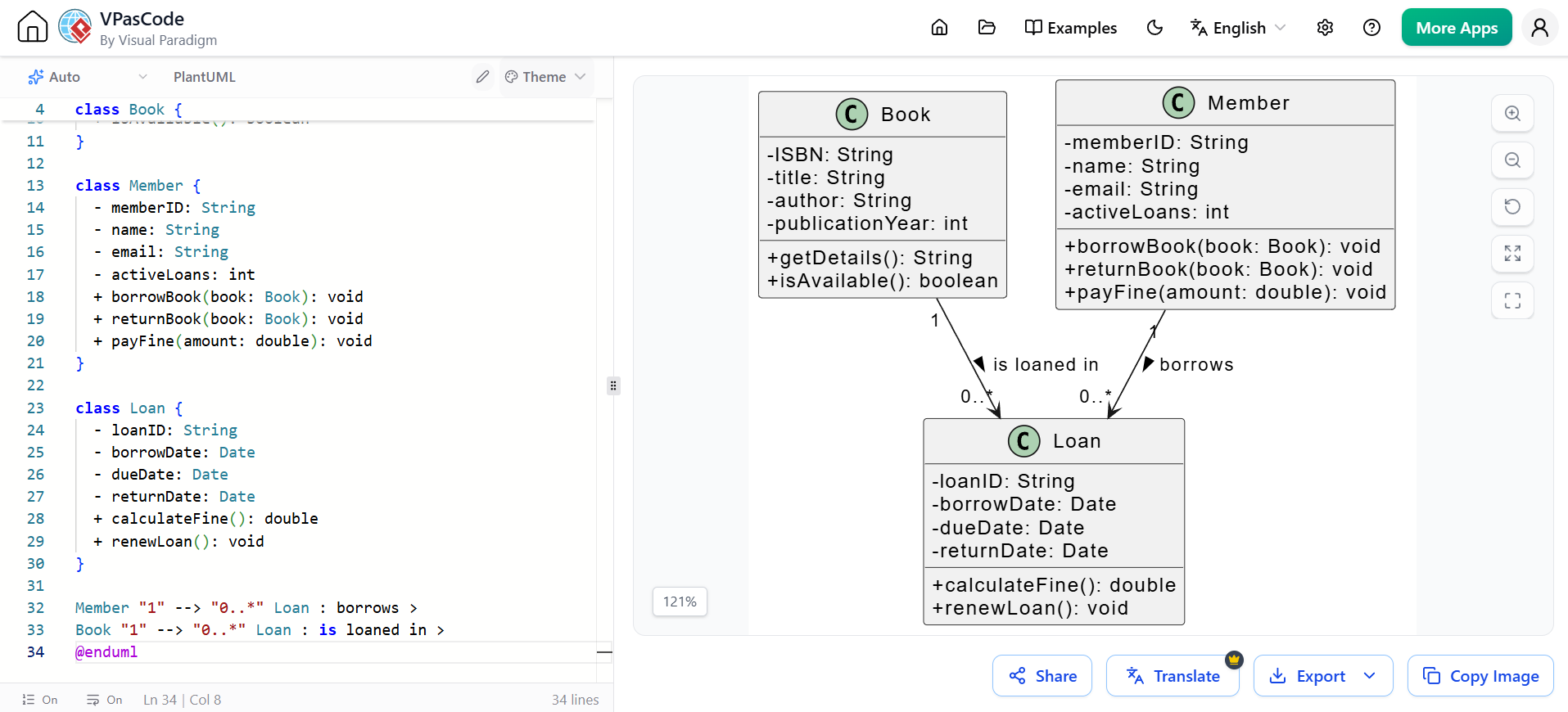
@startuml
skinparam classAttributeIconSize 0

class Book {
  - ISBN: String
  - title: String
  - author: String
  - publicationYear: int
  + getDetails(): String
  + isAvailable(): boolean
}

class Member {
  - memberID: String
  - name: String
  - email: String
  - activeLoans: int
  + borrowBook(book: Book): void
  + returnBook(book: Book): void
  + payFine(amount: double): void
}

class Loan {
  - loanID: String
  - borrowDate: Date
  - dueDate: Date
  - returnDate: Date
  + calculateFine(): double
  + renewLoan(): void
}

Member "1" --> "0..*" Loan : borrows >
Book "1" --> "0..*" Loan : is loaned in >
@enduml
Conclusion
The integration of Artificial Intelligence into software engineering tools has fundamentally shifted how we approach system design. By transforming a process that once required memorizing hundreds of pages of specifications into a natural, conversational workflow, AI removes the friction from UML modeling. Developers and architects can now move from a high-level conceptual idea to a complex, actionable architecture in a matter of seconds, ensuring that their models are not only logically sound but also strictly compliant with UML 2.x standards.
To fully leverage this paradigm shift, robust tooling is essential. Visual Paradigm stands at the forefront of this evolution. By combining the rapid, conversational ideation of its AI Diagramming Chatbot with the deep, professional-grade capabilities of its Desktop application, VPasCode, and OpenDocs, Visual Paradigm provides a seamless, end-to-end ecosystem. It empowers teams to describe, generate, refine, and document their software architectures with unprecedented speed, accuracy, and coherence.
This post is also available in Deutsch, Español, فارسی, Français, English, Bahasa Indonesia, 日本語, Polski, Portuguese, Ру́сский, Việt Nam, 简体中文 and 繁體中文.