


As a Product Manager with a background in Human-Computer Interaction and experience across multiple tech companies, you’ve likely encountered both BPMN (Business Process Model and Notation) and UML (Unified Modeling Language). While they may look similar at a glance, they serve distinct purposes.
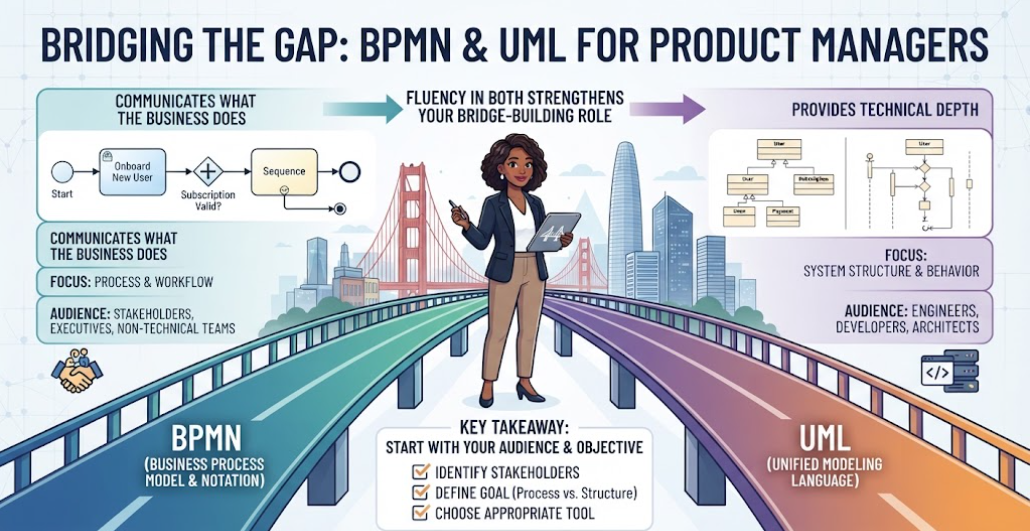
This guide breaks down when to use each standard, helping you make informed decisions for your product work at Acme Cloud or future ventures.
1. Understanding the Fundamentals
🏢 BPMN (Business Process Model and Notation)
BPMN is specifically designed for business process modeling. Maintained by the Object Management Group (OMG), it focuses on:
-
Business workflows and operations.
-
Cross-functional processes.
-
Stakeholder communication (both technical and non-technical).
-
End-to-end business activities.
Key Strengths:
-
Intuitive for business stakeholders.
-
Clear representation of decision points, events, and gateways.
-
Strong support for collaboration between departments.
-
Industry standard for business process documentation.
💻 UML (Unified Modeling Language)
UML is a broader software modeling language that includes multiple diagram types. For process mapping, you primarily use:
-
Activity Diagrams (most similar to BPMN).
-
Sequence Diagrams.
-
State Machine Diagrams.
Key Strengths:
-
Comprehensive software system modeling.
-
Detailed technical specifications.
-
Integration with object-oriented design.
-
Developer-friendly notation.
2. Head-to-Head Comparison
The following table summarizes the key differences to help you decide quickly.
| Aspect | BPMN | UML (Activity Diagrams) |
|---|---|---|
| Primary Audience | Business & Technical Stakeholders | Technical / Engineering Teams |
| Learning Curve | Moderate (Business-friendly) | Steeper (Developer-focused) |
| Process Granularity | High-level business flows | Detailed system behaviors |
| Tool Support | Camunda, Signavio, Bizagi, Visual Paradigm | Enterprise Architect, Lucidchart, Draw.io, PlantUML |
| Execution Capability | Can be directly executed by BPM engines | Primarily for documentation/specification |
| Standardization | ISO 19510 | ISO 19505 |
| Collaboration | Native swimlanes for roles/departments | Swimlanes available but less emphasized |
| Event Handling | Rich event types (timer, message, error) | Basic event representation |
3. When to Use Which?
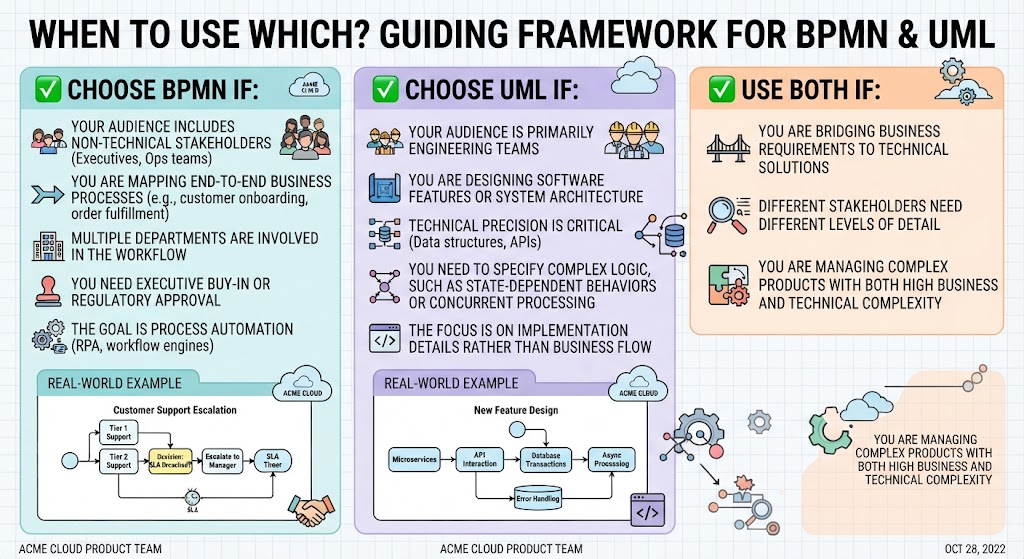
✅ Choose BPMN If:
-
Your audience includes non-technical stakeholders (executives, ops teams).
-
You are mapping end-to-end business processes (e.g., customer onboarding, order fulfillment).
-
Multiple departments are involved in the workflow.
-
You need executive buy-in or regulatory approval.
-
The goal is process automation (RPA, workflow engines).
Real-World Example: At Acme Cloud, documenting the customer support escalation process. BPMN clearly shows who handles initial tickets, decision points for escalation, SLA timers, and handoffs between support tiers.
✅ Choose UML If:
-
Your audience is primarily engineering teams.
-
You are designing software features or system architecture.
-
Technical precision is critical (data structures, APIs).
-
You need to specify complex logic, such as state-dependent behaviors or concurrent processing.
-
The focus is on implementation details rather than business flow.
Real-World Example: Designing a new feature at Acme Cloud. UML activity diagrams help engineers understand how microservices interact, error handling mechanisms, database transaction boundaries, and async processing flows.
✅ Use Both If:
-
You are bridging business requirements to technical solutions.
-
Different stakeholders need different levels of detail.
-
You are managing complex products with both high business and technical complexity.
4. Hybrid Approach: Best of Both Worlds
Given your experience in product management, you’ll often benefit from a Layered Documentation Strategy:
-
Level 1: BPMN for Business Context
-
Executive summaries.
-
Stakeholder alignment.
-
Business value mapping.
-
-
Level 2: UML for Technical Implementation
-
Engineering specifications.
-
System integration details.
-
Technical debt tracking.
-
Example Workflow:
Business Requirement → BPMN Process Map → UML Technical Design → Implementation
5. Tool Recommendations
| Category | Recommended Tools |
|---|---|
| BPMN Tools | Visual Paradigm (Desktop/Online), Draw.io |
| UML Tools | Visual Paradigm, PlantUML (code-based, great for version control), Draw.io/Diagrams.net |
Note: Visual Paradigm is highlighted in several resources as a versatile all-in-one solution supporting both BPMN and UML, along with AI-powered modeling features.
6. Tips for Product Managers
Leveraging your 7+ years in PM roles and HCI background:
-
Start with the “Why”: Define your audience before choosing a notation.
-
Keep it Simple: Over-engineering diagrams reduces their effectiveness. Apply user-centered design principles to diagram readability.
-
Maintain Consistency: Stick to one standard per document unless there’s a clear reason to mix.
-
Version Control: Treat diagrams as living documents, especially in agile environments.
-
Avoid Common Pitfalls:
-
❌ Using UML for high-level business processes (confuses stakeholders).
-
❌ Using BPMN for detailed software architecture (lacks technical precision).
-
❌ Mixing notations without clear labels.
-
❌ Ignoring maintenance (outdated diagrams become liabilities).
-
Conclusion
There is no universal “better” standard—only the right tool for your specific context:
-
BPMN excels at communicating what the business does to diverse audiences.
-
UML provides the technical depth engineers need to understand how the system works.
As a seasoned Product Manager in the SF Bay Area’s tech ecosystem, your ability to fluently navigate both standards strengthens your bridge-building role between business stakeholders and engineering teams. Start with your audience and objective, then choose accordingly.
Further Reading & Resources
This post is also available in Deutsch, Español, فارسی, Français, Bahasa Indonesia, 日本語, Polski, Portuguese, Ру́сский, Việt Nam, 简体中文 and 繁體中文.