


Visual Paradigm AI Chatbot makes it possible to create a C4 System Context Diagram from a plain-language description of an application, its users, and the external systems it interacts with. However, an AI-generated diagram is most useful when it remains editable and maintainable after generation.
This guide demonstrates an end-to-end workflow for generating a Food Delivery Platform context diagram using C4-PlantUML. You will learn how to move from an AI-generated diagram to editable PlantUML code, refine the model in VPasCode, and continue editing it visually in Visual Paradigm Online. The approach combines the speed of AI-assisted modeling with the flexibility of diagram-as-code and the convenience of a graphical diagram editor.
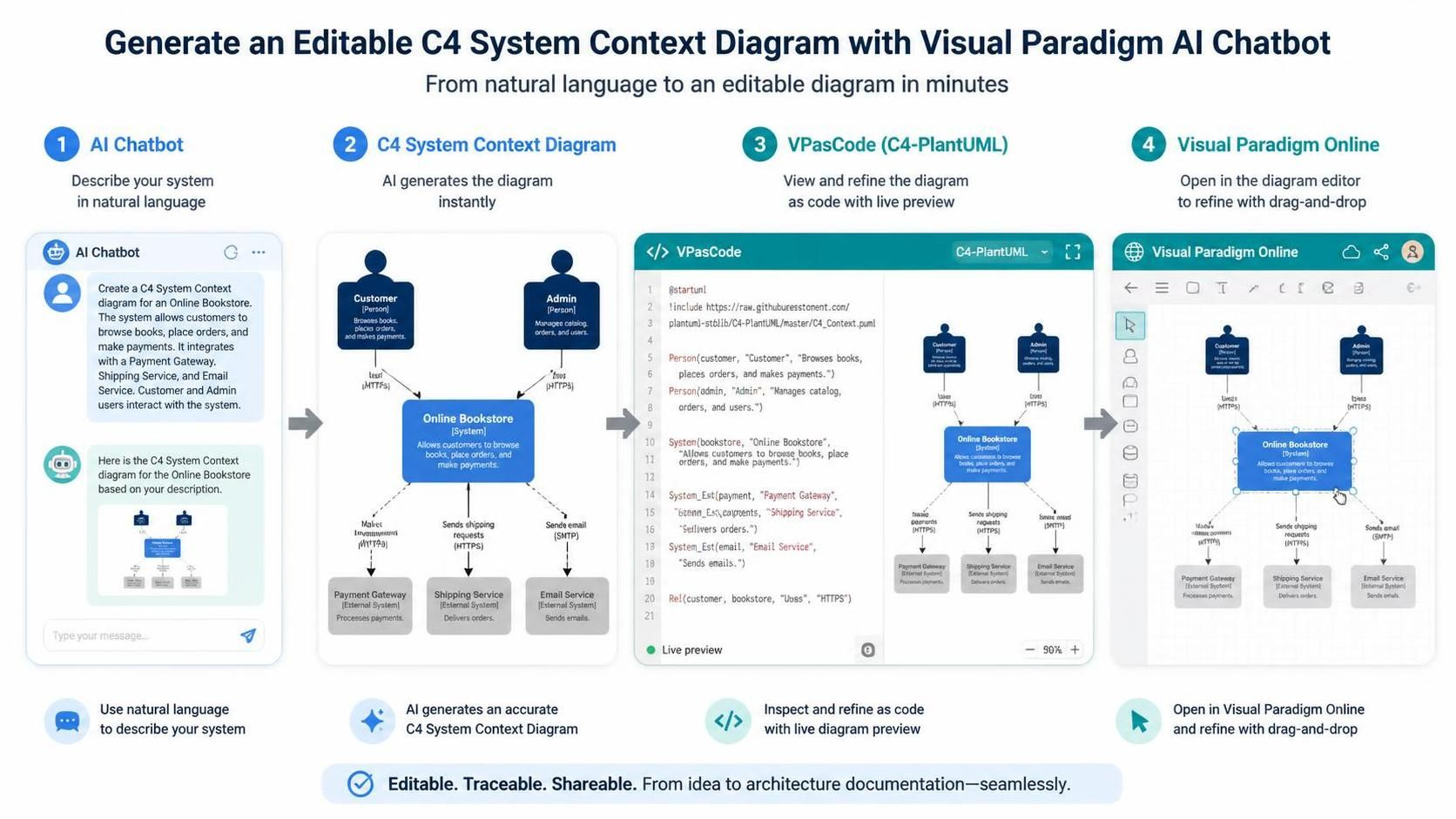
Visual Paradigm provides a practical workflow for turning a natural-language architecture description into an editable C4 Context Diagram:
- Describe the system in the Visual Paradigm AI Chatbot.
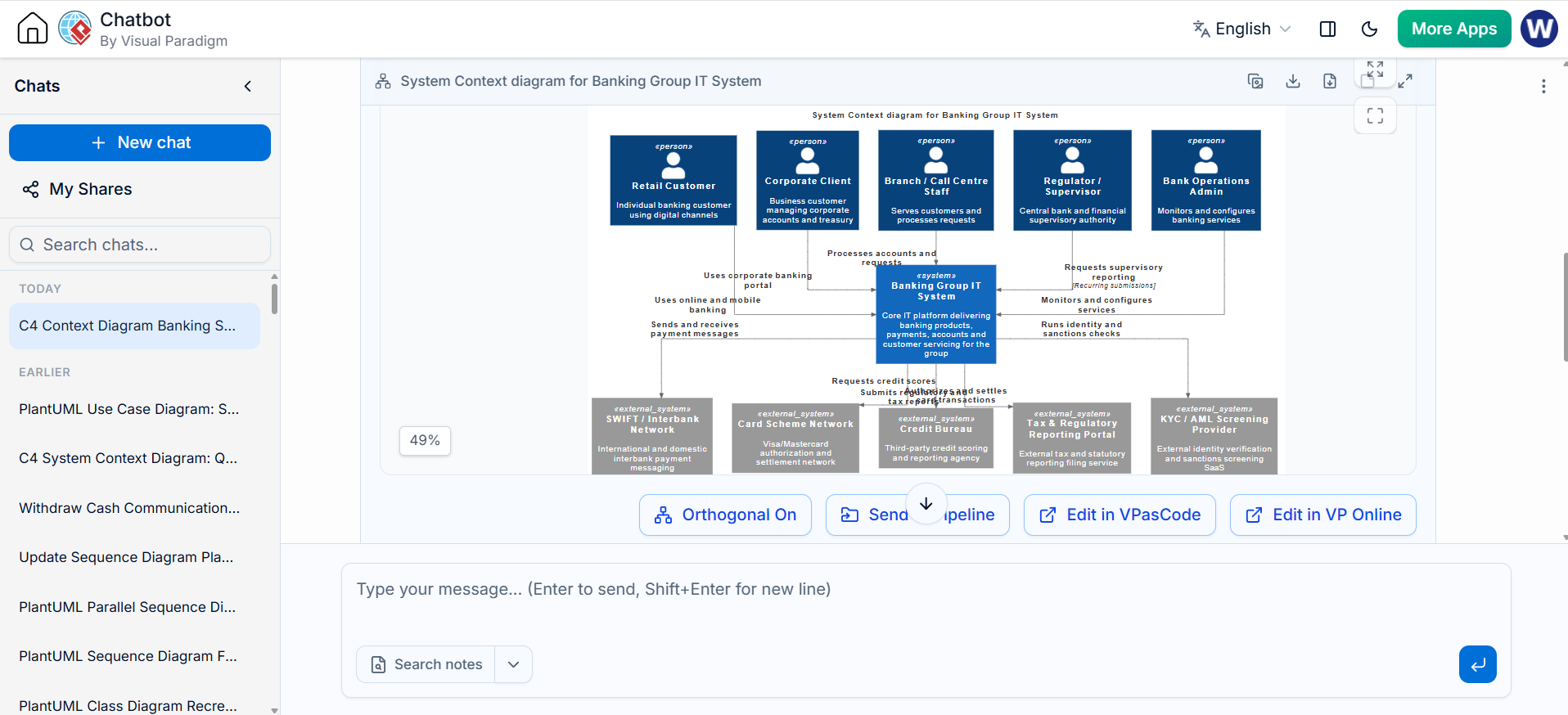
- Generate and review the C4 System Context Diagram.
- Open the result in VPasCode as C4-PlantUML.
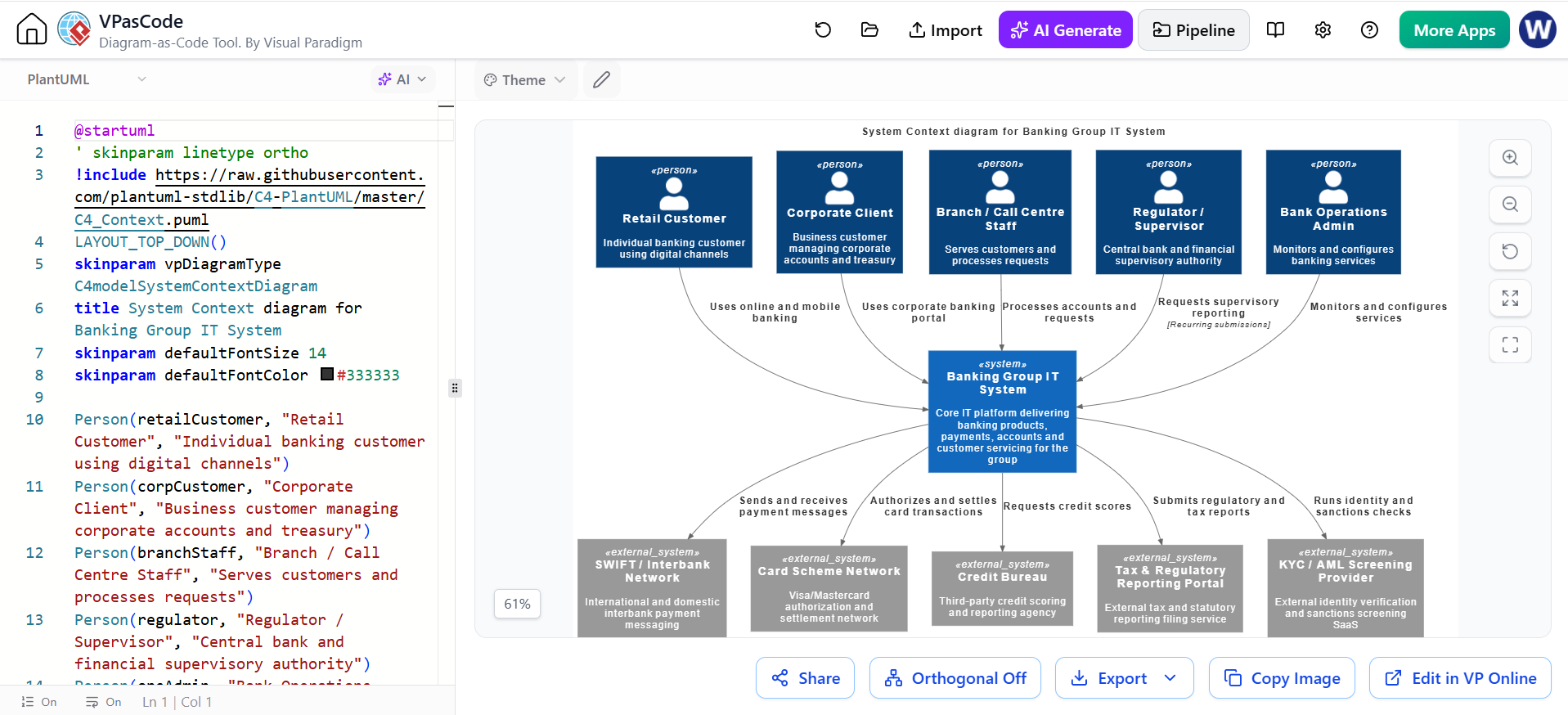
- Modify the diagram by editing PlantUML code.
- Optionally send the result to Visual Paradigm Online.
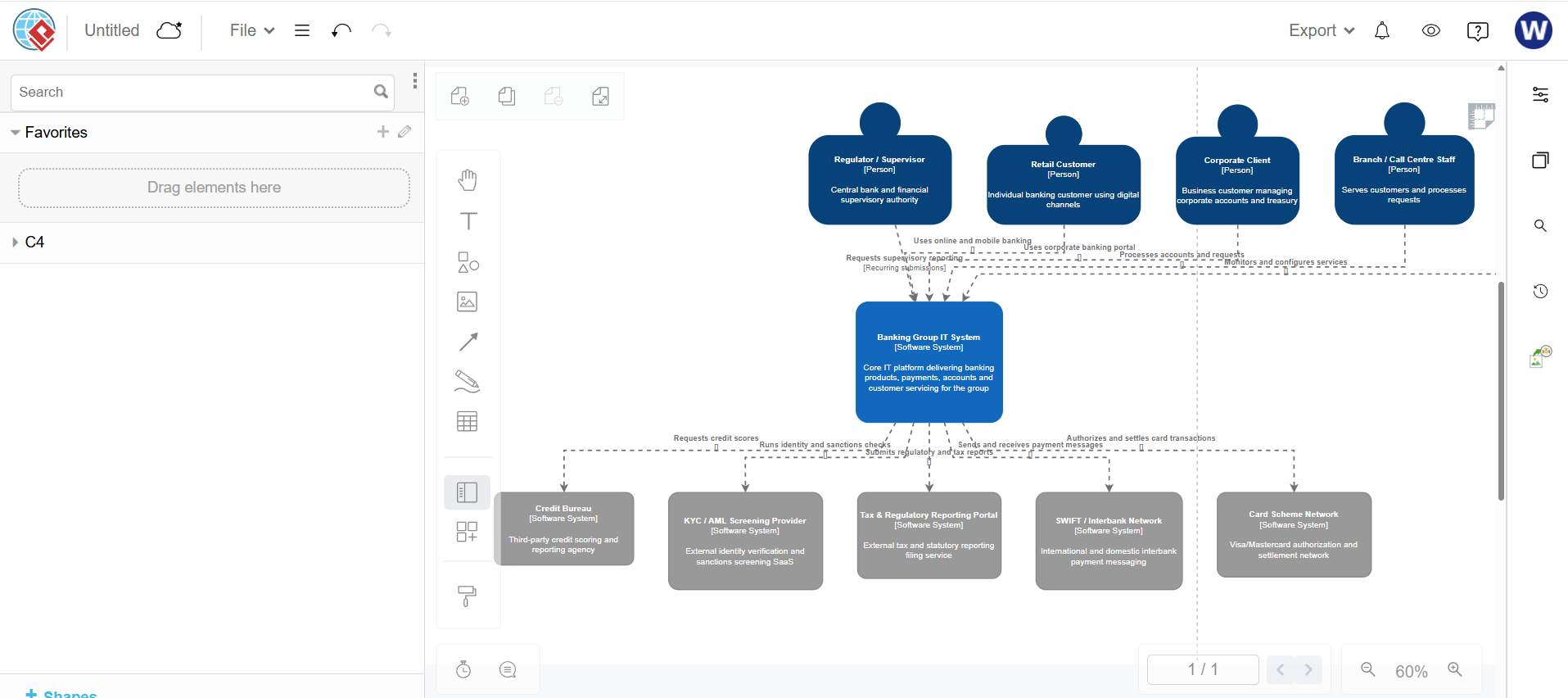
- Modify the diagram visually using the drag-and-drop diagram editor.
This gives you two editing paths:
- Code-based editing: VPasCode and C4-PlantUML
- GUI-based editing: Visual Paradigm Online Diagram Editor
Visual Paradigm’s AI Chatbot supports C4 System Context, Container, Component, and Deployment diagrams. It can also refine a generated diagram through natural-language commands such as adding, removing, renaming, or reconnecting elements.
1. Understand the C4 Context Diagram
A C4 Context Diagram is the highest-level view of a software system. It shows:
- The system of interest
- Human users and organizational actors
- External software systems
- Important relationships between these elements
- A short description of how each relationship works
It normally does not show internal services, databases, classes, APIs, or infrastructure details. Those belong in lower-level C4 diagrams.
For example, a context diagram for an online food-delivery platform might contain:
- Customer
- Restaurant Manager
- Delivery Driver
- Payment Provider
- Map and Geolocation Service
- Notification Service
- Food Delivery Platform
The central system should remain the visual focus. External people and systems should be placed around it.
2. Prepare a Good AI Prompt
The quality of the generated diagram depends heavily on the architecture description supplied to the chatbot.
A useful prompt specifies:
- The system name
- The system’s purpose
- The people who use it
- External systems it communicates with
- The relationships between them
- The desired C4 diagram level
- The desired output format
- What should not be included
Example prompt
Create a C4 System Context Diagram for an online food delivery platform.

System of interest:
Food Delivery Platform — allows customers to browse restaurants, place orders, make payments, and track deliveries.

People:
1. Customer — browses restaurants, places orders, pays, and tracks delivery.
2. Restaurant Manager — manages menus, accepts orders, and updates order status.
3. Delivery Driver — accepts delivery jobs and updates delivery progress.
4. Operations Administrator — monitors platform activity and handles support issues.

External systems:
1. Payment Provider — authorizes and captures customer payments.
2. Map and Geolocation Service — provides addresses, routes, and delivery locations.
3. Notification Service — sends email, SMS, and push notifications.

Relationships:
- Customer uses the Food Delivery Platform to browse restaurants, place orders, make payments, and track deliveries.
- Restaurant Manager uses the Food Delivery Platform to manage menus and process orders.
- Delivery Driver uses the Food Delivery Platform to receive delivery jobs and update delivery status.
- Operations Administrator uses the Food Delivery Platform to monitor operations and resolve issues.
- Food Delivery Platform uses the Payment Provider to authorize and capture payments.
- Food Delivery Platform uses the Map and Geolocation Service to calculate routes and track locations.
- Food Delivery Platform uses the Notification Service to send notifications.

Generate a clean C4 System Context Diagram. Do not show internal containers, components, databases, classes, or deployment infrastructure. Use concise relationship labels.
The explicit instruction to exclude internal details is important. Without it, an AI generator may produce a diagram that mixes context-level and container-level information.
3. Generate the Diagram in Visual Paradigm AI Chatbot
Open the Visual Paradigm AI Chatbot and start a new conversation or diagram-generation session.
Depending on the interface and subscription edition, the chatbot may provide a diagram-type selector. Select:
- C4 Model
- System Context Diagram
Then enter the prompt.
Visual Paradigm’s general chatbot workflow is:
- Describe the diagram.
- Let the AI generate the initial model.
- Review the result.
- Refine it with natural-language commands.
- Export or continue editing in another Visual Paradigm tool.
Review the first result
Check whether the diagram contains:
- Exactly one central system
- All required people
- All relevant external systems
- Correct relationship directions
- Concise relationship descriptions
- No unnecessary internal services or databases
- Consistent naming
- Legible layout
A generated diagram is a starting point, not a substitute for architecture review.
4. Refine the Diagram Through Conversation
The chatbot can modify the diagram using ordinary language.
Add an element
Add a Customer Support Agent who uses the Food Delivery Platform to investigate customer issues and process refunds.
Add an external system
Add an external Fraud Detection Service used by the Food Delivery Platform to evaluate suspicious payments.
Rename an element
Rename “Notification Service” to “Messaging and Notification Service.”
Change a relationship
Change the relationship between the Delivery Driver and the Food Delivery Platform to:
“Receives delivery assignments and submits delivery status updates.”
Remove an element
Remove the Operations Administrator from the diagram.
Improve the layout
Rearrange the diagram so that people appear at the top, external systems appear at the bottom, and the Food Delivery Platform remains centered.
Simplify the diagram
Simplify this into a strict C4 System Context Diagram. Remove implementation details, databases, APIs, microservices, and internal components.
Request a consistency review
Review the diagram for missing relationships, ambiguous labels, duplicate systems, and elements that do not belong in a C4 Context Diagram.
The AI Chatbot documentation describes this iterative approach, including commands for adding payment gateways, renaming elements, changing relationships, and refactoring diagrams.
Part 1: Open the Diagram in VPasCode for Code Editing
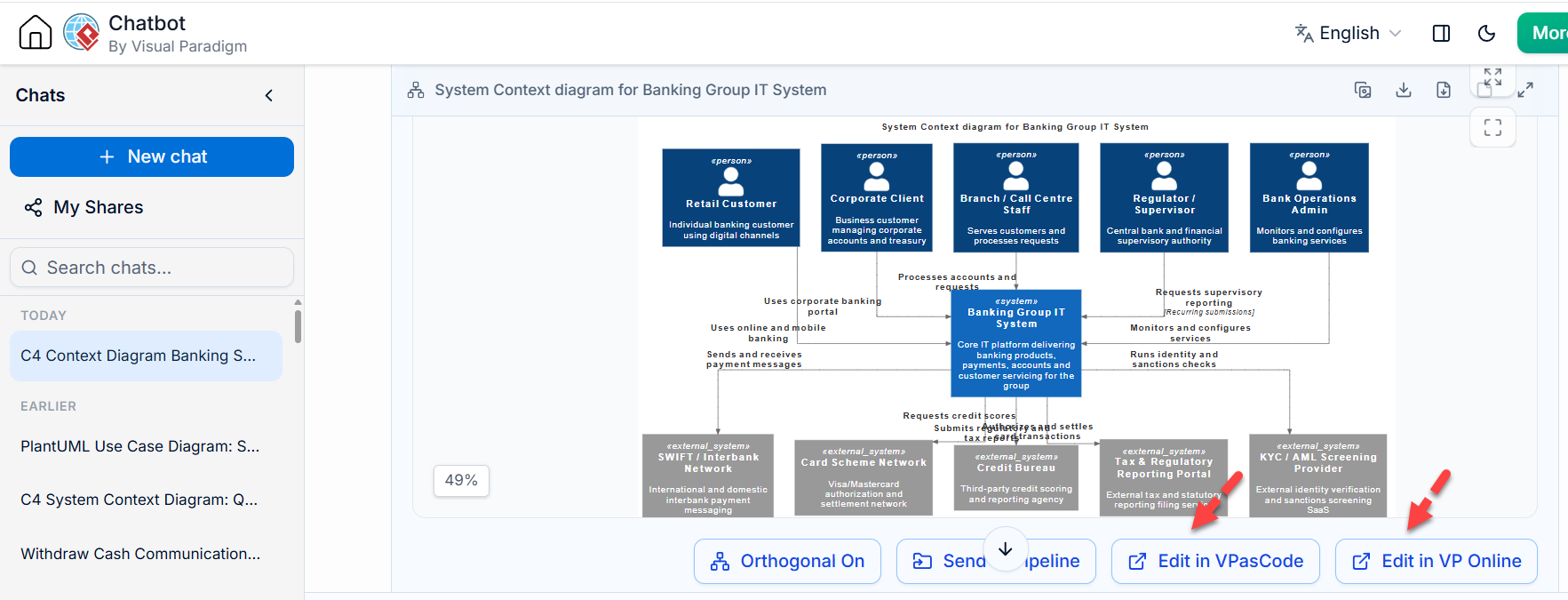
5. Use “Open in VPasCode” or “Edit in VPasCode”
After generating and refining the diagram, use the action labeled similarly to:
- Open in VPasCode
- Edit in VPasCode
- Open Code
- Code Generate for Editing
The exact button label may vary depending on the current interface.
This transfers the diagram’s code into VPasCode, where you can edit the diagram as text while viewing a live rendered preview. Visual Paradigm describes VPasCode as a browser-based diagram-as-code editor supporting PlantUML, C4 models, Mermaid, Graphviz, and other syntax formats.
The generated code should use C4-PlantUML, typically with:
Edit PlantUML in VPasCode
@startuml
!include https://raw.githubusercontent.com/plantuml-stdlib/C4-PlantUML/master/C4_Context.puml
...
@enduml
Edit PlantUML in VPasCode
The generated script may use a different include URL or an internally supported library version. Preserve the include that VPasCode generates unless you have a specific reason to change it.
6. Understand the C4-PlantUML Structure
A typical C4-PlantUML context diagram contains these parts:
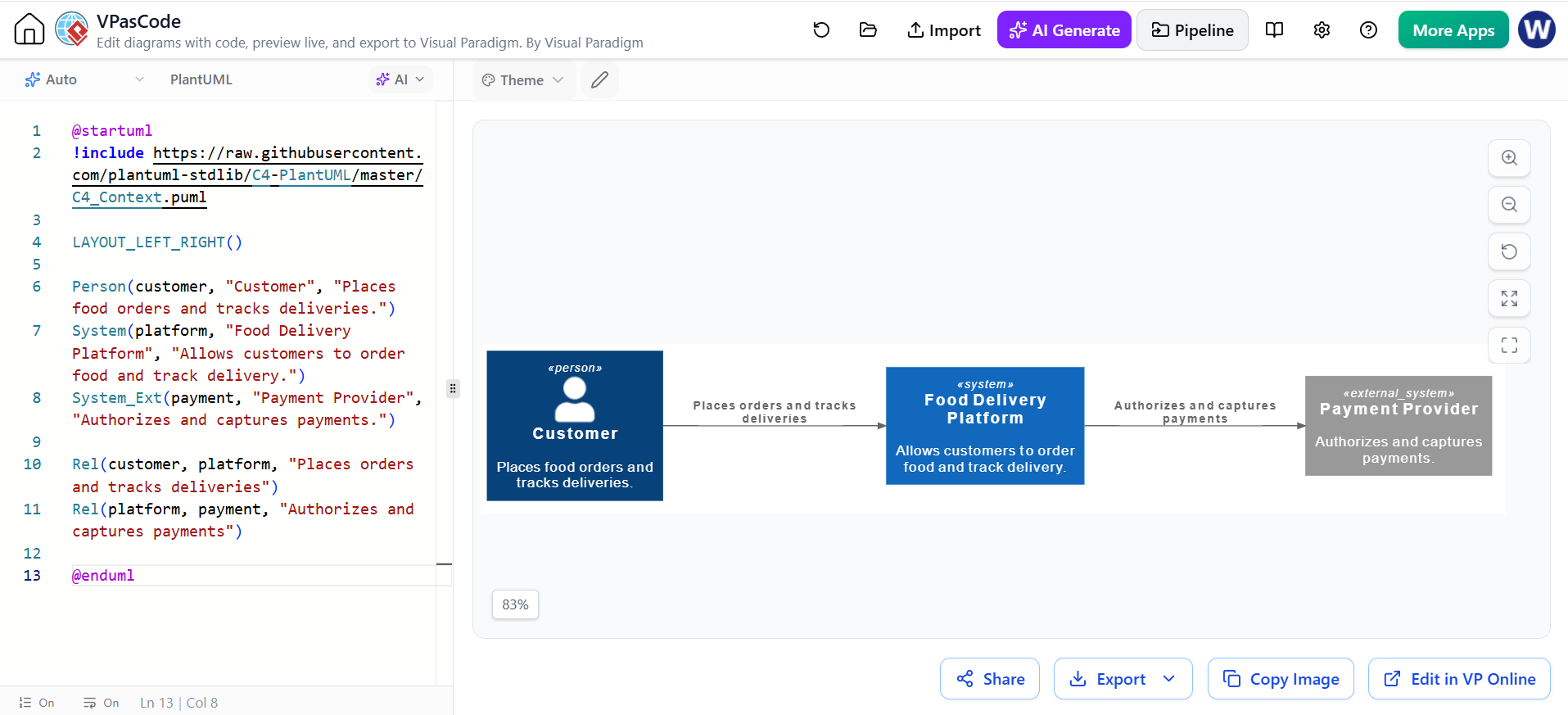
Edit PlantUML in VPasCode
@startuml
!include https://raw.githubusercontent.com/plantuml-stdlib/C4-PlantUML/master/C4_Context.puml

LAYOUT_LEFT_RIGHT()

Person(customer, "Customer", "Places food orders and tracks deliveries.")
System(platform, "Food Delivery Platform", "Allows customers to order food and track delivery.")
System_Ext(payment, "Payment Provider", "Authorizes and captures payments.")

Rel(customer, platform, "Places orders and tracks deliveries")
Rel(platform, payment, "Authorizes and captures payments")

@enduml
Edit PlantUML in VPasCode
Main element types
| Element | Purpose | Example |
|---|---|---|
Person |
Human user or role | Person(customer, "Customer", "...") |
Person_Ext |
External person or actor | Person_Ext(driver, "Delivery Driver", "...") |
System |
Main system of interest | System(platform, "Food Delivery Platform", "...") |
System_Ext |
External software system | System_Ext(payment, "Payment Provider", "...") |
Enterprise_Boundary |
Optional organization boundary | Groups systems belonging to an organization |
Rel |
Relationship between elements | Rel(customer, platform, "Uses") |
The first argument is the internal identifier. The second is the display name. The third is the description.
7. Edit the Diagram in VPasCode
VPasCode normally displays:
- The source code in an editor pane
- The rendered diagram in a preview pane
- Actions for exporting, sharing, copying, or opening the result in another Visual Paradigm product
VPasCode provides live rendering and supports direct code editing. It can also detect supported diagram formats when code is pasted into the editor.
Example: improved C4-PlantUML code
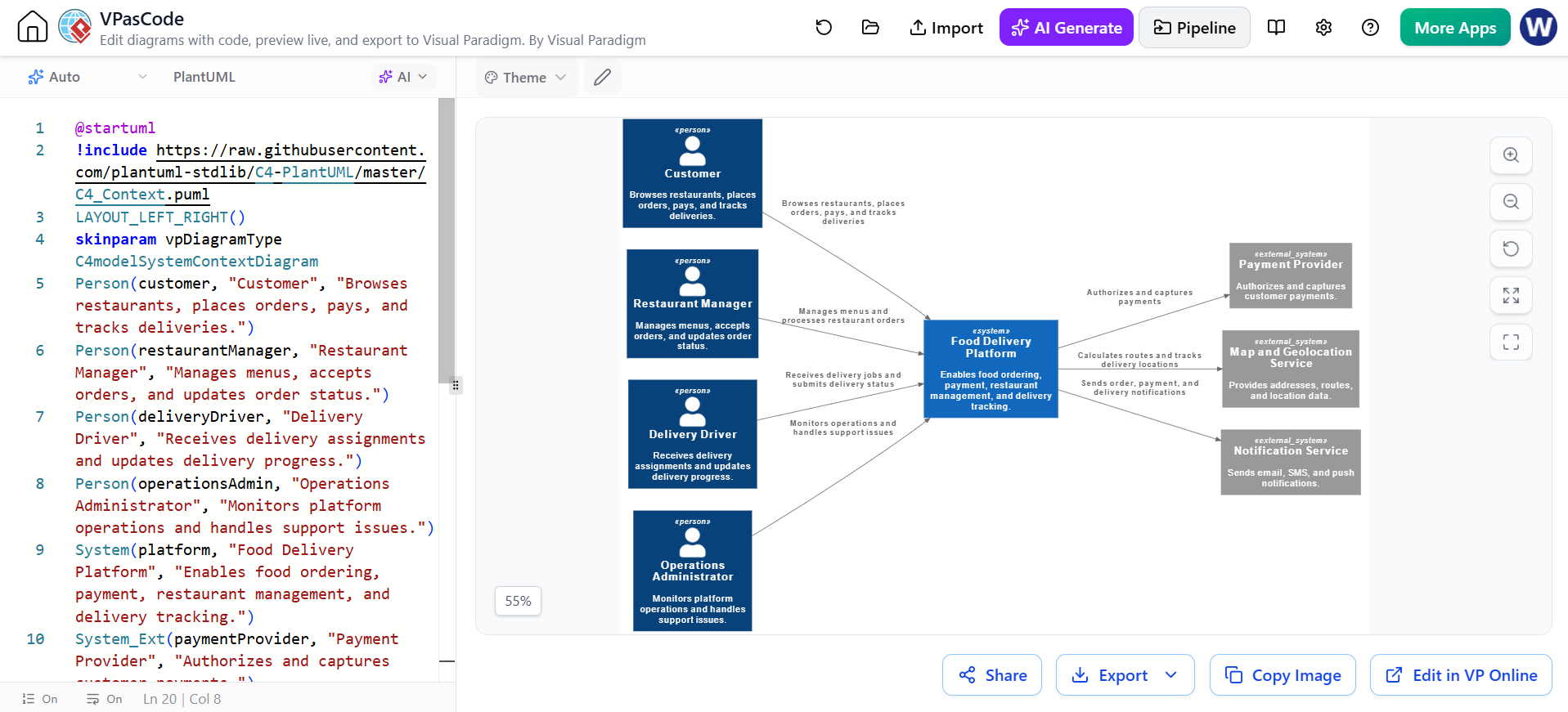
Edit PlantUML in VPasCode
@startuml
!include https://raw.githubusercontent.com/plantuml-stdlib/C4-PlantUML/master/C4_Context.puml

title Food Delivery Platform — System Context

LAYOUT_LEFT_RIGHT()
SHOW_LEGEND()

Person(customer, "Customer",
  "Browses restaurants, places orders, pays, and tracks deliveries.")

Person(restaurantManager, "Restaurant Manager",
  "Manages menus, accepts orders, and updates order status.")

Person(deliveryDriver, "Delivery Driver",
  "Receives delivery assignments and updates delivery progress.")

Person(operationsAdmin, "Operations Administrator",
  "Monitors platform operations and handles support issues.")

System(platform, "Food Delivery Platform",
  "Enables food ordering, payment, restaurant management, and delivery tracking.")

System_Ext(paymentProvider, "Payment Provider",
  "Authorizes and captures customer payments.")

System_Ext(mapService, "Map and Geolocation Service",
  "Provides addresses, routes, and location data.")

System_Ext(notificationService, "Notification Service",
  "Sends email, SMS, and push notifications.")

Rel(customer, platform,
  "Browses restaurants, places orders, pays, and tracks deliveries")

Rel(restaurantManager, platform,
  "Manages menus and processes restaurant orders")

Rel(deliveryDriver, platform,
  "Receives delivery jobs and submits delivery status")

Rel(operationsAdmin, platform,
  "Monitors operations and handles support issues")

Rel(platform, paymentProvider,
  "Authorizes and captures payments")

Rel(platform, mapService,
  "Calculates routes and tracks delivery locations")

Rel(platform, notificationService,
  "Sends order, payment, and delivery notifications")

@enduml
Edit PlantUML in VPasCode
8. Make Common Code-Level Changes
Change the system name
Edit PlantUML in VPasCode
System(platform, "Meal Delivery Platform",
  "Coordinates food ordering and delivery.")
Edit PlantUML in VPasCode
Add a new person
Edit PlantUML in VPasCode
Person(customerSupport, "Customer Support Agent",
  "Investigates customer issues and processes refunds.")

Rel(customerSupport, platform,
  "Investigates issues and handles refunds")
Edit PlantUML in VPasCode
Add a new external system
Edit PlantUML in VPasCode
System_Ext(fraudService, "Fraud Detection Service",
  "Evaluates suspicious payment activity.")

Rel(platform, fraudService,
  "Checks payment transactions for fraud risk")
Edit PlantUML in VPasCode
Change relationship direction
Edit PlantUML in VPasCode
Rel(paymentProvider, platform,
  "Returns payment authorization and settlement results")
Edit PlantUML in VPasCode
Use the relationship direction to represent the primary dependency or interaction. If the direction is not architecturally important, choose a consistent convention and apply it throughout the diagram.
Change layout
C4-PlantUML supports layout hints such as:
Edit PlantUML in VPasCode
Edit PlantUML in VPasCode
or:
Edit PlantUML in VPasCode
Edit PlantUML in VPasCode
You can also influence placement with direction hints:
Edit PlantUML in VPasCode
Lay_R(customer, platform)
Lay_D(platform, paymentProvider)
Edit PlantUML in VPasCode
Use layout hints sparingly. Too many manual constraints can make the diagram harder to maintain.
9. Use VPasCode AI Assistance
Some VPasCode editions provide AI-assisted diagram modification and code-error fixing. The tool can accept instructions such as:
Add an external fraud detection service between the platform and the payment provider.
or:
Fix the PlantUML syntax error and preserve the current diagram structure.
VPasCode is also documented as supporting AI-powered diagram modification, error diagnosis, and translation features, although availability may depend on the edition or subscription.
10. Validate the PlantUML Diagram
Before sending the diagram to Visual Paradigm Online, validate both the syntax and the architecture.
Syntax checklist
- The script begins with
@startuml. - The script ends with
@enduml. - The C4-PlantUML library is included.
- Every relationship references existing identifiers.
- Identifiers contain no spaces or punctuation that could break syntax.
- Quotation marks are balanced.
- Descriptions are not excessively long.
- The preview renders without errors.
C4 modeling checklist
- There is one clearly identified system of interest.
- Users are modeled as people, not as software systems.
- External applications are modeled as external systems.
- Internal containers are not included in a context diagram.
- Relationships describe meaningful interactions.
- The diagram is understandable without reading the source code.
- The terminology matches the project’s architecture documentation.
Example of an undesirable context diagram element
Edit PlantUML in VPasCode
Container(api, "Order API", "Java", "Processes orders")
ContainerDb(database, "Order Database", "PostgreSQL", "Stores orders")
Edit PlantUML in VPasCode
These are container-level elements. They belong in a C4 Container Diagram, not normally in a System Context Diagram.
Part 2: Send the Diagram to Visual Paradigm Online
11. Use “Edit in VP Online” or “Edit in VP Online Diagram”
After the code version is correct, select the action labeled similarly to:
- Edit in VP Online
- Edit in VP Online Diagram
- Open in Online
- Export to VP Online
The exact label can vary by interface version.
Visual Paradigm’s ecosystem is designed to move generated diagrams from the AI Chatbot to VPasCode for code-level refinement and then to Visual Paradigm Online for traditional diagram editing.
The Online Diagram Editor is useful when you need to:
- Move shapes manually
- Resize elements
- Adjust connectors
- Change colors and fonts
- Add notes or annotations
- Add a title or legend
- Apply presentation formatting
- Align diagram elements precisely
- Prepare the diagram for sharing or export
12. Modify the Diagram Using the Visual Paradigm Online GUI
Once the diagram opens in Visual Paradigm Online:
Move elements
Drag people and external systems into a clear arrangement around the central system.
A common layout is:
- People on the left or top
- Main system in the center
- External systems on the right or bottom
Edit text
Double-click an element or select its specification panel to modify:
- Name
- Description
- Stereotype
- Relationship label
Keep names short and descriptions informative.
Edit relationships
Select a connector to:
- Change its direction
- Edit the relationship label
- Reconnect it to another element
- Adjust its routing
- Change line style or appearance
Add elements
Use the diagram palette to add:
- Person
- External Person
- System
- External System
- Relationship
- Note
- Boundary
Add only elements that belong at the context level.
Apply formatting
You can improve readability by adjusting:
- Font size
- Fill color
- Border color
- Line thickness
- Shape size
- Alignment
- Spacing
- Connector routing
Avoid using color as the only way to communicate meaning. Use clear labels as well.
13. Recommended Presentation Layout
A clean context diagram might use this arrangement:
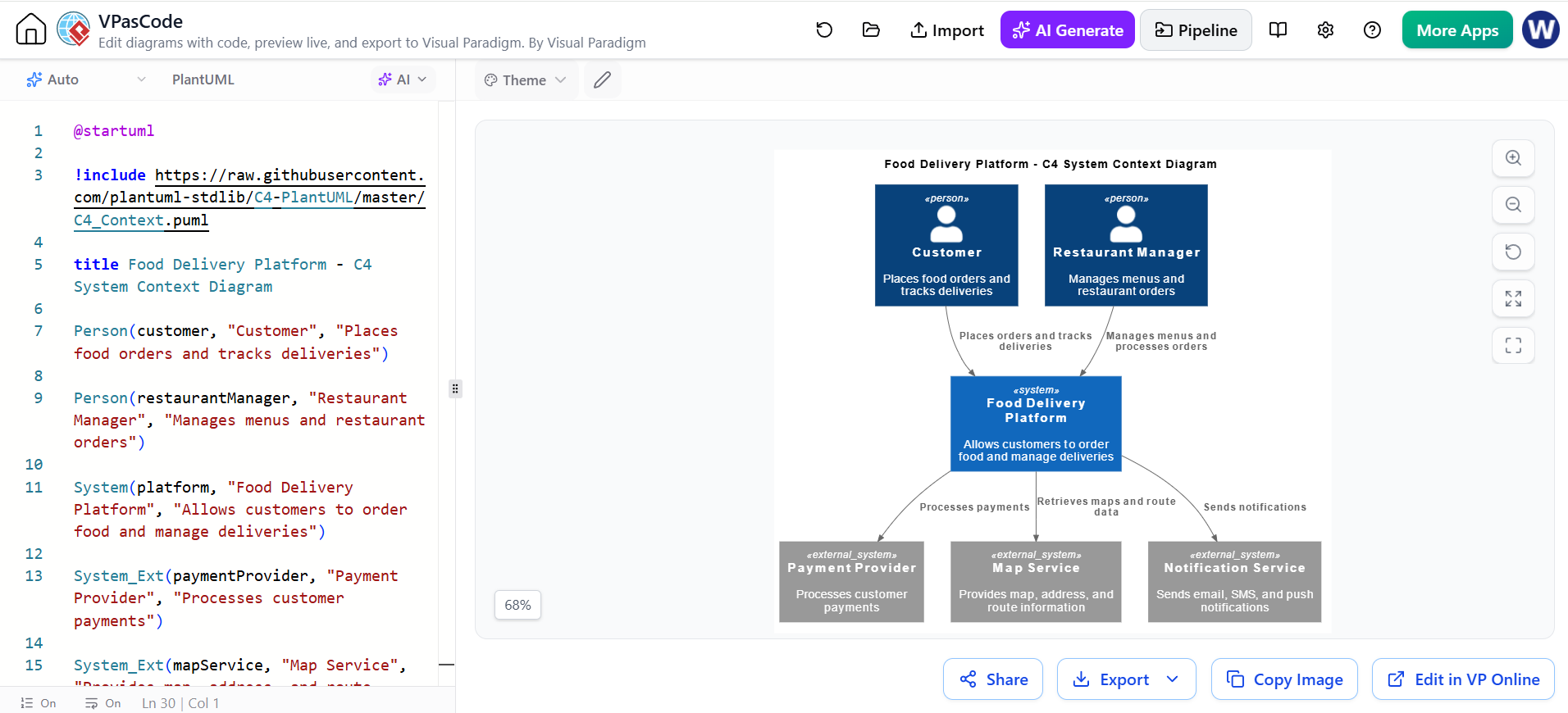
For larger diagrams:
- Keep the main system centered.
- Group people on one side.
- Group external software systems on another side.
- Avoid crossing relationship lines.
- Keep relationship labels horizontal where possible.
- Use short labels rather than paragraphs.
- Leave enough whitespace around the central system.
Part 3: Choosing Between Code and GUI Editing
| Editing method | Best for | Advantages | Limitations |
|---|---|---|---|
| AI Chatbot | Initial generation and conceptual changes | Fast, conversational, good for exploring alternatives | Requires architecture review |
| VPasCode | Precise code-level editing | Versionable text, repeatable changes, fast bulk edits | Requires PlantUML or C4 syntax familiarity |
| Visual Paradigm Online | Visual arrangement and presentation | Drag-and-drop editing, formatting, manual layout control | Manual edits may be harder to reproduce as code |
| Visual Paradigm Desktop | Formal modeling and project integration | Advanced modeling and enterprise workflows | May require a desktop edition or specific license |
VPasCode supports C4 models through PlantUML and provides a live preview, while Visual Paradigm Online offers a traditional visual diagram-editing workflow.
Part 4: Recommended End-to-End Workflow
Quick workflow
- Open the Visual Paradigm AI Chatbot.
- Choose C4 System Context Diagram.
- Describe the system, users, and external systems.
- Generate the diagram.
- Ask the chatbot to remove internal implementation details.
- Review names, relationships, and scope.
- Select Open in VPasCode.
- Edit the C4-PlantUML source.
- Render and validate the result.
- Select Edit in VP Online.
- Refine layout and appearance using the GUI.
- Export or share the final diagram.
Recommended division of responsibilities
Use the AI Chatbot for:
- Creating the first draft
- Exploring architecture alternatives
- Adding or removing participants
- Rewording relationship descriptions
- Reviewing the diagram for omissions
Use VPasCode for:
- Renaming many elements
- Reusing diagram code
- Applying consistent syntax
- Managing code in version control
- Making repeatable structural changes
- Fixing layout directives
- Producing a text-based source of truth
Use Visual Paradigm Online for:
- Final visual positioning
- Presentation formatting
- Manual connector adjustment
- Adding notes and annotations
- Preparing a diagram for stakeholders
Part 5: Example Refinement Conversation
Initial request
Create a C4 System Context Diagram for a food delivery platform.
Refinement 1
Add Customer, Restaurant Manager, Delivery Driver, and Operations Administrator as people.
Refinement 2
Add Payment Provider, Map and Geolocation Service, and Notification Service as external systems.
Refinement 3
Remove all databases, APIs, microservices, containers, and implementation details. This must remain a Level 1 C4 System Context Diagram.
Refinement 4
Rewrite all relationship labels as concise verb phrases and keep them under 10 words where possible.
Refinement 5
Review the diagram for missing relationships and inconsistent terminology. Keep “Food Delivery Platform” as the single system of interest.
Refinement 6
Generate the diagram as C4-PlantUML and make it available for editing in VPasCode.
Part 6: Troubleshooting
The diagram contains too much detail
Ask:
Simplify this to a strict C4 System Context Diagram. Remove containers, components, databases, APIs, and technology names.
The diagram has too many crossing lines
In VPasCode:
- Try
LAYOUT_LEFT_RIGHT()orLAYOUT_TOP_DOWN(). - Add limited
Lay_directives. - Shorten relationship labels.
- Reduce the number of relationships shown.
- Move the final version to VP Online for manual positioning.
The PlantUML preview shows an error
Check:
- The C4 library include
- Missing commas
- Unclosed parentheses
- Misspelled identifiers
- Relationships referring to undefined elements
- Unbalanced quotation marks
- Incorrect element names
A relationship must refer to identifiers that have already been declared, for example:
Edit PlantUML in VPasCode
Person(customer, "Customer", "Places orders")
System(platform, "Food Delivery Platform", "Processes orders")

Rel(customer, platform, "Places orders")
Edit PlantUML in VPasCode
The GUI version differs from the code version
Treat the two versions as separate editing representations after conversion. Make a deliberate decision about which one is the source of truth:
- Use VPasCode as the source of truth if the diagram will be maintained as code.
- Use Visual Paradigm Online as the source of truth if stakeholders will frequently adjust it visually.
Avoid making unrelated changes in both places without synchronizing them.
The generated diagram uses the wrong C4 level
Ask the chatbot:
Regenerate this as a C4 System Context Diagram only. Show people, the system of interest, and external software systems. Do not show containers or components.
Final Quality Checklist
Before publishing the diagram, confirm that:
- The diagram has a clear title.
- The system of interest is obvious.
- People and external systems are correctly classified.
- Relationships have meaningful labels.
- No internal implementation detail has leaked into the context view.
- Names use consistent terminology.
- The diagram is readable at normal zoom.
- Relationship lines do not obscure shapes or labels.
- The PlantUML source renders successfully.
- The VP Online version matches the approved architecture.
- The final diagram has been reviewed by someone familiar with the system.
The most effective workflow is to use the AI Chatbot for rapid modeling, VPasCode for precise and repeatable C4-PlantUML editing, and Visual Paradigm Online for final visual refinement. This combines conversational generation, diagram-as-code maintainability, and GUI-based presentation editing in one process.
This post is also available in Deutsch, Español, فارسی, Français, English, Bahasa Indonesia, 日本語, Polski, Portuguese, Ру́сский, Việt Nam, 简体中文 and 繁體中文.