


Introduction
In the complex world of business operations, clarity is king. Whether you are streamlining internal workflows, defining interactions between partners, or automating services, you need a universal language that bridges the gap between business stakeholders and technical implementers. Enter BPMN (Business Process Model and Notation).
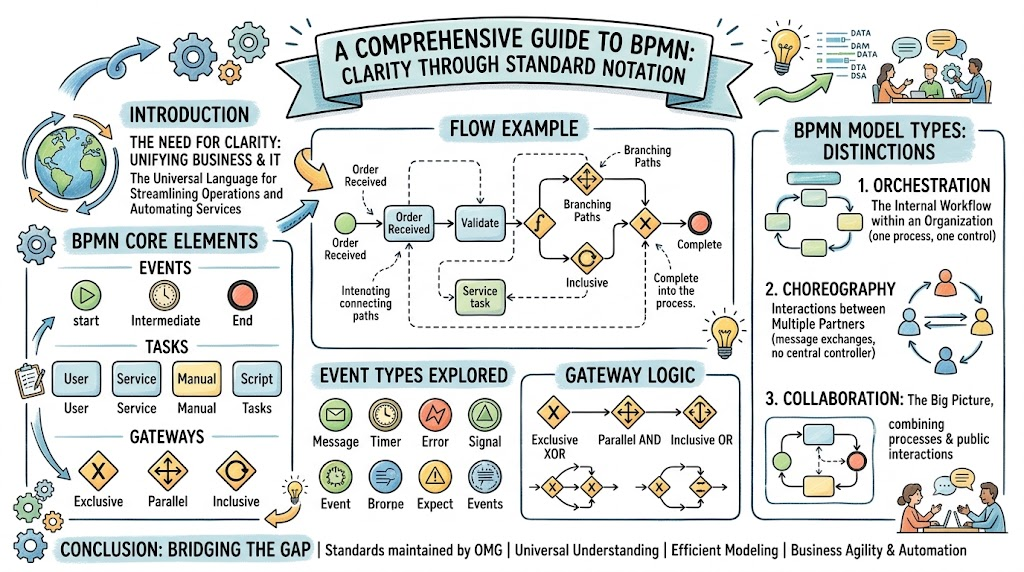
BPMN is a standardized graphical notation for specifying business processes in a business process diagram. Maintained by the Object Management Group (OMG), it provides a rich set of symbols that allow for precise modeling of workflows, far exceeding the capabilities of simple flowcharts or UML activity diagrams. This guide serves as a comprehensive tutorial on BPMN, covering its core elements, event types, gateways, tasks, and the critical distinctions between Orchestration, Choreography, and Collaboration.
1. Core Concepts: What is a BPMN Diagram?
A BPMN diagram depicts business processes using a specific set of notations. While similar to flowcharts, BPMN offers richer semantics specifically designed for the business process domain.
There are three primary kinds of BPMN diagrams, each serving a different level of abstraction:
-
BPMN Conversation Diagram: A high-level view of communications between participants.
-
BPMN Collaboration Diagram: Shows interactions between two or more business entities (pools).
-
BPMN Choreography Diagram: Focuses on the sequence of message exchanges between participants.
Key Symbols Overview
To build these diagrams, BPMN utilizes several categories of symbols:
-
Swimlanes: Pools and Lanes to organize responsibilities.
-
Activities: Tasks, transactions, sub-processes, and call activities.
-
Gateways: Decision points that control flow branching.
-
Events: Start, intermediate, and end points of a process.
-
Data: Inputs, outputs, stores, and objects.
-
Flows: Sequence flows, message flows, and data associations.
-
Artifacts: Groups and text annotations for organization.
2. BPMN Events: The Triggers of Process Flow
Events are things that happen during the course of a process. They are depicted as circles and are categorized by their position in the process and their behavior.
Event Types by Position
-
Start Events: Depicted with a standard width line. They trigger the beginning of a process.
-
Intermediate Events: Depicted with a double standard width line. They occur between activities.
-
End Events: Depicted with a wide border. They signify the conclusion of a process path.
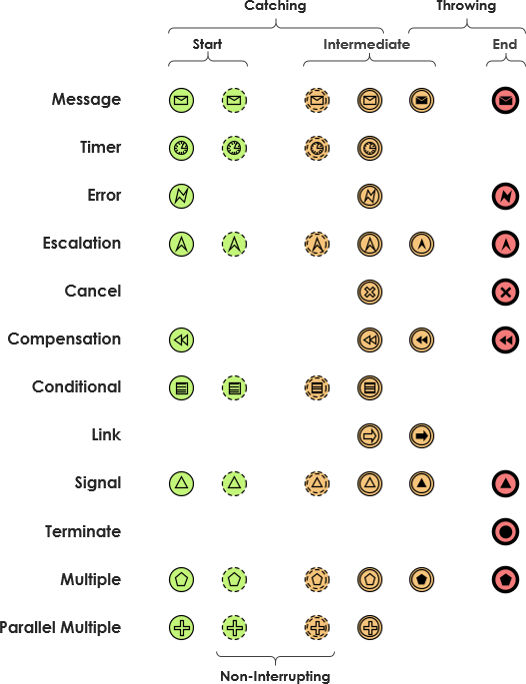
Interrupting vs. Non-Interrupting Boundary Events
Boundary events are attached to the border of an activity (task). They define how a process responds to external stimuli while an activity is ongoing.
-
Interrupting: If the event occurs, the current activity is stopped immediately, and the process follows the event’s flow.
-
Non-Interrupting: If the event occurs, the current activity continues. Once the activity completes, the process splits, continuing both the standard path and the event-specific path in parallel.
Throwing vs. Catching Events
-
Throwing Event: Triggers an event (e.g., sending a signal or message).
-
Catching Event: Waits for and responds to a triggered event.
Comprehensive List of Event Combinations
Not all combinations of start/intermediate/end and throwing/catching are valid. Below are the meaningful combinations defined in BPMN.
Start BPMN Events
-
Compensation Start Event (Interrupting)
-
Conditional Start Event (Interrupting & Non-interrupting)
-
Error Start Event (Interrupting)
-
Escalation Start Event (Interrupting & Non-interrupting)
-
Message Start Event (Interrupting & Non-interrupting)
-
Multiple Start Event (Interrupting & Non-interrupting)
-
Parallel Multiple Start Event (Interrupting & Non-interrupting)
-
Signal Start Event (Interrupting & Non-interrupting)
-
Timer Start Event (Interrupting & Non-interrupting)
Intermediate BPMN Events
-
Message: Catching, Throwing, Interrupting Boundary Catching, Non-interrupting Boundary Catching.
-
Timer: Catching, Interrupting Boundary Catching, Non-interrupting Boundary Catching.
-
Escalation: Interrupting Boundary Catching, Non-interrupting Boundary Catching.
-
Conditional: Catching, Interrupting Boundary Catching, Non-interrupting Boundary Catching.
-
Link: Catching, Throwing.
-
Error: Interrupting Boundary Catching.
-
Cancel: Interrupting Boundary Catching.
-
Compensation: Interrupting Boundary Catching, Throwing.
-
Signal: Catching, Interrupting Boundary Catching, Non-interrupting Boundary Catching, Throwing.
-
Multiple: Catching, Interrupting Boundary Catching, Non-interrupting Boundary Catching, Throwing.
-
Multiple Parallel: Catching, Interrupting Boundary Catching, Non-interrupting Boundary Catching.
End BPMN Events
-
None End Event
-
Message End Event
-
Signal End Event
-
Multiple End Event
-
Escalation End Event
-
Error End Event
-
Compensation End Event
-
Cancel End Event
-
Terminate End Event
3. BPMN Gateways: Controlling the Workflow
Gateways are decision nodes that control the divergence and convergence of sequence flows. They are depicted as diamonds with specific markers inside.
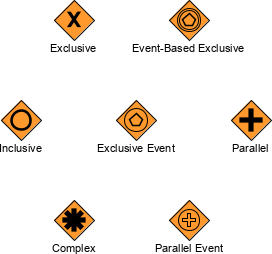
Types of Gateways
-
Exclusive Gateway (XOR):
-
Symbol: Empty diamond or diamond with an ‘X’.
-
Function: Acts as a decision point. Only one outgoing path is taken based on a condition. If no condition is met, a default flow (if defined) is used. Similar to an
if-elsestatement.
-
-
Event-Based Gateway:
-
Symbol: Diamond with a circle containing a pentagram.
-
Function: Similar to Exclusive, but the branch is chosen based on which event occurs first, rather than evaluating a data condition.
-
-
Inclusive Gateway (OR):
-
Symbol: Diamond with a circle ‘O’ inside.
-
Function: Allows multiple outgoing paths to be taken simultaneously if their respective conditions are met. It can also merge multiple incoming paths.
-
-
Parallel Gateway (AND):
-
Symbol: Diamond with a plus ‘+’ sign inside.
-
Function: Splits the flow into concurrent paths (all paths are taken). When merging, it waits for all incoming paths to complete before proceeding. Equivalent to Fork/Join in UML.
-
-
Parallel Event-Based Gateway:
-
Symbol: Diamond with a circle containing a plus ‘+’ sign.
-
Function: Forks the process into concurrent flows triggered by specific events.
-
-
Complex Gateway:
-
Symbol: Diamond with an asterisk ‘*’ inside.
-
Function: Used for complex decision scenarios that cannot be modeled by other gateways. Defined by internal parameters. Note: Rarely used; combining other gateways is usually preferred.
-
4. BPMN Tasks: Units of Work
Tasks are the atomic activities within a process, depicted as rounded rectangles. The specific type of task is indicated by an icon in the top-left corner.
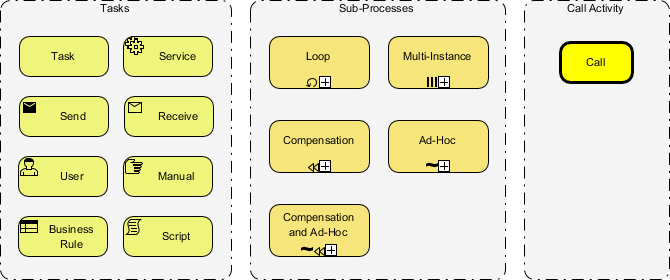
Task Types
-
Abstract Task: A general task with no specific subtype.
-
Business Rule Task: Executes one or more business rules.
-
Manual Task: Performed physically by a human without software automation.
-
User Task: Performed by a human user, potentially with the aid of a software application.
-
Receive Task: Waits for a message to arrive. Completes upon receipt.
-
Send Task: Sends a message to an external participant. Completes upon sending.
-
Script Task: Contains a script executed by the process engine.
-
Service Task: Uses automated processing via a service, web service, or application module.
5. Subprocesses and Transactions
Subprocesses allow for hierarchical modeling, keeping diagrams clean by hiding complexity.
-
Sub Process: A nested process. It can be collapsed (shown with a small plus square at the bottom) or expanded (showing all internal nodes).
-
Adhoc Sub Process: Activities within can be executed in any order, multiple times, or skipped entirely.
-
Event Sub Process: Activated by a specific event. It can run in parallel with the main process or cancel it, depending on the event type.
-
Transaction: A group of activities that must succeed or fail together. Outcomes include Success, Error (Hazard), or Cancellation.
6. Flows and Connectors
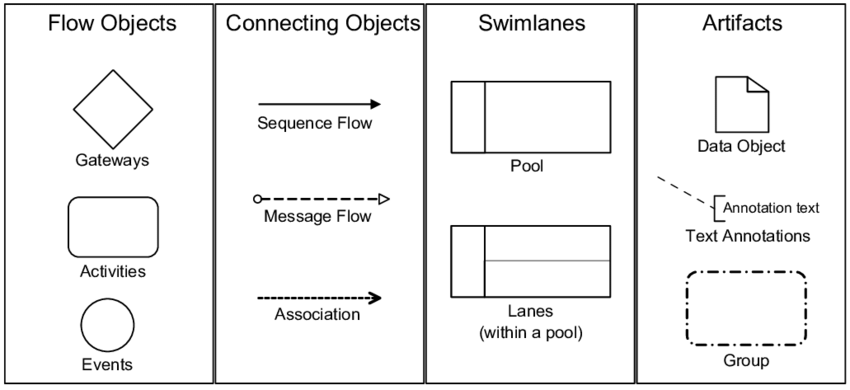
Connectors define the relationships and movement within the diagram.
-
Sequence Flow: Solid line with an arrowhead. Connects activities in execution order.
-
Conditional Flow: Executed only if a condition is true.
-
Default Flow: The “else” branch, executed if no other conditions are met.
-
-
Message Flow: Dashed line with an open circle at the start and arrowhead at the end. Represents communication between separate pools (participants).
-
Association: Dotted line. Links artifacts (like text annotations) to flow objects.
-
Data Association: Dotted line with an arrowhead. Links data objects to activities.
7. BPMN Data Elements
Data elements represent information moving through or stored by the process.
-
Data Object: Information sent between parts of the system.
-
Data Object Collection: A series of data objects.
-
Data Input / Output: External data required or generated by the process.
-
Data Store: Permanent storage existing outside the process lifetime (e.g., a database).
8. Swimlanes: Organizing Responsibility
Swimlanes organize the diagram by participant and role.
-
Pool: Represents a major participant (e.g., a Company, Department, or System). A diagram can have multiple pools.
-
Lane: Sub-divisions within a Pool. Lanes represent specific roles, departments, or systems within that participant.
9. BPMN Orchestration vs. Choreography vs. Collaboration
Understanding the scope of your model is crucial. BPMN distinguishes between private internal processes and public inter-organizational interactions.
Public vs. Private Processes
-
Private (Internal) Processes: Detailed flows within a single entity.
-
Public Processes: Describe interactions between partners. Internal details are treated as “black boxes,” focusing only on exchanged messages and objects.
The Three Categories
1. Orchestration
-
Definition: A standard process modeling a single coordinating point of view.
-
Scope: Within a single business entity (single Pool).
-
Use Case: Internal workflow automation.
2. Collaboration
-
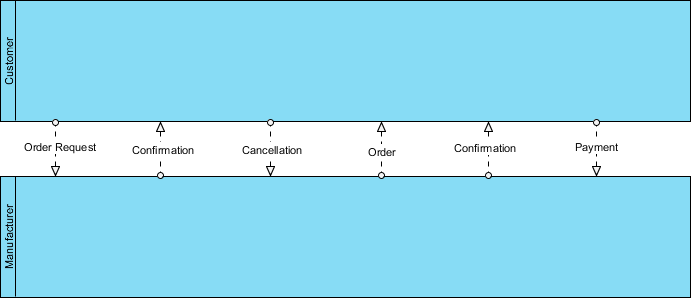
Definition: Shows interactions between two or more business entities.
-
Scope: Multiple Pools connected by Message Flows.
-
Structure: Can show detailed processes within pools or treat them as black boxes.
3. Choreography
-
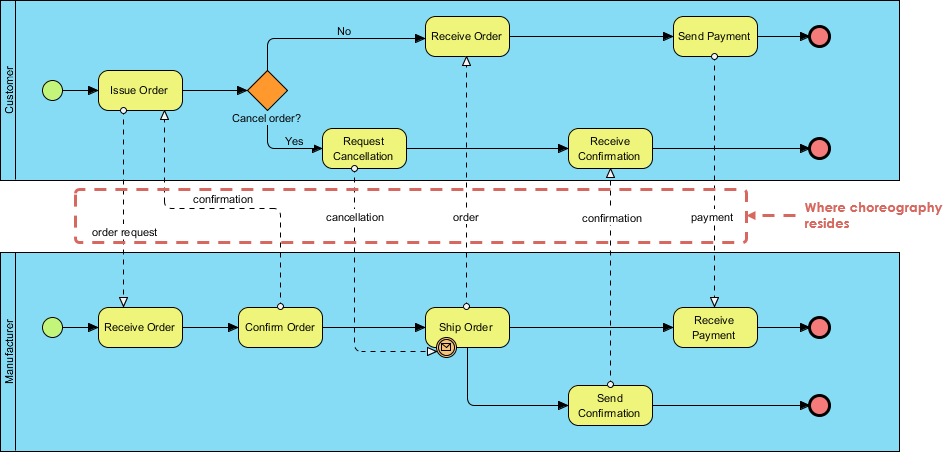
Definition: Focuses strictly on the message exchange between participants, not the internal tasks.
-
Scope: No pools. Participants are embedded within the task shapes.
-
Use Case: Defining the “contract” of interaction between organizations.
Choreography Notation Evolution
-
BPMN 1.1: Choreographies were mixed with orchestrations, lacking dedicated notation.
-
BPMN 2.0: Introduced dedicated Choreography Diagrams.
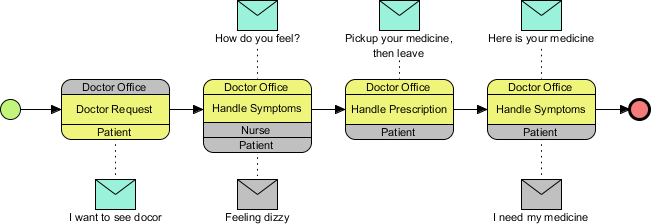
Choreography Tasks
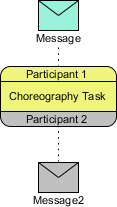
Choreography tasks define the interaction. They consist of:
-
Initiating Participant: Shaded in color.
-
Non-Initiating Participant: Shaded in gray.
-
Messages: Defined initiating and optional return messages.

Example: Clinic Process
Shows interactions between Patient and Doctor’s Office. The initiator changes color based on who starts the interaction.
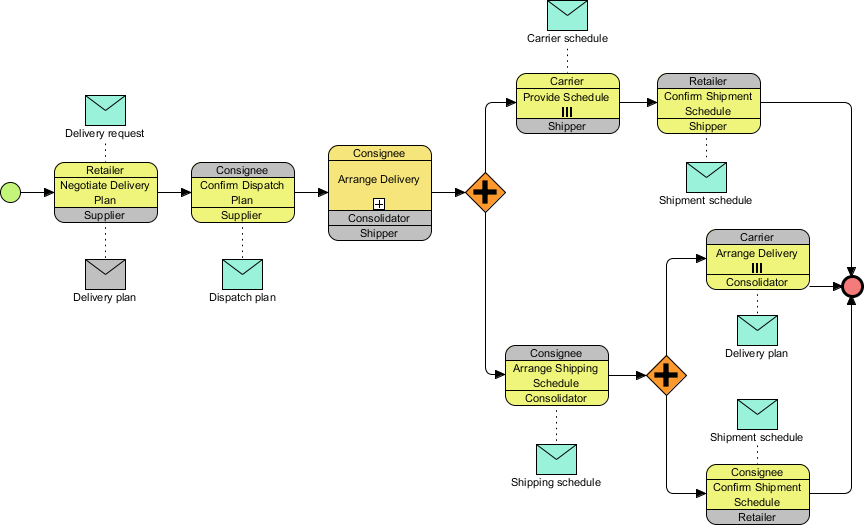
Example: MIS (Management Information System)
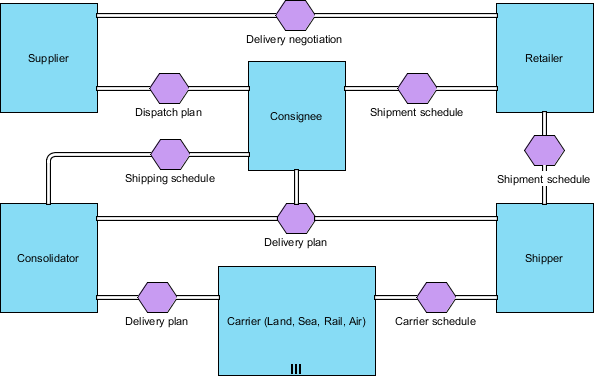
BPMN Conversation Diagrams
The highest level of abstraction. It removes process logic entirely to show only who talks to whom.
-
Elements: Pools, Conversation Nodes (Hexagons), and Conversation Links (Double lines).
-
View: “30,000-foot view” of communications.
Example: MIS Conversation
This diagram simplifies the previous choreography into high-level conversation blocks.
Conclusion
BPMN is a powerful, standardized language that enables clear communication across business and technical boundaries. By mastering the distinction between Orchestration (internal control), Collaboration (multi-party interaction), and Choreography (message contracts), you can model processes at the appropriate level of detail for your audience.
Whether you are documenting a simple approval workflow or designing a complex multi-organization supply chain, BPMN provides the necessary rigor and flexibility. To effectively create these diagrams, leveraging professional tooling is essential. Visual Paradigm offers a robust suite of BPMN modeling tools that support all diagram types discussed in this guide, from detailed orchestration flows to high-level conversation maps. Using such tools ensures compliance with BPMN 2.0 standards and facilitates easier collaboration among stakeholders.
This post is also available in Deutsch, Español, فارسی, Français, English, Bahasa Indonesia, 日本語, Polski, Portuguese, Ру́сский, Việt Nam, 简体中文 and 繁體中文.