


Introduction
In today’s fast-paced digital landscape, professionals are often bogged down by a fragmented toolkit. Architects, product managers, and designers frequently find themselves juggling multiple standalone applications, leading to siloed data, broken workflows, and lost productivity. Enter the Visual Paradigm Unified Platform, unveiled in June 2026 as a groundbreaking solution to these persistent challenges. By seamlessly bridging the gap between robust desktop modeling and accessible cloud-based collaboration, Visual Paradigm has created a single, cohesive ecosystem. This comprehensive guide explores the platform’s core features, real-world applications, and the tangible benefits it brings to modern teams, complete with insights from early adopters and a detailed feature review.
Core Value Proposition & Key Features
The Unified Platform was built around foundational principles that address the most significant pain points in modern visual productivity.
Eliminating Siloed Data with Unified Drive
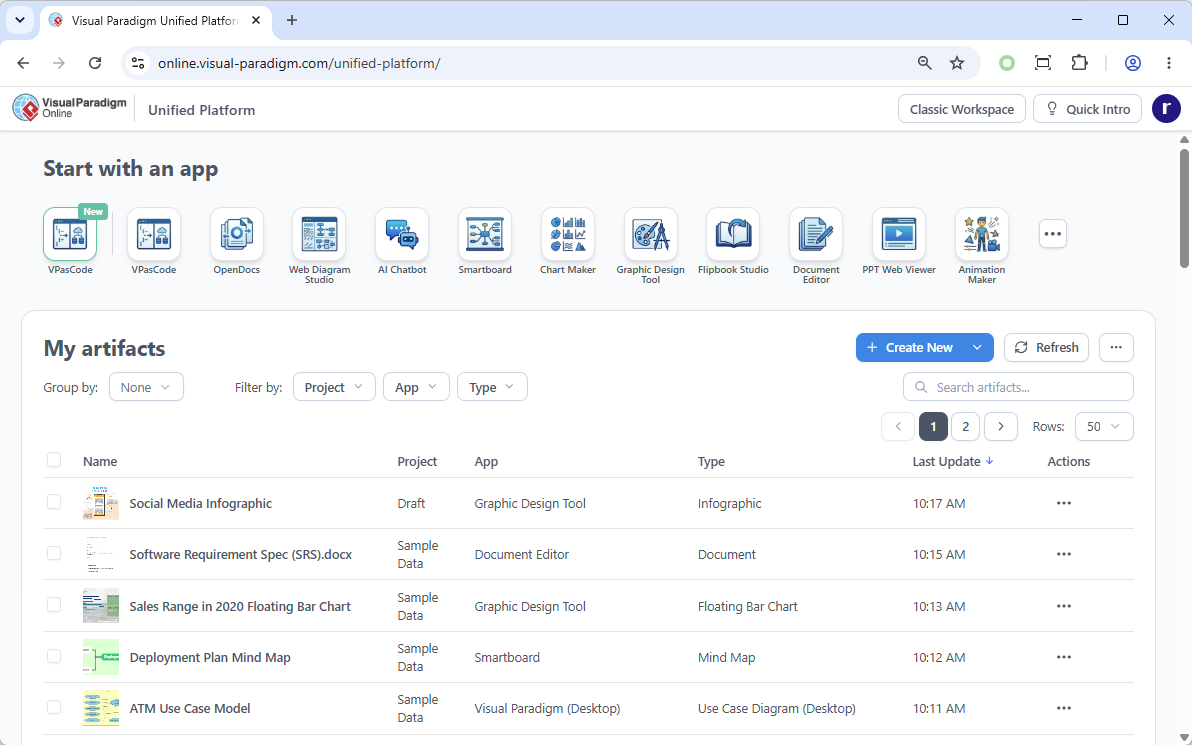
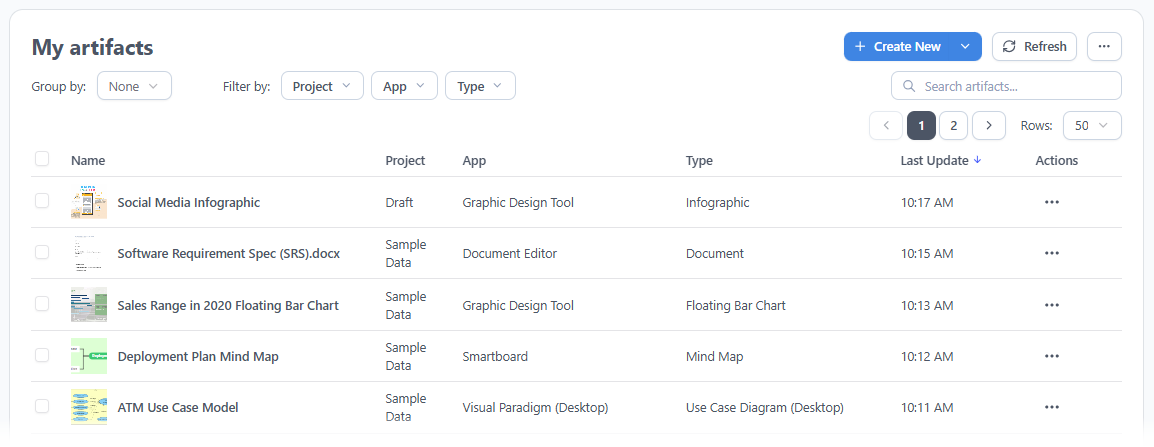
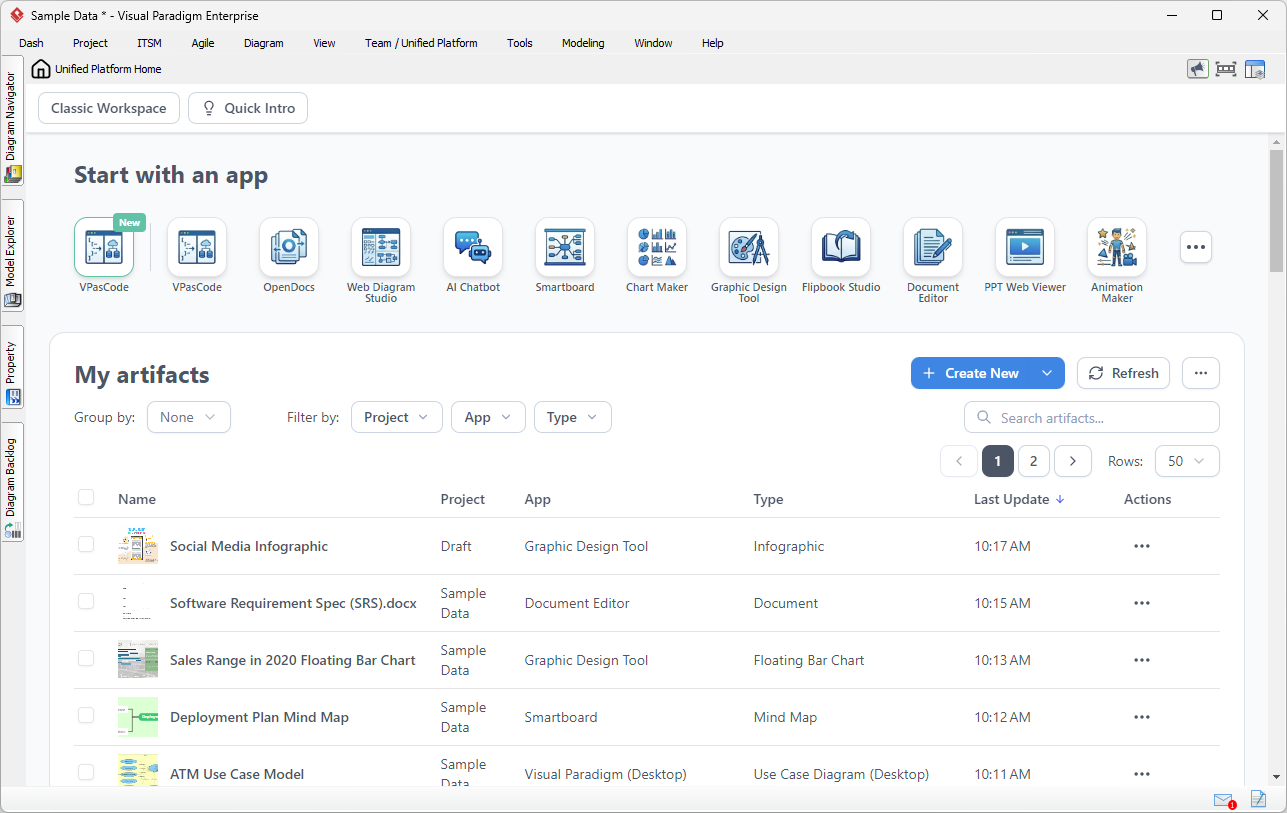
One of the most frustrating aspects of working across multiple tools is the fragmentation of information. The Unified Platform solves this by introducing the Unified Drive, a centralized, drive-like environment that acts as a universal file system for your visual work. Every diagram, artifact, document, or project created across the entire suite of apps is automatically organized, indexed, and visible in this single location.
Consolidating Multi-App Workflows
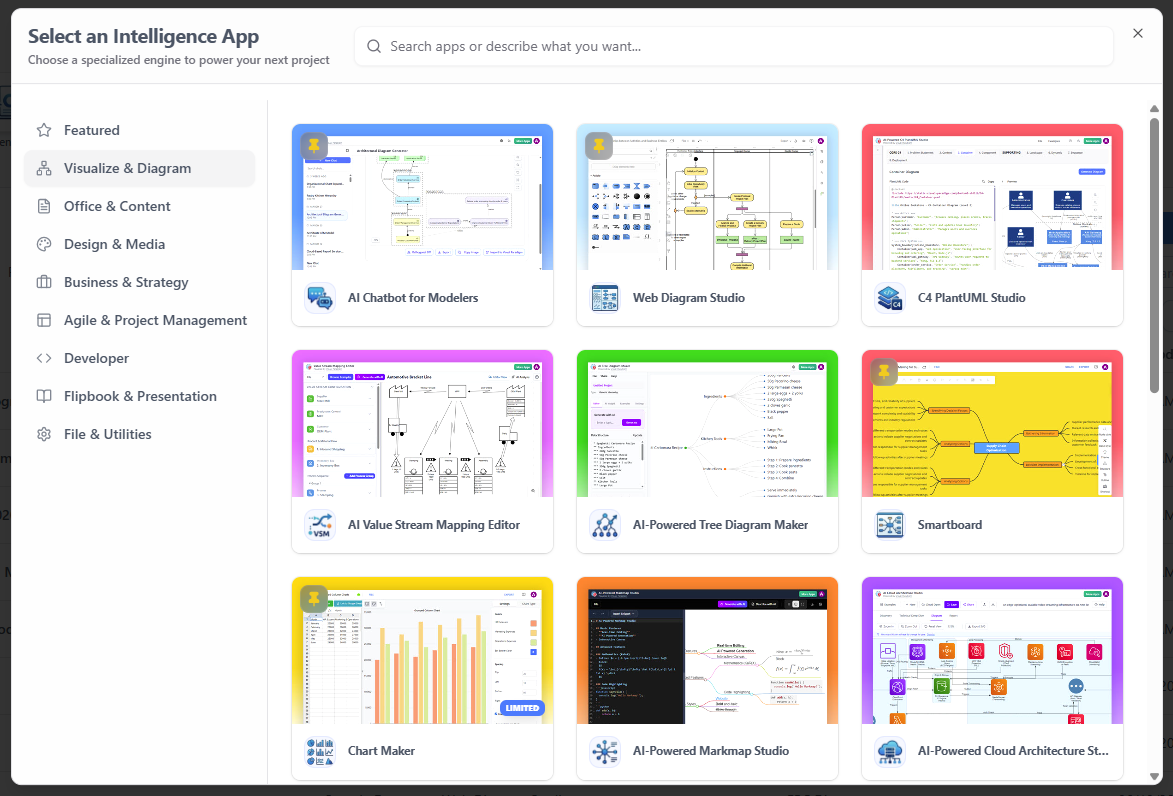
Modern projects rarely fit neatly into a single discipline. The Unified Platform brings all workflows into a unified space through a 100+ Specialized Apps Hub. This centralized dashboard provides instant access to tools spanning agile planning, infographics, system design, business process modeling, and UX wireframing, eliminating the need to install and maintain dozens of separate applications.
Accelerating Production via AI
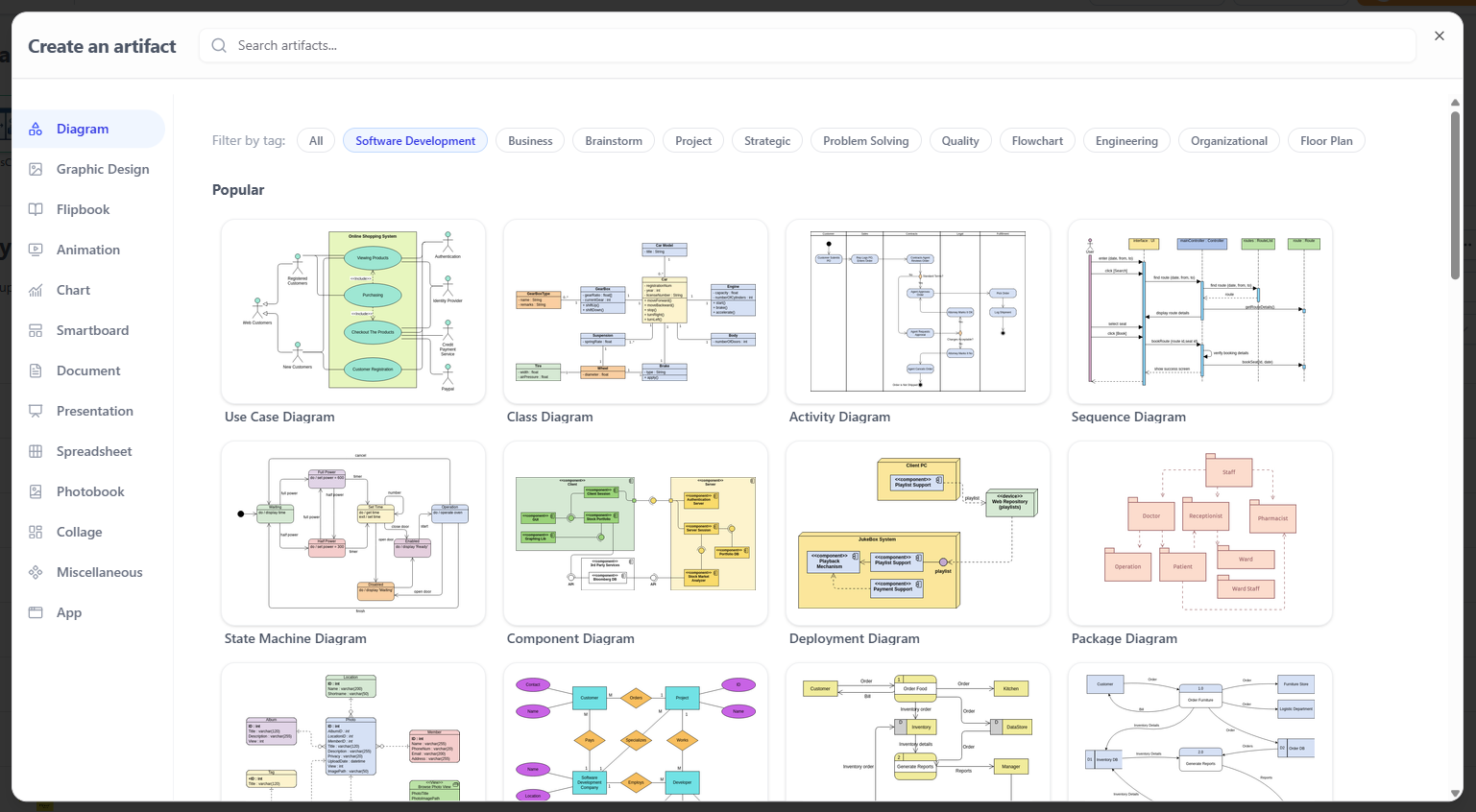
Visual Paradigm has embedded generative AI directly into the creative workflow. Through a redesigned Frictionless Creation Menu, users can instantly spin up any diagram or visual asset. Furthermore, tools like Visual Paradigm VPasCode (Text-to-Diagram), AI Presentation Studio, and AI App Studio allow users to rapidly transition raw text and ideas into production-ready deliverables.
Real-World Scenarios & Desktop Synergy
A standout design decision of the Unified Platform is the seamless relationship it establishes between desktop and web environments. Visual Paradigm Desktop users can open the Unified Platform inside an embedded browser, allowing local enterprise modeling workflows and cloud assets to coexist flawlessly without context-switching.

Scenario 1: Connect Heavy System Modeling with Product Requirements
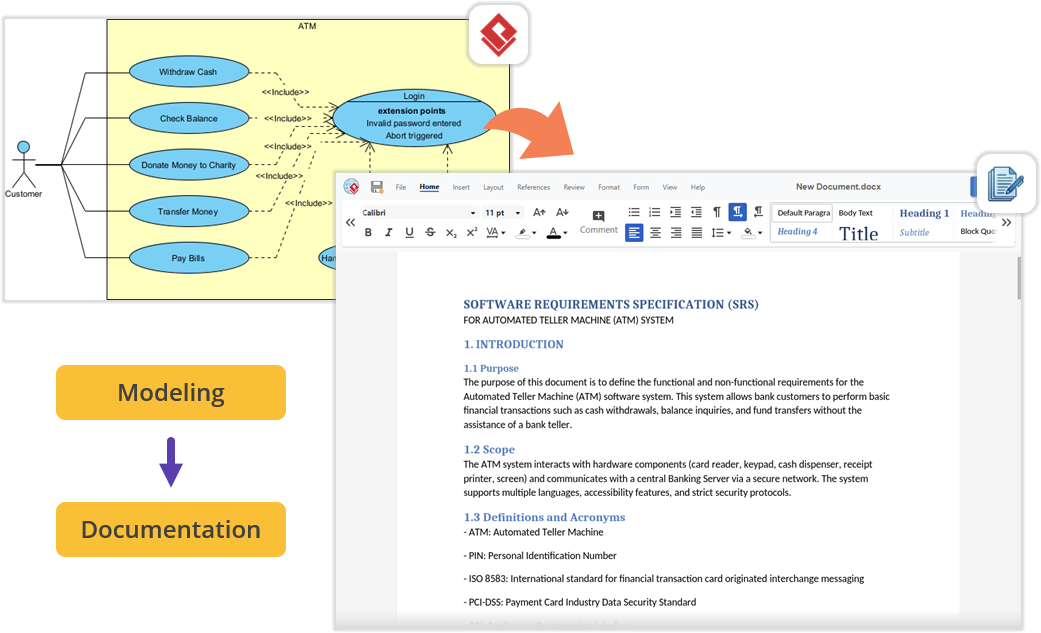
When architecting a new software module using UML or SysML, you can open the embedded Unified Platform to launch the Document Editor app. This allows you to write comprehensive Product Requirement Specifications (PRDs) right next to your active modeling environment, keeping everything perfectly organized under a single project space.
Scenario 2: Effortless Documentation via Pipeline and OpenDocs
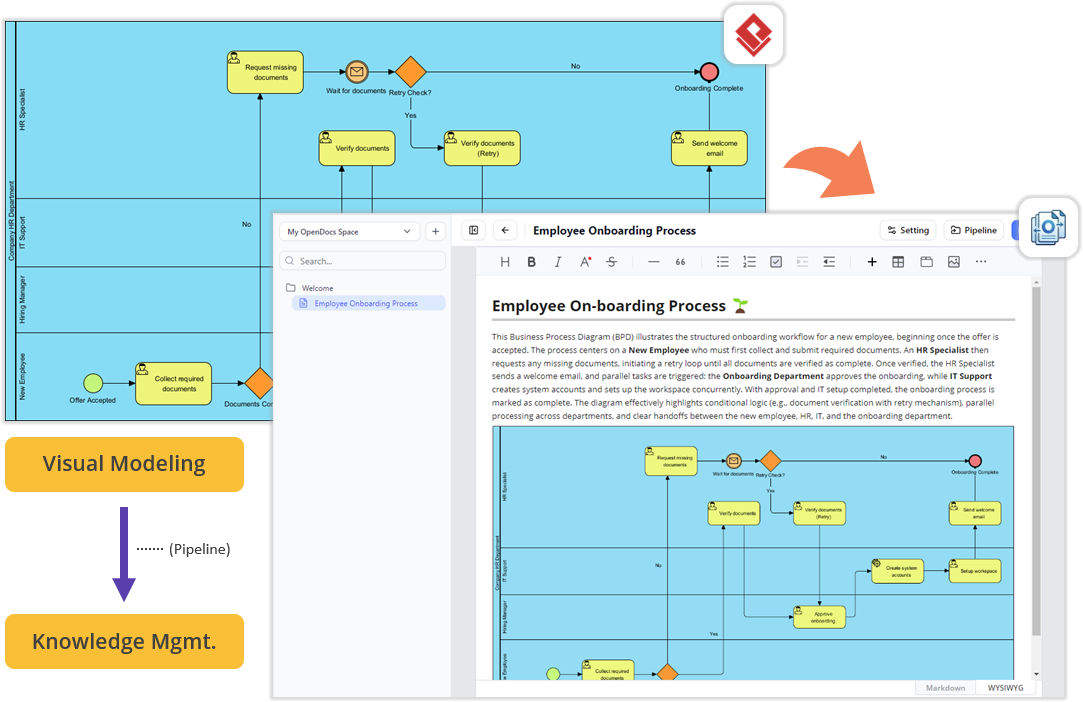
Teams can build diagrams locally in VP Desktop and send them to the cloud-based Pipeline. Switching to the OpenDocs app within the Unified Platform panel reveals your Pipeline pane, allowing you to drag-and-drop desktop-generated diagrams directly into the document canvas. No file exporting, no broken image links, and zero context-switching.
Scenario 3: Supercharge Projects with Agile and Management Tools
Software development requires project management, scheduling, and team alignment. Within the same interface where you manage codebase models, you can instantly jump into apps dedicated to Stakeholder Management, Development Plans, interactive Gantt Charts, RACI Matrix mapping, or even design a prototype site using the Website Builder.
Benefits and User Feedback: A Newly Released Feature Review
Since its release, the Unified Platform has garnered significant attention from enterprise architects, product managers, and agile teams. Here is a review of the newly released features based on user experience sharing and feedback:
Feature Review: The Unified Drive
- User Experience: “I used to spend 15 minutes just locating the right version of a system architecture diagram. Now, the Unified Drive automatically indexes everything across my desktop and cloud apps. It feels like having a universal search engine for my entire visual workspace.”
- Key Benefit: Centralized asset management eliminates version control issues, drastically reduces search time, and ensures a single source of truth for all project artifacts.
Feature Review: Desktop-Web Synergy
- User Experience: “Being able to open the Unified Platform inside an embedded browser within my Desktop client is a game-changer. I can build complex SysML models locally and instantly pull up cloud-based Agile boards without breaking my focus or minimizing my windows.”
- Key Benefit: Eliminates context-switching and allows seamless offline-to-online transitions, keeping heavy technical work and lightweight collaboration in the same field of view.
Feature Review: AI-Powered Creation Tools
- User Experience: “VPasCode allowed me to describe a microservices architecture in plain English, and it generated a baseline diagram in seconds. The AI Presentation Studio turned our raw sprint notes into a polished stakeholder deck instantly.”
- Key Benefit: Accelerates the transition from raw ideas to production-ready visual assets, saving hours of manual formatting and allowing teams to focus on strategy rather than design mechanics.
Feature Review: Cross-Platform Accessibility
- User Experience: “The ability to log in via any external web browser and manage my desktop-synced assets is a massive benefit for our remote team. I can review an architect’s local diagrams on my tablet while commuting.”
- Key Benefit: Unprecedented flexibility for hybrid and remote teams, ensuring that desktop-grade modeling is accessible and manageable from any device, anywhere.
How to Access the Unified Platform
Getting started with the new ecosystem is incredibly straightforward, whether you prefer working in a browser or inside the desktop software.
For Visual Paradigm Online Users
You can access the platform from any device via your web browser:
- Log into your VP Online account at the official login portal.
- Upon successful login, you will automatically be redirected to the new Unified Platform dashboard.
- You can also bookmark and visit the platform directly at any time via the unified platform URL.
For Visual Paradigm Desktop Users
To view your synchronized diagrams and access the 100+ embedded apps right inside your desktop client, use the following steps:
- Ensure you are logged in: To see the Unified Platform menu, you must first connect your desktop application to your cloud repository. Go to the main menu and select Team / Unified Platform > Select Repository and enter your VP Online credentials.

- Open the Platform: Once logged in, simply navigate to Team / Unified Platform > Unified Platform in the main menu.
- An embedded browser will open directly inside your workspace, revealing the centralized cloud drive and your entire app ecosystem.
Conclusion
The Visual Paradigm Unified Platform is more than just a software update; it is a paradigm shift in how we approach visual productivity and enterprise design. By dismantling the barriers between desktop and cloud, and between specialized tools, Visual Paradigm has delivered an ecosystem that truly adapts to the user, rather than forcing the user to adapt to the tools. Whether you are mapping complex software architectures, drafting product requirement documents, or generating AI-powered presentations, the Unified Platform ensures your ideas flow uninterrupted from concept to completion. As the platform continues to evolve with advanced project concepts and cross-source data utilization, it stands poised to remain an indispensable hub for modern creative and technical professionals.
References
- Visual Paradigm Unified Platform: Project Management UI Enhancements: Details on project management interface improvements.
- Introducing Visual Paradigm 18.1: A New Era of Unified Ecosystems and AI-Driven Innovation: Overview of version 18.1’s unified ecosystem and AI capabilities.
- Visual Paradigm Official Website: The main hub for Visual Paradigm products and resources.
- Visual Paradigm Online: Unified Platform: The cloud-based entry point for the Unified Platform.
- Visual Paradigm Unified Platform: Quick Introduction: A beginner-friendly guide to getting started.
- Announcing the All-New Visual Paradigm Unified Platform: The official launch announcement for the Unified Platform.
- Visual Paradigm Desktop Product Updates: Latest updates and enhancements for the desktop application.
- Visual Paradigm Updates Hub: The central repository for all release notes and product updates.
This post is also available in Deutsch, Español, فارسی, Français, English, Bahasa Indonesia, 日本語, Polski, Portuguese, Ру́сский, Việt Nam, 简体中文 and 繁體中文.