


Scope creep is the silent killer of project success. It occurs when the boundaries of a project expand without corresponding adjustments to time, budget, or resources. For project managers, this phenomenon is often unavoidable, yet it can be managed with precision. One of the most effective tools for controlling these boundaries is Business Process Model and Notation, commonly known as BPMN. This standard provides a visual language that clarifies processes, defines deliverables, and establishes clear expectations among stakeholders.
By adopting BPMN, project managers gain the ability to map out exactly what is included and, just as importantly, what is excluded from a project. This guide explores how to leverage this modeling standard to maintain control over project scope, ensure alignment, and prevent unauthorized changes from derailing delivery timelines.
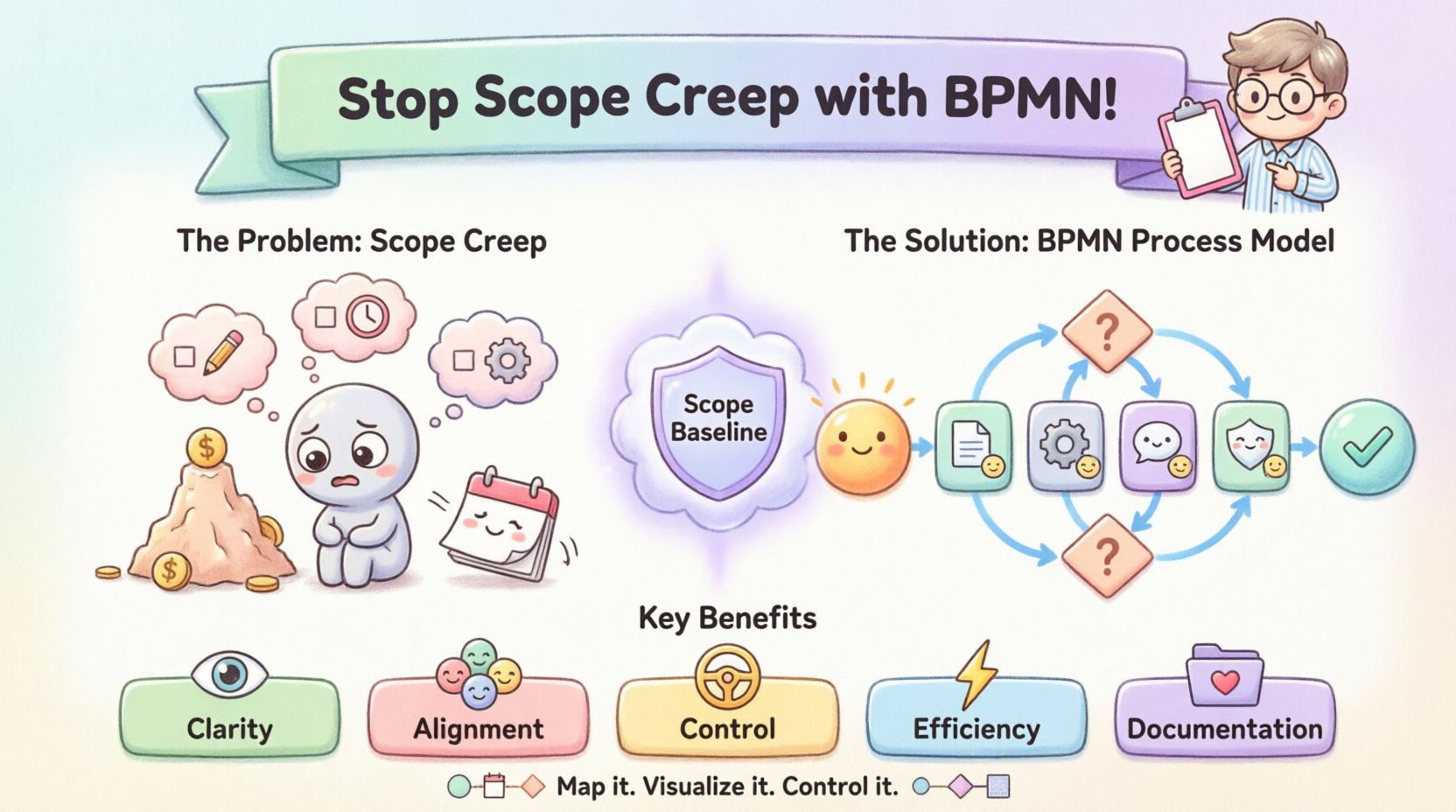
🧐 Understanding Scope Creep and Its Impact
Scope creep does not happen in a vacuum. It is the result of ambiguous requirements, misaligned expectations, and a lack of formal change control. When a project begins without a clear definition of its endpoints, stakeholders often assume that additional features or tasks are implied or expected.
The consequences of unchecked scope creep are severe:
- Budget Overruns: Every additional task requires resources. As the list grows, so does the cost.
- Delayed Delivery: More work means more time. Deadlines slip as the workload exceeds capacity.
- Team Burnout: Continuous expansion of workloads without relief leads to fatigue and reduced quality.
- Stakeholder Dissatisfaction: When projects fail to meet the original promise, trust erodes.
To stop this cycle, you need a baseline. You need a document that serves as the single source of truth for what the project will achieve. This is where process modeling becomes critical.
🗺️ Introduction to Business Process Model and Notation (BPMN)
BPMN is a standardized method for modeling business processes. It uses a set of graphical symbols to represent the steps, decisions, and events that make up a workflow. Unlike textual requirements documents, which can be open to interpretation, BPMN diagrams offer a visual representation that is universally understood by business and technical teams.
For a project manager, BPMN serves as a contract. It visualizes the “As-Is” process and the “To-Be” process. By defining the flow of work, you implicitly define the scope. Anything outside the flow is, by definition, out of scope.
🏗️ Building the Scope Baseline with BPMN
The foundation of scope control lies in the initial mapping of the process. A BPMN diagram creates a visual boundary that acts as a reference point for all future discussions. Here is how specific BPMN elements contribute to scope definition.
1. Start and End Events: Defining Boundaries
Every process must have a beginning and an end. In BPMN, these are represented by circles.
- Start Event: Clearly marks the trigger for the project or process. This defines the entry point. Any request that does not align with this trigger is outside the current scope.
- End Event: Marks the completion criteria. This defines the exit point. Stakeholders know exactly when the process is finished. Ambiguity about “finishing” is removed.
2. Tasks and Activities: The Deliverables
Tasks represent specific work items. In a project context, these map directly to deliverables or milestones.
- Each task should have a clear owner and a clear output.
- When a stakeholder requests a change, you can visually locate where in the process it fits. If it does not fit into a task box, it is a new scope item.
- Tasks can be grouped into pools or lanes to show responsibility. This prevents work from being assumed by the wrong team.
3. Gateways: Decision Points and Constraints
Gateways represent points where the process splits based on a decision. These are crucial for scope control because they define conditions.
- Exclusive Gateway: Indicates that only one path is taken. This helps define what happens if specific conditions are not met. For example, if a requirement is not met, the process may loop back for correction rather than moving forward.
- Inclusive Gateway: Allows multiple paths. This helps manage variations in scope without creating separate projects.
🔄 Managing Changes Without Chaos
Change is inevitable. The goal is not to prevent change, but to manage it so that it does not destroy the project baseline. BPMN facilitates this through visual impact analysis.
The Change Request Workflow
When a stakeholder requests a modification, you do not simply say yes or no. You model the change.
- Visualize the Impact: Draw the proposed change on the existing diagram. Does it require a new task? Does it alter a gateway condition? Does it require a new resource lane?
- Trace Dependencies: BPMN arrows show flow. You can see exactly which downstream tasks will be affected by an upstream change.
- Quantify the Cost: Once the change is modeled, you can count the new tasks and estimate the additional time required.
Comparing Verbal vs. Visual Change Management
| Aspect | Verbal / Text Description | BPMN Visual Model |
|---|---|---|
| Clarity | Open to interpretation; subject to memory errors. | Unambiguous; standardized symbols. |
| Impact Analysis | Requires mental simulation of the process. | Immediate visual trace of flow and dependencies. |
| Stakeholder Buy-in | Difficult to convey without technical jargon. | Easy to understand for non-technical stakeholders. |
| Documentation | Text can be lost or versioned poorly. | Diagram serves as a permanent record of the agreed state. |
🤝 Aligning Stakeholders Through Visuals
One of the primary causes of scope creep is the assumption that everyone understands the requirements in the same way. Text-based requirements often lead to gaps in understanding. A stakeholder might read a requirement and imagine a feature that the team interprets differently.
BPMN bridges this gap.
- Shared Language: BPMN uses symbols that are recognized globally. A rectangle is a task. A diamond is a decision. This reduces the cognitive load of understanding the document.
- Walkthroughs: You can walk stakeholders through the diagram step-by-step. “If we do X, then Y happens. If we do Z, then we stop.” This active engagement confirms the scope.
- Validation: Stakeholders can validate the flow before work begins. If they see a path that does not match their expectation, they can correct it immediately, rather than later.
⚠️ Identifying Risks in the Process Flow
Scope creep often stems from risks that materialize later. When a risk occurs, the team often tries to “fix” it by adding work to the project, which expands scope. BPMN helps identify these risks early.
Exception Paths
Standard processes assume things go right. Real-world projects involve errors. BPMN includes specific symbols for error handling.
- Error Events: These mark where a task fails. By modeling error events, you define the contingency plan.
- Escalations: You can define thresholds for when a process escalates to management. This prevents issues from growing into scope expansion.
By mapping these exceptions, you define what happens when things go wrong without needing to add new scope. The contingency is already part of the process.
🛠️ Practical Steps for Implementation
Integrating BPMN into project management requires a shift in workflow. Here is a step-by-step approach to implementing this without disrupting current operations.
- Define the Trigger: Identify the event that starts the project process. Is it a signed contract? A client request? Mark this clearly on your diagram.
- List Core Tasks: Map out the essential activities required to reach the end state. Do not include “nice-to-haves” here. Stick to the minimum viable scope.
- Add Decision Points: Identify where choices must be made. Document the criteria for each choice. This prevents decision paralysis and scope drift.
- Review with Stakeholders: Present the draft diagram. Ask specific questions: “Does this path match your expectation?” “Is anything missing?” “Is anything unnecessary?”
- Baseline the Model: Once agreed upon, freeze the diagram. This becomes the baseline. Any deviation requires a formal change request.
- Monitor Deviations: During execution, track progress against the model. If the team starts working on a path not in the diagram, investigate immediately.
🚫 Common Pitfalls to Avoid
While BPMN is powerful, it can be misused. To ensure it reduces scope creep rather than creating confusion, avoid these common mistakes.
- Over-Complicating Diagrams: A diagram that is too complex will not be read. Keep it high-level for scope definition. Detail the specifics in supporting documents.
- Ignoring the Audience: If the stakeholders do not understand the symbols, the diagram is useless. Provide a legend or use a simplified subset of BPMN.
- Static Models: A diagram that is never updated becomes irrelevant. Update the model whenever the scope changes formally.
- Using it as a Control Tool Only: Do not use BPMN just to say no. Use it to facilitate understanding. When stakeholders understand the flow, they are more likely to respect the boundaries.
📊 Measuring Success
How do you know if using BPMN is actually reducing scope creep? You need metrics. Track the following indicators over time.
- Change Request Volume: Measure the number of change requests per project phase. A decrease suggests better initial definition.
- Approved vs. Rejected Changes: Track the ratio. If more changes are rejected due to out-of-scope classification, your baseline is working.
- Delivery Variance: Compare planned delivery dates with actual dates. Reduced variance indicates better scope adherence.
- Stakeholder Satisfaction: Survey stakeholders on clarity of expectations. Higher scores suggest better communication.
🔍 Deep Dive: Specific BPMN Symbols for Scope Control
To truly leverage BPMN, you must understand how specific symbols function as control mechanisms.
Message Flows
Message flows represent communication between different participants. In a project, this often represents handoffs. By defining who sends what to whom, you prevent work from being duplicated or missed. If a stakeholder expects a deliverable that is not connected via a message flow, it is not in scope.
Sub-Processes
Complex tasks can be broken down into sub-processes. This allows you to define scope at multiple levels.
- Call Activity: Indicates a reference to another process. This is useful for reusable components.
- Collapsed vs. Expanded: You can hide the details of a sub-process. This allows you to show high-level scope without overwhelming the reader with low-level details.
Data Objects
Data objects represent the information created or consumed. Scope creep often happens when data requirements expand. By explicitly modeling data objects, you define the information scope. If a stakeholder asks for new data, you can see if it is required by the process logic.
🤝 The Role of the Project Manager
Using BPMN requires a specific mindset from the project manager. You are no longer just managing tasks; you are managing the flow of value.
- Facilitator: You facilitate the modeling sessions. You ensure everyone contributes to the map.
- Gatekeeper: You use the model to evaluate requests. “Does this fit the flow?”
- Translator: You translate technical constraints into process implications.
📝 Summary of Benefits
Adopting BPMN for scope management offers distinct advantages over traditional methods.
- Clarity: Visuals remove ambiguity.
- Alignment: Everyone sees the same picture.
- Control: Changes are visualized and measured.
- Efficiency: Risks are identified before work begins.
- Documentation: The process is recorded for future reference.
🚀 Moving Forward
Scope creep is a challenge that every project manager faces. The tools to combat it exist in the form of structured process modeling. BPMN provides the standard to build these models. By investing time in mapping the process, you create a shield against unauthorized expansion.
Start small. Map one process. Review it with stakeholders. Measure the outcome. Over time, this practice will become a standard part of your project lifecycle. The result is not just a finished project, but a finished project that meets the original promise.
This post is also available in Deutsch, Español, فارسی, Français, English, Bahasa Indonesia, 日本語, Polski, Portuguese, Ру́сский, Việt Nam, 简体中文 and 繁體中文.