


Introduction
As someone who’s spent years navigating the complexities of enterprise software architecture, I’ve always believed that a well-structured component diagram is worth a thousand lines of documentation. Yet, like many practitioners, I often found myself stuck in the tedious cycle of manually drawing rectangles, connecting interfaces, and constantly reformatting layouts—only to have requirements change the next day.
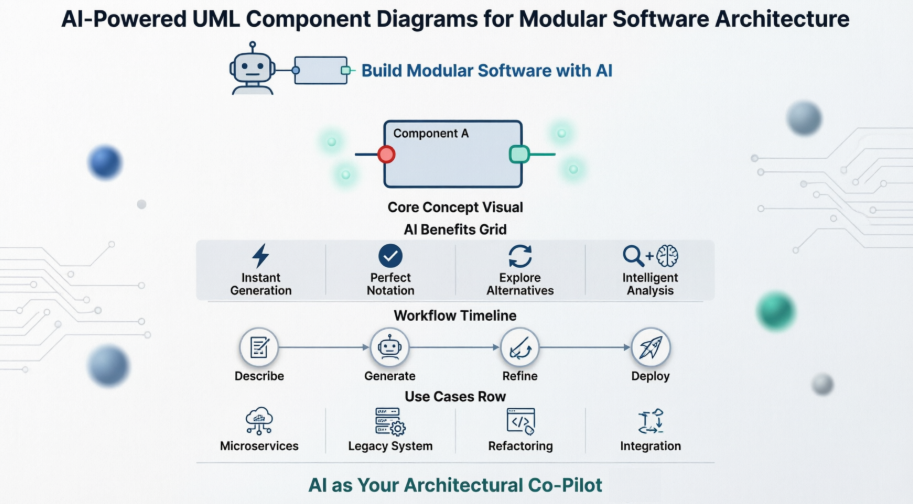
When I first heard about AI-powered UML tools, I was skeptical. Could a chatbot really understand architectural nuance? After spending several weeks testing Visual Paradigm’s AI Component Diagram Generator across its Desktop, Online, and OpenDocs platforms, I’m ready to share my honest experience. This isn’t a marketing piece—it’s a practitioner’s review of how AI is reshaping the way we design, communicate, and evolve modular software systems.
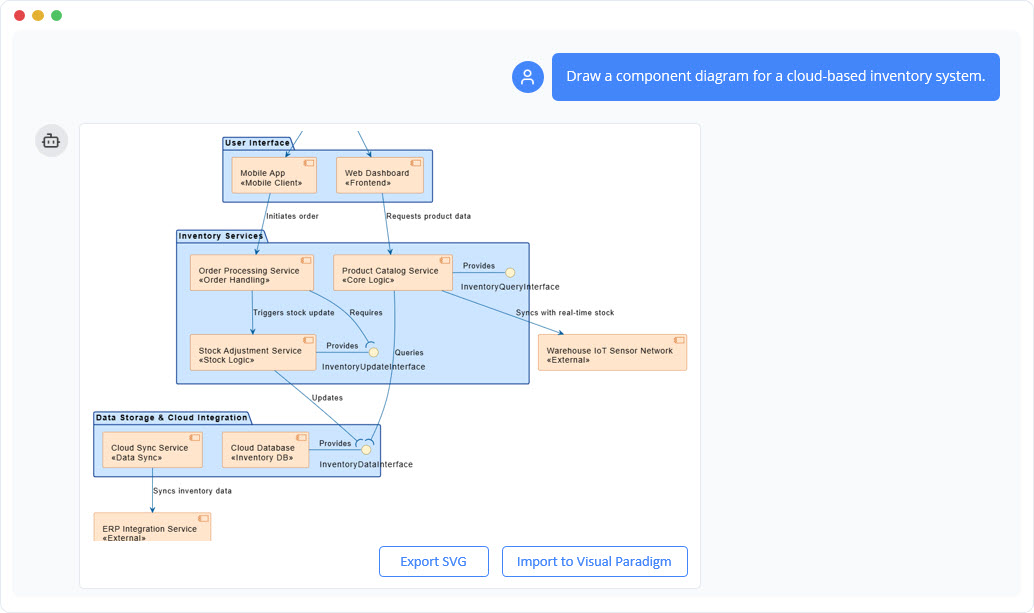
Visual Paradigm Chatbot:
What Is a UML Component Diagram? (And Why It Still Matters)
Before diving into the AI capabilities, let’s ground ourselves in fundamentals. A Component Diagram models the physical aspects of a system, visualizing how a complex application is decomposed into smaller, manageable, and replaceable units—and how those units interact.
In my work refactoring legacy monoliths, these diagrams have been indispensable for creating a shared mental model among developers, architects, and stakeholders. The key elements I rely on:
- Component: A modular, replaceable unit (e.g., a microservice, library, or executable), shown as a rectangle with a two-pronged icon.
- Interface: The contract through which components communicate.
- Provided Interface (“lollipop”): Services a component offers to others.
- Required Interface (“socket”): Services a component depends on.
- Dependency: A dashed arrow indicating that changes in one component may impact another.
- Port: An explicit interaction point on a component’s boundary.
- Assembly Connector: The “wire” linking a required interface to a provided one.
The goal isn’t just documentation—it’s architectural intentionality. And that’s where AI changes the game.
Why I Started Using AI for Component Diagrams
Manually crafting architectural diagrams in fast-moving projects often feels like painting a mural while riding a unicycle. Visual Paradigm’s AI assistant eliminated that friction for me in three tangible ways:
✦ Instant Architecture Generation
Instead of dragging shapes for 20 minutes, I described my system in plain English: “Create a component diagram for an e-commerce platform with User Service, Order Service, Payment Gateway, and Inventory Service.” Within seconds, the AI generated a syntactically correct, visually balanced diagram with proper lollipop/socket notation. The time saved? Roughly 15 minutes per iteration—time I now spend on architectural trade-offs instead of alignment tweaks.
✦ Mastering Notation Without the Memorization
I’ll admit: I’ve mixed up provided vs. required interfaces more than once. The AI handles UML notation flawlessly. I define the contracts; it visualizes them correctly. This reduced review cycles with senior architects and gave junior team members confidence when contributing to design discussions.
✦ Rapid Exploration of Design Alternatives
Good architecture requires evaluating options. With AI, I can now generate side-by-side diagrams for monolithic, microservices, and event-driven patterns in minutes. Asking “Show me how this would look if the Payment Service were externalized” produces an immediate visual comparison—something that previously required hours of manual rework.
Real-World Use Cases: Where Component Diagrams Shine
Through my projects, I’ve found component diagrams most valuable in these scenarios:
- Designing Microservices Architectures: I use them as the “source of truth” for service boundaries and API contracts before any code is written.
- Understanding Legacy Systems: When onboarding to a 10-year-old codebase, modeling its major modules as components gave me—and my team—a high-level map that accelerated refactoring decisions.
- Planning System Evolution: Creating “as-is” and “to-be” diagrams made the impact of extracting a new service from a monolith visually obvious to non-technical stakeholders.
- Documenting Third-Party Integrations: Modeling external systems (like Stripe or Salesforce) through abstract interfaces helped our team design loosely coupled, testable integrations.
How I Generate Component Diagrams with AI: Prompts That Worked for Me
Communicating architectural intent to an AI requires clarity. Here are the prompt patterns I refined through trial and error:
- Basic Structure:
"Create a component diagram with three components: 'User Interface', 'Business Logic', and 'Data Access'." - Adding Dependencies:
"Show a dependency from 'User Interface' to 'Business Logic'." - Defining Interfaces:
"The 'Business Logic' component provides an interface named 'IService'. The 'User Interface' component requires the 'IService' interface." - Connecting Components:
"Connect the required interface of 'User Interface' to the provided interface of 'Business Logic' using an assembly connector." - Requesting Analysis:
"Review this component diagram. Does it follow layered architecture principles? Are there any circular dependencies?"
Pro tip: Start simple, then iteratively refine. The AI responds well to conversational follow-ups like “Now add a caching layer between Business Logic and Data Access.”
My Modern Workflow: Integrating AI Diagramming into Team Practices
Here’s how I’ve embedded AI-powered component diagrams into my team’s routine:
- Live Design Sessions: During architecture meetings, I use the AI chatbot to translate whiteboard sketches into formal diagrams in real-time. This keeps everyone aligned and creates an immediate artifact for documentation.
- The Living Blueprint: We treat the AI-generated component diagram as our project’s architectural “source of truth,” updating it alongside code changes.
- Onboarding Accelerator: New developers review the component diagram before diving into code. It gives them context about system boundaries and data flow that raw code can’t convey.
- Continuous Review: Because updates are so fast, we revisit the diagram during sprint retrospectives to ensure it still reflects our evolving system.
Visual Paradigm’s AI Features: An Honest Assessment
After testing across Desktop, Online, and OpenDocs, here’s my balanced take:
✅ What Impressed Me
- Text-to-Diagram Accuracy: The AI consistently interprets architectural descriptions correctly, even with nuanced requests like “Make the Authentication component expose a REST interface but require a database connection.”
- Conversational Refinement: Being able to say “Rename ‘Data Access’ to ‘Persistence Layer’ and add a Redis cache component” without manual redrawing saved significant iteration time.
- Intelligent Layouts: The AI automatically applies clean spacing, alignment, and UML-compliant notation—no more pixel-pushing.
- Seamless Pro Integration: AI-generated drafts import directly into Visual Paradigm Desktop for advanced tasks like version control, code engineering, and team collaboration.
⚠️ Considerations
- License Requirements: Desktop AI features require a Professional Edition license and an active connection to Visual Paradigm Online.
- Learning Curve for Prompts: While intuitive, crafting precise architectural prompts takes practice. I recommend starting with the example prompts above.
- Complex Systems: For highly intricate architectures with 20+ components, I still find manual refinement necessary for optimal clarity.
How to Access AI Diagramming: My Quick-Start Guide
Depending on your setup, here’s how to get started:
| Edition | Navigation Path |
|---|---|
| Desktop | Tools > AI Diagram Generation > Select “Component Diagram” |
| Visual Paradigm Online | Create with AI > Select AI-assisted generator > Input purpose/scope |
| OpenDocs | Insert > Diagrams > Component Diagram > Create with AI |
Note: Desktop AI features require Professional Edition or higher and an internet connection to Visual Paradigm Online.
Conclusion: AI as an Architectural Co-Pilot, Not a Replacement
After weeks of hands-on use, my verdict is clear: Visual Paradigm’s AI Component Diagram Generator isn’t just a novelty—it’s a genuine productivity multiplier for software architects. It doesn’t replace architectural thinking; it amplifies it. By removing the mechanical friction of diagram creation, it frees me to focus on what matters: designing systems that are modular, maintainable, and resilient.
If you’re evaluating AI tools for architectural design, I recommend starting with a small pilot: model one subsystem of your application using natural language prompts. Measure the time saved, the clarity gained, and the conversations improved. In my experience, the ROI becomes evident within the first few iterations.
The future of software architecture isn’t about choosing between human expertise and AI assistance—it’s about leveraging both. With tools like Visual Paradigm’s AI-powered component diagrams, we can design better systems, faster, and with greater confidence.
References
- Getting Started with AI in Visual Paradigm: Official guide on activating and using AI features across Visual Paradigm products.
- AI Component Diagram Generator Update: Release notes detailing new AI-powered component diagram generation capabilities.
- AI Chatbot for UML Component Diagrams: Interactive AI chatbot interface for generating component diagrams through natural language.
- OpenDocs AI Component Diagram Support: Announcement of AI diagram generation features added to Visual Paradigm OpenDocs.
- What is a Component Diagram? – UML Guide: Comprehensive tutorial explaining component diagram concepts, notation, and best practices.
- AI Diagram Generation Features: Overview of Visual Paradigm’s AI-powered diagram creation tools across multiple modeling standards.
- Visual Paradigm AI Chatbot: Turn Ideas into Diagrams: Blog post showcasing how the AI chatbot transforms textual descriptions into professional diagrams.
- AI Diagram Generator Release: Initial release announcement for the AI diagram generation feature supporting multiple diagram types.
- YouTube: AI Chatbot Demo for Component Diagrams: Video tutorial demonstrating how to use the Visual Paradigm AI Chatbot to create component diagrams.
- Guide to AI-Powered UML Diagram Generation: Step-by-step guide for leveraging AI to generate UML diagrams through conversational prompts.
- Comprehensive Review: Visual Paradigm AI Diagram Features: Third-party review analyzing the capabilities and limitations of Visual Paradigm’s AI diagramming tools.
- Component Diagram Tutorial: Hands-on tutorial for creating component diagrams using Visual Paradigm Online.
- YouTube: Visualize Software Building Blocks with AI: Video demonstration of using AI to instantly generate component diagrams for software architecture.
- YouTube: AI Diagram Generation Walkthrough: Practical walkthrough of the AI diagram generation workflow in Visual Paradigm.
- Free Component Diagram Software: Information about Visual Paradigm’s free tier for creating component diagrams online.
- AI Diagram Generator Supports 13 Diagram Types: Update announcing expanded AI support for multiple diagramming standards including UML, BPMN, and ArchiMate.
- YouTube: AI Chatbot Feature Overview: Video overview of the AI chatbot capabilities for rapid diagram creation and refinement.
This post is also available in Deutsch, Español, فارسی, Français, English, Bahasa Indonesia, 日本語, Polski, Portuguese, Ру́сский, Việt Nam, 简体中文 and 繁體中文.