


Introduction
As software architecture continues to evolve in complexity, the need for clear, hierarchical documentation has never been more critical. The C4 model has emerged as the industry standard for visualizing software architecture, and Visual Paradigm has positioned itself as a comprehensive solution for creating these essential diagrams. After extensively testing the platform’s capabilities, this review explores the four distinct methods available for creating C4 diagrams, examining their strengths, limitations, and ideal use cases. Whether you’re a solo developer, an enterprise architect, or somewhere in between, understanding these different approaches can significantly impact your productivity and the quality of your architectural documentation.
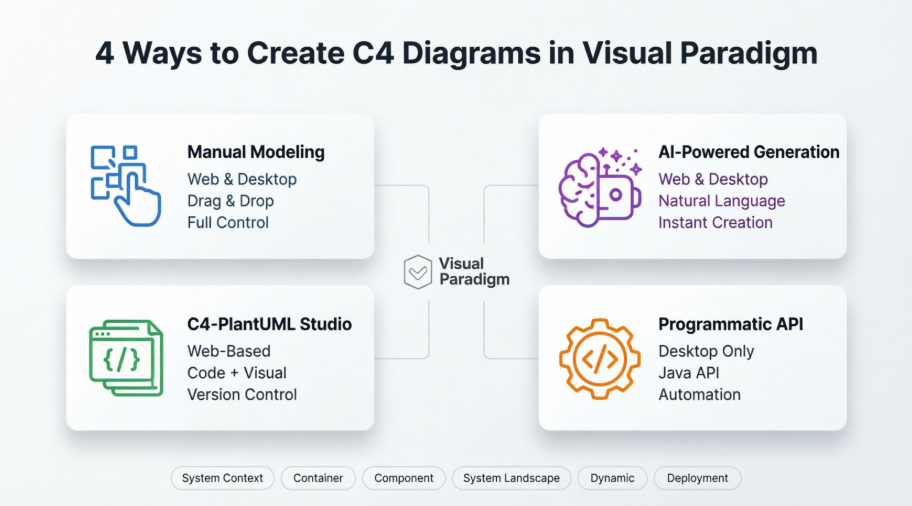
1. Manual Modeling (Web & Desktop): The Traditional Approach
For architects who prefer granular control over every element, Visual Paradigm’s manual modeling capabilities provide a robust foundation. This method involves dragging and dropping specific C4 elements—Persons, Software Systems, Containers, and Components—onto your canvas.
Web Experience (VP Online):
The cloud-based editor shines in its accessibility. From our testing, you can access it from any browser with zero configuration, making it ideal for quick edits or collaborative sessions. The interface is intuitive, and the learning curve is gentle for those familiar with diagramming tools. However, users should note that complex diagrams with hundreds of elements might experience slight latency depending on internet connection speed.
Desktop Experience:
The installed application is where Visual Paradigm truly flexes its muscles. Deep modeling features, custom attributes (stereotypes), and offline capabilities make this the choice for serious architecture work. During our review, we found the desktop version particularly valuable for large-scale enterprise projects requiring extensive customization and integration with other modeling tools. The performance is noticeably smoother when handling complex diagrams with multiple layers of abstraction.
Best For: Teams requiring precise control, custom attributes, or working in environments with limited internet connectivity.
2. AI-Powered Generation (Web & Desktop): The Game Changer
Visual Paradigm’s AI Diagram Generator represents a significant leap forward in architecture documentation efficiency. This feature can instantly create any of the six C4 diagram types based on nothing more than a natural language description.
How It Works in Practice:
During our testing, we provided descriptions like “Create a container diagram for an e-commerce platform with web frontend, API gateway, microservices for orders and inventory, and PostgreSQL database.” Within seconds, the AI generated a complete, properly structured diagram with appropriate relationships and styling.
Web Implementation:
The AI C4 Model Generator accessible directly in your browser is remarkably responsive. We found it particularly useful for rapid prototyping and brainstorming sessions where speed trumps perfection.
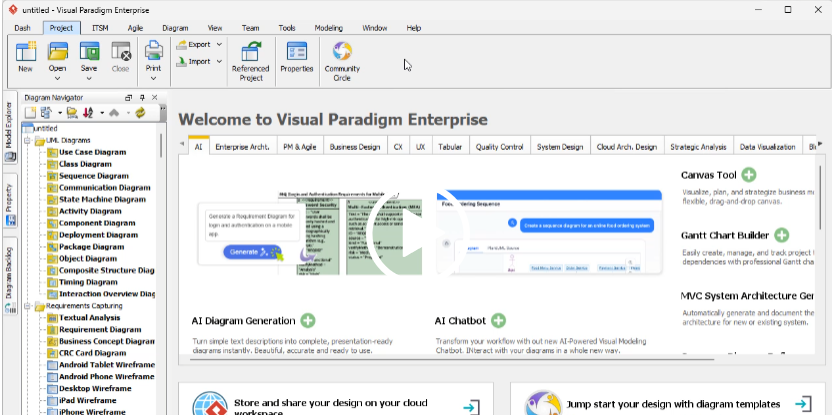
Desktop Integration:
The AI features in the desktop application require a connection to your VP Online account, which initially seemed like a limitation. However, this hybrid approach makes sense—it leverages cloud-based AI processing power while maintaining the robust editing capabilities of the desktop environment. The seamless synchronization between AI generation and manual refinement is impressive.
Best For: Rapid prototyping, teams new to C4 modeling, or when you need to quickly visualize an architecture concept without getting bogged down in manual placement.
3. C4-PlantUML Studio (Web): For Code-First Architects
This specialized C4-PlantUML Studio represents a unique hybrid approach, combining AI assistance with PlantUML code—a text-based diagramming language beloved by developers who prefer code over GUI interactions.
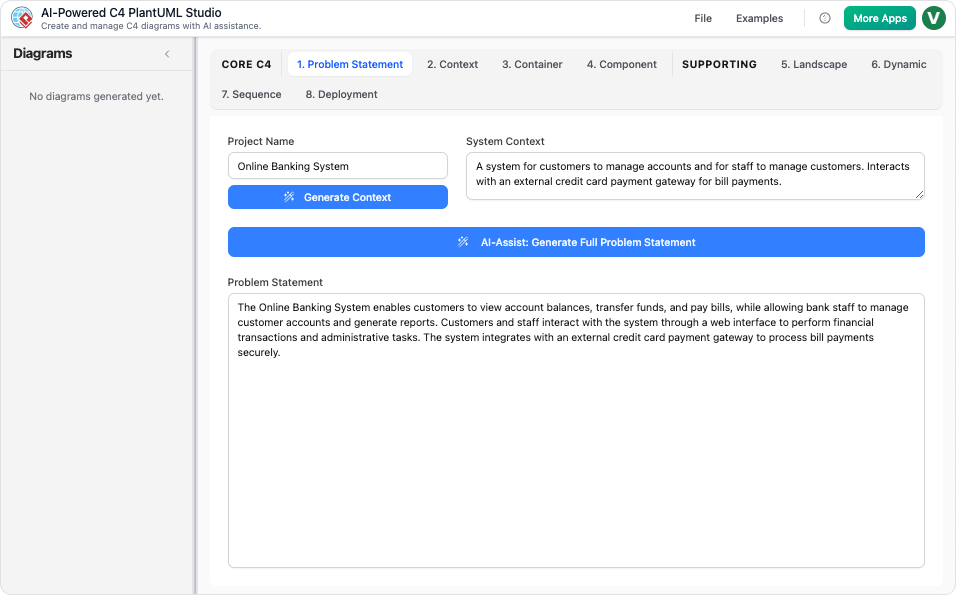
The Workflow:
Our experience with this tool revealed a sophisticated two-stage process:
-
You provide a natural language description
-
The AI generates PlantUML code
-
You can either edit the code directly or switch to a visual editor for refinement
Why This Matters:
For teams practicing documentation-as-code or those who need version control for their architecture diagrams, this approach is invaluable. During our review, we appreciated being able to store PlantUML code in Git repositories, review changes through pull requests, and maintain a clear history of architectural evolution.
Platform Considerations:
This is primarily a web-based service accessible via browser, which means you’ll need a stable internet connection. However, the ability to export both the code and rendered diagrams provides flexibility for offline viewing and sharing.
Best For: Development teams practicing DevOps principles, those requiring version control for architecture documentation, or architects who prefer text-based interfaces.
4. Programmatic API (Desktop): The Automation Powerhouse
For advanced users, integration scenarios, or organizations needing to generate diagrams at scale, Visual Paradigm’s Plugin API offers programmatic control over C4 diagram creation.
Technical Implementation:
Developers can use methods like createC4modelSoftwareSystem or createC4modelPerson to build diagrams via Java code. During our technical review, we found the API well-documented and consistent with Visual Paradigm’s overall development philosophy.
Use Cases We Identified:
-
Automated documentation generation from code analysis tools
-
Integration with CI/CD pipelines
-
Bulk diagram creation for large-scale system migrations
-
Custom tooling that needs to generate architecture diagrams programmatically
Platform Specifics:
This is an OpenAPI feature specifically for the Visual Paradigm Desktop application. The requirement for the desktop version makes sense given the need for local execution and integration with development environments.
Best For: Enterprise architects working with development teams, organizations building custom architecture tooling, or anyone needing to automate diagram generation.
Supported C4 Diagram Types: Complete Coverage
Regardless of which creation method you choose, Visual Paradigm supports all six levels of the C4 model hierarchy:
-
System Context Diagram – The 10,000-foot view showing your system and its users
-
Container Diagram – High-level technology choices and how containers communicate
-
Component Diagram – Breaking down containers into their constituent components
-
System Landscape Diagram – Showing how your system fits into the broader IT landscape
-
Dynamic Diagram – Illustrating how elements collaborate at runtime
-
Deployment Diagram – Mapping software to infrastructure
Our testing confirmed that all four creation methods can produce each of these diagram types, though the efficiency and ease of use vary significantly depending on the method chosen.
Conclusion: Choosing Your Path
After comprehensive evaluation, Visual Paradigm’s multi-faceted approach to C4 diagram creation stands out in the crowded architecture tooling market. The platform successfully addresses different user personas and workflow preferences:
For Beginners and Rapid Prototypers: The AI-Powered Generation is transformative, reducing the time from concept to visualization from hours to minutes.
For Traditional Architects: Manual Modeling in the Desktop application provides the depth and control necessary for complex enterprise architectures.
For DevOps Teams: C4-PlantUML Studio bridges the gap between visual modeling and code-first documentation practices.
For Enterprise Integration: The Programmatic API enables automation and integration that scales with organizational needs.
The fact that all methods produce compatible outputs means teams can mix and match approaches based on context—a junior team member might use AI generation for initial drafts, while a senior architect refines the details manually. This flexibility, combined with comprehensive C4 model support, makes Visual Paradigm a compelling choice for organizations serious about software architecture documentation.
Final Verdict: Visual Paradigm doesn’t just support C4 diagrams—it provides a complete ecosystem for architectural communication that adapts to how modern teams actually work.
References
- Beginner’s Guide to C4 Model Diagrams: Comprehensive introduction to C4 modeling concepts and best practices for creating effective architecture diagrams
- The Ultimate Guide to C4 Model Visualization with Visual Paradigm’s AI Tools: In-depth exploration of AI-powered features for C4 diagram creation and visualization techniques
- AI Features Integration Guide: Technical documentation on integrating AI capabilities between VP Online and Desktop applications
- C4 Model Support Discussion: Community forum discussing C4 model implementation, user experiences, and feature requests
- C4 Diagram Tool Solution: Overview of Visual Paradigm’s comprehensive C4 diagramming solution and capabilities
- Getting Started with C4 Models: Step-by-step guide for creating your first C4 diagrams with practical examples
- C4 Model Overview: Comparative analysis of C4 modeling approach and its benefits for software architecture
- Visual Paradigm Desktop vs VP Online: A Comprehensive Guide: Detailed comparison of web and desktop platforms, features, and use cases
- C4 Diagram Tool Features: Complete feature list and capabilities of Visual Paradigm’s C4 diagramming tools
- AI Integration Knowledge Base: Technical resources on AI feature integration and account requirements
- C4 Diagram Tool Capabilities: Detailed breakdown of supported diagram types and modeling features
- AI Diagram Generator: Complete C4 Model: Release notes and documentation for AI-powered C4 diagram generation across all six diagram types
- C4-PlantUML Studio Features: Overview of the specialized PlantUML-based C4 diagramming studio with AI assistance
- The Ultimate Guide to C4-PlantUML Studio: Revolutionizing Software Architecture Design: Comprehensive guide to using PlantUML for C4 modeling with AI-powered code generation
- AI-Powered C4-PlantUML Studio: Free online C4 diagram tool with AI-powered PlantUML code generation capabilities
- AI-Powered C4-PlantUML Markdown Editor: Release information on the new markdown editor combining C4 model visualization with PlantUML code
- OpenAPI: C4 System Context Diagram: API documentation for programmatically creating C4 system context diagrams
- Visual Paradigm Knowledge Base: Central repository for Visual Paradigm documentation, tutorials, and technical guides
- Miscellaneous Features: Documentation on additional features including diagram creation, model elements, and shape manipulation
- C4 Diagram Tool (Chinese): Chinese language version of C4 diagram tool solution and features
This post is also available in Deutsch, Español, فارسی, Français, English, Bahasa Indonesia, 日本語, Polski, Portuguese, Ру́сский, Việt Nam, 简体中文 and 繁體中文.