


Introduction
Business Process Model and Notation (BPMN) has become the gold standard for visualizing business processes. Yet, despite its widespread adoption, many organizations struggle with models that are confusing, incomplete, or outright misleading. Poor BPMN modeling doesn’t just create documentation headaches—it leads to miscommunication between stakeholders, flawed automation implementations, and costly rework.
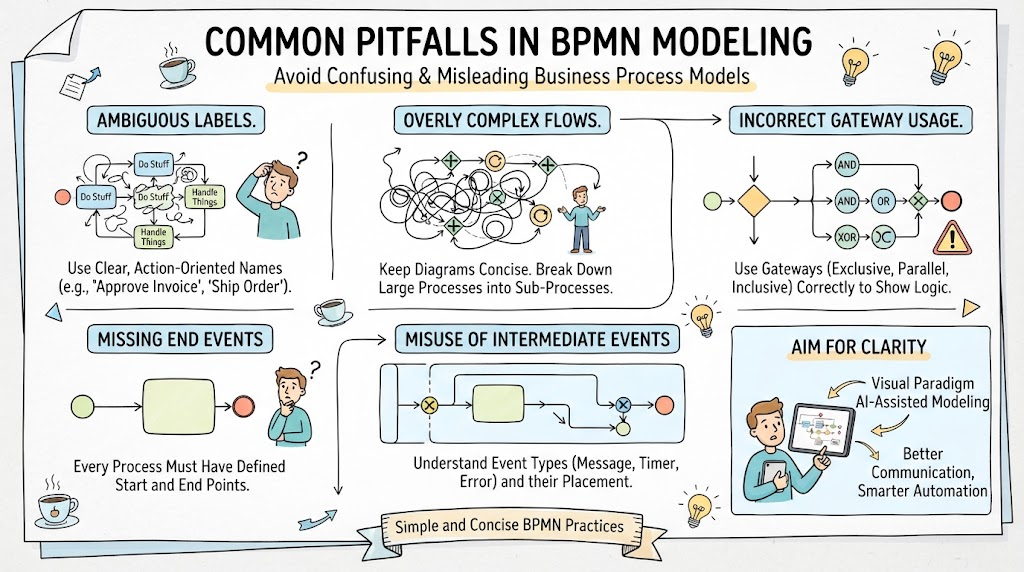
Whether you’re a business analyst, process owner, or product manager like yourself, Angus, understanding these common pitfalls is crucial. With tools like Visual Paradigm now offering AI-assisted modeling capabilities, we have powerful resources at our disposal—but only if we know what mistakes to avoid in the first place.
This guide breaks down the seven most frequent BPMN modeling errors, explains why they matter, and shows you how to leverage modern tooling to create clear, actionable process diagrams.
Key Concepts Before We Begin
What Makes a Good BPMN Model?
-
Clarity: Anyone familiar with BPMN should understand the flow without extensive explanation
-
Completeness: All paths, exceptions, and decision points are accounted for
-
Correctness: Proper use of BPMN elements according to OMG specifications
-
Purpose-driven: The level of detail matches the intended audience and use case
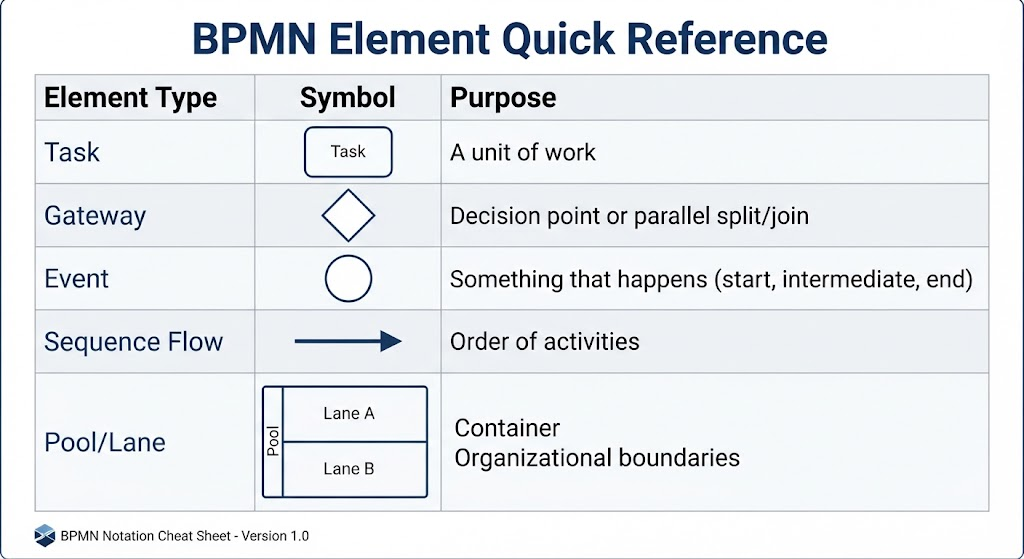
BPMN Element Quick Reference
Mistake #1: Overcomplicating with Excessive Detail
The Problem
Trying to capture every single step, exception, and edge case in one diagram creates an unreadable mess. I’ve seen BPMN diagrams with 80+ elements that look more like subway maps than process flows.
Why It Matters
-
Stakeholders lose interest
-
Critical path becomes obscured
-
Maintenance becomes nearly impossible
Example
❌ Bad Approach: A “Customer Onboarding” diagram that includes every field validation, database query, email template variation, and error message logic.
✅ Better Approach: Create a high-level process showing major phases (Application → Verification → Approval → Activation), then drill into sub-processes for complex stages.
How Visual Paradigm + AI Helps
Use hierarchical modeling in Visual Paradigm:
-
Create your top-level process
-
Right-click complex tasks → “Create Sub-Process”
-
Use AI-assisted suggestions to identify natural decomposition points based on task clustering
Mistake #2: Misusing Gateways
The Problem
Gateways control the flow of tokens through the process, but modelers frequently confuse:
-
Exclusive Gateway (XOR) vs. Parallel Gateway (AND)
-
Event-based Gateway vs. Decision-based Gateway
Why It Matters
Incorrect gateway usage leads to fundamentally wrong process logic—parallel tasks shown as mutually exclusive choices, or vice versa.
Example
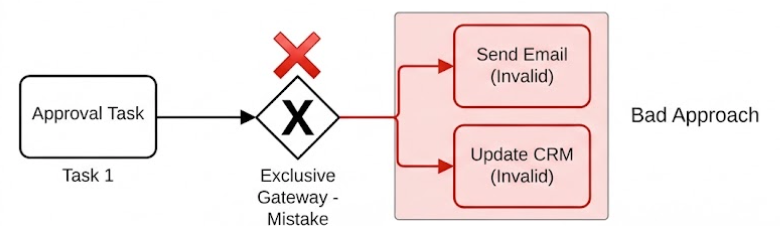
❌ Bad Approach: Using an Exclusive Gateway when both “Send Confirmation Email” AND “Update CRM” should happen simultaneously after approval.
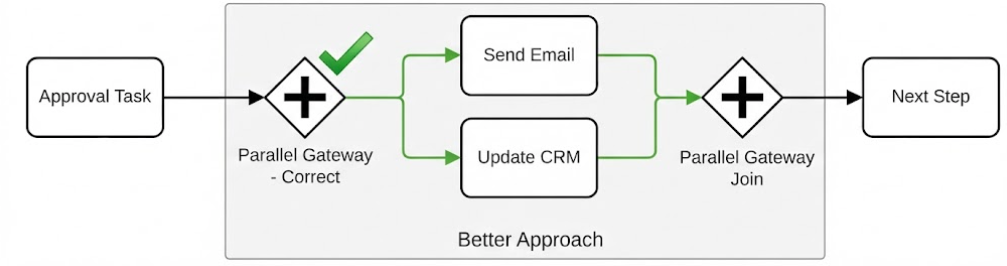
✅ Better Approach: Use a Parallel Gateway to split into two concurrent flows, then join them before proceeding.
How Visual Paradigm + AI Helps
Visual Paradigm’s gateway validation flags potential misuse. The AI assistant can analyze your flow patterns and suggest: “This looks like parallel execution rather than exclusive choice. Would you like to convert this gateway?”
Mistake #3: Ignoring Exception Flows
The Problem
Happy-path modeling dominates, leaving error handling, timeouts, cancellations, and escalations completely undocumented.
Why It Matters
-
Real-world processes fail regularly
-
Automation implementations crash without error handling
-
Support teams lack guidance for exception scenarios
Example
❌ Bad Approach: A payment processing flow that only shows successful transactions.
✅ Better Approach: Include boundary events for:
-
Payment timeout (Timer Event)
-
Insufficient funds (Error Event)
-
Customer cancellation (Message Event)
How Visual Paradigm + AI Helps
Use AI-powered gap analysis:
-
Complete your happy path
-
Ask the AI assistant: “What exception scenarios should I consider for this payment process?”
-
Visual Paradigm suggests common boundary events and compensation handlers based on industry patterns
Mistake #4: Pool and Lane Confusion
The Problem
Modelers either:
-
Put everything in one pool (losing organizational context)
-
Create excessive pools for minor role distinctions
-
Misunderstand message flows between pools vs. sequence flows within pools
Why It Matters
-
Cross-functional handoffs become unclear
-
Responsibility assignments are ambiguous
-
Message exchange protocols are incorrectly modeled
Example
❌ Bad Approach: Showing “Sales Team” and “Marketing Team” as separate pools when they’re part of the same organization and share the same system.
✅ Better Approach: Use lanes within a single pool for different roles/departments. Reserve separate pools for external entities (Customer, Vendor, Partner System).
Key Rule:
-
Sequence Flow = within the same pool
-
Message Flow = between different pools (dashed line)
How Visual Paradigm + AI Helps
Visual Paradigm enforces BPMN rules automatically:
-
Prevents sequence flows between pools
-
Suggests lane structures based on task ownership analysis
-
AI can recommend: “These tasks appear to belong to different departments. Consider organizing them into lanes.”
Mistake #5: Ambiguous or Missing Data Objects
The Problem
Processes manipulate data, but models often show activities without indicating what information is created, consumed, or transformed.
Why It Matters
-
System integration requirements are unclear
-
Data governance gaps emerge
-
Automation developers guess at input/output specifications
Example
❌ Bad Approach: A “Generate Report” task with no indication of what data it needs or what format the output takes.
✅ Better Approach: Attach data objects showing:
-
Input: Sales Database, Date Range Parameter
-
Output: PDF Report, Excel Export
How Visual Paradigm + AI Helps
Use data object association:
-
Select a task
-
Use AI assistant: “What data inputs and outputs are typical for this activity?”
-
Visual Paradigm suggests standard data objects from its library
-
Drag-and-drop to associate with tasks using dashed associations
Mistake #6: Inconsistent Granularity
The Problem
Mixing high-level strategic activities with low-level technical steps in the same diagram creates cognitive whiplash for readers.
Why It Matters
-
Audience confusion (executives vs. developers need different views)
-
Difficult to validate process logic
-
Hard to identify improvement opportunities at the right level
Example
❌ Bad Approach: A single diagram containing both “Develop Product Strategy” (strategic) and “Click Submit Button” (tactical).
✅ Better Approach: Maintain consistent abstraction levels:
-
Level 1: Strategic value chain (5-7 major phases)
-
Level 2: Departmental processes (10-20 activities)
-
Level 3: Detailed work instructions (task-level steps)
How Visual Paradigm + AI Helps
Leverage multi-level modeling:
-
Create your Level 2 process
-
Use AI to identify tasks that could be decomposed further
-
Generate Level 3 sub-processes automatically with suggested task breakdowns
-
Navigate between levels seamlessly using Visual Paradigm’s hierarchy view
Mistake #7: Neglecting Process Performance Metrics
The Problem
BPMN models describe what happens but rarely indicate how well it should happen. Without performance expectations, there’s no baseline for improvement.
Why It Matters
-
Can’t measure process efficiency
-
Improvement initiatives lack targets
-
Bottlenecks remain invisible
Example
❌ Bad Approach: A customer service process with no indication of expected response times, resolution rates, or quality thresholds.
✅ Better Approach: Annotate key activities with:
-
Service Level Agreements (SLAs)
-
Expected duration ranges
-
Quality checkpoints
How Visual Paradigm + AI Helps
Add process annotations and use AI insights:
-
Right-click on critical path activities
-
Ask AI: “What are industry-standard SLAs for this type of activity?”
-
Add text annotations with performance targets
-
Use Visual Paradigm’s simulation features to test if your design meets those targets
Best Practices Summary
| Practice | Tool Feature | Benefit |
|---|---|---|
| Start simple, then elaborate | Hierarchical sub-processes | Maintains clarity while allowing depth |
| Validate gateway logic | AI-assisted pattern detection | Catches logical errors early |
| Model exceptions explicitly | Boundary event suggestions | Ensures robust process design |
| Organize by responsibility | Lane/pool enforcement | Clarifies accountability |
| Document data flows | Data object library | Supports system integration |
| Maintain consistent granularity | Multi-level navigation | Serves different stakeholder needs |
| Include performance targets | Annotation + simulation | Enables continuous improvement |
Leveraging Visual Paradigm’s AI Capabilities
Getting Started with AI-Assisted Modeling
-
Natural Language to BPMN: Describe your process in plain English, and let AI generate an initial draft
-
“Create a BPMN diagram for employee expense approval with three levels of management review”
-
-
Intelligent Suggestions: As you model, the AI watches for:
-
Missing exception paths
-
Potential gateway misuses
-
Opportunities for sub-process decomposition
-
Standard patterns from similar industries
-
-
Automated Validation: Real-time checking against BPMN 2.0 specification rules prevents common syntax errors
-
Pattern Recognition: AI identifies when your process resembles known templates (order-to-cash, hire-to-retire, etc.) and suggests best-practice enhancements
Pro Tip for Product Managers
Given your background in product management, Angus, think of BPMN modeling like user story mapping:
-
Start with the backbone (happy path)
-
Add flesh (exception handling, variations)
-
Validate with stakeholders (just like story refinement)
-
Iterate based on feedback (continuous improvement)
Conclusion
BPMN is a powerful language, but like any language, fluency requires practice and awareness of common pitfalls. The seven mistakes outlined in this guide represent the difference between diagrams that gather dust and diagrams that drive real business value.
The good news? Modern tools like Visual Paradigm with AI assistance make it easier than ever to avoid these traps. Rather than memorizing every BPMN rule, you can focus on understanding your process deeply while letting the tool handle syntax validation, pattern recognition, and best-practice suggestions.
Remember: A perfect BPMN diagram is not the goal—a useful one is. Start with clarity, iterate based on stakeholder feedback, and don’t be afraid to create multiple views for different audiences. Your processes (and your colleagues) will thank you.
Quick Reference Checklist
Before finalizing any BPMN diagram, ask:
-
Is the level of detail appropriate for my audience?
-
Are all gateways correctly typed (XOR vs. AND)?
-
Have I modeled key exception scenarios?
-
Are pools and lanes used correctly to show organizational boundaries?
-
Are critical data inputs/outputs documented?
-
Is granularity consistent throughout the diagram?
-
Have I included performance expectations where relevant?
-
Can someone unfamiliar with the process understand the flow?
Ready to level up your BPMN skills? Start with one current process, apply these principles, and use Visual Paradigm’s AI features to catch what you might miss. Share your improved diagram with stakeholders and watch comprehension—and buy-in—increase dramatically.
This post is also available in Deutsch, Español, فارسی, Français, English, Bahasa Indonesia, 日本語, Polski, Portuguese, Ру́сский, Việt Nam, 简体中文 and 繁體中文.