


Business Process Model and Notation (BPMN) serves as the universal language for defining workflows. When these diagrams reach the final stage of development, they are prepared for handoff to development teams, process owners, or automation platforms. A diagram that looks correct visually may fail logically during execution. The validation phase is not merely a formality; it is a critical control point that ensures the integrity of the business logic.
This guide provides a rigorous framework for reviewing BPMN models. We focus on structural integrity, logical flow, and semantic clarity without relying on specific vendor tools. The objective is to produce models that are robust, executable, and unambiguous.
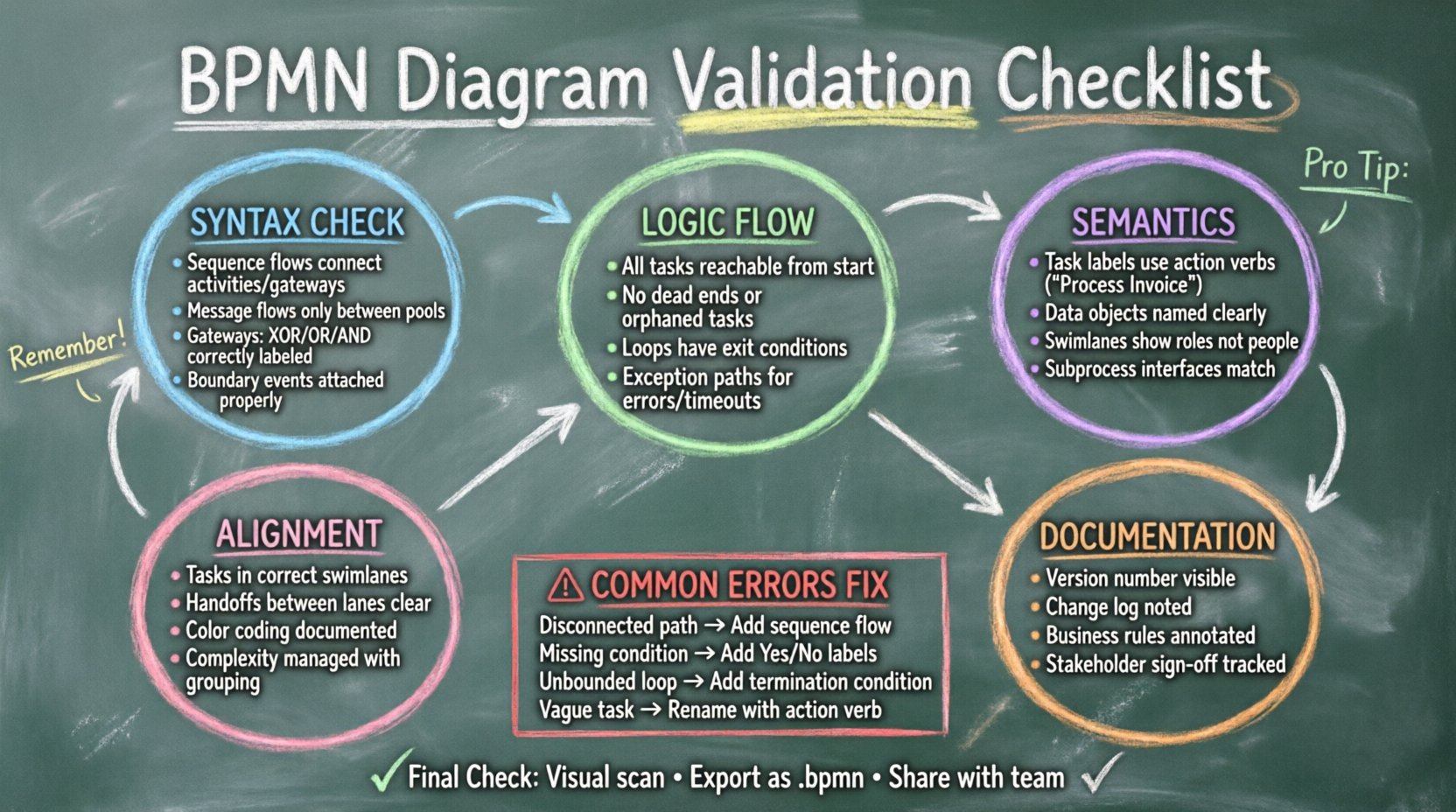
🛑 Why Validation Matters Before Handoff
Errors in process modeling propagate downstream. A missing gateway can cause a workflow to hang indefinitely. An incorrectly defined data object can lead to system integration failures. A mislabeled task can confuse the users who execute the process. Validation acts as a quality gate.
Skipping this step often results in:
- Rework Costs: Developers must stop and ask for clarifications, delaying the project timeline.
- Operational Risk: A flawed process might execute incorrectly in production, causing financial loss or compliance breaches.
- Loss of Trust: Stakeholders lose confidence in the modeling team if diagrams frequently break during implementation.
By adhering to a structured validation checklist, you ensure that the model represents the actual business reality and the technical requirements.
🧩 Part 1: Syntax and Notation Compliance
The foundation of any valid BPMN diagram is strict adherence to the BPMN 2.0 specification. Even if a model makes sense to a human reader, the execution engine relies on formal rules. Deviations here can render the diagram invalid.
1. Element Connectivity Rules
Connectivity errors are the most common syntax mistakes. Ensure every element follows the standard flow of control:
- Sequence Flows: Must only connect activities, gateways, or events. Do not connect events to gateways directly unless specified by the standard.
- Message Flows: Must only occur between pools or between participants in different lanes. A message flow cannot exist within a single pool.
- Association Flows: These should link text annotations, data objects, or icons to process elements. They do not control flow.
2. Gateway Definitions
Gateways control the branching and merging of paths. Incorrect usage leads to logic errors:
- Exclusive Gateways (XOR): Use when only one path is taken. Ensure all incoming paths have a single exit unless it is the start of a loop.
- Inclusive Gateways (OR): Use when one or more paths may be taken. Every path leaving an inclusive gateway must have a condition, and the default path must be clearly defined.
- Parallel Gateways (AND): Use for splitting and joining concurrent flows. A parallel split must be matched by a parallel join to ensure all branches converge before proceeding.
- Event-Based Gateways: These are used for waiting on an event. Ensure the conditions for branching are mutually exclusive or time-based as intended.
3. Event Boundaries
Events attached to tasks or subprocesses alter behavior. Check the following:
- Interrupting Events: If an error event is attached to a task, the task stops when the event triggers. Ensure this aligns with the business requirement.
- Non-Interrupting Events: If an intermediate catch event is used, the original task continues. Verify that this parallel behavior is desired.
- Boundary Events: Ensure they are attached to the correct activity. A boundary event on a subprocess should only catch errors relevant to the internal logic of that subprocess.
🔄 Part 2: Logic and Flow Verification
Once the syntax is clean, the logic must be tested mentally. This involves tracing paths to ensure the process can reach a termination point without getting stuck.
1. Reachability Analysis
Every element in the diagram should be reachable from the start event. Conversely, every element should be able to reach an end event. Look for:
- Orphaned Tasks: Tasks that have no incoming sequence flow.
- Dead Ends: Tasks that have no outgoing sequence flow and are not followed by an end event.
- Unreachable Gateways: Gateways that can never be activated because the incoming conditions are never met.
2. Loop and Cycle Detection
Loops are necessary for rework or retries, but they must be bounded:
- Finite Loops: Does the loop guarantee termination? If a task is repeated based on a decision, ensure there is a condition that eventually leads to “True” and exits the loop.
- Infinite Loops: Avoid scenarios where a process can cycle indefinitely without external intervention. This causes system timeouts.
- Self-Loops: If a task loops back to itself, ensure there is a distinct exit path for the “Success” scenario.
3. Exception Handling
Processes rarely run smoothly. The model must account for failures:
- Error Events: Are there paths for when a task fails? For example, if a payment gateway times out, is there a retry logic or an escalation path?
- Timeouts: Does the process handle delays? If a user does not respond within 3 days, does the process escalate automatically?
- Compensating Transactions: If a subprocess is rolled back, are there steps to undo the work done in previous steps?
🧠 Part 3: Semantic Accuracy and Business Rules
Syntax ensures the diagram runs. Semantics ensure the diagram means the right thing. This section focuses on the business context embedded in the model.
1. Naming Conventions
Clarity is paramount. Labels should be consistent and specific:
- Task Labels: Use action verbs. Instead of “Invoice,” use “Process Invoice.” Instead of “Review,” use “Review Application.” The label should describe the activity, not the noun.
- Data Objects: Names should reflect the data structure. Use standard business terms like “Customer Record” or “Order Details.” Avoid technical abbreviations like “DB_Ref” unless universally understood.
- Lanes and Pools: Lane names should represent roles or departments (e.g., “Finance Team,” “Customer Service”), not specific individuals.
2. Data Objects and Inputs
The flow of information is as important as the flow of control:
- Input Data: Does every task have the necessary information to execute? If a task requires a “Credit Score,” is there a preceding task that generates or retrieves this score?
- Output Data: What does the task produce? Ensure data is passed to the next step or stored appropriately.
- Data Consistency: Does the data object change state correctly? If a document moves from “Draft” to “Approved,” is this state change represented in the model?
3. Subprocess Depth
Complex processes are often broken down into subprocesses. Check the following:
- Abbreviated View: Does the collapsed subprocess accurately represent the complexity of the main diagram? If the main diagram is high-level, the subprocess should be detailed.
- Interface Consistency: Does the subprocess accept the same inputs and outputs as the expanded view? The internal logic should not require data that the parent process does not provide.
- Event Propagation: If an event triggers the subprocess, does the parent process wait for the subprocess to complete? Ensure synchronization is correct.
📄 Part 4: Documentation and Metadata
A diagram is a living document. It requires metadata to be maintained over time. Without context, the diagram becomes obsolete quickly.
1. Version Control
Every diagram must have a version identifier. This allows teams to track changes:
- Version Number: Clearly display the version (e.g., v1.2, v2.0) in the diagram header or title.
- Change Log: Include a text annotation or external document listing what changed from the previous version. What was added? What was removed?
- Date Stamp: Record the date of the last review.
2. Annotations and Notes
Not everything fits into the standard flow. Use annotations to clarify:
- Business Rules: Explain complex logic that cannot be modeled with gateways. For example, “Approval is required if the amount exceeds $10,000.”
- Constraints: Note any time limits or regulatory requirements.
- Assumptions: Document assumptions made during modeling. If you assumed a specific system is available, note that.
3. Stakeholder Sign-off
Validation is not just technical; it is social:
- Owner Verification: The business process owner must sign off on the logic.
- Technical Review: The IT lead must verify that the logic is implementable.
- Compliance Check: Ensure the process meets internal policies and external regulations.
🤝 Part 5: Stakeholder Alignment and Context
The final stage of validation is ensuring the model aligns with the people who will use or build it.
1. Role Clarity
Confusion between roles leads to operational bottlenecks:
- Swimlanes: Are tasks assigned to the correct swimlane? Ensure no task is left without an owner.
- Cross-Functional Handoffs: When a process moves from one lane to another, is the handoff clear? Does the receiving party have the necessary data?
2. Complexity Management
Avoid cluttering the diagram:
- Grouping: Use groups to logically cluster related tasks without creating a subprocess boundary.
- Color Coding: Use colors to distinguish between different types of processes (e.g., operational vs. strategic), but ensure the meaning is documented.
- Zoom Levels: For very large processes, consider creating multiple diagrams (Overview, Detail, Exception) rather than one massive sheet.
📊 Common BPMN Errors and Corrections
The following table summarizes frequent validation failures and how to resolve them.
| Error Type | Description | Correction Action |
|---|---|---|
| Disconnected Path | A task has no incoming flow. | Trace back from the task to the start event. Add a sequence flow. |
| Orphaned Gateway | A gateway has no outgoing paths. | Ensure every gateway connects to at least one task or event. |
| Missing Condition | An Exclusive Gateway has no conditions on outgoing flows. | Add boolean expressions (e.g., “Yes/No”) to every path. |
| Message Flow in Pool | A message flow exists inside a single pool. | Convert to sequence flow or move to a different pool. |
| Unbounded Loop | A process can loop indefinitely. | Add a counter or a termination condition to the gateway. |
| Task Ambiguity | Task label is vague (e.g., “Do it”). | Rename task to describe the action (e.g., “Submit Form”). |
| Data Mismatch | Data object required but not produced. | Add a preceding task to generate the required data object. |
🏁 Finalizing the Model for Production
Once the checklist is complete, the model is ready for the next phase. This phase involves exporting the model into the execution environment or handing it over to the development team.
1. Final Review Pass
Conduct a final visual scan. Does the diagram look balanced? Are the lines crossing unnecessarily? While aesthetics do not affect execution, a clean diagram reduces cognitive load for reviewers.
2. Export and Storage
Save the diagram in a standard format (e.g., .bpmn or .xml). Store it in a version-controlled repository. Ensure the file name matches the project naming convention.
3. Communication Plan
Inform stakeholders that the model is finalized. Provide a brief summary of the key changes or improvements made during the validation phase. This closes the loop on the modeling effort.
📝 Summary of Validation Steps
To ensure a high-quality BPMN model, follow these core steps:
- Verify Syntax: Check connectivity, gateways, and event boundaries.
- Trace Logic: Ensure reachability and proper termination.
- Check Semantics: Validate naming, data objects, and subprocess depth.
- Document Metadata: Add versioning, change logs, and annotations.
- Align Roles: Confirm swimlanes and stakeholder understanding.
By treating validation as an integral part of the modeling process rather than an afterthought, you build a foundation for successful automation and efficient business operations. The time invested in this checklist pays dividends in reduced errors and smoother implementation.
This post is also available in Deutsch, Español, فارسی, Français, English, Bahasa Indonesia, 日本語, Polski, Portuguese, Ру́сский, Việt Nam, 简体中文 and 繁體中文.