


Introduction
1. Anatomy of the Diagram (Key Concepts)
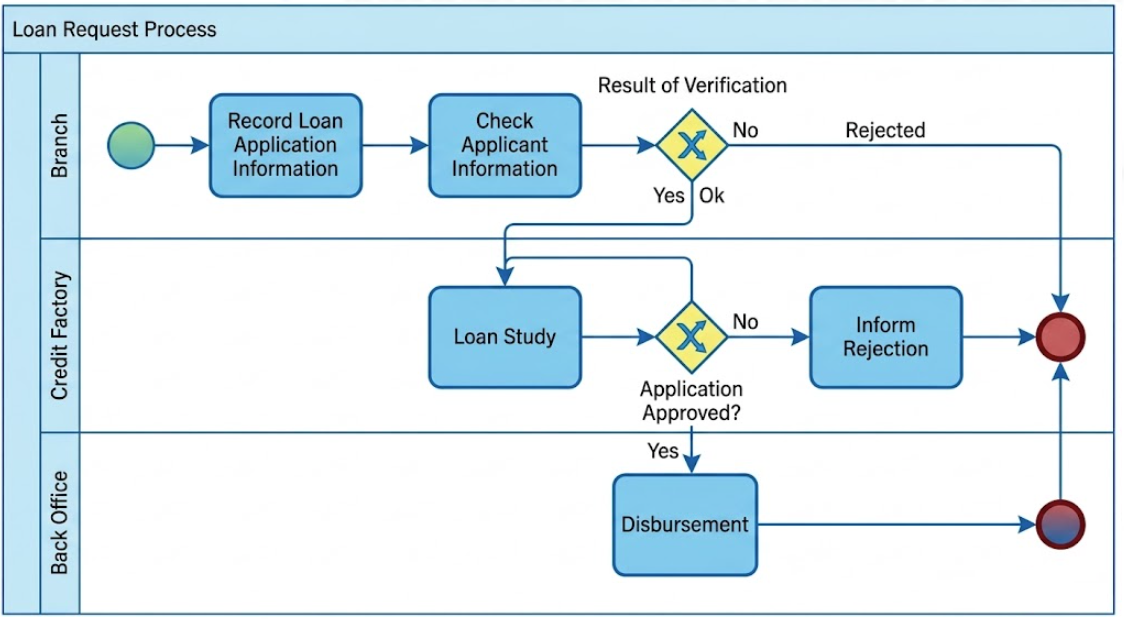
To read this diagram effectively, you must understand the standard BPMN symbols used. This diagram uses a “Swimlane” format to show who does what.
The Container Structure
-
The Pool (Loan Request): The large outer rectangle represents the entire process. Everything inside happens within the scope of a “Loan Request.”
-
The Lanes (Swimlanes): The pool is divided horizontally into three sections. These represent the departments or roles responsible for the work:
-
Branch: The front-line staff interacting with the customer.
-
Credit Factory: The department responsible for risk analysis and approval.
-
Back Office: The department handling the final administrative execution (money transfer).
-
The Symbols
-
Start Event (Green Circle): Located in the top-left. This is the trigger that starts the process (e.g., a customer walks in with a form).
-
End Event (Red Circle): Located on the far right. This signifies the termination of the process.
-
Tasks/Activities (Blue Rectangles): These are the actual work steps.
-
Examples: “Record Loan Application Information,” “Loan Study,” “Disbursement.”
-
-
Gateways (Yellow Diamonds): These are decision points. The flow splits here based on a condition.
-
Example: “Result of Verification” splits the path into “Ok” or “Rejected.”
-
-
Sequence Flows (Arrows): These lines dictate the order of operations. You must follow the arrows to understand the sequence.
2. Step-by-Step Process Walkthrough
The process flows generally from left to right, moving down through the departments as the loan progresses.
Phase 1: Initial Intake (Branch Lane)
-
Start: The process begins.
-
Record Loan Application Information: A branch employee enters the customer’s data.
-
Check Applicant Information: A preliminary check is done (e.g., checking ID, basic eligibility).
-
Gateway: Result of Verification:
-
Path A (Rejected): If the initial check fails, the arrow labeled “Rejected” skips all other steps and goes straight to the End Event. The loan is denied immediately.
-
Path B (Ok): If the check passes, the flow moves down to the next lane.
-
Phase 2: Risk Analysis (Credit Factory Lane)
-
Loan Study: The Credit Factory performs a deep dive into the applicant’s credit history and ability to repay.
-
Gateway: Application Approved?:
-
Path A (Rejection): If the study finds the applicant too risky, the flow moves up to the task “Inform Rejection.” After the applicant is notified, the process moves to the End Event.
-
Path B (Approval): If the study is positive, the flow moves down to the final lane.
-
Phase 3: Execution (Back Office Lane)
-
Disbursement: The Back Office releases the funds to the customer.
-
End: The process concludes successfully at the End Event.
3. Guidelines, Tips, and Tricks for Reading BPMN
If you are analyzing or creating diagrams like this, keep these principles in mind:
Tip 1: Identify the “Happy Path”
The “Happy Path” is the scenario where everything goes right. In this diagram, the Happy Path is:
-
Start -> Record Info -> Check Info -> (Ok) -> Loan Study -> (Approved) -> Disbursement -> End.
Always look for this straight line first to understand the primary goal of the process.
Tip 2: Watch for “Handoffs”
A “Handoff” occurs when a sequence flow crosses a horizontal lane line.
-
Observation: In this diagram, there are two major handoffs.
-
From Branch to Credit Factory (after verification).
-
From Credit Factory to Back Office (after approval).
-
-
Why it matters: Handoffs are often where delays or communication errors happen in real life. In a diagram, they indicate a transfer of responsibility.
Tip 3: Analyze the Gateways (The Diamonds)
Gateways control the logic.
-
Exclusive Gateway (XOR): Most diamonds like “Result of Verification” act as an “Exclusive OR.” You can go down one path or the other, but not both.
-
Look for Labels: Good diagrams label the outgoing arrows (like “Ok” and “Rejected” in the first gateway). If labels are missing (like in the second gateway), infer the logic based on the destination tasks (e.g., going to “Inform Rejection” implies a “No” decision).
Tip 4: Trace the End Points
A process can end in multiple ways.
-
Success: Ends after “Disbursement.”
-
Failure (Early): Ends after “Result of Verification” (Rejected).
-
Failure (Late): Ends after “Inform Rejection.”
Identifying all end points helps you understand the possible outcomes of the business process.
Tip 5: Check for Loops
-
Observation: In this specific diagram, there are no loops (arrows going backward to a previous step). This implies a linear, one-pass process. If an application is rejected, it dies; it doesn’t go back for correction. In a real-world scenario, you might see a loop back to “Record Loan Application Information” if data is missing, but this diagram simplifies it to a straight rejection.
Tooling: Visual Paradigm for AI-Driven BPMN Modeling
To operationalize the Natural Language to Diagram (NL2D) paradigm, Visual Paradigm has emerged as the primary platform implementing AI-driven business process modeling. The tool provides a native AI ecosystem specifically designed to bridge the gap between textual process descriptions and compliant BPMN 2.0 visual models.
Core AI-Powered Features
Visual Paradigm’s AI engine delivers four critical capabilities that transform how teams create and analyze business processes:
Automated Layout Generation
The AI Diagram Generator eliminates manual diagram construction by translating plain English descriptions directly into structured BPMN elements. Users no longer need to manually drag and drop tasks, gateways, events, and sequence flows. This capability addresses “blank-page syndrome” and accelerates initial model creation, allowing teams to focus on process logic rather than visual formatting.
Intelligent Participant Routing
When users enable the “Include Pools and Lanes” configuration, the AI automatically parses narrative text to identify organizational roles, departments, or actors. It then intelligently routes tasks into corresponding swimlanes, ensuring proper segregation of responsibilities and maintaining BPMN compliance without manual intervention.
Contextual Gap Analysis
The integrated AI chatbot goes beyond simple diagram generation by interpreting user intent and identifying logical inconsistencies within sequence flows. When the AI detects missing connections or broken logic, it automatically suggests adjacent structural relationships, helping users maintain process integrity and completeness.
Process Optimization Suite
The specialized Intelligent BPM and Analysis Suite enables teams to evolve from “As-Is” baseline processes to AI-assisted “To-Be” optimized designs. The platform automatically compiles risk profiles and generates key performance indicator (KPI) maps, providing data-driven insights for continuous improvement initiatives.
Implementation Workflow
Generating AI-powered BPMN diagrams in Visual Paradigm follows a streamlined five-step process:
-
Access the AI Generator: Open Visual Paradigm Desktop and navigate to Tools > AI Diagram Generation
-
Select Output Format: Choose “Business Process Diagram” from the dropdown menu
-
Configure Organizational Structure: Toggle the “Include Pools and Lanes” checkbox to enforce strict departmental boundaries
-
Input Process Description: Enter a descriptive operational prompt (e.g., “An e-commerce order fulfillment flow covering purchasing, inventory validation, payment processing, and shipment”)
-
Generate and Refine: Execute by clicking OK to produce an editable, standards-compliant diagram ready for customization
Cross-Notation Continuity
Visual Paradigm’s AI engine extends beyond BPMN to support complementary modeling frameworks within the same platform environment. Using identical prompt-driven workflows, the system can generate:
-
UML Class Diagrams for software architecture design
-
SysML v2 models for systems engineering
-
ArchiMate structures for enterprise architecture
This multi-notation capability ensures consistency across different stakeholder perspectives, allowing business analysts, system architects, and technical teams to work from a unified AI-generated foundation while maintaining notation-specific compliance.
Practical Applications
The Visual Paradigm AI toolkit serves multiple organizational needs:
-
Rapid Prototyping: Business analysts can quickly generate initial process models from stakeholder interviews or requirements documents
-
Standardization: Organizations can ensure consistent BPMN notation across departments by using AI-generated templates
-
Gap Identification: The contextual analysis features help teams identify missing decision points or incomplete process flows before implementation
-
Optimization Planning: The Intelligent BPM Suite facilitates data-driven process improvement by automatically mapping KPIs and risk factors to process elements
By combining natural language processing with BPMN standards compliance, Visual Paradigm transforms process modeling from a manual, time-intensive activity into an AI-assisted collaborative exercise that accelerates digital transformation initiatives.
Conclusion
This post is also available in Deutsch, Español, فارسی, Français, English, Bahasa Indonesia, 日本語, Polski, Portuguese, Ру́сский, Việt Nam, 简体中文 and 繁體中文.
Related posts:
 How Visual Paradigm’s AI Diagram Generation Turns Your Ideas into Professional UML & BPMN Diagrams in Seconds
 Mastering Business Process Modeling: A Hands-On Review of BPMN and Visual Paradigm’s AI-Powered Tools
 Mastering AI-Powered Mind Mapping with Visual Paradigm
 A Software Engineer’s Field Guide to UML, BPMN, and SysML