


Enterprise Architecture (EA) is a discipline that requires precision, clarity, and a structured approach to understanding complex organizations. ArchiMate serves as the standard language for describing, analyzing, and visualizing these architectures. However, adopting this modeling language comes with a steep learning curve. Many practitioners stumble over common errors that compromise the integrity of their models.
This guide addresses the specific pitfalls frequently encountered by those new to ArchiMate. By identifying these traps early, you can ensure your models remain accurate, maintainable, and useful for decision-making. We will explore layering, relationships, motivation, and scope management without relying on specific tooling or software vendors.
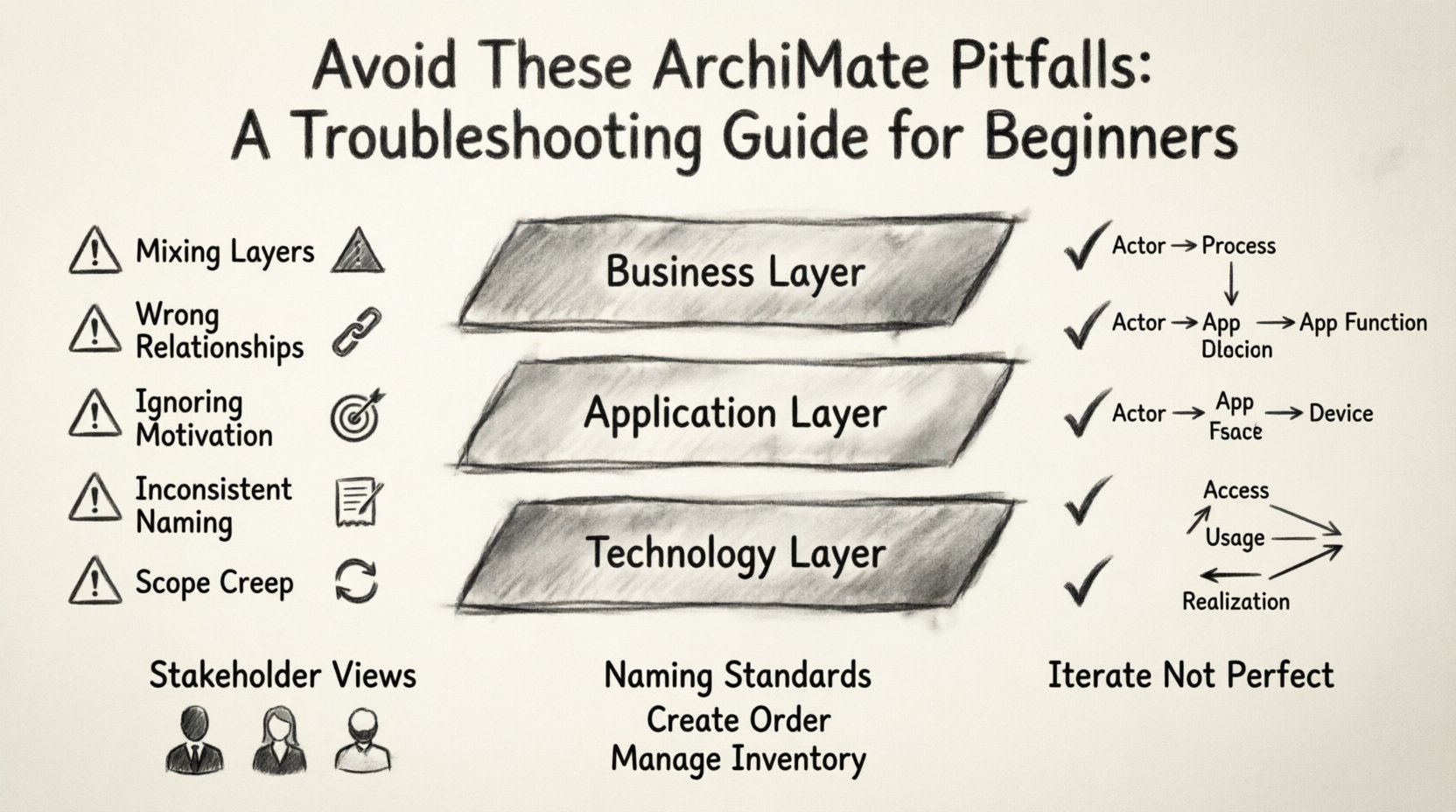
1. The Foundation: Confusing the Layers 🏗️
The most fundamental structure in ArchiMate is the three-layer model: Business, Application, and Technology. Beginners often blur the lines between these layers, resulting in models that are technically incorrect and logically confusing. Each layer represents a different level of abstraction, and mixing them breaks the mapping rules.
- Business Layer: Focuses on business actors, processes, and organizational structures. It answers “What does the business do?”
- Application Layer: Represents the software applications that support the business processes. It answers “What software does it?”
- Technology Layer: Covers the hardware, networks, and infrastructure that host the applications. It answers “Where does it run?”
When a modeler places a software function inside a business process node, or links a business actor directly to a server, the semantic meaning is lost. The following table outlines common layering mistakes and their corrections.
| Pitfall | Incorrect Modeling | Correct Approach |
|---|---|---|
| Mixing Layers | Linking a Business Actor directly to a Database | Link Actor → Business Process → Application Function → Device |
| Over-Engineering Tech | Modeling every server rack in the Data Center layer | Use the Technology Layer for logical infrastructure, not physical inventory |
| Missing Abstraction | Detailing code logic in the Application Layer | Keep Application Layer at the function level, not code implementation |
To maintain clarity, always verify that your relationships respect the layer boundaries. While the language allows for certain cross-layer connections, they must follow specific cardinality rules. For instance, a Business Process may be supported by an Application Function, but it does not directly “run” on a Technology Node without the intermediate Application Layer.
2. Relationship Mapping Errors ⛓️
ArchiMate defines specific types of relationships, each with a distinct meaning. Using the wrong connector can completely alter the interpretation of your architecture. Beginners frequently default to a generic “flow” or “dependency” line, but the standard language offers precise options.
The three most critical relationship types to master are:
- Access: Used when an element interacts with another element directly. For example, a Business Process accessing a Business Object.
- Usage: Used when one element relies on another to function. For example, an Application Function using another Application Function.
- Realization: Used when one element implements or realizes another. For example, an Application Component realizing a Business Process.
A common mistake is using “Access” instead of “Usage” when one system calls another. “Access” implies interaction, whereas “Usage” implies dependency. If you remove the dependent element, the primary element stops working. If you use “Access,” the primary element might still function but simply cannot see the other element.
Directionality Matters
Relationships in ArchiMate have direction. Arrows indicate the flow of information, control, or dependency. Beginners often draw bidirectional lines when only one direction is valid. This creates ambiguity in the model.
- Check the arrow head. Does it point from the provider to the consumer, or vice versa?
- Ensure the relationship makes sense in both directions. If A uses B, does B use A? Usually, no.
- Validate against the specific relationship definition in the standard. Some relationships are unidirectional by design.
3. The Motivation Layer Trap 🎯
The Motivation Layer (Goals, Principles, Requirements, Drivers) is often the most overlooked part of an ArchiMate model. Beginners either ignore it entirely or overuse it. Both extremes lead to models that lack strategic context.
Ignoring Motivation: If you model the business and technology without stating why, the architecture is just a map without a destination. Stakeholders will not understand the business value. Why is this process changing? Why is this application being retired? Without Goals and Drivers, the model is static.
Overusing Motivation: Conversely, some modelers create a separate motivation diagram for every single change. This dilutes the focus. Motivation should be linked to the specific architectural change, not treated as a standalone document.
To avoid this pitfall, ensure every significant architectural change has a supporting Goal or Requirement. Use the Realization relationship to link a Business Object or Process to a specific Goal. This creates a traceability chain from high-level strategy down to the implementation details.
4. Naming Conventions and Consistency 📝
A model is only as good as its readability. Inconsistent naming is a silent killer of architecture projects. If one diagram calls a process “Order Processing” and another calls it “Handle Orders,” the connection is lost to the reader.
Common Naming Pitfalls
- Vague Names: Avoid names like “Process 1” or “System A.” These provide zero context.
- Verb-Noun Mismatch: Business Processes should typically be verb-noun pairs (e.g., “Manage Customer Account”). Business Objects should be nouns (e.g., “Customer Account”). Mixing these grammatical structures confuses the layer definition.
- Acronyms: Do not use internal acronyms unless they are universally understood by your audience. If you use “CRM,” ensure everyone knows what it stands for.
Establish a naming standard early in the project. Document it in a glossary. Enforce it through peer reviews. Consistency reduces the cognitive load required to understand the architecture.
5. Scope Creep and Over-Modeling 📉
One of the biggest risks in enterprise architecture is trying to model everything at once. Beginners often feel the need to capture the entire organization in a single view. This leads to massive, unmanageable diagrams that no one can read.
The “Big Bang” Approach: Creating a single diagram with 100+ elements is a recipe for failure. It obscures relationships and makes changes painful.
Better Strategy: Use views. An ArchiMate model is a collection of views, not a single picture. Break your architecture down by:
- Domain: Focus on Finance, HR, or Supply Chain separately.
- Change: Create a view specifically for the upcoming migration project.
- Stakeholder: Tailor the view for executives (high level) versus engineers (detailed).
If you find yourself adding elements that are not directly relevant to the current discussion, remove them. A good model answers specific questions. If a node does not help answer a question, it does not belong in the view.
6. View Management and Stakeholder Alignment 🤝
Architecture is communication. If your model is technically perfect but stakeholders cannot understand it, it has failed. Beginners often create models that look like technical flowcharts, using symbols that business people do not recognize.
Abstraction Levels: Ensure the level of detail matches the audience.
- Executive View: Focus on business capabilities and goals. Minimal technology detail.
- Manager View: Focus on processes and applications. Show where the value is created.
- Technical View: Focus on infrastructure, interfaces, and data flows. Show how it is built.
Do not show the technical view to the executive team. They care about the business outcome, not the server configuration. Conversely, do not show the high-level business view to the developers; they need the interface details to build the system.
7. Maintenance and Evolution 🔄
Architecture is not a one-time task. It is a living document. A common pitfall is treating the model as a static deliverable that gets handed off and forgotten. This is often called “model rot.”
To prevent rot:
- Version Control: Ensure your model changes are tracked. If you update a process, note when and why.
- Change Management: Integrate the model update process into your IT project lifecycle. No change should happen without updating the architecture.
- Review Cycles: Schedule regular reviews of the architecture. Remove elements that are no longer relevant.
If a model is not maintained, it becomes a source of misinformation. Stakeholders will trust the old data, leading to poor decisions. Treat the model as a contract between the business and IT. If the business changes, the model must change.
8. Syntax and Structural Issues 🔧
While the language itself is logical, the implementation often introduces structural errors. These are often technical constraints within the modeling environment that need to be respected.
Orphan Elements: Avoid creating elements that are not connected to anything. An isolated node in a diagram suggests it is not part of the architecture flow. Every element should serve a purpose within the context of the view.
Complexity Spikes: Avoid creating deep nesting. If you have a Business Process that contains another Business Process, which contains another, you have lost the ability to manage scope. Keep the hierarchy shallow. Use views to drill down rather than nesting endlessly.
Incorrect Use of Composite Nodes: Do not use composite nodes (like a Business Actor) to hold unrelated elements. A Business Actor should represent a human or organization, not a department or a system. Use the correct element types to maintain semantic integrity.
9. Data Flow vs. Control Flow 🔄
ArchiMate distinguishes between data flow (information movement) and control flow (decision making). Beginners often conflate these. A process might send data to another process, but that does not mean the second process is triggered by the first.
- Control Flow: Indicates that the flow of control is passed from one element to another. It dictates the order of execution.
- Data Flow: Indicates that information is moved. It does not necessarily dictate the sequence of events.
Using Control Flow for data transfer is a common error. If Process A sends a report to Process B, but Process B runs on its own schedule, it is a Data Flow, not a Control Flow. Misidentifying this can lead to incorrect assumptions about system triggers and event handling.
10. The “Perfect Model” Fallacy 🎨
There is no such thing as a perfect model. Perfectionism leads to paralysis. Beginners often spend weeks trying to make the diagram look beautiful or mathematically perfect. In Enterprise Architecture, the goal is utility, not aesthetics.
Focus on Value: Does the model help you answer a question? Does it help you plan a change? If yes, it is successful. If it looks pretty but answers no questions, it is a waste of time.
Iterate: Start with a rough draft. Refine it as you gather more information. Do not wait for all the data to be perfect before drawing the first line. Architecture is discovered through the process of modeling, not before it.
11. Integration with Other Standards 🧩
ArchiMate is often used alongside other standards like BPMN (Business Process Model and Notation) or TOGAF. Beginners sometimes try to force these standards to look identical, ignoring their unique strengths.
- BPMN: Better for detailed process flows and rules.
- ArchiMate: Better for structural architecture and cross-domain mapping.
Do not try to model everything in one notation. Use the right tool for the right job. Map the BPMN processes to the ArchiMate business processes. This keeps the models clean and focused.
12. Governance and Compliance 🛡️
Finally, consider how your model supports governance. A common pitfall is creating a model that exists outside the governance framework. If the architecture does not align with the organization’s compliance requirements, it is useless.
Ensure your model includes:
- Compliance Drivers: Why are we building this?
- Regulatory Constraints: What limits do we have?
- Security Controls: How is data protected?
Ignoring these aspects creates a model that looks good on paper but fails in the real world. Integrate governance requirements directly into the Motivation Layer of your model.
Summary of Key Takeaways ✅
Avoiding ArchiMate pitfalls requires discipline and a focus on clarity. By respecting the layer structure, choosing relationships carefully, and managing scope effectively, you can create models that drive value. Remember that architecture is a communication tool first and a technical specification second. Keep it simple, keep it consistent, and keep it relevant.
Start small. Focus on one layer. Validate your relationships. Engage your stakeholders early. With practice, these common errors will become familiar warnings rather than obstacles. Your goal is to build a clear path for your organization’s future, not a perfect diagram.
This post is also available in Deutsch, Español, فارسی, Français, English, Bahasa Indonesia, 日本語, Polski, Portuguese, Ру́сский, Việt Nam, 简体中文 and 繁體中文.