


1. What BPMN is
Business Process Model and Notation (BPMN) is a standardized visual language for describing business processes. It is intended to be understandable to business stakeholders while expressing enough detail to support technical analysis and implementation. BPMN is an international standard, ISO/IEC 19510.
A BPMN diagram can help answer practical questions: What starts the process? Who performs each step? Where can the process branch? What information or messages move between participants? What outcomes end the process?
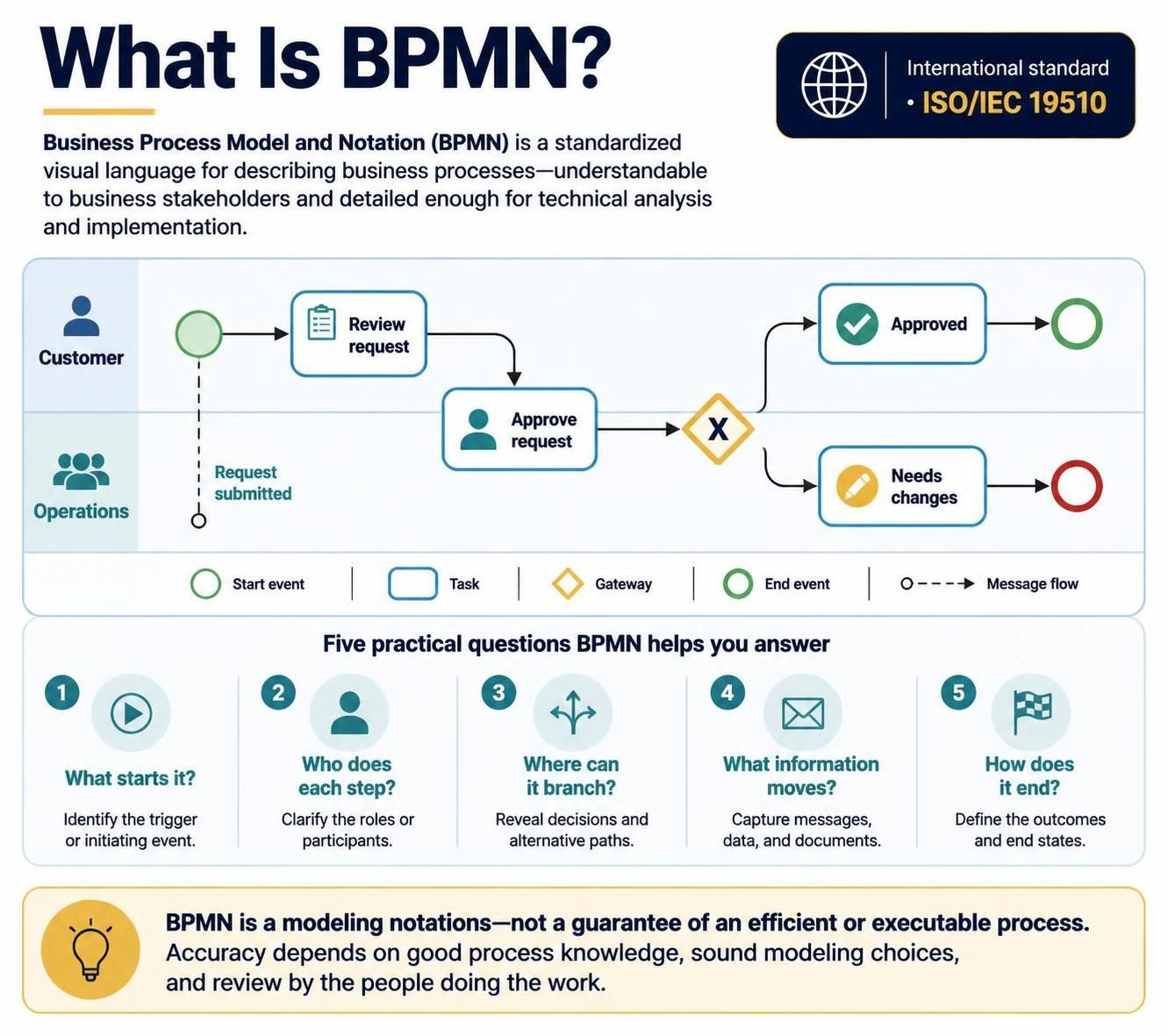
BPMN is a modeling notation, not a guarantee that a process is efficient or executable. A clear diagram still depends on accurate process knowledge, sound modeling choices, and review by the people who do the work.
2. Core BPMN elements
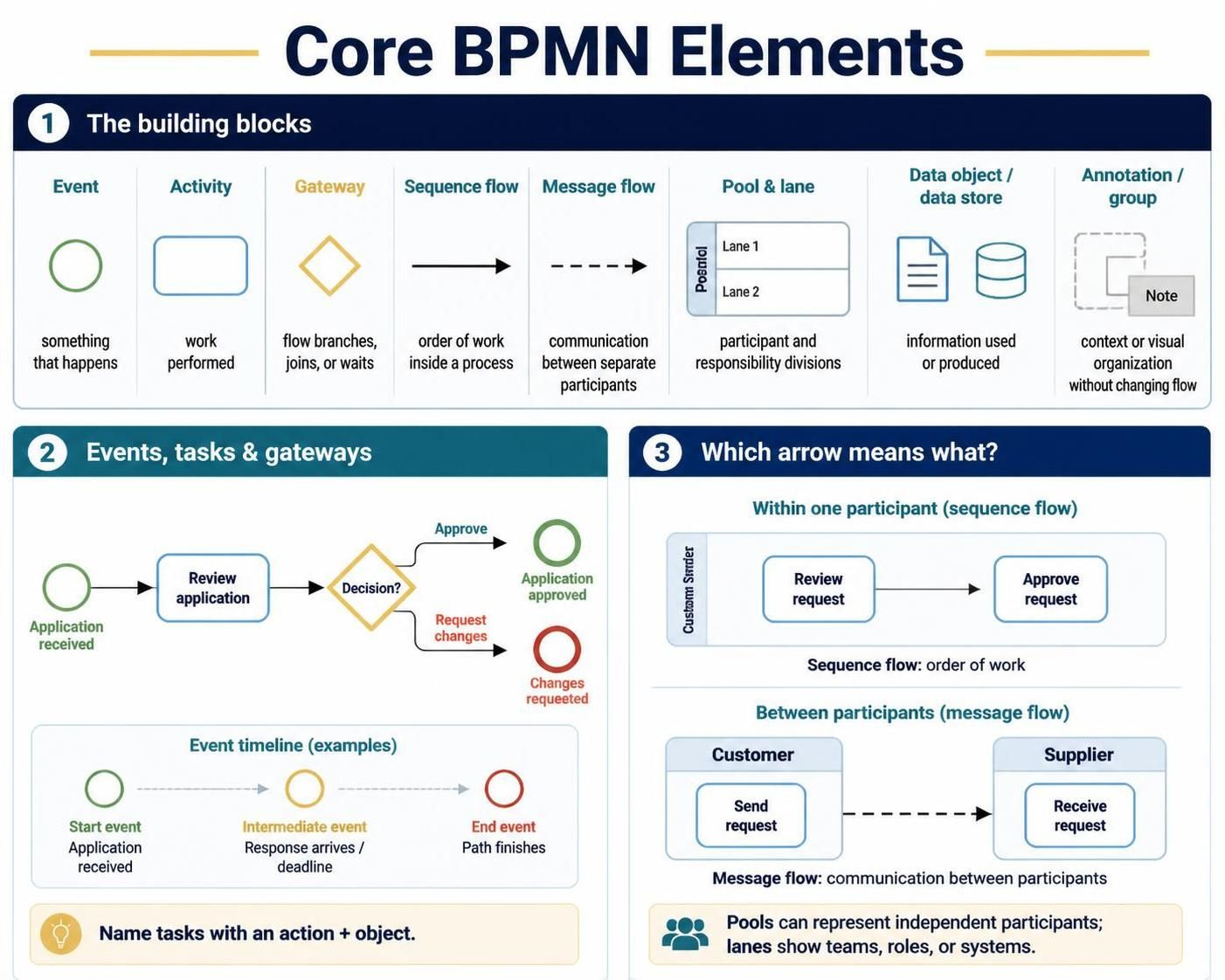
Most process diagrams can be built from a small set of familiar symbols:
| Element | What it represents | Typical use |
|---|---|---|
| Event — circle | Something that happens or affects the process | A process starts, a message arrives, a timer expires, or an outcome occurs |
| Activity — rounded rectangle | Work performed | A person reviews an application or a system issues a receipt |
| Gateway — diamond | A point where the flow branches, joins, or waits for an event | Approve or reject; proceed on one of several conditions |
| Sequence flow — solid arrow | The order of steps within a process | Connects activities and events |
| Message flow — dashed connector | Communication between separate participants | Shows a customer sending a request to a supplier |
| Pool and lane | Process participant and responsibility divisions | A pool can represent an organization or participant; lanes can show teams, roles, or systems |
| Data object or data store | Information used or produced | An application form, case record, or database |
| Annotation or group | Supporting explanation or visual organization | Adds context without changing the process flow |
A useful distinction: sequence flows show the order of work inside a process; message flows show communication between participants. Pools and lanes clarify whose process or responsibility is being shown. In a collaboration diagram, separate pools can represent independent participants whose processes communicate through messages.
Events, tasks, and gateways
-
Start events mark the trigger or beginning of a process. For example, “Application received.”
-
Intermediate events represent something that occurs during the process, such as receiving a response or waiting for a deadline.
-
End events show how a path finishes. Different end events can make distinct outcomes explicit.
-
Tasks are units of work. Name them with an action and an object, such as “Review application” or “Send confirmation.”
-
Gateways represent routing logic. A gateway should make clear whether the process chooses one path, follows multiple paths, or waits for one of several events.
3. A practical modeling method
-
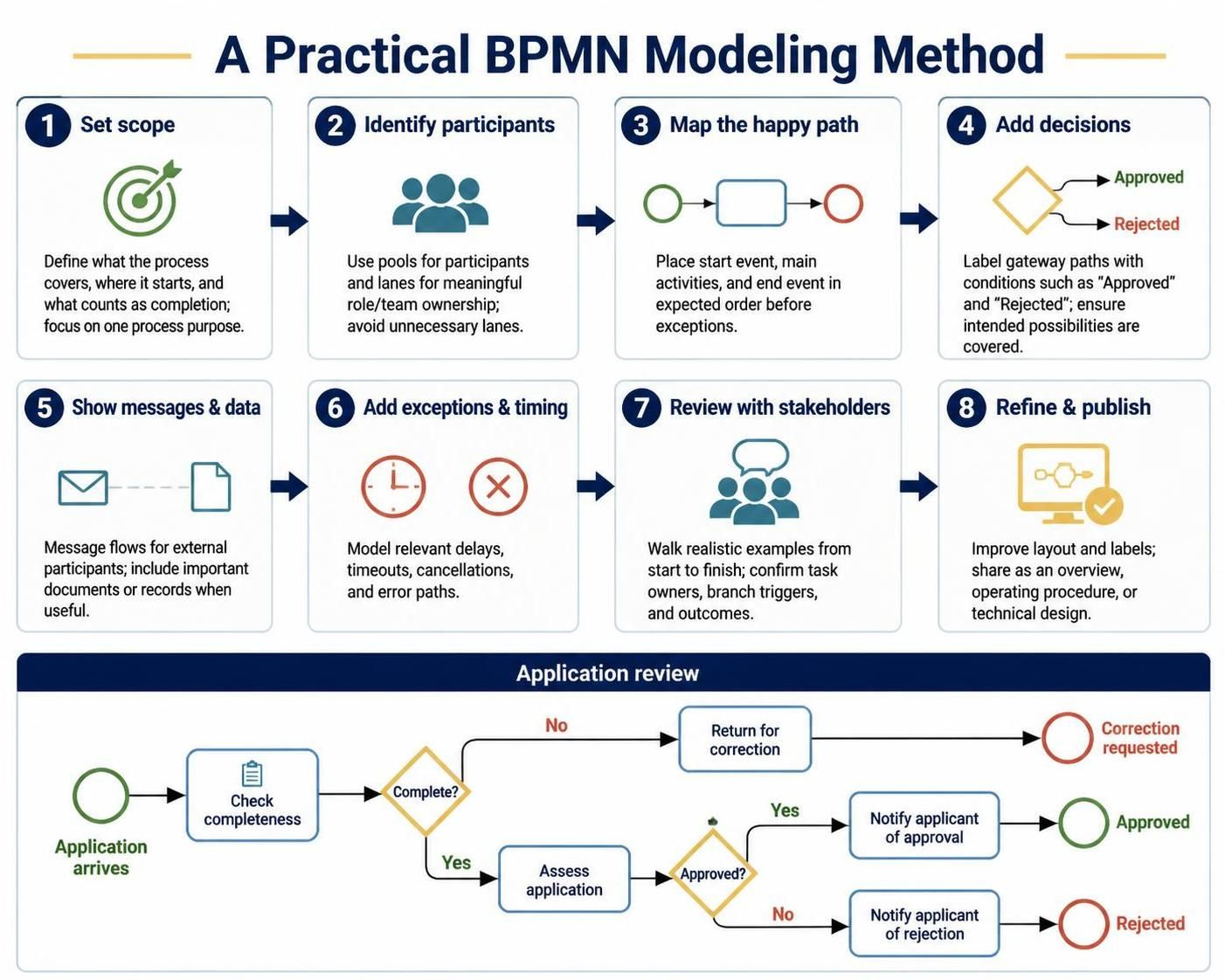
Set the scope. State what the process covers, where it starts, and what counts as completion. Keep the first diagram focused on one process purpose.
-
Identify participants and responsibilities. Use pools for participants and lanes when role or team ownership matters. Avoid adding lanes that do not help readers understand responsibility.
-
Map the happy path. Add the start event, main activities, and end event in their expected order before modeling exceptions.
-
Add decisions and alternate paths. For each gateway, label the outgoing paths with clear conditions, such as “Approved” and “Rejected.” Check that the conditions cover the intended possibilities.
-
Show messages and data where useful. Model interactions with external participants as message flows; show important documents or records when they clarify the work.
-
Add exceptions and timing behavior. Include delays, timeouts, cancellations, and error paths when they matter to the process or its controls.
-
Review with stakeholders. Walk through realistic examples from start to finish. Confirm who does each task, what triggers each branch, and how each path ends.
-
Refine and publish. Improve layout and labels, then share the model in a form appropriate to its audience—overview, operating procedure, or technical design.
A simple example might be an application review: an application arrives; an analyst checks completeness; an incomplete application is returned for correction; a complete one is assessed; an approval decision routes it to either “Notify applicant of approval” or “Notify applicant of rejection”; each path ends with a clear outcome.
4. Using Visual Paradigm
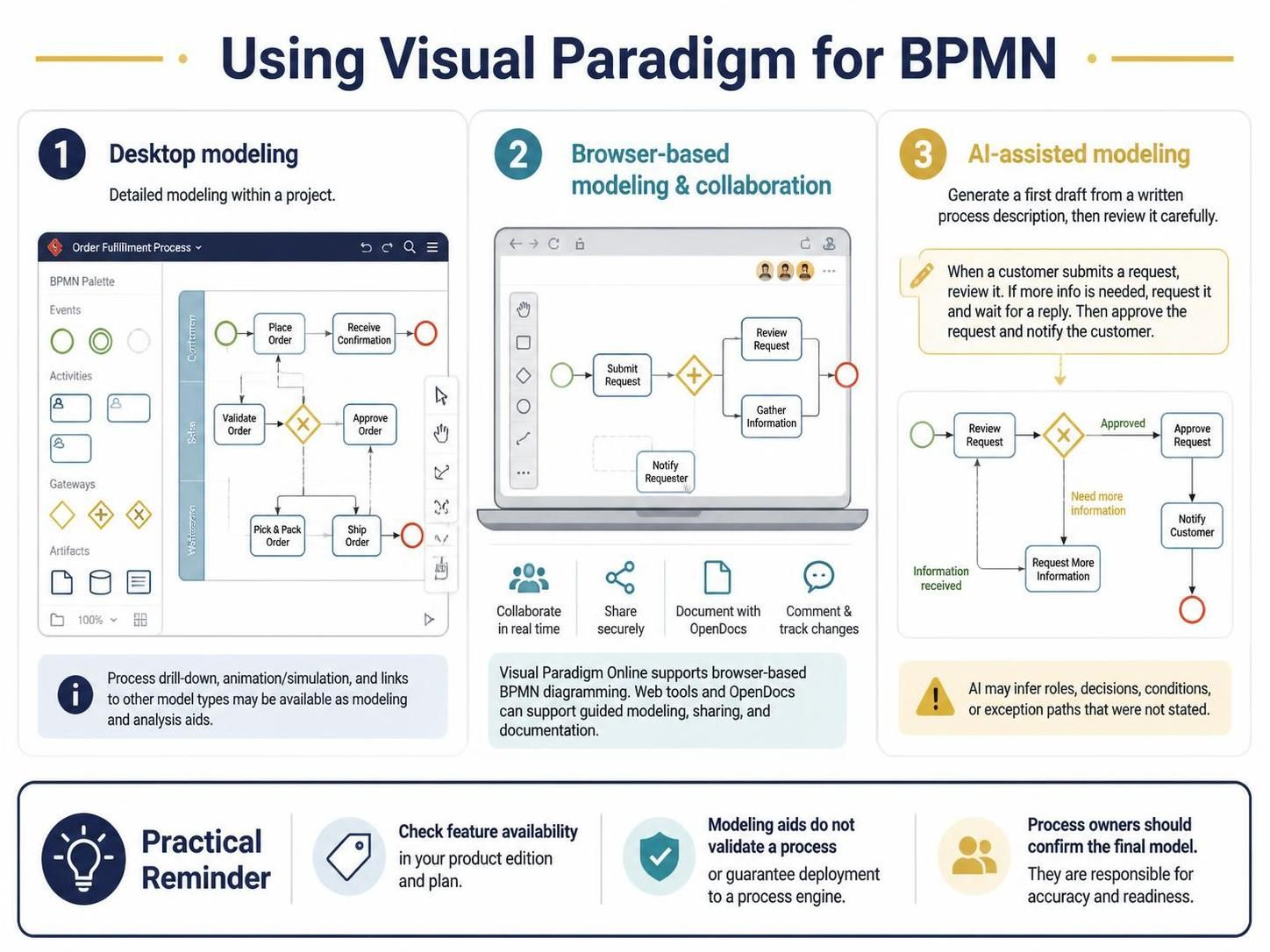
Visual Paradigm offers BPMN modeling in desktop and browser-based environments. Its tools are intended to support both drawing and ongoing process documentation, with features that can vary by product, edition, and workflow. Confirm the current availability of a particular feature in the edition you use.
Desktop modeling
Visual Paradigm Desktop is suited to detailed modeling work within a project. The BPMN modeling workflow described by Visual Paradigm includes a diagram editor with BPMN elements, pools and lanes, connectors, and context-aware modeling tools. Its materials also describe capabilities such as process drill-down, animation or simulation, and links to other model types. Treat these as modeling and analysis aids: they do not by themselves validate the business process or guarantee that a diagram can be deployed to a process engine.
Browser-based modeling and collaboration
Visual Paradigm Online provides a browser-based BPMN diagramming option, including drag-and-drop diagram creation. Visual Paradigm’s broader ecosystem also describes web tools and OpenDocs for guided modeling, sharing, and incorporating diagrams into documentation. Check the relevant product and plan for the collaboration and publishing functions you need.
AI-assisted modeling
Visual Paradigm describes AI-supported workflows that can turn a written process description into an editable BPMN diagram. This can be useful for generating a first draft or exploring a process structure. Review the result carefully: AI may infer roles, decisions, conditions, or exception paths that were not stated in the source description. Have process owners confirm the model before using it as authoritative documentation.
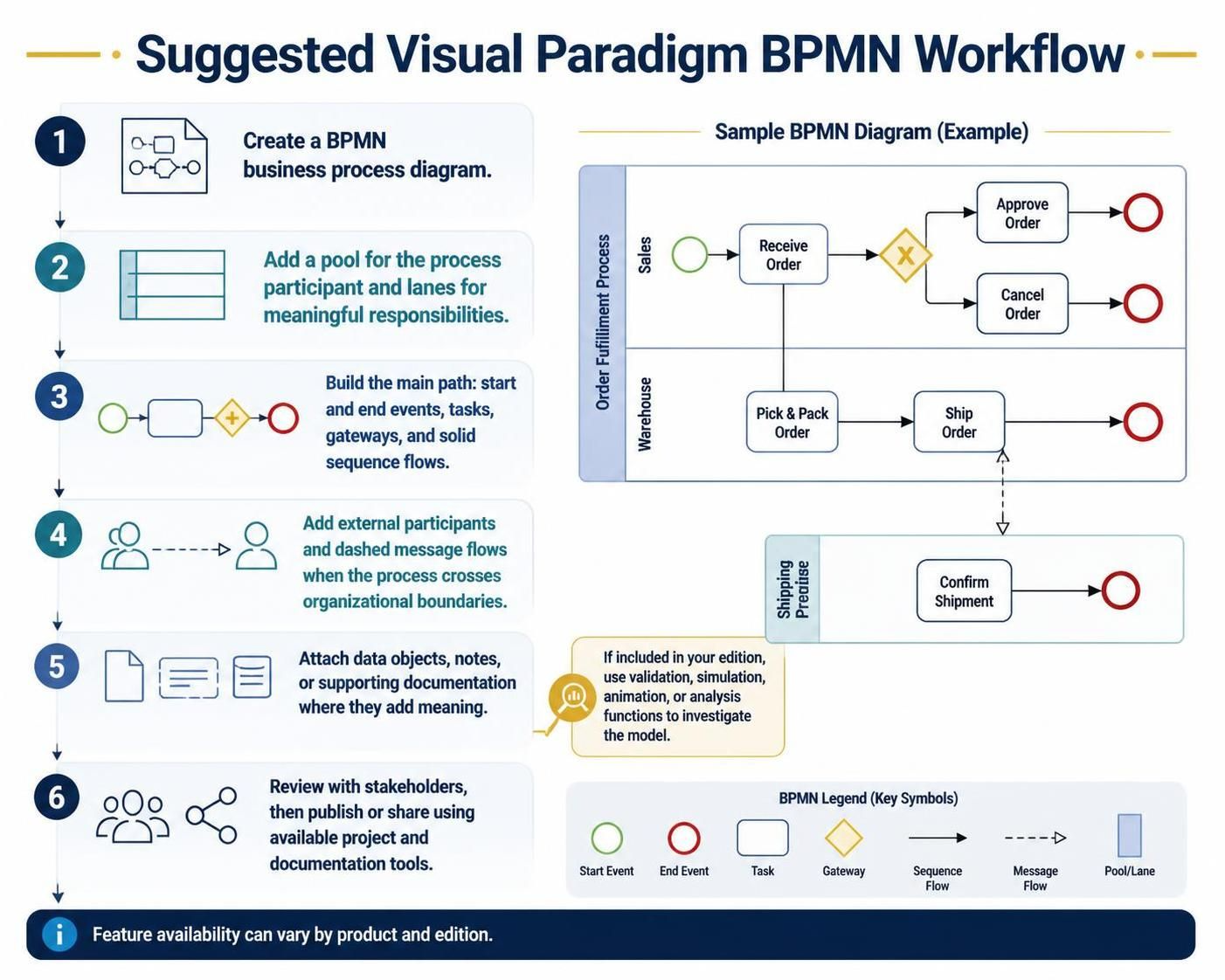
Suggested Visual Paradigm workflow
-
Create a BPMN business process diagram.
-
Add a pool for the process participant and lanes for the responsibilities that matter.
-
Build the main path with start and end events, tasks, gateways, and sequence flows.
-
Add external participants and message flows if the process crosses organizational boundaries.
-
Attach data objects, notes, or supporting documentation where they add meaning.
-
Use available validation, simulation, animation, or analysis functions to investigate the model, if included in your edition.
-
Review the diagram with stakeholders, then publish or share it through the available project and documentation tools.
5. Benefits
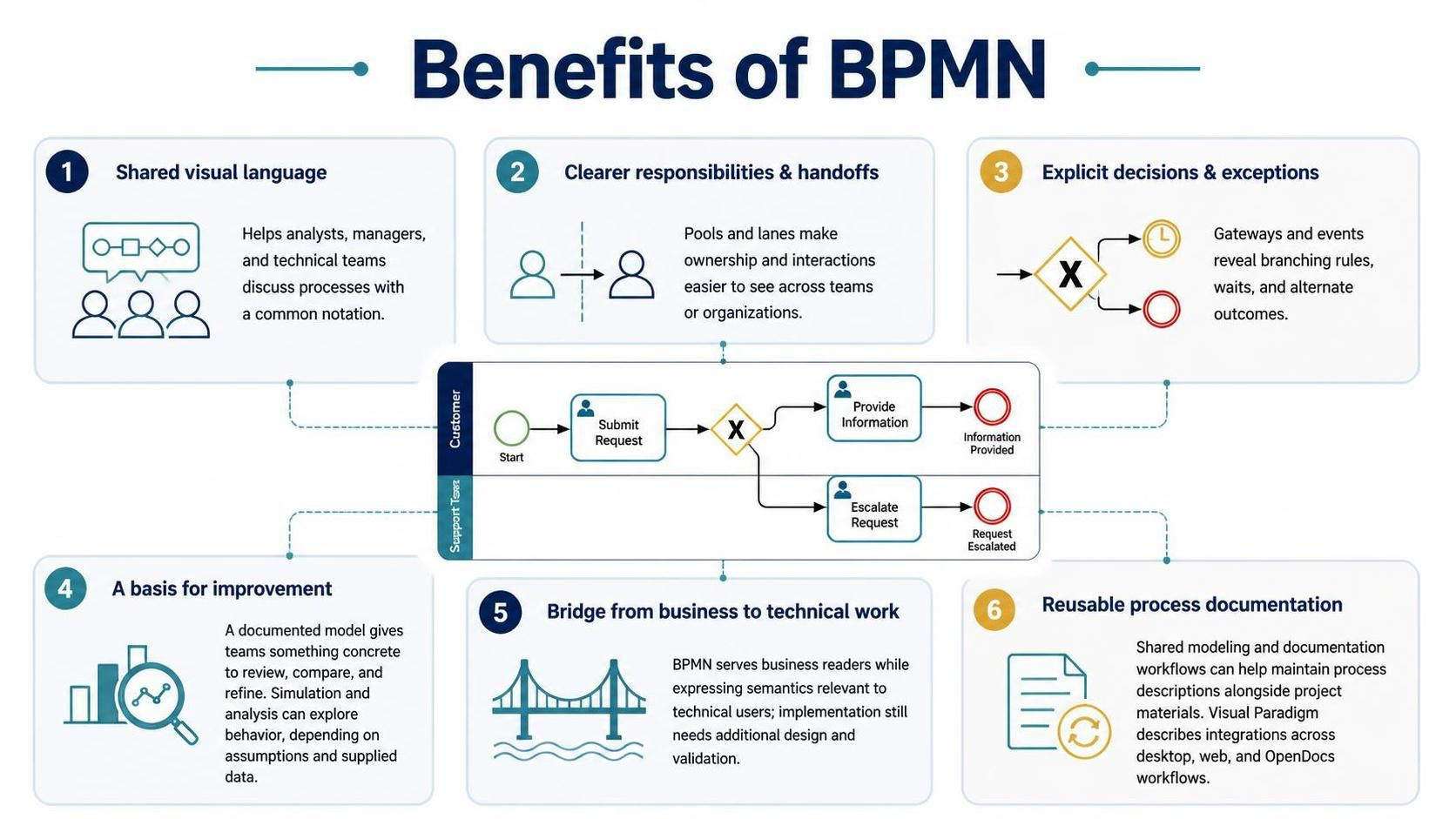
A shared visual language. BPMN helps business analysts, managers, and technical teams discuss a process using a common notation.
Clearer responsibilities and handoffs. Pools and lanes can make ownership and interactions easier to see, especially when a process spans teams or organizations.
More explicit decisions and exceptions. Gateways and events help expose branching rules, waits, and alternate outcomes that may be hidden in prose.
A basis for process improvement. A documented model gives teams something concrete to review, compare, and refine. Visual Paradigm’s described simulation and analysis tools can help explore process behavior, subject to the assumptions and data supplied.
A bridge between business design and technical work. BPMN is designed to serve business readers while representing process semantics relevant to technical users. That makes it useful for discussion and handoff, though implementation still requires additional design and validation.
Reusable process documentation. Keeping models in a shared modeling and documentation workflow can make it easier to maintain process descriptions alongside related project material. Visual Paradigm describes integrations across desktop, web, and OpenDocs workflows.
6. Modeling practices that improve readability
-
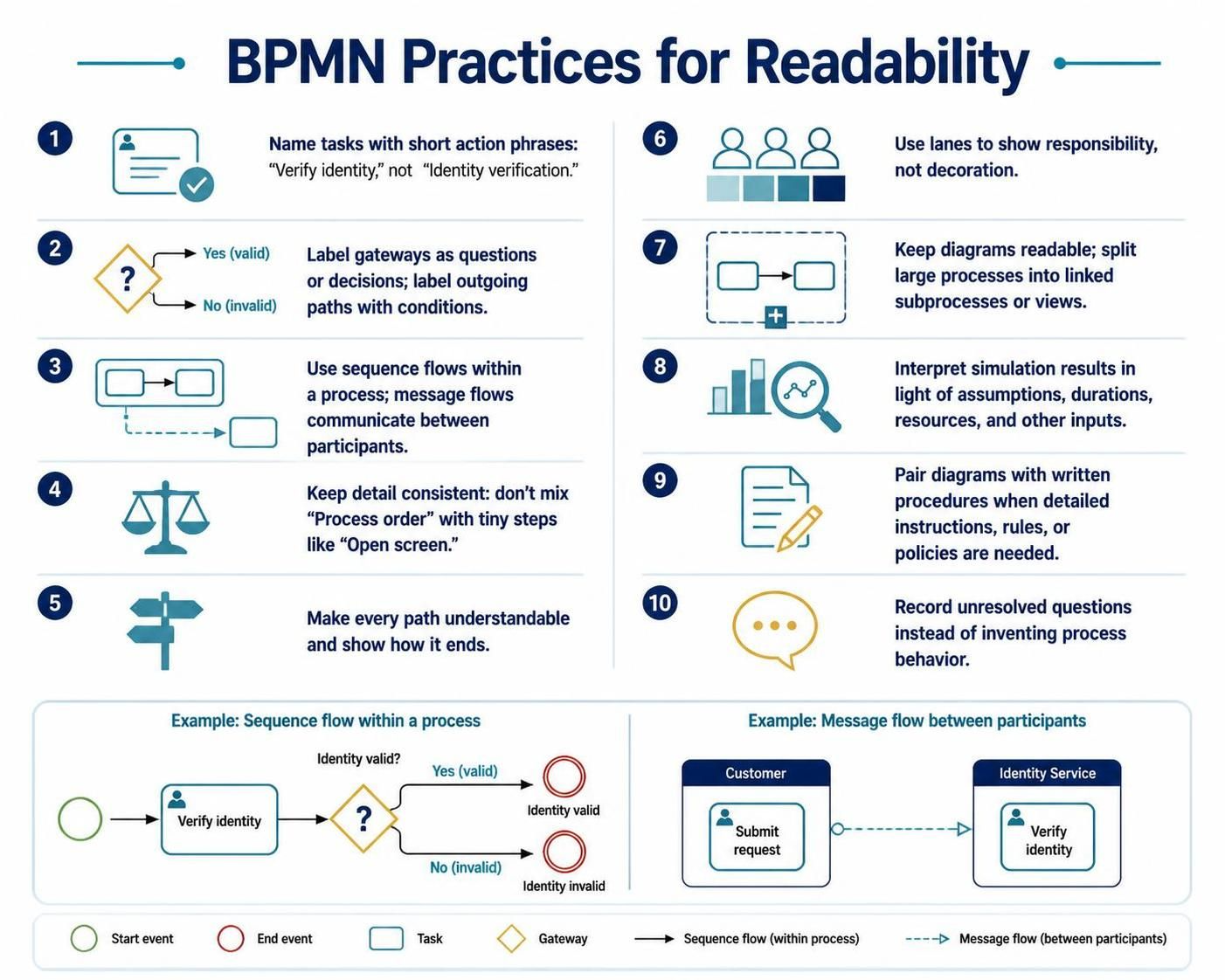
Use short, action-oriented task names: “Verify identity” rather than “Identity verification.”
-
Label gateways as questions or decisions, and label outgoing paths with conditions.
-
Use sequence flows only within a process; use message flows for communication between participants.
-
Keep the level of detail consistent. Do not mix a high-level activity such as “Process order” with tiny steps such as “Open screen.”
-
Make every path understandable and account for how it ends.
-
Use lanes to communicate responsibility, not merely to decorate the diagram.
-
Keep diagrams readable. If a process is too large, divide it into linked subprocesses or views.
-
Treat simulation results as dependent on the assumptions, durations, resources, and other inputs used.
-
Keep a written description or procedure alongside the diagram when readers need detailed instructions, rules, or policies.
-
Record unresolved questions rather than silently inventing process behavior.
7. Common mistakes
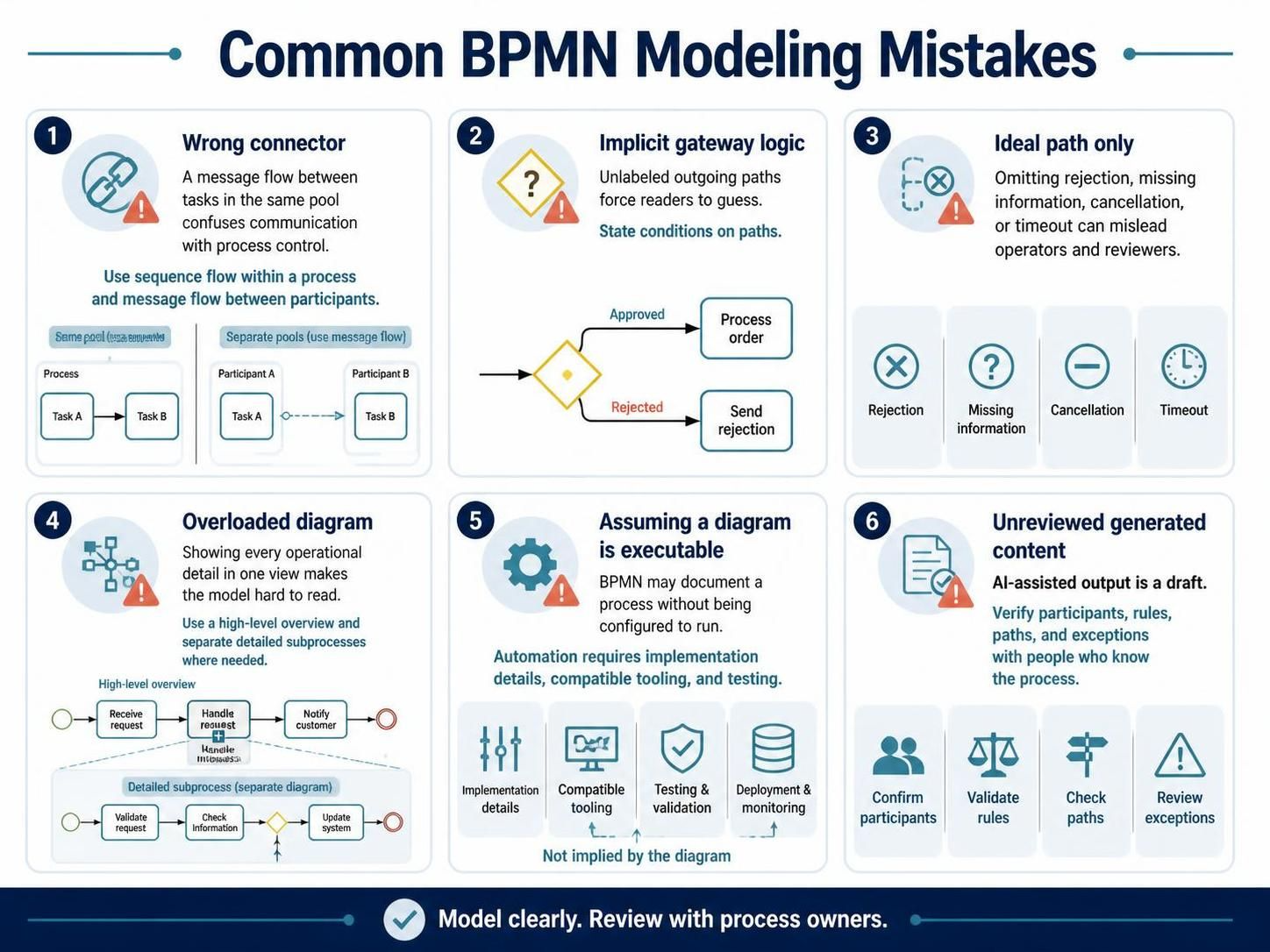
Using the wrong connector. A message flow between tasks in the same pool can confuse communication with process control. Use sequence flow within a process and message flow between participants.
Leaving gateway logic implicit. A diamond with unlabeled outgoing paths forces readers to guess. State the conditions on the paths.
Modeling the ideal path only. A process that omits rejection, missing information, cancellation, or timeout may mislead operators and reviewers.
Overloading one diagram. Trying to show every operational detail in a single view makes the model hard to read. Use a high-level overview and separate detailed subprocesses where needed.
Assuming a diagram is executable. A BPMN diagram may document a business process without being configured for execution. Automation requires implementation details, compatible tooling, and testing.
Accepting generated content without review. AI-assisted output is a draft. Verify participants, rules, paths, and exceptions with people who know the process.
8. Quick quality checklist
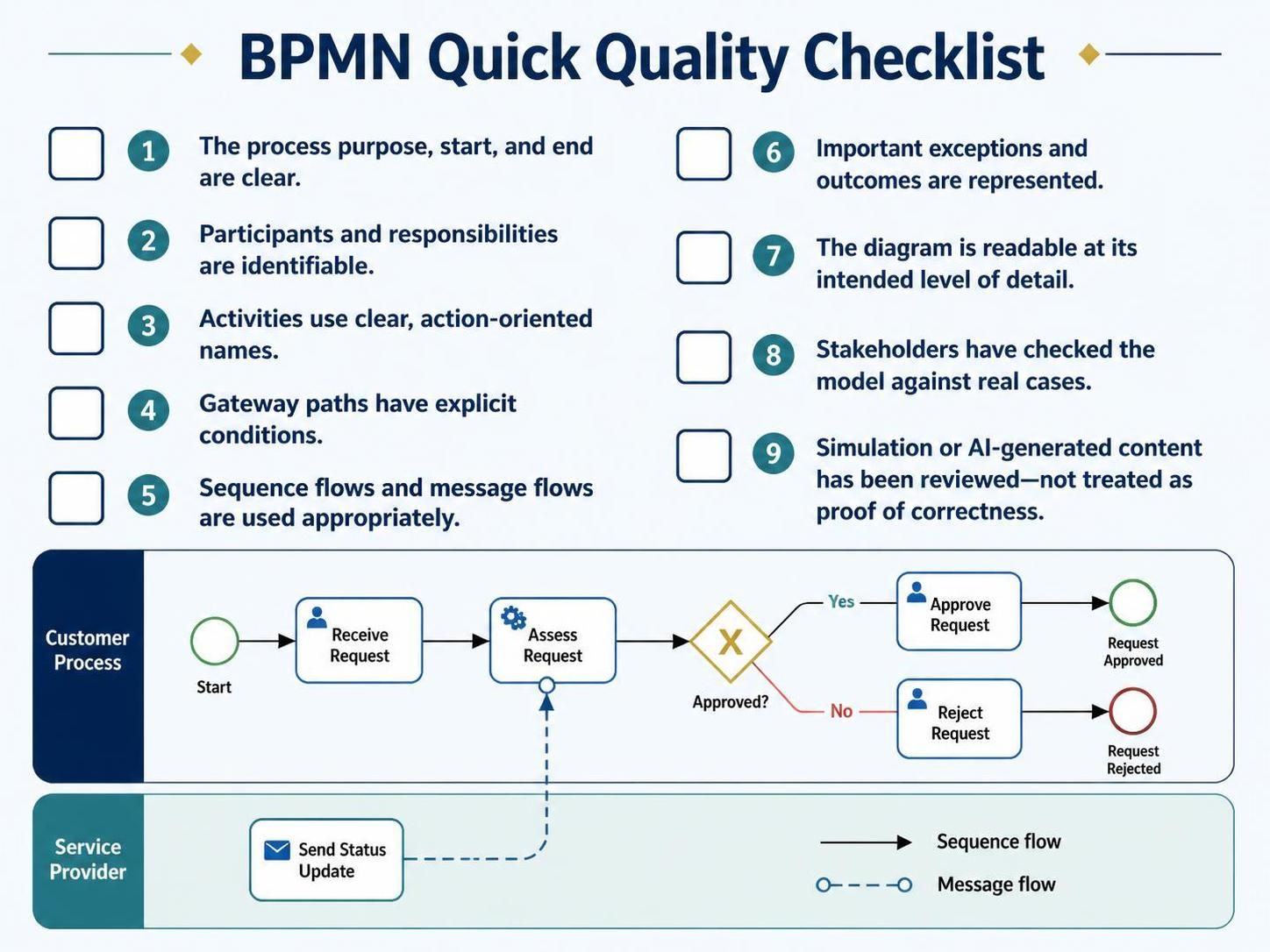
Before sharing a BPMN model, confirm that:
-
The process purpose, start, and end are clear.
-
Participants and responsibilities are identifiable.
-
Activities use clear action-oriented names.
-
Gateway paths have explicit conditions.
-
Sequence flows and message flows are used appropriately.
-
Important exceptions and outcomes are represented.
-
The diagram is readable at the level of detail intended.
-
Stakeholders have checked the model against real cases.
-
Any simulation or AI-generated content has been reviewed rather than treated as proof of correctness.
This post is also available in Deutsch, Español, فارسی, Français, Bahasa Indonesia, 日本語, Polski, Portuguese, Ру́сский, Việt Nam, 简体中文 and 繁體中文.