


Introduction
Project knowledge rarely stays in one place. Meeting minutes may be stored in email, requirements in documents, decisions in chat applications, and architecture diagrams in separate modeling files. As a result, teams often spend significant time searching for information, reconciling conflicting versions, and manually converting written requirements into technical models.
Visual Paradigm NotesKeep addresses this problem by combining collaborative note-taking, document organization, artificial intelligence, and visual modeling in one environment. Rather than treating notes as isolated text, it turns them into a searchable project knowledge base that can support requirements analysis, architecture design, process modeling, and team communication.
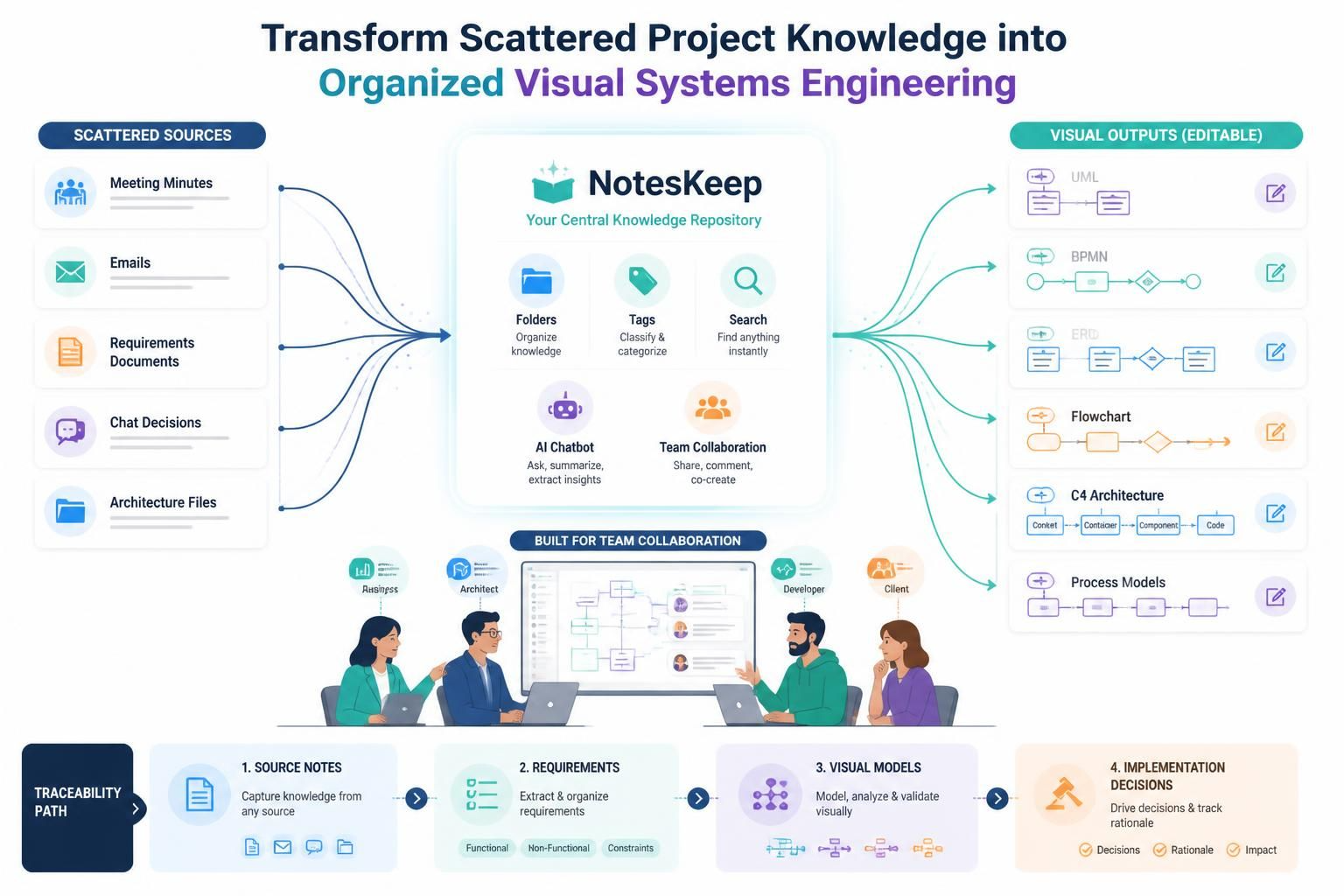
With NotesKeep and the Visual Paradigm AI Diagramming Chatbot, teams can import existing documents, organize information by project and tags, ask questions about their repository, and generate editable visual models from natural-language descriptions. Supported workflows can include UML, BPMN, ERD, flowcharts, C4 models, and other forms of technical visualization.
What Is Visual Paradigm NotesKeep?
Visual Paradigm NotesKeep is a team-oriented knowledge management and AI note-taking tool. It is designed to help organizations create a shared source of truth for project information.
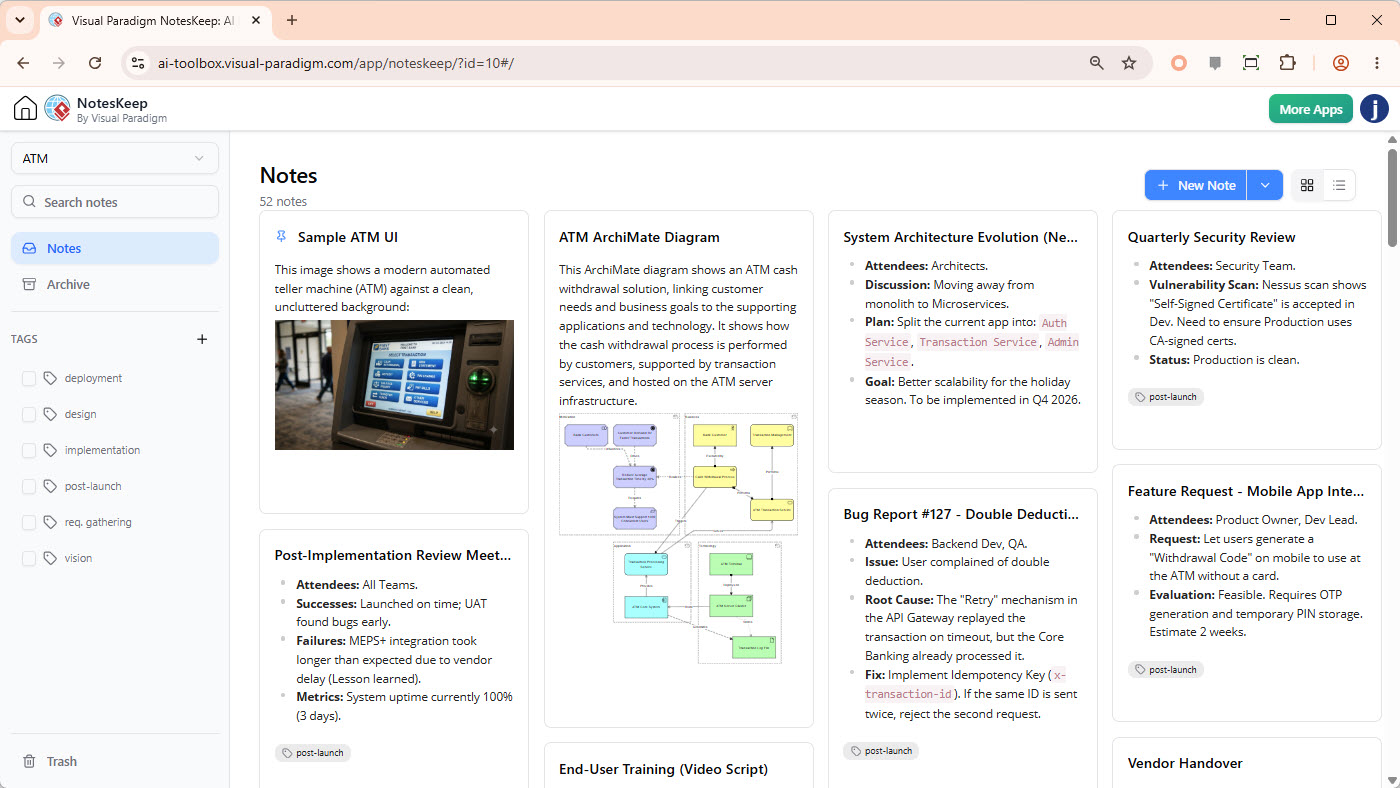
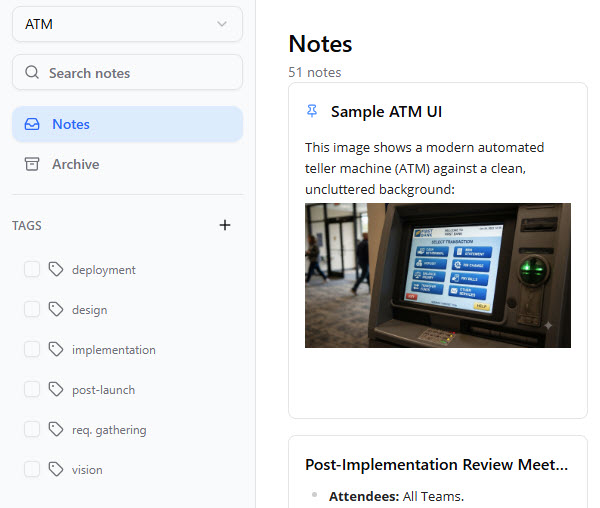
The platform combines:
-
Rich-text project notes
-
Imported documents and files
-
Shared workspaces
-
Tags and hierarchical organization
-
Embedded diagrams and visual assets
-
Searchable project knowledge
-
AI-assisted analysis and diagram generation
-
Integration with Visual Paradigm’s modeling ecosystem
Its main value is not simply recording information. NotesKeep helps preserve the context behind project decisions and makes that knowledge available for later analysis, design, documentation, and collaboration.
For example, a team might store:
-
Meeting minutes
-
Product requirements
-
User interview summaries
-
Regulatory documents
-
Architecture decisions
-
Process descriptions
-
Whiteboard photographs
-
Technical specifications
-
Project guidelines
-
Client feedback
The AI chatbot can then use selected project notes as context when answering questions or generating models.
Why Teams Need a Knowledge-Centered Modeling Workflow
Traditional project documentation often creates three related problems.
1. Information becomes fragmented
Important decisions may be distributed across several tools and file formats. A developer may have one version of a requirement, while a business analyst or client has a newer version in a meeting document.
2. Documentation becomes outdated
A diagram may accurately represent the system when it was created but fail to reflect later changes. Without a connection to the underlying requirements and decisions, it becomes difficult to determine whether the model is still valid.
3. Converting text into diagrams takes time
Teams frequently begin with informal descriptions such as:
“Customers submit an order, the payment service validates the transaction, and the warehouse prepares the shipment.”
Turning this description into a use case diagram, activity diagram, BPMN model, or sequence diagram manually requires modeling knowledge and additional effort.
NotesKeep helps address these problems by connecting the written project narrative with structured visual models. The notes provide context, while Visual Paradigm’s modeling tools provide the formal representation.
Core Concepts
Notes as a Living Knowledge Base
A NotesKeep repository is more than a collection of static pages. It can represent the evolving history of a project.
A useful repository may contain:
-
Original business objectives
-
Stakeholder requests
-
Decisions made during workshops
-
Changes to scope
-
Technical constraints
-
Architecture alternatives
-
Approval records
-
Implementation notes
This historical context can help teams understand not only what the current requirement is, but also why it exists and how it changed.
Scoped AI Queries
The AI chatbot can search selected NotesKeep content rather than relying only on a general prompt. Users can narrow the scope by choosing a project or searching notes associated with specific tags.
For example, a team could use tags such as:
#requirements
#payment
#security
#architecture
#release-v2
#compliance
A scoped query such as the following is more useful than a general question:
“Summarize the active payment requirements from notes tagged
#release-v2and identify any unresolved security concerns.”
The answer can be grounded in the selected project knowledge instead of unrelated information.
Multimodal Project Information
NotesKeep can work with more than typed notes. Its import capabilities include documents such as Word files, PDFs, spreadsheets, presentations, Markdown files, HTML content, images, and URLs. Visual assets may also be analyzed through OCR and computer vision capabilities.
This is useful when project information exists in:
-
Whiteboard photographs
-
Scanned documents
-
Screenshots
-
Existing architecture diagrams
-
Process charts
-
Presentation slides
-
Handwritten workshop material
Text-to-Diagram Generation
The AI Diagramming Chatbot can transform natural-language descriptions into structured visual models. Depending on the use case, teams may generate:
-
UML use case diagrams
-
UML class diagrams
-
Sequence diagrams
-
Activity diagrams
-
BPMN process diagrams
-
Entity-relationship diagrams
-
Flowcharts
-
C4 architecture models
-
User story maps
-
Other software and business models
Generated output should be treated as a starting point for review rather than an automatic replacement for professional modeling judgment.
Traceability
Traceability links project artifacts to the information from which they originated. In practice, this may mean connecting:
-
Business requirements to use cases
-
Use cases to activities or processes
-
Processes to system components
-
Components to implementation decisions
-
Compliance requirements to controls
-
Decisions to meeting notes or source documents
This makes it easier to answer questions such as:
-
Which requirement led to this design decision?
-
What changed after the latest stakeholder meeting?
-
Which diagrams are affected by a revised regulation?
-
Where did this security constraint originate?
Visual Paradigm’s wider modeling ecosystem includes model traceability and documentation capabilities, which can support this type of connected workflow.
A Typical NotesKeep Workflow
The following workflow shows how a team can use NotesKeep from initial discovery through technical design.
Step 1: Create a Project Workspace
Begin by creating a workspace for a product, client engagement, system, or transformation initiative.
A practical structure might include:
Customer Portal Modernization
├── Discovery
├── Requirements
├── Architecture
├── Security
├── Process Models
└── Decisions
Keep the structure understandable to both technical and nontechnical contributors.
Step 2: Import Existing Project Material
Bring existing information into the repository. Depending on the project, this may include:
-
Interview notes
-
PDF briefs
-
Word specifications
-
Excel data
-
Presentation decks
-
Existing process diagrams
-
Screenshots
-
Whiteboard images
-
Web-based reference material
Importing existing content reduces the need to recreate knowledge manually and creates a central location for project analysis.
Step 3: Organize Notes with Tags
Use tags to classify content across multiple dimensions.
For example:
#stakeholder:finance
#domain:payments
#artifact:requirement
#priority:high
#status:open
#release:v2
Tags can help teams locate relevant information even when it belongs to different folders or project phases.
Step 4: Capture Decisions Chronologically
Record important decisions as they happen. Each decision note should ideally include:
-
Date
-
Participants
-
Context
-
Decision
-
Alternatives considered
-
Consequences
-
Follow-up actions
-
Related requirements or diagrams
A decision note could use the following format:
Decision: Use an external payment gateway for card authorization

Context:
The internal payment service does not currently support tokenized card data.

Alternatives:
1. Extend the internal service
2. Integrate with an external provider

Reason:
The external provider offers faster certification and lower initial implementation effort.

Consequences:
The solution requires provider monitoring, webhook handling, and failure recovery.
Step 5: Enable the Relevant Search Scope
When using the AI Diagramming Chatbot, select the appropriate project or activate the notes search function. This helps direct the chatbot toward the relevant repository content.
A project team should avoid asking broad questions when only a small set of notes is relevant. Narrower scopes usually produce clearer and more reviewable results.
Step 6: Ask for Analysis or Generate a Model
You can ask the chatbot to summarize information, identify gaps, or generate a visual model.
Example prompts include:
Summarize the functional requirements for customer registration.
Identify conflicting requirements in the notes tagged #payment.
Generate a UML use case diagram for the customer support portal.
Create a BPMN process for refund approval based on the notes in the Finance project.
Generate a sequence diagram showing order submission, payment authorization,
inventory reservation, and shipment notification.
Step 7: Review and Refine the Result
AI-generated diagrams should be validated by subject-matter experts, business analysts, architects, or developers.
Review the result for:
-
Missing actors
-
Incorrect relationships
-
Ambiguous terminology
-
Incomplete exception paths
-
Incorrect system boundaries
-
Unsupported assumptions
-
Duplicate entities
-
Missing business rules
-
Incorrect sequence order
The generated result can then be refined conversationally or edited in Visual Paradigm’s diagramming environment.
Step 8: Connect the Diagram to the Documentation
Once the diagram has been reviewed, embed or link it within the relevant NotesKeep documentation.
For example:
-
Place the context diagram in the architecture notes.
-
Link the BPMN model to the process requirements.
-
Associate the sequence diagram with the relevant API specification.
-
Add the approved class diagram to the technical design record.
-
Link open questions to the diagram elements they affect.
This helps prevent the diagram from becoming disconnected from the project narrative.
Example 1: Turning Discovery Notes into a Use Case Model
Suppose a product team records the following discovery notes:
Customers can create an account using email or a social identity provider. After signing in, they can browse products, add items to a cart, submit an order, make a payment, and view order status. Support agents can search orders and issue refunds. Administrators manage product information and user permissions.
A suitable AI prompt might be:
Based on the customer portal discovery notes, generate a UML use case diagram.
Identify the primary actors, major system boundaries, and relationships between
customer, support agent, administrator, payment provider, and the portal.
The resulting model may identify:
-
Customer
-
Support agent
-
Administrator
-
Payment provider
-
Identity provider
-
Customer portal
-
Product browsing
-
Account registration
-
Authentication
-
Order submission
-
Payment processing
-
Refund management
-
Product management
-
Permission management
The analyst should then validate whether:
-
Payment processing belongs inside or outside the portal boundary.
-
Refunds require approval.
-
Social login is optional or mandatory.
-
Administrators and support agents have overlapping permissions.
-
Order tracking is connected to a shipping service.
The AI accelerates the first draft, while the team remains responsible for correctness.
Example 2: Converting Requirements into a Sequence Diagram
Consider these notes:
When a customer submits an order, the portal validates the cart, calculates the total, requests authorization from the payment gateway, creates the order, reserves inventory, and sends a confirmation email. If payment fails, the order is not created.
A prompt could be:
Generate a UML sequence diagram for order submission. Include the customer,
web portal, order service, payment gateway, inventory service, and notification
service. Show both successful payment and payment failure scenarios.
A useful sequence could contain:
-
Customer submits the order.
-
Portal validates the cart.
-
Order service calculates the total.
-
Order service requests payment authorization.
-
Payment gateway returns success or failure.
-
On success, the order service creates the order.
-
Inventory service reserves the items.
-
Notification service sends confirmation.
-
On failure, the portal displays an error and does not create the order.
The team should also ask follow-up questions:
-
What happens if inventory reservation fails after payment authorization?
-
Is payment captured immediately or only authorized?
-
Is confirmation sent synchronously or through a message queue?
-
Can the customer safely retry the request?
-
How are duplicate orders prevented?
These questions often reveal design gaps that are not obvious in the original notes.
Example 3: Creating a BPMN Process from Operational Notes
Suppose an operations team documents the following procedure:
A customer submits a refund request. Support checks the order and refund reason. Requests below $100 can be approved by support. Requests above $100 require finance approval. Once approved, the payment provider processes the refund and the customer receives a notification.
A BPMN prompt might be:
Create a BPMN process for refund handling. Include customer, support,
finance, payment provider, and notification service as participants. Model
the approval gateway for refund requests below and above $100.
The generated process may include:
-
Refund request submitted
-
Order and eligibility validation
-
Refund amount decision
-
Support approval
-
Finance approval
-
Payment provider refund
-
Customer notification
-
Rejection or clarification path
The team can then refine the model by adding:
-
Service-level deadlines
-
Escalation rules
-
Fraud review
-
Partial refunds
-
Failed provider transactions
-
Audit record creation
Example 4: Extracting Requirements from a Whiteboard Image
During a workshop, a team may photograph a whiteboard containing:
-
User interface sketches
-
Workflow arrows
-
Field names
-
Notes about approval rules
-
Error messages
-
Integration requirements
After importing the image, the team could ask:
Extract the visible requirements from this whiteboard image. Separate them into
user interface requirements, business rules, integrations, and unresolved questions.
The result can be converted into structured notes and reviewed by the workshop participants.
A follow-up prompt could be:
Create a user story map from the extracted requirements. Organize activities,
tasks, and release candidates.
This workflow helps transform informal workshop material into artifacts that can support backlog planning and system design.
Using NotesKeep for Requirements Traceability
A traceability approach should connect the lifecycle of an idea:
Stakeholder request
        ↓
Business requirement
        ↓
User story or use case
        ↓
Process or interaction model
        ↓
Architecture component
        ↓
Implementation task
        ↓
Test case
For example:
| Source | Derived artifact | Example relationship |
|---|---|---|
| Client meeting note | Business requirement | “Customers need real-time order status” |
| Business requirement | Use case | “Track Order” |
| Use case | Sequence diagram | Portal requests status from order service |
| Sequence diagram | Architecture component | Order service and notification service |
| Architecture component | Development task | Implement order-status API |
| Development task | Test case | Verify status updates after shipment |
The precise implementation depends on the Visual Paradigm tools and project configuration, but the underlying principle is consistent: every important artifact should have a visible connection to its source and downstream consequences.
Organizing Notes for Better AI Results
AI output quality depends heavily on the quality and organization of the source material.
Use specific titles
Prefer:
Payment Gateway Failure Handling — Release 2
over:
Meeting Notes
Separate facts from assumptions
Clearly distinguish between:
-
Confirmed requirements
-
Proposed solutions
-
Open questions
-
Stakeholder preferences
-
Technical assumptions
-
Deferred decisions
Use consistent terminology
If the system uses the term “customer,” avoid alternating between:
-
User
-
Buyer
-
Client
-
Account holder
unless those terms represent different roles.
Record unresolved issues
Add explicit markers such as:
Open question: Can a customer cancel an order after payment authorization?
This helps the AI and the project team identify areas requiring further discussion.
Keep notes focused
A single note containing unrelated requirements from several systems is difficult to search and analyze. Organize information into coherent topics while preserving links between related notes.
Prompt Patterns for Visual Paradigm NotesKeep
Summarization
Summarize the current requirements for the account management module.
Separate confirmed requirements from proposed enhancements.
Conflict detection
Compare the notes tagged #authentication and identify contradictory requirements.
For each conflict, cite the relevant note topic and explain what needs clarification.
Requirement extraction
Extract functional requirements, non-functional requirements, constraints,
assumptions, and open questions from the selected project notes.
Architecture modeling
Generate a C4 container diagram for the platform described in the selected notes.
Include external systems, major containers, responsibilities, and communication paths.
Process modeling
Create a BPMN diagram for the customer refund process. Show approval decisions,
exception paths, participants, and system interactions.
Diagram review
Review the generated sequence diagram for missing error handling, unclear
responsibilities, and inconsistent message ordering.
Documentation generation
Write a technical overview for this diagram. Explain the system boundary,
main components, data flow, assumptions, and unresolved design questions.
Collaboration Benefits
NotesKeep can support several team activities:
-
Shared requirements workshops
-
Architecture reviews
-
Client approvals
-
Design handoffs
-
Onboarding new team members
-
Sprint planning
-
Compliance preparation
-
Decision management
-
Cross-functional communication
Because notes and diagrams can be kept together, a stakeholder does not need to search across multiple tools to understand a design decision. A business user can read the explanatory note, while an architect or developer can inspect the associated model.
Visual Paradigm’s broader platform also connects browser-based and desktop-based work, allowing teams to move between collaborative cloud workflows and more advanced modeling environments.
NotesKeep in Regulated or Audited Environments
Organizations in healthcare, financial services, insurance, and other regulated sectors often need to demonstrate how requirements were interpreted and implemented.
NotesKeep can support this type of process by helping teams maintain:
-
Chronological project notes
-
Source documents
-
Approval records
-
Requirement changes
-
Design decisions
-
Linked visual models
-
Review comments
-
Supporting evidence
Potential applications include:
-
Mapping regulatory obligations to system requirements
-
Documenting security decisions
-
Recording approval workflows
-
Connecting policies to business processes
-
Preparing evidence for internal reviews
-
Tracking changes across releases
However, using NotesKeep does not automatically make a project compliant with a specific regulation. Compliance depends on the organization’s complete governance process, access controls, retention policies, validation procedures, and technical implementation.
Recommended Team Operating Model
A simple operating model can help teams gain value quickly.
Product owners
Product owners maintain business objectives, stakeholder feedback, priorities, and acceptance criteria.
Business analysts
Business analysts organize requirements, identify conflicts, create user stories, and validate generated process or use case models.
Architects
Architects review system boundaries, integrations, data flows, and architectural decisions.
Developers
Developers use approved models and requirements to understand implementation responsibilities and identify technical gaps.
Quality engineers
Quality engineers derive test scenarios from requirements, workflows, exception paths, and acceptance criteria.
Project managers
Project managers use the repository to track decisions, risks, dependencies, and stakeholder approvals.
A useful governance rule is:
AI may accelerate analysis and modeling, but accountable team members must approve requirements and design artifacts.
Quality-Control Checklist
Before publishing an AI-generated diagram or summary, verify the following:
Source quality
-
Are the underlying notes current?
-
Were conflicting versions identified?
-
Are important assumptions clearly marked?
-
Are the relevant tags and project scopes correct?
Model quality
-
Are all important actors or systems included?
-
Are relationships logically correct?
-
Are exceptions represented?
-
Are responsibilities assigned to the right components?
-
Is the level of detail appropriate for the audience?
Terminology
-
Are domain terms used consistently?
-
Do diagram labels match the requirements?
-
Are abbreviations explained?
-
Are similar concepts distinguished?
Governance
-
Has a qualified team member reviewed the result?
-
Is the source of each major decision documented?
-
Are approval and revision dates recorded?
-
Are unresolved questions visible?
Practical Adoption Plan
Teams can introduce NotesKeep gradually rather than migrating every project at once.
Week 1: Establish the workspace
Create the project structure, define naming conventions, and identify the most important existing documents.
Week 2: Import and organize knowledge
Import requirements, meeting notes, diagrams, and reference materials. Add tags for project area, release, priority, and status.
Week 3: Test AI-assisted queries
Use the chatbot for summaries, requirement extraction, and conflict detection. Compare the results with manually reviewed project information.
Week 4: Generate visual models
Convert selected requirements into use case diagrams, activity diagrams, BPMN processes, or architecture views.
Week 5: Introduce review practices
Require analysts and architects to validate AI-generated results before they become approved project artifacts.
Week 6 and beyond: Connect the lifecycle
Link requirements, notes, diagrams, decisions, implementation tasks, and testing information to create a more traceable delivery workflow.
Strengths and Limitations
Strengths
-
Connects notes with formal visual modeling
-
Supports team-based project knowledge management
-
Converts natural-language descriptions into diagram drafts
-
Allows users to query project-specific information
-
Supports multiple document and media formats
-
Can reduce manual diagramming effort
-
Helps preserve the history behind project decisions
-
Integrates with Visual Paradigm’s broader modeling environment
Limitations and Considerations
-
AI-generated models require human review.
-
Ambiguous or incomplete notes can produce incomplete diagrams.
-
Teams need consistent terminology and tagging practices.
-
Advanced modeling still requires knowledge of the relevant notation.
-
Access to NotesKeep and AI capabilities depends on the applicable Visual Paradigm edition or subscription.
-
Traceability is most effective when teams consistently maintain links between source notes and derived artifacts.
-
Generated diagrams should be checked before being used for implementation, compliance, or executive decision-making.
Conclusion
Visual Paradigm NotesKeep provides a practical bridge between informal team knowledge and formal systems engineering. It allows teams to collect meeting notes, requirements, documents, diagrams, and decisions in a shared repository, then use that information to support AI-assisted analysis and visual modeling.
Its most valuable concept is the connection between context and structure. Notes preserve the reasoning behind a project, while diagrams make that reasoning easier to communicate, review, and implement. When combined with disciplined tagging, clear documentation, human review, and traceability practices, NotesKeep can help teams reduce information silos and move more efficiently from discovery to design.
The best results come from treating AI-generated output as a collaborative first draft—not as an unquestionable final answer. Teams should use NotesKeep to accelerate understanding and modeling while retaining expert responsibility for requirements, architecture, compliance, and implementation decisions.
This post is also available in Deutsch, Español, فارسی, Français, English, Bahasa Indonesia, 日本語, Polski, Portuguese, Ру́сский, Việt Nam, 简体中文 and 繁體中文.