


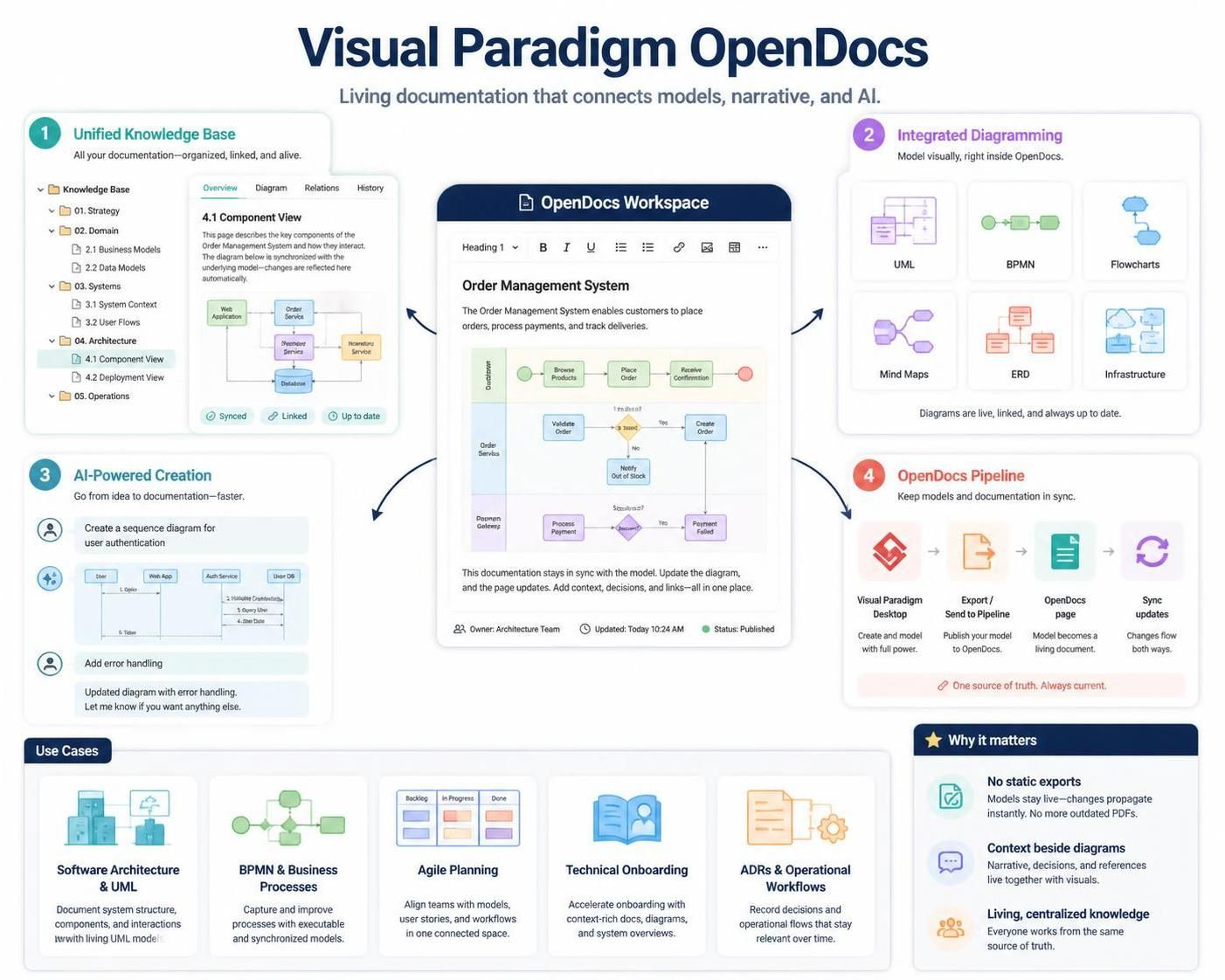
Visual Paradigm OpenDocs is an all-in-one knowledge base and documentation platform designed to bridge the gap between visual modeling and narrative writing. It eliminates the friction of traditional document workflows—where teams bounce between design tools, static image exports, shared drives, and markdown wikis—by unifying rich-text editing, a robust diagramming suite, and generative AI directly into a single workspace.
1. Core Architecture & Philosophy
Traditionally, technical and business documentation suffers from “tool sprawl” and disconnected artifacts: diagrams are exported as static PNGs, pasted into Word or Confluence, and immediately become outdated when code or architecture changes.
OpenDocs solves this by treating documentation as a living, centralized ecosystem:
-
The Unified Home: Write text, structure knowledge trees, and embed fully interactive or synchronized diagrams side-by-side.
-
Contextual Documentation: Every diagram can be framed by its driving requirements, design rationale, architecture decisions (ADRs), and operational workflows.
-
Hierarchical Organization: Folders, nested pages, and tabbed sections let you map out entire project structures, systems, and enterprise knowledge bases cleanly.
2. Key Features & Capabilities
A. Integrated Diagram Editor & Shape Library
-
Built-in Drawing: You do not need to switch tabs or open separate software to sketch. A powerful drawing tool is embedded right inside the editor canvas.
-
Extensive Shape Library: Access hundreds of shapes, templates, and frameworks for flowcharts, mind maps, UML diagrams, BPMN process maps, and IT infrastructure maps.
B. AI-Powered Generation & Chat
-
Text-to-Diagram: Skip manual alignment and box-dragging. Type a plain text prompt (e.g., “Create a sequence diagram for user authentication” or “Build a flowchart for our refund process”) and let the AI generate the structural layout instantly.
-
Conversational Refinement: Iteratively modify diagrams using natural language commands like “Add error handling to this workflow” or “Add a payment verification class linked to the Checkout module”.
C. The OpenDocs Pipeline (Desktop Integration)
For enterprise architects and software engineers working heavily in Visual Paradigm Desktop or VP Online, OpenDocs features a seamless Asset Pipeline:
-
Model: Build or refine your professional models (UML, ERD, BPMN) inside Visual Paradigm Desktop.
-
Push: Right-click your diagram and select Export > Send to OpenDocs Pipeline.
-
Embed: Inside OpenDocs, open your page, click Insert > Pipeline, and drop the living diagram straight into your documentation narrative.
-
Sync: When models change upstream, updates can be looped back seamlessly so your documentation never goes stale.
3. Recommended Use Cases
OpenDocs scales across different teams and organizational needs:
-
Software Architecture & Engineering Specs: Document system context, API boundaries, component layouts, and database structures alongside live UML/SysML diagrams and Architecture Decision Records (ADRs).
-
Business Process Management (BPM): Combine BPMN execution workflows with narrative descriptions, identifying process triggers, participants, expected outcomes, and exception paths.
-
Project Management & Agile Planning: Maintain Work Breakdown Structures (WBS), Gantt timelines, roadmaps, and product requirement documents (PRDs) in a single collaborative view.
-
Technical Onboarding Hubs: Build centralized internal wikis containing glossary terms, architecture principles, deployment flows, local setup guides, and troubleshooting directories.
4. Collaboration & Sharing
-
Secure Sharing: Generate secure, unique read-only or collaborative links to distribute documentation seamlessly to stakeholders.
-
Real-Time Collaboration: Multiple team members can review, comment, and co-create knowledge artifacts simultaneously.
-
Desktop-to-Cloud Interoperability: Easily bridge offline enterprise modeling power with browser-based agile publishing.
Are you looking to use OpenDocs primarily for software architecture/UML design, business process modeling (BPMN), or general project documentation?
This post is also available in Deutsch, Español, فارسی, Français, English, Bahasa Indonesia, 日本語, Polski, Portuguese, Ру́сский, Việt Nam, 简体中文 and 繁體中文.