


Introduction
UML Profile Diagrams are powerful tools for extending the Unified Modeling Language (UML) to fit specific domains, industries, or organizational standards. They allow architects and developers to define custom stereotypes, tagged values, and constraints that bring semantic meaning to standard UML elements. However, creating these diagrams has traditionally required deep knowledge of UML metamodels, complex syntax, and manual diagramming efforts.
Enter VPasCode, Visual Paradigm’s innovative AI-powered diagram-as-code editor. With its new AI UML Profile Diagram Generator, you can now create sophisticated UML profiles using simple, plain English descriptions—no coding expertise required. This guide explores how this breakthrough technology transforms the way teams design, document, and maintain custom modeling standards.
Key Concepts
What is a UML Profile?
A UML Profile is a mechanism for tailoring UML to specific domains or platforms. It extends standard UML by defining:
-
Stereotypes: Custom classifications that extend UML metaclasses (e.g.,
<<HealthRecord>>,<<EncryptedData>>) -
Tagged Values: Additional properties attached to stereotypes (e.g.,
encryptionType,retentionPeriod) -
Constraints: Rules that govern how stereotyped elements behave
Profiles are essential for:
-
Regulatory compliance modeling (HIPAA, GDPR, SOX)
-
Domain-specific architecture (healthcare, finance, IoT)
-
Enterprise governance and standardization
-
Platform-specific implementations (cloud, mobile, embedded systems)
The Challenge with Traditional Approaches
Creating UML Profiles manually involves:
-
Understanding UML metamodel extensions
-
Writing complex PlantUML or XMI code
-
Manually positioning diagram elements
-
Maintaining consistency across versions
-
Training team members on syntax rules
This process is time-consuming, error-prone, and creates barriers for non-technical stakeholders who need to contribute to modeling standards.
The VPasCode Solution
VPasCode eliminates these barriers through conversational AI. Instead of writing code, you describe what you need in natural language, and the AI generates:
-
Complete profile structures with proper stereotypes
-
Tagged values with appropriate data types
-
Relationships between profile elements
-
Clean, version-controllable PlantUML source code
How It Works: Step-by-Step
Step 1: Describe Your Diagram
Start by typing your requirements in everyday language. Be specific about:
-
The domain or industry context
-
The types of stereotypes you need
-
Any tagged values or constraints
-
Relationships between elements
Example Prompt:
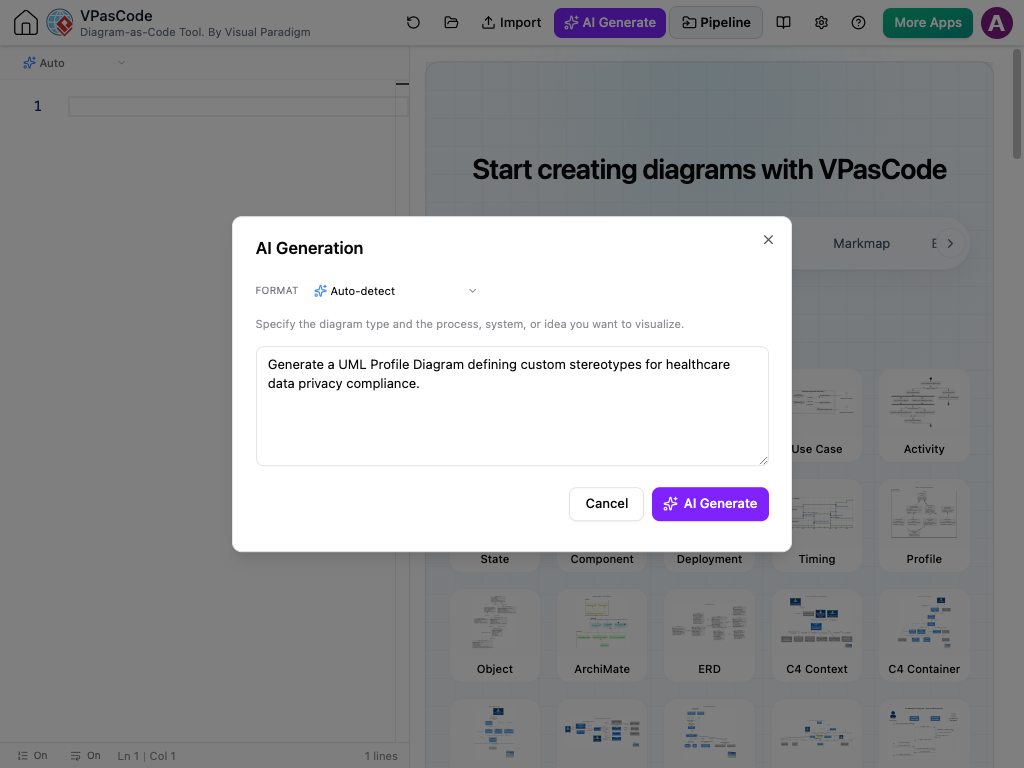
"Generate a UML Profile Diagram defining custom stereotypes for healthcare data privacy compliance."
Step 2: Instant Visual Generation
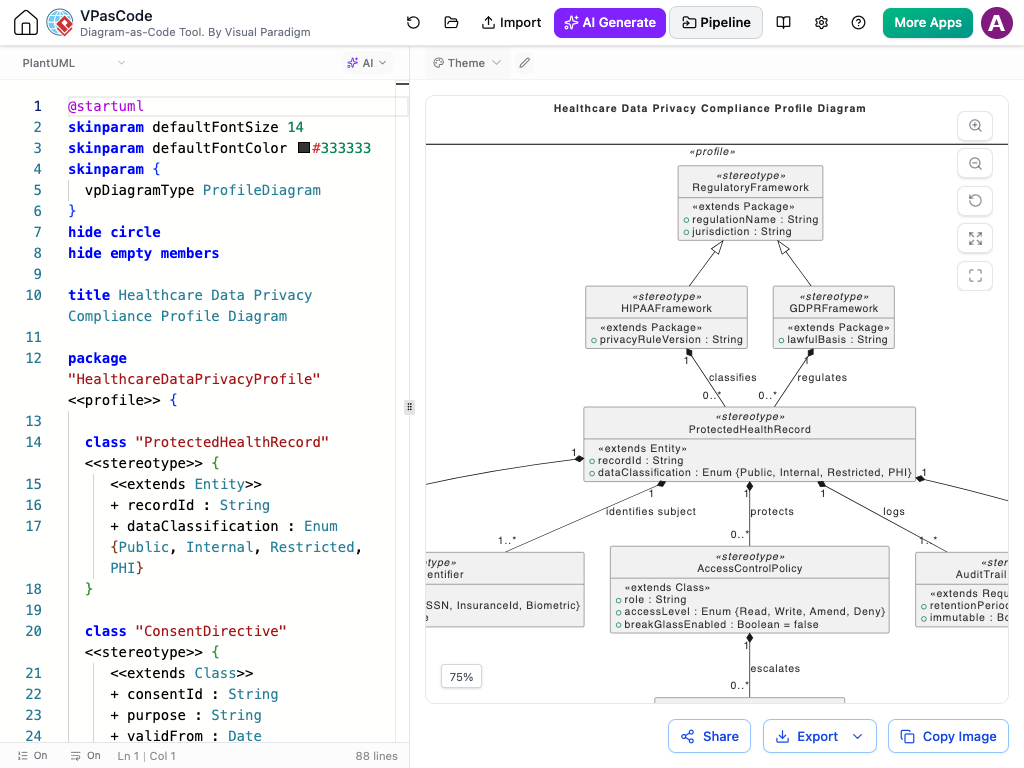
VPasCode interprets your description and automatically builds the complete profile structure. The AI handles:
-
Stereotype naming conventions
-
Appropriate UML element types
-
Logical relationships and multiplicities
-
Visual layout and formatting
The result is a professional-grade UML Profile Diagram ready for use.
Step 3: Conversational Refinement
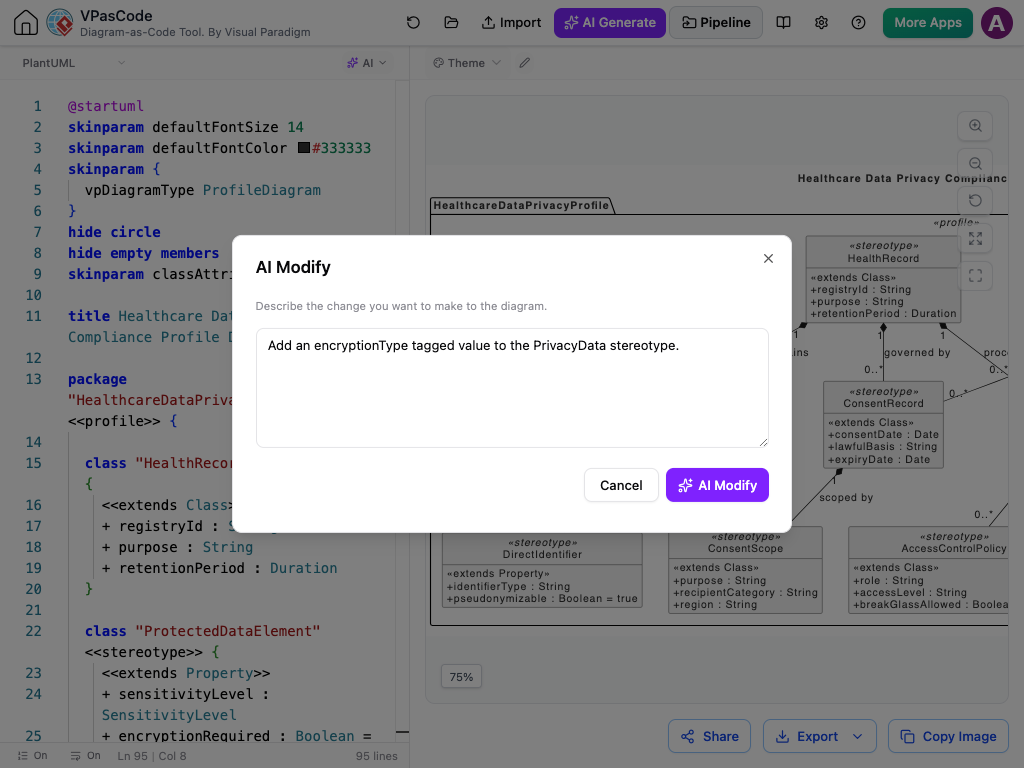
Need changes? Simply chat with the AI to modify your diagram:
-
“Add an encryptionType tagged value to the PrivacyData stereotype.”
-
“Extend the profile to include a specialized AuditLog component.”
-
“Make the DataBreachIncident stereotype inherit from ProcessingActivity.”
The AI understands context and applies changes precisely without requiring you to edit code manually.
Practical Example: Healthcare Data Privacy Compliance
Let’s walk through a real-world scenario where an organization needs to model HIPAA-compliant data handling practices.
The Generated Profile
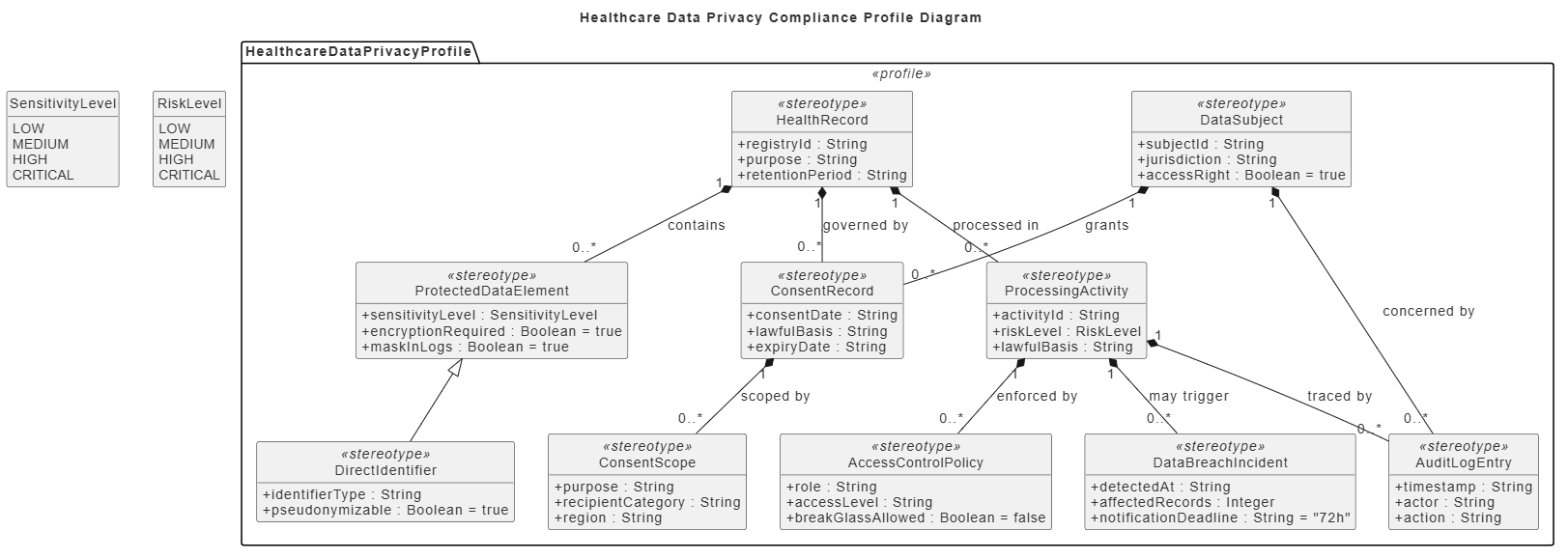
When you prompt VPasCode with “Generate a UML Profile Diagram defining custom stereotypes for healthcare data privacy compliance,” it produces a comprehensive profile including:
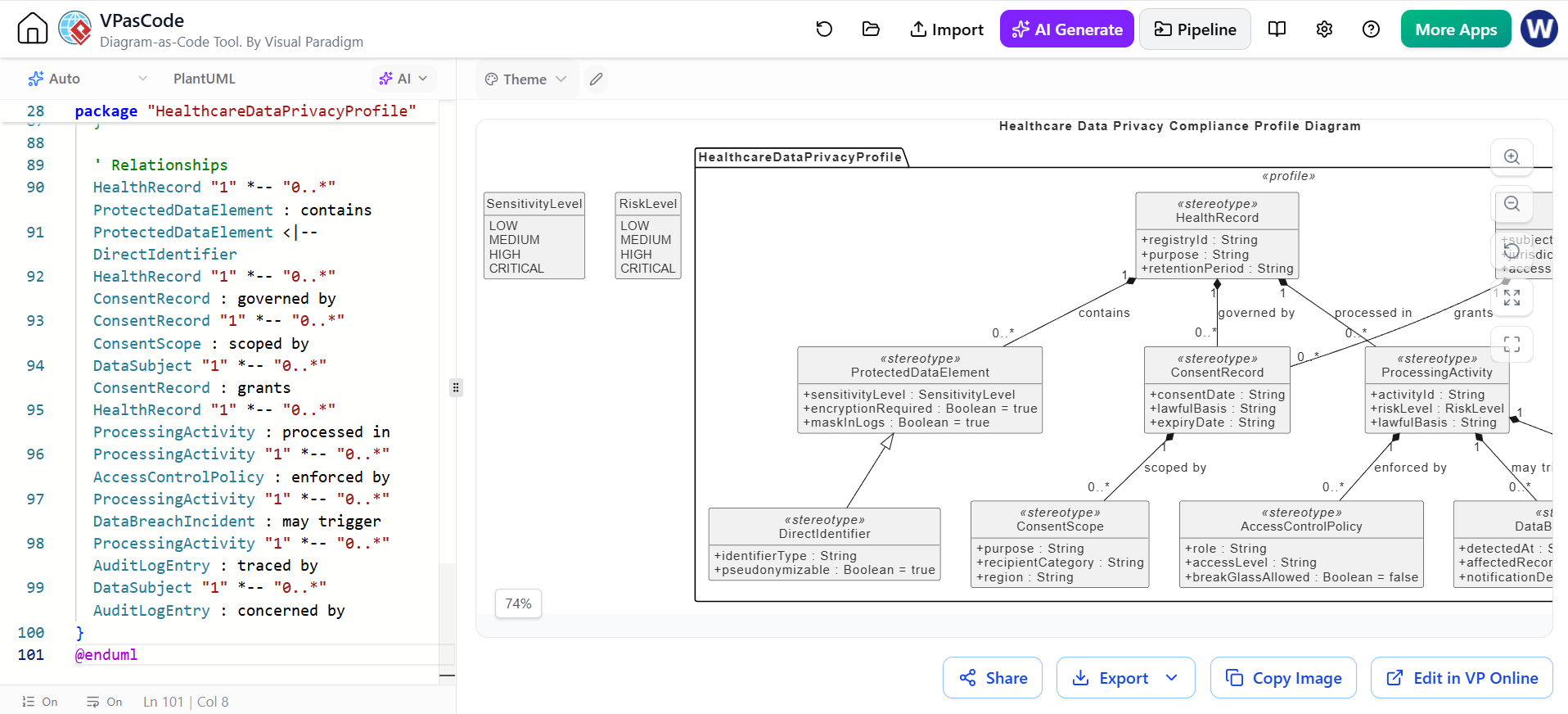
@startuml
skinparam defaultFontSize 14
skinparam defaultFontColor #333333
hide circle
hide empty members
skinparam classAttributeIconSize 0

title Healthcare Data Privacy Compliance Profile Diagram

package "HealthcareDataPrivacyProfile" <> {

  class "HealthRecord" <> {
    + registryId : String
    + purpose : String
    + retentionPeriod : Duration
  }

  class "ProtectedDataElement" <> {
    + sensitivityLevel : SensitivityLevel
    + encryptionRequired : Boolean = true
    + maskInLogs : Boolean = true
  }

  class "DirectIdentifier" <> {
    + identifierType : String
    + pseudonymizable : Boolean = true
  }

  class "ConsentRecord" <> {
    + consentDate : Date
    + lawfulBasis : String
    + expiryDate : Date
  }

  class "ConsentScope" <> {
    + purpose : String
    + recipientCategory : String
    + region : String
  }

  class "DataSubject" <> {
    + subjectId : String
    + jurisdiction : String
    + accessRight : Boolean = true
  }

  class "ProcessingActivity" <> {
    + activityId : String
    + riskLevel : RiskLevel
    + lawfulBasis : String
  }

  class "AccessControlPolicy" <> {
    + role : String
    + accessLevel : String
    + breakGlassAllowed : Boolean = false
  }

  class "DataBreachIncident" <> {
    + detectedAt : DateTime
    + affectedRecords : Integer
    + notificationDeadline : Duration = 72h
  }

  class "AuditLogEntry" <> {
    + timestamp : DateTime
    + actor : String
    + action : String
  }

  HealthRecord "1" *-- "0..*" ProtectedDataElement : contains
  ProtectedDataElement <|-- DirectIdentifier
  HealthRecord "1" *-- "0..*" ConsentRecord : governed by
  ConsentRecord "1" *-- "0..*" ConsentScope : scoped by
  DataSubject "1" *-- "0..*" ConsentRecord : grants
  HealthRecord "1" *-- "0..*" ProcessingActivity : processed in
  ProcessingActivity "1" *-- "0..*" AccessControlPolicy : enforced by
  ProcessingActivity "1" *-- "0..*" DataBreachIncident : may trigger
  ProcessingActivity "1" *-- "0..*" AuditLogEntry : traced by
  DataSubject "1" *-- "0..*" AuditLogEntry : concerned by
}
@enduml
Profile Elements Explained
This healthcare compliance profile includes:
-
HealthRecord: Core entity representing patient records with metadata
-
ProtectedDataElement: Defines sensitive data with encryption and masking requirements
-
DirectIdentifier: Specialized protected data that can be pseudonymized
-
ConsentRecord & ConsentScope: Models patient consent with legal basis and scope
-
DataSubject: Represents patients with jurisdictional rights
-
ProcessingActivity: Tracks data processing with risk levels
-
AccessControlPolicy: Defines role-based access with emergency override capabilities
-
DataBreachIncident: Models breach events with notification deadlines
-
AuditLogEntry: Ensures traceability of all data interactions
The relationships show how these elements interact in a compliant healthcare system, from data creation through processing, access control, and audit trails.
Bringing Diagram-as-Code to UML Profiles
Standard text-to-diagram engines don’t easily support UML Profile Diagrams out of the box. To make this possible, Visual Paradigm created custom PlantUML-based structures, allowing you to store, share, and version-control your UML profiles as clean, lightweight text files—without ever having to write code yourself.
Benefits of the Diagram-as-Code Approach
-
Version Control: Track changes using Git or other VCS tools
-
Collaboration: Multiple team members can review and suggest changes
-
Reusability: Copy and adapt profiles across projects
-
Documentation: Code serves as living documentation
-
Automation: Integrate into CI/CD pipelines for validation
No Syntax Needed—Just Plain English
The real benefit of VPasCode is skipping the manual effort completely. You don’t need to memorize formatting rules, draw shapes by hand, or edit code lines. You simply explain what you need, and the AI handles the layout, connections, and formatting behind the scenes.
Who Benefits?
-
Business Analysts: Define domain concepts without learning UML syntax
-
Compliance Officers: Model regulatory requirements in visual form
-
System Architects: Create reusable profile templates quickly
-
Development Teams: Maintain consistent modeling standards
-
Technical Writers: Generate accurate diagrams for documentation
Connect Custom Profiles to Your Documentation Pipeline
Once your custom UML Profile is defined in VPasCode, it integrates cleanly across the Visual Paradigm ecosystem:
OpenDocs
Embed live profile definitions into system specifications, compliance records, and modeling guidelines. Changes to the profile automatically update embedded diagrams, ensuring documentation stays current.
NotesKeep
Store domain prompts, AI design rationales, and stereotype explanations for team architecture reviews. Create a knowledge base of modeling decisions and their justifications.
Asset Export
Download crisp SVG or PNG diagrams for architectural guidelines and onboarding materials. High-quality exports ensure your profiles look professional in presentations and printed documents.
 Learn more about the AI UML Profile Diagram Generator
Best Practices for AI-Generated UML Profiles
1. Be Specific in Your Prompts
Instead of “Create a security profile,” try:
“Generate a UML Profile for financial transaction security including stereotypes for encrypted fields, authentication methods, fraud detection rules, and audit requirements per PCI-DSS standards.”
2. Iterate Through Conversation
Start broad, then refine:
-
Generate initial profile
-
Review and identify gaps
-
Request specific additions or modifications
-
Validate relationships and constraints
3. Leverage Domain Knowledge
Provide context about:
-
Industry regulations (GDPR, HIPAA, SOX)
-
Organizational standards
-
Technical constraints
-
Integration requirements
4. Validate with Stakeholders
Use the visual output to:
-
Confirm understanding with business users
-
Identify missing elements early
-
Ensure alignment with compliance requirements
5. Maintain Version History
Since profiles are stored as PlantUML code:
-
Commit changes to version control
-
Document rationale for modifications
-
Tag releases for different project phases
Conclusion
The introduction of AI-powered UML Profile Diagram generation in VPasCode represents a significant leap forward in model-driven engineering. By removing the technical barriers of syntax and manual diagramming, Visual Paradigm has made it possible for anyone—from business analysts to compliance officers—to create professional-grade UML profiles using nothing more than plain English descriptions.
This democratization of modeling enables:
-
Faster iteration on domain-specific standards
-
Better collaboration between technical and non-technical stakeholders
-
Improved compliance through clear, visual representation of regulatory requirements
-
Reduced errors through AI-assisted structure and relationship validation
-
Enhanced documentation through seamless integration with Visual Paradigm’s ecosystem
As organizations increasingly rely on precise modeling to navigate complex regulatory landscapes and technical architectures, tools like VPasCode’s AI UML Profile Generator will become indispensable. The ability to translate business requirements directly into formal modeling constructs—without the traditional learning curve—opens new possibilities for agile, compliant, and well-documented system design.
Ready to transform how your team creates UML profiles?
Try AI UML Profile Diagrams in VPasCode
Visual Paradigm Tools and Articles
- Visual Paradigm: A Comprehensive UML Modeling Solution: Overview of Visual Paradigm as a full UML modeling suite supporting the latest UML 2.6 standard.
- AI-Powered Diagram Generator & Productivity Tools | VPasCode: Details how VPasCode integrates with AI chatbots, VP Desktop, and OpenDocs to create a connected design pipeline.
- Profile Diagrams – Visual Paradigm Guides: Guide on creating custom UML extensions (stereotypes, tagged values, constraints) for domain-specific modeling.
- Practical 3: Structural Implementation – Visual Paradigm Guides: Practical tutorial on using AI to generate class diagrams and manually building component/deployment diagrams.
- AI Package Diagram Generator | Visual Paradigm AI: How to generate package diagrams from text prompts using AI in VP Desktop and OpenDocs.
- Connect Diagrams to Documentation | Text to Diagram with VPasCode: Describes VPasCode integration with OpenDocs for maintaining live, synchronized diagrams within documentation.
- AI Profile Diagram Generator | Custom UML Extension Tool: Step-by-step guide for generating UML Profile Diagrams with AI across Desktop, OpenDocs, and the AI Chatbot.
- AI Class Diagram Generation – Visual Paradigm Guides: In-depth explanation of generating standards-compliant UML 2.5 class diagrams from natural language.
- Export Diagram-as-Code to Desktop | Visual Paradigm VPasCode Update: Announcement of the feature to export VPasCode diagrams directly into Visual Paradigm Desktop via the Pipeline.
- Native AI Diagram Generation in Visual Paradigm VPasCode: Introduction to VPasCode’s built-in AI engine for generating and modifying PlantUML, Mermaid, and other diagrams natively.
- From Text to UML: Building Class Diagrams with PlantUML in Visual Paradigm: Overview of VPasCode’s features for text-to-UML workflows, including bidirectional editing and AI assistance.
This post is also available in Deutsch, Español, فارسی, Français, English, Bahasa Indonesia, 日本語, Polski, Portuguese, Ру́сский, Việt Nam, 简体中文 and 繁體中文.