


Introduction
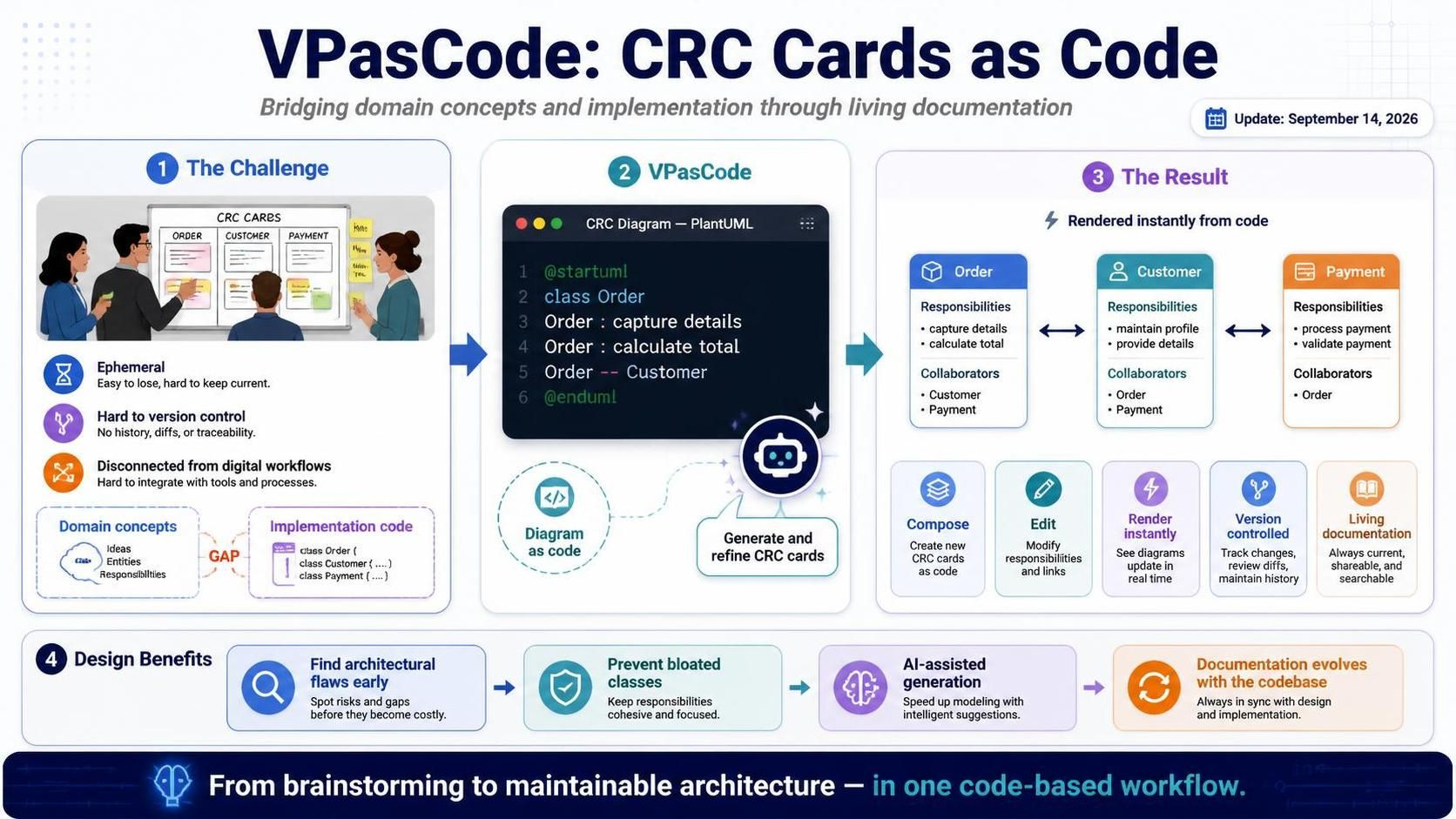
In the fast-paced world of software development, bridging the gap between abstract domain concepts and concrete implementation code remains one of the most challenging aspects of system design. Traditional whiteboard sessions with physical index cards have long been a staple for brainstorming object-oriented architectures, but they suffer from significant drawbacks: they are ephemeral, difficult to version control, and hard to integrate into modern digital documentation workflows.
Enter VPasCode, Visual Paradigm’s innovative diagram-as-code platform. With the latest update announced on September 14, 2026, VPasCode now offers full support for CRC (Class-Responsibility-Collaborator) Card Diagrams. This powerful feature allows developers, system analysts, and domain experts to compose, edit, and instantly render structured CRC layouts using PlantUML directly within their code-based workflow. By leveraging AI-assisted generation and clean syntax, teams can identify architectural flaws early, prevent bloated classes, and maintain living documentation that evolves alongside their codebase.
What is a CRC Card Diagram?
CRC (Class-Responsibility-Collaborator) cards provide a structured, lightweight approach to outlining object-oriented domain models before writing any implementation code. The methodology breaks down complex domain entities into three core areas:
-
Class: Represents a key object, component, or entity in your application domain.
-
Responsibilities: High-level duties, behaviors, knowledge, or obligations managed by the class. These answer the question: “What does this class know or do?”
-
Collaborators: Other classes required to fulfill those responsibilities. These answer the question: “Who does this class work with to get the job done?”
While traditional CRC modeling uses physical index cards on a whiteboard during collaborative brainstorming sessions, preserving and maintaining those models over time is difficult. VPasCode brings that same clarity and simplicity to a digital, code-based format that easily embeds into modern software documentation pipelines.
Key Benefits of Using CRC Cards in VPasCode
-
Clean Map Syntax: Leverage PlantUML
mapstructures to group responsibilities and collaborators neatly side-by-side, creating readable and maintainable diagram code. -
Identify Architecture Flaws Early: Spot bloated classes, single-responsibility violations, or missing service boundaries before writing implementation code, saving significant refactoring effort later.
-
Seamless Documentation Workflow: Edit diagram code easily using version control, export rendered assets, or push diagrams directly to OpenDocs and NotesKeep for centralized team knowledge management.
-
AI-Powered Generation: Utilize Visual Paradigm’s AI capabilities to automatically generate CRC card structures from natural language descriptions or existing codebases, accelerating the design process.
Getting Started with CRC Card Diagrams in VPasCode
Creating CRC Card Diagrams in VPasCode is straightforward thanks to its integration with PlantUML. The platform uses a specialized skin parameter to render the classic CRC card layout while maintaining the flexibility of code-based diagramming.
Basic Syntax Structure
To create a CRC Card Diagram, you need to:
-
Set the diagram type using
skinparam vpDiagramType CRCCardDiagram -
Use the
mapkeyword to define each class -
Structure each map with “Responsibilities => Collaborators” as the header
-
List responsibilities on the left and their corresponding collaborators on the right
Comprehensive Example: Hotel Reservation System
Let’s explore a complete example demonstrating how to model a hotel reservation system using CRC Card Diagrams in VPasCode:
@startuml
skinparam {
  vpDiagramType CRCCardDiagram
}
skinparam defaultFontSize 14
skinparam defaultFontColor #333333
title Hotel Reservation System - CRC Cards

map "Reservation" as Reservation {
  Responsibilities => Collaborators
  Create and hold a booking => Guest\nRoom\nDateRange
  Track check-in and check-out dates => DateRange
  Track reservation status => ReservationStatus
  Calculate total price => RatePlan\nPayment
  Confirm or cancel booking => ReservationManager\nNotificationService
}

map "Guest" as Guest {
  Responsibilities => Collaborators
  Store personal and contact details => -
  Provide identity for booking => Reservation
  View and manage own reservations => ReservationManager
  Provide payment information => Payment
}

map "Room" as Room {
  Responsibilities => Collaborators
  Represent room number and type => RoomType
  Hold availability for a period => DateRange\nRoomAvailability
  Know physical attributes and capacity => RoomType
}

map "RoomType" as RoomType {
  Responsibilities => Collaborators
  Define category and amenities => -
  Set nightly base price => RatePlan
  Define maximum occupancy => Room
}

map "DateRange" as DateRange {
  Responsibilities => Collaborators
  Represent check-in and check-out => -
  Detect overlap with other ranges => Reservation
  Compute number of nights => Reservation
}

map "RoomAvailability" as RoomAvailability {
  Responsibilities => Collaborators
  Track free and booked periods => Room\nDateRange
  Check room availability for range => Reservation
  Reserve and release a room => ReservationManager
}

map "ReservationManager" as ReservationManager {
  Responsibilities => Collaborators
  Coordinate reservation lifecycle => Reservation
  Search available rooms => RoomAvailability\nRoom
  Apply rate rules to a booking => RatePlan
  Trigger booking notifications => NotificationService
}

map "RatePlan" as RatePlan {
  Responsibilities => Collaborators
  Define pricing rules and discounts => RoomType
  Compute price for a date range => DateRange\nReservation
  Apply seasonal adjustments => -
}

map "Payment" as Payment {
  Responsibilities => Collaborators
  Process charges and refunds => PaymentGateway
  Record payment status => Reservation
  Store amount and method => -
}

map "PaymentGateway" as PaymentGateway {
  Responsibilities => Collaborators
  Authorize card transactions => Payment
  Return transaction results => Payment\nNotificationService
}

map "NotificationService" as NotificationService {
  Responsibilities => Collaborators
  Send confirmation emails => Guest\nReservation
  Send cancellation notices => Guest\nReservation
  Format message content => Guest
}

map "ReservationStatus" as ReservationStatus {
  Responsibilities => Collaborators
  Represent booking states => Reservation
  Validate state transitions => ReservationManager
}

Reservation -[hidden]right-> Guest
Guest -[hidden]right-> Room
Room -[hidden]right-> RoomType
Reservation -[hidden]down-> DateRange
Guest -[hidden]down-> RoomAvailability
Room -[hidden]down-> ReservationManager
RoomType -[hidden]down-> RatePlan
DateRange -[hidden]right-> RoomAvailability
RoomAvailability -[hidden]right-> ReservationManager
ReservationManager -[hidden]right-> RatePlan
DateRange -[hidden]down-> Payment
RoomAvailability -[hidden]down-> PaymentGateway
ReservationManager -[hidden]down-> NotificationService
RatePlan -[hidden]down-> ReservationStatus
Payment -[hidden]right-> PaymentGateway
PaymentGateway -[hidden]right-> NotificationService
NotificationService -[hidden]right-> ReservationStatus
@enduml
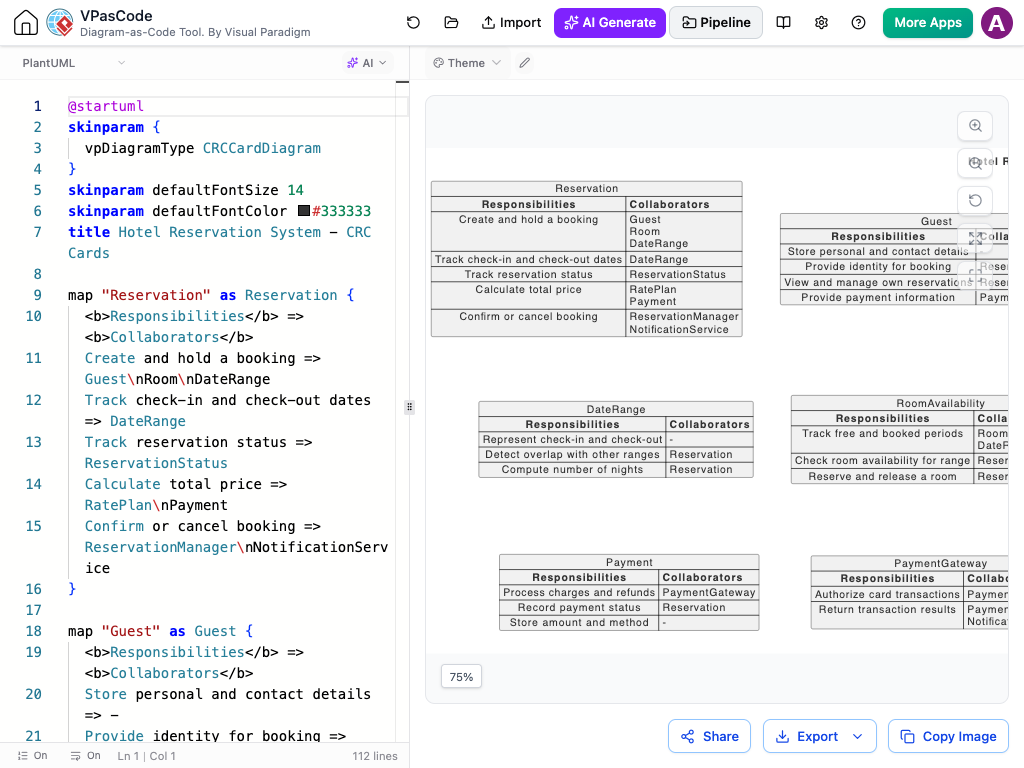
This example demonstrates several important patterns:
-
Clear Responsibility Mapping: Each class clearly lists what it knows and does
-
Collaborator Identification: Dependencies between classes are explicitly shown
-
Hidden Relationships: The hidden arrows at the bottom show the overall system structure without cluttering the individual cards
-
Proper Granularity: Classes are broken down to appropriate levels of responsibility
Why Use CRC Cards & Who Are They For?
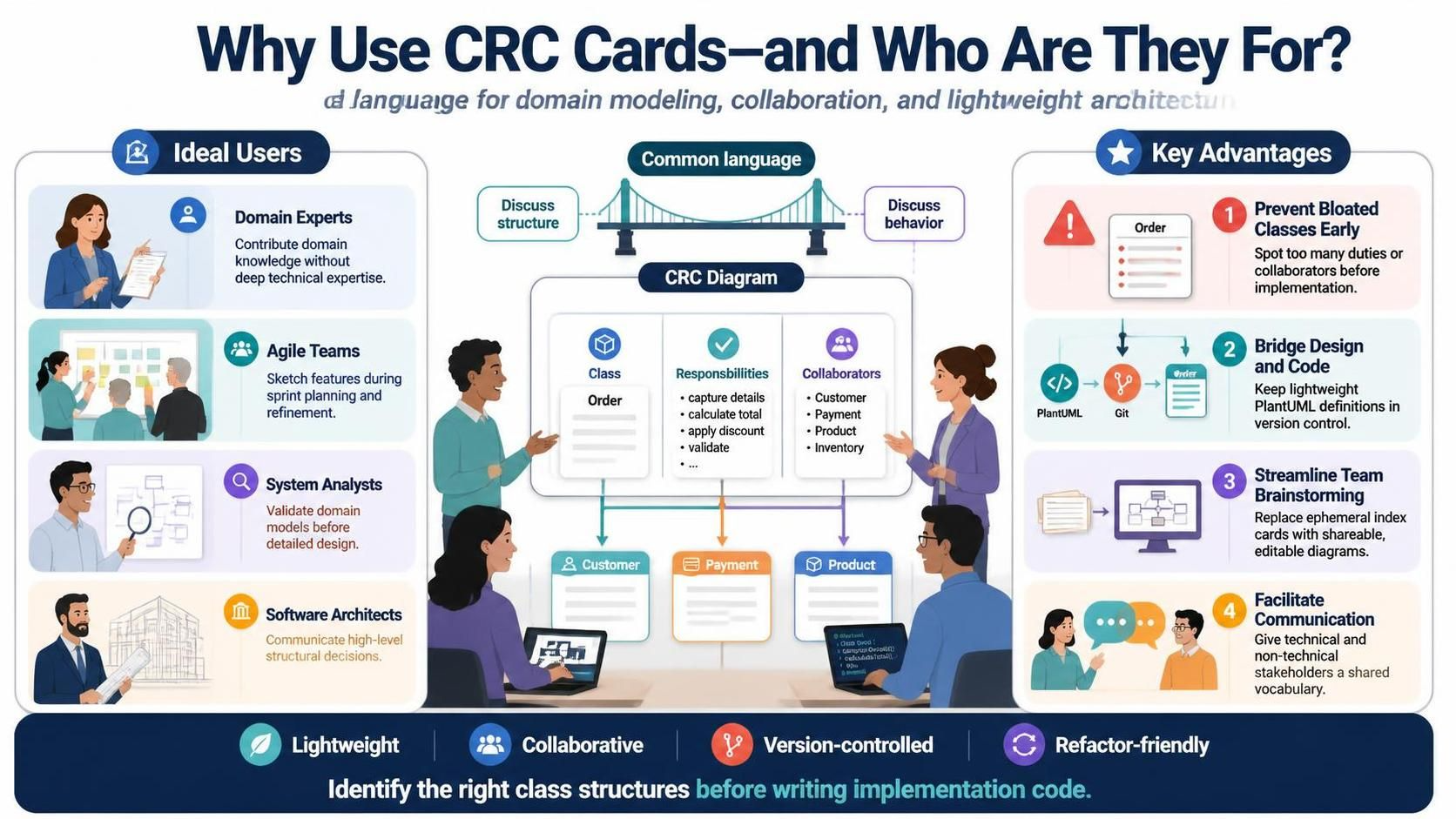
CRC Card Diagrams are particularly valuable for specific roles and scenarios in the software development lifecycle:
Ideal Users
-
Domain Experts: Business analysts and subject matter experts who understand the problem domain but may not be deeply technical can contribute to design discussions using the intuitive CRC format.
-
Agile Teams: Scrum teams performing sprint planning or refinement sessions can quickly sketch out new features and identify necessary class structures.
-
System Analysts: Professionals performing early object-oriented analysis can use CRC cards to validate domain models before committing to detailed design.
-
Software Architects: Architects can use CRC diagrams to communicate high-level structural decisions to development teams.
Key Advantages
-
Prevent Bloated Classes Early: By mapping duties side-by-side with collaborators, you can immediately spot single-responsibility violations before writing any implementation code. If a class has too many responsibilities or depends on too many collaborators, it’s a clear signal that refactoring is needed.
-
Bridge Design and Code: Keeps class definitions lightweight and readable using simple PlantUML text structures that can be stored in version control alongside your source code.
-
Streamline Team Brainstorming: Replaces physical index cards with a digital, version-controlled format that integrates smoothly into technical documentation and can be easily shared, reviewed, and updated.
-
Facilitate Communication: Provides a common language for technical and non-technical stakeholders to discuss system structure and behavior.
Best Practices for CRC Card Modeling
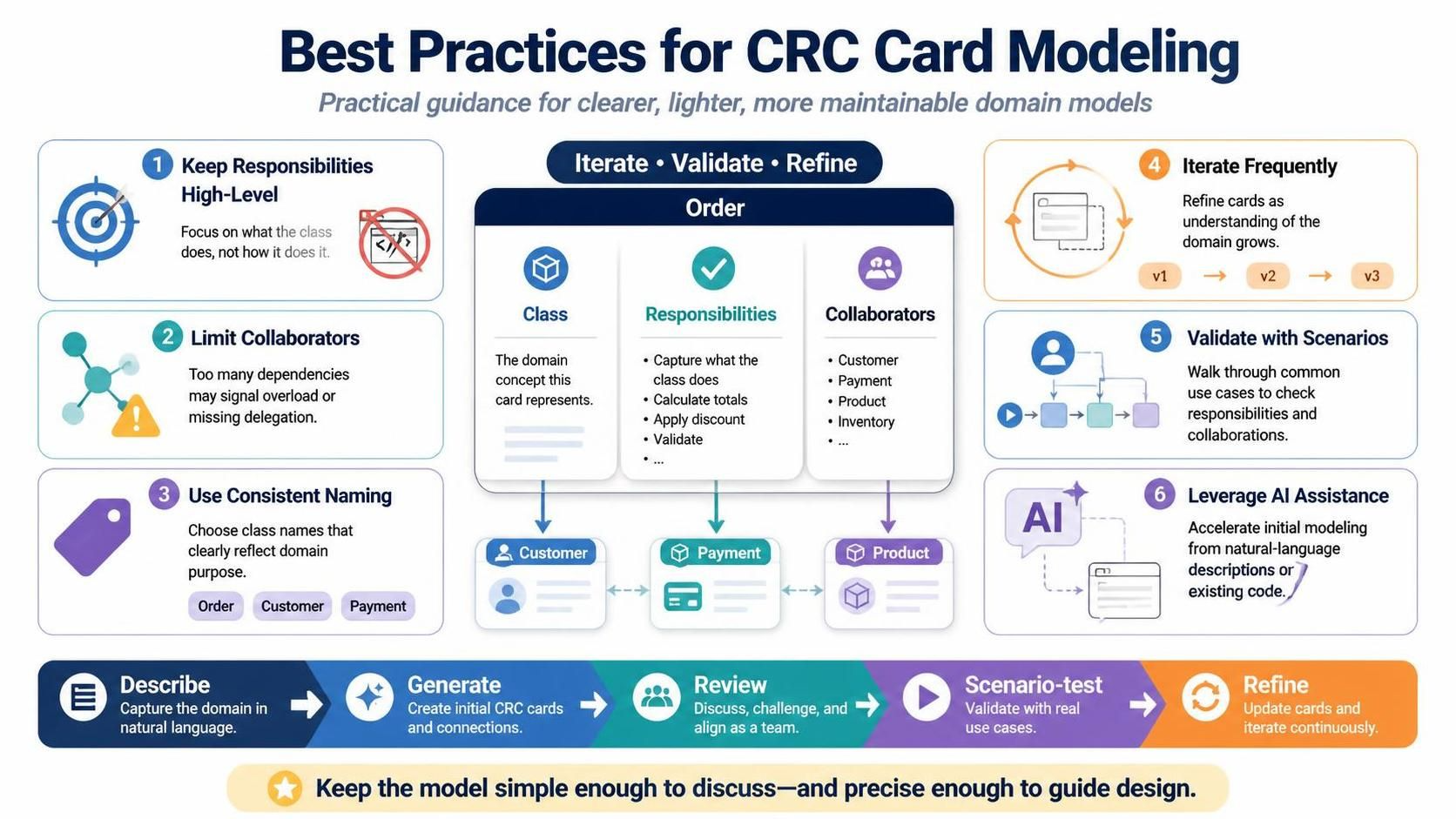
To get the most value from CRC Card Diagrams in VPasCode, consider these best practices:
-
Keep Responsibilities High-Level: Focus on what the class does, not how it does it. Avoid implementation details.
-
Limit Collaborators: If a class has too many collaborators, consider whether it’s taking on too much responsibility or if some responsibilities should be delegated.
-
Use Consistent Naming: Ensure class names clearly reflect their purpose in the domain.
-
Iterate Frequently: CRC modeling is an iterative process. Refine your cards as you gain deeper understanding of the domain.
-
Validate with Scenarios: Walk through common use cases to ensure all necessary responsibilities and collaborations are captured.
-
Leverage AI Assistance: Use Visual Paradigm’s AI CRC Card Diagram Generator to accelerate initial modeling from natural language descriptions or existing code.
 Learn more about the AI CRC Card Diagram Generator
Integrating CRC Diagrams into Your Workflow
VPasCode makes it easy to integrate CRC Card Diagrams into your existing development workflow:
-
Version Control: Store your PlantUML source files alongside your code in Git or other version control systems
-
Documentation Integration: Export rendered diagrams to include in technical documentation, wikis, or presentation materials
-
OpenDocs & NotesKeep: Push diagrams directly to Visual Paradigm’s documentation platforms for centralized team access
-
CI/CD Pipeline: Automatically generate and validate diagrams as part of your continuous integration process
-
Code Generation: Use CRC models as input for AI-assisted code generation tools to accelerate implementation
Conclusion
The introduction of CRC Card Diagram support in VPasCode represents a significant advancement in bridging the gap between conceptual design and practical implementation. By combining the timeless wisdom of CRC modeling with modern diagram-as-code tooling, Visual Paradigm empowers teams to create clearer, more maintainable object-oriented designs.
Whether you’re starting a new project, refactoring an existing codebase, or facilitating collaborative design sessions, CRC Card Diagrams in VPasCode provide the structure and clarity needed to build better software. The ability to version control, share, and integrate these diagrams into your documentation workflow ensures that your design decisions remain visible and accessible throughout the development lifecycle.
Ready to streamline your object-oriented design? Open VPasCode, write your PlantUML script, and start mapping class responsibilities in seconds.
Try CRC Card Diagrams in VPasCode
Recommended Resources
-
AI CRC Card Diagram Generator Update: Learn about Visual Paradigm’s AI-powered tool for automatically generating CRC card diagrams from natural language descriptions.
-
VPasCode Official Editor: Access the online VPasCode editor to create, edit, and render CRC Card Diagrams and other diagram types using PlantUML syntax.
-
Visual Paradigm Updates Blog: Stay informed about the latest features, improvements, and best practices for Visual Paradigm tools including VPasCode.
-
OpenDocs Documentation Platform: Explore Visual Paradigm’s collaborative documentation platform for integrating diagrams and technical documentation.
-
PlantUML Official Documentation: Reference guide for PlantUML syntax and features used in VPasCode for creating various diagram types.
This post is also available in Deutsch, Español, فارسی, Français, English, Bahasa Indonesia, 日本語, Polski, Portuguese, Ру́сский, Việt Nam, 简体中文 and 繁體中文.