


Introduction
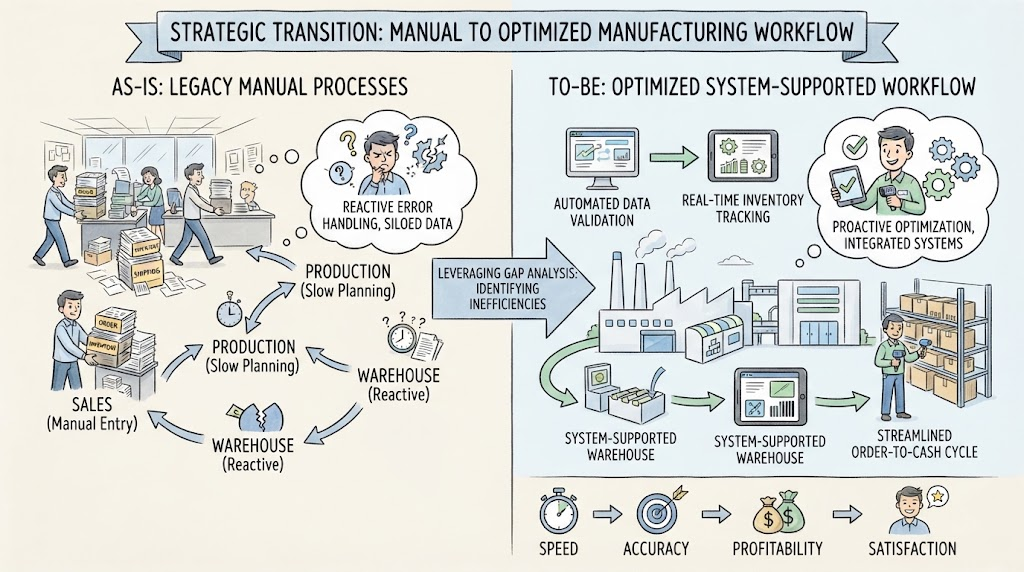
In the modern manufacturing landscape, the speed and accuracy of order fulfillment are critical determinants of customer satisfaction and operational profitability. However, many organizations, like the fictional Apex Manufacturing Inc., rely on legacy “As-Is” processes characterized by manual handoffs, siloed departments, and reactive error handling.
This guide explores the strategic transition from a manual workflow to an optimized “To-Be” state. By leveraging Gap Analysis—a method of comparing current operating conditions against a target state to determine how to bridge the difference—businesses can identify inefficiencies in their order-to-cash cycles. We will examine how integrating automated data validation, real-time inventory tracking, and system-supported warehouse operations can eliminate bottlenecks and streamline the path from purchase order to delivery.
Key Concepts
1. Business Process Model and Notation (BPMN)
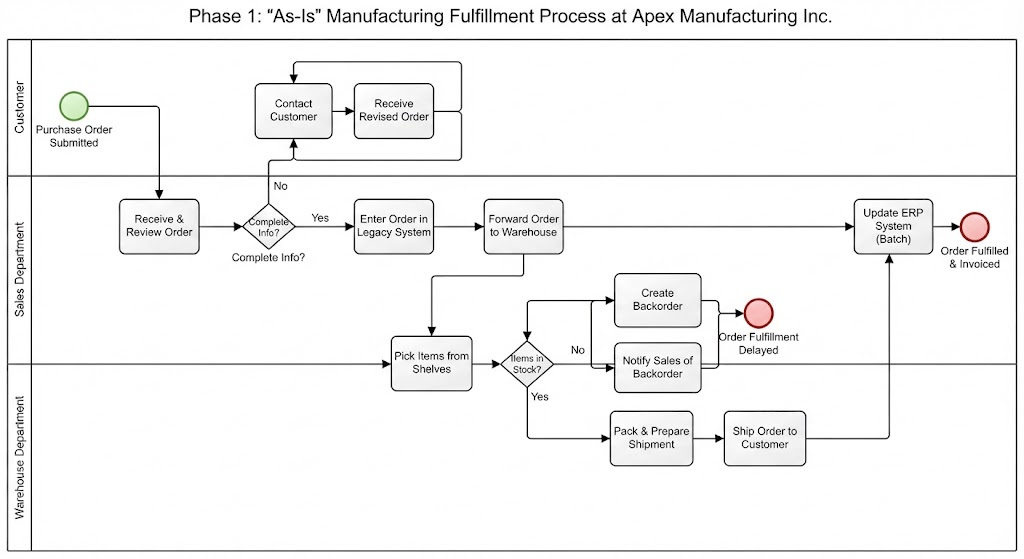
BPMN is a standard for business process modeling that provides a graphical notation for specifying business processes in a Business Process Diagram. In the context of Apex Manufacturing, BPMN is used to visualize the flow of tasks between the Customer, Sales Department, and Warehouse Department.
-
Pools and Lanes: These represent the different participants (e.g., Sales vs. Warehouse) and help identify where handoffs occur.
-
Gateways: The diamond shapes (X) represent decision points, such as “Complete Info?” or “Items Available?”, which dictate the process path.
2. Gap Analysis (As-Is vs. To-Be)
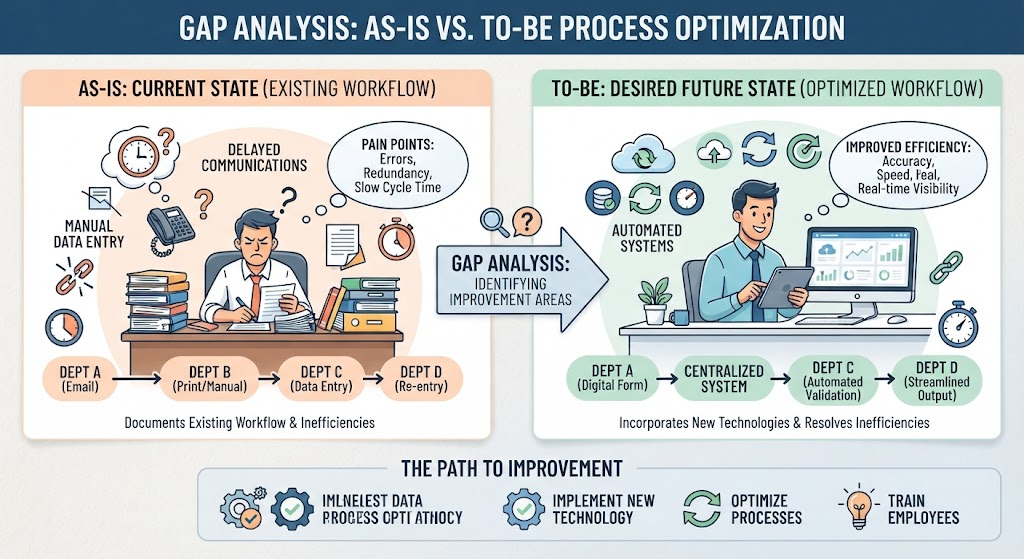
Gap analysis involves identifying the current state (“As-Is”), defining the desired future state (“To-Be”), and analyzing the gaps between them to implement improvements.
-
As-Is Process: Documents the existing workflow, often highlighting pain points like manual data entry or delayed communications.
-
To-Be Process: Illustrates the optimized workflow incorporating new technologies or methodologies to resolve identified inefficiencies.
3. System-Supported Automation
This refers to replacing manual human intervention with software-driven actions. In order fulfillment, this includes Automated Data Validation (checking order forms for errors instantly) and ERP Synchronization (ensuring inventory and financial records update in real-time without manual keying).
The Transformation Journey: Apex Manufacturing Inc.
To understand the practical application of these concepts, we analyze the specific operational gaps at Apex Manufacturing Inc. and the solutions implemented to bridge them.
Phase 1: Visualizing the Current State (As-Is)
The first step in any process improvement initiative is documenting the current reality. The diagram below illustrates the “As-Is” process at Apex Manufacturing. Notice the heavy reliance on manual tasks (rectangles) and the linear, sequential nature of the workflow.
Analysis of the As-Is State:
-
Manual Submission: The customer submits a purchase order, which enters the Sales Department lane without pre-validation.
-
Reactive Error Handling: If information is incomplete (“Complete Info? -> No”), a sales representative must manually “Contact Customer.” This creates a delay loop that halts the process until the customer responds.
-
Siloed Warehouse Operations: The Warehouse Department checks inventory manually. If items are missing, a backorder is created, and sales is notified via a separate, likely non-integrated channel.
-
Delayed ERP Updates: The “Update ERP System” task occurs late in the cycle, meaning financial and inventory data may be out of sync during the picking and packing phases.
Phase 2: Identifying the Gaps
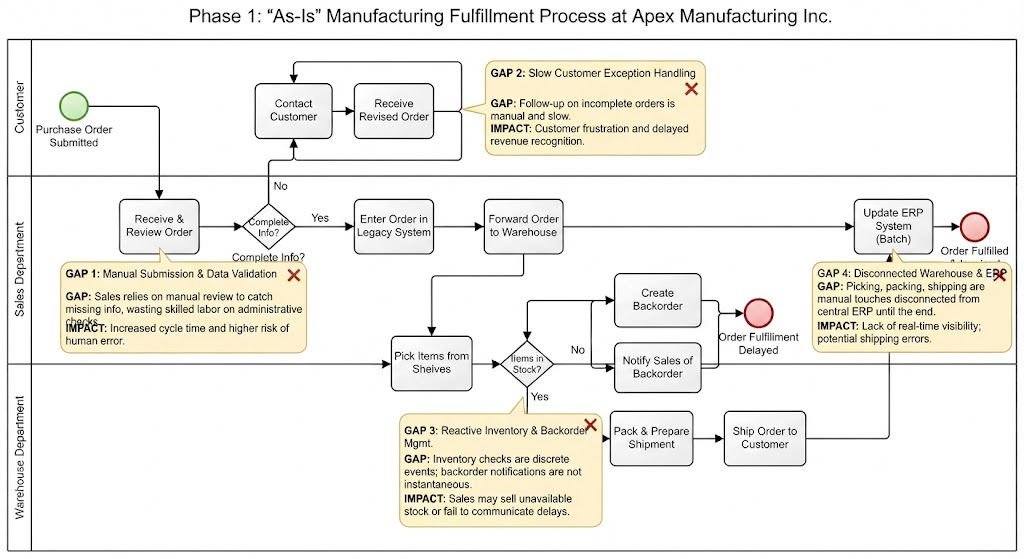
A detailed gap analysis reveals four critical areas for improvement:
-
Order Submission & Data Validation:
-
Gap: Sales relies on manual review to catch missing info, wasting skilled labor on administrative checks.
-
Impact: Increased cycle time and higher risk of human error.
-
-
Customer Exception Handling:
-
Gap: Follow-up on incomplete orders is manual and slow.
-
Impact: Customer frustration and delayed revenue recognition.
-
-
Inventory and Backorder Management:
-
Gap: Inventory checks are discrete events rather than continuous monitoring; backorder notifications are not instantaneous.
-
Impact: Sales teams may sell stock that isn’t available, or fail to communicate delays proactively.
-
-
Warehouse Fulfillment & ERP Synchronization:
-
Gap: Picking, packing, and shipping are manual touches disconnected from the central ERP until the end of the process.
-
Impact: Lack of real-time visibility into order status and potential shipping errors
-
Phase 3: Implementing the Future State (To-Be)
The “To-Be” process diagram below demonstrates how technology bridges these gaps. Red annotations in the diagram highlight specific automation interventions.
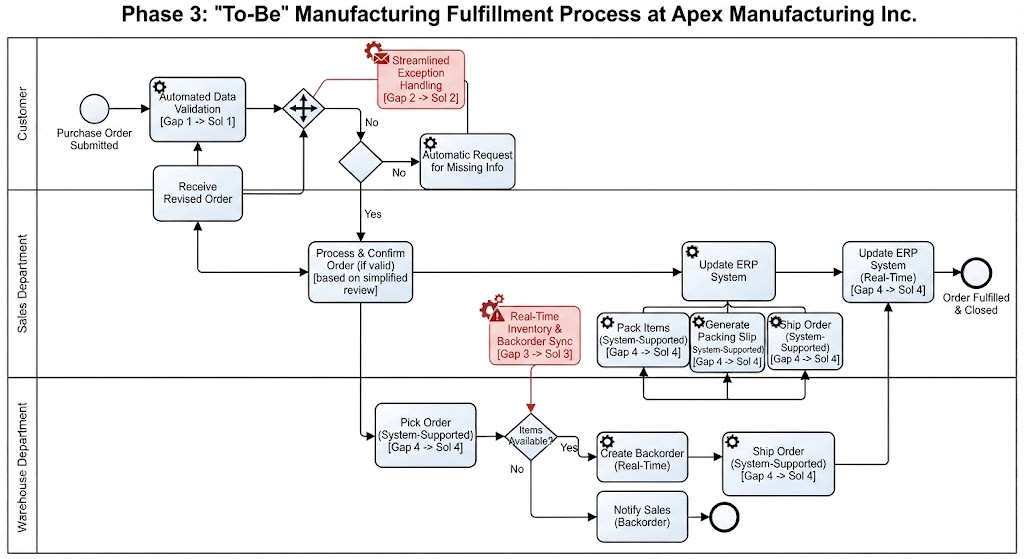 (Note: In a live document, the second user-provided image would be displayed here)
Key Improvements in the To-Be State:
1. Automated Data Validation at Source
-
Change: An “Automated Data Validation” step (indicated by the gear icon) is added immediately after “Submit Purchase Order.”
-
Benefit: Orders are auto-validated before reaching the Sales Department. This ensures that the “Receive & Review Order” task is streamlined, as the data is already verified.
2. Streamlined Exception Handling
-
Change: The manual “Contact Customer” task is replaced by an “Automatic Request for” information (indicated by the envelope/gear icon).
-
Benefit: If the “Complete Info?” gateway returns “No,” the system automatically triggers a request to the customer. This removes the sales staff from the initial follow-up loop, allowing them to focus on “Process & Confirm Order” once valid data is received.
3. Real-Time Inventory & Backorder Sync
-
Change: The “Create Backorder” task is now labeled “(Real-Time),” and “Notify Sales” is automated “(Backorder).”
-
Benefit: When the “Items Available?” gateway returns “No,” the system instantly creates a backorder record and notifies the sales team. This synchronization ensures that the ERP system reflects inventory constraints immediately, preventing overselling.
4. End-to-End System Support in Warehouse
-
Change: Every major warehouse task—”Pick Order,” “Pack Items,” “Generate Packing Slip,” and “Ship Order”—is now labeled “(System-Supported).”
-
Benefit: Warehouse staff use digital interfaces (e.g., barcode scanners, mobile tablets) guided by the system. This ensures that every physical action is recorded digitally in real-time. The multiple arrows pointing to “Update ERP System” indicate that data flows continuously from the warehouse to the central system, rather than in a single batch at the end.
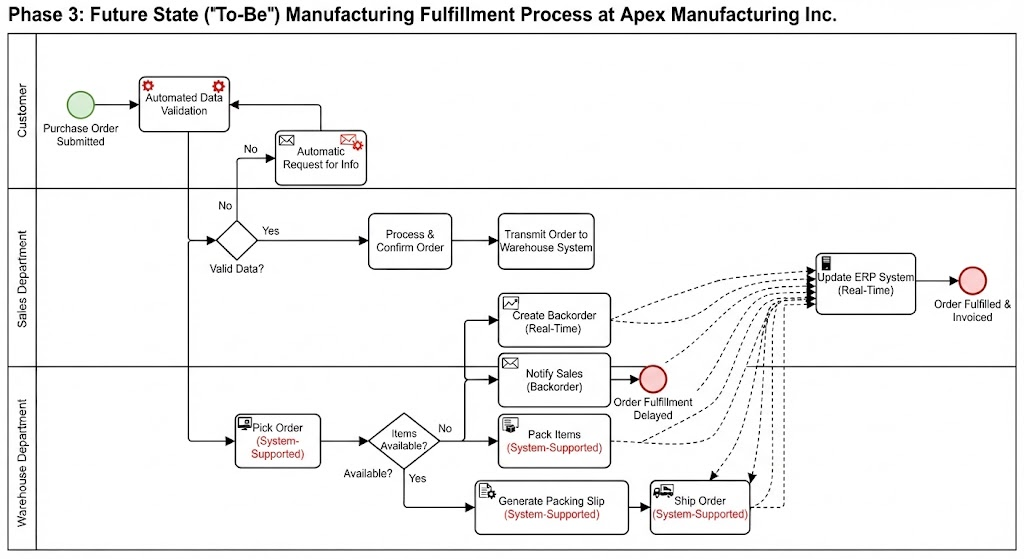
Examples of Operational Impact
To illustrate the value of this transformation, consider the following scenarios:
Example 1: The Incomplete Order
-
Scenario: A customer submits an order missing a shipping address.
-
As-Is Outcome: The order sits in the Sales queue for 4 hours until a rep reviews it. The rep emails the customer. The customer replies the next day. The rep manually updates the order. Total Delay: 28 hours.
-
To-Be Outcome: The “Automated Data Validation” catches the missing field instantly. The system sends an automatic email to the customer within 1 minute. The customer corrects it via a portal link. The order proceeds to “Process & Confirm” automatically. Total Delay: 15 minutes.
Example 2: The Stock-Out
-
Scenario: A high-demand widget is out of stock.
-
As-Is Outcome: Warehouse staff discovers the shortage during “Check Inventory.” They create a paper backorder and send an internal memo to Sales. Sales might not see the memo until the end of the day, potentially calling the customer too late to manage expectations.
-
To-Be Outcome: The system detects zero inventory during the “Check Inventory” scan. It triggers “(Real-Time)” backorder creation. The Sales dashboard flashes a notification immediately. The sales rep calls the customer proactively while the order is still fresh, offering an alternative or confirmed restock date.
Conclusion
The transition from the As-Is to the To-Be process at Apex Manufacturing Inc. exemplifies the power of targeted gap analysis in driving operational excellence. By shifting from manual, reactive workflows to automated, system-supported processes, the organization achieves three primary goals:
-
Reduced Cycle Times: Automated validation and exception handling remove days from the order processing timeline.
-
Enhanced Accuracy: System-supported warehouse tasks and real-time ERP synchronization minimize data entry errors and inventory discrepancies.
-
Improved Customer Experience: Faster processing and proactive communication regarding backorders lead to higher trust and satisfaction.
For manufacturing leaders, the lesson is clear: optimizing order fulfillment is not just about working faster; it is about redesigning the workflow to let technology handle the routine, freeing human talent to manage exceptions and relationships. Through rigorous gap analysis and strategic automation, companies can transform their supply chain from a cost center into a competitive advantage.
This post is also available in فارسی, 日本語 and 繁體中文.
Related posts:
 How Visual Paradigm’s AI Diagram Generation Turns Your Ideas into Professional UML & BPMN Diagrams in Seconds
 Mastering Business Process Modeling: A Hands-On Review of BPMN and Visual Paradigm’s AI-Powered Tools
 Mastering AI-Powered Mind Mapping with Visual Paradigm
 A Software Engineer’s Field Guide to UML, BPMN, and SysML