


Introduction
In modern software engineering, the “Diagram-as-Code” (DaC) approach has revolutionized how we document system architecture. VPasCode, developed by Visual Paradigm, stands out as a unified, browser-based platform that supports multiple syntaxes like PlantUML, Mermaid, and Graphviz. While writing code to generate diagrams offers precision, manually updating complex structures—such as adding attributes to multiple subclasses—can be tedious.
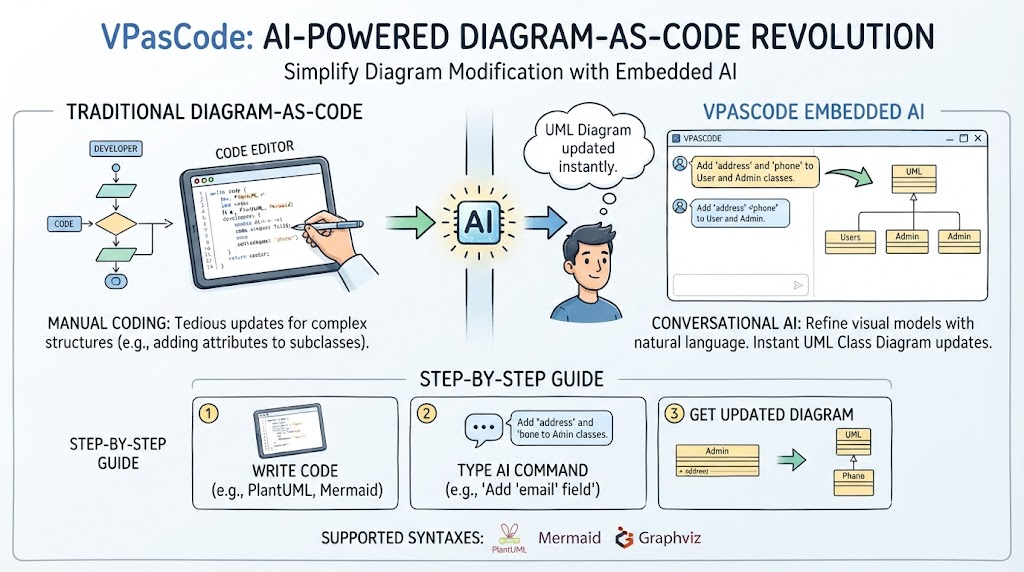
This is where VPasCode’s Embedded AI shines. By integrating natural language processing directly into the editor, VPasCode allows developers to refine their visual models conversationally. This guide explores how to leverage the “AI Modify” feature to instantly update a UML Class Diagram, bridging the gap between textual code and visual design without ever leaving your workspace.
Key Concepts
Before diving into the steps, it is helpful to understand the core technologies at play:
-
Diagram-as-Code (DaC): A methodology where diagrams are generated from text-based source code rather than being drawn manually with a mouse. This ensures diagrams are version-controllable and easily reproducible.
-
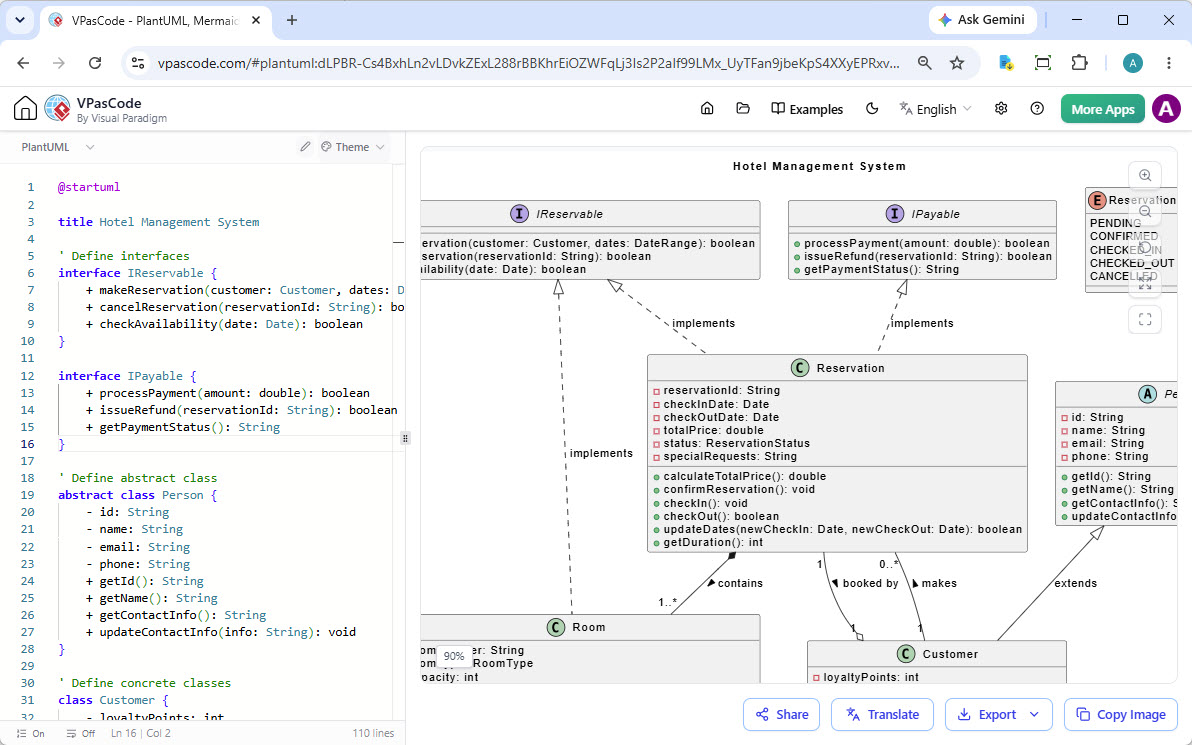
PlantUML: A popular open-source tool that uses a simple textual description to create UML diagrams. In the example below, PlantUML syntax defines classes like
Customer,Order, andPayment. -
Embedded AI Modification: Unlike external AI tools where you must copy-paste code back and forth, VPasCode’s embedded AI understands the context of your current file. It parses your existing PlantUML code, applies your requested changes (e.g., adding attributes), and rewrites the code automatically.
-
Real-Time Rendering: VPasCode provides a split-screen view where changes to the code on the left are instantly reflected in the visual diagram on the right, ensuring immediate feedback.
Step-by-Step Guide: Refining a Class Diagram with VPasCode Embedded AI
Refining a Class Diagram quickly and conveniently within VPasCode without external tools can be accomplished in a few simple steps using the built-in AI feature.
The Starting Point
Imagine you have a basic e-commerce class diagram defined in PlantUML. You have a Payment class with three children: Cash, Check, and Credit. Currently, these child classes are empty shells, inheriting only from the parent.
(Note: In the actual interface, this corresponds to the first image provided, showing the code on the left and the rendered diagram on the right with empty child classes.)
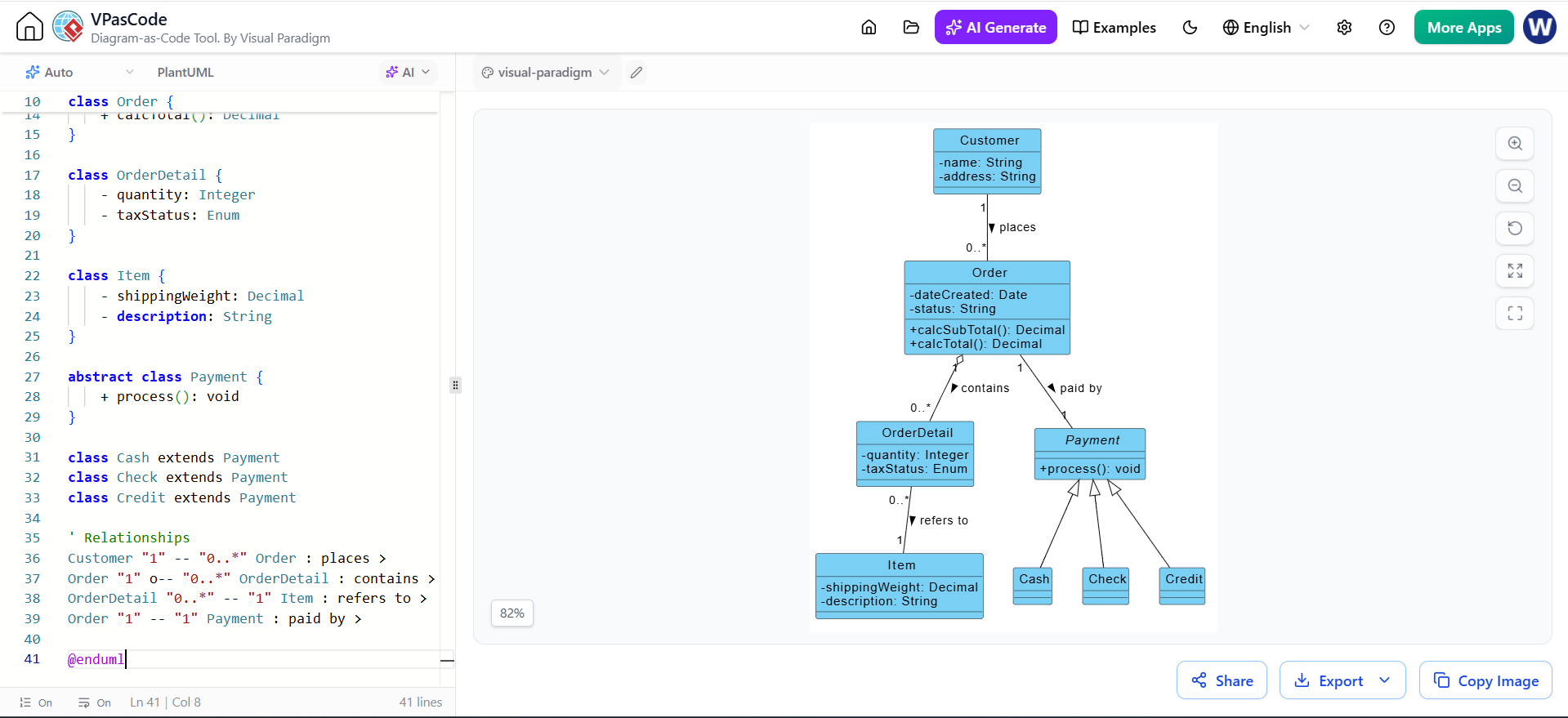
Figure 1: The initial state of the Class Diagram in VPasCode. Note the Cash, Check, and Credit classes lack specific attributes.
Step 1: Open the AI Menu
To begin the refinement process, locate the AI controls within the editor interface.
-
Click on the AI dropdown button located at the top-left section above the code editor. This menu is your gateway to intelligent diagram manipulation.
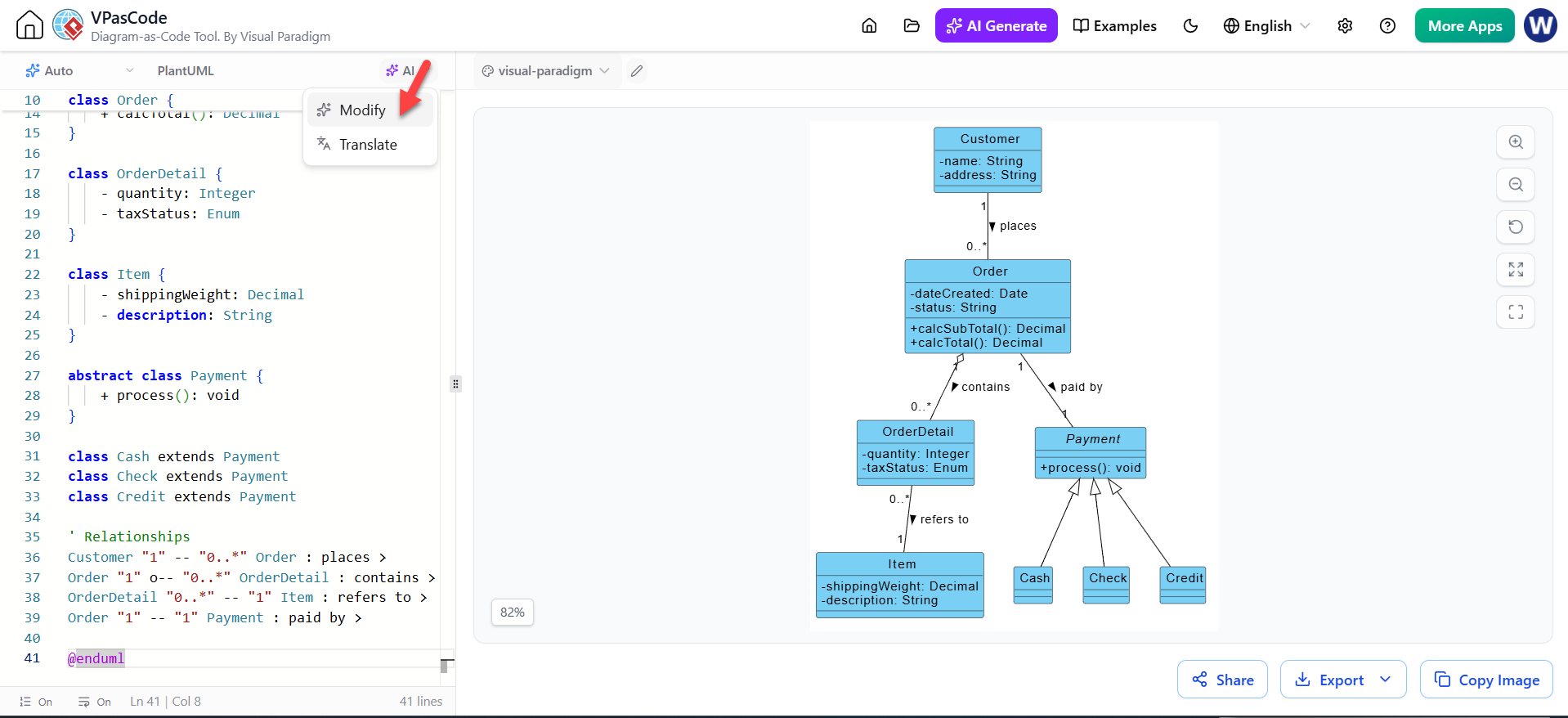
Figure 2: Clicking the AI dropdown reveals options to Modify or Translate the diagram code.
Step 2: Select the Modify Option
The AI menu offers different capabilities depending on your needs. For structural changes, you will use the Modify function.
-
From the dropdown menu, click on the Modify option with the AI icon next to it. This tells the system you intend to alter the existing logic and structure of the diagram rather than generating something from scratch.
Step 3: Describe the Desired Changes
This is the most critical step where natural language replaces manual coding. You do not need to know the exact PlantUML syntax for the new attributes; you simply describe what you want.
-
In the AI Modify dialog box that appears, enter a natural language description of how you want to refine or change your diagram.
-
Example Prompt: “Add some attributes to the children Classes of the Payment Class in the Class Diagram”
-
Click the AI Modify button to submit your request.
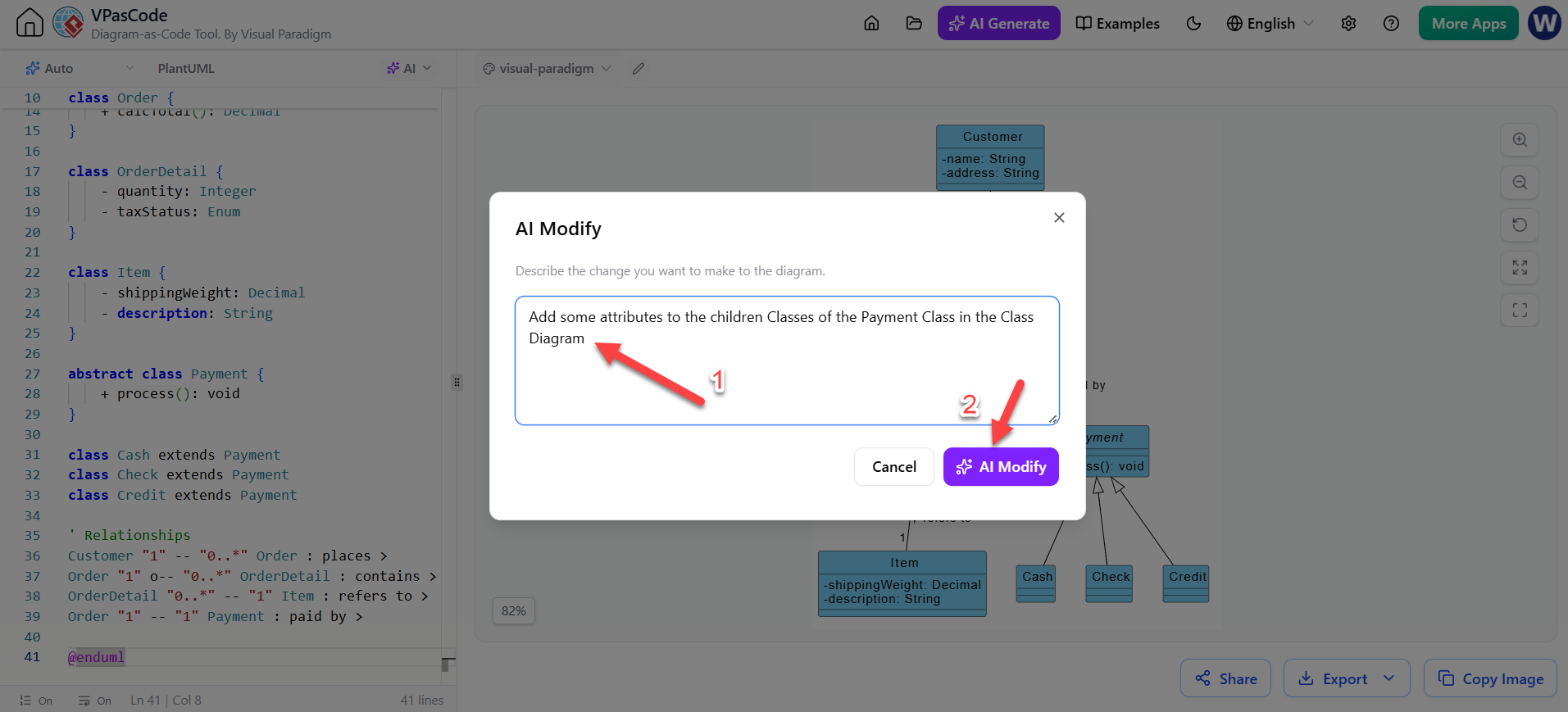 Figure 3: The AI Modify dialog box. The user enters a natural language prompt (1) and triggers the process (2).
Step 4: View the Refined Diagram
Once you submit the prompt, the VPasCode engine goes to work. It analyzes the request, identifies the target classes (Cash, Check, Credit), and injects relevant attributes and methods based on standard domain knowledge.
-
The AI will automatically process your description, update the code, and reflect the newly added classes, attributes, or methods directly in your visual Class Diagram.
-
Result: As seen below, the
Cashclass now hascashTendered, theCheckclass hasbankIDandbankName, and theCreditclass includesnumberandexpDate. The code on the left has been updated to match the visual on the right.
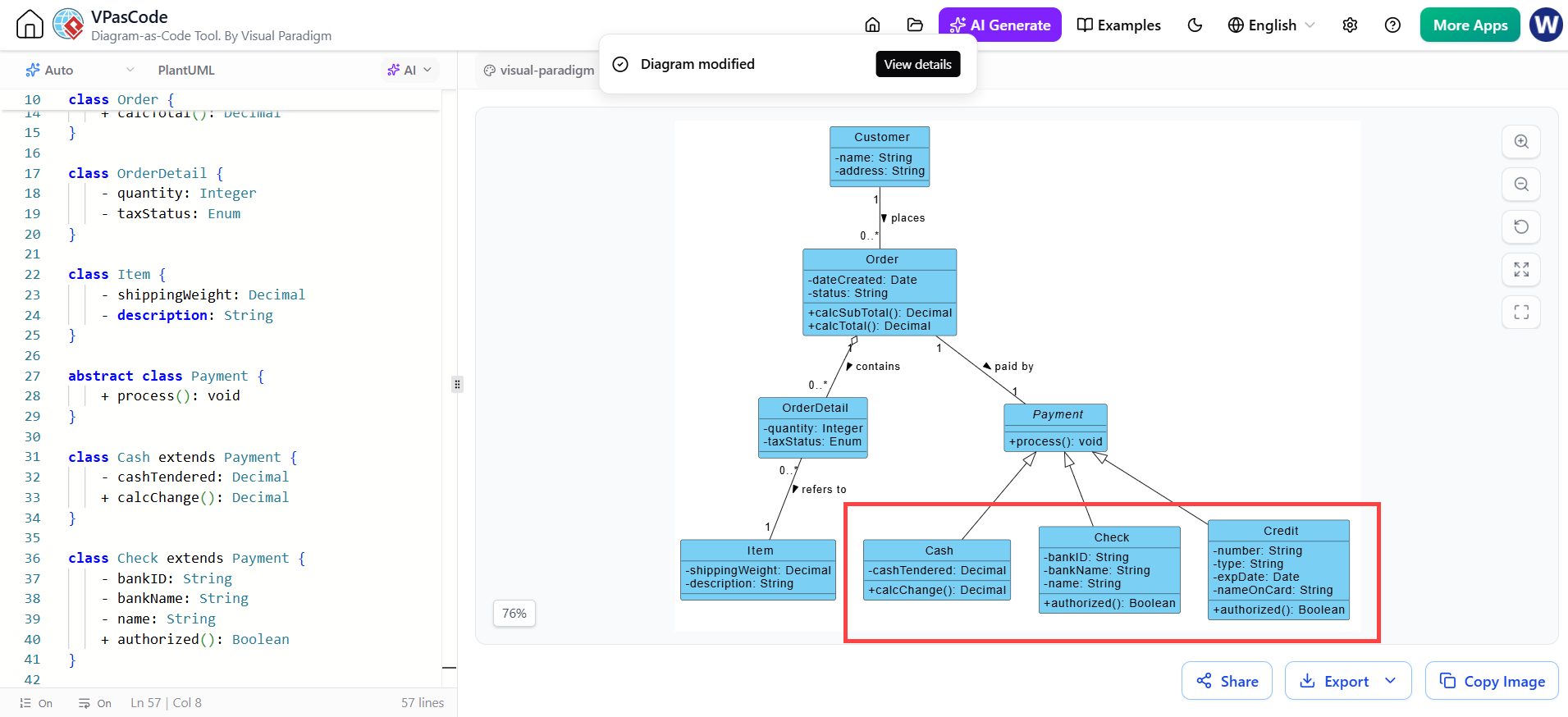
Figure 4: The refined diagram. The AI has successfully populated the child classes with relevant attributes and methods, updating both the code and the visual representation.
Conclusion
The integration of AI into Diagram-as-Code tools like VPasCode represents a significant leap forward in productivity for software architects and developers. By following this simple four-step process, you can transform a skeletal class diagram into a detailed design document in seconds.
The ability to say “Add attributes to the children of Payment” and watch the code and diagram update simultaneously eliminates the friction of manual syntax editing. Whether you are modeling a complex enterprise system or a simple application, VPasCode’s embedded AI ensures that your documentation evolves as fast as your ideas.
Ready to try it yourself? Visit VPasCode to start turning your text into professional diagrams instantly
Reference Articles & Resources for Visual Paradigm’s VPasCode
Here is a curated list of articles and resources covering Visual Paradigm’s VPasCode, a unified text-to-diagram platform. The resources are organized to help you understand its core capabilities, AI features, and ecosystem integrations.
Core Guides & Feature Overviews
-
Comprehensive Guide to VPasCode by Visual Paradigm: A foundational guide explaining the Diagram-as-Code (DaC) philosophy, its multi-engine architecture (PlantUML, Mermaid, Graphviz), and the core dual-panel editor interface .
-
Mastering VPasCode: The Ultimate Guide to AI-Powered Diagram-as-Code: An in-depth tutorial on leveraging AI-powered features, including the AI Chatbot for natural language to diagram conversion, and how to transfer AI-generated diagrams directly into the VPasCode editor .
-
VPasCode Deep Dive: Unifying Mermaid, PlantUML, and AI in One Platform: This article provides a technical deep dive into the platform’s support for Mermaid, PlantUML, and Graphviz, with detailed feature comparison and practical use cases .
Quickstart & Practical Guides
-
60-Second Quickstart Guide | VPasCode Text to Diagram Guide: A step-by-step tutorial to create, customize, and share your first diagram in less than a minute using the cloud-native editor .
-
From Code to Clarity: A Beginner’s Guide to Seamless Diagramming with VPasCode and OpenDocs: A practical walkthrough on creating realistic diagrams (Sequence, C4, Class) and sending them from VPasCode to OpenDocs documentation via the Pipeline integration .
Integration & Ecosystem
-
Seamlessly Connect Diagramming to Documentation: VPasCode Integrates with OpenDocs: Announces the direct pipeline integration, detailing how to “Send to OpenDocs Pipeline” to turn diagrams into living documentation .
-
Seamlessly Connect As-Code Diagrams to Documentation with OpenDocs: Explains how VPasCode acts as a bridge between diagram creation and documentation, solving the problem of outdated diagrams by enabling instant updates .
AI Capabilities & Case Studies
-
Visual Paradigm – AI驱动的可视化建模: Showcases Visual Paradigm’s broader AI ecosystem, with sections dedicated to VPasCode and its ability to generate diagrams from text, plus AI error fixing .
-
What’s New in VPasCode – Launch Feature Roundup: A launch roundup highlighting key features: multi-syntax support, AI code error fixing, AI translation for global teams, and OpenDocs integration .
-
案例研究:通过 VPasCode 加速软件架构文档编制: A case study demonstrating how VPasCode accelerates software architecture documentation through automated layout, AI generation, and unified engine support .
Official Product Pages
-
Visual Paradigm VPasCode: Unified Diagram-as-Code Platform: The official product feature page detailing supported diagram types (PlantUML, Mermaid, Graphviz), core technical capabilities, and FAQ .
-
VPasCode Official Documentation & Playground: The central hub to access the free VPasCode Playground editor, official documentation, and the latest updates on the platform .
This post is also available in Deutsch, Español, فارسی, Français, English, Bahasa Indonesia, 日本語, Polski, Portuguese, Ру́сский, Việt Nam, 简体中文 and 繁體中文.
Related posts:
 Comprehensive Guide: From Problem Statement to Class Diagram, ERD, and Database Modeling with Visual Paradigm
 Visual Paradigm’s AI‑Powered ERD Generator
 How Visual Paradigm’s AI Diagram Generation Turns Your Ideas into Professional UML & BPMN Diagrams in Seconds
 Why Teams Are Switching to Visual Paradigm: Powerful Modeling Meets Cutting-Edge AI