Introduction: Why I Decided to Test This AI Tool
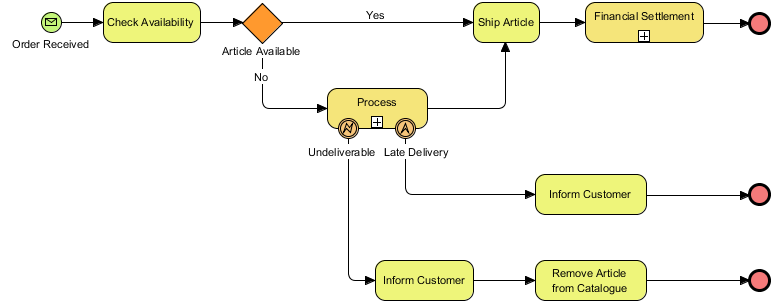
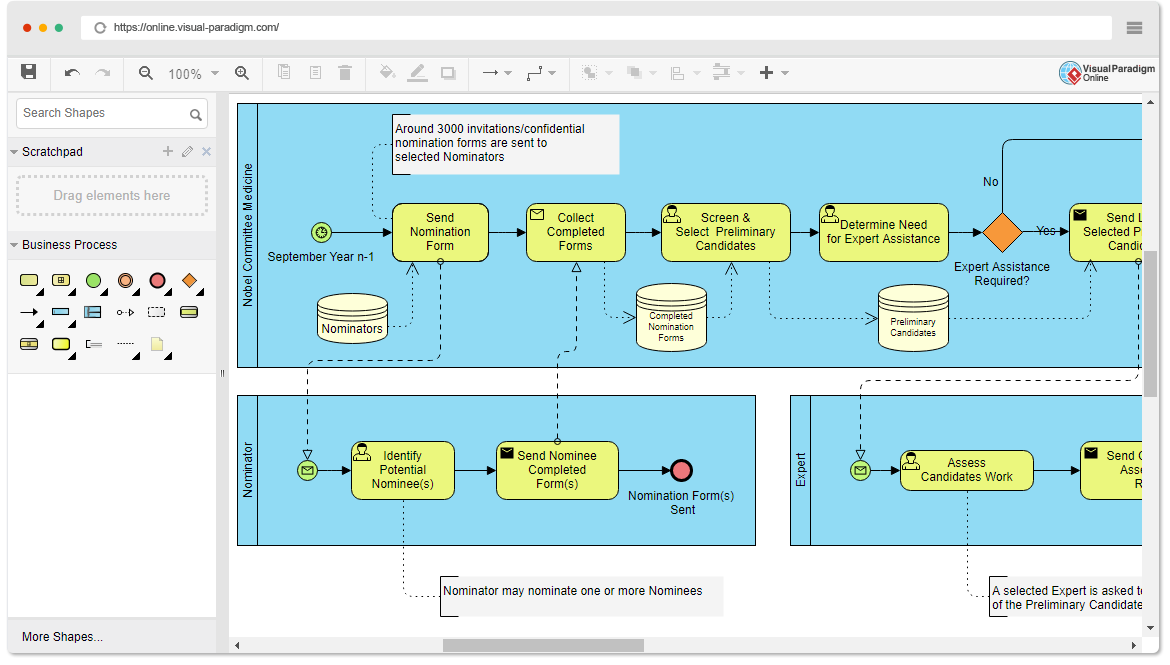
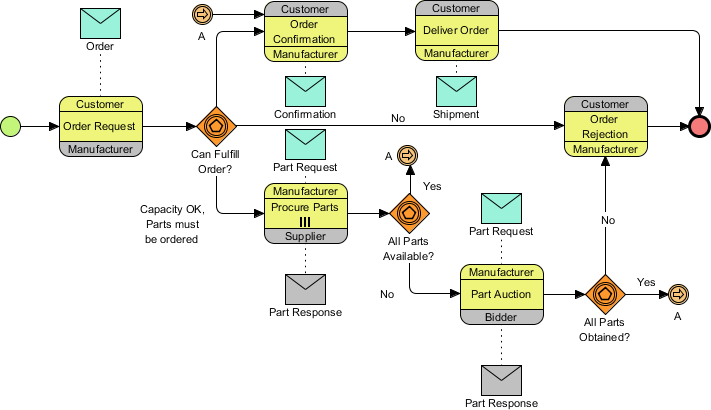
As a business analyst who has spent countless hours manually crafting BPMN diagrams—from stakeholder interviews, messy whiteboard sessions, and lengthy procedure documents—I was immediately intrigued by Visual Paradigm’s claim: translate plain-English process narratives directly into fully interactive, standard-compliant BPMN 2.0 diagrams. The promise of bypassing manual drag-and-drop drafting sounded almost too good to be true. So, I downloaded the latest Visual Paradigm Desktop (Professional Edition) and put the AI BPMN Diagram Generator through its paces across several real-world scenarios. This guide shares my firsthand experience, practical tips, honest observations, and final verdict for fellow process professionals considering this tool.
First Impressions: Setup and Accessibility
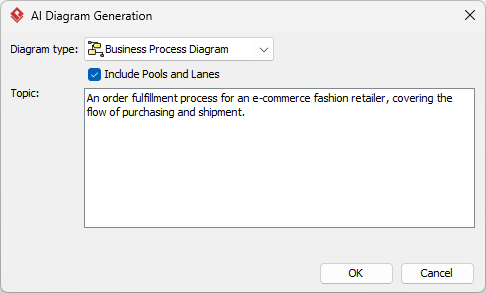
Getting started was refreshingly straightforward. The AI capabilities are built directly into the Visual Paradigm Desktop environment—no separate plugin installation or cloud account required. After launching the application, I navigated to Tools > AI Diagram Generation, selected Business Process Diagram as my target diagram type, and made sure to check the “Include Pools and Lanes” box. This last step is critical; it instructs the AI to automatically organize roles and departments into clear swimlanes, which is essential for readable, role-based process maps. The interface felt intuitive, and the description field was ready for my first process narrative.
My Testing Methodology: Three Real-World Prompts
To evaluate the tool thoroughly, I crafted three distinct process descriptions reflecting common business scenarios. For each, I followed a consistent approach: write a clear, chronological narrative, paste it into the AI tool, generate the diagram, and then assess the output against BPMN 2.0 standards and practical usability.
Test 1: E-Commerce Order Fulfillment
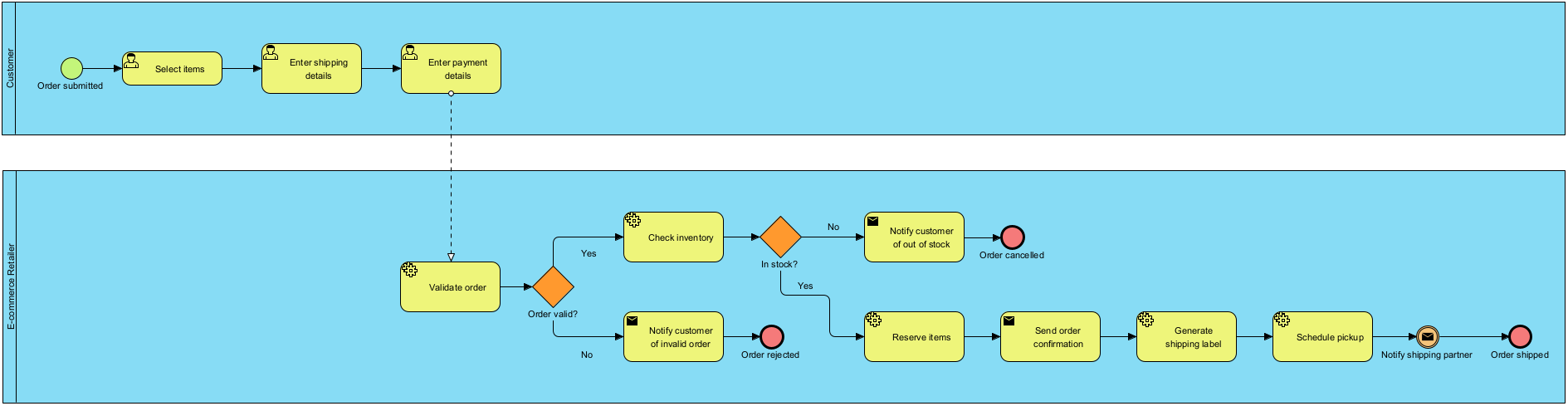
My Prompt: “The Customer places an online purchase order. The Sales Department reviews the inventory availability. If the item is out of stock, Sales cancels the order and notifies the customer. If the item is in stock, the Warehouse packs the item, and the Shipping Department delivers it.”
Result: Within seconds, the AI produced a clean BPMN diagram with distinct swimlanes for Customer, Sales, Warehouse, and Shipping. The “In Stock?” decision point correctly generated an Exclusive Gateway (XOR) with labeled “Yes” and “No” sequence flows. Minor layout adjustments were needed to reduce arrow crossings, but the foundational logic was sound and fully editable.
Test 2: Employee Onboarding Workflow
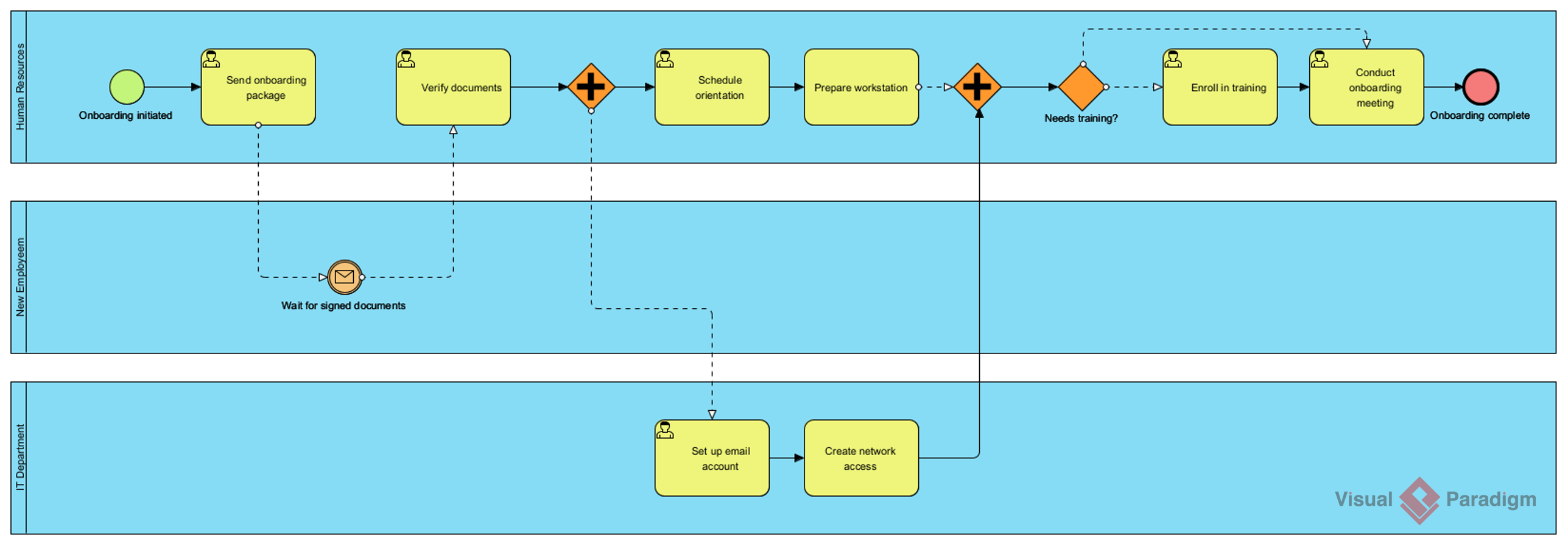
My Prompt: “An employee onboarding process in a mid-sized company.”
Result: The AI generated a comprehensive onboarding flow covering HR paperwork, IT setup, manager introductions, and training schedules. Swimlanes for HR, IT, Manager, and New Hire were automatically created. While the initial layout was slightly dense, the logical sequence was accurate, and I appreciated how tasks like “Complete I-9 Form” and “Provision Laptop” were appropriately categorized. This demonstrated the tool’s ability to infer common subprocesses from a high-level prompt.
Test 3: SaaS Customer Support Ticket Resolution
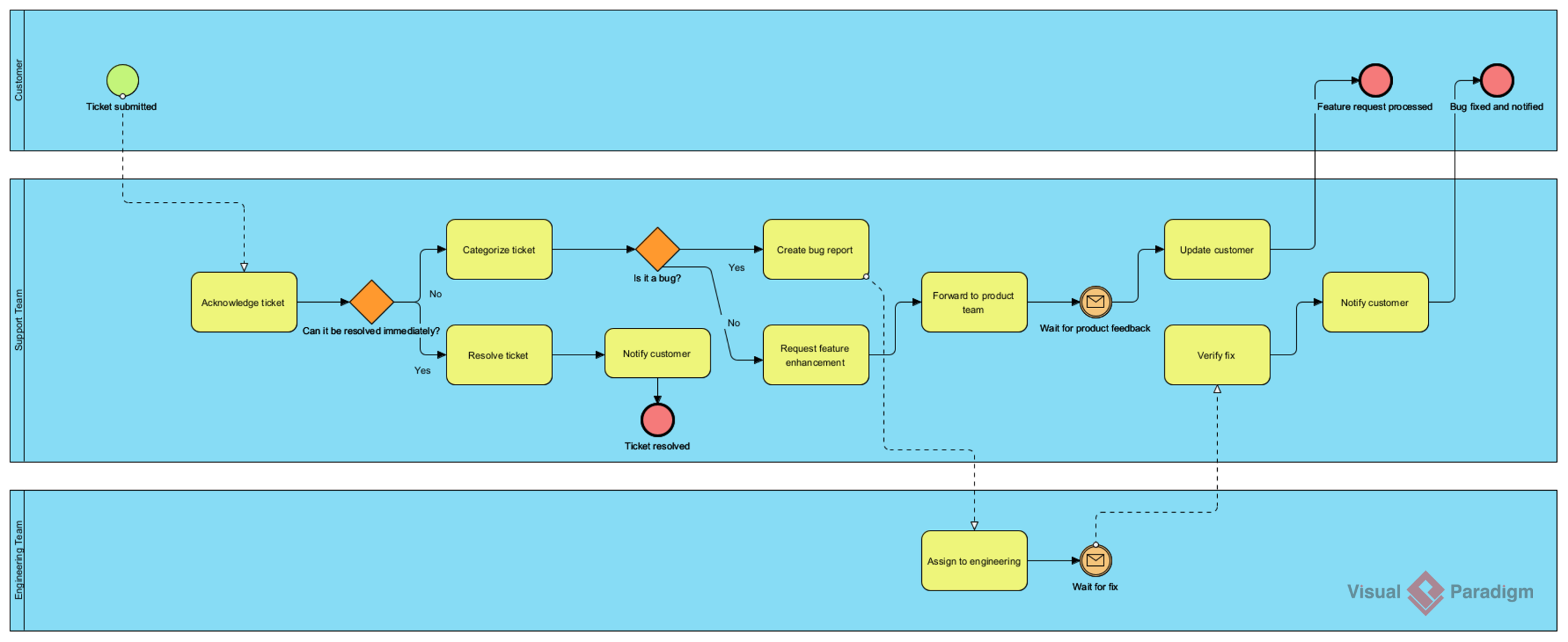
My Prompt: “A customer support ticket resolution process for a SaaS company.”
Result: The generated diagram effectively mapped ticket submission, triage, assignment, resolution, and customer follow-up. The AI correctly implemented a parallel gateway for simultaneous actions like “Notify Customer” and “Update Ticket Status.” I was particularly impressed by how it handled escalation paths and SLA checkpoints. With minimal refinement, this became a production-ready model for our support team’s documentation.
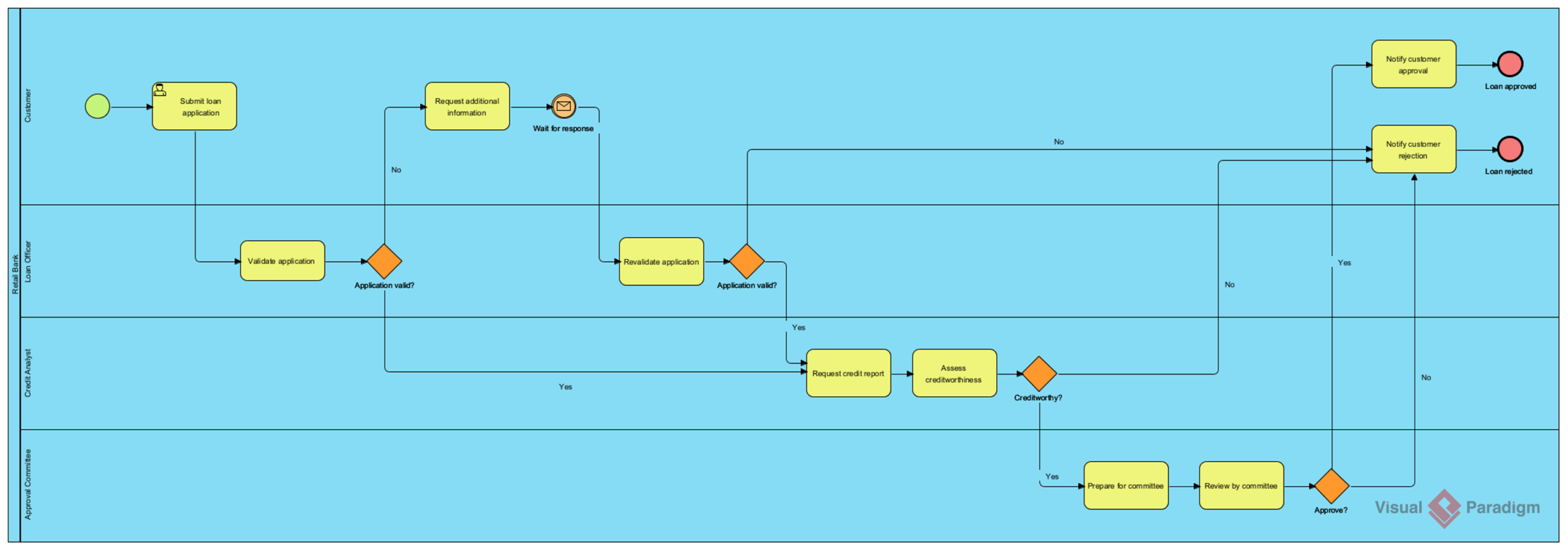
Bonus Test: Retail Bank Loan Approval
My Prompt: “A loan application and approval process in a retail bank.”
Result: This more complex scenario tested the AI’s handling of multi-stage approvals, risk assessments, and compliance checks. The output included appropriate gateways for credit score thresholds and manual underwriting steps. While I needed to add a few custom data objects for regulatory documentation, the core workflow was remarkably accurate and saved me hours of initial drafting.
What Worked Exceptionally Well
-
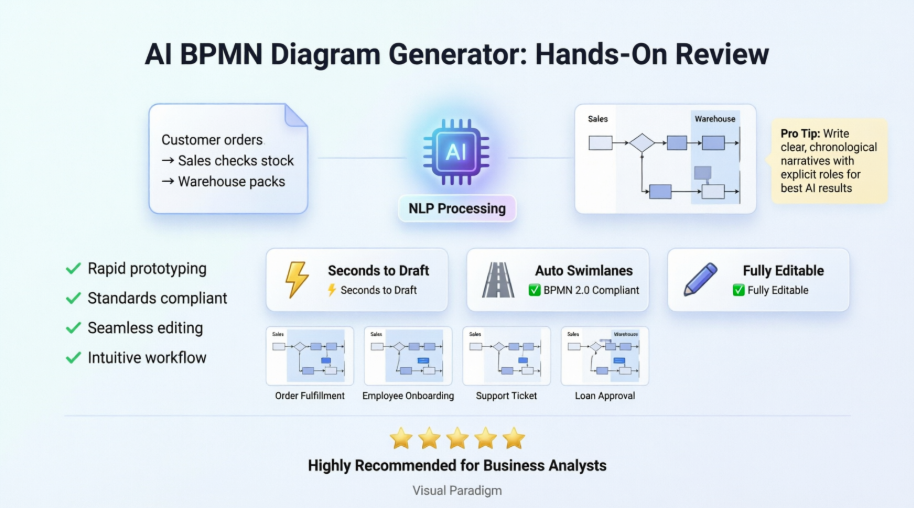
Speed to First Draft: Going from text to interactive diagram in seconds is transformative. This is invaluable for workshop follow-ups or rapid prototyping.
-
Standards Compliance: The AI consistently applied BPMN 2.0 elements correctly—proper gateway types, event markers, and sequence flow conventions.
-
Swimlane Intelligence: The “Include Pools and Lanes” feature reliably identified roles and organized them logically, which is often the most tedious manual step.
-
Seamless Editability: The output isn’t a static image; it’s a fully functional Visual Paradigm model. I could immediately refine, annotate, or extend the diagram using familiar tools.
-
Advanced Feature Integration: Features like the Working Procedure Editor and As-Is/To-Be comparison worked flawlessly with AI-generated models, enabling deeper analysis without starting from scratch.
Areas for Consideration and Practical Tips
-
Prompt Crafting is Key: The AI’s output quality directly reflects your input clarity. Invest time in writing structured, chronological narratives with explicit actors and conditions. Avoid vague statements.
-
Initial Layout May Need Tweaking: While logically sound, generated diagrams can sometimes have overlapping elements. Use Visual Paradigm’s auto-layout or manual adjustment tools for polish.
-
Complex Conditional Logic: For highly intricate decision trees with multiple nested conditions, you may need to manually refine gateway connections. The AI handles standard if/then well but may simplify very complex business rules.
-
Domain-Specific Terminology: If your process uses highly specialized jargon, briefly define key terms in your prompt to ensure accurate interpretation.
Pro Tip: Start with a strong, detailed prompt for your core workflow. Generate the base diagram, then use Visual Paradigm’s modeling tools to add data objects, annotations, or performance metrics. This hybrid approach—AI for structure, human for nuance—delivers the best results.
Final Verdict: Who Should Use This Tool?
Visual Paradigm’s AI BPMN Diagram Generator is a powerful asset for:
-
Business Analysts seeking to accelerate requirements documentation and process discovery sessions.
-
Process Architects who need to rapidly prototype multiple workflow variants for stakeholder review.
-
Consulting Teams aiming to deliver high-quality process models efficiently across client engagements.
-
Agile Product Teams wanting to visualize user journeys or operational workflows without deep BPMN expertise.
It may be less ideal for:
-
Users requiring highly customized, non-standard diagramming conventions outside BPMN 2.0.
-
Scenarios where process logic is exceptionally complex and requires extensive manual rule definition upfront.
Conclusion: A Significant Step Forward in Process Modeling
After extensive hands-on testing, I can confidently say that Visual Paradigm’s AI BPMN Diagram Generator delivers on its core promise: transforming textual process descriptions into professional, interactive diagrams with remarkable speed and accuracy. It doesn’t replace the analyst’s critical thinking or domain expertise; instead, it eliminates the mechanical overhead of initial diagram construction. This allows professionals to focus on what truly matters—analyzing process efficiency, identifying improvement opportunities, and facilitating stakeholder alignment. For teams looking to enhance their process modeling agility, reduce time-to-value, and leverage AI as a collaborative partner, this tool represents a compelling and practical advancement. I recommend giving it a try on your next process documentation task—you might be surprised at how much time and mental energy you save.
References
- How AI-Powered NLP is Revolutionizing Text-to-BPMN Generation for Enterprise Process Modeling: An in-depth guide exploring the technical foundations and enterprise applications of natural language processing for automated BPMN diagram creation.
- AI Business Process Improvement Tool Release: Official release notes detailing Visual Paradigm’s AI-enhanced capabilities for business process analysis and optimization workflows.
- AI BPMN Diagram Generator: Quick BPD Tool Update: Comprehensive update announcement covering the features, usage steps, and benefits of the AI-powered Business Process Diagram generator.
- BPMN Diagram and Tools Feature Overview: Detailed documentation of Visual Paradigm’s BPMN 2.0 modeling capabilities, including advanced editing, validation, and collaboration features.
- AI Diagram Generation Feature Page: Official product page outlining the scope, supported diagram types, and integration points of Visual Paradigm’s AI diagram generation technology.
- What is BPMN? Guide to Business Process Model and Notation: Foundational resource explaining BPMN 2.0 standards, elements, and best practices for effective process modeling.
- From Text to Process Flow: Hands-On Review of Visual Paradigm’s AI BPMN Generator: Third-party user review providing practical insights, testing methodology, and real-world evaluation of the AI diagram generation feature.
- Visual Paradigm AI x BPMN Demonstration: Video walkthrough showcasing the AI BPMN diagram generation workflow, from text input to interactive model output.
This post is also available in Deutsch, Español, فارسی, Français, English, Bahasa Indonesia, 日本語, Polski, Portuguese, Ру́сский, Việt Nam, 简体中文 and 繁體中文.