


Practical modeling advice from the trenches, powered by Visual Paradigm
Introduction: Why I Stopped Writing Docs and Started Drawing Models
Early in my career, I made the classic rookie mistake: I documented entire systems in Word files. By the time the code shipped, those documents were already outdated. Meetings turned into debates over interpretations, and onboarding new developers felt like handing them a puzzle with missing pieces.
Then I discovered structured modeling—and specifically, how to use UML, BPMN, and SysML together. It wasn’t about creating pretty diagrams for stakeholders. It was about building a shared language that kept architects, developers, and business teams aligned. Over the years, I’ve used Visual Paradigm across dozens of projects, from lean startups to enterprise-grade IoT platforms. What I’ve learned is simple: modeling isn’t about perfection; it’s about clarity.
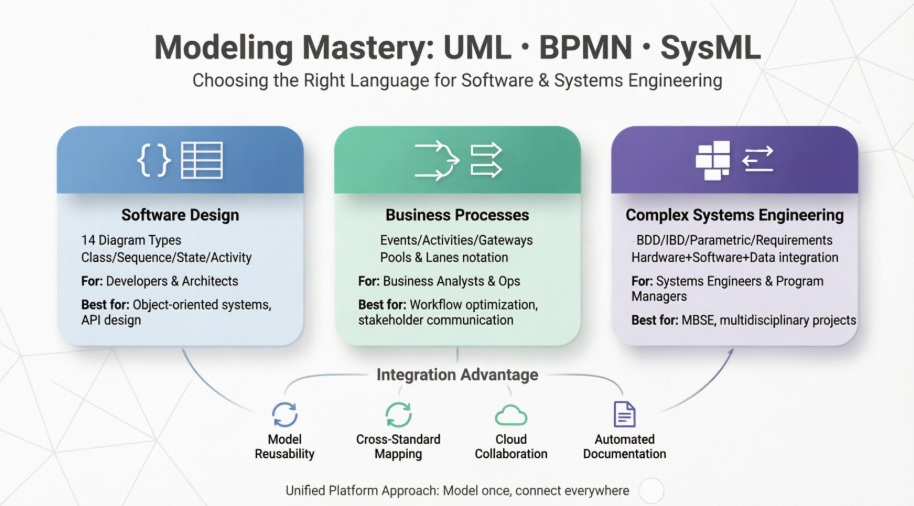
If you’re new to system design, this guide cuts through the academic jargon and shows you exactly how these three standards work in practice, where beginners trip up, and how I actually use Visual Paradigm’s features to save hours every sprint.
Unified Modeling Language (UML): The Blueprint for Software
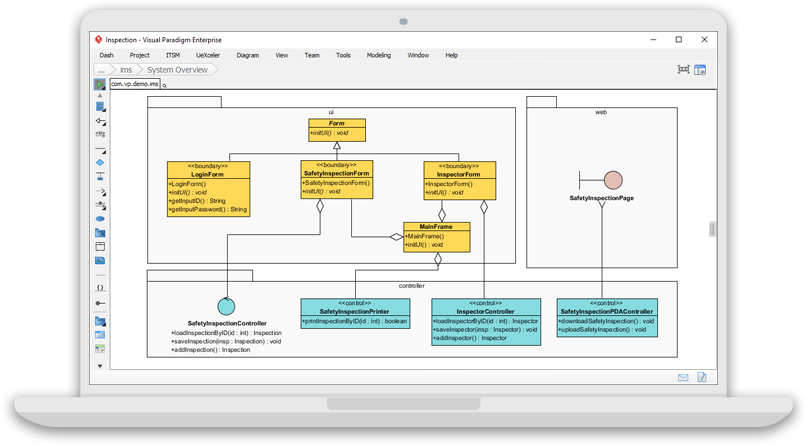
Unified Modeling Language (UML) is the closest thing we have to a universal blueprint language for software. Instead of describing code in paragraphs, UML lets you visualize how classes talk to each other, how data flows, and how states change over time.
What Beginners Need to Know:
-
Class Diagram: Shows your objects and how they relate (inheritance, composition, dependencies). Think of it as your system’s skeleton.
-
Sequence Diagram: Maps out who calls whom, and in what order. Perfect for debugging complex API flows.
-
State Diagram: Tracks how an object changes over time (e.g.,
Pending → Approved → Shipped). -
Activity Diagram: A flowchart for logic, algorithms, or simple workflows.
From the Trenches:
When I first started using UML, I tried to diagram everything. Big mistake. UML scales best when you focus on hotspots—the parts of your system that are complex, frequently changed, or shared across teams. In Visual Paradigm, I lean heavily on the Resource Catalog. Instead of manually drawing every connector, I drag from existing classes and the tool only shows me valid relationships. It’s saved me countless hours of fixing broken references. The AI Diagram Chatbot is also a lifesaver for greenfield projects: I paste a rough text description, and it generates a starting Class or Sequence diagram in seconds. I tweak it, not start from scratch.
Business Process Model and Notation (BPMN): Mapping How Work Actually Gets Done
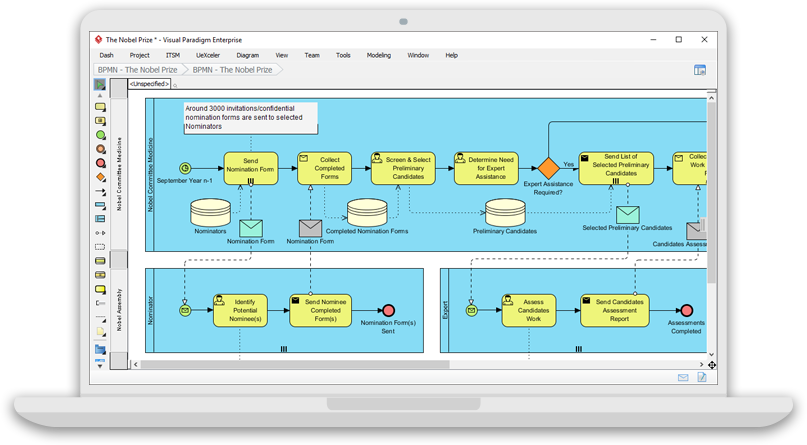
Business Process Model and Notation (BPMN) is the language of operations. While UML focuses on software internals, BPMN focuses on people, departments, and workflows. It’s how you answer the question: “What happens after a customer clicks ‘Submit’?”
What Beginners Need to Know:
-
Events: Triggers (start), outcomes (end), or pauses (intermediate).
-
Activities: The actual work being done (tasks, sub-processes).
-
Gateways: Decision points (split/merge paths, parallel flows).
-
Flow Objects: Arrows that show sequence and dependencies.
From the Trenches:
I used to write process docs that became shelf-ware. Switching to BPMN changed how I collaborate with product and ops teams. The visual nature means a non-technical stakeholder can point to a gateway and say, “Wait, why do we approve manually here?” In Visual Paradigm, the As-Is vs. To-Be matrix is my go-to for process migrations. I map the current workflow, duplicate it, and start editing the future state. The tool tracks differences automatically, so during sprint reviews, I can show exactly what’s changing and why. Pro tip: don’t overuse lanes early on. Start with the core flow, then add role boundaries once the logic is stable.
Systems Modeling Language (SysML): When Software Meets the Physical World
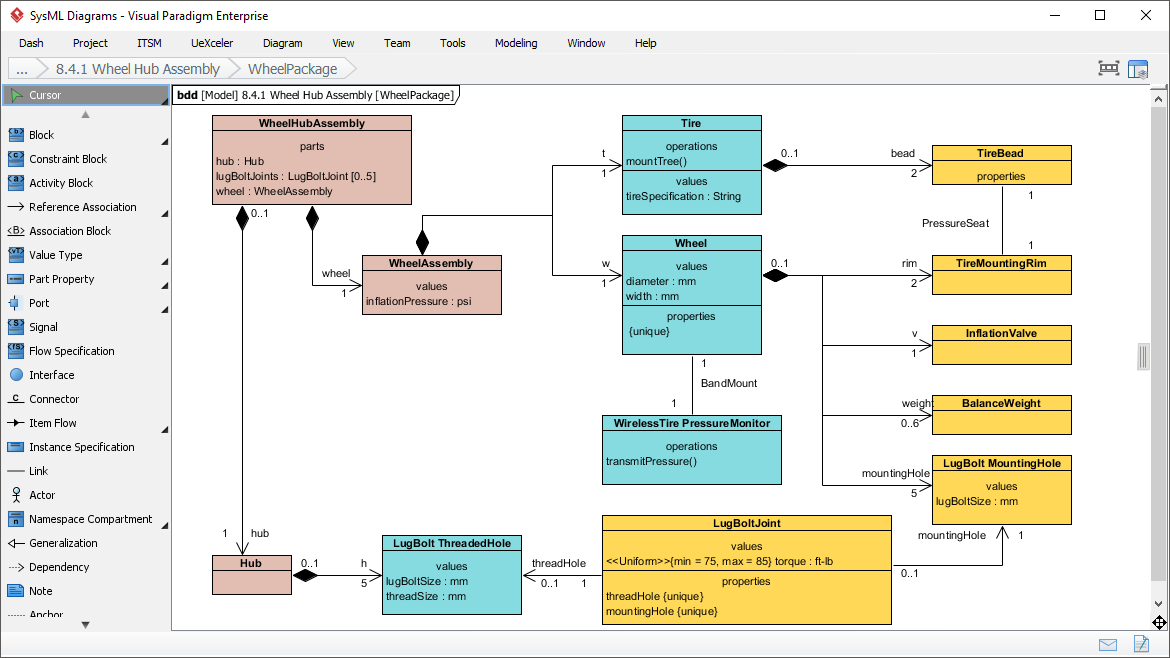
SysML extends UML for systems that aren’t just code. If your project involves hardware, sensors, strict compliance requirements, or cross-disciplinary teams, SysML is your anchor. It’s the standard behind Model-Based Systems Engineering (MBSE).
What Beginners Need to Know:
-
Requirements Diagram: Captures what the system must do and links requirements to design elements.
-
Block Definition Diagram (BDD): Defines system components and how they relate.
-
Internal Block Diagram (IBD): Shows how parts connect through ports and data flows.
-
Parametric Diagram: Models performance constraints and engineering calculations.
From the Trenches:
I avoided SysML until I worked on an IoT platform where firmware, cloud APIs, and physical hardware had to sync flawlessly. The moment we started using VP’s Requirement Diagrams, missed compliance checks dropped to zero. Why? Because every hardware spec, API contract, and user story was visually traced to a requirement block. The SysML v2 text-to-model editor feels like writing code but generates synchronized visual blocks. It’s perfect for engineers who think in text but need to communicate visually. If you’re new to SysML, start with Requirements and BDDs. Master those before diving into parametric modeling.
Quick Comparison: Which Language Fits Your Project?
| Focus | UML | BPMN | SysML |
|---|---|---|---|
| Best For | Software architecture, API design, code structure | Business workflows, operational processes, stakeholder alignment | Complex systems, hardware+software integration, compliance tracking |
| Core Diagrams | Class, Sequence, State, Activity | Events, Activities, Gateways, Pools/Lanes | Requirements, BDD, IBD, Parametric |
| Who Uses It | Developers, Architects, QA | Business Analysts, Ops Managers, Product Owners | Systems Engineers, Hardware/Software Teams, Program Managers |
| Beginner Tip | Start with Sequence diagrams to untangle logic | Map the happy path first, add exceptions later | Trace every requirement to a block before designing interfaces |
Visual Paradigm: How I Actually Use It in Production
Tools don’t replace good engineering habits, but the right platform multiplies your impact. After years of juggling separate tools for code, processes, and requirements, I consolidated everything in Visual Paradigm. Here’s how I use its features day-to-day:
UML in Practice
-
Round-Trip Engineering: I generate starter code from Class diagrams during prototyping, and reverse-engineer legacy modules when refactoring. It keeps models and code in sync without manual updates.
-
AI Diagram Generation: I paste rough user stories into the chatbot, get a draft Sequence or Use Case diagram, then refine it. Cuts initial design time by 60%.
-
Syntax Validation: The tool warns me when I create illegal relationships (like a package depending on a use case). It’s like a linter for architecture.
BPMN in Practice
-
Sub-Process Drill-Down: I keep high-level processes clean by nesting detailed steps inside collapsed sub-processes. Stakeholders see the forest; devs see the trees when they click through.
-
Procedure Documentation: I attach step-by-step instructions directly to BPMN tasks. When auditors ask for operational docs, I export them automatically instead of rebuilding Word files.
-
Gap Analysis: The As-Is/To-Be comparison tracks exactly what changed during digital transformation projects. No more guessing which steps were added or removed.
SysML in Practice
-
Requirement Matrices: Every requirement gets a unique ID and visual links to design blocks. When a spec changes, I see exactly which components are affected.
-
Allocation Tables: I use tabular views to verify that functional, structural, and performance requirements are properly assigned across subsystems. Catches integration blind spots early.
-
v2 Textual Modeling: I write system definitions in the Monaco editor, and VP syncs them to visual diagrams instantly. Great for teams that prefer code-like precision.
Shared Platform Wins
-
Cross-Standard Mapping: I link a BPMN swimlane to a UML Use Case, then trace that to a SysML requirement block. One change ripples correctly across views.
-
Cloud Collaboration: My team edits diagrams concurrently. Visual diff tracking shows exactly who changed what, eliminating merge conflicts.
-
Automated Reporting: I generate PDF/Markdown docs directly from models. Documentation stays alive because it’s pulled from the source of truth, not copied manually.
A Beginner’s Checklist: Getting Started Without Overwhelm
If you’re evaluating a modeling workflow for your next project, ask yourself:
🔹 Who’s on the team? Developers lean UML. Analysts lean BPMN. Hardware/Compliance teams lean SysML. Pick the language that matches your primary bottleneck.
🔹 Cloud or On-Premise? Cloud wins for distributed teams and real-time reviews. On-premise suits regulated industries with strict data policies.
Do you code in an IDE? If yes, enable IDE integration for round-trip engineering. It bridges the gap between diagrams and repositories.
🔹 Start small. One diagram. One process. One requirement matrix. Expand only when the baseline proves valuable.
Conclusion: Modeling Is a Conversation, Not a Deliverable
When I first started engineering, I thought modeling was about producing polished artifacts for reviews. Years later, I know better. Modeling is how we have better conversations. UML clarifies how software behaves. BPMN reveals how work actually flows. SysML ties complex systems together when code alone isn’t enough.
The real advantage isn’t mastering every diagram type—it’s knowing which lens to use for the problem at hand, and using a platform like Visual Paradigm to keep those lenses aligned. Start simple. Iterate visibly. Let your models evolve alongside your code and processes. You’ll spend less time explaining, more time building, and your team will thank you.
Reference List
- UML Practical Guide: Step-by-step tutorials for software modeling, diagram creation, and system design
- What is BPMN: Introduction to Business Process Model and Notation fundamentals, elements, and modeling best practices
- MBSE and SysML: Guide to Systems Modeling Language for model-based systems engineering methodologies and complex system design
- Free UML Tool: Visual Paradigm’s free unified modeling language solution for software design and documentation
- BPMN Notation Overview: Complete reference for business process modeling elements, symbols, and workflow notation
- SysML Modeling Guide: Model-based systems engineering with Systems Modeling Language for multidisciplinary projects
- UML Tool Features: Advanced unified modeling language capabilities, diagram support, and code engineering features
- BPMN and UML Integration: Bridging business processes with software design through integrated modeling approaches
- SysML Modeling Tools: Systems engineering diagram support, MBSE features, and requirement management capabilities
- Visual Paradigm Solutions: Enterprise modeling solutions for diverse industries and engineering disciplines
- UML Tool Overview: Chinese language resource for unified modeling language features and software design tools
- UML Practical Guide: Step-by-step tutorials for software modeling, diagram creation, and system design
- UML Modeling Process: Best practices for software development workflows using unified modeling language
- What is UML: Foundational concepts of unified modeling language, history, and standardization
- 14 UML Diagram Types: Complete reference for structural and behavioral diagrams in unified modeling language
- UML Tool Features: Professional unified modeling capabilities for development teams and enterprise projects
- BPMN Diagram Tools: Business process modeling features, notation support, and workflow optimization tools
- BPMN Tutorial Video: Visual guide to business process modeling techniques, notation, and process optimization
- Business Process Modeling: Enterprise workflow design, optimization solutions, and process transformation strategies
- Documenting BPMN Tasks: Guide for creating auditable business procedures, working documentation, and process governance
- SysML v2 Studio: Next-generation text-to-model systems engineering environment with advanced automation
- MBSE and SysML: Model-based systems engineering methodology, tools, and implementation frameworks
- SysML Diagram Tool: Comprehensive systems modeling diagram support for complex engineering projects
- SysML Tutorial Video: Visual introduction to systems modeling language diagrams, MBSE concepts, and engineering workflows
- BPMN Part II: Swimlanes Tutorial: Advanced BPMN tutorial covering swimlane notation, role assignment, and process partitioning
- BPMN Part III: Flow and Connecting Objects: Guide to BPMN flow objects, connectors, gateways, and process orchestration techniques
- As-Is and To-Be Business Process Development: Methodology for analyzing current processes and designing future-state business workflows
- Free SysML Requirement Diagram Tool Online: Web-based SysML requirement diagram tool for requirements capture, traceability, and management
This post is also available in Deutsch, Español, فارسی, Français, English, Bahasa Indonesia, 日本語, Polski, Portuguese, Ру́сский, Việt Nam, 简体中文 and 繁體中文.
Related posts:
 How Visual Paradigm’s AI Diagram Generation Turns Your Ideas into Professional UML & BPMN Diagrams in Seconds
 What is Case Management Model and Notation (CMMN)
 Visual Paradigm AI: Generate Professional UML Use Case Diagrams from Text in Seconds
 GourmetReserve Development Simplified: Transforming Requirements with the Best AI-Powered Use Case Modeling Studio