


Introduction to C4 Model
The C4 Model is a framework for visualizing software architecture at different levels of abstraction. Created by Simon Brown, it helps teams communicate software structure effectively through hierarchical diagrams. The “C4” stands for Context, Containers, Components, and Code – the four levels of detail.
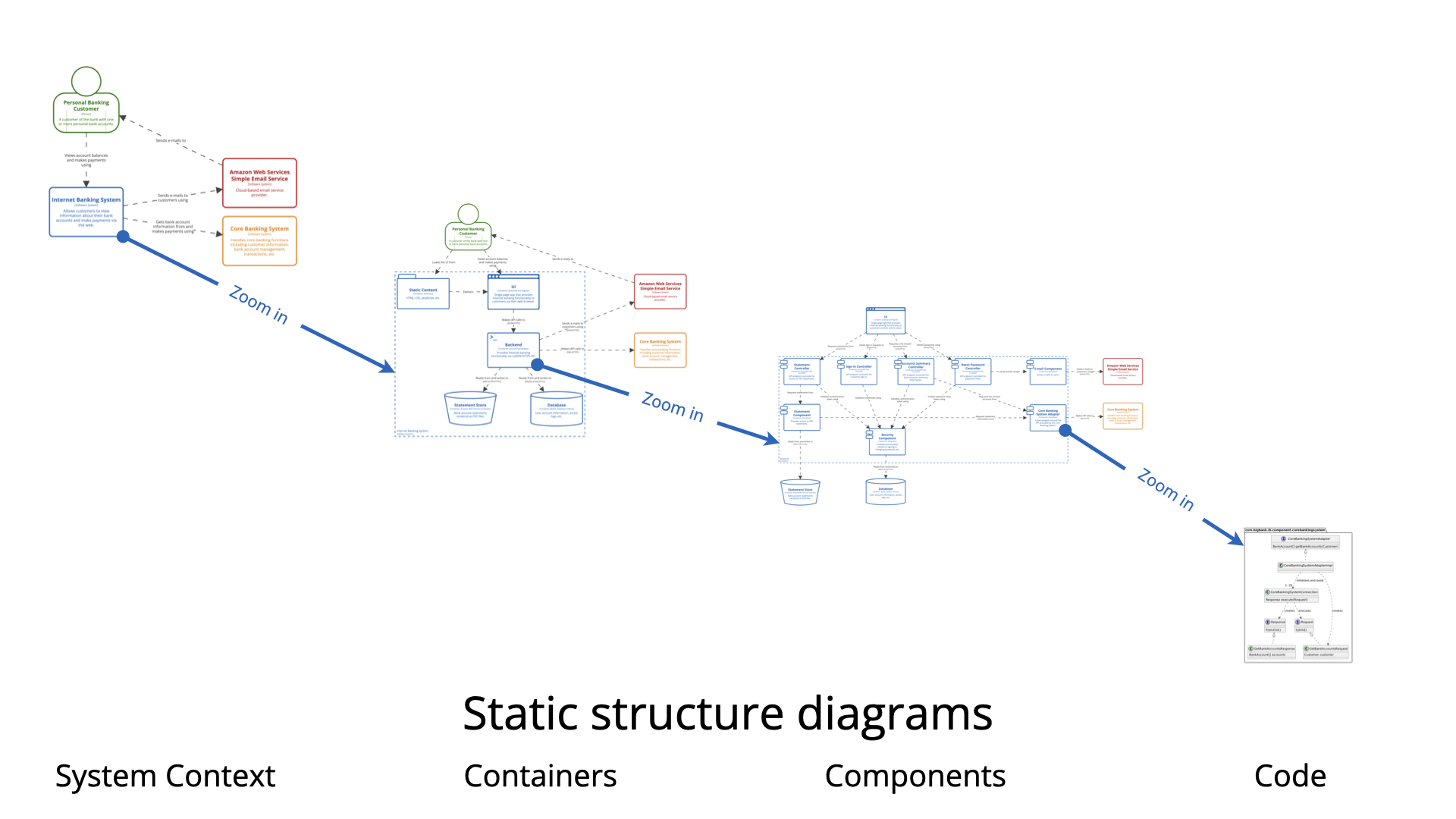
Visual Paradigm Online provides a powerful, easy-to-use platform for creating professional C4 Model diagrams with drag-and-drop simplicity, real-time collaboration, and extensive template libraries.
The Four Levels of C4 Model
Level 1: System Context Diagram
Purpose: Show your system in scope and how it fits into the world around it.
Key Elements:
-
Person/Actor: Users of the system
-
System: The software system you’re building
-
External Systems: Dependencies your system relies on
Example: Internet Banking System Context Diagram
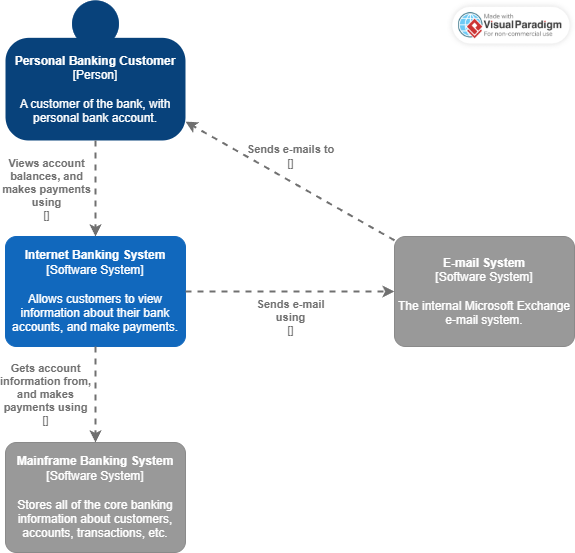
This diagram illustrates:
-
Personal Banking Customer interacting with the Internet Banking System
-
Mobile Banking Customer using mobile apps
-
ATM as an external system
-
Mainframe Banking System as a backend dependency
-
Email System for notifications
When to use: Start here! This is your “big picture” view that anyone (technical or non-technical) can understand.
Level 2: Container Diagram
Purpose: Zoom into your system to show the high-level technical building blocks.
Key Elements:
-
Containers: Applications, data stores, microservices, etc.
-
Technology choices: What technology each container uses
-
Communication: How containers interact
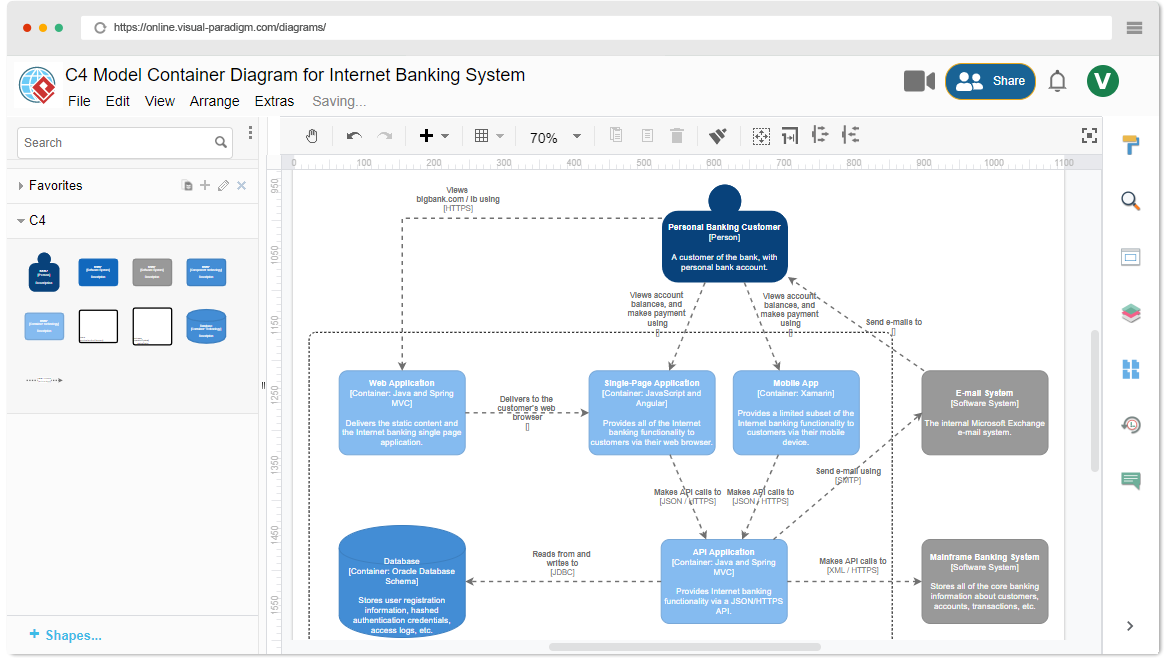
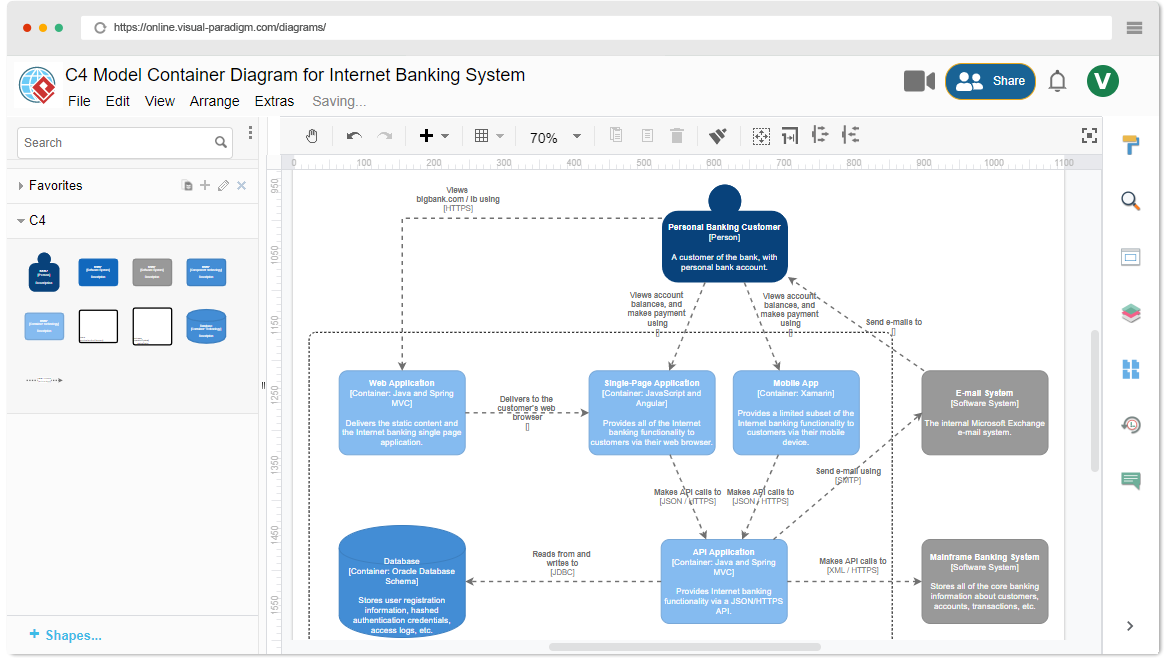
Example: Internet Banking System Container Diagram
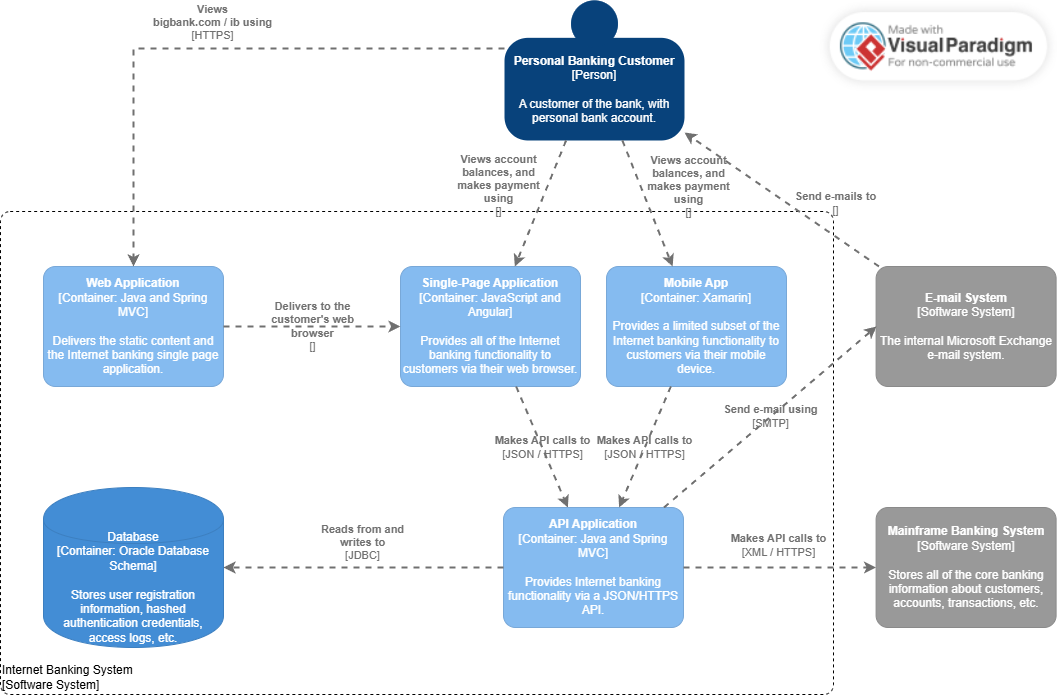
This diagram reveals:
-
Single-Page Application (Angular/JavaScript) – Web frontend
-
Mobile App (Xamarin) – Mobile frontend
-
Internet Banking API (Java/Spring MVC) – Backend API
-
Database (Oracle) – Data storage
-
Email System – External service
Key Relationships:
-
Users → SPA → API → Database
-
Mobile App → API → Database
-
API → Email System
When to use: After establishing context, show your architectural choices and technology stack to developers and architects.
Level 3: Component Diagram
Purpose: Zoom into individual containers to show their internal structure.
Key Elements:
-
Components: Logical groupings of code (modules, classes, services)
-
Interfaces: How components communicate
-
Responsibilities: What each component does
Example: Internet Banking System Component Diagram
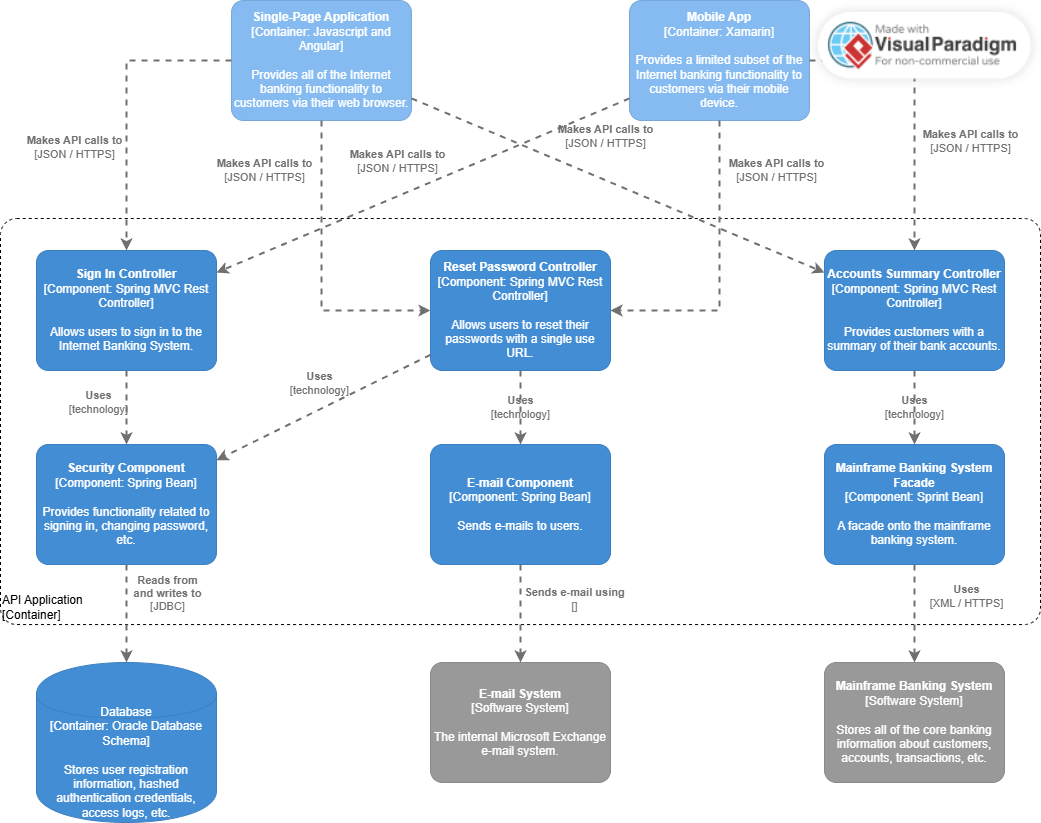
This diagram breaks down the Internet Banking API container into:
-
Sign In Controller – Authentication handling
-
Accounts Summary Controller – Account data retrieval
-
Security Component – Security logic
-
Mainframe Banking System Facade – External system integration
-
Email Component – Notification handling
When to use: For development teams to understand module boundaries and responsibilities within a specific container.
Level 4: Code/Class Diagram
Purpose: Show the actual code-level implementation details.
Note: While C4 includes this level, it’s often generated automatically from code using tools like IDE plugins. Visual Paradigm supports this through code engineering features.
Additional C4 Diagram Types
System Landscape Diagram
Example: Big Bank Plc System Landscape
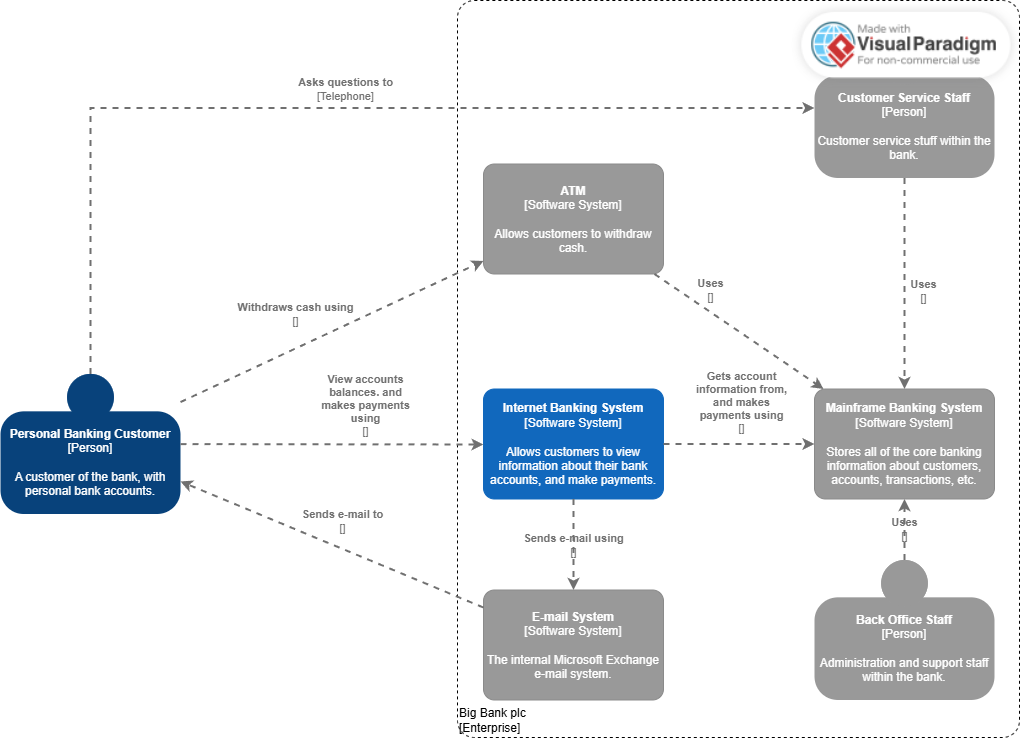
Shows multiple systems across an enterprise and their relationships. Useful for enterprise architecture views.
Deployment Diagram
Purpose: Show how containers are deployed to infrastructure.
Example: Internet Banking System Deployment Diagram
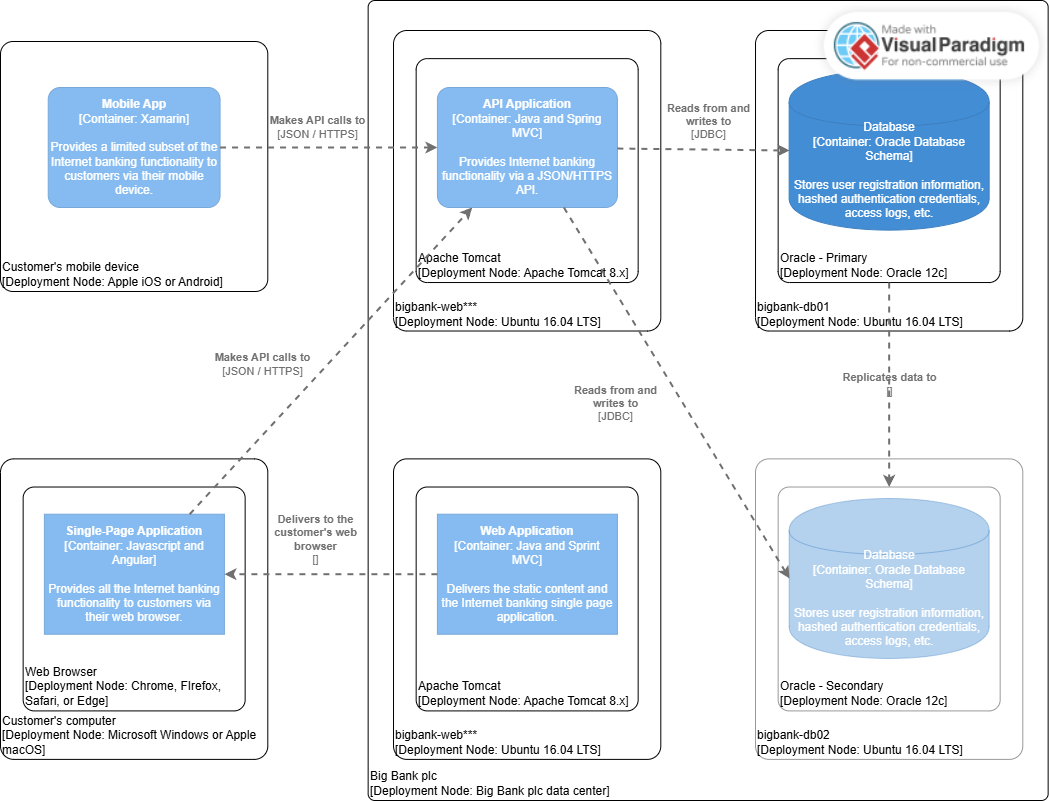
Illustrates:
-
Web Server hosting the SPA
-
App Server running the API
-
Database Server with Oracle
-
Network zones (DMZ, internal)
-
Deployment nodes and infrastructure
When to use: For DevOps teams and infrastructure planning.
Dynamic Diagram
Purpose: Show how the system behaves over time through sequences and interactions.
Example: API Application Dynamic Diagram
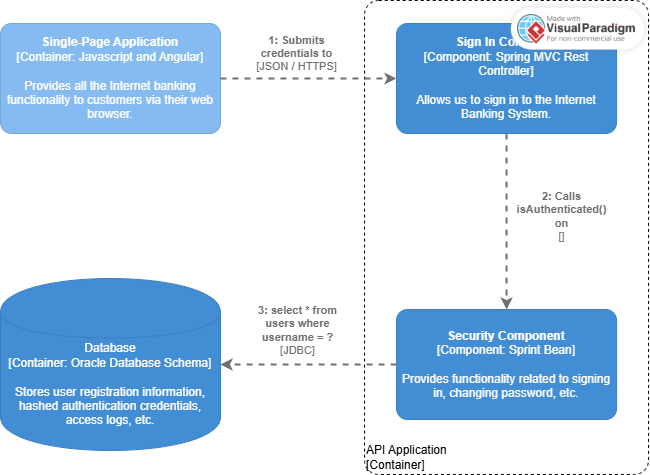
Demonstrates:
-
Request/response flows
-
Sequence of operations
-
Runtime behavior
-
API interactions
When to use: To explain complex workflows and API interactions.
Getting Started with Visual Paradigm Online
Why Choose Visual Paradigm for C4 Modeling?
-
No Installation Required – Browser-based tool accessible anywhere
-
Free to Start – No registration needed for basic use
-
Rich Template Library – 2,000+ professional templates
-
Real-Time Collaboration – Team editing and commenting
-
Multiple Export Options – PNG, JPG, SVG, PDF, GIF
Step-by-Step: Creating Your First C4 Diagram
Step 1: Choose Your Starting Point
Option A: Start from Template
-
Browse the C4 Model template gallery
-
Select a template matching your needs
-
Click “Edit” to customize
Option B: Start from Scratch
-
Create a new C4 Model diagram
-
Select diagram type (Context, Container, Component, etc.)
Step 2: Add C4 Elements
Visual Paradigm provides dedicated C4 shapes:
For System Context Diagrams:
-
Drag Person shapes for users/actors
-
Drag System shapes for your software
-
Drag External System shapes for dependencies
-
Use Relationship connectors to show interactions
For Container Diagrams:
-
Use Container shapes (web app, mobile app, database, etc.)
-
Add technology labels to each container
-
Connect with communication lines showing protocols (HTTPS, TCP, etc.)
For Component Diagrams:
-
Break down containers into Component shapes
-
Show interfaces and dependencies
-
Label with component responsibilities
Step 3: Customize and Format
-
Colors: Apply consistent color schemes (e.g., blue for internal, gray for external)
-
Labels: Add clear, descriptive names
-
Technology tags: Specify frameworks, languages, platforms
-
Layout: Use auto-layout or manually arrange for clarity
Step 4: Add Documentation
-
Descriptions: Add notes to elements
-
Comments: Use the comment feature for team discussions
-
Links: Connect to external documentation
Step 5: Export and Share
Visual Paradigm supports multiple export formats:
-
PNG/JPG – For presentations and documents
-
SVG – For scalable web graphics
-
PDF – For formal documentation
-
GIF – For animated sequences
MS Office Integration:
-
Embed diagrams directly into Word, PowerPoint, Excel
-
Maintain editability through VP Online links
Best Practices for C4 Modeling
1. Start Simple, Then Zoom In
Always begin with a System Context Diagram before diving into details. This ensures everyone understands the big picture.
2. Use Consistent Naming
-
People: Job roles (Customer, Administrator, Support Staff)
-
Systems: Clear, descriptive names (Internet Banking System, not “IBS”)
-
Containers: Technology + purpose (Angular SPA, Spring Boot API)
-
Components: Responsibility-based (Authentication Service, Account Repository)
3. Show Only What’s Necessary
-
Context: No technical details
-
Containers: Major technology choices only
-
Components: Logical groupings, not every class
-
Code: Only for critical or complex areas
4. Maintain Hierarchy
Each diagram should:
-
Fit on one page
-
Have 5-10 elements maximum
-
Link to more detailed diagrams when needed
5. Keep Diagrams Current
-
Update diagrams as architecture evolves
-
Use Visual Paradigm’s version history
-
Link diagrams to code repositories
Real-World Example Walkthrough
Let’s trace the Internet Banking System through all levels:
Level 1: Context
[Personal Banking Customer] → [Internet Banking System] → [Mainframe Banking System]
[Mobile Banking Customer]   →                            → [Email System]
[ATM]                       →                            →
Level 2: Containers
[Customer] → [Angular SPA] → [Spring Boot API] → [Oracle Database]
           → [Xamarin App] →                   → [Email System]
Level 3: Components (API Container)
[Spring Boot API]
├── [Sign In Controller]
├── [Accounts Summary Controller]
├── [Security Component]
├── [Mainframe Facade]
└── [Email Component]
Level 4: Code
@RestController
public class AccountsSummaryController {
    @Autowired
    private AccountsSummaryService accountsSummaryService;

    @GetMapping("/accounts/{customerId}")
    public AccountsSummary getAccountsSummary(@PathVariable String customerId) {
        return accountsSummaryService.getSummary(customerId);
    }
}
Advanced Visual Paradigm Features
Team Collaboration
-
Real-time editing: Multiple team members can work simultaneously
-
Comments: Add feedback directly on diagrams
-
Version control: Track changes over time
-
Sharing: Public links or private team access
Integration Capabilities
-
Import Visio: Migrate existing diagrams
-
MS Office: Embed in Word, PowerPoint, Excel
-
Cloud storage: Save to Google Drive, Dropbox, OneDrive
-
API access: Automate diagram generation
Professional Templates
Access pre-built templates for:
-
Internet Banking Systems
-
E-commerce Platforms
-
Microservices Architecture
-
Cloud-Native Applications
-
Enterprise Systems
C4 Model Notation Reference
Shape Legend
| Shape | Represents | Used In |
|---|---|---|
| 👤 Person | User/Actor | Context, Container |
| 🖥️ System | Software system | Context |
| 📦 Container | Application/Data store | Container, Component |
| ⚙️ Component | Module/Service | Component |
| 💾 Database | Data storage | Container |
| 🌐 External System | Third-party system | All levels |
Relationship Types
-
Synchronous: Solid line with arrow (request/response)
-
Asynchronous: Dashed line with arrow (fire-and-forget)
-
Returns: Dotted line with open arrow
-
Uses: Solid line with label
Common Use Cases
1. New Project Architecture
Start with Context → Container → Component as you design the system.
2. Legacy System Documentation
Work backwards: Code → Component → Container → Context to document existing systems.
3. System Migration
Create “As-Is” and “To-Be” diagrams at each level to plan migrations.
4. Stakeholder Communication
-
Executives: Context diagrams only
-
Product Owners: Context + Container
-
Developers: All levels
-
DevOps: Container + Deployment
Tips for Effective C4 Diagrams
Do’s ✅
-
Keep diagrams simple and focused
-
Use consistent colors and styles
-
Include technology choices at Container level
-
Link diagrams together hierarchically
-
Update diagrams as code changes
-
Use Visual Paradigm’s auto-layout features
Don’ts ❌
-
Don’t mix abstraction levels in one diagram
-
Don’t show every class or database table
-
Don’t use technical jargon in Context diagrams
-
Don’t create diagrams and forget them
-
Don’t overcrowd – split into multiple diagrams if needed
Getting Help and Resources
Visual Paradigm Support
-
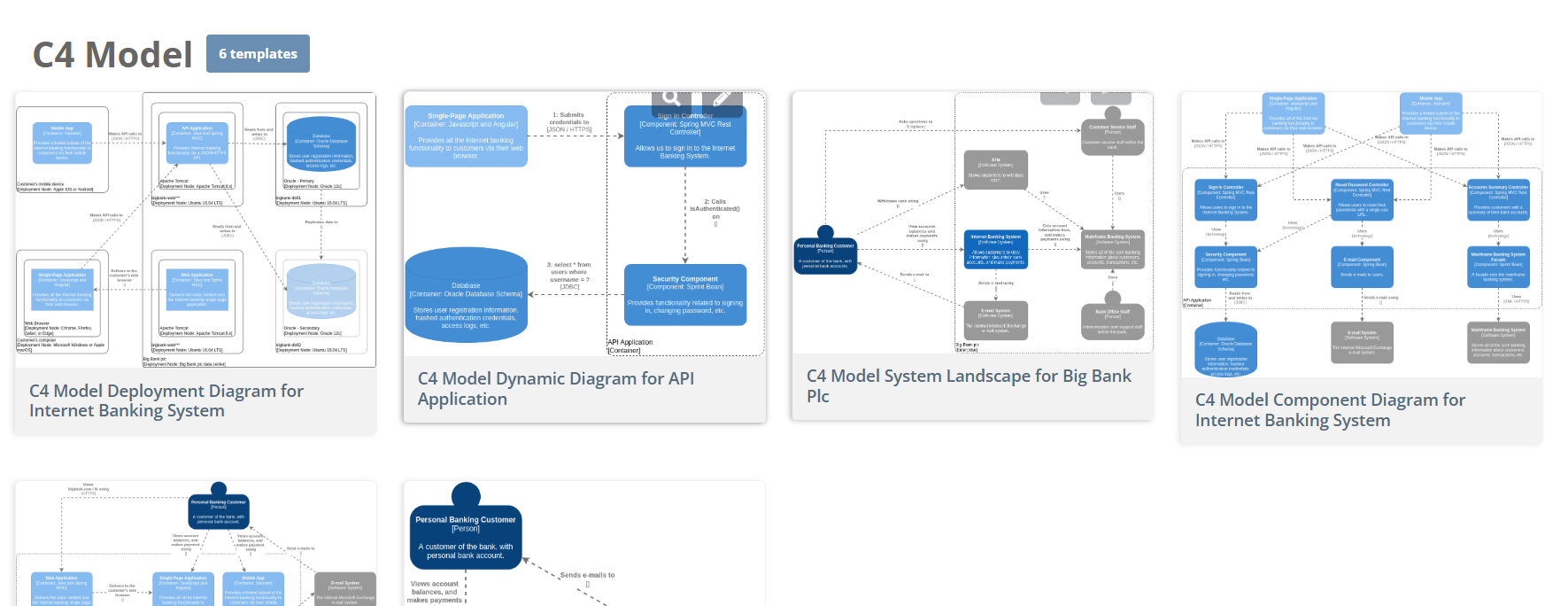
Template Gallery: Browse C4 Templates
-
Documentation: Built-in help and tutorials
-
Community: User forums and examples
-
Free Tier: Start without registration
C4 Model Resources
-
Official Site: c4model.com
-
Book: “Software Architecture for Developers” by Simon Brown
-
Tools: Visual Paradigm, Structurizr, PlantUML
Conclusion
The C4 Model provides a structured, hierarchical approach to software architecture visualization. By starting with the big picture (Context) and progressively zooming in (Containers → Components → Code), you create documentation that serves different audiences effectively.
Visual Paradigm Online makes C4 modeling accessible with:
-
Intuitive drag-and-drop interface
-
Comprehensive C4 shape libraries
-
Professional templates for common scenarios
-
Real-time collaboration features
-
Flexible export and integration options
Start with the C4 Model template today and create your first architecture diagram in minutes – no registration required!
References
- C4 Diagram Tool & Features: Overview of Visual Paradigm’s comprehensive C4 diagramming capabilities, supported diagram types, and platform options for architecture modeling.
- Mastering C4 Diagrams in Visual Paradigm: A Hands-On Review: Independent third-party review comparing all four C4 creation methods with practical workflow insights and user experience observations.
- Full C4 Model Support Added to Visual Paradigm Desktop: Official release announcement detailing dedicated support for all six C4 diagram types in the Desktop application.
- Full C4 Model Support Release Notes: Technical documentation covering implementation details for Context, Container, Component, Landscape, Dynamic, and Deployment diagram support.
- C4 Model Tool – Visual Paradigm Online: Feature overview of the web-based C4 diagram editor, including templates, collaboration features, and browser-based workflow benefits.
- Beginner’s Guide to C4 Model Diagrams: Educational resource introducing C4 modeling fundamentals with practical examples using Visual Paradigm templates.
- Hands-On Review: Mastering C4 Diagrams: Detailed comparative analysis of creation methods with real-world testing scenarios and productivity metrics.
- Visual Paradigm Know-How: Plugin API Documentation: Technical knowledge base covering programmatic diagram generation, API methods, and automation integration patterns.
- C4 Diagram Tool Solution Overview: Comprehensive solution page describing enterprise use cases, integration capabilities, and platform comparison for C4 modeling.
- AI Diagram Generator: Complete C4 Model Support: Release documentation for AI-powered generation across all six C4 diagram types with natural language processing capabilities.
- AI-Powered C4 PlantUML Studio: Dedicated web application for transforming text descriptions into PlantUML code and rendered C4 diagrams with AI assistance.
- C4 Diagram Tool: Enterprise Solution: Enterprise-focused overview highlighting team collaboration, governance, and scalability features for C4 modeling.
- C4 Modeling Tutorial Video: Video demonstration of C4 diagram creation workflows, featuring practical examples and interface navigation tips.
- AI Chatbot for C4 Component Diagrams: Interactive AI assistant interface for conversational creation and refinement of C4 diagrams through natural language prompts.
- OpenDocs: AI-Powered Knowledge Management: Documentation platform integrating AI diagram generation directly into collaborative document editing workflows.
- PlantUML Studio Workflow Demo: Video walkthrough of the C4-PlantUML Studio interface, showcasing text-to-diagram generation and code editing capabilities.
- AI Diagram Generation Tutorial: Step-by-step video guide for using AI features to accelerate C4 diagram creation across multiple abstraction levels.
- Beginner’s Guide: C4 Model Fundamentals: Foundational resource explaining C4 model principles, diagram types, and best practices for architecture communication.
- The Ultimate Guide to C4-PlantUML Studio: In-depth exploration of PlantUML-based C4 modeling with AI assistance, covering workflows, use cases, and integration patterns.
- C4-PlantUML Studio: AI-Powered Architecture Design: Official tool page for the specialized web application combining natural language processing, PlantUML code generation, and interactive diagram editing.
This post is also available in Deutsch, Español, فارسی, Français, English, Bahasa Indonesia, 日本語, Polski, Portuguese, Ру́сский, Việt Nam, 简体中文 and 繁體中文.