


Designing a robust business process requires more than just mapping the ideal scenario. While the “happy path” shows how a process works when everything goes right, the true test of a system lies in how it handles the unexpected. In the context of Business Process Model and Notation (BPMN), managing exception flows is critical for maintaining integrity, compliance, and operational continuity. This guide explores the mechanics of error handling within BPMN 2.0 standards, ensuring your process diagrams remain clean, logical, and resilient.
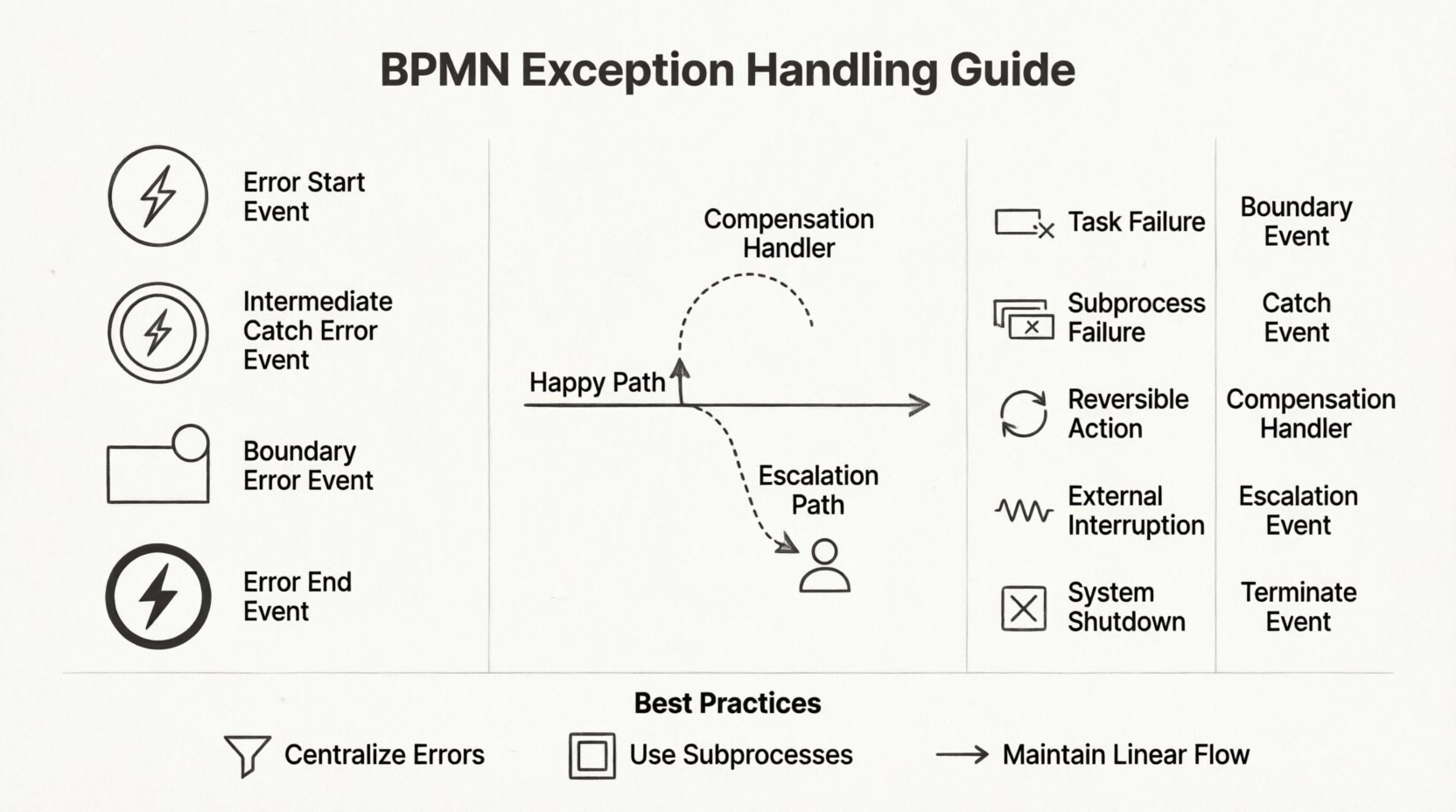
🧩 Understanding Exception Flows in BPMN
Exception flows represent the alternative paths a process takes when a specific condition deviates from the norm. These are not merely error messages; they are structured decisions that dictate the future state of a business transaction. Without proper definition, a process diagram becomes fragile, breaking down at the first sign of friction. A well-architected exception flow ensures that:
- State Consistency: The process does not leave data in an ambiguous state.
- Visibility: Stakeholders can see exactly where and why a process diverged.
- Recovery: Mechanisms exist to either correct the error or terminate the process gracefully.
When modeling exceptions, the goal is clarity. A diagram should answer the question: “What happens next?” even when things go wrong. This requires a deep understanding of specific BPMN elements designed to catch interruptions.
⚠️ The Anatomy of an Error Event
Errors in BPMN are distinct from general messages or signals. They are specifically designed to handle system failures, validation failures, or external disruptions. BPMN defines three primary ways to incorporate these errors into a flow:
1. Error Start Events
An Error Start Event initiates a process triggered by a failure elsewhere. This is useful for monitoring systems. For example, if a payment gateway fails, an Error Start Event can trigger a notification workflow to alert the finance team. It allows the system to react asynchronously to failures without blocking the primary transaction flow.
2. Intermediate Catch Error Events
These events pause a process to wait for an error condition. Unlike a standard Intermediate Message Event, which waits for communication, this waits for a specific error signal. It is often used to:
- Catch errors bubbling up from subprocesses.
- Implement retry logic by looping back to a previous task.
- Route the process to a specialized error-handling subprocess.
3. Boundary Error Events
This is perhaps the most common method for handling exceptions within a task. A Boundary Error Event is attached to the boundary of a task or subprocess. If an error occurs while that specific activity is running, the flow immediately diverts to the path connected to the boundary event. This keeps the main flow clean because the normal logic remains untouched until an error actually occurs.
4. Error End Events
When an error cannot be recovered, an Error End Event terminates the process instance. It is crucial to define what information is captured at this stage. Metadata regarding the error code or message should be logged before the instance closes. This ensures audit trails remain intact even after a process failure.
🔄 Compensation: Undoing Actions
Not all exceptions require termination. Sometimes, a process must roll back to a previous state. This is where Compensation Handlers come into play. In BPMN, compensation is the act of reversing a completed activity. This is vital for transactions involving financial settlements, inventory updates, or data entry.
When a process reaches a point where a previous step must be undone, the model should define a compensation boundary. This involves:
- Defining the specific activity that requires rollback.
- Specifying the compensation flow that executes the reverse action.
- Ensuring the compensation flow is idempotent (safe to run multiple times).
Consider a loan approval process. If a customer application is approved but the subsequent contract generation fails, the approval status must be revoked. A compensation handler ensures the “Approved” state is reverted to “Pending” without manual intervention.
📊 Comparing Exception Handling Strategies
Selecting the right mechanism depends on the nature of the failure. The table below outlines when to use specific BPMN constructs for exception management.
| Exception Type | BPMN Element | Best Use Case |
|---|---|---|
| Task Failure | Boundary Error Event | Specific task fails, need local retry or alert. |
| Subprocess Failure | Intermediate Catch Event (Global) | Entire sub-process fails, need high-level response. |
| Reversible Action | Compensation Handler | Need to undo completed steps after a later failure. |
| External Interruption | Escalation Event | Requires human management or external policy change. |
| System Shutdown | Terminate Event | Process must end immediately due to critical error. |
🚨 Escalations vs. Errors
It is important to distinguish between an Error and an Escalation. While both represent deviations, they serve different semantic purposes.
- Errors: Technical or logical failures. The system cannot proceed due to a broken condition (e.g., invalid data format, missing resource).
- Escalations: Procedural or management failures. The process cannot proceed because a condition requires human attention or policy override (e.g., approval limit exceeded, SLA breach).
Using Escalation Events allows you to model the human element of exceptions. When an escalation occurs, the process can route to a manual task for review. This keeps the automated logic separate from the decision-making logic, preserving the clarity of the diagram.
🕸️ Avoiding the “Spaghetti” Trap
One of the most common challenges in BPMN is the visual clutter that occurs when adding exception flows. If every task has a boundary event leading to a different end point, the diagram becomes unreadable. To maintain logic integrity without breaking visual clarity, follow these structural principles:
1. Centralize Error Handling
Instead of creating unique paths for every minor error, group similar errors together. For example, if three different tasks can all fail due to a database timeout, route all three boundary events to a single “System Error Handling” subprocess. This reduces the number of lines crossing the diagram.
2. Use Subprocesses for Complexity
If an exception flow involves multiple steps (e.g., logging, notification, retry, rollback), encapsulate it in a Subprocess. Do not clutter the main process diagram with the details of the recovery logic. This keeps the high-level view clean and allows you to drill down into the exception handling only when necessary.
3. Maintain Linear Flow Where Possible
Even with exceptions, the process should ideally feel linear. Avoid creating loops that go back too far into the process. If a retry loop is necessary, limit it to a specific number of iterations or a specific time window. Infinite loops can cause the process engine to hang or generate excessive logs.
🛡️ Ensuring Data Integrity
When an exception occurs, data state is often the biggest risk. A process might have updated a database record in Step 1 but failed in Step 2. If the process terminates, that record is left in a half-finished state. To handle this:
- Define Transaction Boundaries: Ensure that tasks updating shared data are grouped logically. If a task fails, the system should know if it should roll back the data changes associated with that task.
- Log Exception Context: When an Error End Event is triggered, ensure the process variables containing the error details are saved to a persistent log before the instance ends. This is vital for debugging later.
- Use Message Correlation: If the process involves external systems, use correlation keys to ensure the error message is matched to the correct process instance.
🧪 Testing Exception Paths
A process model is only as good as its ability to handle reality. Testing exception flows requires a different mindset than testing happy paths. You must simulate failure conditions.
Key testing scenarios include:
- Boundary Conditions: What happens if a field is empty? What if a number is negative?
- Timeout Scenarios: What happens if a system hangs for 30 seconds?
- Concurrent Failures: What happens if two instances of the process try to update the same record simultaneously?
- Recovery Success: If the system retries after a failure, does the process complete successfully, or does it loop indefinitely?
📝 Best Practices for Maintenance
Over time, processes evolve. Exception handling requirements change as business rules shift. To keep your BPMN models maintainable:
- Version Control: Always track changes to exception logic. A change in error handling can impact compliance reporting.
- Documentation: Add comments to complex boundary events. Explain why a specific error path exists. Future analysts may not understand the business context without it.
- Standardization: Establish naming conventions for error events. Use codes (e.g., “ERR_001”) consistently across all processes to simplify debugging.
- Review Cycles: Periodically review the exception paths. Are there paths that are never taken? Are there paths that are too complex? Simplify where possible.
🔍 Common Pitfalls to Avoid
Even experienced modelers can fall into traps when designing exception flows. Be aware of these common mistakes:
- Ignoring Silent Failures: Just because a task doesn’t throw an exception doesn’t mean it succeeded. Ensure validation logic is explicit.
- Overusing Gateways: Do not use X-Gateways to handle errors. Use Error Events instead. Gateways are for logic branching, not exception catching.
- Orphaned Paths: Ensure every boundary event has a clear destination. An error that catches but leads nowhere is a dead end.
- Mixing Logic Types: Do not mix message events and error events on the same boundary. They serve different purposes and can confuse the execution engine.
🚀 The Impact of Resilient Processes
Building processes that handle exceptions effectively is an investment in operational stability. When a process is resilient, it reduces the burden on support teams. Errors are caught automatically, logged correctly, and routed to the right handlers. This leads to:
- Higher customer satisfaction due to faster recovery times.
- Reduced manual intervention for routine failures.
- Better data quality, as rollback mechanisms prevent partial updates.
- Compliance assurance, as all error states are tracked and audited.
By treating exception flows as a first-class citizen in your BPMN design, you create systems that are robust and reliable. The goal is not to eliminate errors, but to ensure that when they occur, the process continues to function or terminates in a controlled manner.
🏁 Final Thoughts on Logic Integrity
Effective BPMN modeling requires a balance between ideal flow and realistic failure. By utilizing Error Events, Compensation Handlers, and Escalation Events correctly, you can build diagrams that reflect the true complexity of business operations. Remember that clarity is king. A process model should be understandable even when it fails. Focus on maintaining a clean structure, documenting your logic, and testing your recovery paths rigorously. This approach ensures your business processes remain functional and adaptable in any environment.
This post is also available in Deutsch, Español, فارسی, Français, English, Bahasa Indonesia, 日本語, Polski, Portuguese, Ру́сский, Việt Nam, 简体中文 and 繁體中文.